
MOSISO Compatible with MacBook Neo Case
4.5Editor score
Precision polycarbonate shell
Crystal clear transparency
Complete protection kit
The MacBook Neo represents a significant leap in portable computing, bringing powerful performance to a sleek design. To truly maximize your experience with this new device, selecting the right accessories is essential. Whether you need protection from daily wear or tools to expand connectivity, the market offers a wide array of options tailored specifically for this model.
We have carefully evaluated numerous products to bring you a curated list of the most reliable and effective accessories available today. Our comparison focuses on build quality, compatibility with the specific A3404 model, and user feedback to ensure you make an informed decision. Each item on this list has been scrutinized for its ability to meet the demands of students, professionals, and creatives alike.
In this guide, you will find detailed reviews of the top ten picks, ranging from protective cases to advanced docking stations. Each selection highlights key features, pros, and cons to help you understand exactly what you are getting. Please note that product availability and pricing can fluctuate frequently, so we recommend checking the latest details before making your final purchase.
4.5Editor score

4.2Editor score
4.6Editor score
As an Amazon Associate we earn from qualifying purchases.
This side-by-side comparison highlights the key specifications and unique selling points of each selected accessory. By reviewing these details together, you can quickly identify which products align best with your specific needs and budget constraints.


This shortcut sticker is a simple yet effective solution for users who want to speed up their workflow on the MacBook Neo. With a high rating of 4.6 stars, it offers a clear visual guide for essential commands without cluttering your workspace. The design focuses on utility, placing frequently used keys exactly where your eyes naturally rest while typing.
We may earn a commission when you buy through this link, at no additional cost to you.
The sticker features 52 essential shortcuts grouped by task, such as navigation, screenshots, and system controls. This thoughtful organization helps both beginners and power users remember commands faster. The material is premium vinyl that repels water and resists fading, ensuring it stays sharp and functional for years of daily use.
While the adhesive is strong to keep the sticker in place, it is designed to be residue-free when removed. You may need a warm soapy cloth if you decide to take it off later, but it generally lifts clean. The only minor trade-off is that it occupies a small space on your palm rest, which some users might find slightly distracting at first.
This product is ideal for students and professionals who rely heavily on keyboard shortcuts but struggle to memorize them. It is a low-cost investment that pays off in efficiency and reduced frustration. If you want to master your MacBook Neo faster, this sticker is a highly recommended addition to your setup.
The sticker allows you to glance down and see commands instantly, keeping your focus on the screen and tasks rather than searching for guides.
Made from ultra-thin matte vinyl, it is thin enough to be comfortable under your wrists while tough enough to handle spills and smudges.
We may earn a commission when you buy through this link, at no additional cost to you.
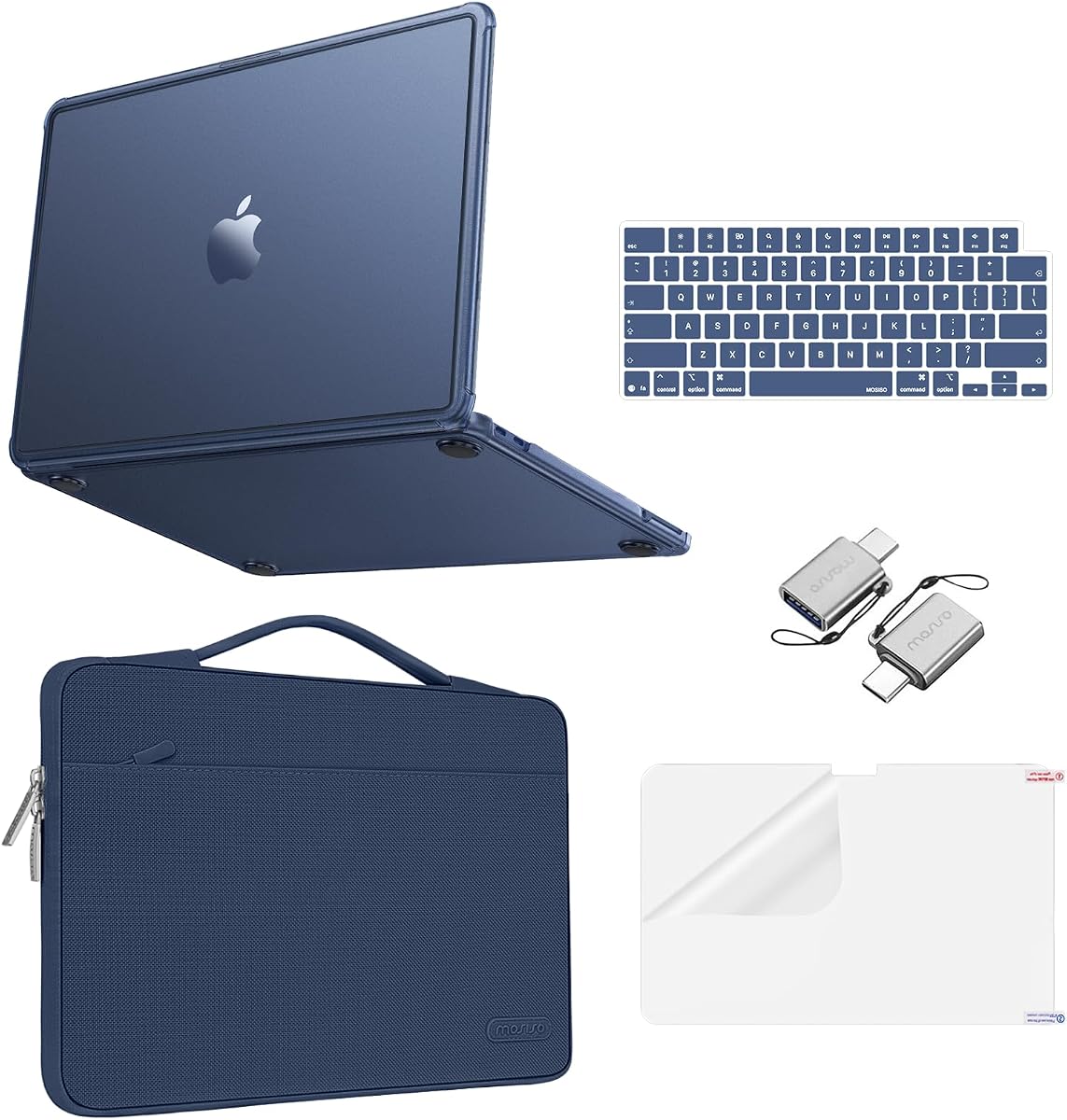
The MOSISO case bundle offers exceptional value by providing full-body protection in one package. Designed exclusively for the MacBook Neo 13-inch model A3404, it ensures a precise fit that does not interfere with buttons or ports. The clear shell allows the original beauty of your device to shine while guarding it against the rigors of daily transport.
We may earn a commission when you buy through this link, at no additional cost to you.
This kit includes a hard shell case, two keyboard covers, and a screen protector, making it a one-stop solution for new owners. The engineering polycarbonate material is sturdy and crack-resistant, protecting your laptop from keys in bags or accidental drops. The smooth surface reduces fingerprints, keeping the look polished and professional throughout the day.
One potential drawback is that clear plastic cases can sometimes develop a yellow tint over extended exposure to light, though this specific model is engineered to resist that. Additionally, the smooth surface might be slippery for some users. However, the inclusion of keyboard and screen protectors makes this a comprehensive choice that addresses multiple risk factors at once.
If you are looking for a complete protection solution that is easy to install and remove, this MOSISO kit is an excellent choice. It is perfect for students and travelers who want to keep their MacBook Neo pristine without spending extra on individual items. The balanced mix of protection and style makes it a top contender in this category.
Instead of buying items separately, this bundle covers the case, keyboard, and screen, saving you time and ensuring all parts are compatible.
The case is crafted to fit the A3404 model exactly, ensuring that ports and buttons remain accessible without forcing or gaps.
We may earn a commission when you buy through this link, at no additional cost to you.
This premium version of the MOSISO case elevates protection with a specialized matte finish that actively repels fingerprints and smudges. It includes a 360-degree protective sleeve, making it a robust choice for users who travel frequently. The rating of 4.6 reflects its high quality and ability to keep your device looking brand new for longer.
We may earn a commission when you buy through this link, at no additional cost to you.
The engineering of the matte surface is a key differentiator, as it prevents the oily marks that often accumulate on glossy cases. Along with the hard shell, you get two keyboard covers and a screen protector, ensuring every surface is shielded. The sleeve features a soft plush lining and a front pocket, providing extra layer of security during transit.
While the price is higher than basic options, the added value of the sleeve and the superior finish justifies the cost for many users. The only minor downside is that the sleeve adds a small amount of bulk when carrying the laptop, but this is a fair trade-off for the extra protection. It is designed to be lightweight yet durable.
This kit is ideal for business professionals and creatives who demand a clean aesthetic and maximum security for their devices. If you want a case that looks and feels premium while offering complete coverage, this is the best option available. The combination of style and functionality makes it a standout product in the Neo accessory market.
The matte finish is not just cosmetic; it is engineered to reduce oils and grime, keeping the case looking fresh with minimal effort.
The included sleeve matches the case perfectly and offers additional cushioning against bumps and scratches in crowded environments.
We may earn a commission when you buy through this link, at no additional cost to you.
This MOSISO bundle stands out for its unique sixteen grid puffy sleeve, which adds a stylish touch to your travel gear. The hard shell case is designed to resist cracks and scratches, offering reliable protection for your MacBook Neo. With a high rating, it is clear that users appreciate the balance of form and function in this package.
We may earn a commission when you buy through this link, at no additional cost to you.
The sleeve features a soft plush interior that cushions the laptop against bumps, while the exterior is made of durable polyester. The case itself snaps on easily and slides off cleanly, leaving no residue. It includes keyboard covers and a screen protector, ensuring that you have everything you need to protect the device fully.
The fit is precise for the A3404 model, which ensures that the case does not interfere with the laptop's closure. However, some users might find the fit snug, which is typical for hard shell cases. The sleeve is lightweight and easy to slip into a backpack, making it a convenient choice for daily commutes or business trips.
If you value a distinct look and solid protection, this bundle is a great option. It is perfect for anyone who wants to keep their laptop safe while traveling without compromising on style. The combination of a durable case and a trendy sleeve makes it a popular choice among students and young professionals.
The sixteen grid quilted pattern gives the sleeve a distinctive look that sets it apart from standard laptop bags.
Both the case and sleeve are built to withstand daily wear, ensuring your device stays protected through years of use.
We may earn a commission when you buy through this link, at no additional cost to you.
The EooCoo case is designed for those who want to showcase the original color of their MacBook Neo while adding a layer of protection. With a rating of 4.7, it is one of the highest-rated cases in this lineup. The crystal clear material is ultra-slim, ensuring that the laptop remains portable and sleek without added bulk.
We may earn a commission when you buy through this link, at no additional cost to you.
The hard plastic exterior features a full edge wrap that shields against scratches and minor bumps. It includes a matching keyboard cover and versatile USB-C to USB-A adaptors, adding functional value beyond just protection. The lightweight design makes it a favorite for users who carry their laptop daily.
While clear cases are beautiful, they can sometimes show dust or scratches more easily than matte ones. However, this model is built to be durable and scratch-resistant to mitigate that issue. The inclusion of USB adaptors is a thoughtful touch, helping you connect older peripherals without needing a hub.
This case is perfect for users who prioritize aesthetics and portability. If you love the look of your MacBook Neo and want to keep it visible, this is the ideal choice. The high rating suggests that it delivers on both protection and style, making it a strong contender for anyone buying accessories for the Neo.
The transparent design allows the aluminum finish of your MacBook to remain fully visible, maintaining its premium look.
The included USB adaptors add convenience, allowing you to connect standard USB devices easily with your laptop.
We may earn a commission when you buy through this link, at no additional cost to you.
The VENTION hub expands the connectivity of your MacBook Neo with a detachable magnetic design that is both innovative and practical. It supports blazing-fast speeds of up to 80Gbps, making it ideal for transferring large files quickly. The ability to drive 8K displays ensures that you get the most out of external monitors for work or entertainment.
We may earn a commission when you buy through this link, at no additional cost to you.
The magnetic USB-C connector is a standout feature, allowing for effortless attachment and detachment without constant plugging and unplugging. It also supports up to 140W power delivery, meaning you can charge your laptop while using the hub. The aluminum alloy shell aids in heat dissipation, ensuring stable performance during heavy use.
A key consideration is that the magnetic piece might not fit if your MacBook has a bottom case, so you may need to use the standard plug instead. This affects stability but not functionality. Despite this, the versatility and high speed make it a top choice for power users who need a reliable docking solution.
This hub is perfect for professionals who need multiple ports and high-speed connections without compromising on style. If you work with large files or high-resolution displays, this device will significantly enhance your workflow. Its robust build and advanced features make it a standout product in the docking station category.
The 80Gbps bandwidth ensures that data transfers are nearly instantaneous, saving you time on large projects and media files.
The magnetic connector makes it easy to connect and disconnect the hub, reducing wear on your laptop's ports over time.
We may earn a commission when you buy through this link, at no additional cost to you.
This magnetic privacy screen protector offers a simple and effective way to safeguard your data in public spaces like cafes and airports. It uses strong magnets to attach securely without adhesive, so you can remove it whenever you need to. The privacy angle blocks side views beyond 30 degrees, keeping your screen content private from others.
We may earn a commission when you buy through this link, at no additional cost to you.
The protector is made of scratch-resistant PET material that shields the original screen from daily abrasion. It also features anti-glare and blue light blocking technology to reduce eye strain during long working hours. The ultra-thin profile ensures that it fits easily with most protective cases without affecting the laptop's closure.
One trade-off is that privacy screens can sometimes make the display appear slightly dimmer or reduce viewing angles. However, this is a standard limitation for privacy filters. The benefit of protecting sensitive information and reducing eye strain outweighs this minor drawback for many users. It is easy to install and removes clean.
If you often work in public or shared offices, this screen protector is a valuable tool. It ensures that your sensitive data remains confidential while also protecting your eyes and the screen surface. The magnetic design makes it a user-friendly option that anyone can install without any special tools or skills.
The 30-degree privacy angle ensures that only you can see the screen clearly, preventing prying eyes from reading sensitive information.
The anti-glare and blue light features help reduce visual fatigue, making long work sessions more comfortable for your eyes.
We may earn a commission when you buy through this link, at no additional cost to you.
The Peslv privacy screen combines high definition clarity with effective privacy protection using premium imported materials. It features a reinforced magnetic strip that attaches securely and easily to the top bezel of your screen. The quality of the filter layer ensures that the visuals remain sharp and true-to-life even with the privacy effect active.
We may earn a commission when you buy through this link, at no additional cost to you.
In addition to privacy, it reduces 95 percent of blue light and UV light to protect your eyes and the screen. The matte surface intercepts reflections, making it easier to work in bright environments. A storage clip is included, allowing you to detach the screen and store it safely when you do not need it.
The precision of the angle correction ensures that only the front view is visible, providing reliable privacy. While the price is higher, the quality of the materials and the clarity are superior to many competitors. You must align the magnet correctly during installation, but once in place, it stays put firmly.
This product is ideal for professionals who need a balance of privacy and display quality. If you want a screen that protects your eyes and data without sacrificing visual fidelity, this is a top choice. The high definition and durability make it worth the investment for daily use in various settings.
The imported materials ensure that the screen remains clear and vibrant, avoiding the darkening effect found in cheaper privacy filters.
The included storage clip allows you to detach the screen and keep it safe in your bag when you are in a private environment.
We may earn a commission when you buy through this link, at no additional cost to you.
This shortcut sticker is designed specifically for MacBook Air and Pro models, offering a clear guide to essential Mac commands. It is made of laminated vinyl in the USA, ensuring high quality and durability. The strong adhesive helps it stay in place, though it may leave a light residue that can be wiped off with warm soapy water.
We may earn a commission when you buy through this link, at no additional cost to you.
The sticker helps users master Mac shortcuts instantly, making it easier to boost productivity without searching online. It is perfect for beginners and power users who want to work faster. The clear black design ensures that the keys are easy to read without obscuring the laptop's original look.
Note that this version is not compatible with the MacBook Neo or smaller models like 11 or 12 inches. It is important to check your laptop size before purchasing to ensure it fits correctly. For those who fit, the utility is high, allowing you to keep commands visible on your device at all times.
If you own a MacBook Air or Pro, this is a great tool to improve your workflow. It is a simple addition that saves time and reduces frustration when learning new commands. The satisfaction guarantee and responsive support add to the value, making it a reliable choice for your Mac setup.
The sticker acts as a permanent cheat sheet, helping you memorize commands faster by keeping them visible during use.
Made in the USA with laminated vinyl, this sticker is built to last and withstand daily use without fading or peeling.
We may earn a commission when you buy through this link, at no additional cost to you.
These dust plugs offer a simple solution to protect the ports of your MacBook Neo from debris and liquids. Made of high-quality silicone, they are flexible yet durable, ensuring a snug fit without damaging the ports. The set includes covers for USB-C, MagSafe, HDMI, SDXC, headphone jack, and webcam, providing comprehensive protection.
We may earn a commission when you buy through this link, at no additional cost to you.
The low-profile design ensures that the plugs do not stick out and interfere with the laptop's aesthetics or storage. They are easy to insert and remove, and they do not leave residue when taken out. The included webcam covers add an extra layer of privacy and protection for your camera.
While they are small and easy to use, there is a slight risk of losing them if they fall out of the bag. However, their value in keeping your ports clean is high. The silicone material is soft enough to avoid scratches but tough enough to last for months of use.
This product is perfect for anyone who wants to keep their MacBook Neo ports clean without buying expensive cases. It is a practical and affordable accessory that helps maintain the longevity of your device. For students and travelers who use their laptop in various environments, these plugs are a smart investment.
Using these plugs regularly prevents dust buildup in ports, which can cause connection issues over time.
The included webcam covers give you control over your camera privacy, adding a security layer for online meetings.
We may earn a commission when you buy through this link, at no additional cost to you.
Choosing the right accessories for your MacBook Neo requires understanding your specific needs and how you use your device. This guide breaks down the key factors to consider to help you make the best decision.
The most critical factor is ensuring that the accessory fits your specific model. The MacBook Neo 13-inch A3404 has specific dimensions and port placements that may not match older models. Always verify the model number before purchasing cases or screen protectors to avoid issues with fit or functionality.
Check the product description for A3404 compatibility to ensure a seamless experience.
Consider how much protection you need based on your lifestyle. If you travel often, a rugged case and a protective sleeve are essential. For desktop use, a simple skin or keyboard cover might suffice. Assessing the risks your laptop faces will guide you to the right level of protection.
Select protection that matches your daily environment to keep your device safe without unnecessary bulk.
Accessories should add value to your workflow rather than just looking good. Hubs and adapters should offer the ports you actually use. Shortcuts stickers should help you learn commands faster. Ensure that any functional accessory solves a real problem for you.
Prioritize tools that enhance your productivity or solve connectivity issues you face regularly.
Look for materials that are durable and resistant to wear. Polycarbonate and aluminum cases tend to last longer than cheaper plastics. For screen protectors, PET materials that are scratch-resistant will ensure clarity over time. Reading reviews can help you gauge the long-term durability.
High-quality materials ensure that the accessory lasts as long as your laptop.
The best accessories are those that are easy to install and remove. Magnetic attachments and snap-on cases save time and effort. If an accessory requires tools or complex steps to set up, it may not be used frequently. Convenience is key to daily utility.
Choose products that can be attached or removed quickly to suit your busy schedule.
Accessories range from a few dollars to over a hundred. Determine how much you are willing to spend on protection and functionality. Often, bundles offer better value than buying items separately. Balance cost with the features you need most.
Set a budget that allows you to buy essential items without overspending on extras.
Your accessories should match your personal style. Clear cases show off the original design, while matte finishes hide fingerprints. Color and texture matter if you want your laptop to look good. Choose options that make you happy to use your device.
Select colors and finishes that complement your look and preferences.
Reliable customer service is important in case you have issues with a product. Brands that offer satisfaction guarantees and respond to queries are preferable. This ensures that you are not stuck with a defective item. Checking reviews for support experiences is a good idea.
Look for brands with positive feedback on customer service to ensure peace of mind.
To keep your accessories in good condition, clean them regularly with a soft, dry cloth. Avoid using harsh chemicals that could damage the materials. For cases, remove them occasionally to wipe the back of the laptop and prevent dust buildup.
When installing stickers or screen protectors, work in a clean environment to avoid trapping dust. Use a credit card to smooth out air bubbles gently. For magnetic attachments, ensure the surface is dry to maintain a strong hold.
Store accessories like dust plugs and privacy screens in a small bag when not in use. This prevents them from getting lost or damaged in your bag. Proper storage ensures they are ready whenever you need them.
Most of the accessories listed are specifically designed for the MacBook Neo 13-inch model A3404. However, items like the Synerlogic sticker are for Air and Pro models. Always check the compatibility details before purchasing to ensure a perfect fit for your device.
No, the magnetic accessories like hubs and privacy screens are designed to work without interfering with the laptop's internal functions. They are safe to use as long as you follow the installation instructions. Ensure the magnets are clean to maintain a secure attachment.
Using a case with a magnetic hub may be difficult if the case covers the bottom of the laptop. Some hubs have detachable plugs to accommodate this. Check the specific compatibility notes of the hub to see if it works with your case.
To remove a sticker without residue, peel it off slowly and gently. If there is any leftover, wipe it with a soft cloth and warm, soapy water. This should clean the surface without damaging the laptop's finish.
Yes, the magnetic privacy screens are designed for easy installation and removal. They attach with strong magnets and can be taken off when you are not in public. Some come with storage clips to keep them safe when detached.
Use a soft, lint-free cloth to wipe down your case. For tougher grime, slightly dampen the cloth with water. Avoid alcohol or harsh cleaners that might damage the finish of the case or your laptop.
While a case protects the outside, a keyboard cover protects the keys from dust and spills. Using both provides comprehensive protection. Keyboard covers are especially useful if you eat or drink near your laptop.
Choose hubs that support power delivery and have high ratings. Ensure the hub is rated for the voltage of your laptop. High-quality hubs with heat dissipation features are generally safer for long-term use.
In conclusion, the top picks for MacBook Neo accessories offer a mix of protection, functionality, and style. Whether you need a clear case, a magnetic hub, or a privacy screen, there is a product on this list to suit your needs.
Prioritize compatibility and build quality when selecting your accessories. The right combination can extend the life of your laptop and improve your daily workflow. Choose items that match your lifestyle and budget.
Remember that prices and availability change over time. Check the current details on Amazon before you buy to ensure you get the best deal. With the right accessories, your MacBook Neo will serve you well for years to come.