
Air Mouse Remote MX3 Pro
3.8Editor score
Built-in Mini Keyboard
Plug and Play Setup
Five Key IR Learning
This guide compares the top air mouse for Android TV Box options featuring wireless connectivity voice control and mini keyboards for seamless smart home
Finding the right air mouse for Android TV Box can transform your streaming experience significantly. These devices combine wireless freedom with intuitive motion control allowing you to navigate menus without constantly reaching for a traditional remote. They are essential for anyone who wants quick access to apps and content from their couch.
We evaluated ten leading models based on connectivity stability motion tracking accuracy and feature sets like voice input and IR learning. Each product was analyzed for compatibility with various Android systems and build quality ensuring you get reliable performance. Our list covers options ranging from budget friendly picks to advanced feature rich remotes.
Each pick highlights specific strengths such as keyboard integration battery life or specialized sensors for precise cursor movement. We also note compatibility limitations to help you avoid mismatches with your specific hardware setup. Please keep in mind that pricing and availability can fluctuate so always verify details before purchasing.
3.8Editor score

4.5Editor score
4.3Editor score
This table provides a side-by-side overview of all ten selected air mice highlighting their primary connectivity types and standout features to help you quickly identify the right fit for your setup.


The BOXPUT Android Universal Remote with Air Mouse stands out as the top choice for users seeking a balance of features and reliability. With a solid 4.5 rating it delivers smooth motion control through its built-in 6-axis gyroscope. This device is designed to work with 99 percent of Android TV boxes making it a versatile solution for most households.
We may earn a commission when you buy through this link, at no additional cost to you.
Its universal remote control chip supports IR learning on all buttons allowing you to consolidate multiple remotes into one. The four blue TV buttons let you control an external device like your TV while managing your Android box separately. Voice search functionality works seamlessly in supported apps helping you find content quickly without typing.
While the remote is powerful there are minor trade-offs such as the need to update PC firmware to avoid compatibility hiccups. Additionally it does not work with Fire Stick or Roku devices which limits its universality slightly. However these constraints are acceptable given the robust performance and extensive Android support.
If you want a reliable air mouse for Android TV box that handles navigation and device control effortlessly this is the ideal pick. It simplifies your entertainment setup by merging keyboard input motion control and IR commands into a single streamlined remote.
The 6-axis gyroscope provides intuitive cursor movement based on wrist motion making navigation feel natural.
Switch between Bluetooth and 2.4G RF for flexible pairing with various smart TVs and boxes.
We may earn a commission when you buy through this link, at no additional cost to you.
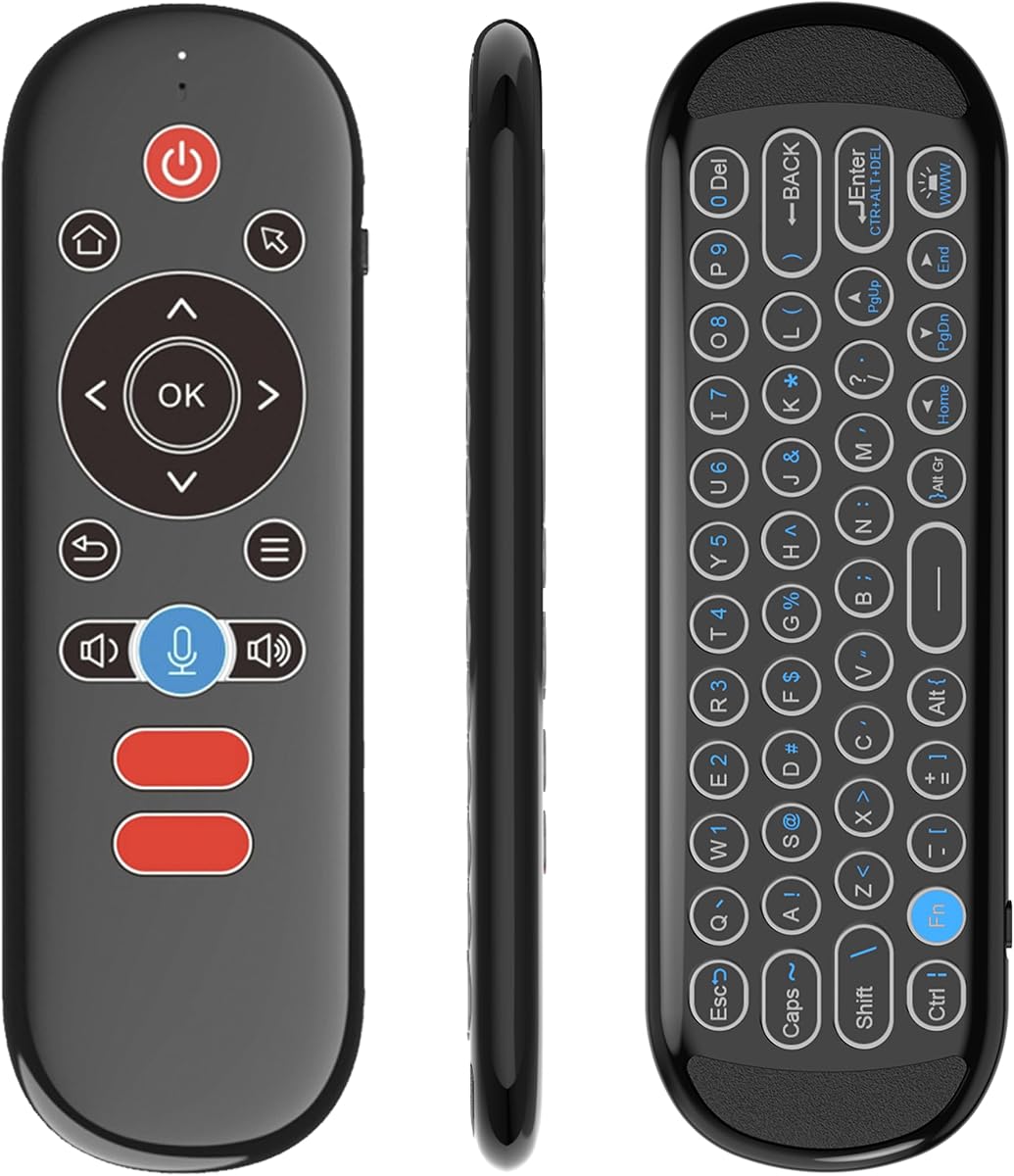
The Air Mouse Remote MX3 Pro offers a cost effective entry into air mouse technology without sacrificing essential features. It uses a 2.4G USB connection for instant setup and includes a mini keyboard on the back for easy typing. This makes it perfect for those who need quick text input on their TV screens.
We may earn a commission when you buy through this link, at no additional cost to you.
Its built-in 6-axis somatosensory system allows cursor control through simple hand movements. You can navigate menus smoothly without lifting your hand from the couch. The remote also supports IR learning on five keys so you can control basic TV functions like power and volume directly.
The main drawbacks include a lightweight build that may feel less durable over time and limited IR learning keys compared to premium models. However these are reasonable compromises given the budget friendly pricing. It remains a solid choice for casual users.
If you are looking for a no-fuss air mouse for Android TV box that covers the basics at a low cost this model delivers. It combines motion control and typing into a compact design suitable for everyday media consumption.
The rear mini keyboard simplifies text entry for searches and logins without needing a separate device.
Get reliable wireless control and motion tracking without spending a premium on advanced features.
We may earn a commission when you buy through this link, at no additional cost to you.
This 2.4G and Bluetooth Dual Mode Air Mouse sets a high standard with its rechargeable design and colorful backlighting. It features a 6-axis gyroscope for ultra-smooth pointing and a full QWERTY keyboard for efficient typing. The dual mode connectivity ensures it works seamlessly across Android TV and PC environments.
We may earn a commission when you buy through this link, at no additional cost to you.
Unlike many competitors it allows you to learn and store one hundred percent of IR functions from your existing remotes. This means you can replace multiple controllers with this single device for ultimate convenience. Voice control adds another layer of ease for searching shows hands-free.
The remote is heavier than standard options which might take getting used to for some users. Additionally pairing processes can vary between devices requiring a bit of patience during setup. Despite these minor issues it delivers premium performance and versatility.
For those seeking a high-end air mouse for Android TV box with advanced features like backlights and rechargeability this model is unmatched. It merges style function and comprehensive control into one premium package.
Built-in battery reduces waste and eliminates the need for constant battery replacements during use.
Learn all IR functions to consolidate TV audio and media controls into one remote.
We may earn a commission when you buy through this link, at no additional cost to you.
The BOXPUT BPR1S Plus introduces a unique firmware switch feature that lets you toggle between standard TV mode and PC mode. This versatility makes it adaptable for various use cases including controlling computers and tablets. It supports voice input in 2.4G mode for easy search functionality on Android devices.
We may earn a commission when you buy through this link, at no additional cost to you.
Its 6-axis gyroscope ensures accurate cursor movement so you can control media playback and menus precisely. The USB receiver allows for plug-and-play setup without drivers. Once IR learning is complete the power button prioritizes sending IR signals to control your TV directly.
The main limitation is that it does not work with Fire Stick or Roku devices. Also the battery is not included with the package so you will need to purchase AAA batteries separately. These are small drawbacks in an otherwise highly capable remote.
If you need an air mouse for Android TV box that can also adapt to PC use this model offers exceptional flexibility. Its firmware switching capability sets it apart from standard remotes in this category.
Switch between TV box and PC modes to maximize compatibility across different devices.
Built-in voice assistant helps find content quickly without typing manually.
We may earn a commission when you buy through this link, at no additional cost to you.
The EASYTONE Air Mouse is designed for versatility across Windows Android and Mac OS systems. It uses 2.4GHz RF technology for a stable connection up to 10 meters. The included USB receiver ensures easy setup without any software installation required.
We may earn a commission when you buy through this link, at no additional cost to you.
A built-in high fidelity microphone allows voice input for chat or search within supported apps. The remote features 17 keys for basic navigation and typing. Its 6-axis gyroscope accurately detects direction changes for smooth cursor movement.
However the voice search function only works within built-in search boxes or specific apps not universally across all software. Some users may find the build quality less robust than premium options. Still it offers solid value for multi-device users.
For those seeking an air mouse for Android TV box that also works with laptops and PCs this model provides broad compatibility. It simplifies control across different ecosystems with a single versatile remote.
Supports multiple operating systems making it ideal for users with mixed device setups.
Use the microphone for quick voice input without needing a separate keyboard.
We may earn a commission when you buy through this link, at no additional cost to you.
The iPazzPort Mini Air Mouse is a compact solution that combines air mouse functionality with a mini keyboard. It features a vibrant 7-color backlight for clear key visibility in dark rooms. This makes it perfect for nighttime browsing and entertainment without needing external lighting.
We may earn a commission when you buy through this link, at no additional cost to you.
It pairs seamlessly via Bluetooth or 2.4GHz for flexible connectivity with laptops and PCs. The built-in rechargeable battery provides long-lasting power so you avoid frequent battery changes. Motion sensing is precise thanks to the 6-axis gyroscope included in the design.
Note that compatibility is limited with proprietary software like LG or Samsung smart TVs. Also the charging cable is not included with the package. These points to consider before buying for specific setups.
If you want an air mouse for Android TV box that is stylish and easy to use in low light this model delivers. Its compact design and backlight make it stand out for casual viewing.
RGB backlighting helps you find keys quickly in dark viewing environments.
Rechargeable battery reduces waste and ensures long-term reliability.
We may earn a commission when you buy through this link, at no additional cost to you.
The Rii MX3 is a 3-in-1 device combining a wireless keyboard mouse and infrared remote. It uses 2.4GHz wireless technology for reliable connectivity up to 10 meters. The motion sensor lets you control the cursor by waving the remote making navigation intuitive.
We may earn a commission when you buy through this link, at no additional cost to you.
It supports Google Android Smart TV IPTV and Mini PC systems effectively. Five keys can be programmed to learn TV remote functions for basic control. The 3-gyro and 3-sensor setup ensures smooth movement in both horizontal and vertical modes.
The key layout is compact which may require a learning curve for some users. IR learning is limited to five keys so it may not replace all remote functions. Still it is a robust compact solution for many setups.
For a portable air mouse for Android TV box that fits easily in a bag this is a great option. It balances size and functionality well for casual media users.
Small form factor makes it easy to carry for travel or storage.
Motion controls support simple somatosensory games on compatible devices.
We may earn a commission when you buy through this link, at no additional cost to you.
This MX3 Pro model features an LED backlight for typing in the dark. It connects via 2.4GHz RF for a stable signal up to 10 meters. The mini wireless keyboard allows you to enter all characters with just 38 keys by pressing Alt for punctuation.
We may earn a commission when you buy through this link, at no additional cost to you.
Five programmable IR learning keys let you control common TV functions like power and volume. It supports Windows Android Mac OS and Linux systems making it versatile for different environments. The 3-gyro and 3-sensor setup ensures accurate motion control.
Compatibility issues exist with many Samsung Sony LG and Roku smart TVs. Also the batteries are not included with the package. These factors should be checked against your current setup.
If you need an air mouse for Android TV box with backlighting for night use this model delivers. It provides a good balance of features for text entry and motion control.
LED lights help you find keys easily in dimly lit rooms.
Supports multiple OS options for broader device compatibility.
We may earn a commission when you buy through this link, at no additional cost to you.
The G20S PRO BT 2.4G features a gyroscope core compensation algorithm to identify gestures accurately. It uses a single-sided design for simplicity and wear resistance. The buttons are permanent and distinguishable for quick function access.
We may earn a commission when you buy through this link, at no additional cost to you.
Bluetooth mode requires disconnecting the USB receiver and pressing specific keys to pair. This mode currently supports Android systems only. The remote helps avoid lines and desktop shackles making it suitable for various scenes.
There is no current rating data for this model which makes confidence harder to gauge. Bluetooth compatibility is limited to Android systems restricting cross-platform use. These are important factors to consider.
If you want an air mouse for Android TV box with anti-shake tech this model offers innovation. It focuses on gesture accuracy and durability for smooth control.
Anti-tremor algorithms reduce shaking for smoother cursor movement.
Optimized for Android system integration with Bluetooth pairing.
We may earn a commission when you buy through this link, at no additional cost to you.
The Rock&Rown MX3 Pro offers a reliable 2.4G wireless connection with a mini keyboard. It uses a 3-Gyro and 3-G sensor setup for convenient cursor operation. The remote allows learning up to five keys from your old remote for better control.
We may earn a commission when you buy through this link, at no additional cost to you.
It supports Android Windows Linux and Mac OS systems broadly. You can use it for Android TV Box IPTV Xbox and Raspberry Pi. The learning function makes it easier to control TV and box with one device.
You must learn the power key from your original IR remote for the unit to turn off devices. It lacks voice input which might limit search options. However it covers essential functions well.
For an air mouse for Android TV box that balances reliability and versatility this model is strong. It simplifies control across multiple systems with a simple design.
Program keys to mimic your original remote for seamless integration.
Supports multiple systems including Xbox and Raspberry Pi.
We may earn a commission when you buy through this link, at no additional cost to you.
Selecting the right air mouse involves evaluating connectivity features and compatibility to ensure it meets your streaming needs.
Most air mice use 2.4G RF or Bluetooth. RF offers stable plug-and-play with a USB receiver while Bluetooth reduces dongle clutter. Consider which your box supports best.
Choose 2.4G RF for guaranteed stability or Bluetooth for a cleaner setup if your device supports it.
Look for 6-axis gyroscope sensors which detect movement accurately. This allows natural cursor navigation without lifting your hand. Better sensors reduce lag and errors during use.
Prioritize remotes with 6-axis gyros for smooth precise cursor control.
IR learning lets the remote mimic your TV remote to control power and volume. Check how many keys can be programmed for full control. This consolidates multiple remotes into one.
Ensure the remote supports learning essential keys like power and volume for convenience.
A mini keyboard helps with typing searches and logins. Some have backlights for dark rooms. Consider layout size and backlight if typing is frequent.
Opt for a model with a mini keyboard and backlight if typing is common.
Voice search helps find content hands-free. Check if it works with your apps and OS. Some remotes only support voice in specific modes or devices.
Verify voice features work with your apps and OS for easy searches.
Not all remotes work with every Android TV box. Check lists for Fire Stick Roku or LG support issues. Confirm with the seller if unsure before buying.
Confirm compatibility with your specific devices to avoid return hassles.
Remotes may use AAA batteries or rechargeable packs. Rechargeable units save costs but need cables. Consider usage frequency and charging convenience.
Choose rechargeable for cost savings or replaceables for simplicity.
Durability matters for daily use. Look for sturdy materials and ergonomic shapes. Comfortable designs reduce strain during long sessions.
Pick a remote with solid build and ergonomic grip for comfort.
To set up your air mouse plug the USB receiver into your Android TV Box and insert batteries. If using Bluetooth navigate to settings and pair the device manually. Once connected move the remote to see the cursor respond.
For IR learning hold the learning key and press the target button on your original remote until it beeps. This records the signal for that function. Repeat for each key you want to program.
Clean the remote with a dry cloth and avoid moisture to preserve the sensor. Store it in a dry place to prevent damage. Update firmware if supported to maintain performance.
Most air mice support standard Android systems but some brands like Fire Stick or Roku may have limitations. Always verify compatibility with your specific model before buying. Contacting the seller beforehand can prevent issues.
For Bluetooth pair disconnect the USB receiver and press OK and Back buttons simultaneously. Hold for three to five seconds until the light blinks. Ensure your TV is in pairing mode to complete the connection.
Yes if the air mouse supports IR learning for all buttons. Check that the power and volume keys can be learned. This lets you control both the box and TV with one device.
This may happen due to interference or sensor issues. Try moving closer to the receiver or removing obstructions. Updating firmware or restarting the device can also stabilize motion tracking.
Voice search works only in supported apps and systems. It may not function in all environments. Confirm app support for your TV box before relying on voice features.
Battery life varies by model and usage. Rechargeable units last weeks while AAA batteries may last months. Check product details for estimated usage time before purchasing.
Yes many air mice support somatosensory games on compatible devices. Motion controls work well for simple games. Check game requirements to ensure full support.
Most air mice work plug-and-play without drivers. Simply insert the receiver and it should connect immediately. Some devices may require minor firmware updates for best performance.
We reviewed ten top air mice for Android TV Box covering budget to premium features. The BOXPUT Android Universal Remote leads with versatility while the MX3 Pro offers budget value and the Dual Mode model excels with rechargeability.
Prioritize connectivity type motion precision and IR learning based on your needs. Confirm compatibility with your devices to avoid issues. Balancing these factors ensures a smooth streaming experience.
Remember to check current pricing and availability as details may change. Investing in the right remote enhances daily use significantly. Choose one that fits your setup for lasting satisfaction.