
ASUS GeForce GT 1030 2GB GDDR5
4.6Editor score
Passive cooling for quiet operation
Supports DirectX 12
Compact low profile design
This guide compares the top GPUs for ASUS Prime A320M K motherboards to help you find the best graphics card for gaming performance and compatibility in 2026.
Choosing the right graphics card for your build is crucial for performance. The ASUS Prime A320M K is a popular motherboard that supports various GPUs. Finding the right match ensures smooth gaming and efficient multitasking without bottlenecks or compatibility issues.
We analyzed ten top GPUs compatible with the ASUS Prime A320M K. Our comparison considers performance, cooling, power requirements, and value. This list helps you navigate options from budget-friendly to high-end cards for your specific needs and budget.
Each pick highlights key features and potential trade-offs for your setup. Prices and availability change frequently so check current listings before buying. This guide aims to simplify your decision process for upgrading your PC graphics hardware effectively.
4.6Editor score

4.6Editor score

4.6Editor score
This table provides a side-by-side comparison of all ten graphics cards considered for the ASUS Prime A320M K. Review these specs to understand memory sizes, cooling solutions, and key features before making your final selection.


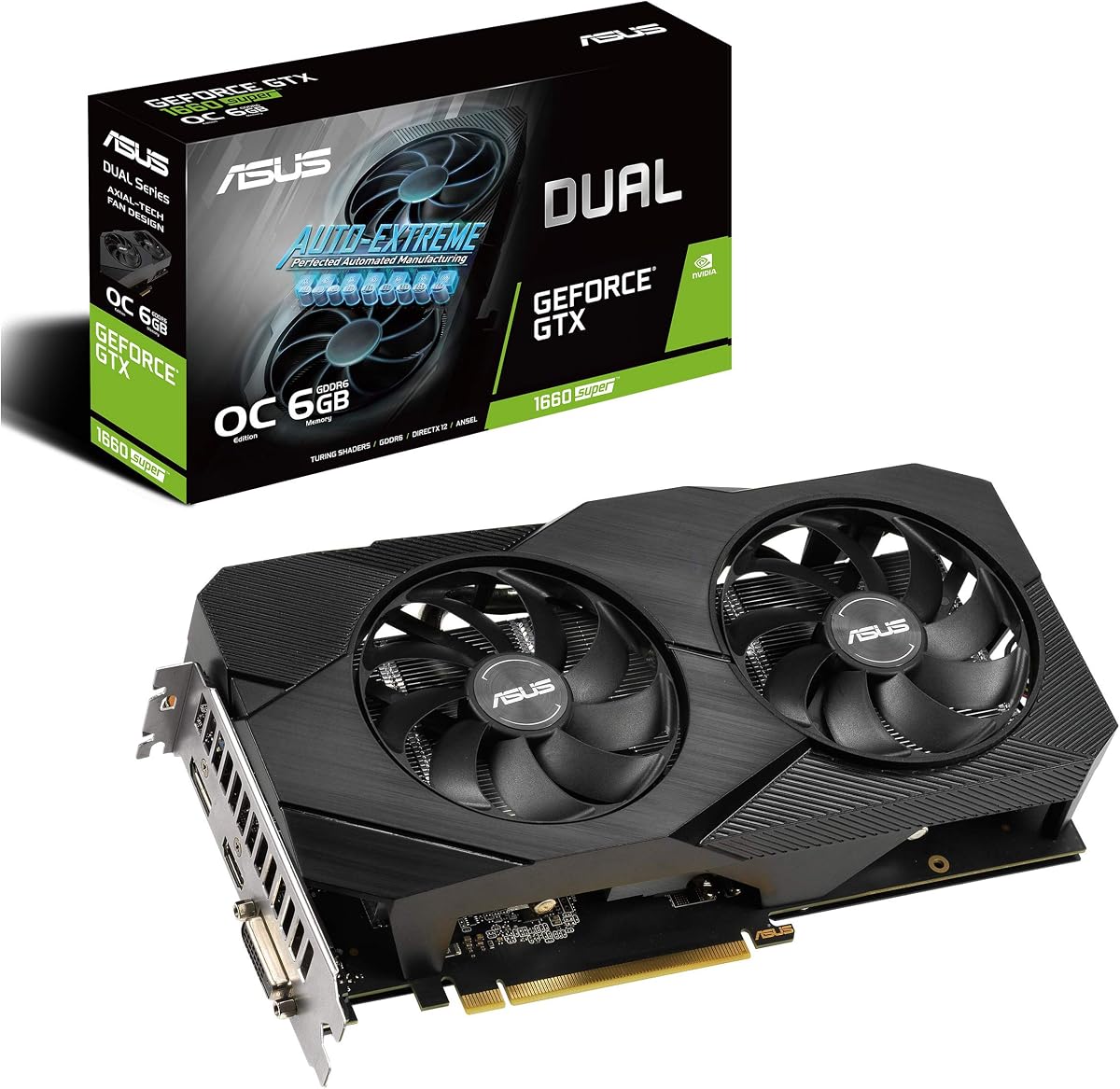


The ASUS TUF Gaming GeForce GTX 1660 Super is our top pick for balancing cost and capability. It earns high marks for reliable performance in modern titles at 1080p resolution. This card delivers a smooth gaming experience without breaking the bank.
We may earn a commission when you buy through this link, at no additional cost to you.
Built with space-grade lubricant and Auto-extreme technology, this card prioritizes long-term durability. The overclocked 6GB GDDR6 memory ensures textures load quickly and play remains fluid. TUF compatibility testing guarantees it works flawlessly with matching hardware components.
While it lacks Ray Tracing and DLSS features found in newer cards, it still handles esports and AAA titles well. The cooling system keeps noise levels low during intense sessions. These trade-offs are acceptable given the price point and raw rasterization power.
Buy this if you want a dependable upgrade for your ASUS Prime A320M K without overspending. It fits users who prioritize stability and solid frame rates over cutting-edge visual effects. This card represents the sweet spot for budget-conscious gamers.
Space-grade lubricant enhances bearing life for quieter operation and longevity.
6GB GDDR6 provides ample bandwidth for high settings in most current games.
We may earn a commission when you buy through this link, at no additional cost to you.
For entry-level needs, the ASUS GT 1030 is the most accessible option available. It scores well for users needing basic display output or light multimedia tasks. This card is perfect for office PCs or home theater builds requiring silent operation.
We may earn a commission when you buy through this link, at no additional cost to you.
Its passive cooling design ensures zero noise during operation, making it ideal for quiet environments. The low power draw means it often requires no extra power connectors from your PSU. It supports DirectX 12 for basic modern gaming compatibility.
Expect limited performance in demanding games; it suits casual titles or older releases well. You will likely see lower frame rates in AAA settings. These limitations are expected at this price and target casual users rather than enthusiasts.
Choose this card if you need a simple, silent upgrade for your Prime A320M K. It is best for media centers or light work where gaming is not the priority. This model offers excellent value for specific low-intensity use cases.
Passive heatsink design eliminates fan noise for completely silent usage.
Low power consumption often removes the need for additional power cables.
We may earn a commission when you buy through this link, at no additional cost to you.
The ASUS RTX 3060 V2 delivers premium features like Ray Tracing and DLSS. It stands out for high 1080p performance and capable 1440p gaming. This card offers the best features for users wanting modern visual enhancements.
We may earn a commission when you buy through this link, at no additional cost to you.
Equipped with 12GB GDDR6 memory, it handles high textures and future titles well. The Axial-tech fan design improves airflow and reduces noise. Dual ball bearings extend fan life significantly compared to standard sleeve designs.
It requires a more robust power supply and carries a higher price than entry options. You might see thermal throttling if airflow in your case is poor. These factors are acceptable trade-offs for the advanced performance and capabilities provided.
Invest in this card if you want the best features compatible with your motherboard. It suits gamers targeting 1440p or those needing AI upscaling for higher frame rates. This model is the top tier option for quality and longevity.
DLSS and RT cores enable higher frame rates with better visual fidelity.
12GB VRAM ensures smooth gaming with high texture packs and mods.
We may earn a commission when you buy through this link, at no additional cost to you.
The ASUS Dual RTX 3050 6GB offers a compact form factor with modern Ampere architecture. It is a solid choice for small chassis builds needing efficient cooling. The card provides good entry to mid-range performance for 1080p gaming.
We may earn a commission when you buy through this link, at no additional cost to you.
Its Axial-tech fan design increases air pressure for better cooling in tight spaces. IP5X dust resistance protects internal components for long-term durability. This model balances size and features well for users with space constraints.
The 6GB VRAM is slightly lower than the 8GB variant which limits texture quality. Performance in very demanding titles may require adjustments to settings. These compromises allow for a smaller size and lower power draw overall.
Select this if you need a low-profile card that fits small cases easily. It works well for users prioritizing physical fit alongside decent gaming performance. This option is great for compact builds needing modern features.
Maximizes compatibility for small chassis with a 2-slot design.
IP5X dust resistance ensures protection against particle ingress.
We may earn a commission when you buy through this link, at no additional cost to you.
The ASUS RTX 2060 Phoenix brings Ray Tracing to the budget sector at a lower cost. It remains a capable card for 1080p gaming with decent visual features. The Phoenix fan provides superior airflow with a long lifespan.
We may earn a commission when you buy through this link, at no additional cost to you.
Auto-extreme manufacturing ensures premium quality components for reliability. It supports up to four monitors for flexible display setups. This model allows users to experience RTX features without a high price tag.
Since it is renewed, you must check return policies carefully. Older architecture means slightly less efficiency than Ampere cards. These factors are acceptable if you want performance savings over newest tech.
Buy this for a budget RTX upgrade that fits your motherboard easily. It is best for users who want to try Ray Tracing affordably. This card offers excellent value for entry-level RTX gaming.
Provides entry into hardware-accelerated Ray Tracing and DLSS features.
Phoenix double ball bearing fan ensures superior airflow and longevity.
We may earn a commission when you buy through this link, at no additional cost to you.
This card earns high user ratings for its solid performance and cooling. The Dual-Fan Evo Edition offers quiet operation and stable temperatures. It serves as a reliable option for VR and 1080p gaming.
We may earn a commission when you buy through this link, at no additional cost to you.
The 6GB GDDR6 memory handles modern games well without stuttering. It comes renewed which often means it looks and works like new. This model is a safe bet for stability and value.
As a renewed product, you rely on Amazon Renewed guarantees for coverage. It lacks newer features like DLSS which limits upscaling options. These are minor cons for a card that performs well overall.
Choose this if you need a proven card with strong cooling for your build. It is ideal for users prioritizing quiet operation and reliable frame rates. This model delivers consistent performance for the price.
Earns high customer satisfaction for consistent and reliable performance.
Dual-fan design provides doubled airflow and quieter gameplay.
We may earn a commission when you buy through this link, at no additional cost to you.
This Evo edition offers a quiet experience with dual-fan cooling design. The 3-year warranty adds peace of mind for your investment. It is a balanced option for users wanting reliability and low noise.
We may earn a commission when you buy through this link, at no additional cost to you.
Auto-extreme technology delivers premium quality components for consistent performance. The 6GB memory ensures smooth textures in most current games. This model supports multiple displays and modern APIs effectively.
It costs slightly more than renewed units but offers full warranty protection. You miss out on Ray Tracing found in newer architectures. These trade-offs are acceptable for buyers prioritizing longevity and silence.
Select this if you need a quiet card with full manufacturer support. It works well for home office or gaming setups where noise matters. This model is a strong all-rounder for most users.
Dual-fan cooling provides doubled airflow for 3x quieter gameplay.
3 Year Warranty ensures long-term support for your hardware purchase.
We may earn a commission when you buy through this link, at no additional cost to you.
This Phoenix edition features a short form factor ideal for smaller cases. It maintains the strong performance of the 1660 Super series in a compact size. The Phoenix fan offers superior airflow with a 2x longer lifespan.
We may earn a commission when you buy through this link, at no additional cost to you.
Aerospace-grade Super Alloy Power II components help run faster and last longer. It supports up to three monitors for multi-screen productivity. This card is designed for builds where physical space is limited.
It is slightly more expensive than other variants but offers unique size benefits. The bearing design is robust but differs from TUF dual ball bearings. These trade-offs are acceptable for users prioritizing small build dimensions.
Buy this if you need a small card without sacrificing performance. It fits perfectly into ITX or SFF builds using the A320M K motherboard. This option is best for compact gaming rigs needing power.
Short form Factor fits smaller cases without sacrificing gaming power.
Super Alloy Power II runs faster and lasts longer than reference.
We may earn a commission when you buy through this link, at no additional cost to you.
The STRIX GTX 970 is a legendary card that holds up for budget users. It has silent gaming features and fits older PCIe standards well. This card is a rare high rating choice for renewed hardware.
We may earn a commission when you buy through this link, at no additional cost to you.
DirectCU II technology keeps it cooler with 0dB fan silence when idle. The 4GB memory supports basic modern titles but struggles with heavy textures. It is a nostalgic pick for users on strict budgets.
Architecture is old so expect lower performance in new releases. You might need to lower settings significantly for smooth frame rates. This card is best for retro gaming or basic computing tasks.
Choose this if you have a tight budget and need any GPU upgrade. It suits users who value silence and low cost over modern features. This model is a great pick for entry-level needs.
0dB fan technology ensures silent operation during lighter workloads.
DirectCU II provides 30% cooler temperatures for silent gaming.
We may earn a commission when you buy through this link, at no additional cost to you.
This renewed TUF model holds exceptional scores for quality and reliability. It features space-grade lubricant and Auto-extreme tech for durability. Users appreciate its performance at a lower price point.
We may earn a commission when you buy through this link, at no additional cost to you.
It works flawlessly with TUF motherboards and chassis components. The cooling ensures stable temperatures during extended gaming sessions. This card is a great example of value in the refurbished market.
Buying renewed means relying on Amazon Renewed Guarantee for support. You may not get a full manufacturer warranty. These are small risks for such a well-performing card overall.
Select this for the best value in the list for your motherboard. It is ideal for users who want durability without paying premium prices. This model delivers strong performance and excellent user feedback.
Earns top scores for reliable performance in renewed conditions.
Space-grade lubricant brings durability to quieter bearing designs.
We may earn a commission when you buy through this link, at no additional cost to you.
Selecting the right graphics card depends on your specific needs and constraints. Here are key factors to consider before making your purchase decision.
Start by setting a clear spending limit to narrow down your options. Entry-level cards offer basic upgrades while premium options provide better future-proofing. Balance what you can spend with the performance you truly need.
Choose a card that meets your current needs without overspending for unused features.
VRAM capacity impacts how well games handle textures and high resolutions. Modern titles often recommend 6GB or more for smooth 1080p gaming. Larger memory helps ensure your card stays relevant for longer.
Look for at least 6GB VRAM for better longevity in new game releases.
Cooling solutions vary from passive to dual-fan designs affecting noise levels. Efficient cooling maintains performance and protects components from overheating. Check fan technology to ensure it fits your case's airflow.
Prioritize cards with dual fans or robust designs for quiet and stable operation.
Newer architectures like Ampere include features like Ray Tracing and DLSS. Older cards may lack these but still offer solid raw rasterization performance. Consider which technologies matter most to your workflow.
Decide if you need advanced features or just raw frame rate power.
Ensure the card fits your PC case and matches the Prime A320M K layout. Compact cards are essential for small builds while larger ones may fit standard towers. Check slot count to avoid blocking other ports.
Measure your case space before buying to guarantee a perfect physical fit.
Check the recommended PSU wattage to ensure your power supply can handle the card. Some cards require extra connectors that older PSUs might lack. Mismatched power can cause instability or hardware failure.
Verify your PSU meets wattage and connector needs before finalizing your purchase.
Consider whether you prefer new or renewed products for cost savings. New units come with full manufacturer warranties while renewed offer lower prices. Amazon Renewed guarantees help protect your investment on used items.
Weigh the trade-off between warranty coverage and price savings carefully.
Ensure your monitor ports match available outputs like HDMI or DisplayPort. The A320M K uses standard PCIe interfaces so most cards slot in easily. Verify you have enough ports for your display setup.
Check available video outputs to match your monitor's input requirements.
Install the new GPU securely in the PCIe slot and attach any required power cables. Ensure the card is aligned properly before securing it with the bracket screws.
Update your graphics drivers immediately after installation for optimal performance. Visit the manufacturer's website or use their software for the latest patches and features.
Keep your PC case dust-free and ensure proper airflow for cooling. Clean fan filters regularly to prevent overheating and maintain long-term performance.
Yes, the Prime A320M K uses PCIe 3.0 which is fully compatible with modern GPUs. While it limits maximum bandwidth slightly compared to newer slots, performance impact is minimal for most gaming cards in this list.
Most of these GPUs work with standard PSUs but check your wattage. Cards like the RTX 3060 require around 550W so ensure your PSU is sufficient. Lower models usually work with existing 400W or 500W units.
The GTX 1660 Super models offer the best balance for 1080p gaming. They handle most titles at high settings with solid frame rates without requiring a budget upgrade. The RTX 3050 is also strong for newer titles.
Yes, renewed GPUs can be reliable if bought from trusted sellers like Amazon Renewed. They undergo inspection and testing to ensure they work like new. Just check return policies for added peace of mind.
Yes, the motherboard supports RTX features via PCIe and CPU compatibility. The GPU determines Ray Tracing capabilities and the A320M K works with RTX cards like the 3060. Just ensure your PSU meets power needs.
Turn off your PC and remove the case side panel. Align the GPU with the PCIe slot and press down until it clicks. Connect any required power cables and secure the bracket screws to the case.
Most cards in this list support multiple monitors. The RTX 3060 and 2060 can handle up to four displays depending on ports. Always check specific port layouts on the card for your setup needs.
We reviewed ten top GPUs suitable for the ASUS Prime A320M K motherboard from budget options to premium picks. Each card offers unique benefits tailored to different performance needs and physical space constraints.
Prioritize factors like power requirements and cooling to ensure your new hardware runs smoothly. Choose a model that aligns with your gaming goals and budget to get the best value.
Always check current prices and availability before finalizing your purchase. Prices change frequently so stay updated to find the best deal for your upgrade today.