
Hyperkin Trooper 2
4.1Editor score
Premium USB connectivity
Ergonomic grip design
Classic Atari feel
Discover the top rated Mac game joysticks for every style from budget arcade sticks to premium flight sims tested for performance.
Finding the right Mac game joysticks can transform your gaming setup significantly. Whether you crave retro arcade action or immersive flight simulation, the right controller offers precision and comfort. A good joystick provides reliable inputs, ergonomic design, and seamless compatibility with macOS systems.
Our team analyzed ten top contenders based on build quality, connectivity options, and user feedback. We focused on devices that work smoothly with Mac hardware without requiring complex driver installations. This list covers various categories including flight sticks, arcade panels, and versatile wireless controllers.
Each pick highlights specific strengths and potential limitations to help you decide quickly. We included detailed breakdowns of features like Hall Effect sensors and programmable buttons. Please note that product availability and pricing may fluctuate over time so check current listings before purchasing.
4.1Editor score

4.3Editor score

4.0Editor score
This side-by-side comparison highlights key specifications and features across all ten models. It helps you quickly identify which device matches your specific gaming needs and Mac setup requirements.




The Hyperkin Trooper 2 is a dedicated USB game controller designed for Mac users seeking a retro arcade experience. With a 4.1 star rating it offers reliable inputs for classic games without breaking the bank.
We may earn a commission when you buy through this link, at no additional cost to you.
Its ergonomic design features chamfered corners and soft rubber grommets to ensure comfort during long sessions. The quiet movement joystick and responsive buttons provide smooth inputs for precision gameplay.
While it lacks modern wireless capabilities the included 10 foot USB cable offers flexibility. Some users might find the plastic construction less durable than premium options.
This controller is ideal for emulation enthusiasts on a budget. It delivers the classic Atari feel with modern upgrades making it a solid choice for casual Mac gamers.
The ergonomic design with chamfered corners ensures you can hold the controller comfortably for extended periods without hand fatigue.
Four way joystick and six mappable buttons allow precise control for old school arcade games and retro titles on Mac.
We may earn a commission when you buy through this link, at no additional cost to you.
The Thrustmaster T-Flight Stick X provides an immersive flight simulation experience with its ergonomic design and solid base. It features adjustable resistance to match your flying style during various missions.
We may earn a commission when you buy through this link, at no additional cost to you.
Twelve reprogrammable buttons and a built in throttle lever give you full command over maneuvers without external hardware. The weighted base prevents sliding during aggressive inputs in combat scenarios.
Mac users should verify system compatibility as the product targets PC primarily. The preset button with internal memory helps store configurations for quick switching between profiles.
This joystick is perfect for those entering flight simulation on Mac. Its precise controls and stability make it a reliable companion for space sims and combat flights.
Adjustable resistance lets you fine tune stick tension to match your specific flying style for gentle turns or intense dogfights.
The solid weighted base keeps your joystick firmly planted on the desk ensuring no unwanted movement during critical flight moments.
We may earn a commission when you buy through this link, at no additional cost to you.
The abxylute C6 Wireless stands out with its Hall Effect joysticks that eliminate drifting and offer precise control. It supports a 1000Hz polling rate for ultra low latency gaming across many platforms.
We may earn a commission when you buy through this link, at no additional cost to you.
With wired Bluetooth and 2.4G options it connects seamlessly to Mac devices. The dual turbo modes and 4-level vibration allow customization for different gaming experiences.
Users appreciate the 18 hour battery life ensuring uninterrupted sessions. However the dongle mode is recommended for competitive play to minimize input lag effectively.
This controller is ideal for versatile Mac gamers needing a single solution for multiple devices. Its durability and performance make it a top choice for competitive play.
Hall Effect joysticks prevent drifting and dead zones providing extended lifespan and glitch free responsive performance for competitive gaming.
The 1000Hz polling rate in wired and dongle modes ensures precise and prompt responses minimizing input lag for a competitive edge.
We may earn a commission when you buy through this link, at no additional cost to you.
The MAYFLASH F300 is designed for fighting game enthusiasts seeking a reliable arcade stick on Mac. It supports Sanwa Denshi buttons and joystick for deep customization.
We may earn a commission when you buy through this link, at no additional cost to you.
Operating with XINPUT and DINPUT modes on PC ensures seamless integration. Turbo functions with speed settings allow rapid inputs for complex combos easily.
Users note the platform is accessible for further customization making it perfect for modding enthusiasts. However the large size may limit desk space availability.
This fight stick is ideal for competitive players on Mac who value precision. Its compatibility and quality make it a strong option for arcade gaming.
The F300 is compatible with Sanwa components and its accessible platform allows enthusiasts to customize parts to suit their playstyle perfectly.
Supports Turbo functions with different speed settings allowing you to execute rapid inputs for complex combos in fighting games.
We may earn a commission when you buy through this link, at no additional cost to you.
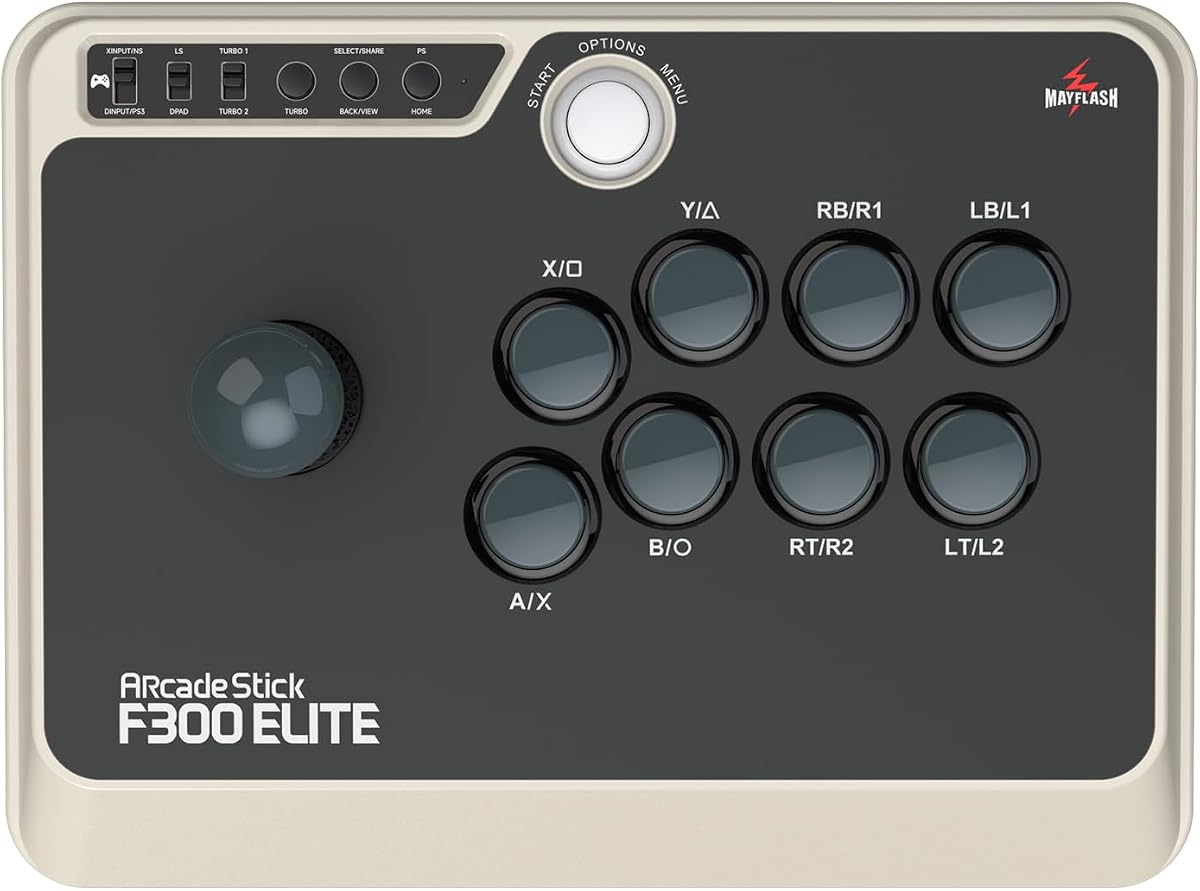
The MAYFLASH F300 Elite comes with premium Sanwa components out of the box for reliable strikes. It supports XINPUT and DINPUT ensuring broad compatibility with Mac systems.
We may earn a commission when you buy through this link, at no additional cost to you.
Built for modding enthusiasts the inside of the platform is accessible for further customization. The buttons and joystick can be switched to suit specific playstyles.
Users appreciate the fully tested quality before shipping ensuring a premium experience. However the price is higher than the standard version.
This elite stick is ideal for serious Mac fighting game players. Its high performance and modding support make it a top tier choice.
Using premium quality Sanwa components including nine highly responsive buttons and a precision four way joystick you can strike instantly.
The inside of the platform is accessible for further customization so the joystick and buttons can be switched to suit your playstyle.
We may earn a commission when you buy through this link, at no additional cost to you.
The Thrustmaster SimTask FarmStick is built specifically for farming simulator enthusiasts on Mac. Its realistic 3-axis joystick offers smooth control for operating tractors and construction equipment.
We may earn a commission when you buy through this link, at no additional cost to you.
With up to 33 programmable inputs you manage every function without relying on a keyboard. H.E.A.R.T technology eliminates drift ensuring long-term precision.
Users can build a complete cockpit by pairing with a steering wheel or using two joysticks. The ambidextrous design supports flexible setups for personal comfort.
This joystick is ideal for serious farming sim players on Mac. Its specialized controls make managing heavy machinery lifelike and efficient.
Experience precise smooth control when operating tractors and loaders giving you a more immersive and lifelike farming simulator setup.
H.E.A.R.T technology eliminates drift and wear ensuring long-term precision and reliable control for demanding farming and construction simulation gameplay.
We may earn a commission when you buy through this link, at no additional cost to you.
The 8Bitdo Ultimate 2 offers TMR joysticks with higher sensitivity and durability. It delivers a stable 2.4G connection with ultra-low latency under 1ms on Mac.
We may earn a commission when you buy through this link, at no additional cost to you.
Trigger Mode Switch lets you toggle between linear Hall Effect and non-linear tactile triggers for different scenarios. Two back paddle buttons enhance control for faster responses.
It includes a multifunctional charging dock and USB-C adapter for seamless connectivity. Users find the customization via software powerful for advanced setups.
This controller is ideal for Mac gamers seeking a premium wireless experience. Its features and reliability make it a standout choice for general gaming.
TMR Joysticks offer higher sensitivity greater precision and enhanced durability compared to traditional analog sticks for better performance.
8BitDo Exclusive Wireless Technology delivers an exceptionally stable 2.4G connection with ultra-low latency under 1ms.
We may earn a commission when you buy through this link, at no additional cost to you.
The Moonag Wireless PC Controller features Hall Effect joysticks to prevent drift effectively. It supports a 1000Hz polling rate for ultra-low latency gaming across platforms.
We may earn a commission when you buy through this link, at no additional cost to you.
Dynamic RGB lighting creates an immersive atmosphere while dual vibration motors provide feedback for action games. The ergonomic shape with textured grip reduces fatigue.
Users can switch between Bluetooth and 2.4G modes easily. The 800mAh battery ensures long playtime and support for charging while playing.
This controller is ideal for budget-conscious Mac gamers wanting wireless freedom. Its precision and lighting make it a compelling option.
Equipped with Hall effect sensor joysticks that effectively prevent stick drift and wear for smoother control and longer durability.
Supports up to 1000Hz polling rate in both 2.4GHz wireless and wired modes providing ultra-fast response time and minimal input lag.
We may earn a commission when you buy through this link, at no additional cost to you.
The Logitech G X56 H.O.T.A.S offers military-grade precision with customizable options for aspiring combat pilots. It includes over 189 programmable controls for total immersion.
We may earn a commission when you buy through this link, at no additional cost to you.
Features include mini analog sticks for control surfaces and RGB backlighting to match your rig. The Advanced 4-Spring System adjusts stick force for realism.
It places controls perfectly under your fingers for VR navigation. However it requires two USB ports and a high-end PC setup.
This rig is ideal for serious flight sim enthusiasts on Mac or PC. Its advanced features make it the ultimate choice for realism.
Military-grade Space and Flight Sim Precision with customizable options including all the control surface options required to achieve the exact level of performance.
Accurate 16-bit aileron and elevator axis with hall-effect sensors and adjustable stick force via Advanced 4-Spring System for realism.
We may earn a commission when you buy through this link, at no additional cost to you.
The SPEEDLINK Competition PRO brings nostalgic design taken from the original arcade machine stick. It includes a collection with 20 retro games for download.
We may earn a commission when you buy through this link, at no additional cost to you.
As a digital USB joystick it offers a simple plug and play experience. The anniversary edition adds value with its classic aesthetic.
Users find it perfect for casual arcade and retro games. However it lacks modern features like wireless connectivity or high-end programmability.
This joystick is ideal for retro gaming enthusiasts on Mac. Its design and included games make it a charming choice for nostalgia.
Nostalgic Design Taken from the Original Competition Pro's Arcade Machine Stick offers a classic feel for retro gaming sessions.
Anniversary Edition Includes Games Collection with 20 Retro Games for Download making it ready to play right out of the box.
We may earn a commission when you buy through this link, at no additional cost to you.
Choosing the right joystick requires evaluating compatibility, connectivity, and features that match your preferred gaming style. These factors ensure you get the best experience on your Mac.
Ensure the joystick explicitly supports macOS. Some flight sticks require specific drivers that may not be available for Apple Silicon chips. Check product listings for Mac certification.
Verify Mac support before purchase to avoid driver headaches and ensure seamless plug and play functionality on your system.
Decide between wired and wireless based on your desk setup. Wired connections offer stability while wireless provides flexibility. Look for USB-C or Bluetooth options for modern Macs.
Choose wired for competitive play and wireless for convenience. Ensure the wireless technology is compatible with your Mac version.
Hall Effect sensors use magnets to measure position preventing wear and stick drift. This tech extends the lifespan of your controller. Traditional potentiometers may drift over time.
Prioritize Hall Effect technology for long-term reliability and precision. It ensures your inputs remain accurate for years of use.
Look for solid bases and durable materials to ensure stability during intense gameplay. Weighted bases prevent sliding on your desk. Plastic components should feel sturdy.
Select a build that feels solid in hand. A heavy base is crucial for flight sim and arcade precision.
Consider the number of buttons and their placement. Flight sticks need more programmable controls while arcade sticks focus on action. Ensure triggers are tactile and responsive.
Match the button layout to your genre needs. More buttons are better for sims while simplicity suits fighting games.
Customizable controls enhance your workflow and comfort. Software support allows you to map complex macros. Check if the device supports XINPUT or DINPUT modes on PC.
Look for programmable buttons to simplify complex commands. Internal memory helps save profiles for quick access.
A higher polling rate ensures faster response times for competitive gaming. 1000Hz is ideal for minimizing input lag. Lower rates may cause noticeable delays in fast-paced games.
Aim for a 1000Hz polling rate for the best responsiveness. It guarantees that your inputs are registered instantly.
Comfort is key for long gaming sessions. Textured grips and curved handles reduce hand fatigue. Adjustable tension on sticks helps match your preference.
Pick a design that fits your hand comfortably. Ergonomic shapes prevent pain during extended play.
Start by connecting your joystick to a USB port or pairing via Bluetooth on your Mac. Follow any on-screen prompts for drivers if required. Ensure the device is recognized by your system.
Calibrate your controller through system settings or gaming software. Test each button and axis to ensure proper function. Adjust tension or grip settings if available.
Keep the joystick clean with a soft cloth to remove dust. Avoid exposing it to moisture or extreme temperatures. Store it in a dry place when not in use.
No not all devices support macOS. Always check the product specifications for Apple Silicon or macOS compatibility. Some flight sticks may require specific drivers not available for Mac.
Hall Effect technology uses magnetic sensors to track stick position instead of mechanical parts. This prevents drift and extends the lifespan of your joystick making it ideal for long-term use.
Modern wireless joysticks with 2.4G connections are highly reliable. Look for low latency models to avoid input lag. Wired connections remain the best choice for competitive play.
Yes many flight sticks support Mac but compatibility varies by model. Always verify with the manufacturer. Some advanced features may require specific software drivers.
Use a soft dry cloth to wipe the surface. For deeper cleaning use slightly dampened areas. Avoid harsh chemicals or exposing internal components to moisture to ensure longevity.
A 1000Hz polling rate is generally considered the best for gaming. It ensures minimal input lag and precise tracking. Lower rates may cause delays in fast-paced games.
Some arcade sticks come pre-assembled while others require basic setup. Check product details before purchase. Customizing buttons often requires simple tools and effort.
Many devices support multiple platforms but adapters may be needed. Check specific compatibility lists. Some sticks work natively on PS5 while others require conversion.
We reviewed ten top contenders ranging from budget arcade sticks to premium flight rigs. Each offers unique strengths tailored to different gaming preferences and Mac compatibility.
Prioritize sensor technology and build quality for long-term satisfaction. Consider your primary gaming style to determine if you need a flight stick or arcade panel.
Always verify current pricing and availability as these details change often. We hope this guide helps you find the perfect Mac game joystick for your setup.