
Redragon K618 PRO
4.1Editor score
Tri-mode connectivity options
Dedicated macro zone
Slim low profile design
This guide compares the top low profile mechanical keyboards for gaming and work, evaluating switch types, connectivity options, and build quality to help you
Low profile mechanical keyboards offer a unique blend of tactile feedback and slim design. They are perfect for users who want the precision of mechanical switches without the bulk of traditional boards. These keyboards reduce wrist strain and fit better on crowded desks.
We evaluated ten top models based on switch quality, connectivity, and build materials. Our analysis covers wireless options, RGB features, and ergonomic designs. Each product was chosen for its ability to deliver comfort and performance in professional and gaming settings.
Each pick highlights specific strengths like macro keys or tri-mode connectivity. Prices and availability change frequently so always check the latest offers. This list helps you find the ideal keyboard for your typing style and budget constraints today.
4.1Editor score

4.3Editor score

4.7Editor score
The following table provides a side-by-side comparison of all ten products selected for this guide. It highlights key specifications like switch type, connectivity, and layout to help you make a quick decision based on your specific needs.



The Redragon K618 PRO is a top choice for budget conscious buyers seeking a low profile mechanical keyboard. With a rating of 4.1 stars it offers solid performance for both gaming and typing. Its slim design reduces wrist strain while maintaining responsive feedback.
We may earn a commission when you buy through this link, at no additional cost to you.
Key strengths include tri-mode connectivity that lets you switch between devices without re-pairing. The dedicated macro zone allows for quick command recording without software. Linear Red switches provide smooth actuation ideal for fast-paced games or long typing sessions.
Trade-offs include a simpler build compared to premium models. The keycaps may feel less durable over time. However for the price these factors are acceptable for users prioritizing cost and basic functionality.
This keyboard is best for casual gamers or office workers on a tight budget. It delivers reliable performance without breaking the bank. We recommend it as an entry point into low profile mechanical typing.
The dedicated 4×5 macro zone lets you record complex key combinations instantly. This feature is perfect for gamers who need quick access to abilities or office users automating tasks.
Tri-mode connectivity supports USB-C, Bluetooth, and 2.4GHz wireless. This flexibility ensures you can connect to PC, laptop, or tablet with zero lag and minimal setup.
We may earn a commission when you buy through this link, at no additional cost to you.
The Keychron K3 Version 2 stands out as an editor's choice for its balance of features and build. It scores a 4.3 rating and appeals to users wanting customization. The 75% layout saves space while keeping essential keys.
We may earn a commission when you buy through this link, at no additional cost to you.
Its QMK firmware allows endless remapping possibilities via a web app. The aluminum body ensures durability and a premium feel. Bluetooth 5.1 supports seamless switching between three devices like laptop and phone.
Some users may need to update firmware for exact device matching. The price is higher than entry models but justified by materials. This trade-off is acceptable for professionals needing reliable daily drivers.
Ideal for Mac and Windows users wanting flexibility. It suits developers and creatives who customize workflows. We recommend it for those valuing long-term usability over lowest cost.
Open-source QMK firmware allows deep customization through Keychron Launcher. You can remap keys or create macros without installing complex software on your device.
Reinforced aluminum body makes this one of the thinnest mechanical keyboards. It balances weight and stability better than plastic alternatives in this category.
We may earn a commission when you buy through this link, at no additional cost to you.
The Cherry MX 10.0N brings authentic switch quality to low profile designs. Rated 4.3 it is built for users prioritizing feel and durability. The aluminum housing offers robust protection against wear.
We may earn a commission when you buy through this link, at no additional cost to you.
MX Low Profile Speed switches deliver fast linear feedback. RGB backlighting provides full customization. Integrated stand ensures ergonomic typing angles during work or gaming sessions.
It lacks wireless connectivity which limits portability. The price reflects brand reputation. For desk-bound users this is acceptable trade-off for reliability.
Best for gamers needing speed and quality. It suits setups where wireless isn't critical. We recommend it for those who trust Cherry switch longevity.
Cherry MX Low Profile Speed switches offer consistent linear feedback. They are tested for durability and smooth actuation across millions of keystrokes.
Customizable RGB colors and effects allow personalization. You can match lighting to your room or game mood easily.
We may earn a commission when you buy through this link, at no additional cost to you.
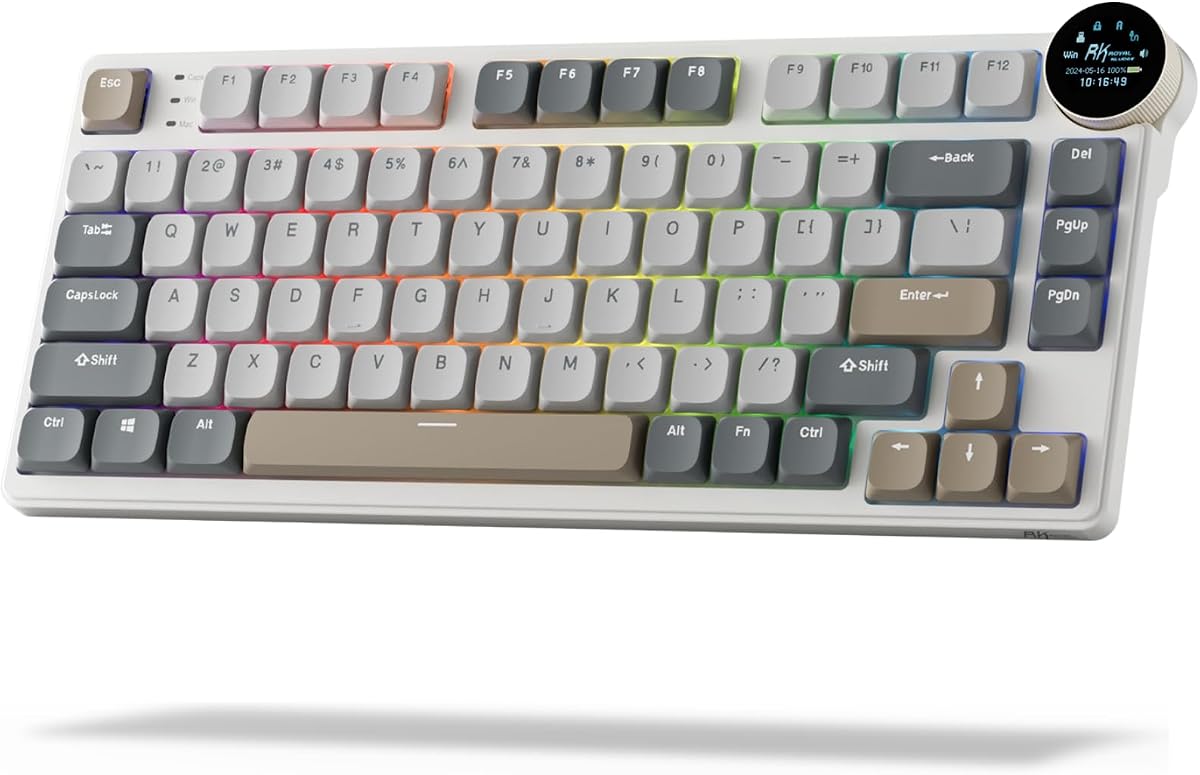
The RK ROYAL KLUDGE N80 offers a smart screen for status updates. With 4.1 stars it targets users who want modern features. Tri-mode connectivity supports various devices seamlessly.
We may earn a commission when you buy through this link, at no additional cost to you.
Top-mounted design ensures stability during gaming. Sound-absorbing layers reduce hollow noise. Knob control manages volume and brightness effortlessly.
Screen adds slight thickness. Navigation might require time to learn. These are minor compared to functionality gains.
Ideal for tech enthusiasts. It suits setups wanting visual feedback. We recommend it for those who value innovation.
Dynamic display shows connection modes and battery status. This feature adds convenience without needing external software.
Triple sound-absorbing layers minimize hollow sounds. This results in a smoother and quieter typing experience.
We may earn a commission when you buy through this link, at no additional cost to you.
Flow Lite 84 Keys focuses on wrist comfort and typing feel. Rated 4.3 it features gasket mount for cushioning. PBT keycaps provide durable texture.
We may earn a commission when you buy through this link, at no additional cost to you.
Specter Linear switches reduce finger strain. 1000Hz polling ensures responsiveness. Battery life supports long work days.
Plastic body feels lighter than aluminum. RGB is basic. Trade-offs suit comfort seekers.
Best for long typing sessions. It suits ergonomic priorities. We recommend it for comfort-focused users.
Gasket mount brings soft and cushioned feel. This design lowers wrist strain during long typing hours.
Built-in 2000mAh battery offers up to 80 hours. Charging via USB-C is quick and convenient.
We may earn a commission when you buy through this link, at no additional cost to you.
Keychron K1 Ultra delivers top-tier performance for enthusiasts. With 4.7 stars it leads in speed. 8K polling ensures ultra-fast response.
We may earn a commission when you buy through this link, at no additional cost to you.
Hot-swappable sockets allow easy switch changes. Hardwood panels add premium aesthetics. ZMK firmware supports deep customization.
Higher cost limits accessibility. Setup requires learning. Trade-offs are worth for pros.
Ideal for competitive gamers. It suits quality seekers. We recommend it as best premium option.
Supports up to 8K wired polling for gaming. This reduces latency to near zero in wired connections.
Hot-swappable sockets allow replacement without soldering. You can change switches to match typing preferences easily.
We may earn a commission when you buy through this link, at no additional cost to you.
Keychron K17 Max targets productivity with 96% layout. Rated 4.4 it saves space. Gateron Brown switches offer tactile feedback.
We may earn a commission when you buy through this link, at no additional cost to you.
Ultra-slim body fits crowded desks. QMK ensures customization. RGB adds style without bulk.
Layout may not fit all. Switch selection is fixed. Trade-offs suit office users.
Best for professionals needing number pad. It suits desk efficiency. We recommend it for work setups.
96% layout includes numpad in compact size. This saves desk space while keeping essential keys.
Gateron Brown switches provide tactile bump. This feels great for typing and gaming without being loud.
We may earn a commission when you buy through this link, at no additional cost to you.
Flow Lite 100 Keys offers full functionality in low profile. Rated 4.4 it keeps number pad. PBT keycaps ensure durability.
We may earn a commission when you buy through this link, at no additional cost to you.
Gasket mount provides cushioned typing. 1000Hz polling supports gaming. 3000mAh battery lasts up to 100 hours.
Larger footprint may not fit small desks. Heavier than smaller models. Trade-offs suit full size needs.
Ideal for spreadsheets. It suits desk setups. We recommend it for number pad users.
Built-in 3000mAh battery offers up to 100 hours. This supports long workdays without frequent recharges.
Upgraded gasket sound-dampening layer enriches keystrokes. This provides a richer and more satisfying tone.
We may earn a commission when you buy through this link, at no additional cost to you.
Keychron K3 Max SE offers hot-swap flexibility. Rated 4.6 it supports customization. EPDM foam improves acoustics.
We may earn a commission when you buy through this link, at no additional cost to you.
Triple connectivity options ensure flexibility. Redesigned stabilizers reduce wobble. Layout balances compact and essential keys.
Switch availability varies. Firmware learning required. Trade-offs are acceptable for features.
Ideal for tinkerers. It suits mod enthusiasts. We recommend it for customization.
Allows change switches in seconds without soldering. You can tailor switch feel to your preferences easily.
Redesigned stabilizers reduce wobble on larger keys. This results in smoother and more stable typing.
We may earn a commission when you buy through this link, at no additional cost to you.
Razer Ornata V3 blends membrane and mechanical. Rated 4.5 it offers smooth typing. UV-coated caps resist wear.
We may earn a commission when you buy through this link, at no additional cost to you.
Mecha-membrane switches provide feedback. Magnetic wrist rest adds comfort. Media keys manage audio easily.
Not true mechanical feel. Fixed profile limits choice. Trade-offs suit general gaming.
Ideal for casual users. It suits hybrid feel. We recommend it for Razer fans.
Mecha-membrane switches fuse clicky feedback with familiar feel. Each keystroke feels satisfying and precise.
UV-coated keycaps ensure fade-resistant legends. This offers protection against wear and tear from frequent use.
We may earn a commission when you buy through this link, at no additional cost to you.
Choosing the right low profile mechanical keyboard requires understanding switch types, layouts, and connectivity. This guide explains key factors to ensure you find the perfect fit.
Switches determine feel and noise. Linear switches offer smooth travel while tactile provide bumps. Red and Brown are common for low profile.
Choose based on noise tolerance and preference.
Layouts range from 60% to full-size. Smaller layouts save desk space while 96% keeps numpad. Consider your workflow needs.
Select size based on desk space and keys used.
Wired ensures zero lag while wireless adds freedom. Tri-mode allows switching between PC and mobile. Battery life matters for wireless.
Check connection type to match device usage.
Materials affect weight and durability. Aluminum offers premium feel while plastic is lighter. Ensure solid base to prevent wobble.
Look for sturdy materials for long-term use.
QMK or ZMK firmware allow deep remapping. Hot-swap sockets let you change switches. Software should be user-friendly.
Prioritize firmware features for customization.
Low profile designs reduce wrist strain. PBT keycaps provide better grip and texture. Wrist rests help maintain posture.
Focus on ergonomics for health.
Prices vary widely. Higher cost buys better materials and features. Balance features with actual needs.
Set budget before browsing to filter options.
Some keyboards use dampening layers for quiet typing. Others are louder. Check reviews for sound feedback.
Ensure acoustic profile suits your environment.
Keep your keyboard clean by using compressed air to remove dust between keys. This ensures switches maintain consistent actuation over time.
Update firmware regularly to access latest features and stability fixes. Follow manufacturer steps via USB-C connection.
Avoid liquid spills by using a protective cover when not in use. Regularly wipe keycaps with microfiber cloth to prevent grime buildup.
Yes they often reduce wrist strain due to lower height. The shorter travel distance allows faster and lighter keystrokes compared to standard keyboards.
They feel lighter with shorter travel. While the tactile bump may be less than standard switches they still provide mechanical feedback and durability.
Modern ones use 2.4GHz or Bluetooth 5.1 for stable connections. Look for models with 1000Hz polling rates to ensure lag-free performance.
Only if they are hot-swappable. Models like Keychron K1 allow this but others have soldered switches so check product specs.
Most support Mac via layout switching or included caps. Always confirm macOS compatibility before purchase to ensure all multimedia keys work.
Linear Red or Silent switches are generally quiet. Look for dampening layers or gasket mounts to further reduce noise.
Typically 40 to 100 hours depending on usage. Features like RGB and polling rates impact this so check specs.
Not strictly but recommended for long sessions. Low profiles help but rest support aligns wrists for extra comfort.
This guide covered ten excellent low profile mechanical keyboards ranging from budget to premium. Each offers unique strengths like tri-mode or hot-swap.
Prioritize comfort and switch feel based on your needs. Wireless connectivity is essential for modern desks.
Always check current prices and availability before buying as deals change frequently. We hope this helps you find your ideal typing companion.