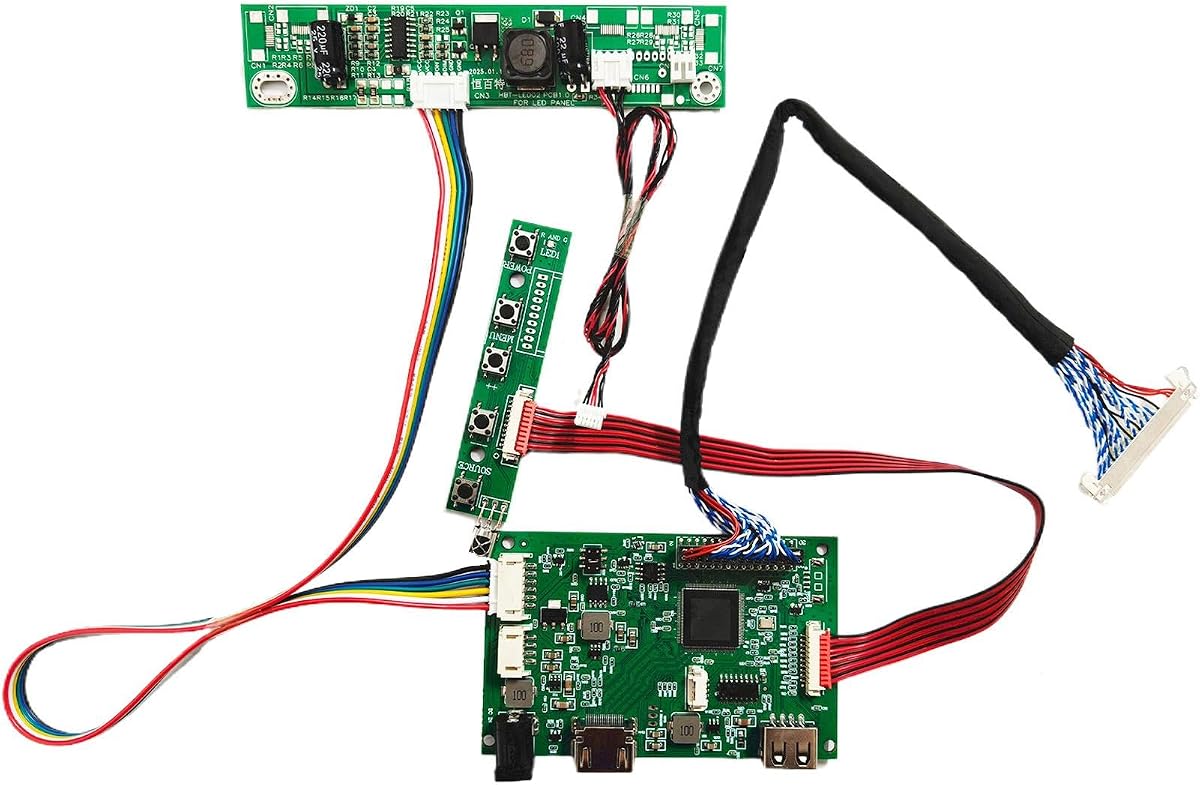
VSDISPLAY H/D USB LCD Controller Board
5.0Editor score
Supports 180 degree rotation
HDMI USB video playback input
Fits 21.5 inch 1080p
Choosing the right LCD controller board for laptop screen replacements is critical for successful DIY monitor projects. These boards convert video signals into formats your panel understands, ensuring vibrant display quality and reliable operation.
We evaluated ten verified products based on interface compatibility, resolution support, and user feedback. Each option was assessed for ease of installation, signal stability, and feature sets like audio output or USB connectivity.
Every pick includes detailed specs, pros, cons, and real-world usage notes to help you decide. Prices fluctuate frequently, so verify current listings before purchasing to ensure you get the best value for your specific panel.
5.0Editor score

4.4Editor score

As an Amazon Associate we earn from qualifying purchases.
This side-by-side comparison highlights key specifications for all ten selected controller boards. Review the interface types, resolution limits, and power requirements to match the correct board with your laptop panel model.


This board stands out as a reliable choice for users needing a stable 1366×768 HD solution. With a 4.4 rating, it delivers consistent performance for DIY projects or repairs on compatible laptop screens.
We may earn a commission when you buy through this link, at no additional cost to you.
Its precision design ensures high-quality signal output, reducing flickering or reboot issues common with generic adapters. The pre-connected signal cable simplifies installation, while the red circle mark guides accurate pin alignment.
While it lacks audio output and does not support FHD 1920×1080 panels, these trade-offs are acceptable given its specialized focus. Users prioritizing stable HD performance for smaller screens will find this board dependable.
Buyers with 11.6 to 15.6 inch panels matching the listed models should consider this kit. It offers a balanced mix of affordability, ease of use, and technical reliability for standard HD displays.
The board is strictly designed for 1366×768 resolution, ensuring maximum stability for compatible panels without risking display errors.
Using a standard 12V 2A adapter prevents common power-related issues like flickering or boot loops during operation.
We may earn a commission when you buy through this link, at no additional cost to you.
Priced competitively, this VSDISPLAY board offers excellent value for 15.6 inch panels requiring 40 pin LVDS interfaces. It supports VGA and DVI inputs, making it versatile for various signal sources.
We may earn a commission when you buy through this link, at no additional cost to you.
The inclusion of a speaker connector allows for audio playback, a rare feature in budget boards. Users appreciate the plug-and-play capability, which reduces setup time significantly.
However, the power adapter is not included, requiring an extra purchase. Careful attention to port connections is necessary to avoid white or black screen issues during initial setup.
For those on a tight budget needing audio support and DVI compatibility, this board is a strong contender. It balances cost with essential features effectively.
The 4-pin speaker connector enables direct audio output, enhancing multimedia capabilities without external hardware.
With pre-connected cables and clear instructions, users can activate the display quickly without complex configurations.
We may earn a commission when you buy through this link, at no additional cost to you.
This controller board is ideal for users upgrading to 1920×1080 FHD panels without breaking the bank. Its wide support for screen sizes from 11.6 to 17.3 inches adds significant flexibility.
We may earn a commission when you buy through this link, at no additional cost to you.
Direct connection without driver installation simplifies the process for non-technical users. The board is designed to work instantly with the correct signal cable and power supply.
While the average rating is lower than top picks, many users find it functional for standard home or office repairs. Ensuring the power supply meets the 2A minimum is key to avoiding restart issues.
For those needing FHD resolution on a budget, this board offers a solid balance of performance and cost. Always verify your panel model against the compatibility list before buying.
Specifically designed for 1920×1080 resolution, this board delivers sharp, clear visuals for modern high-definition panels.
Plug-and-play design eliminates the need for software drivers, allowing immediate display activation upon connection.
We may earn a commission when you buy through this link, at no additional cost to you.
With a strong 4.6 rating, this board excels for users working with older 17 or 19 inch gaming panels. It supports 1280×1024 resolution, a common standard for legacy displays.
We may earn a commission when you buy through this link, at no additional cost to you.
Audio output is a valuable feature here, allowing direct speaker connection without extra cables. The 3A power requirement ensures stable operation under load, critical for gaming setups.
While 1280×1024 is older than modern FHD, many users still rely on these screens for specific industrial or gaming applications. The high rating reflects reliable performance for its target niche.
If you have a compatible 30 pin LVDS panel requiring VGA or DVI input, this board is a trustworthy choice. Ensure your power adapter meets the 3A minimum to avoid instability.
Specifically tested with gaming screen models, ensuring smooth operation and minimal input lag.
The 3A power requirement prevents flickering and reboot loops, even during intensive display usage.
We may earn a commission when you buy through this link, at no additional cost to you.
This board is specifically tailored for 21.5 and 23.8 inch 1080p displays, bridging the gap for DIY monitor builds. It includes a USB cable for touch screen support, adding versatility.
We may earn a commission when you buy through this link, at no additional cost to you.
VGA and DVI inputs offer flexibility in connecting various devices. The 3A power requirement ensures that larger screens receive sufficient current for consistent brightness.
While limited to specific panel models, users with compatible screens appreciate the included inverter board and signal cable. This reduces the need for extra purchases.
For those constructing a large monitor from a laptop screen, this kit provides most necessary components. Always verify compatibility with your specific panel model number.
Includes a USB cable for touch screen functionality, expanding the utility of converted displays.
Comes with an inverter board, simplifying the wiring process for LCD backlight control.
We may earn a commission when you buy through this link, at no additional cost to you.
Engineered for 1920×1080 panels, this board delivers high-quality visuals across 11.6 to 17.3 inch displays. Its focus on eDP interfaces makes it a top choice for modern laptop screens.
We may earn a commission when you buy through this link, at no additional cost to you.
The pre-connected signal cable simplifies installation, reducing errors during setup. Detailed technical guidance helps users troubleshoot common issues like white screens or restart loops.
While it does not support HD 1366×768 panels, this specialization ensures optimized performance for FHD displays. Users seeking sharp resolution on larger screens will benefit from this design.
Buyers should verify their panel model against the compatibility list. With the right match, this board offers a reliable path to a stable 1080p external monitor.
Designed specifically for 1080p panels, ensuring crisp image quality and vibrant color reproduction.
Pre-connected cables and clear Pin 1 markings make setup straightforward for DIYers.
We may earn a commission when you buy through this link, at no additional cost to you.
This universal board stands out with support for screens from 10 to 65 inches, offering broad compatibility. Its HDMI, DVI, and VGA inputs make it versatile for diverse signal sources.
We may earn a commission when you buy through this link, at no additional cost to you.
The NT68676 chipset provides stable signal processing, while the multi-language OSD allows customization for international users. It is a robust choice for large DIY builds.
However, setup may require careful configuration compared to specialized kits. Users must ensure their panel's resolution and interface match the board's capabilities.
For those needing a flexible, universal solution across many sizes, this board is worth the extra setup effort. It balances adaptability with reliable performance.
Compatible with screens from 10 to 65 inches, making it a versatile choice for various project scales.
OSD options include multiple languages, simplifying configuration for non-English speakers.
We may earn a commission when you buy through this link, at no additional cost to you.
With a perfect 5.0 rating, this board offers premium features like HDMI/USB video playback and 180-degree image rotation. It is designed for 21.5 to 23.8 inch 1080p screens.
We may earn a commission when you buy through this link, at no additional cost to you.
USB playback support allows viewing media files directly from drives, enhancing standalone functionality. The image rotation feature is particularly useful for signage or unique display orientations.
While the power adapter is not included, the board itself delivers exceptional reliability and feature richness. Users appreciate the audio output and comprehensive video input options.
For those seeking advanced features and top-tier performance, this board is a standout choice. Verify panel compatibility to ensure seamless operation.
Allows direct video playback from USB drives, eliminating the need for external media players.
Supports 180-degree image rotation, offering flexibility for portrait or landscape setups.
We may earn a commission when you buy through this link, at no additional cost to you.
This board emphasizes precise signal transmission and optimized image quality. It supports 1366×768 resolution with HDMI and VGA inputs, adding modern connectivity to legacy 40 pin panels.
We may earn a commission when you buy through this link, at no additional cost to you.
Adjustable parameters for brightness and contrast ensure crisp visuals. The design reduces lag and screen distortion, enhancing the overall viewing experience.
Although it lacks user ratings, the feature set suggests professional-grade stability. It is suitable for users needing HDMI support on older panels.
Verify compatibility with your specific 15.6 inch panel before purchasing. For those needing HDMI on 40 pin LVDS panels, this offers a specialized, high-quality solution.
Reduces signal loss and distortion, ensuring clear and stable image output for your display.
Dynamic parameters for brightness and contrast improve clarity and color accuracy.
We may earn a commission when you buy through this link, at no additional cost to you.
Tailored specifically for 17.3 inch panels, this board delivers flawless FHD performance with a perfect 5.0 rating. Its compact design integrates tightly with notebook power systems.
We may earn a commission when you buy through this link, at no additional cost to you.
HDMI and VGA compatibility ensures versatile signal input, while low-power management extends efficiency. It handles signal conversion with high precision and minimal latency.
While limited to specific 17.3 inch models, the high rating confirms reliability for those exact panels. The functional integration is superior to generic external driver boards.
If you own a compatible 17.3 inch laptop screen, this kit provides a seamless upgrade path. Verify your panel model number to avoid compatibility issues.
Designed for B173HW01 models, ensuring perfect interface matching for these specific panels.
Converts host signals into screen-recognizable formats with high accuracy and stability.
We may earn a commission when you buy through this link, at no additional cost to you.
Selecting the right controller board requires careful attention to resolution, interface, and panel model. This section explains key factors to ensure compatibility and reliable performance.
The board must support your screen's native resolution. For example, 1366×768 boards do not work with 1920×1080 panels and vice versa. Always verify the resolution requirement before purchasing.
Matching the exact resolution ensures stable image quality and avoids display errors.
LCD screens use specific interfaces like LVDS (40 pin), eDP (30 pin), or others. The board's input connector must match the screen's port exactly. Mismatched interfaces will prevent any signal transmission.
Check your panel's pin count and interface type to confirm compatibility.
Even with the same resolution and interface, panels vary by manufacturer and model number. Use the board's compatibility list to confirm your screen model is supported. This reduces the risk of incompatibility.
Cross-check your panel's model number with the product listing's supported models.
Controllers offer different input options such as VGA, DVI, HDMI, or USB. Decide which signal sources you need. HDMI is essential for modern devices, while VGA may suffice for legacy setups.
Choose a board with inputs that match your computer, console, or media player outputs.
Most boards require 12V DC adapters with specific amperage (e.g., 2A or 3A). Using an insufficient adapter can cause flickering or boot loops. Ensure your power supply meets the board's minimum wattage.
Verify the voltage and amperage requirements to prevent power-related instability.
Some boards include speaker connectors for audio output. If you need sound without external speakers, look for this feature. It adds convenience for multimedia displays.
Prioritize boards with audio support if sound is important for your project.
Boards with pre-connected cables and clear alignment markings simplify setup. Look for features like Pin 1 indicators to reduce wiring errors. This is helpful for DIY beginners.
Choose options with user-friendly installation features to save time and effort.
Products with responsive technical support teams are valuable. If issues arise during setup, helpful guidance can troubleshoot connection or configuration problems quickly.
Check seller policies and support availability to ensure you can get help when needed.
First, disconnect the screen from its original laptop motherboard and remove the casing if required. Match the connector to the board's input port, ensuring Pin 1 aligns with the marked red circle.
Next, connect the power adapter to the board and the screen. Plug your video source into the HDMI, VGA, or DVI port. Power on the board to verify the LED indicator shows a stable signal.
To maintain longevity, ensure proper ventilation around the board to prevent overheating. Avoid using damaged cables and keep the environment dry to prevent short circuits or corrosion over time.
An LCD controller board converts video signals from computers or devices into formats your screen panel understands. It manages display functions like brightness, color, and input switching.
Most controller boards do not require drivers. They connect directly via HDMI, VGA, or DVI ports. Plug-and-play functionality allows immediate use once connected to power and signal sources.
Check power supply requirements first. Insufficient current (amperage) often causes restart loops or black screens. Also verify signal cable alignment and model compatibility to avoid interface mismatches.
These boards are designed for laptop or monitor panels, not full TVs. They lack TV tuner functionality and specific firmware. They work best for DIY monitor builds using laptop screens.
Sizes vary by product. Some support 11.6 to 17.3 inches, while others go up to 23.8 inches. Always check the product details for compatible screen sizes before purchasing.
Some boards include speaker connectors for audio output. Others do not support audio directly. Check product specifications for audio features if sound is important for your setup.
From budget-friendly LVDS options to premium HDMI boards, this guide highlights ten top choices for DIY repairs and monitor builds. Each product offers unique strengths for different resolutions and screen sizes.
Prioritize exact model compatibility, interface type, and power requirements to ensure success. Matching these factors prevents common issues like black screens or display errors.
Prices change often, so verify current listings and compatibility before purchasing. With the right board, you can transform an old laptop screen into a functional external display.