
SABRENT USB 3.0 to 2.5in SATA Adapter Cable for SSD & HDD, UASP
4.7Editor score
2.5 inch SATA drives only
USB bus-powered design
UASP support for speed
Finding the right laptop hard drive adapter kit is essential for anyone looking to recover data or upgrade storage without opening a device. These tools connect internal drives to external ports, enabling seamless file access and backup processes for modern users who need flexibility and reliability.
We evaluated ten leading adapter kits based on compatibility, transfer speed, power delivery, and build quality. Our analysis covers USB 3.0 and Type-C options, dual-drive support, and features like hot-swapping to ensure you find a solution that fits your specific technical requirements and budget constraints.
Each pick highlights unique strengths whether you need universal drive support or a simple cable for quick transfers. Prices and availability change frequently so verify current listings before purchasing to ensure you get the best value for your specific data recovery or storage expansion needs.
4.7Editor score

4.6Editor score
4.6Editor score
As an Amazon Associate we earn from qualifying purchases.
This comparison table breaks down key specifications for all ten adapters to help you make an informed decision based on drive type support and interface options.


This hard drive reader stands out as a top choice for users needing reliable data recovery and transfer capabilities. With a strong rating from users, it offers broad compatibility across various drive types making it a versatile tool for home users and professionals alike.
We may earn a commission when you buy through this link, at no additional cost to you.
The adapter features both USB 3.0 and USB-C connectivity ensuring you can connect it to modern laptops and older desktops without issues. Its 12V power supply ensures stable performance for larger drives which is critical for preventing data loss during critical operations.
While it offers excellent functionality users should note that the cable management can be slightly cumbersome due to the number of connections required. However this trade-off is acceptable given the robust power handling and universal drive support it provides for diverse storage needs.
If you need a reliable adapter kit for retrieving files from old drives or expanding your storage options this model is an excellent investment. Its combination of speed compatibility and safety features makes it a standout choice for anyone dealing with legacy hardware.
Compatible with 2.5 and 3.5 inch SATA and IDE drives ensuring broad utility.
An on-off power switch protects drives from electrical damage during use.
We may earn a commission when you buy through this link, at no additional cost to you.
For those needing a simple and cost-effective solution this adapter cable is an ideal choice. It is designed specifically for 2.5 inch SATA drives making it perfect for laptop users looking to access old hard drives or SSDs without bulk.
We may earn a commission when you buy through this link, at no additional cost to you.
The bus-powered design means you do not need an external power source which simplifies setup and enhances portability. Its UASP support ensures faster data transfers compared to standard USB 3.0 connections providing efficient performance for daily file transfers.
The main limitation is its restriction to 2.5 inch drives so it will not work with larger 3.5 inch desktop drives. However for the price point this is a minor drawback for users focused on laptop storage expansion or quick file access.
This adapter is best suited for users who prioritize budget and portability over universal compatibility. If you have 2.5 inch drives and need a reliable way to connect them to a USB port this cable delivers excellent value and performance.
Compact design allows you to carry it easily in a laptop bag or pocket.
UASP support accelerates file transfers significantly for compatible systems.
We may earn a commission when you buy through this link, at no additional cost to you.
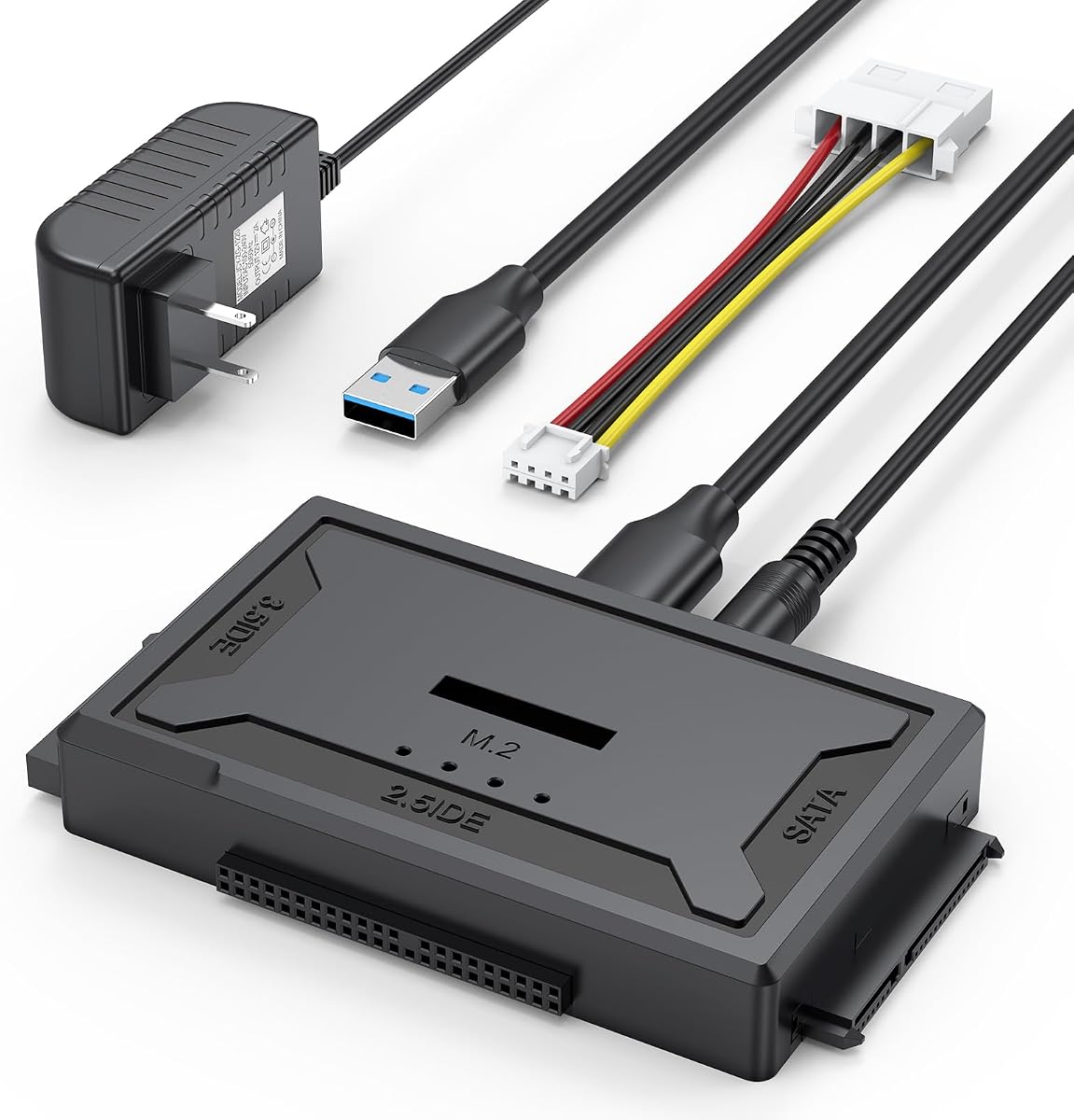
This 4-in-1 hard drive reader is a premium solution designed for tech enthusiasts and professionals who need maximum versatility. It supports a wide range of drive types including M.2 NVMe SATA and IDE drives making it a future-proof choice for evolving storage needs.
We may earn a commission when you buy through this link, at no additional cost to you.
The standout feature is its 10Gbps transfer speed for M.2 drives which significantly outperforms standard USB 3.0 connections. This ensures that you can access high-speed SSDs with minimal bottleneck making it ideal for large data transfers and media work.
While the price is higher than basic adapters the extensive compatibility justifies the investment for users with multiple drive types. The dual IDE ports also allow for simultaneous connections which is a unique advantage for backup or cloning tasks.
If you need a single tool to handle all modern and legacy drives this dock is the best option available. Its robust build and high-speed capabilities make it a top-tier choice for serious users who require reliability and performance.
Compatible with modern M.2 NVMe drives for ultra-fast data access.
Handles multiple drive formats in one unit simplifying your tech toolkit.
We may earn a commission when you buy through this link, at no additional cost to you.
The Unitek adapter is unique in its ability to connect two drives simultaneously allowing for efficient data migration between IDE and SATA drives. This feature is particularly useful for users who need to clone drives or transfer large amounts of data quickly.
We may earn a commission when you buy through this link, at no additional cost to you.
It supports both IDE and SATA drives with a robust power adapter that ensures stability during operation. The USB 3.0 connectivity provides fast transfer speeds while backward compatibility ensures it works with older systems without issues.
The main downside is the requirement for external power which limits portability compared to bus-powered options. Additionally the design can be bulky making it less ideal for travel but perfectly suited for stationary home or office use.
If you frequently need to move data between different drive types this adapter offers a practical solution. Its dual-drive support and reliable power make it a strong choice for users who prioritize functionality over portability.
Connect one IDE and one SATA drive at the same time for direct transfers.
Included power adapter ensures reliable performance for larger drives.
We may earn a commission when you buy through this link, at no additional cost to you.
This adapter kit is designed to handle large capacity drives making it a reliable tool for backup and data recovery tasks. Its support for up to 20TB drives ensures it can accommodate modern high-capacity storage devices without issues.
We may earn a commission when you buy through this link, at no additional cost to you.
With both USB and USB-C ports it offers flexibility in connecting to different devices whether you use a modern laptop or a traditional desktop. The included instructions are detailed which helps users navigate any technical challenges during setup.
The performance is average compared to higher-end models but it remains a solid choice for standard data transfer needs. The wide operating system compatibility ensures it works across Windows Mac and Linux environments seamlessly.
If you need a versatile adapter for large drives this kit provides good value for the price. While it may not offer the fastest speeds it delivers reliable performance for users who prioritize capacity and connectivity options.
Handles drives up to 20TB making it suitable for modern storage needs.
Connect via USB-A or USB-C depending on your computer's ports.
We may earn a commission when you buy through this link, at no additional cost to you.
YINNCEEN adapter is designed for users who need a universal solution for connecting both IDE and SATA drives. It supports capacities up to 6TB making it suitable for most laptop and desktop drives found in current or older systems.
We may earn a commission when you buy through this link, at no additional cost to you.
The included 12V power supply ensures that even power-hungry drives can spin up properly which is critical for reliable data access. The 5Gbps transfer speed provides fast file access while backward compatibility with USB 2.0 ensures it works with older ports.
Users should be aware that some older IDE drives require specific jumper settings which may add complexity to the setup process. However detailed instructions are provided to guide you through these steps ensuring a smooth experience.
This kit is ideal for users looking to recover data from old drives or backup important files efficiently. Its robust build and comprehensive feature set make it a reliable choice for data recovery and storage management tasks.
Dedicated power adapter ensures drives spin up correctly for stable access.
Supports both IDE and SATA drives for broad compatibility with legacy hardware.
We may earn a commission when you buy through this link, at no additional cost to you.
This adapter kit provides a comprehensive solution for users needing versatile connectivity options. It includes both USB 3.0 and USB-C capabilities ensuring it works with modern laptops and older desktops without requiring additional adapters.
We may earn a commission when you buy through this link, at no additional cost to you.
The inclusion of a stable 12V power supply and an on-off power switch highlights a focus on drive safety and performance. This ensures that your hard drives receive consistent power reducing the risk of data corruption during use.
While the price is slightly higher than basic adapters the added features justify the investment for users who value reliability. The kit includes all necessary cables and a manual making it ready to use out of the box.
If you need a reliable and versatile adapter for daily use or professional data recovery this model delivers strong performance. Its combination of speed and safety features makes it a practical choice for many users.
Power switch and stable supply protect drives from electrical damage.
USB and USB-C ports ensure compatibility across various computer models.
We may earn a commission when you buy through this link, at no additional cost to you.
The SABRENT docking station offers a robust tool-free solution for connecting SATA drives directly to your computer. It supports both 2.5 and 3.5 inch drives allowing you to access laptop and desktop drives without requiring a specialized enclosure.
We may earn a commission when you buy through this link, at no additional cost to you.
The included 12V power adapter ensures stable power for 3.5 inch drives which is essential for preventing unexpected disconnections during use. The USB 3.0 interface provides fast transfer speeds and backward compatibility with USB 2.0 ports.
The main limitation is that it only supports SATA drives excluding IDE or NVMe options. However for users focused on SATA drives this docking station delivers excellent performance and ease of use with its hot-swappable design.
If you need a reliable docking station for SATA drives this model is a strong choice. Its simple design and reliable power make it a practical tool for backup and data recovery tasks.
Lay-flat bay allows easy drive insertion without any tools required.
Safely swap drives without restarting your computer for quick access.
We may earn a commission when you buy through this link, at no additional cost to you.
This adapter kit stands out for its dual interface design allowing connections via USB 3.0 or Type-C ports. It supports both SATA and IDE drives providing flexibility for users who work with older hardware and modern SSDs alike.
We may earn a commission when you buy through this link, at no additional cost to you.
The included 12V power adapter ensures that 3.5 inch drives can run stably without relying on USB power. This is a crucial feature for reliable data recovery tasks where power consistency can prevent drive failures.
While the setup may require attention to jumper settings for older IDE drives the kit provides clear guidance to help users navigate these steps. The dual drive support also allows for direct cloning without needing a computer intermediary.
If you need a compact and versatile adapter for multiple drive types this kit is an excellent option. Its affordable price and broad functionality make it a popular choice for home users and tech enthusiasts.
USB and USB-C ports provide flexibility for different computer setups.
Support for two drives at once aids in quick data cloning.
We may earn a commission when you buy through this link, at no additional cost to you.
This hard drive reader offers broad compatibility supporting both hard drives and optical drives for comprehensive data access. Its USB 3.0 interface provides fast transfer speeds while the dual-head IDE connector ensures legacy drive compatibility.
We may earn a commission when you buy through this link, at no additional cost to you.
The inclusion of a 12V power adapter ensures that larger drives receive sufficient power for stable operation. This is essential for preventing data loss during critical recovery tasks where consistent power is paramount.
While it does not support modern M.2 drives its focus on SATA and IDE makes it a solid choice for traditional hardware users. The hot-swappable design adds convenience allowing you to connect and disconnect drives without rebooting.
If you need a reliable and affordable solution for accessing various drive types this kit delivers excellent value. Its broad support and strong performance make it a great choice for users with mixed storage needs.
Handles optical drives alongside hard drives for versatile data access.
Supports IDE and SATA drives covering most storage types.
We may earn a commission when you buy through this link, at no additional cost to you.
Selecting the right adapter kit requires understanding your specific drive types connectivity needs and power requirements to ensure reliable data access.
Check whether your adapter supports SATA IDE or M.2 drives since most kits specialize in specific formats. Ensure the adapter can handle your drive size whether it is 2.5 or 3.5 inches to avoid connection issues.
Confirm your adapter matches your drive types exactly to prevent buying a unit that cannot connect to your hardware.
Look for USB 3.0 or Type-C ports depending on your computer setup to ensure fast transfer speeds. Modern laptops often rely on Type-C while older desktops may only have USB-A ports so verify your system requirements.
Choose an adapter with ports matching your computer to avoid needing extra dongles or adapters.
3.5 inch desktop drives typically require an external power adapter to spin up while 2.5 inch drives can often run on USB power alone. Ensure the kit includes the necessary power supply for your specific drive needs.
Verify the kit includes external power if you plan to use larger 3.5 inch hard drives.
USB 3.0 supports speeds up to 5Gbps which is sufficient for most data recovery and transfer tasks. Some newer models offer USB 3.1 or 3.2 speeds which are beneficial for large media files or frequent backups.
Prioritize USB 3.0 or higher for efficient and fast data access.
Sturdy adapters with good cable construction ensure longer lifespan and stable connections during use. Check user reviews to see if cables are durable and connectors fit snugly without wobbling.
Select adapters with reinforced cables and connectors for long-term reliability.
Hot-swapping allows you to connect or disconnect drives without restarting your computer which saves time and improves workflow. Look for adapters that explicitly mention hot-swap support in their product descriptions.
Choose adapters supporting hot-swapping for convenient drive management.
Some kits include LED indicators for power and activity status which help you monitor drive status easily. Dual-drive support is another useful feature for users who need to clone drives without a computer.
Look for useful extras like LED status lights and dual-drive capabilities.
Begin by identifying your hard drive type and connector size to ensure the adapter you have supports it. Most kits require you to plug in the power adapter first before connecting the hard drive to the computer.
Connect the data cable from the adapter to your computer and wait for the operating system to recognize the drive. Once the drive appears in your file explorer you can begin transferring files or accessing data as needed.
To care for your adapter store it in a dry place away from extreme temperatures and physical stress. Avoid bending the cables excessively when not in use to maintain their integrity and ensure reliable connections over time.
Most standard adapters do not support M.2 NVMe drives unless specified in the product description. You should look for a 4-in-1 model that explicitly lists NVMe compatibility to ensure your drive will work.
If you are using a 3.5 inch desktop hard drive you will need an external power adapter to spin it up. Most adapters include one but you should verify this in the product specs before purchasing.
Common reasons include not connecting the external power adapter or the drive needing initialization in Disk Management. Also ensure your USB ports are functional and try different ports to rule out connection issues.
Yes you can clone a drive if the adapter supports both source and destination drives simultaneously. Some models offer dual-drive ports allowing direct cloning without needing a separate computer connection.
Most USB adapters are compatible with macOS as long as the drive format is supported by your Mac. You may need to format the drive to APFS or exFAT if it currently uses a Windows-only file system.
USB 3.0 adapters provide speeds up to 5Gbps but actual speeds depend on your drive performance and system capabilities. SSDs usually transfer faster than mechanical hard drives due to their faster read and write capabilities.
We have reviewed ten top adapters that cover a wide range of needs from simple SATA connectivity to universal IDE and M.2 support. Each option offers unique strengths depending on whether you prioritize speed compatibility or budget.
When choosing prioritize matching the adapter to your specific drive types and port availability for the smoothest experience. Investing in a model with adequate power supply ensures reliability especially if you work with larger desktop drives.
Remember to check current prices and availability as these can fluctuate regularly on the platform. Select the adapter that best fits your usage scenario to ensure successful data recovery and storage management.