
HDMI KVM Switch 3 Monitors 2 Computers 4K@60Hz KVM Switches with 4 USB 3.0 Ports
4.5Editor score
Affordable triple monitor support
4 USB 3.0 ports included
Simple panel button switching
This guide compares the top ten KVM switches for triple monitor setups to help you choose the right model for your dual PC workstation needs.
Finding a reliable KVM switch for triple monitors is essential for efficient dual PC setups. It allows seamless switching between computers while sharing peripherals and displays without constant cable changes.
We evaluated ten top-rated models based on resolution support, USB capabilities, and ease of use. Each product was analyzed for compatibility with modern graphics cards and operating systems.
Each pick highlights specific strengths and ideal use cases for different users. Please note that prices and availability change frequently, so verify current details before purchasing your final choice.
4.5Editor score

4.9Editor score

4.6Editor score
The following table provides a side-by-side comparison of all ten selected products to help you quickly identify the features that matter most for your specific triple monitor workstation requirements.





This AV Access KVM docking station stands out as a premium solution for users needing a seamless triple monitor experience across two systems. It supports high resolutions and allows users to switch between devices without physically swapping cables constantly.
We may earn a commission when you buy through this link, at no additional cost to you.
The standout feature is the ability to charge a laptop via a single USB C cable while maintaining high-resolution video output. This reduces desk clutter significantly and provides a cleaner workspace compared to standard KVM switches.
Users should note that macOS users might face limitations regarding extended display modes. Additionally, the price is higher than standard models, but the added docking functionality often justifies the investment for professional setups.
If you need a robust docking station that handles video, data, and power simultaneously, this model is an excellent choice. It simplifies complex dual PC workflows effectively.
The single USB C cable connects for video, data, and charging simultaneously. This eliminates the need for multiple cables and keeps the desk area clean and organized efficiently.
The Ethernet connection stays active on both computers even when switching. This ensures that downloads and cloud sync processes continue uninterrupted in the background without disruption.
We may earn a commission when you buy through this link, at no additional cost to you.
This UGREEN KVM switch offers a premium aluminum build that fits well in high-end office setups. It supports high resolutions and includes a desktop controller for easy access outside the immediate work area.
We may earn a commission when you buy through this link, at no additional cost to you.
The device supports 8K@60Hz on DisplayPort ports which is ideal for future-proofing your display setup. It also includes HDR support which enhances visual quality for multimedia content consumption and creative work.
The desktop controller adds convenience by letting users switch computers without reaching behind the device. However, the requirement for specific DP1.4 and HDMI2.1 cables might be an extra cost for some users.
For those who value build quality and high-resolution support, this UGREEN model is a strong contender. It provides reliable performance for demanding multi-monitor workflows.
The aluminum housing provides durability and a professional aesthetic. It resists wear and tear effectively ensuring the switch looks good even after years of daily use.
The included desktop controller allows switching outside the main workspace. This keeps your desk tidy and lets you control devices without reaching behind the monitor setup.
We may earn a commission when you buy through this link, at no additional cost to you.
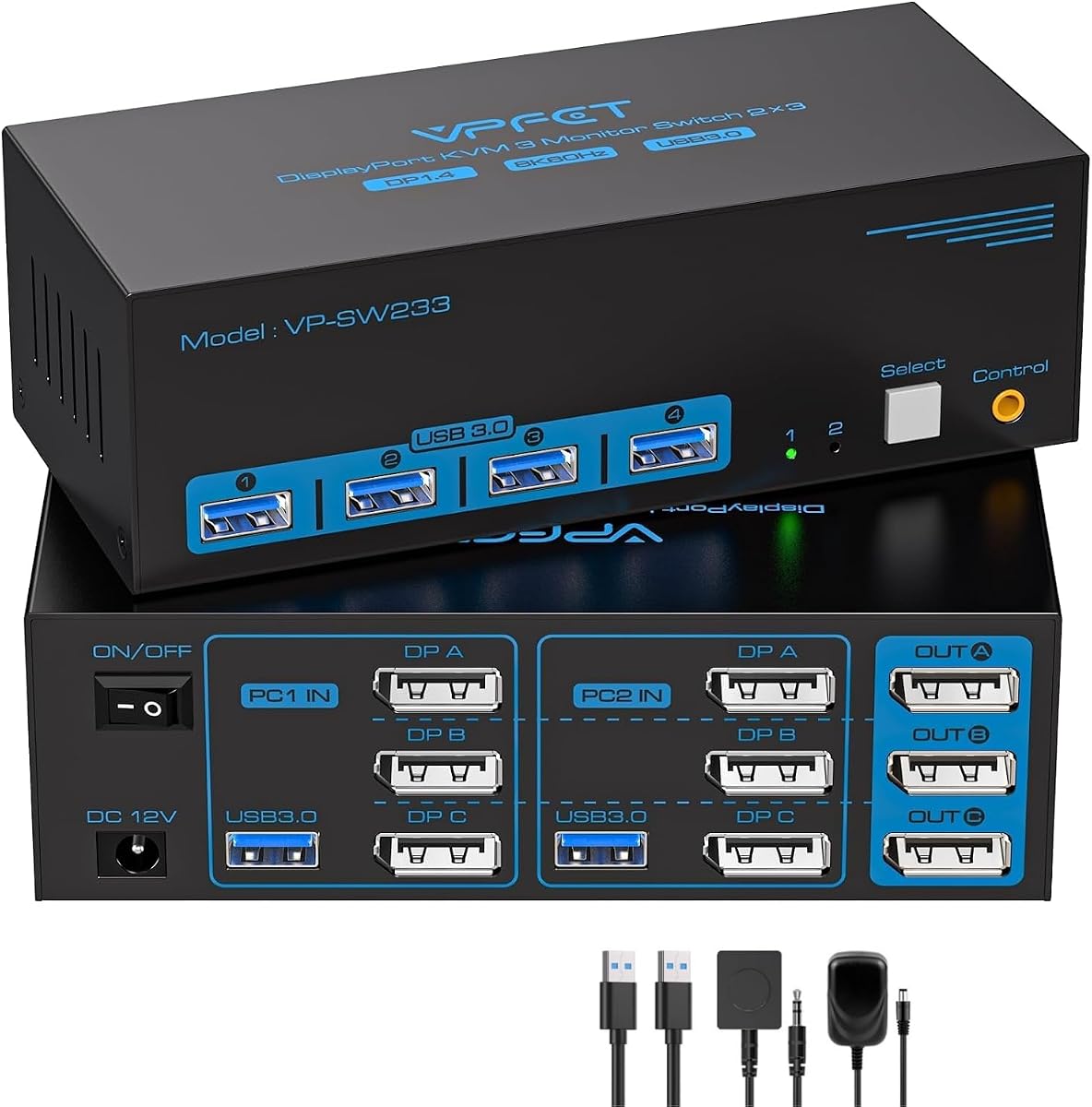
This HDMI KVM switch is an affordable entry point for users needing triple monitor support. It handles 4K@60Hz which is sufficient for most modern displays and provides four USB 3.0 ports for peripherals.
We may earn a commission when you buy through this link, at no additional cost to you.
The switching mechanism is straightforward using either a panel button or a wired controller. This makes it easy to integrate into various desk layouts without significant effort or setup complexity.
While it lacks 8K support found in premium models, it covers most standard use cases effectively. It is perfect for home offices where cost is a primary concern and 4K resolution is standard.
If you need a reliable switch that does not break the budget, this model is highly recommended. It offers essential features without unnecessary complexity or high cost.
This switch allows three monitors to connect to two computers easily. It is designed to be cost-effective for users who need multiple screens without high-end pricing.
Four USB 3.0 ports are available for high-speed peripherals. This allows efficient file transfers and connectivity for keyboards, mice, and storage devices effectively.
We may earn a commission when you buy through this link, at no additional cost to you.
This unique model supports four computers instead of the standard two making it ideal for environments with multiple machines. It maintains support for triple monitors and high resolution output for modern displays.
We may earn a commission when you buy through this link, at no additional cost to you.
The inclusion of a wired remote helps manage the switching between four different systems easily. This is particularly useful when the computers are located in different spots but share one workspace.
Users should be prepared for a slightly more complex cabling setup due to the extra computer inputs. Managing four video connections can be tricky but it offers significant flexibility for larger offices.
If you have more than two computers to manage, this switch offers a rare solution. It balances multiple inputs with high-quality video support effectively.
The device allows four computers to connect to three monitors. This is rare for triple monitor setups and provides excellent flexibility for multi-device workspaces.
The included remote allows switching between four systems easily. This ensures you can control the switch without reaching behind the device constantly.
We may earn a commission when you buy through this link, at no additional cost to you.
This switch supports up to 8K resolution which ensures sharp visual quality for professional work. It combines HDMI and DisplayPort inputs to maximize compatibility with different monitor types effectively.
We may earn a commission when you buy through this link, at no additional cost to you.
The inclusion of a power adapter ensures stable operation even with high power USB devices. This prevents issues where USB drives might lose connection due to power limitations from the computer.
Users should note that cable length must be kept short to maintain 8K performance. This is a common constraint for high bandwidth video signals and requires planning cable routing carefully.
For users needing maximum resolution support, this switch delivers excellent performance. It balances high-end video capabilities with practical usability features.
The switch supports 8K resolution on DisplayPort outputs. This ensures that future 8K monitors can be utilized fully without compromising image quality or performance.
An external power adapter ensures stable USB device operation. This prevents connectivity drops for devices like hard drives that require consistent power supply.
We may earn a commission when you buy through this link, at no additional cost to you.
This AV Access docking station combines KVM switching with full docking features to provide a complete solution for dual computer workflows. It is designed to streamline setups by reducing cable clutter significantly.
We may earn a commission when you buy through this link, at no additional cost to you.
Users benefit from 100W USB C charging which keeps laptops powered while switching. This is crucial for mobile workstations where charging cables are often a bottleneck in dual PC setups.
The shared Ethernet connection ensures that network tasks run continuously even when switching computers. This is valuable for tasks that require persistent internet connectivity across multiple machines.
If you need a docking experience alongside switching, this model is a top choice. It offers comprehensive connectivity in a single device for professional users.
The docking station delivers up to 100W power via USB C. This ensures laptops stay fully charged while connected to multiple monitors and peripherals simultaneously.
A built-in SD card reader allows easy file access. This removes the need for separate card readers and keeps your workspace organized and efficient.
We may earn a commission when you buy through this link, at no additional cost to you.
This switch provides a solid balance of features at an affordable price point. It supports 8K resolution and includes a wired controller for easy access without reaching behind the device.
We may earn a commission when you buy through this link, at no additional cost to you.
The setup is straightforward with plug and play functionality supporting most operating systems. This makes it accessible for non-technical users who need reliable switching capabilities quickly.
While it lacks advanced docking features it focuses on core switching needs. It provides four USB ports which are sufficient for typical office peripherals and storage devices.
If you want high resolution support without premium pricing, this model is a good option. It offers reliable performance for standard dual PC environments.
The device works without requiring specific drivers or software. This ensures users can start switching computers immediately after connecting cables.
The included wired controller allows placing the switch out of reach. This keeps the desktop neat and provides easy access to controls without clutter.
We may earn a commission when you buy through this link, at no additional cost to you.
This model supports three computer inputs which is ideal for environments needing more than the standard dual setup. It allows seamless switching between three systems while sharing the same monitors and peripherals.
We may earn a commission when you buy through this link, at no additional cost to you.
The high resolution support ensures that visual quality remains sharp across all connected systems. This is beneficial for users who need to manage multiple machines with different tasks.
Users should expect a bit more cabling work to connect three systems. However, the included cables and remote help mitigate setup challenges for complex desk configurations.
If you need to manage three computers with one set of monitors, this switch is a practical solution. It balances multi-input flexibility with high performance features.
The device supports three computer inputs on one workspace. This allows efficient management of multiple machines without needing multiple monitor setups.
The package includes necessary USB cables for connectivity. This simplifies the initial setup and ensures users have compatible connections out of the box.
We may earn a commission when you buy through this link, at no additional cost to you.
This DisplayPort KVM switch is designed for high refresh rate displays making it great for gaming or smooth motion workflows. It ensures stable signal transmission for demanding environments like professional workstations.
We may earn a commission when you buy through this link, at no additional cost to you.
The inclusion of USB 3.0 sharing keeps file transfers fast while switching between computers. This is useful for workflows that require frequent data access across different systems.
Users should note that it primarily relies on DisplayPort inputs which might limit HDMI compatibility. Ensure your monitors have the necessary ports before purchasing this specific model.
If smooth motion and high refresh rates are critical, this switch is a top pick. It balances performance and usability for specialized display needs.
The switch supports up to 144Hz at 4K resolution. This ensures smooth motion for gaming and video editing without screen tearing or stuttering.
Designed for demanding environments the connection stays stable. This ensures daily work and professional tasks run without signal interruptions or flickering.
We may earn a commission when you buy through this link, at no additional cost to you.
This KVM switch offers a well rounded set of features including high resolution support and a full cable kit. It ensures that users have everything they need to get started immediately after unboxing.
We may earn a commission when you buy through this link, at no additional cost to you.
The inclusion of both HDMI and DisplayPort inputs maximizes compatibility with different monitor types. This makes it flexible for mixed setups where both connection types are needed.
Users should note that PC ports must match the switch requirements for triple display. This is common for triple monitor KVMs but requires checking your PC hardware carefully.
If you want a complete package with reliable performance, this model is a strong choice. It offers excellent value considering the included accessories and warranty.
The package includes all necessary cables for setup. This ensures users do not need to buy additional cables to connect their monitors and USB devices.
Support for both HDMI and DisplayPort allows flexibility. This accommodates mixed monitor setups where different connection types are required.
We may earn a commission when you buy through this link, at no additional cost to you.
Selecting the right KVM switch requires understanding your specific hardware needs and usage scenarios.
Ensure your computers have enough video ports to support three monitors. Most triple monitor KVMs require two DisplayPort and one HDMI output per computer.
Check your graphics card or laptop ports to confirm compatibility before buying.
Consider the maximum resolution your monitors support. High resolution displays require KVMs that support at least 4K@60Hz for clear visuals.
Choose a model that matches your display capabilities to avoid performance issues.
Check how many USB 3.0 ports the KVM provides. You need enough ports for all your peripherals like keyboards and mice.
Higher count models ensure all devices can connect simultaneously without losing functionality.
Decide if you want panel buttons or a wired remote. A remote allows easier access if the device is behind your monitor.
Select a mechanism that fits your desk layout for efficient workflow.
Some KVMs need an external power adapter for stability. This helps if you are connecting high power USB devices like drives.
Ensure the switch supports the power needs of your specific peripheral devices.
Verify that the KVM supports your operating system like Windows or Linux. Most models are compatible with major systems but check specifics.
Compatibility ensures seamless integration with your current computing environment.
Ensure you have high quality cables like HDMI 2.1 for best resolution. Cable length can affect signal quality especially for high bandwidth outputs.
Keep cables short to maintain stability for high resolution video transmission.
Consider docking stations if you need extra features like charging. Some models combine KVM and docking for a cleaner desk.
This is useful if you need to charge a laptop while switching computers.
Connect your computers and monitors first before turning on the power. Ensure all video cables are securely attached to avoid signal loss.
Use the provided software settings on your PC to switch display modes if needed. Some systems require changing to extended mode manually via OS settings.
Regularly update your graphics drivers to maintain compatibility. This ensures the switch continues to function smoothly with your hardware over time.
Yes, you need specific cables like HDMI 2.1 or DP 1.4 for high resolutions. Using standard cables may limit your resolution to 1080p only. Always check the package contents or buy high quality cables separately for best results.
MacBooks often support only mirrored displays through this hardware. Some models support extended modes but many restrict Mac to mirrored setups only. Check specific product compatibility details for your Mac model.
Most KVMs require an external power adapter for stable operation. This ensures USB devices do not lose power when switching. Always connect the adapter to avoid connection drops during use.
Some models support four computers but most support only two. If you need four inputs check for models specifically designed for that configuration. This adds complexity but allows multi device setups.
Your computer must support three displays to use all monitors simultaneously. If it only supports two the third monitor will not activate. Check your graphics card specs before buying any triple monitor switch.
You can press the button on the switch or use the wired controller. Most switches have LED indicators showing which computer is active. This allows quick switching without reaching behind the setup.
Yes USB drives connect to the USB ports and work with the active PC. Ensure the USB port is connected to the computer for proper recognition. This allows seamless file sharing across systems.
Most models support standard refresh rates but check for high refresh models. Gaming requires high FPS and low latency which some KVMs limit. Look for gaming specific features if this is your primary use.
The top three picks offer distinct advantages for different budgets and needs. The AV Access model stands out for docking needs while the HDMI switch offers a budget option.
Consider your PC hardware capabilities and display resolution requirements before deciding. This ensures you choose a switch that will not bottleneck your setup.
Always check current prices and availability before purchasing to get the best value. Product availability changes often and prices may vary by retailer.