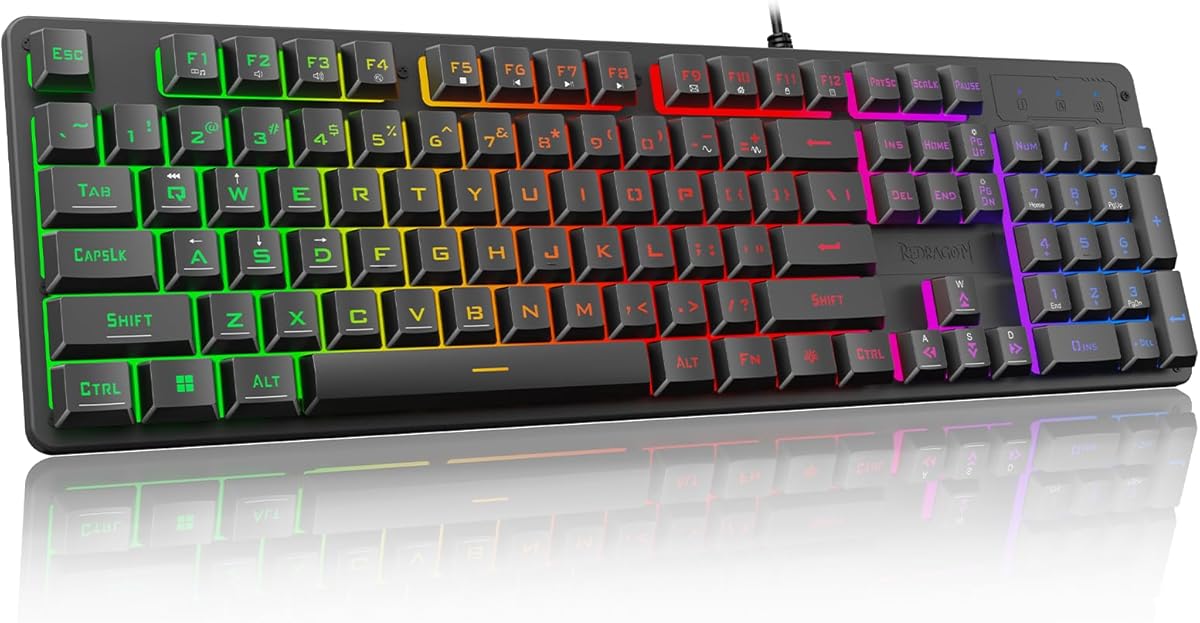
Redragon K521
4.4Editor score
Rainbow LED backlighting
Mechanical feeling switches
Anti-ghosting support
This guide compares the top keyboards for Rainbow Six Siege, analyzing switch types, anti-ghosting, and customization features to help you choose the right
Finding the right keyboard for Rainbow Six Siege is crucial for competitive performance. The game demands precise inputs and quick reactions during intense tactical gameplay scenarios.
We evaluated ten top-rated models based on switch responsiveness, durability, and customization options. Each pick balances performance with comfort for extended gaming sessions.
Each review highlights key strengths and trade-offs to help you decide. Remember that product availability and pricing can change frequently across major online retailers.
4.4Editor score

4.4Editor score

4.6Editor score
This side-by-side comparison highlights the key specifications and features of each keyboard model to help you make an informed purchasing decision.



The Corsair K55 RGB PRO offers a solid balance of features for tactical gamers. It scores well on durability and customization options available at this price point.
We may earn a commission when you buy through this link, at no additional cost to you.
Six dedicated macro keys allow you to bind common commands for quick execution. The IP42 rating ensures accidental spills do not interrupt your gameplay.
While it uses membrane technology, the tactile feedback is sufficient for most users. Some competitive players might prefer true mechanical switches for crispness.
This keyboard is ideal for gamers needing macros without breaking the bank. Consider it if spill resistance and lighting customization are priorities.
The six macro keys simplify complex command inputs during high-pressure matches.
IP42 rating guards against dust and liquid spills to extend keyboard lifespan.
We may earn a commission when you buy through this link, at no additional cost to you.
The SteelSeries Apex 3 is known for its quiet operation and durability. It is a strong choice for shared living spaces where noise is a concern.
We may earn a commission when you buy through this link, at no additional cost to you.
Its IP32 rating provides protection against liquid spills. The whisper quiet switches ensure minimal noise during late-night gaming sessions.
The membrane switches may not offer the precision of mechanical options. RGB customization requires software setup which can be complex.
Consider this model if you prioritize silence and spill resistance. It suits casual gamers who value comfort over extreme performance.
Whisper quiet switches reduce noise pollution for better focus during matches.
IP32 rating offers peace of mind against accidental drink spills.
We may earn a commission when you buy through this link, at no additional cost to you.
The Razer Ornata V3 brings low-profile keys for ergonomic comfort. It blends the feel of membrane with the sound of mechanical switches.
We may earn a commission when you buy through this link, at no additional cost to you.
UV-coated keycaps resist wear better than standard plastic options. The magnetic wrist rest provides support for long gaming sessions.
Low-profile keys might not fit well with standard keycap sets. The mecha-membrane technology can feel inconsistent compared to pure mechanical.
Choose this keyboard if comfort and aesthetics are priorities. It suits users who want a modern look without high costs.
Slimmer keycaps reduce wrist strain during extended tactical gameplay.
UV coating ensures legends remain visible despite heavy daily use.
We may earn a commission when you buy through this link, at no additional cost to you.
The Logitech G413 TKL SE offers a sturdy mechanical build in a compact form. It uses PBT keycaps which resist shine and wear better than ABS.
We may earn a commission when you buy through this link, at no additional cost to you.
Tactile switches provide clear feedback for key actuation. The aluminum top case ensures the keyboard remains stable during intense gaming.
It lacks RGB lighting which may disappoint users wanting customization. Media controls require pressing the FN key which can slow down volume changes.
This model is ideal for users wanting reliable mechanical feedback. Prioritize this if you prefer durability and space-saving designs.
Tenkeyless layout frees up desk space for wider mouse movements.
Brushed aluminum top case enhances durability and premium feel.
We may earn a commission when you buy through this link, at no additional cost to you.
The Redragon K521 is an affordable entry into mechanical-feeling keyboards. It delivers decent performance for budget-conscious gamers needing reliable inputs.
We may earn a commission when you buy through this link, at no additional cost to you.
Anti-ghosting ensures multiple key presses register correctly during complex combos. Rainbow backlighting adds visual appeal without software requirements.
Build quality is basic compared to higher-end mechanical keyboards. Lack of advanced software limits deep customization of keys or lighting.
Choose this if budget is your main constraint. It serves well as a starter keyboard for casual tactical gaming.
Delivers mechanical feel at a fraction of the price of competitors.
Ensures simultaneous inputs are recognized during fast-paced action.
We may earn a commission when you buy through this link, at no additional cost to you.
The AULA F75 Pro offers wireless freedom with hot-swappable switches. This flexibility allows you to change switches without soldering or technical skills.
We may earn a commission when you buy through this link, at no additional cost to you.
Tri-mode connection supports Bluetooth, 2.4GHz wireless, and wired USB. The multi-function knob provides quick access to volume or lighting adjustments.
Wireless mode might introduce minimal latency compared to direct wired USB. Driver setup can be complex for users new to custom keyboards.
Pick this if you want modularity and wireless convenience. It suits enthusiasts willing to tweak settings for optimal performance.
Hot-swap sockets let you experiment with different switch types easily.
Switch seamlessly between devices using Bluetooth or wireless connections.
We may earn a commission when you buy through this link, at no additional cost to you.
The ASUS ROG Strix Scope II 96 combines compact size with full functionality. It includes pre-lubed switches for smoother keystrokes out of the box.
We may earn a commission when you buy through this link, at no additional cost to you.
Tri-mode connectivity supports Bluetooth, wireless, and wired options. Enhanced acoustics reduce noise during typing with integrated foam dampeners.
The price is high compared to standard mechanical boards. Software requirements might feel heavy for simple plug-and-play users.
Choose this for premium build and features. It is ideal for streamers needing robust macro support.
96% layout keeps arrow keys while saving valuable desk space.
Integrated foam reduces pinging for a satisfying typing sound.
We may earn a commission when you buy through this link, at no additional cost to you.
The ASUS ROG Strix Scope II X offers a full-size layout with modern features. Its wired connection ensures zero latency for competitive play.
We may earn a commission when you buy through this link, at no additional cost to you.
Hot swappable switches allow easy customization. PBT keycaps resist wear over time compared to standard ABS materials.
Wired design limits flexibility in desk setup. The price is high considering the lack of wireless capability.
Ideal for users prioritizing stability over mobility. Consider this if you prefer a full number pad.
Wired USB connection guarantees consistent response times for FPS.
Hot swap base supports custom switch upgrades without soldering.
We may earn a commission when you buy through this link, at no additional cost to you.
The Razer BlackWidow V4 X features fast linear switches optimized for speed. Its yellow switches reduce actuation distance for rapid inputs.
We may earn a commission when you buy through this link, at no additional cost to you.
Six dedicated macro keys enhance command binding capabilities. Chroma RGB offers dynamic lighting effects that sync with supported games.
Price is high compared to similar spec keyboards. Razer Synapse software is required for full RGB and macro features.
Select this if you want speed and brand ecosystem. It suits users invested in the Chroma ecosystem.
Yellow switches provide rapid-fire inputs with minimal resistance.
Chroma RGB syncs with games for immersive lighting effects.
We may earn a commission when you buy through this link, at no additional cost to you.
The Aula WIN60 HE uses magnetic switches for unmatched precision. Rapid trigger mode allows quick re-triggering of keys essential for tactical movement.
We may earn a commission when you buy through this link, at no additional cost to you.
The 8000Hz polling rate ensures ultra-low input latency. The compact 60% design saves desk space but lacks dedicated arrow keys.
Learning curve exists for rapid trigger configuration. The 60% layout requires key combos for navigation functions.
Pick this for competitive advantage and compactness. It is best for players prioritizing raw speed.
Magnetic sensors ensure consistent actuation without physical wear.
Adjustable actuation lets you control reset points precisely.
We may earn a commission when you buy through this link, at no additional cost to you.
Selecting the right keyboard involves considering switch types, layout, and features tailored to tactical gameplay needs.
Mechanical switches provide tactile feedback and durability, while membrane keyboards offer quieter operation at lower costs. Linear switches are preferred for rapid inputs in tactical shooters.
Choose mechanical if you want speed and tactile feedback; membrane suits noise-sensitive environments.
Full-size keyboards include number pads, while tenkeyless (TKL) and compact options save desk space for wider mouse movement. Layout affects your ability to access function keys quickly.
Opt for TKL or compact designs if desk space is limited during gameplay.
These features ensure multiple simultaneous key presses register correctly, crucial for complex movement and shooting combos. Avoid models with limited anti-ghosting support.
Prioritize keyboards with full N-Key rollover to prevent missed inputs during intense moments.
Dedicated macro keys allow binding complex commands to single keystrokes. Look for software that lets you remap keys easily for tactical scenarios.
Select a model with easy macro programming to streamline your command usage.
Materials like aluminum top cases and PBT keycaps resist wear better than plastic. Durability ensures longevity under heavy daily use.
Check for premium materials if you plan to use the keyboard for years.
Wired keyboards offer zero latency, while wireless options provide desk freedom. Ensure wireless models have low latency modes suitable for competitive gaming.
Choose wired for competitive advantage; wireless for setup flexibility if latency is managed.
RGB lighting helps locate keys in low light, but may drain batteries on wireless models. Customizable lighting adds visual appeal to your setup.
Ensure lighting features align with your aesthetic without compromising performance.
Price varies widely between budget and premium models. Balance features like switch quality and connectivity with your spending limits.
Determine your budget first to avoid overspending on unnecessary features.
Clean regularly with compressed air to remove debris that affects key response. Dust buildup can cause sticky keys or missed inputs during gameplay.
Adjust software settings to match your preferred actuation depth and macro bindings. Configuring these features ensures the keyboard meets your tactical needs.
Replace keycaps or switches if they wear out over time. Proper maintenance extends the lifespan of your gaming gear.
Yes, mechanical keyboards often offer faster response times and tactile feedback. This helps with precise movements and rapid shooting. They are preferred by many competitive players for consistent actuation.
Modern wireless keyboards with low-latency modes are suitable for competitive play. Ensure the model supports 2.4GHz wireless to minimize input lag. Always check battery levels before intense sessions.
Anti-ghosting ensures multiple simultaneous key presses register correctly. This prevents missed commands during complex maneuvers. It is essential for tactical shooters requiring precise control.
Linear switches offer smooth travel with no bump, ideal for speed. Tactile switches provide a physical bump for feedback. Most competitive gamers prefer linear for rapid-fire inputs.
Compact layouts like TKL or 60% save desk space for mouse movement. This improves aiming precision in shooters. However, ensure you are comfortable without a number pad.
Macro keys allow binding complex commands to single strokes. This speeds up weapon switching or ability activation. Many tactical players use them to reduce reaction time.
Clean your keyboard monthly with compressed air and a soft brush. Dust and debris can interfere with key mechanisms. Regular cleaning ensures consistent performance over time.
We reviewed ten top options ranging from budget-friendly to premium mechanical boards. Each offers unique benefits tailored to tactical gameplay needs and preferences.
Prioritize switch speed, anti-ghosting, and durability when selecting your next keyboard. These factors directly impact your performance and comfort during matches.
Check current pricing and availability before purchasing to ensure the best deal. Prices change frequently, so compare options carefully before making a final decision.