
Logitech K120
4.6Editor score
Spill-Resistant Durable Design
Plug-and-Play USB Connection
Comfortable Full-Size Layout
Choosing the right keyboard for your point of sale system is critical for smooth operations. Businesses need devices that handle constant use while offering quick access to essential functions and reliable connectivity for seamless transactions.
We evaluated ten top-rated keyboards based on durability layout layout features and connectivity options. Our analysis focuses on models designed for commercial environments that offer relegendable keys touchpads or spill resistance to meet diverse operational needs effectively.
Each selection highlights specific strengths suitable for different business types and budget ranges. Please note that prices and availability can fluctuate frequently so verify current details before making your final purchase decision for your specific setup requirements.
4.6Editor score
4.5Editor score

4.2Editor score
As an Amazon Associate we earn from qualifying purchases.
This side-by-side comparison highlights key specifications across all ten selected keyboards to help you identify the best fit for your specific point of sale environment and operational demands.


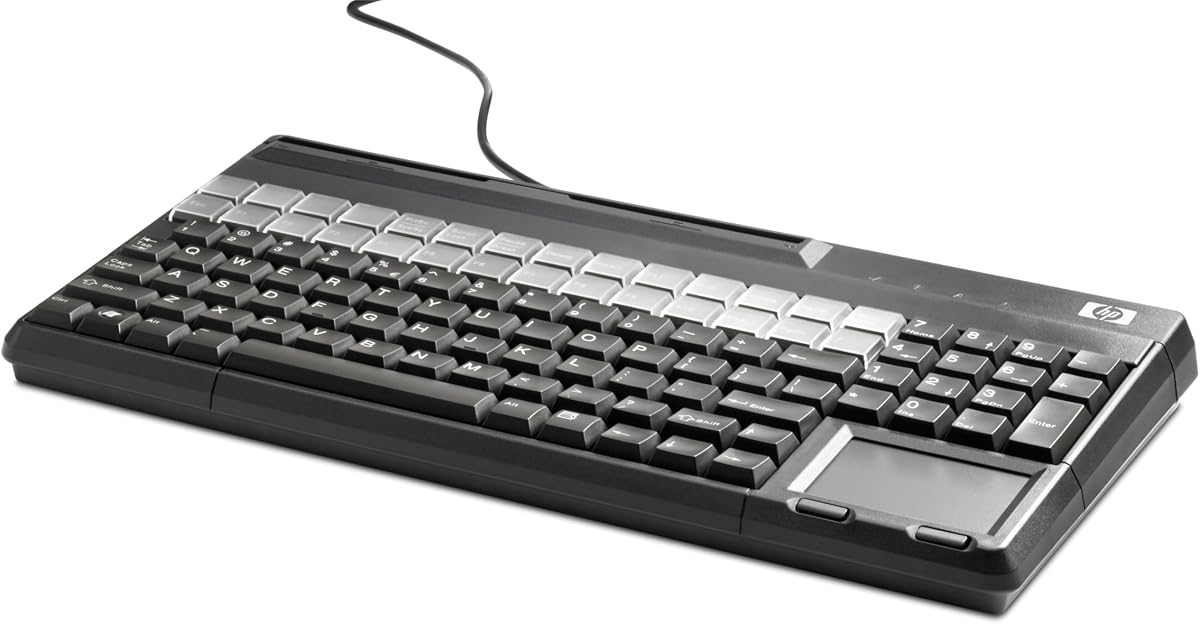
The HP POS Keyboard is a specialized device built for high-traffic retail environments where speed and accuracy matter. It features a standard 106-key layout with 28 relegendable keys to customize functions for specific applications. The integrated magnetic stripe reader allows for quick card swipes without extra hardware, making it a solid all-in-one solution for counters.
We may earn a commission when you buy through this link, at no additional cost to you.
Its standout feature is the combination of input methods. The touchpad eliminates the need for a separate mouse, saving valuable desk space in cramped checkout areas. The relegendable keys let staff quickly access common commands or shortcuts without needing complex software setup. This reduces training time and streamlines transactions significantly.
While it lacks advanced software customization, the hardware reliability is strong. The USB connection ensures stable performance, and the build quality is designed for commercial use. The only trade-off is the higher price compared to standard keyboards, but the included magnetic stripe reader often justifies the cost for retailers.
This keyboard is ideal for small to medium retail businesses needing a compact terminal with card reading capabilities. If you require a dedicated payment interface without additional peripherals, this model offers excellent functionality. It balances essential features with professional durability well.
Combining keyboard touchpad and card reader simplifies counter setups and reduces cable clutter.
Relegendable keys allow staff to map frequent actions directly to the surface for efficiency.
We may earn a commission when you buy through this link, at no additional cost to you.
The Logitech K120 is a straightforward full-size keyboard that works well for basic POS tasks where customization is not needed. It offers a familiar layout with dedicated F-keys and a number pad. The spill-resistant design is a major advantage for environments where drinks or liquids might spill, ensuring longevity even after accidents.
We may earn a commission when you buy through this link, at no additional cost to you.
Its primary strength lies in its simplicity and reliability. There is no software installation required, so it is ready to use immediately after plugging into the USB port. The deep-profile keys provide a comfortable typing experience for data entry tasks. It is also made with certified post-consumer recycled plastic, aligning with eco-friendly practices.
The main limitation is the lack of specialized POS features. It does not have relegendable keys or a touchpad, so users might need a separate mouse for navigation. However, for basic inventory management or administrative tasks, this limitation is often acceptable given the price point.
Choose this keyboard if you need a reliable entry-level device for non-sales functions. It is perfect for back-office workstations or setups where the POS system handles specialized functions elsewhere. Its durability and low cost make it a safe choice for high-turnover environments.
The durable design withstands accidental spills ensuring the device continues to function after minor accidents.
Includes certified recycled plastic reducing environmental impact without sacrificing durability.
We may earn a commission when you buy through this link, at no additional cost to you.
Cherry is known for durable industrial hardware and the G86-62401 reflects that reputation. This compact keyboard integrates a touchpad directly into the layout which saves significant space on crowded countertops. The 106-key layout ensures all essential keys are available without sacrificing functionality. It is designed specifically for commercial environments needing a self-contained solution.
We may earn a commission when you buy through this link, at no additional cost to you.
The integrated touchpad is the standout feature. By merging input devices, it reduces clutter and simplifies the checkout experience. The spill-resistant construction adds an extra layer of protection against daily wear and tear. The typing experience is quiet and responsive suitable for environments where noise levels need to be managed.
While it is more expensive than basic keyboards, the value comes from the space-saving design and build quality. There are no relegendable keys but standard POS software works well with its standard layout. The only drawback is the price compared to cheaper non-branded options.
This model is best for businesses that need a clean counter setup with minimal peripherals. It suits cafes or retail spaces where desk space is limited. The balance of compactness and durability makes it a strong candidate for premium environments.
Integrating the touchpad eliminates the need for a separate mouse saving valuable counter real estate.
Constructed to withstand daily commercial use with spill-resistant materials for long-term reliability.
We may earn a commission when you buy through this link, at no additional cost to you.
The Cherry Lpos G86-71411 is designed for businesses that require extensive key customization. With 169 total keys and 42 relegendable options it provides unmatched flexibility for complex POS applications. The magnetic stripe reader is built-in reducing the need for separate payment peripherals. This makes it suitable for businesses with specialized operational needs.
We may earn a commission when you buy through this link, at no additional cost to you.
The large number of relegendable keys allows staff to assign unique commands to specific buttons. This is particularly useful for restaurants or warehouses where quick access to item codes is crucial. The magnetic stripe reader streamlines the checkout process. The USB connection ensures reliable data transfer without compatibility issues.
The main drawback is the physical size. This keyboard takes up more space than compact models which might be an issue for smaller counters. The higher price reflects the added complexity and build quality. If space is a constraint this might not be the best fit.
Select this model if your business relies on complex shortcuts and dedicated payment hardware. It is ideal for larger retail chains or service centers. The flexibility and integrated features justify the cost and footprint for heavy users.
42 relegendable keys allow extensive mapping of custom commands for complex workflows.
Built-in magnetic stripe reader speeds up checkout by eliminating external card readers.
We may earn a commission when you buy through this link, at no additional cost to you.
The Perixx PERIBOARD-513III offers a cost-effective solution for businesses needing a compact input device. It features an integrated touchpad that saves desk space compared to using separate peripherals. The quiet scissor keys make it suitable for open office environments. noise control is necessary. The full-size layout ensures efficient data entry with a number pad.
We may earn a commission when you buy through this link, at no additional cost to you.
The multimedia hotkeys add extra utility for quick access to audio or video controls. This can be handy if the POS terminal also serves as an entertainment or media kiosk. The plug-and-play USB design means no driver installation is required. It is also backed by a limited warranty providing some peace of mind.
The touchpad size is smaller than dedicated mice so users needing precision might prefer an external mouse. The keys are low-profile which some may find less comfortable over long hours. However for general POS tasks the performance is reliable and responsive.
This keyboard is a great middle-ground option for businesses wanting space savings without paying premium prices. It works well for cafes or small retail shops. The balance of features and price makes it a competitive choice in its category.
Scissor-switch keys provide a quiet typing experience suitable for customer-facing areas.
Combines keyboard number pad and touchpad into one device for easier setup.
We may earn a commission when you buy through this link, at no additional cost to you.
The Adesso Easy Touch 630Ub is built for environments where spills and debris are common. Its IP67 waterproof rating means it can withstand submersion up to three feet making it suitable for kitchens or workshops. The large keys offer excellent contrast and readability reducing errors during input. The robust construction ensures it can handle rough daily use.
We may earn a commission when you buy through this link, at no additional cost to you.
Cleaning this keyboard is straightforward due to its waterproof design. This minimizes downtime caused by maintenance issues in high-traffic areas. The USB connection ensures stable performance across Windows systems. The plug-and-play setup means staff can start using it immediately without technical training.
The size is larger than standard keyboards which might limit placement options on smaller desks. The price point is higher but reflects the specialized durability. If you work in a standard office this overkill might not be necessary.
Choose this model for industrial or food-service POS setups where reliability is critical. It is perfect for environments prone to frequent spills or dust. The peace of mind regarding durability often justifies the investment.
IP67 rating provides unmatched protection against water and dust common in harsh settings.
Large print size keys ensure high visibility reducing typing errors in low light.
We may earn a commission when you buy through this link, at no additional cost to you.
The Cherry G86-71401 offers a mix of standard and programmable keys in a compact design. It includes an integrated touchpad to reduce desk clutter. The 127 programmable keys allow for significant customization. This model was designed for commercial environments needing a balanced input solution.
We may earn a commission when you buy through this link, at no additional cost to you.
The touchpad functionality is a key benefit for space-constrained setups. The USB interface ensures compatibility with standard systems. The relegendable keys support quick access to frequent functions. It is a solid option for users looking for specific Cherry hardware quality.
User ratings suggest potential compatibility issues or software limitations compared to newer models. This might require extra configuration time. The design is older which could affect modern software integration. Buyers should check compatibility with their current POS software.
Use this if you need customizable keys and a touchpad in a compact device. It works well for standard retail counters. Ensure software support before purchasing to avoid integration hurdles.
127 programmable keys allow extensive mapping of custom commands for complex workflows.
Space-saving dimensions fit well in tight checkout areas without sacrificing essential keys.
We may earn a commission when you buy through this link, at no additional cost to you.
The Cherry KC 1000 is designed for secure environments requiring smartcard authentication. It includes an integrated card reader for reading writing ISO compliant smartcards. The secure PIN entry feature protects sensitive data. It is FIPS 201 approved ensuring high standards for government and enterprise use.
We may earn a commission when you buy through this link, at no additional cost to you.
The thin design and low smartcard contacting unit make it ergonomic for staff. Support for multiple operating systems including Windows and Linux ensures flexibility in heterogeneous IT environments. The wired connection ensures stable secure data transfer without wireless risks.
This keyboard is specialized and may not be necessary for standard retail use. The cost reflects the security features which might be overkill for basic applications. It is best suited for healthcare or government facilities requiring strict access control.
Select this model if your POS system requires smartcard authentication. It provides a secure reliable solution for access control and data protection. Ensure your software supports the required protocols.
FIPS 201 and EMV approvals ensure compliance with strict government and banking security standards.
Built-in smartcard reader streamlines secure access processes reducing separate hardware costs.
We may earn a commission when you buy through this link, at no additional cost to you.
The Cherry G80-1800 is a compact mechanical keyboard designed for industrial and specialized use. It features MX Black switches known for reliability and a lifespan of over 100 million actuations. The compact dimensions save space on desks. It includes USB and PS/2 connections for legacy compatibility.
We may earn a commission when you buy through this link, at no additional cost to you.
The mechanical switches provide a distinct tactile feedback that many professionals prefer. This reduces typing fatigue during long shifts. The PS/2 adapter offers flexibility for older systems. The space-saving design fits well in 19-inch racks or tight workspaces.
Mechanical switches can be louder than membrane options which might disturb customers. The design is dated compared to modern keyboards. Ensure your POS software supports PS/2 if needed. It is best for environments prioritizing durability over noise.
This model is ideal for industrial setups or legacy systems needing robust input. It suits factories or warehouses where key life is critical. Consider the noise level before use in public areas.
Over 100 million actuation lifespan ensures consistent performance in high-traffic industrial environments.
Compact dimensions allow placement in 19-inch racks or tight spaces saving valuable floor space.
We may earn a commission when you buy through this link, at no additional cost to you.
The Logitech K270 offers wireless convenience for businesses wanting less cable clutter. It features a standard full-size layout with a number pad and F-keys. The 24-month battery life reduces maintenance needs. The spill-resistant design protects against minor accidents. It works seamlessly with Windows systems via a tiny USB receiver.
We may earn a commission when you buy through this link, at no additional cost to you.
Wireless connectivity simplifies workstation setups especially for portable terminals. The reliable 2.4 GHz connection ensures stable performance. Multimedia hotkeys provide quick access to system controls. The familiar typing experience reduces the learning curve for new staff.
The need for battery replacement can be a minor inconvenience over time. It lacks specialized POS features like touchpads or relegendable keys. However for general data entry it performs well. Ensure you replace batteries to maintain uptime.
Choose this for back-office tasks or setups needing mobility. It is a solid choice for standard desktops where a cord is inconvenient. The balance of features and price makes it a safe option for most users.
Wireless connection reduces cable clutter and allows flexible placement within 33 feet range.
24-month battery life minimizes maintenance interruptions during standard office use.
We may earn a commission when you buy through this link, at no additional cost to you.
Selecting the right keyboard involves evaluating layout features durability and connectivity options that match your operational needs. This guide outlines the most important factors to consider before making your final choice.
Commercial keyboards must withstand high-traffic usage. Look for models with reinforced frames and sturdy keycaps designed to handle constant pressing. Industrial-grade keyboards often feature sealed surfaces that protect internal components from dust or debris common in retail environments. Choosing a durable unit ensures you do not have to replace hardware frequently.
Prioritize build quality to avoid downtime caused by hardware failures. A sturdy keyboard reduces maintenance costs.
The layout of keys is critical for efficiency. Standard keyboards have a fixed layout while POS-specific keyboards offer relegendable keys that can be mapped to specific functions. This feature allows staff to access common commands like "Print Receipt" without navigating menus. Ensure the layout matches your software requirements to maximize speed and accuracy.
Select a layout that supports your most frequent tasks to streamline operations and reduce training time.
Connection type impacts setup flexibility. Wired USB keyboards offer reliable plug-and-play functionality without battery worries. Wireless options provide freedom of movement but require battery management and can sometimes have latency issues. PS/2 connections are found in legacy systems but are becoming rare. Choose the connection that fits your infrastructure.
Ensure your chosen connectivity method is supported by your operating system and POS terminal.
Integrated peripherals save desk space. Touchpads eliminate the need for a separate mouse while magnetic stripe readers allow direct card swiping. These features are valuable in compact checkout areas where extra devices create clutter. However adding integrated features often increases the price. Weigh the convenience against your budget constraints.
Decide if you need integrated tools or if external devices suit your setup better.
Liquids and food debris are common hazards in hospitality and retail settings. Spill-resistant keyboards prevent liquid from damaging internal circuits ensuring the device remains functional after minor accidents. Some models are even rated for submersion for extreme environments. This feature is a smart investment to protect your hardware investment from common workplace accidents.
Opt for spill resistance if your staff handles food or beverages near the POS.
Ensure the keyboard is compatible with your operating system whether Windows or Linux. Check if your POS software supports specialized features like programmable keys or smartcard readers. Incompatibility can lead to setup issues and reduced functionality. Always verify technical specs against your current hardware and software requirements before purchasing.
Confirm software compatibility to avoid integration headaches during implementation.
Prices vary significantly from basic models to specialized industrial units. Determine your budget based on the essential features you need. Sometimes paying slightly more for a specialized model saves money in the long run by reducing wear. Avoid overpaying for features your business does not use.
Find a balance between essential features and cost to get the best value.
Established brands often provide better build quality and warranty support. Researching manufacturer history can give insight into product longevity. Reputable brands are more likely to offer customer support if issues arise. This is particularly important for business environments where hardware failure can lead to lost revenue.
Choose well-known brands to ensure reliable support and product longevity for your business.
Set up your keyboard by connecting it to the POS terminal using the specified cable. Ensure the operating system recognizes the device immediately. Test key functions before going live to confirm that all commands work as expected.
Clean the surface regularly to prevent buildup of dust and dirt. Use a soft dry cloth or an air duster for mechanical keyboards. Avoid harsh chemicals that might damage the keycaps or casing surface.
For spill-resistant models wipe up liquids immediately to maintain protection. Check key responsiveness periodically to ensure consistent performance. If keys become sticky or unresponsive clean them carefully or replace the device if necessary.
A suitable keyboard for a POS system usually features durability to withstand constant use and customizable keys for quick access to commands. It often includes specialized connectors for payment devices or integrated touchpads to save desk space.
Relegendable keys are important because they allow staff to map frequent actions like Print Receipt to specific buttons. This reduces training time and speeds up transactions by avoiding menu navigation.
Most standard keyboards do not include a mouse but some compact models have integrated touchpads. If your model lacks this you will need to connect a separate mouse for navigation purposes.
Use compressed air to remove debris between keys and a damp cloth for the surface. Avoid spraying liquids directly on the device and let it dry completely before plugging it back in.
Mechanical keyboards offer greater durability and tactile feedback which can improve typing accuracy. They are ideal for environments requiring constant heavy typing but may be noisier than membrane models.
Yes wireless keyboards work well for POS if you prioritize cable-free setups. However wired models are preferred for security and reliability since they avoid battery issues and connectivity drops.
Many modern keyboards support Windows and macOS but legacy systems may require specific drivers. Check compatibility with your POS software before purchasing to ensure seamless operation.
Commercial keyboards typically last several years depending on usage frequency. High-quality models often have switches rated for 50 million actuations making them suitable for high-traffic retail environments.
This guide highlighted ten keyboards ranging from budget-friendly models to specialized industrial units. The HP POS Keyboard stands out for its all-in-one card reading capabilities while the Logitech K120 offers reliable basic performance at a low cost. Choose based on your specific operational needs.
Prioritize durability and key layout features that match your staff's workflow. If space is limited look for integrated touchpads. For high-volume tasks consider keyboards with relegendable keys to speed up transactions and reduce errors.
Remember that prices and availability can change so verify the latest details before purchasing. Investing in the right input device ensures smooth daily operations and reduces long-term maintenance headaches.