
PXN 2113PRO PC Joystick
3.6Editor score
Vibration feedback support
12 programmable buttons
Windows 11 compatible
This guide compares the top ten joysticks for Windows 11 to help you find the best flight or gaming controller for your PC setup today.
Finding the right joystick for Windows 11 can transform your gaming experience from standard play to immersive simulation. Whether you fly planes or drive trucks, the right controller offers precise inputs and comfortable handling for long sessions.
We evaluated ten top-rated joysticks based on compatibility, build quality, button layout, and user feedback. Each product was selected for its ability to work seamlessly with Windows 11 and popular simulation titles available on PC.
Each pick below highlights specific strengths and ideal use cases to help you decide quickly. Keep in mind that availability and stock levels change frequently, so checking current listings ensures you get the latest version available.
3.6Editor score

4.4Editor score

4.0Editor score
The table below provides a side-by-side comparison of all ten selected joysticks, highlighting key specifications and compatibility details to help you narrow down your choices quickly.






The PXN 2113PRO is a budget-friendly joystick designed specifically for flight simulation on Windows PCs. It offers a solid foundation for users wanting to experience flight games without a large investment. With 12 programmable buttons and a vibration function, it provides essential controls for basic maneuvers.
We may earn a commission when you buy through this link, at no additional cost to you.
This controller excels in its compatibility with major flight simulators like Microsoft Flight Simulator and War Thunder. The ergonomic design ensures comfortable handling during longer sessions, while the suction cups on the base keep it stable on smooth surfaces. Users can adjust vibration strength through the driver settings for a more immersive feel.
While it lacks advanced features like force feedback, the trade-off is acceptable given its price. Some games may not support the joystick fully, and drivers need to be installed manually for full functionality. These limitations are manageable for casual sim pilots seeking an entry-level option.
For beginners or those on a tight budget, this joystick delivers good value. It is ideal for players testing the waters of flight simulation before committing to higher-end hardware. Its straightforward setup and reliable performance make it a solid starting point.
This joystick allows new pilots to experience flight controls without breaking the bank.
Users can map buttons to suit their preferred control scheme for various games.
We may earn a commission when you buy through this link, at no additional cost to you.
The Thrustmaster T-Flight Hotas One strikes a balance between performance and usability for flight simulation enthusiasts. It features a modular design that allows the stick and throttle to be used together or separately, offering flexibility for different playspaces. This adaptability makes it suitable for both desk setups and lap gaming.
We may earn a commission when you buy through this link, at no additional cost to you.
Its ergonomic handle includes adjustable resistance, giving users control over how stiff or loose the stick feels. The throttle is detachable, which simplifies storage and transport. With plug-and-play compatibility on Windows, setup is quick and requires no complex driver installations for most games.
While it lacks advanced force feedback, the precision and build quality are impressive for its price range. Some users may find the button layout basic compared to premium models, but it covers essential functions well. The expandability with separate rudder pedals enhances realism for serious simmers.
This controller is an excellent choice for intermediate users seeking reliability and comfort. It works seamlessly with popular flight simulators and offers enough customization to grow with your skills. Its versatility and ease of use make it a top recommendation for most PC pilots.
The detachable throttle allows for adaptable configurations based on available desk space.
Adjustable resistance ensures the stick feels right for different hand sizes and preferences.
We may earn a commission when you buy through this link, at no additional cost to you.
The V-one Wired USB Gaming Controller is designed for versatility across multiple platforms including PC, Android, and PS3. It functions as a standard gamepad with joystick capabilities, making it useful for a wide range of gaming styles. This broad compatibility appeals to users who game on different devices without needing separate controllers.
We may earn a commission when you buy through this link, at no additional cost to you.
Its plug-and-play functionality simplifies setup on Windows systems, requiring no drivers for most modern games. The turbo function and vibration feedback add depth to gameplay, enhancing action and racing titles. The red color scheme gives it a distinct look compared to generic black controllers.
However, it does not support Xbox One or Mac OS, which limits its utility for console-focused gamers. Build quality is functional but may not withstand heavy use over time. These trade-offs are minor given its low cost and broad system support.
For budget-conscious gamers needing a versatile controller, this is a practical choice. It works well for casual play and offers enough features to handle varied genres. Its ability to switch modes ensures flexibility across different gaming environments.
Support for PC, Android, and PS3 makes it a versatile option for multi-device users.
Enhanced features like turbo and vibration improve gameplay immersion without extra cost.
We may earn a commission when you buy through this link, at no additional cost to you.
The Thrustmaster USB Joystick is a straightforward controller designed for essential flight controls on Windows. It features a point-of-view button that simplifies camera switching, a valuable tool in many simulation and action games. The ergonomic handle ensures comfortable use during extended play sessions.
We may earn a commission when you buy through this link, at no additional cost to you.
With three axes and four buttons plus a trigger, it covers basic flight functions without overwhelming users. This simplicity makes it ideal for beginners who do not need complex programmability. The build quality is solid for its class, offering reliable performance over time.
However, the limited button count restricts advanced users who require more inputs for custom mappings. It also lacks vibration or force feedback, which reduces immersion in some titles. These constraints are acceptable for casual players seeking a no-frills controller.
This joystick is best for users prioritizing simplicity and cost-effectiveness. It provides the core functions needed for basic flight simulation without unnecessary complexity. Its focus on ease of use makes it a reliable option for entry-level pilots.
The dedicated POV button streamlines camera control during gameplay for better situational awareness.
Core axes and buttons cover standard flight operations without cluttered controls.
We may earn a commission when you buy through this link, at no additional cost to you.
The Microsoft Sidewinder Precision 2 is a well-regarded joystick known for its precision and programmability. It features 16 programmable functions including eight buttons and a hat switch, allowing detailed customization for various games. The rotating handle provides precise rudder control, which is essential for accurate flight simulation.
We may earn a commission when you buy through this link, at no additional cost to you.
Its 146-degree action throttle offers smooth range control, enhancing the feel of engine management in sims. Users can save and download game-specific controller profiles, making it easy to switch between different titles. The build quality reflects Microsoft's reputation for durability and reliability.
Despite its strengths, it is an older model that may lack full support for some modern titles without tweaks. Some users find the design dated compared to newer controllers with RGB or hall sensors. However, its functionality remains competitive for specific simulation needs.
This joystick is ideal for users who value precision and programmability over modern aesthetics. It works well for classic flight sims and arcade games alike. Its proven track record makes it a trusted choice for those seeking a reliable controller.
16 programmable functions allow users to tailor controls to their specific play style.
The rotating handle enables accurate rudder inputs essential for advanced flight maneuvers.
We may earn a commission when you buy through this link, at no additional cost to you.
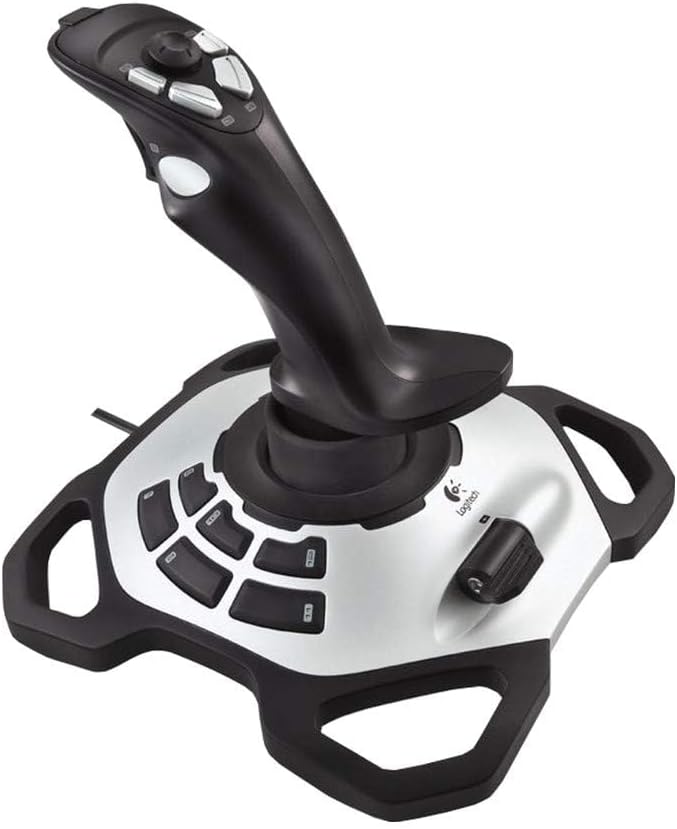
The Logitech Extreme 3D Pro is a dedicated fightstick designed for precision and accuracy in simulation games. Its ratchet throttle system allows for incremental speed adjustments, which is crucial for realistic flight control. The twist rudder axis adds another layer of control, enabling nuanced maneuvering without extra pedals.
We may earn a commission when you buy through this link, at no additional cost to you.
Built with high-quality materials, it offers a solid and stable platform for extended use. The multiple buttons and easy access support complex command inputs, appealing to serious simmers. It works with most major flight simulators on PC with straightforward setup.
Some users may find the throttle mechanism takes time to get used to compared to smooth throttles. The lack of force feedback means less physical immersion during turbulence or impacts. These factors are balanced by its accuracy and durability.
This controller is best for users focused on precise input and simulation realism. Its design prioritizes function over flash, delivering reliable performance for demanding flight tasks. It remains a top choice for those seeking a dedicated fightstick experience.
The ratchet system ensures precise speed control, ideal for realistic flight simulation.
Built-in twist rudder allows for advanced control without requiring additional pedals.
We may earn a commission when you buy through this link, at no additional cost to you.
The VOYEE PC Controller is a budget-friendly wired controller optimized for Xbox 360 compatibility on Windows systems. It features responsive trigger buttons and joysticks that react quickly to commands, enhancing action gameplay. Rumble vibration feedback adds immersion by matching in-game events with physical sensations.
We may earn a commission when you buy through this link, at no additional cost to you.
Its ergonomic design fits comfortably in hands during long sessions, reducing strain. The seven-foot cord provides flexibility in placement, allowing freedom of movement. This controller is a practical option for gamers prioritizing affordability without sacrificing basic performance.
However, it is not designed for flight simulation or specialized joystick modes, limiting its use to standard games. The build materials are functional but may not match higher-end durability. These trade-offs are minor for casual gamers seeking a reliable controller.
For casual players needing an affordable controller, this model delivers solid value. It performs well in standard titles and offers comfort and responsiveness at a low price. Its simplicity makes it a good choice for general gaming needs.
Upgraded triggers and joysticks ensure quick reactions to player commands without delay.
Ergonomic contours are designed to fit hands comfortably for extended play sessions.
We may earn a commission when you buy through this link, at no additional cost to you.
The Thrustmaster SimTask FarmStick is a specialized controller tailored for Farming Simulator 25 on PC and Xbox. It features 33 programmable inputs that allow detailed control over machinery functions without needing a keyboard. Hall effect sensors ensure long-term precision and eliminate drift, critical for heavy machinery simulation.
We may earn a commission when you buy through this link, at no additional cost to you.
Its ambidextrous design allows flexible placement alongside racing wheels, supporting cockpit setups. The 3-axis joystick provides smooth and realistic control when operating tractors and construction equipment. This level of detail appeals to serious farming simulation enthusiasts seeking immersion.
It is designed specifically for Farming Simulator 25, which limits broader utility for other game genres. A racing wheel is required in conjunction, adding to setup complexity. These constraints are acceptable for dedicated simmers focused on agricultural gameplay.
For fans of farming simulation, this joystick offers unmatched control and realism. It streamlines operations with customizable inputs and durable technology. Its specialized nature makes it a valuable tool for immersive agricultural experiences.
Designed for Farming Simulator 25 to deliver precise machinery management.
H.E.A.R.T technology ensures long-term accuracy and eliminates sensor drift.
We may earn a commission when you buy through this link, at no additional cost to you.
The Logitech G X56 H.O.T.A.S represents a top-tier flight system for serious simulation enthusiasts. It features over 189 programmable controls and hall effect sensors for high precision and reliability. The RGB lighting adds visual flair, while adjustable stick force allows customization of tactile feedback.
We may earn a commission when you buy through this link, at no additional cost to you.
Its design places controls intuitively under the fingers, supporting VR setups where navigation is crucial. The dual throttle setup with friction adjusters and locks offers precise engine management. This level of detail appeals to users seeking a complete cockpit-like experience on PC.
Despite its capabilities, it comes at a high cost and requires significant time to configure effectively. The two USB ports and extensive software can complicate setup for beginners. These factors are trade-offs for the advanced features it delivers.
This system is best for enthusiasts seeking maximum control and realism. It supports a wide range of flight and space simulations with professional-grade inputs. For those prioritizing performance, it remains a top premium choice.
189 programmable controls allow detailed customization for complex flight tasks.
RGB lighting and ergonomic layout support VR use and personal aesthetic preferences.
We may earn a commission when you buy through this link, at no additional cost to you.
The Thrustmaster T.16000M Fcs delivers high precision through its H.E.A.R.T technology, ensuring accuracy does not degrade over time. It includes 16 action buttons with physical identification for quick access without looking. The ambidextrous design allows adjustment for left or right-handed users, increasing comfort.
We may earn a commission when you buy through this link, at no additional cost to you.
Its four independent axes support complex control schemes, essential for realistic flight simulation. The TARGET software enables loading specific mapping profiles per game, streamlining transitions between titles. This technical focus appeals to users prioritizing function and performance over aesthetics.
Some users may need to install software to unlock full customization potential. The design is utilitarian without advanced lighting or premium materials. These factors are minor given the controller's reliability and precision focus.
This joystick is ideal for users valuing long-term precision and customizability. It provides a robust platform for flight simulation with proven technology. Its combination of durability and flexibility makes it a strong contender in its class.
Hall-effect sensors ensure high precision that remains consistent over time.
Customizable profiles allow tailored setups for different flight games and simulations.
We may earn a commission when you buy through this link, at no additional cost to you.
Selecting the right joystick requires evaluating compatibility, features, and build quality to match your gaming preferences and hardware.
Ensure the joystick supports Windows 11 to avoid driver conflicts or recognition issues. Many models list support for specific versions such as 7, 8, 10, and 11, so confirm this detail before purchasing.
Check if the device works with other platforms you might use like Xbox or Android if you plan to switch devices.
Flight and simulation games often require many inputs for weapons, gears, and cameras. Controllers with 12 or more programmable buttons allow for comprehensive mapping and reduce reliance on keyboard shortcuts.
Consider your gaming style; competitive players may prioritize speed while simmers prioritize detailed input options.
Look for ergonomic grips and adjustable resistance to prevent hand fatigue during extended sessions. Comfortable designs improve accuracy and enjoyment over time.
Test weight and size if possible to ensure it fits your desk space and hand size comfortably.
Some models include detachable throttles or twist rudder axes that add realism to flight simulation. Decide if you want these integrated or if you plan to buy separate pedals later.
A ratchet throttle can help with precise speed control which is valuable for aviation sims.
Hall effect sensors are more durable and precise than potentiometers, ensuring consistency over time. This is particularly important for serious simulation enthusiasts looking for long-term reliability.
Check if the manufacturer uses proven sensor technology to minimize drift and wear.
Access to custom software enables mapping profiles per game and adjusting sensitivity. This feature is crucial for switching between different simulation titles smoothly.
User-friendly software interfaces help reduce setup time and increase usability.
Strong plastic or metal components ensure the joystick withstands repeated use and accidental drops. Durability impacts the lifespan and value of the controller.
Read user reviews to gauge real-world longevity and common failure points.
Balance the cost against the features provided to find a controller that offers good value. Budget models may lack advanced sensors but suffice for casual players.
Invest more in premium units only if you need specialized inputs and higher durability.
Start by plugging the joystick into a USB port before launching any game to ensure Windows detects it properly. Most models work with plug and play but some require driver installation for full features.
Open the game's control settings and map the joystick buttons to preferred actions. Use the manufacturer's software if available to create profiles that adjust sensitivity or assign complex commands.
Keep the controller away from direct sunlight and moisture to prevent wear on sensitive components. Clean dust regularly with a soft cloth and store it in a dry place when not in use.
Most modern controllers are designed to work with Windows 11, but older models may need driver updates. Always check product details to confirm support before buying. If you encounter issues, installing the latest drivers from the manufacturer website helps resolve conflicts.
Some controllers support plug and play while others require drivers for features like vibration or custom mapping. Newer models often include installation guides on the product page. Check the manual or support section for step-by-step instructions.
Hall effect sensors use magnetic fields to measure position and are more durable than potentiometers which rely on contact. This means they are less prone to drift and offer better long-term accuracy. Hall sensors are preferred for high-end flight simulation controllers.
Some models like the Thrustmaster T-Flight Hotas One work with Xbox but most are optimized for PC. Always verify console compatibility on the product page as support varies. If you play on multiple systems choose a versatile model with cross-platform support.
Vibration feedback can add immersion during turbulence or explosions but it is not essential for core gameplay. Some pilots prefer it for realism while others find it distracting. Adjust settings to your preference using the driver or in-game options.
Look for a detachable or integrated throttle with a smooth range of motion and adjustable friction. Ratchet systems allow precise speed steps which are useful for aviation sims. Ensure the throttle connects securely and fits your desk setup comfortably.
Use the built-in game controller settings in Windows to test and calibrate your device. Access it via Control Panel or Settings and select the joystick option to run the calibration wizard. This helps ensure the stick centers correctly and responds accurately.
Yes, some controllers like the Thrustmaster FarmStick are designed specifically for Farming Simulator 25. They offer optimized inputs and layouts for agricultural gameplay. These specialized options are ideal for enthusiasts focusing on specific simulation titles.
The best joystick depends on your needs whether you want affordable entry-level hardware or a premium precision system. Each model reviewed offers distinct advantages to suit different budgets and gaming styles.
Prioritize compatibility and sensor quality to ensure long-term reliability and immersion in your chosen games. Adjustable ergonomics and customization options further enhance comfort and control accuracy.
Remember to check current availability and settings before purchasing as these may vary over time. With careful selection you can enjoy a satisfying simulation experience tailored to your setup and preferences.