
ASRock Intel Arc B570 Challenger 10GB OC
4.7Editor score
10GB GDDR6 Memory
Xe2-HPG Architecture
Dual Fan Cooling
This comprehensive guide compares the top Intel Arc GPU models for gaming, AI, and creative workloads to help you choose the right graphics card.
Choosing the right graphics card is critical for modern computing needs ranging from high-end gaming to professional AI inference. The Intel Arc GPU lineup offers compelling options with advanced architectures and competitive pricing for various user segments.
We have evaluated ten distinct models based on performance metrics, memory capacity, cooling efficiency, and software support. Our analysis focuses on real-world applicability for gamers, creators, and professionals seeking reliable hardware.
Each product selection highlights key specifications and potential use cases to guide your decision-making process. Please note that pricing and availability can fluctuate frequently across different retail channels.
4.7Editor score

3.9Editor score

The following table provides a side-by-side comparison of all ten selected Intel Arc GPU models. It highlights key specifications including memory capacity, architecture generation, and unique features to assist in quick identification of the right fit.



The ASRock Intel Arc Pro B60 Creator 24GB stands out as a specialized workstation GPU designed for heavy computational tasks. With a rating of 3.9 based on early professional feedback, it offers significant capabilities for AI inference and 3D rendering workloads.
We may earn a commission when you buy through this link, at no additional cost to you.
Its standout feature is the 24GB GDDR6 memory which provides ample space for large language models and complex datasets. The Xe2-HPG architecture delivers 197 INT8 TOPS of AI acceleration making it suitable for demanding creative workflows.
While the blower cooling design ensures efficient heat dissipation in multi-GPU setups it can be louder than traditional air coolers. Additionally the specialized nature of this card means it may require specific system configurations for optimal performance.
This GPU is ideal for professionals working with AI models generative design or multi-monitor setups. It balances high memory capacity with robust connectivity options for an expanded workstation environment.
The dedicated AI engines allow local execution of quantized models without relying on cloud services.
Four DisplayPort 2.1 outputs enable simultaneous connection to multiple high-resolution displays.
We may earn a commission when you buy through this link, at no additional cost to you.
The ASRock Intel Arc B570 Challenger 10GB OC delivers impressive value for gamers seeking strong mid-range performance. It holds a strong 4.7 rating reflecting user satisfaction with its 1440p gaming capabilities and smooth frame rates.
We may earn a commission when you buy through this link, at no additional cost to you.
Equipped with a 2600 MHz clock speed and 10GB of GDDR6 memory this card handles modern titles with ease. The Xe2-HPG architecture ensures compatibility with latest gaming features including DirectX 12 Ultimate.
Trade-offs include limited VRAM for highest texture settings and ongoing driver refinement. However the efficient cooling system and metal backplate add significant build quality at this price point.
This is the recommended choice for budget-conscious gamers wanting high refresh rates without excessive cost. It offers a balanced package for mainstream gaming and content creation tasks.
XeSS 2 technology provides AI upscaling to boost frame rates while maintaining image quality.
The metal backplate prevents GPU sag and improves thermal performance during long sessions.
We may earn a commission when you buy through this link, at no additional cost to you.
The WEELIAO MAXSUN Intel Arc Pro B60 48G Turbo represents the pinnacle of local AI deployment with 48GB of VRAM. It enables running large language models like DeepSeek-R1:70B without cloud dependencies or multi-card complexity.
We may earn a commission when you buy through this link, at no additional cost to you.
With dual GPUs working in tandem it delivers 394 TOPS of INT8 compute power. The triple-thermal cooling system ensures stability during long inference tasks essential for production environments.
While expensive this card eliminates need for cloud subscription fees for heavy AI workloads. It requires a motherboard supporting PCIe lane bifurcation and robust power supply for full functionality.
This solution targets enterprises and researchers needing private high-concurrency inference. It offers unmatched memory capacity and compute power for specialized local deployment scenarios.
Native support for PyTorch and vLLM facilitates easy integration into existing AI workflows.
48GB VRAM allows loading of large datasets entirely on card memory.
We may earn a commission when you buy through this link, at no additional cost to you.
The ASRock Intel Arc A580 Challenger 8GB OC offers a balanced entry into high-performance gaming. With a 4.6 rating it is praised for smooth performance at 1440p resolutions and efficient thermal management.
We may earn a commission when you buy through this link, at no additional cost to you.
Factory overclocked to 2000 MHz it leverages Xe HPG architecture to support modern gaming features. The dual-fan design ensures quiet operation under normal loads thanks to 0dB silent cooling.
Its main limitation is the 8GB VRAM which may restrict ultra settings in new titles. However for most gamers and casual creators this card delivers excellent value and reliability.
It is best suited for users needing strong mid-range performance without premium pricing. The included metal backplate and robust cooling make it a durable choice for everyday use.
The 0dB Silent Cooling stops fans completely at low temperatures for silent operation.
Three DisplayPort 2.0 outputs support multi-monitor setups with high resolutions.
We may earn a commission when you buy through this link, at no additional cost to you.
The Sparkle Intel Arc B580 Titan OC combines performance with striking visual design elements. It holds a 4.5 rating based on user reports for its robust cooling and high clock speeds.
We may earn a commission when you buy through this link, at no additional cost to you.
With 12GB of GDDR6 memory it provides a buffer for high-resolution textures better than 8GB options. The 2760MHz boost clock ensures responsive gaming experiences in demanding titles.
The blue breathing light and metal backplate enhance aesthetics but may add cost without performance gains. However included sag bracket shows attention to hardware durability.
This card suits gamers who value aesthetics alongside performance. It offers a solid step up in VRAM capacity for modern gaming needs.
The blue breathing light adds a unique visual element to custom PC builds.
Torn Cooling 2.0 uses axial fans to maximize airflow across the heatsink.
We may earn a commission when you buy through this link, at no additional cost to you.
The MAXSUN Intel Arc Pro B60 Dual 48G Turbo delivers exceptional parallel processing power in a dual-slot form factor. It is engineered specifically for demanding AI and visual computing workloads.
We may earn a commission when you buy through this link, at no additional cost to you.
With 48GB of dedicated graphics memory it handles large-scale rendering and inference tasks smoothly. The turbo fan efficiently exhausts heat ensuring stable temperatures during sustained heavy loads.
This hardware requires significant power but offers a compact solution compared to multi-card setups. The dual-GPU design allows flexible task assignment for complex computing scenarios.
It is ideal for professionals needing high memory capacity without occupying entire motherboard space. The design balances performance with reasonable physical footprint.
Two Arc Pro B60 GPUs work in tandem to increase processing throughput.
Single large-diameter turbo fan ensures effective heat dissipation in standard cases.
We may earn a commission when you buy through this link, at no additional cost to you.
This bundle combines the ASRock Intel Arc B570 Challenger GPU with a PRO-650G 80+ Gold PSU. It holds a 5.0 rating reflecting high user satisfaction with the complete package for system building.
We may earn a commission when you buy through this link, at no additional cost to you.
The PSU provides stable clean power essential for maximizing performance. With 10GB of GDDR6 memory the GPU handles modern gaming and creative workflows efficiently.
While convenient bundling may limit customization options for power supply upgrades. However for beginners or straightforward builds this offers significant savings and compatibility assurance.
This is perfect for first-time builders needing a reliable GPU and PSU combination. It simplifies the purchasing process for a balanced gaming system.
The 80 PLUS Gold PSU ensures stable power delivery to maximize system performance.
GPU fans use 0dB Silent Cooling to remain silent during light usage.
We may earn a commission when you buy through this link, at no additional cost to you.
The GUNNIR Intel ARC PRO B50 LP 16GB is a slim low-profile card designed for small form factor systems. It offers substantial 16GB of VRAM and strong compute power despite its compact size.
We may earn a commission when you buy through this link, at no additional cost to you.
Weighing minimal external power connector it draws power directly from the PCIe slot. The turbo fan ensures efficient heat dissipation in tight chassis environments.
While cooling is constrained by size the 16GB memory remains a highlight for professional tasks. It balances power and portability effectively for edge workstations.
This GPU is perfect for mini-tower or SFF workstation upgrades. It brings professional capability to small desktops without excessive heat output.
The slim 18.4mm profile fits into cases where standard GPUs cannot.
16GB VRAM enables running of larger models directly on the GPU.
We may earn a commission when you buy through this link, at no additional cost to you.
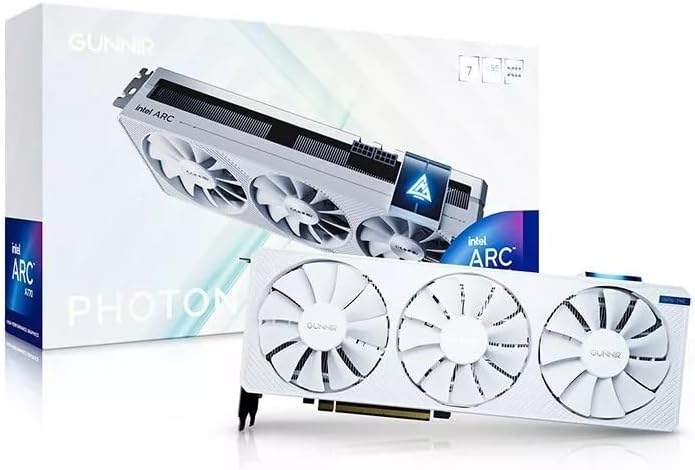
The WEELIAO GUNNIR Intel Arc A770 Photon 8GB OC features a distinctive white design with triple-fan cooling. It holds a 4.5 rating for its reliable performance and aesthetic appeal in custom builds.
We may earn a commission when you buy through this link, at no additional cost to you.
With 256-bit interface it delivers substantial bandwidth for high-resolution gaming. The triple-fan setup ensures temperatures remain stable during long gaming sessions.
Its white color scheme is ideal for specific build themes but may cost more than standard models. Performance remains strong for 1440p and light 4K gaming.
This card suits users prioritizing visual style alongside performance. It offers robust cooling and memory bandwidth for modern creative tasks.
The white finish makes it a standout component for themed PC builds.
Triple fan design provides ample airflow to maintain stable temperatures.
We may earn a commission when you buy through this link, at no additional cost to you.
The Sparkle Intel Arc A310 Omni View 4GB is a compact card designed for multi-monitor setups. It holds a 4.6 rating for its utility in office and lightweight work environments.
We may earn a commission when you buy through this link, at no additional cost to you.
With four HDMI outputs it supports four displays simultaneously for extended workspace. The 50W power draw ensures low energy usage and minimal heat generation.
It is not designed for gaming but excels as a display adapter or entry-level GPU. The single slot design frees up valuable PCIe space in compact systems.
This card is ideal for office workstations requiring multiple screens. It offers a simple and reliable solution for extended desktop configurations.
Four HDMI outputs enable connection to four displays without adapters.
50W power draw ensures low energy usage and minimal heat generation.
We may earn a commission when you buy through this link, at no additional cost to you.
Selecting the right graphics card requires balancing performance needs with budget and physical constraints. This guide outlines critical factors to consider before making a purchase.
Memory capacity is essential for handling large datasets and high-resolution textures. For AI and rendering workloads larger VRAM is critical to avoid bottlenecks.
Ensure the card has sufficient VRAM for your specific tasks to maintain smooth performance over time.
Newer architectures like Xe2-HPG offer improved efficiency and AI capabilities. Check if the card supports latest codecs and features for longevity.
Choose a card with newer architecture for better long-term support and compatibility.
Higher performance GPUs require more wattage. Verify your PSU capacity and connector availability to ensure stable operation.
Calculate total system power needs to prevent instability or shutdowns during heavy loads.
Effective cooling maintains performance under sustained workloads. Blower fans are compact while dual fans offer better silence.
Select a cooling solution that matches your case airflow and noise tolerance.
Modern displays require HDMI 2.1 or DisplayPort 2.1. Check if the card supports your monitor's refresh rate and resolution.
Verify output ports match your display setup to utilize full visual potential.
Check case clearance for length and slot width. Compact cards are better for small form factor builds.
Measure available space to ensure the card fits without obstructing other components.
Driver support and compatibility with professional software are vital for workstations. Check for ISV certification if using specialized tools.
Ensure the software stack supports the card to avoid workflow interruptions.
Balance performance against cost to find the best value. Bundles may offer savings on power supplies.
Compare total system costs to identify the most cost-effective solution.
Install the card carefully into the PCIe slot and secure it with screws. Connect all required power cables to ensure stable voltage delivery.
Download and install the latest drivers from the manufacturer to ensure compatibility with your applications. Keep drivers updated for performance improvements and bug fixes.
Clean dust from the GPU regularly using compressed air to maintain airflow. Ensure your case has good ventilation to prevent overheating during sustained workloads.
Yes many newer Arc GPUs support XMX engines optimized for AI tasks. Models like the Pro B60 offer high VRAM capacity suitable for running quantized language models locally.
Intel Arc GPUs rely on updated drivers for best performance. Always download the latest drivers from Intel or the board manufacturer to ensure stability and compatibility.
The B570 Challenger offers excellent value for 1440p gaming. It balances price and performance effectively with modern upscaling support.
Yes specialized models like the Pro B60 are ISV certified for professional work. They offer high memory capacity and stable drivers for creative applications.
Requirements vary by model but generally expect 8-pin connectors. Check specific TDP ratings and ensure your PSU has adequate wattage and connectors.
Some models are compact low-profile for SFF builds while others are large. Always check physical dimensions against your case clearance.
The top picks cover a wide range of needs from budget gaming to enterprise AI workloads. Each model offers distinct advantages tailored to specific professional or gaming requirements.
Prioritize memory capacity and architecture generation when planning for longevity. Ensure your power supply and case can support the hardware you choose.
Check current prices and availability as they change frequently across retailers. The right choice depends on matching performance to your specific workflow and budget.