
NOYAFA NF-488 POE Cable Tester
4.5Editor score
Multifunctional network cable testing
Large LCD backlit screen visible
Anti-slip casing design for grip
This guide compares the top ten Inline POE Tester tools for 2026, evaluating features, accuracy, and ease of use for network professionals.
Choosing the right Inline POE Tester ensures your network installations run smoothly without unexpected power failures. These tools help technicians verify voltage, current, and compatibility quickly before connecting sensitive devices like cameras and phones.
We evaluated ten highly rated models based on their testing modes, display clarity, and portability. Each product was selected for its ability to handle standard and non-standard Power over Ethernet setups effectively in real-world scenarios.
Every pick below highlights specific strengths and limitations to help you match a tool to your workflow. Keep in mind that prices fluctuate often, so check current listings before making your final purchasing decision today.
4.5Editor score

4.1Editor score

4.1Editor score
The following table provides a side-by-side comparison of all ten products featured in this guide. Review the specifications and features to determine which model best fits your specific network testing needs and budget requirements for reliable performance.


This TRENDnet model stands out as the top choice for professionals who need compliance and accuracy. It holds a solid rating and delivers consistent results across a variety of Power over Ethernet standards. Its ability to handle 4PPoE makes it future-proof for modern deployments.
We may earn a commission when you buy through this link, at no additional cost to you.
The device features three distinct testing modes that allow you to verify PSE devices and monitor real-time power usage effectively. You can cycle through voltage, amperage, and wattage readings using the convenient step button. The NDAA compliance ensures it meets strict government requirements for network installations in the U.S. and Canada.
One trade-off is that it only supports Gigabit ports, which might limit use with older hardware. However, this limitation is acceptable given the robust support for newer standards. The manufacturer protection warranty adds peace of mind for field technicians relying on durability.
Anyone working in government or enterprise environments should consider this tester for its reliability. It eliminates guesswork and ensures devices receive the correct power before installation. We recommend it as the primary tool for serious network professionals seeking compliance and performance.
NDAA compliance guarantees the device meets strict security standards required for federal and government network projects in North America.
Supporting 4PPoE allows technicians to prepare networks for higher power delivery standards without needing to replace tools later.
We may earn a commission when you buy through this link, at no additional cost to you.
This tester brings premium features with its bright OLED display that makes reading data easy even in dark server rooms. It holds a strong rating for accuracy and supports a broad range of Power over Ethernet standards. The self-powered design ensures you never run out of juice during critical installations.
We may earn a commission when you buy through this link, at no additional cost to you.
It supports three testing modes including PD, Inline, and DC which cover most troubleshooting scenarios efficiently. The display shows voltage, current, power, and polarity on one screen so you do not have to toggle through menus constantly. This speed helps reduce downtime when diagnosing network issues in the field.
While it is pricier than some options, the display quality and broad voltage support justify the investment for professionals. It lacks detailed cable fault diagnostics which means you might need a separate tool for continuity checks. However, its primary focus on power delivery is executed exceptionally well.
Network engineers who prioritize display clarity and power accuracy will find this tool invaluable. It simplifies the verification process for complex setups involving various PoE standards. We recommend it for users who want a high-end, reliable power verification tool.
The OLED screen ensures high contrast and clarity making it easy to read power data in low-light environments.
Supporting up to 57V DC allows testing of both standard and non-standard devices without risking damage.
We may earn a commission when you buy through this link, at no additional cost to you.
This NOYAFA model offers incredible value for money while still providing essential Power over Ethernet testing capabilities. It has a high rating for its versatility in checking both power and cable continuity. The backlit screen and anti-slip case make it a practical choice for daily field work.
We may earn a commission when you buy through this link, at no additional cost to you.
It can detect standard and non-standard POE information including voltage and polarity automatically. The remote wiring function helps test for opens, shorts, and crossovers which is rare at this price point. This multifunctionality saves technicians from carrying multiple tools for basic network checks.
The device is somewhat basic compared to high-end analyzers so it might not suit complex enterprise needs. The LCD is clear but smaller than OLED alternatives which could be a slight inconvenience. Despite this, it remains a top pick for budget-conscious installers needing reliability.
Installers working on residential or small business projects will find this tool perfectly adequate. It covers the basics of power verification and cable testing without a huge cost. We recommend it as an excellent entry-level option for general network maintenance.
Combining PoE and continuity testing in one affordable unit reduces the need to buy separate tools.
The anti-slip casing and backlit screen ensure usability even in awkward or poorly lit locations.
We may earn a commission when you buy through this link, at no additional cost to you.
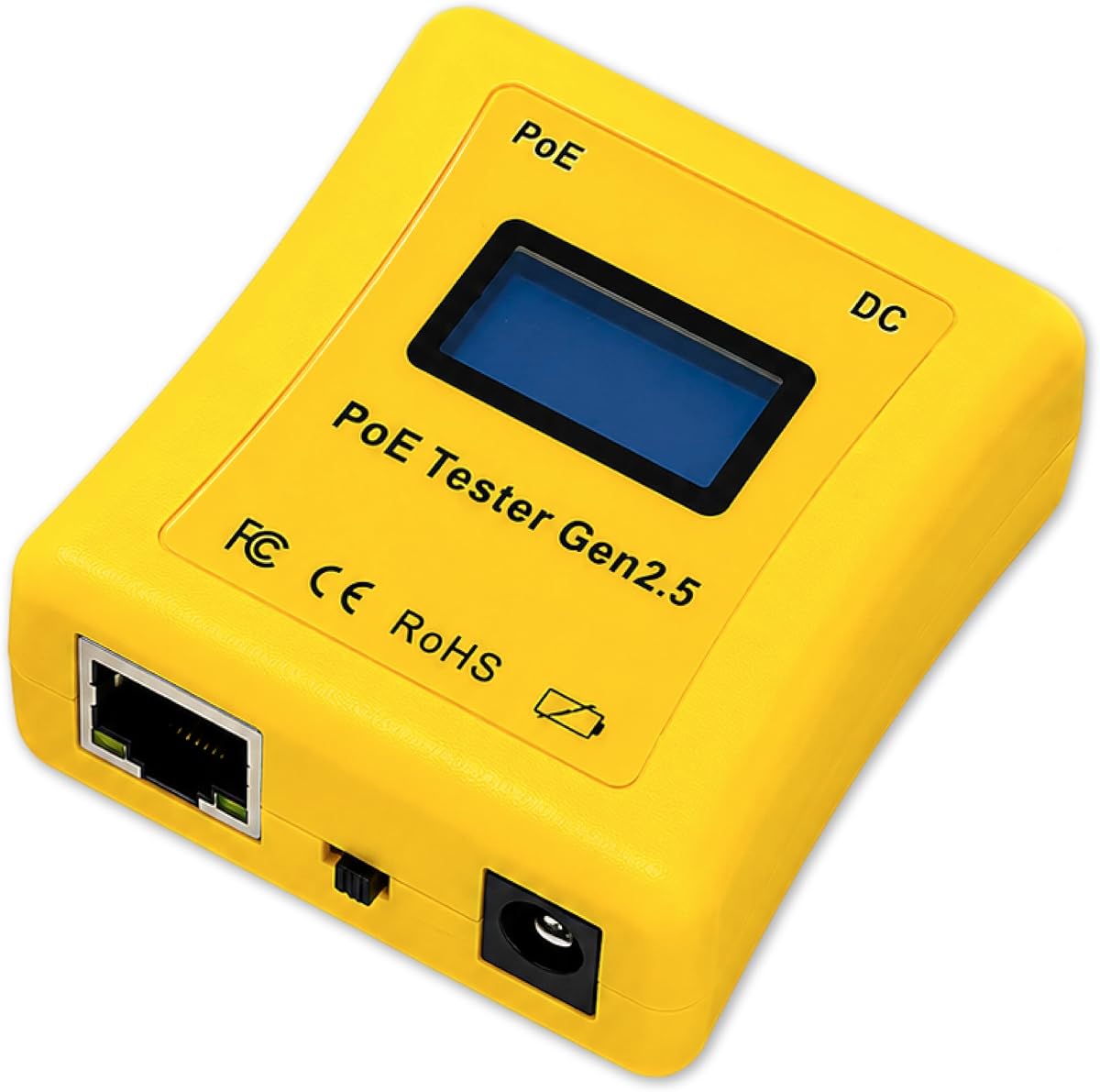
This PoE Texas device is engineered for portability without sacrificing performance. It rates well for its ability to test power without relying on external batteries. The ergonomic design makes it comfortable to hold during extended testing sessions on large installations.
We may earn a commission when you buy through this link, at no additional cost to you.
It measures DC power supply voltages and can activate ports on AF AT BT switches easily. The LCD screen automatically cycles through voltage current and power readings so you do not need to press buttons constantly. This feature helps maintain focus on the device being tested.
One limitation is the screen size which might be hard to read in bright sunlight without adjustment. It also lacks some advanced continuity features found in other tools. However for pure power verification it remains a solid choice for techs who want simplicity.
Technicians who need a quick check tool in their pocket should consider this model. It works well for verifying switch outputs and ensuring cameras get power. We recommend it for users prioritizing comfort and self-sufficiency over complex features.
Drawing power from the PoE line means you never worry about dead batteries during critical troubleshooting.
The curved body fits naturally in the hand reducing fatigue during long days of installation work.
We may earn a commission when you buy through this link, at no additional cost to you.
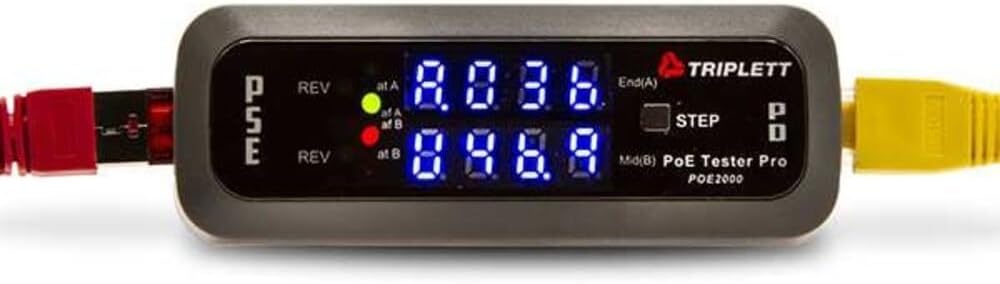
This Triplett model relies on clear visual indicators rather than a complex screen to convey information. It has a decent rating for reliability in basic PoE verification tasks. The LED system is designed to give instant feedback on power sources and polarity issues.
We may earn a commission when you buy through this link, at no additional cost to you.
Dual 7-digit LEDs indicate whether the power source is End Span or Mid Span which helps locate injectors quickly. Two yellow LEDs signal reversed polarity so you can correct wiring before it causes damage. A step button allows you to lock in specific data views if needed.
The lack of a numeric screen means you might need to interpret values visually which can be less precise. Some users find the LED brightness insufficient in bright conditions. However for quick checks it offers a straightforward solution without unnecessary features.
Installers who prefer simple visual cues over digital displays will find this tool helpful. It is especially useful for identifying power source types in legacy setups. We recommend it for basic verification needs where cost is a concern.
LED indicators provide immediate status updates without requiring you to read numbers on a screen.
Identifying End Span versus Mid Span connections simplifies complex network diagnostics for technicians.
We may earn a commission when you buy through this link, at no additional cost to you.
The Triplett POE3000 is positioned as a higher-end solution for professional network environments. It focuses on speed and accuracy to help speed up installations and troubleshooting of PoE system devices. The visual indicators are designed to be clear and easy to interpret at a glance.
We may earn a commission when you buy through this link, at no additional cost to you.
It detects PSE type and class along with polarity and power levels for comprehensive data collection. The inline power level monitoring function allows you to track consumption over time without needing extra devices. A step button helps select specific data for focused monitoring sessions.
While it offers robust features the cost is higher than many alternatives in the market. Since it is a newer model there are fewer user reviews to validate long-term reliability. However the design suggests a focus on professional durability and clear operation.
Network engineers looking for a dependable tool for enterprise environments may find this useful. It balances simplicity with enough data points to handle complex setups. We recommend it for those prioritizing professional grade accuracy over budget.
Designed for professionals who need accurate and fast verification of power systems without complex interfaces.
Real-time monitoring helps detect power drops instantly allowing for proactive network maintenance.
We may earn a commission when you buy through this link, at no additional cost to you.
This Jonard Tools device combines PoE and cable testing capabilities into one compact unit. It is designed to verify voltage amperage and standards instantly for various Ethernet cables. The inclusion of a remote ensures flexibility when testing long cable runs or loop backs.
We may earn a commission when you buy through this link, at no additional cost to you.
It supports passive and standard 802.3af/at/bt standards making it versatile for older and newer devices. The cable continuity verification ensures flawless data transmission by measuring resistance. You can run it without batteries when powered by PoE or use AA batteries for unpowered tests.
The lack of a user rating makes it hard to gauge long-term satisfaction among peers. However Jonard Tools is known for quality equipment which adds confidence to the purchase. The belt clip and light weight make it easy to carry around daily.
Installers needing a complete kit for both power and cable checks should consider this tool. It simplifies the workflow by merging two functions into one device. We recommend it for users who value convenience and a comprehensive testing approach.
Merging PoE and cable continuity checks reduces the gear you need to carry during field installations.
Using PoE power or AA batteries ensures the tool is always ready regardless of network conditions.
We may earn a commission when you buy through this link, at no additional cost to you.
This tester stands out with a very high user rating for its comprehensive features. It verifies both standard and non-standard PoE effectively making it suitable for mixed environments. The rechargeable battery ensures you can work all day without hunting for replacements.
We may earn a commission when you buy through this link, at no additional cost to you.
It measures Ethernet cable lengths for CAT5 and CAT6 which is vital for checking long runs. Port flash detection helps locate active ports quickly saving time in crowded server rooms. The auto-shutoff function helps preserve battery life when the tool is idle.
One drawback is the dependency on charging which means you must manage power levels during busy days. It also requires specific cable types for length measurement which might not cover all legacy setups. Despite this it remains a top-rated option for most users.
Professionals who need detailed cable data alongside power checks will find this highly useful. The combination of length testing and PoE verification saves extra tool swaps. We recommend it for anyone looking for a robust battery-powered solution.
Measuring cable length from five to three hundred meters helps prevent data drop issues caused by distance.
Port flash detection speeds up identification of live connections in large structured cabling systems.
We may earn a commission when you buy through this link, at no additional cost to you.
This unit is designed for heavy-duty use with a power panel integration. It supports CAT5 and CAT6 networks ensuring compatibility with a wide range of legacy and modern systems. The voltage measurement capabilities allow for precise checks without additional equipment.
We may earn a commission when you buy through this link, at no additional cost to you.
It functions as a network PoE tester giving you essential data for installation and maintenance. The panel design suggests a more industrial approach suitable for fixed installations or control rooms. It offers reliable performance for standard verification tasks.
The design feels dated compared to modern handheld testers which might limit portability. There is little available data on user experiences to validate its current popularity. However for specific industrial applications it remains a functional choice for network maintenance.
Users needing a fixed power verification solution might find this model suitable for their needs. It provides the basics without requiring portable handling. We recommend it for specialized setups where a panel-mounted tool is preferred.
Panel mounting allows for continuous monitoring of power status in dedicated network equipment rooms.
Supporting CAT5 and CAT6 ensures the device works with older infrastructure still in use today.
We may earn a commission when you buy through this link, at no additional cost to you.
This tester combines network cable diagnostics with PoE verification for a versatile tool. It checks for short crossover and open circuit statuses making it a great general maintenance device. A standout feature is the included LED lamp for illumination in dark areas.
We may earn a commission when you buy through this link, at no additional cost to you.
It detects standard and non-standard PoE devices ensuring accurate power identification across different brands. The loop-back test helps diagnose issues with switches and the voltage detection range covers most needs. Customer service is highlighted as friendly and responsive within twenty-four hours.
While it offers great service it shares many features with other models in the lineup. This redundancy might mean it is not the most unique option available. However the added illumination tool and support add value for less experienced users.
Technicians who appreciate responsive support and added accessories will find this useful. It is a solid choice for those wanting a multi-purpose tester for various network faults. We recommend it for users valuing service and convenience.
Friendly customer service ensures quick help if you face setup issues or questions during installation.
The built-in LED lamp helps you see ports in dark spaces without needing an external flashlight.
We may earn a commission when you buy through this link, at no additional cost to you.
Selecting the right Inline POE Tester depends on your specific needs and environment. We analyze the key factors below to help you make an informed decision for your network work.
Ensure the tester supports the PoE standards you use such as 802.3af or 4PPoE. Modern devices often require higher wattages so checking compatibility is vital.
Choose a model that covers all your current and future needs to avoid upgrades.
A clear display helps you read voltage and current readings quickly in low light. Look for backlighting or OLED screens to avoid eye strain.
Clear text ensures you can see data accurately during complex tasks.
Self-powered testers draw energy from the PoE line eliminating battery dependency. This feature is critical for long field days where charging is difficult.
Prioritize battery-free options if you want uninterrupted testing sessions.
Gigabit support is essential for modern networks to ensure you do not limit your connection speed. Older models might only support Fast Ethernet.
Select a tester that matches your current network port speeds for accuracy.
Network tools often face drops and rough handling so a sturdy casing is important. Look for anti-slip grips to maintain control during use.
Invest in a durable model to protect your investment over time.
Some testers offer cable continuity checks or length measurement which adds value. Determine if you need these functions to streamline your workflow.
Extra features can reduce the need to carry multiple tools on site.
Prices vary widely between basic and professional grade testers. Set a realistic budget based on how often you will use the tool.
Balance cost with necessary features to ensure you get the best value.
A strong warranty indicates manufacturer confidence in product quality. Good customer support helps if you encounter issues with the device.
Check the terms before buying to ensure protection for your purchase.
Start by connecting the tester between your power source and device to verify voltage. Ensure all cables are secure to avoid intermittent readings or damage.
Always cycle through all available modes to get a full picture of power delivery. This helps you identify if a device is drawing the correct amount of energy.
Keep the tester in a protective case when not in use to prevent physical damage. Regular cleaning of the ports ensures consistent contact and reliable testing results.
An Inline POE Tester is a tool used to verify power delivery and connection integrity between a network switch and a powered device. It measures voltage current and other data to ensure devices receive safe power levels.
Many modern testers operate without batteries by drawing power directly from the PoE line. This self-powered feature ensures you can work continuously without worrying about battery life.
Compliance usually means the device supports specific standards like 802.3af or NDAA requirements. Check the product specifications to ensure it matches your regional or network security needs.
Some advanced testers include cable length measurement features to help identify long runs. This helps you troubleshoot signal loss issues without needing separate equipment.
Yes when used according to instructions testers are safe and designed to protect equipment. Always verify polarity and voltage before connecting sensitive devices to avoid damage.
Beginners should look for testers with clear displays and simple step buttons for data. Tools that are self-powered and come with warranties offer easier learning curves.
We have reviewed ten top-rated Inline POE Testers that offer a range of features for different needs. From budget options to professional grade models each pick brings unique strengths to your toolkit.
Prioritize compatibility with your network standards and ease of use when making your decision. Ensure the device supports the power levels you require to avoid future limitations.
Remember that prices and availability can change quickly so always verify current listings before buying. Investing in the right tool today saves time and trouble on future network projects.