
2×2 4k Video Wall Controller
4.6Editor score
HDMI and DVI input support
Eleven splicing modes included
180 degree rotation per screen
Compare the best HDMI Video Wall Controllers for seamless multi-screen displays. This guide evaluates resolution, modes, audio extraction, and connectivity for
Video wall controllers enable seamless multi-screen displays for businesses and entertainment. A quality unit supports high resolution, flexible layouts, and reliable connectivity without signal loss or lag during critical presentations.
We analyzed ten top HDMI video wall controllers based on resolution support, display modes, audio extraction, and control options. Our review focuses on real-world performance, compatibility, and ease of setup for various professional and commercial environments.
Each pick highlights key strengths and limitations to help you choose the right controller. Product availability and details may vary over time, so verify current specifications and stock before making your final purchasing decision for your setup.
4.6Editor score

4.8Editor score

4.6Editor score
The following table compares all ten HDMI video wall controllers across key specifications. Review input resolution, output capabilities, supported display modes, and control methods to find the ideal match for your multi-screen installation needs.



The J-Tech Digital HDMI Video Wall Controller offers a strong balance of features for professional setups. With a high rating, it delivers reliable 4K input support and flexible display layouts for seamless multi-screen presentations.
We may earn a commission when you buy through this link, at no additional cost to you.
This controller supports 4K 30Hz input and allows up to 1080p outputs. The eight display modes cover common configurations like 2×2 and 1×4. Audio extraction via SPDIF ensures sound routing to external systems without signal loss.
Edge masking and 180 degree rotation help minimize bezel gaps and align screens correctly. The lack of web control may limit remote management compared to advanced models, but local control remains effective and straightforward for most users.
It suits businesses needing reliable multi-screen displays with solid audio routing. The lifetime technical support and one-year warranty add confidence to long-term use in office or commercial video wall installations.
Eight display modes including 2×2 and 1×4 allow flexible layouts tailored to your screen arrangement and content requirements.
SPDIF optical audio extraction ensures clean sound routing to external speakers or sound systems for immersive presentations.
We may earn a commission when you buy through this link, at no additional cost to you.
The 2×2 4k Video Wall Controller is an affordable option for basic multi-screen setups. It supports HDMI and DVI inputs with flexible splicing modes for combining four screens into one display wall.
We may earn a commission when you buy through this link, at no additional cost to you.
Eleven splicing modes including 2×2, 1×2, and 1×3 allow versatile layouts. Edge masking and 180 degree rotation minimize bezel gaps and improve alignment for cleaner visuals.
Input resolution caps at 4K 30Hz and outputs are generally lower resolution. The simple design and memory function ensure quick setup without requiring drivers or complex configuration steps.
It fits small businesses or users needing cost-effective multi-screen displays. The straightforward operation and remote control make it easy to switch modes during daily use.
Eleven splicing modes and vertical splicing allow tailored screen arrangements to match your display wall configuration and needs.
Plug and play design with remote and button control ensures quick installation without driver installation or software configuration.
We may earn a commission when you buy through this link, at no additional cost to you.
The OREI 4K Video Wall Controller supports high-resolution inputs with flexible USB-C and HDMI connectivity. It handles up to 4K 60Hz input and offers essential display modes for multi-screen installations.
We may earn a commission when you buy through this link, at no additional cost to you.
USB-C input support broadens compatibility with modern laptops and devices. RS-232 control enables reliable integration into automated systems or commercial setups requiring remote management and configuration.
Output resolution may be lower than input limits requiring careful planning for high-fidelity content. The inclusion of an international power adapter adds versatility for global deployments without additional hardware.
It suits professional environments needing reliable high-resolution input support. The USB-C option and RS-232 control make it a strong choice for modern commercial or office video walls.
HDMI and USB-C inputs with support for up to 4K 60Hz ensure compatibility with modern laptops and media players.
RS-232 control and optical audio output support integration into automated commercial systems for reliable operation.
We may earn a commission when you buy through this link, at no additional cost to you.
The OREI 4K 2×2 HDMI Video Wall Controller handles 4K 60Hz input with multiple display modes. USB-C and HDMI inputs provide compatibility for various source devices and modern laptops.
We may earn a commission when you buy through this link, at no additional cost to you.
Bezel adjustment and 180 degree rotation help align screens and minimize gaps. Audio extraction via optical and analog outputs ensures sound routing without relying solely on HDMI.
Output resolution may be capped at 4K 30Hz depending on mode, limiting full high refresh rate support across all displays. HDR10 and Dolby Vision are unsupported, affecting premium content playback.
It fits users needing solid 4K input support with audio routing. The bezel adjustment and USB-C input make it useful for professional presentations and commercial installations.
Supports 4K 60Hz input via HDMI and USB-C, ensuring compatibility with high-fidelity source devices and laptops.
Optical and analog audio extraction with 180 degree rotation and bezel adjustment for precise screen alignment and setup.
We may earn a commission when you buy through this link, at no additional cost to you.
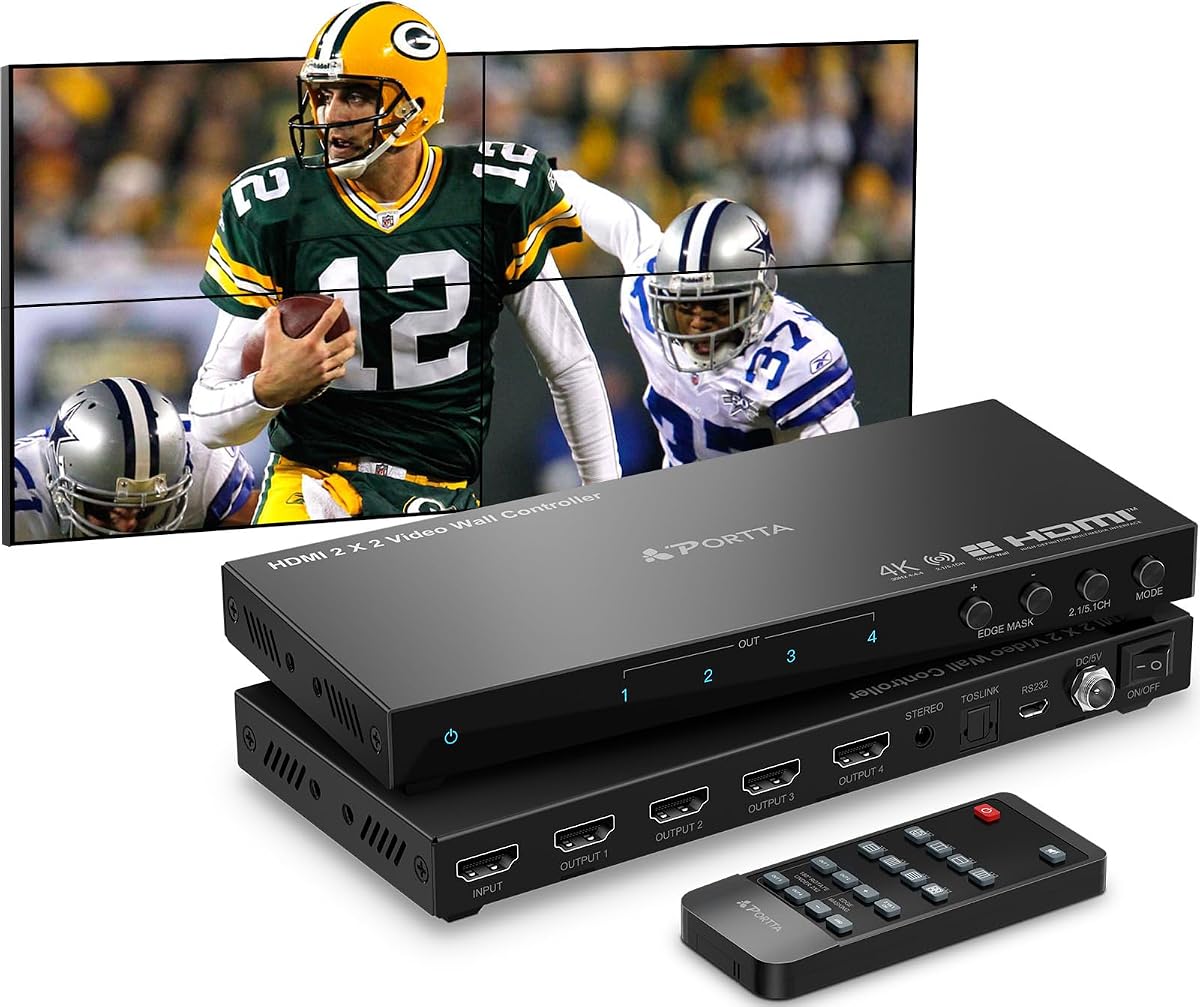
The PORTTA HDMI Video Wall Controller supports 11 splicing modes with edge masking to reduce bezel distortion. It accepts 4K 30Hz input and delivers 1080p 60Hz outputs for consistent multi-screen performance.
We may earn a commission when you buy through this link, at no additional cost to you.
Edge masking allows fine-tuning output pictures to minimize unnatural appearances. Audio extraction via Toslink and 3.5mm ports provides flexible sound routing to external speakers or amplifiers.
Input resolution caps at 4K 30Hz, limiting high refresh rate support. The two-year warranty and lifetime technical support provide added assurance for commercial deployments and long-term use.
It suits setups needing precise bezel alignment and multiple layout options. The edge masking and audio extraction features make it a strong choice for retail and information displays.
Edge masking and 180 degree rotation help reduce bezel gaps and ensure clean visual continuity across all screens.
Toslink and 3.5mm audio extraction supports external sound systems for immersive presentations and commercial environments.
We may earn a commission when you buy through this link, at no additional cost to you.
The OREI 4K@60Hz 4×4 Seamless HDMI Matrix allows switching four sources across four displays or splitting one source across screens. It supports 4K 60Hz input and includes web control for remote management.
We may earn a commission when you buy through this link, at no additional cost to you.
Matrix switching enables flexible routing for complex setups requiring multiple input sources. Advanced EDID support ensures reliable detection and compatibility with various displays and source devices.
Audio formats include PCM, Dolby Digital, DTS, and TrueHD. The higher price and setup complexity may limit it to professional or commercial environments with demanding requirements.
It fits large installations needing multi-source switching and video wall capability. The web control and matrix switching make it a powerful choice for control rooms and broadcasting.
Switch four HDMI sources to four displays or split sources across screens, offering versatile configuration for complex setups.
Supports PCM, Dolby Digital, and DTS formats for high-quality audio routing alongside video in professional environments.
We may earn a commission when you buy through this link, at no additional cost to you.
The ISEEVY 4K60 Video Wall Controller supports full 4K 60Hz input and output across four displays. It handles multiple splice modes and offers plug-and-play installation without requiring drivers.
We may earn a commission when you buy through this link, at no additional cost to you.
USB-C and HDMI inputs allow compatibility with modern laptops and devices. Three buttons or remote control enable quick mode switching for different presentation or display requirements.
The controller offers stable 24×7 operation suitable for continuous commercial use. Limited control options and fewer display modes compared to advanced models may restrict advanced layout flexibility.
It suits environments needing reliable 4K output across all screens. The USB-C input and stable operation make it a practical choice for retail and office video walls.
Supports 4K 60Hz input and output across four ports, enabling full-resolution multi-screen displays without downscaling.
Three-button control or remote switching allows quick mode changes without software or complex configuration steps.
We may earn a commission when you buy through this link, at no additional cost to you.
The J-Tech Digital 4k 2×2 Video Wall Controller supports 4K 60Hz input with web control via LAN for remote management. Multiviewer presets allow viewing multiple sources on one screen for monitoring setups.
We may earn a commission when you buy through this link, at no additional cost to you.
Resolution scaling supports upscale and downscale to various formats including 1080p and 720p. This ensures compatibility with displays that may not support full 4K across all outputs.
Web control enables configuration without physical access. The higher price and output resolution limits may be acceptable for users prioritizing remote control and multiviewer functionality.
It suits control rooms and professional environments needing remote management. The web control and multiviewer presets make it a strong choice for monitoring and security installations.
LAN-based web control enables remote configuration and management without needing physical access to the controller unit.
Multiviewer presets allow multiple source signals to be viewed on one screen for monitoring and management tasks.
We may earn a commission when you buy through this link, at no additional cost to you.
The 4K60 2×2 Video Wall Controller supports USB playback with auto display when inserting media files. It handles 4K 60Hz input and offers multiple video wall modes for flexible screen arrangements.
We may earn a commission when you buy through this link, at no additional cost to you.
USB auto display supports videos, pictures, and audio playback without needing a connected computer. The remote extension allows control up to 10 meters away for convenient operation.
Image adjustments including brightness and contrast ensure optimal display quality. The higher price may be justified for setups requiring standalone USB media playback and presentation capabilities.
It suits digital signage and standalone display setups. The USB playback and image adjustments make it ideal for retail displays and information kiosks needing self-contained operation.
Insert USB drives for auto display of videos, pictures, and audio, enabling standalone media playback without a computer.
Adjust brightness, contrast, and color temperature to optimize display quality for different lighting and viewing conditions.
We may earn a commission when you buy through this link, at no additional cost to you.
The ISEEVY 4K60 Video Wall Controller supports six HDMI outputs for larger video wall setups. It handles 4K 60Hz input and output, enabling full-resolution displays across multiple screens.
We may earn a commission when you buy through this link, at no additional cost to you.
Multiple splice modes including 2X3 and 3X2 provide flexibility for different wall configurations. USB-C and HDMI inputs ensure compatibility with modern laptops and devices.
Setup requires planning for six displays and may be complex. The higher price and output count suit professional environments needing expansive multi-screen installations for monitoring or presentations.
It suits large commercial installations requiring six-screen displays. The 4K output and USB-C input make it a robust choice for large retail displays and control rooms.
Six HDMI outputs enable six-screen video walls with full 4K 60Hz input and output resolution for expansive installations.
Multiple splice modes including 2X3 and 3X2 allow adaptable configurations for different wall and display layouts.
We may earn a commission when you buy through this link, at no additional cost to you.
Choosing the right HDMI video wall controller requires evaluating resolution support, input and output capabilities, and control options to match your specific display wall setup and usage scenario.
Ensure the controller supports your source resolution and output requirements. Some units accept 4K 60Hz inputs but output at 4K 30Hz or 1080p, affecting visual fidelity and refresh rates.
Match input and output resolution to your display needs for consistent quality across screens.
Look for controllers with multiple display modes like 2×2, 1×2, and 1×4 to support various screen arrangements and layouts.
Choose a unit with enough modes to accommodate your specific wall configuration and presentation requirements.
Verify the controller supports your source devices with HDMI, USB-C, or DVI inputs. Audio extraction via optical or analog outputs ensures proper sound routing.
Select a model with compatible inputs and audio outputs for your setup.
Consider control methods like remote control, RS-232, or web control for remote management. Advanced controllers offer LAN web interfaces for configuration without physical access.
Choose control options that match your operational needs and automation requirements.
Features like edge masking, bezel adjustment, and 180 degree rotation help minimize bezel gaps and align screens properly for seamless visuals.
Prioritize units with image adjustment tools for cleaner multi-screen displays.
Check warranty terms and availability of technical support. Lifetime technical support can be valuable for troubleshooting setup issues or configuration help.
Select a controller with reliable warranty and support coverage.
Verify power supply options including international adapters for global use. Ensure the controller supports continuous operation for 24×7 deployments in commercial settings.
Choose a unit with appropriate power and stability for your environment.
Plug-and-play controllers with memory functions simplify setup and operation. Look for intuitive interfaces and clear documentation to reduce installation time.
Select a model that matches your technical expertise and setup complexity needs.
Connect your source device to the HDMI or USB-C input port using high-quality cables. Link each display to the controller's HDMI outputs ensuring secure connections and proper cable routing.
Power on the controller and displays in sequence to allow EDID detection and initialization. Use the remote or control interface to select your preferred display mode and layout.
Adjust image settings like edge masking, rotation, and brightness to minimize bezel gaps and optimize screen alignment. Keep firmware updated and clean cables regularly for stable operation.
An HDMI video wall controller splits a single input signal across multiple displays to create a unified video wall. It supports various screen layouts and allows seamless content distribution across connected screens for presentations or monitoring.
Many modern controllers support 4K 60Hz input but may output at lower resolutions like 4K 30Hz or 1080p. Always check the specifications to ensure the unit meets your resolution and refresh rate requirements.
A 2×2 video wall controller typically supports up to four displays. Some models offer additional modes for different configurations, but four screens is the standard maximum for this class of controllers.
Some controllers support USB-C inputs alongside HDMI for compatibility with modern laptops and devices. Verify the unit’s input options if you plan to use USB-C sources for your setup.
Many controllers include audio extraction via optical (SPDIF) or analog outputs. This allows routing sound to external speakers or sound systems separately from the HDMI signal.
Use edge masking and bezel adjustment features to crop or align output images. Rotate screens as needed and adjust settings to reduce the visual impact of bezels for a cleaner display.
This guide reviewed ten top HDMI video wall controllers, highlighting their strengths and limitations. Top picks include models with reliable 4K input, flexible display modes, and robust audio extraction capabilities.
Prioritize resolution support, control options, and display modes that match your specific setup needs. Consider warranty and technical support for long-term reliability in commercial or professional environments.
Product availability and specifications may vary over time. Always verify current details and prices before purchasing to ensure the controller meets your current requirements and setup.