
HDMI Extender Over Ethernet 1080P 60Hz 164FT PoC EDID HT202P
4.4Editor score
1080P 60Hz support
164FT single cable run
Power over Cable included
Compare the top HDMI over Ethernet extenders for long distance 4K and 1080p video transmission across home, office, and professional AV setups today.
Finding the right HDMI over Ethernet solution means balancing signal quality with installation ease. These extenders let you send high definition video across long cable runs without bulky cabling. They support various resolutions from 1080p to 4K depending on the model chosen.
We reviewed ten top rated extenders based on distance capabilities and resolution support. Our comparison covers Power over Cable features and remote control options. Each product was analyzed for compatibility and warranty support to ensure reliable performance.
Each pick highlights key strengths and ideal use cases for buyers. Prices vary by features and range so check current listings before purchasing. This guide helps you select the best extender for your specific video transmission needs now.
4.4Editor score

4.6Editor score

4.6Editor score
This side by side comparison lists all ten extenders with key specs. You can see differences in distance support and resolution caps at a glance. Use this table to quickly find the model that fits your AV setup requirements.



The OREI HDMI Extender delivers reliable 4K signal transmission over standard CAT cables. It scores a strong rating for performance in extended distance setups. Its loop-out feature helps monitor local displays simultaneously during use.
We may earn a commission when you buy through this link, at no additional cost to you.
This extender supports 1080P and 4K@30Hz across 50 meters of cable. It includes IR cables for remote control and maintains stable visuals without loss. The package has all power adapters and cables needed for setup.
The main trade-off is the 30Hz limit on 4K instead of 60Hz. This is acceptable for media playback but not high refresh gaming. It also relies on direct CAT connection not IP networks for signal.
Ideal for media players and Blu-ray setups needing long reach. Use this if you need a compact point-to-point solution with loop-out for local viewing.
Signal stability is maintained up to 70m for 1080P over CAT6 cables without degradation.
IR Tx and Rx cables allow control of sources from the receiver end via the kit.
We may earn a commission when you buy through this link, at no additional cost to you.
The HT202P HDMI Extender offers a budget friendly path for 1080P distribution. It maintains solid quality for classrooms or office setups needing 164FT reach. PoC technology simplifies power needs significantly.
We may earn a commission when you buy through this link, at no additional cost to you.
It transmits uncompressed HDMI over single network cables with clear results. The EDID function helps the source match the display correctly. Setup requires no software or drivers for immediate use.
Limitations include no 4K support and basic IR control options. This model is best for standard HD video needs where cost is a priority. You still get reliable 60Hz refresh rates.
Select this if you need a straightforward 1080P extension without extra features. It works well for projectors and wall mounted TVs in commercial spaces.
Only one power adapter is needed for the transmitter which powers both units via cable.
EDID copy reads display info to ensure correct resolution delivery across long runs.
We may earn a commission when you buy through this link, at no additional cost to you.
This OREI extender handles full 4K@60Hz with HDR and HDCP 2.2 support. It delivers premium quality for high fidelity media setups. The 230ft range allows flexible placement in large rooms.
We may earn a commission when you buy through this link, at no additional cost to you.
It supports 18Gbps bandwidth for crisp visuals and high fidelity audio. The rugged design aids heat dissipation during extended use. International adapters are included for dual voltage use.
The lack of a loop-out port is a minor trade-off for this power level. Users might also note the higher cost compared to 1080P options. However performance justifies the investment for critical setups.
Ideal for home theaters and Blu-ray players requiring HDCP compliance. Choose this for reliable 4K transmission without compromise on quality or distance.
18Gbps bandwidth enables 4K@60Hz with YUV 4:4:4 color depth.
Full OREI support with 1-year warranty ensures long-term reliability.
We may earn a commission when you buy through this link, at no additional cost to you.
This 1×4 splitter extender distributes one source to four displays easily. It supports 4K@30Hz for presentations or meeting rooms. The local monitor port allows quick checks without routing to all displays.
We may earn a commission when you buy through this link, at no additional cost to you.
Power over Cable simplifies wiring for all four receivers at once. IR pass back lets you control sources remotely from any display. The unit includes necessary cables and adapters for setup.
The price reflects the four unit bundle which may be steep for single use. Also 4K is limited to 30Hz which impacts high speed content. For standard 1080p it performs well.
Select this for conference rooms needing multiple display points. It is ideal where one source feeds several screens with remote control access.
Transmitter has four Cat6 outputs to send signal to multiple displays at once.
IR pass back forwards commands to source from the remote display location.
We may earn a commission when you buy through this link, at no additional cost to you.
This balun provides 4K@60Hz over 165ft with local monitoring. It supports HDMI 2.1 features like HDR and HDCP 2.2. The loop-out port ensures you can see content at the source.
We may earn a commission when you buy through this link, at no additional cost to you.
Audio formats include LPCM and Dolby TrueHD for high fidelity sound. Setup is straightforward with included IR cables for remote control. It is designed for clean AV rack setups.
The range is shorter than some models but suits smaller spaces. Price is moderate for 60Hz support in this range. Ensure Cat6 cables are high quality for stability.
Ideal for gaming consoles and streaming devices needing 60Hz. Use this where local monitoring and audio quality are priorities.
Transmitter HDMI loop-out allows local viewing while sending remote signal.
Supports LPCM and Dolby TrueHD for immersive sound performance.
We may earn a commission when you buy through this link, at no additional cost to you.
The HT275 offers long reach for 4K at 30Hz up to 131ft. For 1080P it reaches 230ft making it flexible for larger spaces. IR cables let you control sources from the remote location.
We may earn a commission when you buy through this link, at no additional cost to you.
Power over Cable reduces the need for a second adapter at the receiver. EDID management ensures smooth resolution selection during setup. It is plug and play without software installation.
The 30Hz cap on 4K is acceptable for most media but not gaming. Power is still required at the transmitter end. Cables are included for immediate use.
Ideal for classrooms and conference rooms needing long distance. Use this for secure video transmission across multiple display points.
Single power adapter at transmitter powers both units via Ethernet cable.
IR cables allow remote control of source devices from receiver end.
We may earn a commission when you buy through this link, at no additional cost to you.
This OREI model adds USB KVM extension to video transmission. It handles 4K@60Hz over 230ft for remote control. HDMI loop-out allows local monitoring at the source side.
We may earn a commission when you buy through this link, at no additional cost to you.
Audio extraction is possible via 3.5mm output at receiver end. Full HDCP 2.2 compliance ensures protected content playback. Setup is plug and play for quick AV deployment.
The KVM feature allows keyboard mouse control remotely. However price is higher for this added functionality. Ensure CAT6 or 7 cables are used for best results.
Ideal for offices needing remote PC control via network cable. Use this where both video and input control are required.
Control PC through keyboard and mouse at receiver end via USB.
3.5mm output allows connection to analog speakers at receiver.
We may earn a commission when you buy through this link, at no additional cost to you.
The KVZOO HDMI Extender handles various environments from classrooms to outdoor screens. It supports 4K@30Hz over 130ft or 1080P to 230ft easily. Mounting holes allow secure installation in permanent setups.
We may earn a commission when you buy through this link, at no additional cost to you.
It offers both mirror and extended modes for flexible dual-screen setups. Dual voltage support adapts to international use. Included IR cables provide remote control access.
HDR support is limited to HDMI 1.4 protocol which lacks native HDR. This is acceptable for standard content but not HDR specific apps. Ensure high quality CAT6 cables for stability.
Ideal for venues needing secure mounting options and remote control. Use this for presentations or large venues where stability matters.
Patented mounting holes facilitate easy installation in permanent setups.
Supports both mirror and extended modes for screen flexibility.
We may earn a commission when you buy through this link, at no additional cost to you.
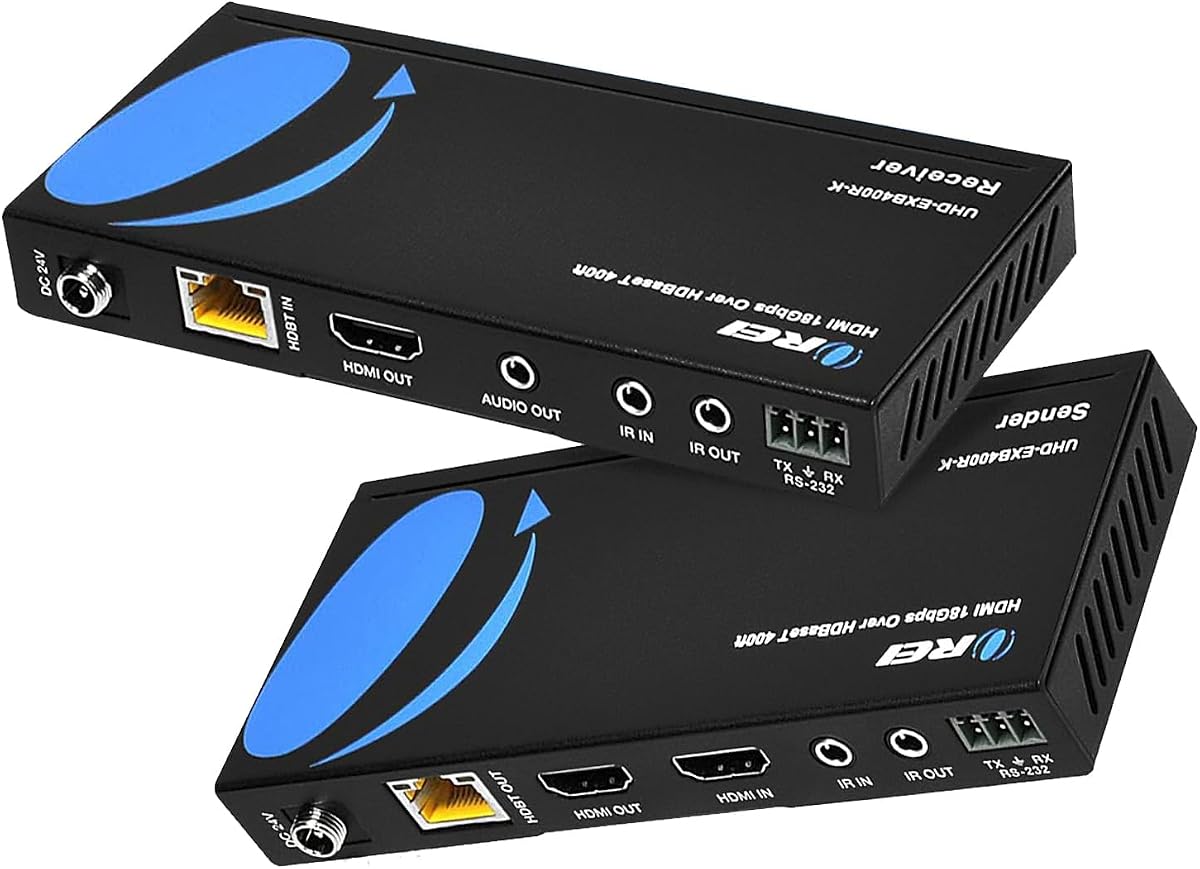
This HDBaseT model offers extreme range up to 400ft with 4K@60Hz. Two-way IR control allows commands from either end of the cable. RS-232 ports enable professional system integration.
We may earn a commission when you buy through this link, at no additional cost to you.
Zero latency ensures responsive video for live monitoring. PoC technology simplifies power needs. It supports CEC for control automation and protection features.
Higher price reflects professional features like RS-232 and range. Note that HDBaseT models are not interchangeable across different brands. Always match sender and receiver units exactly.
Ideal for large venues and professional AV integration. Use this when you need maximum range and two-way control options.
Two-way IR allows control from remote or source location.
RS-232 command port allows system automation integration.
We may earn a commission when you buy through this link, at no additional cost to you.
The PWAY HT275 HDMI Extender offers high performance at a solid price. It supports 4K@30Hz up to 130ft and 1080P to 230ft. Loop-out port allows local preview during setup.
We may earn a commission when you buy through this link, at no additional cost to you.
IR control allows remote management of source devices easily. Power over Cable reduces clutter at the receiver. Setup is simple and requires no additional software installation.
While 4K refresh is limited to 30Hz it works well for movies and media. The design is functional and straightforward without extra features. Ensure high quality cables for optimal results.
Ideal for home theaters and streaming setups needing reach. Use this where simple reliable extension and local monitoring are priorities.
Loop-out port allows local viewing while extending signal remotely.
IR remote control changes channels or volume from receiver side.
We may earn a commission when you buy through this link, at no additional cost to you.
Selecting the right extender depends on your video requirements and cable setup.
Determine if you need 4K@60Hz or if 4K@30Hz suffices. Higher refresh rates require more bandwidth and specific model support.
Check bandwidth caps like 18Gbps for 4K@60Hz before buying.
Measure the distance from source to display to find a model with enough range. Some models go up to 400ft while others stop at 165ft.
Use CAT6 or CAT7 for best results at longer distances.
PoC allows one adapter to power both transmitter and receiver. This simplifies installations where the receiver has no power source.
Verify PoC is included before purchase to save power adapters.
IR control allows remote device management from the receiver. Two-way IR offers more flexibility than one-way pass-through.
Check if IR cables are included in the package.
HDCP 2.2 is required for protected 4K content from streaming or Blu-ray. Ensure your extender supports this version to avoid black screens.
Verify HDCP 2.2 on specs if using protected sources.
A loop-out port lets you view the source signal locally while sending it remotely. This is helpful for setup and monitoring without extra cables.
Look for HDMI loop-out if local preview is needed.
Brands like OREI offer 1-year warranties and tech support. Check warranty terms to ensure coverage for parts or defects.
Prefer models with documented support channels.
CAT6 or CAT7 cables are recommended for 4K stability. Older CAT5e might work for 1080P but not high bandwidth modes.
Invest in shielded cables to reduce interference.
Connect your source HDMI to the transmitter and plug in the power adapter. Run a single CAT6 cable from the transmitter to the receiver located at the display.
Connect the receiver to your TV or monitor via HDMI. Ensure IR cables connect the receiver to your source device if you need remote control from that end.
Secure cables with mounts or clips to prevent strain on connectors. Check connections if you see signal loss or artifacts over time.
Most extenders work over standard Cat5e to Cat7 cables. You do not need active networking hardware like routers. Just use a direct cable connection between transmitter and receiver.
Select models that support 4K@60Hz for high refresh gaming. Some only support 4K@30Hz which limits frame rates. Check specs carefully for 60Hz support before purchasing.
PoC sends power from transmitter to receiver through the Ethernet cable. This means only one power adapter is needed. It simplifies wiring for displays with limited power access.
These extenders are for point-to-point direct connections. They do not work with network switches or routers unless specifically labeled as IP extenders.
EDID copy helps source devices detect display resolution limits. If you face resolution errors EDID copy ensures compatibility. Most models include this feature by default.
Yes many models support 1080P at 60Hz over long distances. They are affordable and work well for classroom and office setups requiring clear HD video.
This guide highlighted top extenders for varying needs from budget to premium performance. Models like OREI HT275 offer solid value while HDBaseT units deliver max range.
Prioritize resolution support and distance based on your setup. For home theaters choose 4K@60Hz. For offices 1080P is often enough.
Always check current listings for warranty and adapter details. Prices and features may change so verify specs before finalizing your purchase.