
HUION Artist Drawing Glove, One Size, Left or Right Hand
4.5Editor score
Universal fit for both hands
Soft Lycra and Nylon
Soiling resistant color
This guide compares the top 10 glove for drawing tablet options for digital artists seeking reduced friction, anti-smudge protection, and comfortable long-sessi
Digital artists and designers rely on precision when working with graphic tablets. A quality glove for drawing tablet ensures your hand glides smoothly without leaving smudges or scratches on the screen.
We analyzed ten highly rated products based on material comfort, fit, durability, and user feedback. Each option offers unique features like palm rejection support and breathable fabrics for extended creative sessions.
Every pick includes detailed specs and pros and cons to help you decide. Keep in mind that prices and availability may change over time, so check the current links for the latest information.
4.5Editor score

4.6Editor score
4.4Editor score
The following table provides a side-by-side comparison of all ten selected gloves. Review key specifications like material, size options, and special features to find the best match for your workflow.


This artist drawing glove stands out for its 3-layer palm rejection design, making it ideal for users who want to avoid accidental touches. With a 4.6 rating, it delivers smooth performance and comfort. The fabric feels soft and stretches well to fit different hand shapes without slipping.
We may earn a commission when you buy through this link, at no additional cost to you.
Its two-finger design works for both left and right hands, so you do not need to worry about handedness. The moisture-wicking properties keep hands dry during long sessions, which helps maintain grip and precision. The extra cleaning cloth adds value and ensures your screen stays spotless.
While some users find the sizing a bit tight if they have larger hands, the material is stretchy enough to adapt. The three available sizes help find a better fit. The color remains clean and soiling resistant, reducing the need for frequent washing.
If you need a reliable glove that balances price with performance and palm rejection, this is a top choice. It suits digital artists using iPads or graphics tablets who want protection from smudges and scratches. The included cloth is a nice touch for maintenance.
The 3-layer design provides stronger anti-smudge and anti-slip performance compared to single-layer options.
Soft stretchy fabric with moisture-wicking properties keeps hands cool and dry during long creative sessions.
We may earn a commission when you buy through this link, at no additional cost to you.
The HUION artist drawing glove is a budget-friendly option that delivers solid performance for digital artists. Its one-size-fits-most design means you can use it on either hand without hassle. Made from soft Lycra and Nylon, it provides a comfortable feel and reduces friction with the tablet surface.
We may earn a commission when you buy through this link, at no additional cost to you.
Users appreciate its classic black color, which resists dirt and reduces the need for frequent washing. It works well for sketching, inking, coloring, and digital drawing. The flexible material adapts to your hand shape, allowing for natural movement while drawing.
Since it is a free size, it may not fit very small or very large hands as precisely as multi-size options. However, most users find it comfortable enough for regular use. The anti-fouling design keeps your screen clean from smudges and oils.
If you are new to digital art or want a cost-effective glove to try, this HUION model is a safe bet. It covers the basics well and fits most hand types. The durable fabric ensures it holds up over time even with daily use.
One unit works for both left and right hands with a free size that fits most users comfortably.
The black color and soiling resistant material mean you do not need to wash it frequently.
We may earn a commission when you buy through this link, at no additional cost to you.
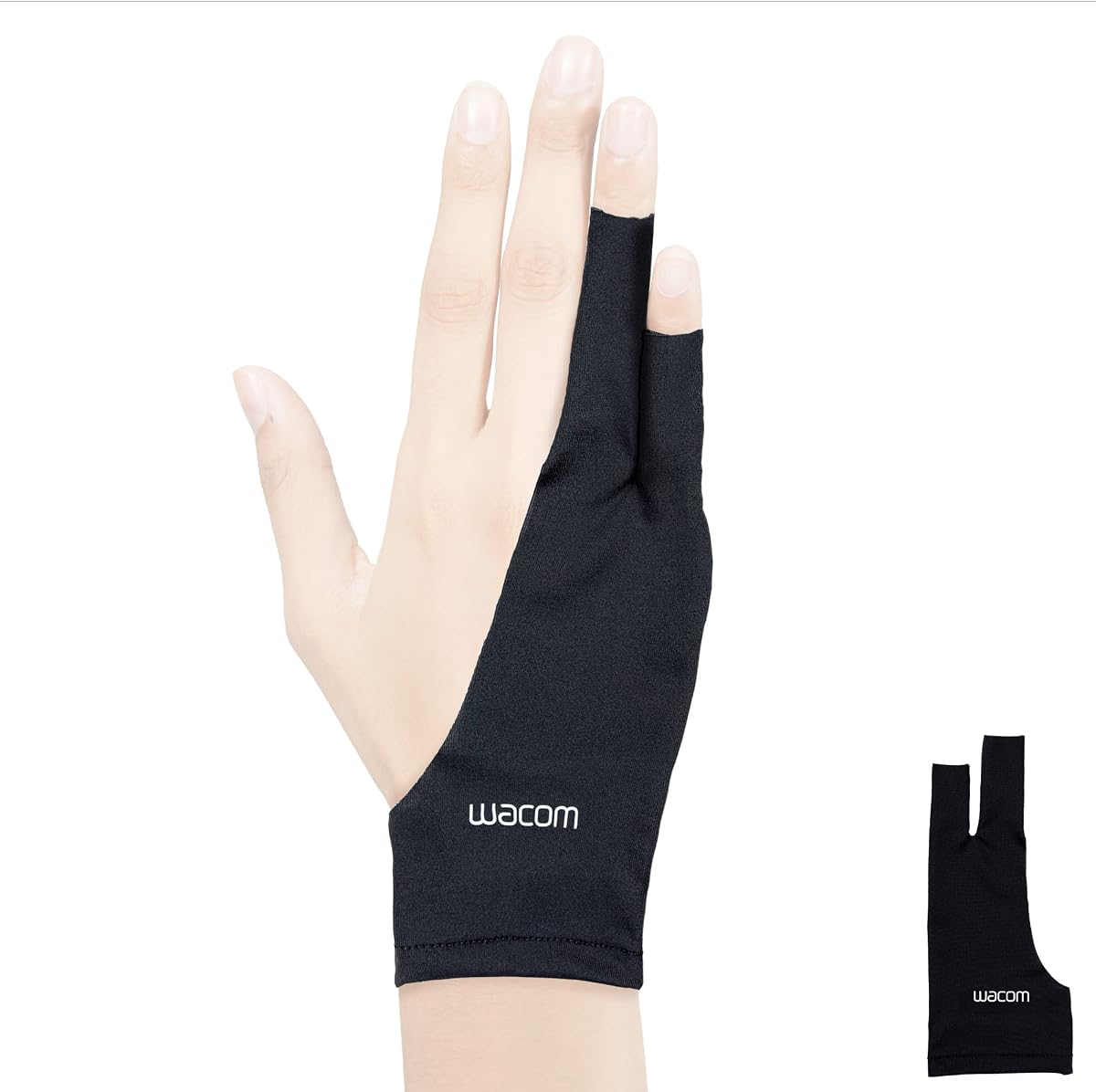
Wacom is a trusted name in the drawing tablet industry, and its glove offers a sustainable option made from 90% recycled material. The exposed fingertip design allows access to touchscreens and typing, which is useful for devices that support those features. It glides smoothly over screens and reduces friction for hours of comfort.
We may earn a commission when you buy through this link, at no additional cost to you.
The one-size-fits-most ambidextrous fit works for right or left-handed users and measures around 7.6 inches in length. The recycled polyester and spandex construction offers comfort, stretch, and durability. Users report that it helps keep the screen clear of smudges from oils or sweat.
While it costs more than some competitors, the eco-friendly build and brand reputation make it appealing. The exposed tip can be a limitation if you prefer full palm coverage. Some users find the fit a bit loose if they have smaller hands.
If you care about sustainability and want a glove from a well-known brand, this Wacom model is worth considering. It works well for artists who need to access touch features while drawing. The reduced friction helps maintain control during detailed work.
Made from 90% recycled polyester and spandex, supporting sustainability without sacrificing comfort or performance.
Allows users to access touchscreen capabilities and type with ease without removing the glove.
We may earn a commission when you buy through this link, at no additional cost to you.
XPPen offers a reliable drawing glove that is designed to fit the habits of both left and right-handed artists. The high elastic material provides excellent air permeability, keeping hands cool during use. Its soft texture stops smudging and allows for easier glide across the tablet surface.
We may earn a commission when you buy through this link, at no additional cost to you.
The black color resists dirt and reduces the need for frequent washing. It comes in Size M, so users should check measurements before buying to ensure a proper fit. The flexible cloth is comfortable on the fingers and does not restrict movement.
While only Size M is shown here, XPPen typically offers S, M, and L options. The single unit may feel too tight or loose if it does not match your hand size. However, the material is stretchy and often adapts well to different hands.
For artists using XPPen tablets or any graphics drawing tablet, this glove provides solid protection from smudges and scratches. Its skin-friendly texture is gentle and comfortable for long sessions. Check size availability before purchasing to get the best fit.
The soft skin-friendly texture stops smudging on drawing tablets and allows for an easier glide.
The high elastic material offers excellent air permeability, keeping fingers cool and comfortable.
We may earn a commission when you buy through this link, at no additional cost to you.
This 4-pack from OTraki gives you multiple gloves to use or share. Each unit is lightweight and made from high-elastic Lycra fiber, making it comfortable for extended drawing sessions. The gloves reduce friction between your hand and the tablet, improving efficiency and keeping the screen scratch-free.
We may earn a commission when you buy through this link, at no additional cost to you.
They work for both hands and come in multiple size options, though the package may include same-sized items. The smudge gloves are black and soiling resistant, which helps them stay clean longer. They fit men, women, or teens, including those with small hands.
Keep in mind these gloves cannot avoid palm sensing on touchscreens unless you adjust device settings. They act as a buffer to help your hand slide easier. Users should close the built-in palm detect function if needed before drawing.
If you want value and flexibility, this 4-pack is a strong choice. It suits sketching, inking, coloring, and digital drawing on monitors, tablets, or tracing pads. Having extras means you can always have a clean pair ready.
The package includes four soft painting gloves, offering more value and readiness for daily use.
Lightweight gloves allow your hand to slide smoothly over the tablet and reduce surface friction.
We may earn a commission when you buy through this link, at no additional cost to you.
The HUION skeleton artist glove stands out with its unique black and skeleton pattern design. It is made from soft Lycra and Nylon, offering extreme flexibility and comfort for drawing work. The anti-dust design helps prevent smudges and scratches on graphic tablets or monitors.
We may earn a commission when you buy through this link, at no additional cost to you.
It measures 7.87 inches in length and 3.15 inches in width, providing a free-size fit for most users. Works for both left and right hands, so you do not need separate gloves. The classic black base with pattern remains soiling resistant, reducing washing frequency.
While the design is eye-catching, some may prefer a plain look. The material is comfortable and reduces friction effectively between your hand and the surface. However, like similar gloves, it cannot prevent accidental touch on touchscreens unless you adjust settings.
If you like a bold look while drawing, this skeleton model combines style with function. It works well for sketching, inking, coloring, and digital drawing on graphics tablets. The comfortable material ensures you can focus on creating without distractions.
The black glove with skeleton pattern offers a peaceful and charming color that stands out from plain options.
Helps avoid smudges and scratches on tablets and monitors while providing a soft feel.
We may earn a commission when you buy through this link, at no additional cost to you.
This 2-pack of black artist gloves features 3-layer palm rejection support for iPads and digital plates. The high elastic smooth fabric reduces friction and provides a comfortable feel when drawing on graphics monitors or tablets. Its sweat-wicking and breathable fabric help keep hands dry.
We may earn a commission when you buy through this link, at no additional cost to you.
The symmetrical design suits left and right hands with a universal size around 20.5 by 8.5 cm. An extra stable design includes a fixed strap between thumb and index to prevent sliding. This makes stylus use more accurate during use.
While the breathable fabric helps with sweat, it cannot completely stop it during very long sessions. The palm rejection helps avoid accidental touch, but screen settings may still need adjustment. Overall, the material feels cool and keeps the screen scratch-free.
If you need two gloves for backup or sharing and want palm rejection support, this pair is a strong choice. It works well for stylus pen, pencil, sketching, and painting on tablets. The stable strap adds accuracy and confidence while drawing.
A fixed strap between thumb and index prevents sliding for more accurate stylus use during drawing.
Cool and breathable fabric helps prevent smudges and keeps hands dry for longer periods.
We may earn a commission when you buy through this link, at no additional cost to you.
This drawing glove comes in a 2-pack with Size M and uses upgraded side fabric with composite silk for improved comfort and breathability. The air layer design helps keep hands cool during extended use. The black gloves reduce friction and prevent smudges on graphic tablets and iPads.
We may earn a commission when you buy through this link, at no additional cost to you.
Available in three sizes, it ensures a perfect fit for various hand preferences and accommodates both left and right-handed users. The durable Lycra material is soft, easy to wash, and maintains its shape. The product helps facilitate smooth movement over screens for a grease-free experience.
While Size M is shown here, choosing the right size improves comfort and control. The gloves are built to last and suit animators, digital artists, or hobbyists. They support precise control over digital surfaces and enhance creative workflow.
If you need versatile sizing and durability, this pair offers a strong fit and reliable performance. It helps ensure a scratch-free experience and boosts productivity. The comfortable fit makes long sessions easier without hand fatigue.
Upgraded side fabric with composite silk creates an air layer for improved breathability during extended use.
Available in Small, Medium, and Large to ensure a perfect fit for various hand sizes and preferences.
We may earn a commission when you buy through this link, at no additional cost to you.
This upgraded version includes a fixed design that improves comfort and prevents the palm from staining tablets. Made of elastic Lycra, the cloth offers high elasticity, softness, and breathability. The gloves eliminate friction, allowing your hand to slide smoothly over screens without grease or scratches.
We may earn a commission when you buy through this link, at no additional cost to you.
The art glove works for both hands with sizes available including Small, Medium, and Large. Each pair is designed for use on computer graphics tablets, iPads, or light boxes. The black color resists dirt and reduces washing needs.
Manual measurement may lead to slight size deviation up to 0.4 inches, so check dimensions before ordering. The two-finger design suits many art styles, from sketching to inking. The breathable cloth is light and sturdy for regular use.
If you want an updated glove that improves stability and keeps your work surface clean, this is a great pick. It helps you devote yourself to creation without smudge concerns. Ensure you choose the right size for a secure fit.
The fixed design helps prevent the palm from staining tablets and improves overall comfort while wearing.
Eliminates friction between hand and screen to allow smooth sliding without grease or sweat.
We may earn a commission when you buy through this link, at no additional cost to you.
OTraki offers a 4-pack of two-finger gloves designed for both right and left hands. Each glove is made from high elastic Lycra fiber with great air permeability and strong tensile resistance. The moisture-wicking fabric ensures comfort during long sessions and reduces cleaning needs.
We may earn a commission when you buy through this link, at no additional cost to you.
Available in many sizes including XS to Large, you can choose the best fit for your hand. The lightweight gloves reduce friction between your hand and the screen, improving work efficiency. The black color resists stains and helps keep hands clean.
This set works widely for sketching, inking, coloring, and digital drawing on various devices. Its two-finger design helps focus on creating without distraction. However, users should note that manual measurement may lead to small size deviations.
If you want multiple gloves and flexible sizing to ensure the right fit, this pack is a solid choice. It is ideal for artists and learners who need reliable protection from smudges and scratches. The moisture-wicking fabric adds comfort during long use.
High elastic Lycra fiber offers soft texture and great air permeability for comfortable long sessions.
Perfect for sketching, inking, coloring, and digital drawing on monitors, tablets, and light pads.
We may earn a commission when you buy through this link, at no additional cost to you.
Choosing the right glove involves considering size, material, features, and compatibility with your device. Below are key factors to help you find the best glove for your needs.
A proper fit is critical for comfort and precision. Many gloves come in one-size-fits-most, while others offer multiple sizes like S, M, and L. Measure your hand dimensions if possible to avoid issues with tightness or slipping. An ill-fitting glove can restrict movement or cause hand fatigue during long sessions.
Materials like Lycra, Nylon, and Spandex provide stretch and comfort. Breathable fabrics help prevent sweat buildup, which can affect grip and comfort. Look for moisture-wicking properties if you draw for hours at a time. High-quality material also improves durability and reduces the risk of tearing over time.
For touchscreens or tablets that detect palm input, a glove with palm rejection support helps avoid accidental touches. Not all gloves provide this, so check product details. Some models use layered designs or special materials to reduce sensing while still allowing smooth movement across the surface.
Most drawing gloves cover the palm and two fingers to protect the screen while allowing finger access. Some gloves expose fingertips for touch or typing. Decide what matters most to your workflow. Full coverage offers better anti-smudge protection, while exposed fingertips add versatility for device interaction.
Look for gloves made from strong tensile material that can withstand regular use. Some models resist dirt and soiling, reducing wash frequency. Check care instructions to see if they can be machine washed or need gentle handling. Proper care extends the life of the glove and maintains its performance.
Black is the most common color because it hides dirt well and looks neutral. Some gloves offer unique designs like skeleton patterns for personal style. Choose a color that matches your preferences and does not show wear easily. Style does not affect function but can boost confidence while working.
Prices vary from budget packs to premium options. Consider how many gloves you need and if you want extras for backup. Multi-packs can offer better value. Balance cost with features like material quality and size options to find the best fit for your budget and needs.
Ensure the glove works with your specific tablet or device, such as iPads, Wacom tablets, or other graphics monitors. Some gloves specify compatibility with certain brands. Read product descriptions carefully to confirm it suits your workflow. Compatibility affects whether palm rejection works as intended.
After use, follow care instructions to keep the glove clean. Hand wash or spot clean to avoid fabric damage. Let it air dry completely before storing. Regular cleaning helps maintain breathability and prevents dirt buildup. Avoid harsh chemicals that might degrade the elastic material over time.
A glove for drawing tablet is a wearable accessory that reduces friction between your hand and the screen. It prevents smudges, scratches, and oils from your skin, ensuring cleaner output and smoother drawing motion. Artists use it for long sessions to maintain comfort and accuracy.
Most gloves reduce palm sensing but may not fully block accidental touches on touchscreens. Some models use special layers to improve palm rejection. Check if your glove supports palm rejection. You may also need to adjust device settings for best results.
Not necessarily. Many gloves are made from soiling resistant materials and black colors that hide dirt. Spot cleaning or occasional washing is usually enough. Overwashing can damage elastic fibers. Always follow care instructions to extend glove life and maintain performance.
Yes, many gloves are ambidextrous and work for both left and right hands. They feature symmetric designs and flexible materials that adapt to hand shape. Check product descriptions to confirm it works for your preferred hand. Most options support both user types seamlessly.
High-elastic Lycra, Nylon, or Spandex blends are common and effective. They offer comfort, stretch, and breathability. Look for moisture-wicking properties to stay cool. Quality material reduces friction and improves glide. Avoid stiff fabrics that might restrict finger movement.
Check the size chart and measure your hand if possible. Most gloves offer Small, Medium, and Large. Some are one-size-fits-most. If between sizes, consider comfort versus snugness. A proper fit prevents slipping and keeps the glove in place during use.
No, a good glove should not affect stylus accuracy. It reduces friction and keeps the screen clean. Some gloves include straps between fingers for stability. Ensure the glove fits well to avoid shifting that could interfere with precise strokes or tool movement.
Yes, many gloves work for both digital tablets and paper sketching. They prevent smudges on paper and reduce friction with stylus pens. They help keep hands clean during inking and coloring. Universal gloves are versatile for mixed media artists.
Prices and availability may change, so check the current links for the latest deals. Compare specs and user feedback before deciding. With the right glove, you can focus on creating without worrying about smudges or discomfort.