
Gaming Desktop PC Core i7
4.5Editor score
Core i7-14700KF Processor
RTX 4070 12GB GPU
16GB DDR5 1TB SSD
This guide compares the top gaming PCs with RTX 4070 to help you find the best performance and value for your budget today.
Finding the right gaming PC with an RTX 4070 GPU ensures smooth 1440p gaming and creative work. These machines balance power and price for gamers who demand high frame rates without overspending on unnecessary features.
We evaluated ten prebuilt desktops based on processor speed, memory capacity, storage types, and cooling efficiency. Our analysis highlights which systems offer the best value for competitive gaming, streaming, and multimedia tasks in the current market.
Each pick below details specific strengths like overclocking support, RGB customization, and warranty coverage. Prices fluctuate frequently due to demand and promotions, so verify current listings before making your final purchase decision for this year.
4.5Editor score

4.6Editor score

5.0Editor score
This comparison table outlines the key specifications for all ten desktop systems to help you quickly identify the best fit for your specific gaming needs and budget constraints.


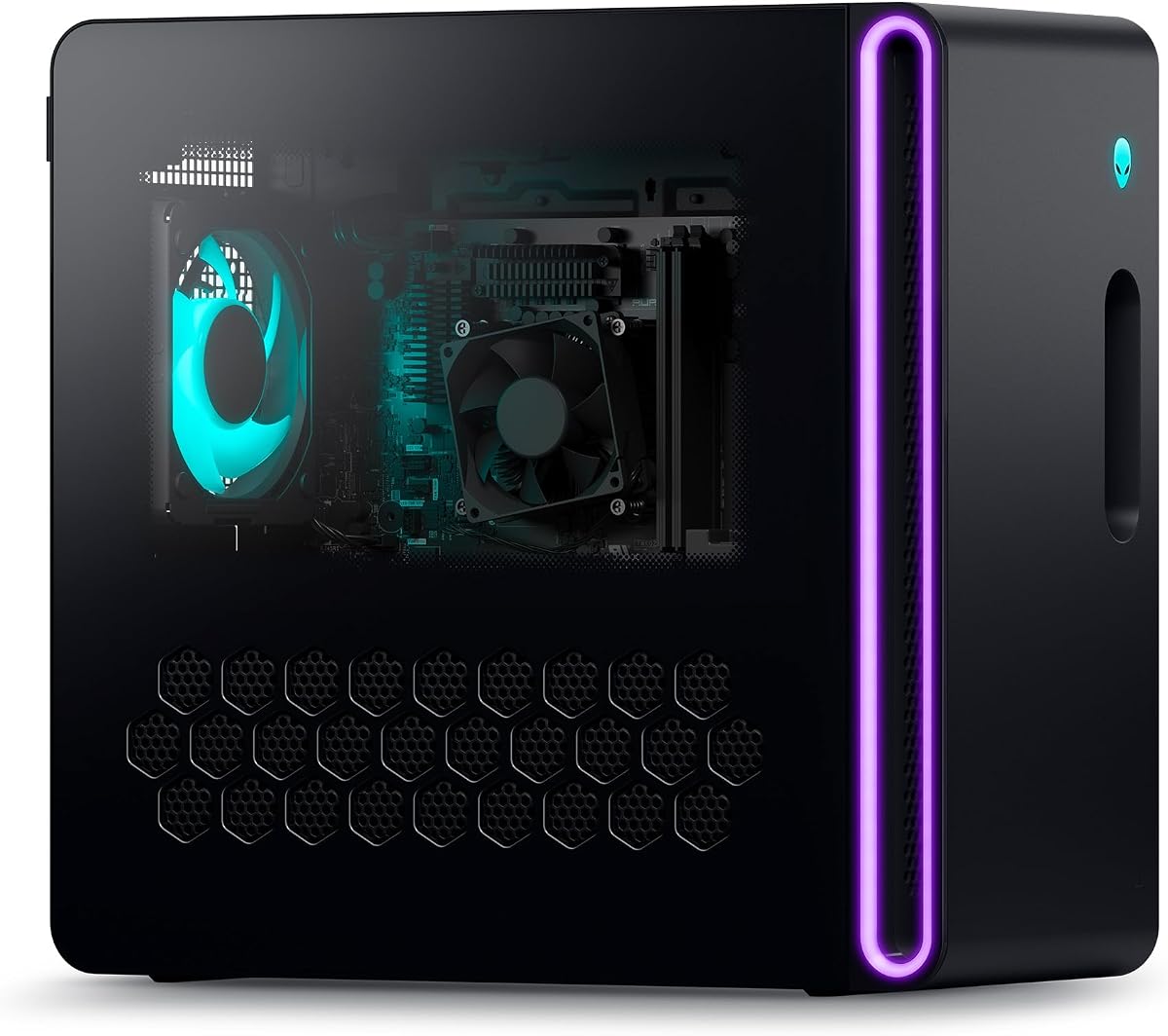

This gaming desktop features a Core i7-14700KF processor paired with an RTX 4070 graphics card. It stands out for delivering high performance in modern titles without exceeding typical mid range budgets.
We may earn a commission when you buy through this link, at no additional cost to you.
The system uses 16GB of DDR5 memory and a 1TB SSD for fast boot times and smooth multitasking. It handles AAA games at 1440p resolutions effectively and supports streaming workflows well.
While it lacks extensive RGB lighting options, the focus remains on raw performance and reliability. The integrated WiFi 6 ensures stable internet connections which is vital for online competitive matches.
This desktop is ideal for gamers seeking a plug and play experience without building a custom rig. It offers the best balance of speed and cost for general gaming tasks.
Beyond gaming, the powerful processor aids video editing and content creation tasks efficiently.
DDR5 memory and WiFi 6 ensure this system remains relevant for years to come.
We may earn a commission when you buy through this link, at no additional cost to you.
The MXZ desktop uses a 13th Gen Intel Core i7 processor and RTX 4070 for strong gaming capabilities. It includes RGB fans to keep temperatures down while adding visual flair to your setup.
We may earn a commission when you buy through this link, at no additional cost to you.
Performance is high enough for competitive titles like Valorant and Fortnite at high frame rates. The system comes with Windows 11 Pro pre-installed and includes free lifetime technical support.
DDR4 memory keeps costs lower but may limit future upgrade potential compared to DDR5 models. However, the 1TB SSD provides ample space for installing multiple large games quickly.
Buyers should consider this for a cost effective solution that still delivers solid performance. The lifetime support adds value for those concerned about long term maintenance issues.
Multiple RGB fans provide excellent airflow and customizable lighting for a modern gaming look.
Lifetime technical support helps resolve potential issues quickly without extra hardware costs.
We may earn a commission when you buy through this link, at no additional cost to you.
This system offers a high quality mix of AMD and NVIDIA components for exceptional gaming. The RTX 4070 Super provides better performance than standard 4070 models for ray tracing tasks.
We may earn a commission when you buy through this link, at no additional cost to you.
Speed is a key feature with 16GB DDR5 running at 6000MHz which ensures fast data processing. The white case design looks elegant and includes a free keyboard and mouse for convenience.
While more expensive than basic options, the inclusion of a 750W Gold PSU ensures stability under load. It avoids bloatware and focuses on delivering a clean Windows 11 Home experience.
It is perfect for gamers who want premium components and style without building from scratch. The overall package justifies the price with superior hardware selection and accessory inclusion.
The Super GPU delivers superior ray traced visuals compared to previous generation models.
Free peripherals mean you can start playing immediately without buying extra gear.
We may earn a commission when you buy through this link, at no additional cost to you.
This desktop features the latest AMD Ryzen 7 9700X processor paired with a powerful RTX 4070 Super. It represents a modern choice for those wanting the newest architecture in a prebuilt.
We may earn a commission when you buy through this link, at no additional cost to you.
DDR5 memory and fast NVMe storage ensure quick application launches and smooth gameplay. The system includes Windows 11 Pro and features multiple RGB fans for thermal management and style.
However, user reviews suggest some quality control issues compared to established brands. The price is competitive but might not offer the best value if reliability is your top priority.
It is suitable for tech enthusiasts who want cutting edge specs in a ready to use box. Just be aware of potential support variances before purchasing this specific configuration.
The 9700X processor brings significant improvements in efficiency and single core speed.
Multiple RGB fans and case windows allow you to customize the look of your desk.
We may earn a commission when you buy through this link, at no additional cost to you.
This Aurora model introduces the next generation RTX 5070 graphics and Intel Core Ultra 7 processor. It focuses on future proofing with cutting edge architecture for upcoming game titles.
We may earn a commission when you buy through this link, at no additional cost to you.
The design features a matte basalt black finish with customizable AlienFX lighting zones. The chassis is optimized for airflow which helps maintain cool temperatures during long gaming sessions.
Dell services include one year onsite support which allows technicians to visit your home or office. This reduces downtime significantly compared to standard mail-in warranty processes.
It is a strong choice for users who prioritize service quality and brand reputation. The unique chassis design and future tech make it stand out in the market.
AlienFX lighting allows full ecosystem synchronization across multiple Dell products for style.
Onsite service provides peace of mind for those who cannot afford system downtime.
We may earn a commission when you buy through this link, at no additional cost to you.
This system offers generous memory and storage with 32GB DDR5 and a massive 2TB SSD. It is perfect for users who keep many games installed at once without managing space.
We may earn a commission when you buy through this link, at no additional cost to you.
Powered by AMD R7-8700F and RTX 5070 it delivers strong performance for modern titles. The design is simplistic but functional with effective cooling fans to manage heat.
MSI Center software allows you to customize lighting and performance profiles easily. The 8-core processor handles streaming and background tasks well during gameplay.
It is ideal for power users who need extra space and RAM for heavy workflows. The combination of high end GPU and storage makes it very versatile.
A 2TB SSD means you can store hundreds of games without external drives.
MSI Center lets you switch performance modes based on your current gaming needs.
We may earn a commission when you buy through this link, at no additional cost to you.
This desktop combines a 14th Gen Intel i5 processor with a high-end RTX 5070 GPU. It offers a balanced approach where graphics power is prioritized for gaming performance.
We may earn a commission when you buy through this link, at no additional cost to you.
32GB DDR5 RAM ensures smooth multitasking even when streaming or using heavy background apps. The WiFi 6E provides low latency which helps in competitive online gaming environments.
It uses standard components which makes future upgrades easier than proprietary systems. The cooling system uses four fans to maintain consistent temperatures during long sessions.
Gamers who focus on GPU power but need plenty of RAM will appreciate this setup. The VR Ready label ensures compatibility with modern headsets for immersive experiences.
The high end GPU and ample RAM provide a solid base for VR gaming titles.
Standard components mean you can swap parts later without needing special tools.
We may earn a commission when you buy through this link, at no additional cost to you.
This premium desktop features a 360mm liquid cooling system for maximum thermal performance. It is designed to keep the Ultra 7 processor running at high speeds without thermal throttling.
We may earn a commission when you buy through this link, at no additional cost to you.
The RTX 4070 Super GPU provides excellent image quality and high frame rates for 1440p gaming. With 2TB SSD and 32GB RAM it handles any creative or gaming task smoothly.
MSI recommends Windows 11 Pro for business use but it ships with Home. It is VR Ready and includes USB Type C ports for modern peripherals.
Users seeking the absolute best cooling and component quality will find it worth the investment. The high rating reflects satisfaction with its build and performance.
Liquid cooling ensures your CPU stays cool even during extreme overclocking or rendering.
USB Type C allows for faster data transfer and modern device connectivity.
We may earn a commission when you buy through this link, at no additional cost to you.
The R16 model uses a 12-phase voltage regulation design for clean energy delivery. This ensures the CPU and GPU perform reliably under long gaming or streaming sessions.
We may earn a commission when you buy through this link, at no additional cost to you.
Efficient airflow design and optimized cable management help reduce noise levels. The Basalt Black finish looks professional and blends well with modern home offices.
It includes 1 Year Onsite service which allows support staff to visit your location. This reduces downtime significantly if hardware issues arise during critical use.
Ideal for professionals who need reliable hardware with top tier support options. The premium price covers the advanced engineering and service inclusion.
The 12-phase design ensures consistent power delivery for stable performance.
Optimized airflow means quieter operation even when the system is under full load.
We may earn a commission when you buy through this link, at no additional cost to you.
This desktop features a tempered glass RGB case that looks striking on any desk. It comes with a free gaming keyboard and mouse to complete your setup instantly.
We may earn a commission when you buy through this link, at no additional cost to you.
The RTX 4070 Super and 32GB DDR5 5600 RAM handle modern games efficiently. There is no bloatware so you start with a clean Windows 11 Home experience.
2TB SSD space allows for extensive game libraries without needing external drives. The 802.11AC Wi-Fi ensures stable connections for multiplayer gaming.
It is a great value for users wanting a complete gaming package with style. The included accessories save you time and money on peripherals.
RGB lighting and tempered glass panels make this unit visually appealing.
Free keyboard and mouse mean you can start playing right out of the box.
We may earn a commission when you buy through this link, at no additional cost to you.
Choosing the right desktop requires balancing CPU power, memory, and future needs.
The processor determines how well the system handles modern games and streaming. Look for high clock speeds and core counts to avoid bottlenecks with powerful GPUs.
Prioritize i7 or Ryzen 7 CPUs for smooth multitasking and long term relevance.
16GB DDR5 is standard but 32GB offers better multitasking for heavy workflows. Modern titles increasingly recommend more RAM to load assets quickly.
Choose 32GB if you plan to stream or run background applications while gaming.
SSD type affects load times and system responsiveness. NVMe drives are significantly faster than SATA options.
Ensure at least 1TB NVMe storage for a modern gaming experience.
Thermal management impacts sustained performance during long sessions. Air coolers are reliable but liquid cooling can reduce noise.
Look for systems with multiple fans or liquid cooling for stability.
Some brands use proprietary parts which limit future upgrades. Standard components allow you to swap RAM or storage easily.
Check if the chassis supports additional drives or graphics cards.
Modern ports like USB-C and WiFi 6E offer better speed and lower latency. Ensure enough USB ports for peripherals.
Look for WiFi 6E to future-proof your wireless connections.
Onsite service reduces downtime if hardware fails. Standard warranties cover parts but labor varies.
Prioritize brands offering onsite support for faster resolution.
RGB lighting and case designs vary widely by brand. Decide if visual customization matters for your desk setup.
Choose a clean look or RGB based on your personal style preferences.
Place your PC in a well-ventilated area to prevent overheating during long sessions. Keep vents clear of dust and debris to maintain airflow efficiency.
Update graphics drivers regularly to ensure compatibility with new game releases. This ensures you get the latest optimizations and security patches.
Run periodic disk cleanup to maintain storage speed and system responsiveness. Clearing temporary files helps prevent slowdowns over time.
16GB is sufficient for most modern games at 1080p or 1440p. However, streaming or heavy multitasking benefits from 32GB for smoother performance.
This depends on the power supply and physical space. Standard models allow easier upgrades but proprietary ones may need specific components.
DDR5 offers faster data transfer speeds and better efficiency. This reduces bottlenecks in modern games requiring high memory bandwidth.
Yes all models listed have GPUs capable of handling VR titles. Just ensure you have the right ports for your headset.
If you rely on your PC daily onsite support saves time and effort. It avoids shipping hardware which can take weeks to resolve.
Intel often excels in single core speed while AMD offers efficiency. For gaming both provide excellent performance in this tier.
Prebuilts save time and include warranties. Custom builds allow specific component choices but require technical skill.
Most brands offer one year coverage for parts and labor. Check if they include onsite visits or require shipping.
This roundup highlights the best options for gamers seeking powerful performance and value. Whether you prefer AMD or Intel there is a system for every budget.
Prioritize RAM and cooling for long term stability especially if you plan to stream. A balanced build ensures smooth gameplay across all modern titles.
Prices change frequently so check current listings before buying. Ensure you verify warranty terms and support options for your region.