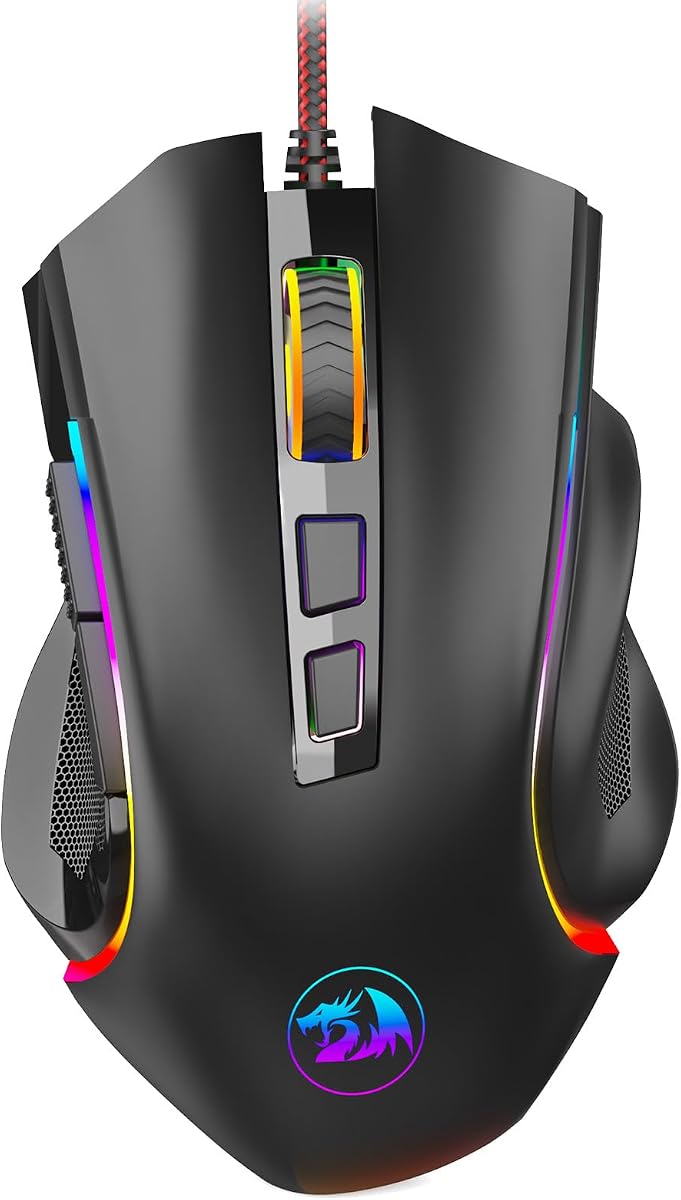
Redragon M602 Gaming Mouse
4.6Editor score
7200 adjustable DPI range
9 programmable buttons
Ergonomic RGB design
Discover the best Gaming Mouse for Diablo 4 with our expert guide comparing top-rated models for performance, comfort, and precision gaming.
Finding the right Gaming Mouse for Diablo 4 can transform your gameplay experience significantly. You need precise tracking and comfortable ergonomics to master complex skills and inventory management during intense dungeon raids.
We compared ten top-rated mice based on sensor accuracy, button customization, and build quality. Our analysis focuses on features that matter most for action RPG players seeking reliability and speed.
Each pick highlights key strengths and potential trade-offs to help you choose wisely. Please note that prices fluctuate frequently so check current listings before making your final purchase decision today.
4.6Editor score

4.6Editor score

4.2Editor score
This side-by-side comparison highlights key specifications and features across all ten selected mice to help you find the perfect match for your Diablo 4 playstyle.






The Logitech G502 Hero stands out as a top contender for Diablo 4 players due to its exceptional HERO sensor and robust build. It offers a perfect blend of precision and customization that enhances gameplay during intense raids.
We may earn a commission when you buy through this link, at no additional cost to you.
Its 11 programmable buttons allow you to map complex macros for skills and potions effortlessly. The adjustable weight system lets you fine-tune the mouse to fit your grip style perfectly for extended sessions.
While it lacks wireless connectivity which might bother some users the wired connection ensures zero lag during critical moments. The weight might feel heavy to those used to ultra-light mice but many prefer the stability.
This mouse is ideal for players seeking reliable performance and customization without breaking the bank. We recommend it for anyone serious about optimizing their Diablo 4 control setup today.
The HERO sensor ensures accurate movement tracking which is crucial for precise skill targeting in Diablo 4 combat scenarios.
Mapping frequently used abilities to side buttons reduces reaction time significantly during boss fights and dungeon clears.
We may earn a commission when you buy through this link, at no additional cost to you.
The Redragon M602 offers incredible value for budget-conscious gamers looking for a reliable mouse for Diablo 4. It delivers essential features like programmable buttons and ergonomic comfort at a fraction of the cost of premium models.
We may earn a commission when you buy through this link, at no additional cost to you.
Its 7200 DPI sensor provides ample precision for most gaming scenarios while the nine programmable buttons allow for effective macro setup. The RGB lighting adds a nice visual touch to your gaming setup without being distracting.
Software support is basic compared to high-end brands which might limit advanced customization options for some users. The DPI range is sufficient but might not appeal to competitive players needing extreme sensitivity settings.
We highly recommend this mouse for casual players or those building their first gaming setup on a tight budget. It proves you do not need to spend a fortune to enjoy a comfortable Diablo 4 experience.
Enjoy high-quality gaming features without the premium price tag making it accessible for students and budget gamers.
The shape supports natural hand positioning reducing fatigue during long hours of grinding loot and completing quests.
We may earn a commission when you buy through this link, at no additional cost to you.
The Razer Naga V3 Pro represents the pinnacle of MMO and action RPG peripherals with its customizable side plates and top-tier sensor. It is designed for players who demand absolute control and flexibility in their gaming setup for Diablo 4.
We may earn a commission when you buy through this link, at no additional cost to you.
With three interchangeable side plates you can switch between button layouts depending on the game or playstyle. The Focus Pro 50K sensor ensures flawless tracking while the HyperSpeed wireless connection eliminates latency completely.
The price is steep which may be a barrier for many gamers but the build quality and features justify the investment for enthusiasts. It is also heavier than average which could cause fatigue during very long sessions for some users.
This mouse is perfect for dedicated Diablo 4 fans who want the best technology available and do not mind paying for it. The ability to tailor the button layout makes it a versatile tool for any gaming genre.
Switch between 2, 6, or 12 side buttons to adapt to different character builds or game modes seamlessly.
Experience zero lag gameplay with HyperSpeed wireless technology that rivals wired performance for competitive scenarios.
We may earn a commission when you buy through this link, at no additional cost to you.
The Razer DeathAdder Essential offers a classic ergonomic experience that suits many hand shapes comfortably during Diablo 4 sessions. It simplifies the feature set while maintaining core performance standards that are crucial for accurate aiming.
We may earn a commission when you buy through this link, at no additional cost to you.
Its 6400 DPI sensor provides smooth tracking while the five programmable buttons allow for essential macro setup. The mechanical switches ensure a crisp click feel that lasts for millions of uses over time.
It lacks the extensive button count of dedicated MMO mice which might limit complex skill rotations for some builds. The lighting is also more basic compared to RGB-heavy models but functions well for visibility.
This is an excellent choice for players who prefer simplicity and comfort over flashy features and excessive buttons. It delivers reliable performance at a price point that is hard to beat for entry-level gamers.
The iconic shape supports your hand naturally reducing strain during extended play sessions or intense boss fights.
High-quality mechanical switches provide consistent tactile feedback ensuring your inputs register accurately every time.
We may earn a commission when you buy through this link, at no additional cost to you.
The Corsair NIGHTSWORD RGB focuses on perfecting weight balance which can significantly impact control and comfort during gameplay. Its tunable weight system allows you to adjust the mouse to match your exact preference for speed or stability.
We may earn a commission when you buy through this link, at no additional cost to you.
With an 18000 DPI sensor you get precise tracking for quick movements in Diablo 4. The ten programmable buttons offer enough flexibility for most skill setups without overwhelming your hand layout.
Adjusting the weights requires some trial and error which might be frustrating initially until you find the right setting. The absence of wireless technology means you are tethered to your PC but ensures consistent power delivery.
We recommend this mouse for players who prioritize physical feel and balance in their peripheral setup. It is a solid option for those who want to fine-tune their equipment to match their unique play style.
Adjust weights to change the center of gravity helping you achieve smoother movements and better control.
The high DPI optical sensor ensures accurate tracking across various surface types without losing fidelity.
We may earn a commission when you buy through this link, at no additional cost to you.
The Razer Basilisk V3 features a unique scroll wheel that switches between free-spin and tactile modes enhancing inventory management. This dual-mode wheel is particularly useful for navigating Diablo 4s extensive loot and skill trees quickly.
We may earn a commission when you buy through this link, at no additional cost to you.
Its 26000 DPI sensor provides exceptional accuracy while the eleven programmable buttons allow for detailed macro configurations. The ergonomic design includes a thumb rest that improves comfort during extended gaming sessions.
As a wired mouse it requires a cable connection which limits desk mobility slightly compared to wireless options. The full feature set relies heavily on software which must be installed to unlock all customization capabilities.
This mouse is ideal for players who value scroll wheel versatility and high-end sensor performance in a comfortable package. It strikes a great balance between usability and technical performance for action RPG enthusiasts.
Switch between free spin for quick scrolling and tactile mode for precise control depending on the task.
The built-in thumb rest reduces strain on your hand allowing you to play for longer periods comfortably.
We may earn a commission when you buy through this link, at no additional cost to you.
The Logitech G305 Lightspeed brings wireless freedom to Diablo 4 players without a premium price tag. It uses Logitechs reliable LIGHTSPEED technology to ensure lag-free performance that feels just like a wired connection.
We may earn a commission when you buy through this link, at no additional cost to you.
Powered by a single AA battery it offers up to 250 hours of continuous gameplay on one charge. The HERO sensor delivers precise tracking suitable for most gaming needs while keeping the mouse lightweight.
It has fewer buttons than specialized MMO mice which may require more keyboard reliance for complex skill chains. The reliance on an AA battery means you must carry spares for long gaming sessions away from home.
This mouse is perfect for players who want wireless convenience and reliability in a portable package. It is an excellent choice for travelers or those who prefer a clutter-free desk setup.
Enjoy zero lag movement with LIGHTSPEED wireless technology that ensures responsive and accurate gameplay.
The efficient power usage allows for months of play on a single AA battery reducing frequent recharging needs.
We may earn a commission when you buy through this link, at no additional cost to you.
The Corsair Scimitar RGB Elite is designed specifically for MMO gaming with its unique button layout. Its Key Slider system allows you to move the side buttons to fit your thumb naturally which improves comfort and reach.
We may earn a commission when you buy through this link, at no additional cost to you.
With 17 programmable buttons you can map almost every skill in Diablo 4 directly to your mouse. The 18000 DPI sensor ensures accurate tracking even during fast-paced combat scenarios.
Its larger size might not fit smaller hands comfortably requiring some adjustment to the grip. The wired cable ensures stable performance but limits your desk space flexibility compared to wireless alternatives.
This mouse is best suited for players who need extensive button access and value ergonomic adjustability. It is a robust tool for those who want maximum control over their in-game actions.
Adjust the side buttons to match your thumb length reducing strain and improving access to essential skills.
Access 17 buttons easily allowing you to keep your keyboard free for movement and other functions.
We may earn a commission when you buy through this link, at no additional cost to you.
The UtechSmart Venus Pro Wireless offers a rare combination of high button count and wireless flexibility for Diablo 4. You can switch between wireless and wired modes depending on your need for mobility or stability.
We may earn a commission when you buy through this link, at no additional cost to you.
Its 16 programmable buttons allow for extensive macro setups while the rechargeable battery ensures you stay powered up. The ergonomic design includes specific angles for buttons to make clicking more comfortable over time.
The software interface is somewhat dated which might make advanced customization more difficult for new users. It is also heavier than ultra-light wireless mice which could lead to fatigue during very long sessions.
This is a strong contender for players who want many buttons without sacrificing wireless convenience. It bridges the gap between traditional MMO mice and modern wireless technology effectively.
Choose wireless for freedom or wired for maximum stability during intense gameplay without changing hardware.
Buttons are angled to fit your thumb naturally improving comfort and reducing accidental clicks.
We may earn a commission when you buy through this link, at no additional cost to you.
The Redragon M901K provides extensive customization options at a budget-friendly price point for Diablo 4 players. It features 19 programmable buttons and weight tuning to help you tailor the experience to your preferences.
We may earn a commission when you buy through this link, at no additional cost to you.
With a 12400 DPI sensor it delivers solid performance for everyday gaming tasks. The RGB lighting adds a stylish touch and can be customized to match your gaming setup aesthetic.
Build quality can be inconsistent across batches which might affect durability over time. The software requires learning to unlock the full potential of the buttons which may be frustrating for beginners.
This mouse is ideal for gamers seeking maximum buttons and customization without spending a premium amount. It is a versatile choice for those willing to experiment with settings to find the perfect fit.
Map up to 19 buttons to reduce keyboard reliance and speed up your skill rotations.
Customize the weight and balance to suit your preferred grip and movement style.
We may earn a commission when you buy through this link, at no additional cost to you.
Selecting the right mouse involves considering several factors that impact your comfort and performance. This guide breaks down key aspects to help you make an informed choice.
Sensor accuracy determines how well the mouse tracks your movements which is critical for precise aiming and skill casting. Higher DPI allows for faster cursor movement but you should ensure the sensor maintains precision at higher settings.
Look for a sensor with high resolution and minimal smoothing to ensure consistent tracking during intense gameplay.
Diablo 4 players often need quick access to skills and items which requires multiple programmable buttons. MMO mice typically offer more side buttons than standard gaming mice providing greater control.
Choose a button layout that allows easy access to your most used abilities without requiring awkward hand positions.
Wired mice offer zero latency and unlimited battery life which can be crucial for competitive play. Wireless mice provide freedom of movement and a cleaner desk setup but require charging or battery replacement.
Modern wireless technology is often fast enough for gaming but ensure you prioritize models with proven low latency.
Your hand size and grip style dictate which mouse shape will be most comfortable during long sessions. Ergonomic designs reduce strain on your wrist and hand allowing you to play longer without pain.
Try to select a mouse that feels natural in your hand to prevent fatigue and potential repetitive strain injuries.
A durable mouse ensures longevity and consistent performance over time. Look for models with high-quality switches and materials that can withstand frequent clicking and heavy use.
Check reviews and warranty options to ensure the mouse will stand up to your gaming habits effectively.
Advanced software allows you to map macros adjust DPI settings and configure lighting to your preference. A user-friendly interface makes these customizations easier to manage and use regularly.
Prioritize mice with robust software support to fully utilize the features you pay for.
The weight of a mouse influences how quickly you can move it across your desk and control precision. Some models allow you to adjust weights to find the balance that suits your play style best.
Consider whether you prefer a lighter mouse for speed or a heavier one for stability and control.
Budget constraints will naturally influence your options but value should not be overlooked. There are excellent options available at every price point that deliver reliable performance for Diablo 4.
Assess which features matter most to you and invest in a model that offers the best balance of performance and cost.
First ensure your mouse surface is clean and flat to maintain accurate tracking. Use a quality mouse pad that matches your sensor type for optimal performance.
Regularly clean the sensor lens and buttons to remove dust and debris that could interfere with functionality. Use compressed air and a soft cloth to keep the device in good condition.
Adjust your DPI and sensitivity settings within the software to match your play style. Experiment with different configurations to find what feels most comfortable and responsive for you.
Not necessarily as most players find 1000 to 1600 DPI sufficient for comfortable control. High DPI is more critical for competitive gaming where ultra-fast movements are required.
Absolutely since MMO mice offer many programmable buttons useful for managing skills and items. Many Diablo players prefer MMO mice for their customization capabilities.
Both options work well but wired mice guarantee zero latency. Wireless mice offer convenience and have improved significantly making them a viable choice for most players.
You can map skills using the mouse software to create macros or use in-game key binding settings to assign actions to mouse clicks directly.
Palm grip is generally preferred for comfort during long sessions while claw grip offers faster reflexes. Choose based on what feels most natural to your hand.
Clean your mouse at least once a month to prevent dust buildup. Use compressed air to clear out any particles from the sensor or buttons.
Yes software allows you to customize buttons and DPI settings. Without it you may not be able to use all the features the mouse offers.
It depends on personal preference but lighter mice around 80 to 100 grams are popular for faster movements. Heavier mice provide stability which some users prefer.
Choosing the right mouse significantly enhances your Diablo 4 experience by improving control and comfort. The models highlighted offer a range of options from budget-friendly to premium high-end choices.
Prioritize ergonomics and button customization that fit your specific play style to maximize enjoyment. A mouse that feels natural will allow you to focus on the game rather than your equipment.
Remember to check current prices and availability as deals can change frequently. Investing in a quality mouse today will pay dividends during your next adventure through Sanctuary.