
ACEMAX 4K@60Hz Offline Media Player
3.5Editor score
Combines media player with HDD enclosure
Supports 4K@60Hz H.265 decoding
Metal housing for better heat dissipation
This guide compares the top External Hard Drive Media Player options for 4K playback, storage compatibility, and digital signage features to help you choose
Finding the right External Hard Drive Media Player can transform your viewing experience by allowing you to play high-resolution files directly from local storage. These devices bridge the gap between large media libraries and your home theater setup without requiring constant internet connectivity or subscription fees.
We evaluated ten distinct models based on their codec support, connectivity options, and ease of use for both home entertainment and commercial displays. Our comparison focuses on how well each unit handles 4K video, manages large external drives, and offers features like auto-play or loop modes for unattended scenarios.
Each pick below highlights specific strengths such as compact design, robust file system support, or advanced signage capabilities tailored to different user needs. Please note that product availability and pricing may change frequently, so verify current details before making your final purchase decision today.
3.5Editor score

4.1Editor score
4.3Editor score
This side-by-side comparison outlines the key specifications and capabilities of each External Hard Drive Media Player to help you quickly identify the model that best fits your storage and playback requirements.


The Micca 4K Ultra-HD Media Player stands out as a versatile device that turns any standard TV into a capable media hub. With a solid 4.1 rating from users, it delivers smooth playback of high-resolution files directly from USB drives or microSD cards without needing complex software setups.
We may earn a commission when you buy through this link, at no additional cost to you.
Its ability to support files up to 4096×2304 resolution ensures you can enjoy crisp visuals on modern displays. The dual reader setup allows for flexible storage options while the support for FAT exFAT and NTFS file systems means you can access media from almost any computer format.
While it caps at 30fps for 4K content which might be a consideration for high frame rate sports videos the device handles most standard streaming files effortlessly. The video rotation feature adds unique value for digital signage applications where screen orientation might vary.
This player is ideal for home users wanting to play local movie files or small businesses needing simple menu board displays. Its compact size and ease of use make it a top recommendation for those seeking a reliable plug-and-play solution.
The dual USB and microSD slots allow you to swap media sources quickly without unplugging cables or moving drives around.
Configurable video rotation and automatic looping make this device suitable for static displays like welcome screens or art installations.
We may earn a commission when you buy through this link, at no additional cost to you.
This mini HDMI Media Player offers a compact solution for users who need reliable 1080p playback without breaking the bank. Rated at 4.1 stars it fits easily in your hand and includes essential features like breakpoint playback and loop modes that enhance user convenience.
We may earn a commission when you buy through this link, at no additional cost to you.
The device supports both USB 2.0 and 3.0 standards allowing you to connect large external storage devices for extensive media libraries. Its aluminum alloy body provides durability during travel making it a great companion for presentations or vacation viewing setups.
Although it lacks 4K support which may limit future-proofing for newer TVs the 60Hz refresh rate ensures smooth motion for standard high-definition content. The inclusion of an AV cable extends usability to older analog televisions which is a rare find in modern players.
Ideal for budget-conscious shoppers or those with existing HD collections this player delivers solid performance for its class. If you do not need 4K resolution this unit provides a cost-effective way to access local files on any display.
The small footprint and lightweight build make this player easy to transport between rooms or for travel use without bulk.
With composite AV output included you can connect this unit to older televisions that lack HDMI ports for basic media playback.
We may earn a commission when you buy through this link, at no additional cost to you.
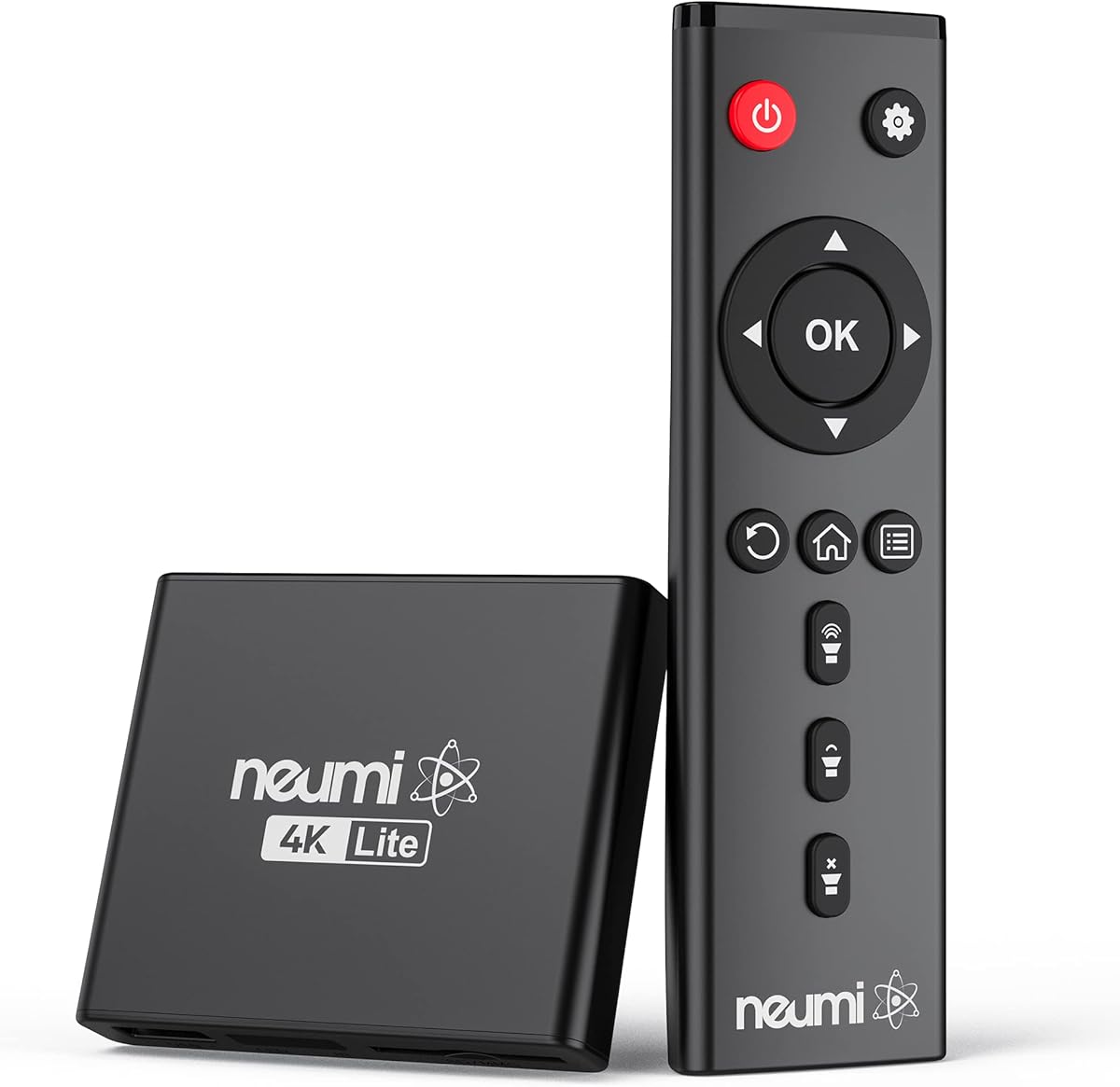
The NEUMI Atom 4K Lite distinguishes itself with a trigger sensor input that enables interactive digital signage and on-demand video playback. With a 4.3 rating it offers stunning 4K video quality and robust file system support that appeals to both tech enthusiasts and professional users.
We may earn a commission when you buy through this link, at no additional cost to you.
This player reads USB drives and SD cards up to 1TB or 8TB respectively allowing you to store large collections of high-resolution movies or photos. The support for H.265 HEVC codecs ensures efficient compression and smooth playback even on demanding content without excessive bandwidth usage.
While the push-button and motion sensors are sold separately the hardware is designed to integrate seamlessly with these external tools for automated playback. The compact size means it can be hidden behind a monitor or TV while still maintaining access to all connection ports.
For users needing interactive displays like museum exhibits or event signage this unit provides a unique feature set not found in standard players. It remains a strong choice for home theater use due to its surround sound support and easy intuitive interface.
The trigger input allows you to start specific videos based on external events like motion detection or button presses.
H.265 HEVC support reduces file sizes while maintaining quality allowing you to store more content on the same drive.
We may earn a commission when you buy through this link, at no additional cost to you.
The ACEMAX 4K@60Hz Offline Media Player offers a unique 2-in-1 design that combines a media player with a SATA HDD enclosure for integrated storage solutions. While it holds a 3.5 rating users appreciate its metal housing and broad format support for digital signage and home use.
We may earn a commission when you buy through this link, at no additional cost to you.
By allowing you to install an internal hard drive this unit keeps your media local and secure without relying on external cables for storage. The support for H.265 10-bit playback ensures that you can enjoy high dynamic range content on compatible displays with vibrant colors and sharp details.
The aluminum enclosure helps dissipate heat which is crucial for extended playback periods often required in commercial or unattended setups. You must provide your own drive but the included infrared remote makes navigation through your library straightforward even if you sit far from the screen.
This model is excellent for users who want a clean look with internal storage and need 4K support at a lower price point. Just ensure you format your drive correctly for your operating system to avoid recognition issues when first setting up the device.
The built-in enclosure allows you to install a drive internally reducing cable clutter and protecting the storage from accidental disconnections.
Auto play and loop modes make this device ideal for running continuous content on displays in retail or office environments.
We may earn a commission when you buy through this link, at no additional cost to you.
This 4K@30hz Media Player emphasizes audio performance with support for up to 7.1 surround sound via HDMI and optical outputs. With a 4.0 rating it balances visual quality with robust audio capabilities making it a strong contender for home theater enthusiasts with dedicated speaker systems.
We may earn a commission when you buy through this link, at no additional cost to you.
The dual USB ports allow you to connect a mouse or keyboard which transforms the interface into a more interactive experience for browsing files. This is particularly useful for users who need to navigate large libraries or present PPT documents without relying solely on the remote control.
While the 4K output is capped at 30fps which is standard for many budget players the H.265 decoding ensures files load quickly and efficiently. The ability to read external subtitle files like SRT and SUB provides flexibility for international movies that lack embedded captions.
If you prioritize audio clarity and need a versatile interface for file management this player offers great value. It is especially well-suited for users who want to integrate local media into an existing high-fidelity home audio setup.
Optical and HDMI audio passthrough allow you to connect the player to high-end soundbars or receivers for immersive listening.
Support for PPT documents and mouse input makes this unit suitable for office presentations or educational settings beyond just videos.
We may earn a commission when you buy through this link, at no additional cost to you.
This HDMI Media Player stands out for its extensive format support including ISO files which are often used for disc images of Blu-ray content. Rated at 4.2 stars it delivers reliable 4K playback and includes multiple output options to suit various display setups and legacy equipment.
We may earn a commission when you buy through this link, at no additional cost to you.
The inclusion of fiber optic AV and VGA interfaces gives you flexibility to connect to projectors older TVs or external speaker systems. The powerful decoding chip handles H.265 H.264 and AVC codecs ensuring that you can play a wide variety of downloaded or ripped videos without conversion.
While the 4K resolution is capped at 30fps the device offers stable playback for most standard media files. The USB port allows for keyboard and mouse connection which improves navigation efficiency when browsing through large folders on external hard drives.
This player is a strong candidate for businesses needing to run multimedia advertising or for users with diverse file collections. Its ability to handle ISO files without burning to a disc adds a layer of convenience for archival media users.
Direct decoding of ISO files allows you to play full disc backups without needing to extract the contents manually first.
Multiple output types ensure you can connect this player to almost any display type whether modern HDMI or legacy VGA.
We may earn a commission when you buy through this link, at no additional cost to you.
The WD 2TB Elements Portable External Hard Drive is not a player itself but serves as the perfect companion storage device for any media player setup. With an impressive 4.7 rating it offers high capacity in a small enclosure ideal for storing large collections of movies and photos.
We may earn a commission when you buy through this link, at no additional cost to you.
Its USB 3.2 Gen 1 interface ensures fast data transfer speeds allowing you to copy files quickly from your computer to the drive. The plug-and-play nature means you do not need to install drivers to use it making it compatible with both Windows and Mac systems.
While it does not play videos directly you can use it with players like the Micca or NEUMI to store and access content on your TV. The lightweight design makes it easy to carry around so you can take your media library anywhere you go.
For anyone looking to expand their storage capacity for home media libraries this drive is a reliable choice. Pair it with a media player to enjoy a seamless local streaming experience across different rooms in your home.
USB 3.0 speeds allow you to move large 4K files quickly saving time compared to older USB standards.
The drive works seamlessly with Windows and Mac computers allowing you to share files between systems without issues.
We may earn a commission when you buy through this link, at no additional cost to you.
This 4K@60Hz Digital Media Player & HDD Enclosure offers a highly rated 5.0 score for its seamless integration of playback and storage management. The device allows you to play videos directly from an internal SATA drive while also providing a Type-C cable for easy transfer to laptops.
We may earn a commission when you buy through this link, at no additional cost to you.
With H.265 decoding support and a 200Mbps data rate it handles high-quality video files efficiently. The ability to support Mac formatted drives makes it a versatile choice for users in mixed operating system environments who need to access content across different computers.
The compact design includes shuffle and loop modes that enhance usability for casual viewing or commercial displays. Since the hard drive is not included you have the flexibility to choose a storage capacity that fits your specific needs and budget.
Ideal for users who want a streamlined setup without external cables this unit is a robust choice for office media displays or home theaters. Its high user satisfaction suggests reliability and ease of use in everyday scenarios.
By housing the drive internally this player reduces clutter and makes it easier to set up permanent displays in offices.
The included Type-C cable allows you to connect the player to a laptop for direct data transfer without removing the drive.
We may earn a commission when you buy through this link, at no additional cost to you.
The Ultra HD 4K@60Hz Digital Media Player & HDD Enclosure provides a compact 2-in-1 solution for users who want integrated storage and playback. Rated at 3.8 stars it supports H.265 decoding and auto-play features that are useful for digital signage or background music setups.
We may earn a commission when you buy through this link, at no additional cost to you.
It allows you to connect an internal hard drive or use external Type-C USB drives and SD cards for flexible storage options. The ability to resume playback from where you left off is a handy feature for users who need to stop and start content frequently.
While batteries for the remote are not included this device is designed to be easy to set up with clear instructions for drive formatting. The one-year warranty adds a layer of security for your purchase ensuring support if issues arise during normal use.
This model is best suited for small businesses or home users who want a simple plug-and-play system for local media files. Its compact design ensures it does not take up much space on your entertainment console or desk.
The resume feature remembers where you stopped watching allowing you to pick up exactly where you left off.
The small design means you can hide the player behind a monitor or TV for a clean look.
We may earn a commission when you buy through this link, at no additional cost to you.
This 4K Ultra HD Media Player & HDD Enclosure offers a versatile solution for digital signage applications with features like configurable video rotation and auto playback. With a 3.0 rating it provides basic functionality for running menus or promotional videos on any standard TV.
We may earn a commission when you buy through this link, at no additional cost to you.
It supports a wide range of audio formats including APE which is less common in standard players. The built-in enclosure allows you to install a drive internally while still supporting external USB and microSD options for flexible storage management.
The device is designed to be intuitive and simple to use requiring no complicated setup steps to start playing content. The resume feature ensures that if power is lost playback can continue from the last known position once power is restored.
Ideal for budget-minded businesses needing to run simple visual displays this player offers the necessary features without unnecessary complexity. While it may have a lower rating its core capabilities make it a practical choice for basic signage needs.
Video rotation allows you to mount the player in different orientations without distorting the image on the screen.
Support for formats like APE ensures you can play high-fidelity music files that might be skipped by other players.
We may earn a commission when you buy through this link, at no additional cost to you.
Selecting the right media player requires understanding your storage needs and display capabilities to ensure smooth playback.
Consider whether you need 4K resolution and if the frame rate of 30fps or 60fps is important for your content. High refresh rates provide smoother motion for sports or action sequences while standard rates are sufficient for movies.
Prioritize 4K support if you have a modern high-resolution TV to ensure your content looks its best on the screen.
Check that the player supports external hard drives up to the capacity you own. Some models cap at 8TB or limit USB versions which can affect your choice.
Ensure the player accepts the file systems like NTFS or exFAT that your hard drive is formatted with to avoid connection issues.
H.265 HEVC support is increasingly common and allows for higher quality video at smaller file sizes. Make sure the player can decode the codecs used in your media library.
Verify audio codec support if you plan to connect to a surround sound system to ensure you get full audio fidelity.
Look for multiple output ports like HDMI and AV to ensure you can connect to your specific display type. Some players offer optical audio outputs for better sound systems.
USB ports should be accessible and support the devices you need to plug in such as keyboards or mice for better navigation.
If you intend to use the player for business displays features like auto-loop and resume playback are essential. These ensure that content runs continuously without intervention.
Consider models with trigger inputs if you need interactive displays that respond to motion or other external signals.
A compact design is beneficial if you need to hide the player behind a TV or monitor. Metal housings often dissipate heat better for plastic ones.
Ensure the unit is quiet and does not make noise that could distract from your viewing experience especially in a living room setting.
Check if the remote includes necessary buttons for navigation and media control. Some remotes require line of sight which can limit placement options.
A user-friendly on-screen menu makes it easier to find files quickly without getting frustrated by complex layouts.
Look for devices with solid build quality that can withstand regular use or travel. Brands with good support reputations often provide better service if issues arise.
Check the warranty terms to understand what is covered and for how long to protect your investment in the long term.
Begin by connecting the media player to your TV using an HDMI cable for video and audio. If your TV has older inputs you may need to use the composite AV output for proper signal transmission.
Insert your formatted USB or external hard drive into the player USB port. Ensure the drive is formatted correctly such as NTFS or exFAT to match what the player supports.
Power on the device and navigate the menu to select your media files. Use the remote or keyboard to browse folders and start playback. If you plan to leave it on long check that your display settings match the player output.
Many models support drives formatted for Mac but compatibility depends on the file system used. Check the specific player manual to see if APFS or HFS+ is supported for seamless playback.
Most players in this list are designed for local storage only and do not connect to network shares. You must copy files to a USB or internal drive to play them.
H.265 HEVC compresses video more efficiently than H.264 allowing for higher quality at lower bitrates. Choose a player that supports H.265 if you have large 4K files.
Many units include AV outputs to connect to older televisions lacking HDMI. However for best results a modern HDMI connection is recommended for clear digital signals.
Most players work with standard USB hard drives and SSDs up to 8TB. Ensure the drive has no special software that might interfere with the player reading the files.
Updates typically require downloading a file from the manufacturer website and placing it on a USB drive. Check the product page or manual for specific steps as not all models allow updates.
The Micca 4K Ultra-HD remains the top pick for its balance of features and usability across home and small commercial applications. For those needing interactive capabilities the NEUMI Atom offers unique sensor inputs.
If you are on a tight budget the ACEMAX 4K@60Hz provides solid performance with internal storage options that save on cable clutter. Each option delivers different strengths depending on your specific needs.
Always verify current model details and pricing before buying to ensure you get the right version for your display setup. With the right choice you can enjoy a seamless local media experience.