
HP LaserJet M207dw
4.0Editor score
Affordable pricing point
Strong built-in security
Compact office footprint
This guide compares the top ten Ethernet laser printers for offices and small teams focusing on speed, reliability, and network connectivity for efficient
Finding the right printer for your workspace can be challenging especially when you need reliable network connectivity. Ethernet laser printers offer stable connections ideal for busy offices requiring consistent output without wireless interference issues.
We have evaluated ten top models based on speed, security, paper handling and connectivity options. Each product was reviewed for its ability to integrate seamlessly into modern office environments while delivering high-quality monochrome documents.
Every pick includes detailed pros and cons to help you decide quickly. Prices and availability may change so always check current listings before purchasing. Our guide ensures you find a printer that meets your specific workflow needs efficiently.
4.0Editor score

4.0Editor score

4.2Editor score
Below is a detailed side-by-side comparison of all ten selected Ethernet laser printers. Each entry highlights key specifications and connectivity options to help you visualize differences at a glance.



The Brother HL-L2460DW stands out as the top choice for small offices needing reliable Ethernet laser printing. With a 4.0 rating and robust features it delivers consistent quality for daily workflows. Its combination of speed and connectivity makes it a versatile tool for modern teams.
We may earn a commission when you buy through this link, at no additional cost to you.
This model offers impressive 36 pages per minute speeds ensuring quick turnaround for multipage documents. The dual-band wireless and Ethernet options provide flexible connection paths reducing network bottlenecks. Automatic duplex printing helps cut paper waste while maintaining professional document standards.
While it lacks color output the black and white sharpness is excellent for text and graphics. Some users note initial setup can be slightly complex but the Brother Mobile Connect app simplifies ongoing management. These trade-offs are minor compared to the reliability it provides.
If you run a home office or small business this printer is highly recommended. It balances performance and value effectively. We suggest pairing it with genuine Brother toner for best results. The included warranty gives added peace of mind for long-term use.
Built-in Ethernet and dual-band Wi-Fi ensure your printer stays connected even when wireless networks fluctuate. This hybrid approach keeps your office workflow uninterrupted during peak hours.
The 250-sheet tray and manual feed slot accommodate standard and specialty paper. This flexibility supports varied printing needs without requiring constant refills or manual swaps.
We may earn a commission when you buy through this link, at no additional cost to you.
The HP LaserJet M207dw is a budget-friendly Ethernet laser printer ideal for small teams. It maintains HP's trusted reputation for reliability and security. With essential features like duplex and mobile printing it offers great value for cost-conscious buyers.
We may earn a commission when you buy through this link, at no additional cost to you.
This printer delivers up to 28 pages per minute which is sufficient for light office use. Its standout feature is the self-reset Wi-Fi that automatically resolves connection issues. Security is also a priority with built-in protections against cyber threats.
The lower speed compared to high-end models might slow down heavy print jobs. However the compact size fits well in small desks or shared workspaces. Toner costs are reasonable making it economical for daily operations.
Choose this model if you need a dependable workhorse without breaking the bank. It suits startups or home offices well. Ensure you use genuine HP supplies to avoid cartridge lockouts. Overall it is a smart investment for essential printing needs.
HP Wolf Pro Security and hardware-level defenses protect your data from unauthorized access. This is crucial for businesses handling sensitive client information daily.
Print from any mobile device with ease using AirPrint or the HP Smart app. This flexibility keeps your team productive even when away from the desk.
We may earn a commission when you buy through this link, at no additional cost to you.
The Brother HL-6210DW is a powerhouse for high-volume printing environments. Its 50 ppm speed and 520-sheet tray make it perfect for busy teams. The Gigabit Ethernet and triple-layer security ensure fast and safe network operations.
We may earn a commission when you buy through this link, at no additional cost to you.
This model handles large jobs effortlessly thanks to its expandable paper capacity. You can add more trays for uninterrupted printing up to 1,660 sheets. The robust build quality ensures it withstands daily wear and tear in demanding office settings.
The higher price tag and larger footprint might be concerns for smaller setups. However the efficiency gains and security features justify the investment. It reduces downtime and operational costs over time through reliable performance.
Invest in this printer if your office requires rapid throughput and top-tier security. It is a premium solution that pays off with productivity. Pair it with high-yield toner for maximum cost savings. This is a top choice for serious businesses.
Gigabit Ethernet support ensures data transfers happen without bottlenecks. This is essential when multiple users send large jobs simultaneously over the network.
The 520-sheet tray minimizes refills allowing staff to focus on work rather than maintenance. Optional trays expand this further for heavy production workflows.
We may earn a commission when you buy through this link, at no additional cost to you.
The HP LaserJet Pro 4001dn excels in speed with 42 pages per minute output. It is designed for wired networks making it secure and stable. The 4.4 rating reflects its reliability in small team environments.
We may earn a commission when you buy through this link, at no additional cost to you.
This printer focuses on core productivity features without extra wireless complexity. HP Wolf Pro Security protects data effectively. The automatic duplex feature helps save paper costs. It is a solid choice for offices that prefer wired connections.
Lack of Wi-Fi means you must run cables to each print station. This can be inconvenient in flexible office layouts. However for stationary setups the performance is exceptional. The security is a major plus for corporate users.
Buy this if you prioritize speed and security over wireless flexibility. It works well in IT-managed offices. Ensure Ethernet ports are available before purchasing. Overall it is a strong contender for professional environments.
Ethernet-only design ensures stable connections without wireless interference. This is ideal for offices where security and reliability are paramount.
Built-in Wolf Pro security defends against threats. Customizable settings allow you to tailor protection to your business needs easily.
We may earn a commission when you buy through this link, at no additional cost to you.
The Brother DCP-L2640DW combines print scan and copy in one unit. It is perfect for offices needing all-in-one convenience. With Ethernet and Wi-Fi it integrates smoothly into any network. The 4.1 rating confirms its steady performance.
We may earn a commission when you buy through this link, at no additional cost to you.
Print speeds match the 36 ppm of similar models. The 50-page auto document feeder simplifies multi-page scanning tasks. This saves time during high-volume workflows. Compact design fits well in shared workspaces.
Scanning speeds are lower than print speeds which is typical. It lacks color scanning but works for documents. Setup is straightforward and the mobile app is useful. Maintenance is simple with genuine toner.
Choose this for offices needing scanning without buying separate hardware. It balances features well. Ensure your space is adequate for the multi-function design. It is a practical solution for small business operations.
The 50-page ADF handles stacks of paper quickly. This speeds up digitization workflows significantly compared to flatbed only models.
Use the Brother Mobile Connect app to print and scan remotely. This keeps your team agile even when away from the printer.
We may earn a commission when you buy through this link, at no additional cost to you.
The HP Laserjet Pro 3001dw offers a balanced mix of speed and connectivity. It includes Ethernet and Bluetooth for versatile setup options. The 4.1 rating reflects consistent performance for daily use. Ideal for small offices needing reliability.
We may earn a commission when you buy through this link, at no additional cost to you.
It prints up to 35 pages per minute which handles moderate workloads. Security is robust with HP Wolf Pro technology. This protects against common cyberattacks. The smart connectivity helps maintain stable networks easily.
Paper capacity is standard for its class but not expandable. You may need to refill often with high volume users. However the speed compensates for this. Setup is user-friendly for most staff members.
Opt for this if you want secure wireless and wired options. It works well in hybrid work setups. Keep an eye on toner levels. It is a solid choice for general office needs.
Bluetooth and Ethernet provide flexibility for mobile and desktop users. This ensures everyone can print without connection hurdles.
HP Wolf Pro security keeps your data safe. Custom settings let you adapt protection to your office policies.
We may earn a commission when you buy through this link, at no additional cost to you.
The Brother HL-L2405W is ideal for home offices. It offers reliable 30 ppm speeds in a compact design. While it focuses on Wi-Fi the connectivity ensures seamless network integration. The 4.1 rating shows consistent quality.
We may earn a commission when you buy through this link, at no additional cost to you.
It uses a 250-sheet tray to minimize refills. Mobile printing via the Brother app is straightforward. Energy efficiency keeps costs low. The quiet operation suits shared living spaces well.
Manual duplex printing requires flipping pages which is slower than auto options. Also it lacks a physical Ethernet port which limits some office setups. However for home use this is usually acceptable.
Buy this for personal or home office use. It balances cost and performance effectively. Ensure you have strong Wi-Fi coverage. It is a great value for light users.
The small footprint fits on most desks without clutter. This helps keep home workspaces organized and professional.
Low power consumption reduces electricity costs. This is beneficial for home users paying their own utility bills.
We may earn a commission when you buy through this link, at no additional cost to you.
The HP LaserJet Pro M404dn is a reliable workhorse for offices. Its 40 ppm speed handles heavy daily loads well. The 4.4 rating confirms its durability and consistent output. Ideal for small businesses prioritizing wired stability.
We may earn a commission when you buy through this link, at no additional cost to you.
Security is a key feature with HP Wolf Pro. This protects data from external threats. Energy saving technologies help reduce costs. The automatic duplex feature cuts paper waste significantly.
Missing Wi-Fi limits placement options to wired desks. This might not suit flexible setups. However the speed is a major advantage. The compact size fits shared workspaces easily.
Choose this if you want a reliable wired printer. It suits environments with stable network layouts. Use genuine HP toner for best results. It is a dependable choice for consistent printing.
Consistent high speed and quality build make this a trusted choice. Offices benefit from reduced downtime and reliable output.
Energy saving tech reduces electricity usage. This helps meet sustainability goals while lowering operational expenses.
We may earn a commission when you buy through this link, at no additional cost to you.
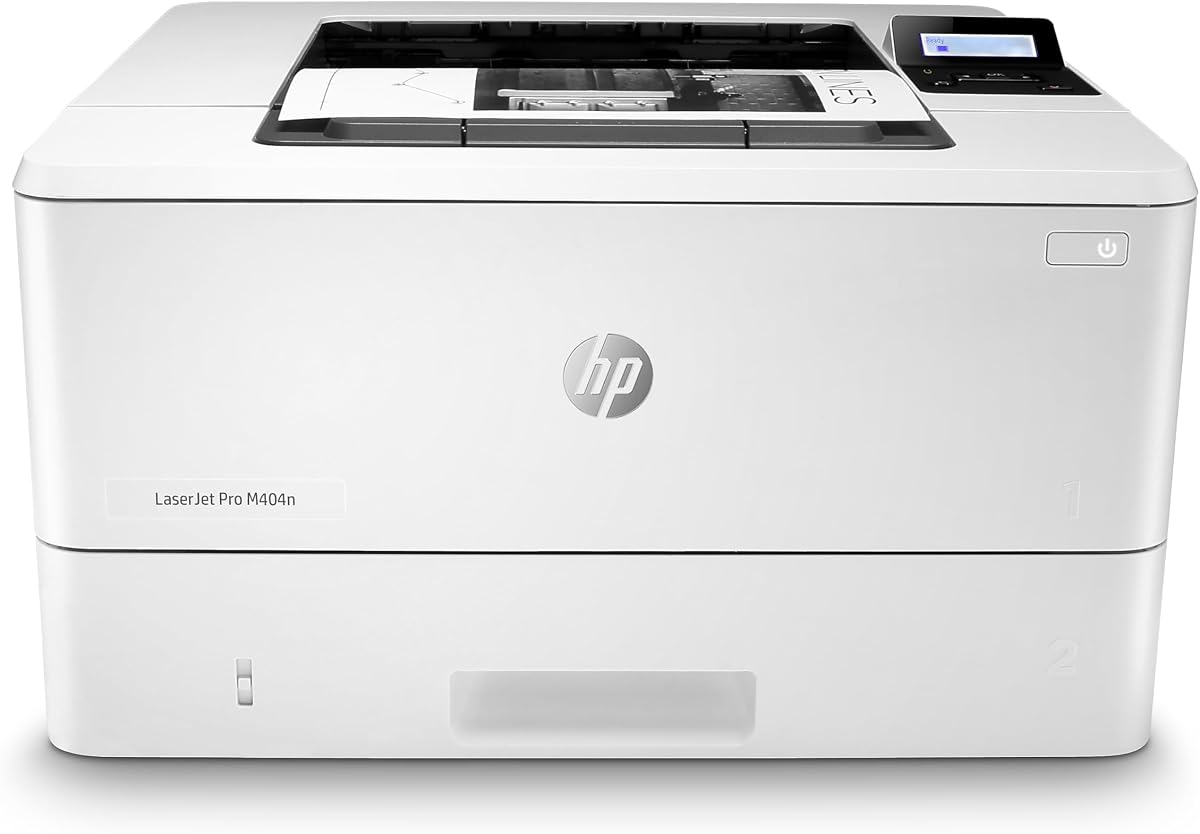
The HP LaserJet Pro M404n focuses on core performance. With 40 ppm speed it meets basic office needs effectively. The 4.3 rating shows it is well-received. Ideal for setups needing strict security and simplicity.
We may earn a commission when you buy through this link, at no additional cost to you.
It includes HP Wolf Pro Security for data protection. The Ethernet only design prevents wireless vulnerabilities. Energy efficiency helps cut bills. It is simple to manage and maintain over time.
Lack of duplex printing increases paper usage. You must flip pages manually for double-sided work. This adds time to long tasks. Also no Wi-Fi limits remote printing.
Buy this for secure wired offices without duplex needs. It works well in IT-controlled environments. Use genuine toner for longevity. It is a straightforward choice for specific requirements.
Direct Ethernet connection simplifies setup. IT admins can manage it easily within existing network infrastructure.
Built-in security safeguards sensitive documents. This is vital for businesses handling confidential information daily.
We may earn a commission when you buy through this link, at no additional cost to you.
The Brother HL-L5100DN is a strong mid-range option. Its 42 ppm speed handles high-volume tasks efficiently. The 4.4 rating reflects its reliability. It is a great choice for offices needing legal size support.
We may earn a commission when you buy through this link, at no additional cost to you.
Security features like Secure Print restrict unauthorized access. This is useful for shared environments. The tray is expandable to support more paper. Legal size capability suits contracts and forms.
It lacks Wi-Fi which limits remote printing. The design is older but still functional. Setup is standard for Brother units. Maintenance is straightforward for most users.
Select this for offices needing speed and expandable trays. It suits stable wired networks. Ensure security settings are configured properly. It is a solid workhorse for consistent daily use.
Add-on trays increase capacity for high-volume runs. This reduces interruptions during busy periods significantly.
Restrict who can print sensitive documents. This adds a layer of security for shared office environments.
We may earn a commission when you buy through this link, at no additional cost to you.
Choosing the right Ethernet laser printer involves several key factors. This guide outlines essential considerations to help you find a model that fits your workspace and workflow needs.
Print speed determines how quickly your documents are output. For busy offices look for models offering 35 ppm or higher to prevent bottlenecks. Home users may find 30 ppm sufficient for basic needs.
Choose a speed that matches your daily volume to ensure efficiency without overspending on unnecessary features.
Ethernet provides a stable wired connection ideal for security. Some models also offer Wi-Fi for wireless flexibility. Ensure the printer supports your network setup.
Prioritize Ethernet for stability and add Wi-Fi only if remote access is needed.
Standard trays hold 250 sheets but high-volume users may need more. Expandable trays reduce refills during busy times. Check if optional trays are available for your model.
Select a capacity that aligns with your daily print volume to avoid downtime.
Built-in security like HP Wolf Pro or Secure Print protects data. These features prevent unauthorized access to your documents. Always verify security specs in office environments.
Invest in models with strong encryption to safeguard sensitive business information.
Genuine toner ensures reliability but costs vary by model. High-yield cartridges reduce long-term costs. Check page yield ratings before purchasing to budget effectively.
Compare total cost of ownership rather than just upfront price for true savings.
Automatic duplex saves paper and money on long documents. Manual duplex requires flipping pages which slows workflows. Look for auto duplex if cost efficiency matters.
Prioritize automatic duplex to reduce waste and improve productivity.
Compact printers fit better in shared workspaces or small offices. Multi-function units save space by combining features. Measure your desk space before buying.
Ensure the size fits your layout without causing clutter or obstruction.
Standard warranties cover hardware for one year. Check support options like chat or phone availability. Reliable support minimizes downtime during issues.
Choose brands with strong support reputations to ensure quick resolutions.
Connect the printer to your network via Ethernet cable. Ensure your devices are on the same network for easy access. Follow setup wizards in the manual or app.
Clean the exterior regularly with a soft cloth. Dust the interior gently to prevent paper jams. Use only approved cleaning tools.
Update firmware periodically via the app. This keeps security features active and ensures compatibility. Schedule updates during low-usage times.
Yes most models function perfectly with just an Ethernet cable. Some units require Ethernet for stable office setups. Check specs to confirm wireless needs before buying.
Typical lifespan is around five years with moderate use. High-end models often last longer with proper maintenance. Regular cleaning extends operational life significantly.
Use built-in security features like HP Wolf Pro or Secure Print. Change default passwords and enable encryption. Regular firmware updates patch vulnerabilities effectively.
Generic toners may work but can void warranties. OEM toners ensure consistent quality and reliability. Avoid non-HP chips to prevent blocking issues.
Yes if the model supports mobile apps via network connection. Most allow printing via Wi-Fi or cloud. Confirm app compatibility before purchasing.
It allows the printer to print both sides of a page automatically. This reduces paper usage and saves time. Look for it in most modern models.
We have reviewed ten top Ethernet laser printers with strong connectivity. The Brother HL-L2460DW offers the best overall balance of speed and features. For budget buyers the HP LaserJet M207dw delivers solid value.
Prioritize speed and security if you run a business office. Home users may prefer compact models with Wi-Fi options. Consider paper capacity to avoid frequent refills.
Prices and availability can change so check current listings before purchasing. Our guide helps you compare options clearly. Select the right printer to boost your productivity today.