
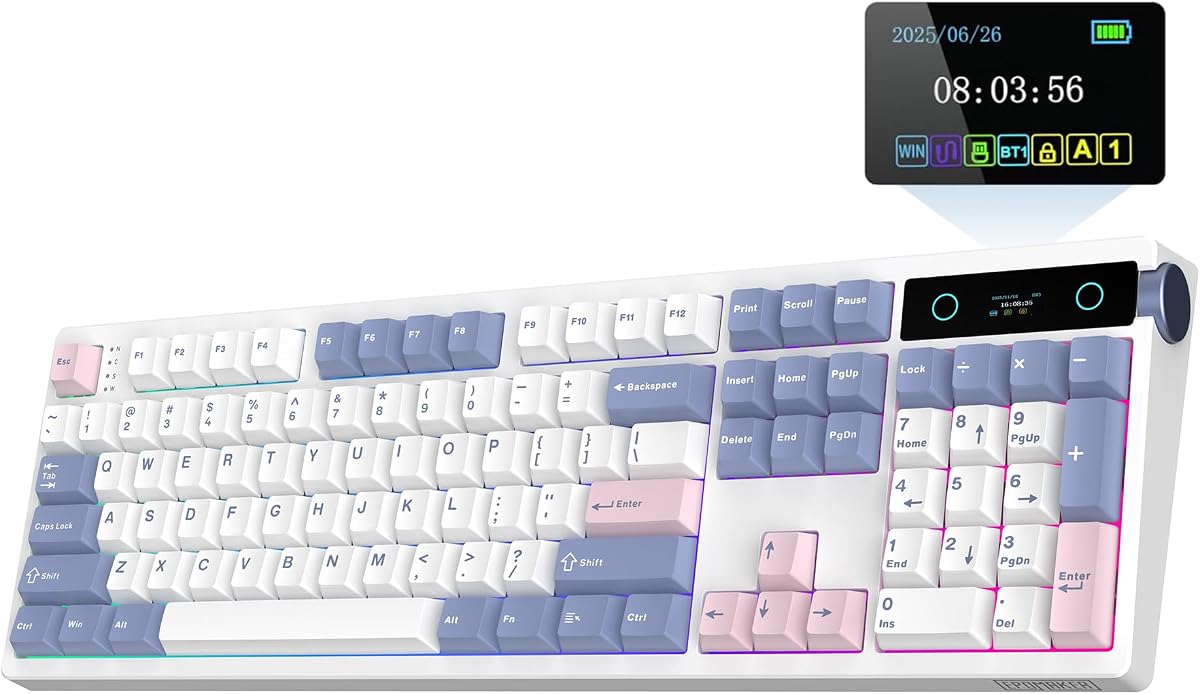
EPOMAKER TH108 V2 PRO Full Size Mechanical Keyboard with Screen&Knob
4.7Editor score
Advanced RGB lighting
Multi-device switching
Low latency mode
Discover the top Epomaker keyboards ranked by performance, sound, and features. Compare wireless options, layouts, and customization tools for your setup.
Epomaker keyboards offer a unique blend of premium build quality, wireless freedom, and extensive customization options for enthusiasts. Their latest models feature gasket mounts, hot-swappable switches, and vibrant displays that elevate any desk setup significantly.
We compared ten top-rated models based on layout versatility, wireless latency, battery life, and acoustic performance. Each keyboard was evaluated for its suitability across gaming, productivity, and creative workflows to ensure reliable daily performance.
Every pick highlights specific strengths like screen integration, battery capacity, or switch compatibility. Please note that prices and availability may change over time, so always verify current listings before making your final purchasing decision.
4.7Editor score
4.7Editor score

4.7Editor score
The following table provides a side-by-side comparison of all ten featured keyboards. It highlights key specifications like layout size, connectivity options, and unique features to help you identify the right model.

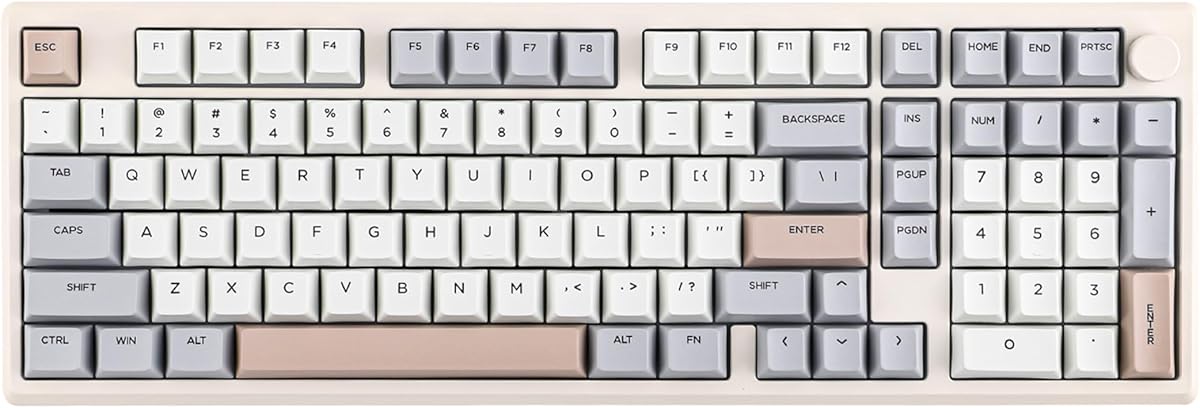


The EPOMAKER TH108 PRO stands out as the premier full-size option in this lineup. With a robust 4.7 rating, it delivers a premium typing experience enhanced by a customizable TFT screen and a large battery that eliminates frequent charging needs.
We may earn a commission when you buy through this link, at no additional cost to you.
Its standout feature is the intelligent integration of a smart screen and rotary knob, allowing users to monitor battery life, time, and system status without interrupting their workflow. The gasket mount design ensures a soft, thocky sound profile that satisfies enthusiasts seeking acoustic bliss.
While the keyboard is heavy and occupies significant desk space, these are acceptable trade-offs for the stability and functionality provided. The 10000mAh battery ensures weeks of usage, making it ideal for professionals who value uninterrupted operation over portability.
This keyboard is best suited for desktop setups where full-size functionality and customization are priorities. We recommend it for users who want a reliable, high-performance device that combines practical utility with visual flair for both gaming and work.
The TFT screen offers real-time feedback on battery status and keyboard settings, enhancing usability without cluttering the workspace with external devices or software overlays.
The five-layer sound-dampening system creates a rich, muted sound profile that reduces fatigue during long typing sessions, making it a top choice for writers and coders.
We may earn a commission when you buy through this link, at no additional cost to you.
The EPOMAKER X Aula F75 MAX offers a perfect balance of compact size and advanced features. Rated at 4.6, it delivers a satisfying typing experience with a gasket mount design and a TFT screen that provides essential status updates in a smaller footprint.
We may earn a commission when you buy through this link, at no additional cost to you.
Its 75% layout saves desk space while retaining arrow keys and function rows, making it ideal for gaming and productivity. The customizable screen allows for visual flair, and the gasket mount ensures a soft, flexible typing feel that reduces wrist strain significantly.
While the battery life is lower than full-size models, it remains sufficient for typical daily use. The compact design may require users to adjust their workflow if they frequently rely on a number pad for data entry tasks.
This model is best for users seeking a portable yet feature-rich keyboard for their primary desk. We recommend it for gamers and writers who appreciate compact ergonomics without sacrificing the high-end feel of a gasket-mounted device.
The adjustable kickstand and low front height reduce wrist strain, promoting a more natural typing posture during extended work sessions.
Users can upload GIFs or monitor system status directly on the screen, adding a layer of personalization that enhances the visual appeal of any desk setup.
We may earn a commission when you buy through this link, at no additional cost to you.
The EPOMAKER TH108 V2 PRO builds on the success of its predecessor with refined features and enhanced compatibility. With a 4.7 rating, it offers a premium full-size experience, including dedicated Mac/Win keys and a massive battery that supports extended usage without interruption.
We may earn a commission when you buy through this link, at no additional cost to you.
Its standout feature is the dual system compatibility, allowing seamless switching between operating systems with dedicated keys. The RGB lighting is vibrant and customizable, providing a dynamic visual experience that complements high-end gaming rigs and creative workspaces effectively.
The heavy build ensures stability during intense gaming sessions but makes it less portable. Users prioritizing portability may find the weight cumbersome, though it is a minor trade-off for the robust performance and aesthetic appeal it provides.
This keyboard is ideal for professionals and gamers who need a reliable full-size device for multiple platforms. We recommend it for those who want premium RGB effects and system versatility without compromising on build quality or battery life.
Dedicated keys for Mac and Windows allow users to switch systems quickly, improving workflow efficiency for those working across different operating environments.
The integrated light bar and RGB backlighting offer extensive customization, enabling users to create unique lighting profiles that match their specific moods or games.
We may earn a commission when you buy through this link, at no additional cost to you.
The EPOMAKER TH99 PRO offers a 96% layout that retains full-size functionality while saving significant desk space. Rated at 4.6, it features a massive 10000mAh battery and a TFT screen, making it a versatile choice for users who need a number pad without the bulk of a full keyboard.
We may earn a commission when you buy through this link, at no additional cost to you.
Its compact design allows for more mouse movement, which is crucial for FPS gamers, while the gasket mount ensures a soft, thocky sound profile. The screen and knob provide quick access to settings, enhancing workflow efficiency for complex data entry tasks.
The dense key arrangement may require an adjustment period for those used to standard layouts. However, the improved mouse space and battery life make it a practical solution for modern workstations where desk space is at a premium.
This keyboard is best suited for professionals who use spreadsheets and require a number pad. We recommend it for users seeking a balance between full functionality and ergonomic comfort in a space-saving design.
The 96% layout retains all essential keys while freeing up space for mouse movement, making it ideal for both office work and gaming scenarios.
The gasket mount design creates a soft, cushioned typing experience that reduces fatigue during long work sessions, ensuring comfort throughout the day.
We may earn a commission when you buy through this link, at no additional cost to you.
The EPOMAKER TH108 is a reliable full-size option that focuses on core performance features like battery life and sound quality. With a 4.5 rating, it provides a creamy gasket mount experience and a massive battery, making it an excellent value for users who prioritize typing feel over extra displays.
We may earn a commission when you buy through this link, at no additional cost to you.
Its standout feature is the acoustic performance, delivering a soft, thocky sound that satisfies enthusiasts. The hot-swappable PCB allows for easy customization of switches, ensuring the keyboard can be tailored to personal preference without technical difficulties.
While it lacks the TFT screen found in other models, this simplifies the experience for users who prefer a cleaner aesthetic. The fixed RGB options may be less flexible than programmable lighting, but the overall performance remains strong for the price.
This keyboard is best for users who want a high-quality wireless keyboard without extra features. We recommend it for those seeking a reliable, comfortable typing experience with a focus on sound and stability.
The gasket mount and sound-dampening layers create a rich, muted acoustic profile that reduces noise pollution and enhances typing pleasure.
The hot-swappable design allows users to experiment with different switches easily, making it easy to customize the feel and sound to personal preferences.
We may earn a commission when you buy through this link, at no additional cost to you.
The EPOMAKER G84 HE is designed for competitive gamers who require the fastest response times. With a 4.7 rating, it features Hall Effect switches, an 8K polling rate, and adjustable actuation, providing a performance edge that is unmatched in traditional mechanical keyboards.
We may earn a commission when you buy through this link, at no additional cost to you.
Its standout feature is the adjustable actuation point, allowing users to customize how far a key must be pressed to trigger. This level of precision is essential for fast-paced games, and the gasket mount ensures that the keyboard remains comfortable during intense sessions.
The smaller 80% layout may not suit those who rely on a number pad for work. However, for gamers prioritizing speed, the compact design frees up space and ensures that every keystroke is registered instantly without physical latency.
This keyboard is best suited for competitive FPS and MOBA players. We recommend it for users who want a high-performance device that offers precise control and minimal input lag for optimal gaming results.
The 8K polling rate and Hall Effect switches provide near-instantaneous input registration, giving competitive players a critical advantage in fast-paced matches.
Adjustable actuation allows users to fine-tune their keyboard sensitivity, reducing accidental triggers and enhancing control for complex gaming maneuvers.
We may earn a commission when you buy through this link, at no additional cost to you.
The EPOMAKER Galaxy100 QMK offers extensive customization options through VIA software support. Rated at 4.5, it features a solid aluminum shell and a hot-swappable PCB, making it a top choice for enthusiasts who want to tweak their layout and sound profile deeply.
We may earn a commission when you buy through this link, at no additional cost to you.
Its standout feature is the VIA support, which allows for complex key remapping and macro creation without complex software. The aluminum case provides a premium feel and durability, ensuring that the keyboard remains stable and professional-looking for years.
While the price is higher than other models, the build quality and customization options justify the investment. The heavier weight may reduce portability, but for a desktop setup, it provides a premium feel that enhances the overall user experience.
This keyboard is best for enthusiasts and programmers who need precise control over their input. We recommend it for users who prioritize software flexibility and a premium aluminum build over standard convenience.
VIA support allows for complex key remapping and macro editing, making it ideal for users who need tailored workflows for work and gaming.
The aluminum shell provides durability and a stable typing surface, ensuring the keyboard remains solid during intense use.
We may earn a commission when you buy through this link, at no additional cost to you.
The EPOMAKER TH99 offers a 96% layout that balances productivity and space efficiency. With a 4.6 rating, it features an 8000mAh battery and tri-mode connectivity, making it a reliable choice for users who switch between devices frequently.
We may earn a commission when you buy through this link, at no additional cost to you.
Its standout feature is the efficient layout that retains the number pad while saving space. The South-facing LEDs ensure that the lighting is bright and visible from any angle, which is helpful for low-light work environments.
While it lacks advanced features like a screen or Hall Effect switches, it provides a solid, reliable experience for daily tasks. The fixed switches limit customization but ensure consistent out-of-box performance for those who prefer simplicity.
This keyboard is best for office workers and professionals who need a reliable tool for data entry. We recommend it for users who prioritize functionality, battery life, and a stable typing experience over extensive customization.
The 96% layout ensures easy access to the number pad while keeping the desktop tidy, which is ideal for spreadsheet-heavy work.
Tri-mode wireless and cable connections allow seamless switching between PC, Mac, and mobile devices for maximum versatility.
We may earn a commission when you buy through this link, at no additional cost to you.
The EPOMAKER Ajazz AK820 Pro brings a TFT display to a compact 75% layout at an accessible price. With a 4.7 rating, it features a gasket mount and South-facing LEDs, making it an excellent choice for users who want modern features without a high investment.
We may earn a commission when you buy through this link, at no additional cost to you.
Its standout feature is the TFT display, which provides system status and battery monitoring in a small form factor. The gasket mount ensures a soft typing experience that is satisfying for daily use, and the 1.6M RGB options allow for extensive customization.
While the battery life is limited compared to larger models, it is sufficient for typical workdays. The compact layout may require adjustments for those used to full-size keyboards, but it frees up desk space for better mouse ergonomics.
This keyboard is best for budget-conscious users who want a stylish, feature-rich device. We recommend it for users seeking a modern aesthetic and basic customization without paying for premium features they may not use.
The TFT display and RGB lighting create a visually appealing desk setup that appeals to modern users who value design.
The 75% layout saves desk space and encourages a more natural mouse position, reducing strain during long work sessions.
We may earn a commission when you buy through this link, at no additional cost to you.
The EPOMAKER x Aula F99 is a budget-friendly option that does not compromise on sound quality. With a 4.5 rating, it features a five-layer sound-dampening design and hot-swappable sockets, making it an excellent entry point for enthusiasts seeking a creamy typing experience.
We may earn a commission when you buy through this link, at no additional cost to you.
Its standout feature is the acoustic performance, which rivals more expensive models. The 96% layout ensures full functionality while saving space, and the hot-swappable PCB allows for easy upgrades as users become more experienced with custom keyboards.
While it lacks advanced features like a screen or wireless customization, it delivers a solid core experience. The fixed RGB may be less flexible than programmable lighting, but the overall performance remains strong for the price.
This keyboard is best for users on a budget who want high-quality sound and customization. We recommend it for those seeking a reliable, comfortable typing experience without paying for features they do not need.
The five-layer sound-dampening system creates a rich, muted acoustic profile that reduces noise pollution and enhances typing pleasure.
The hot-swappable design allows users to experiment with different switches easily, making it easy to customize the feel and sound to personal preferences.
We may earn a commission when you buy through this link, at no additional cost to you.
Selecting the right Epomaker keyboard involves balancing layout preferences, connectivity, and desired features like screen integration or Hall Effect switches.
Full-size layouts offer a number pad, while 75% and 96% layouts save desk space. Choose based on whether you need a numpad for productivity or prioritize mouse space for gaming.
Decide on the layout that matches your desk and usage habits before buying.
All models offer tri-mode connectivity (USB-C, Bluetooth, 2.4Ghz). Ensure the device supports your primary operating system and that you are comfortable switching between connections.
Prioritize stable wireless modes if you work across multiple devices frequently.
Capacities range from 8000mAh to 10000mAh. Larger batteries are essential for full-size models and long periods away from power sources.
Choose larger batteries for minimal recharging interruptions during extended work sessions.
Options include mechanical linear switches, tactile switches, and Hall Effect switches for gaming. Consider if you need adjustable actuation or a specific acoustic profile like creamy or clicky.
Test switch types if possible to ensure they match your typing preferences.
Features like TFT screens, knob integration, and hot-swappable PCBs enhance personalization. Decide if you need visual feedback or advanced macro capabilities.
Opt for models with screens if you want to monitor system status directly.
Look for gasket mounts, aluminum shells, or thick plastic bodies for stability. Gasket mounts generally offer a softer, more comfortable typing experience.
Ensure the keyboard has a solid build to withstand daily heavy use.
Connect the keyboard via USB-C or wireless modes to your device. Install the manufacturer software or driver for macOS and Windows to access advanced settings.
Use the rotary knob to adjust volume or screen settings easily. Customize RGB lighting and key mappings through the companion app.
Clean the keycaps regularly with a soft cloth and compressed air. Avoid liquid cleaners to prevent damage to the electronic components inside.
Yes, most Epomaker keyboards are compatible with macOS. You may need to switch to Mac mode via a shortcut, or the software may need minor tweaks for full functionality.
Use a soft brush to remove dust between keys. Avoid harsh liquids. For stubborn dirt, gently wipe the keycaps with a damp cloth, but avoid the PCB area.
Yes, most models support Bluetooth 5.1 for connection to Android and iOS devices. Ensure the keyboard is in the correct pairing mode before connecting.
Most models feature a hot-swappable PCB, allowing you to swap 3-pin or 5-pin mechanical switches. Use the included puller to remove switches safely.
Yes, displaying GIFs or complex animations can shorten battery life. Consider disabling the screen or reducing brightness for longer usage.
Yes, Epomaker provides free drivers and web-based software for key mapping and RGB customization. These tools are available on their official website for Windows and Mac.
Yes, all keyboards in this guide feature RGB backlighting. You can customize the color and brightness to suit low-light environments.
Yes, most models use PBT keycaps which are more durable and resistant to shine than ABS. This ensures legends remain clear over long-term use.
The EPOMAKER TH108 PRO, F75 MAX, and G84 HE stand out as top choices for different needs. Whether you prioritize a full-size layout or competitive gaming features, there is a model for every user.
Focus on layout and battery life to ensure long-term satisfaction. High-quality acoustic features like gasket mounts provide a superior experience worth the investment.
Check current availability and prices before purchasing. Models may sell out quickly, so act promptly if you find a suitable option.