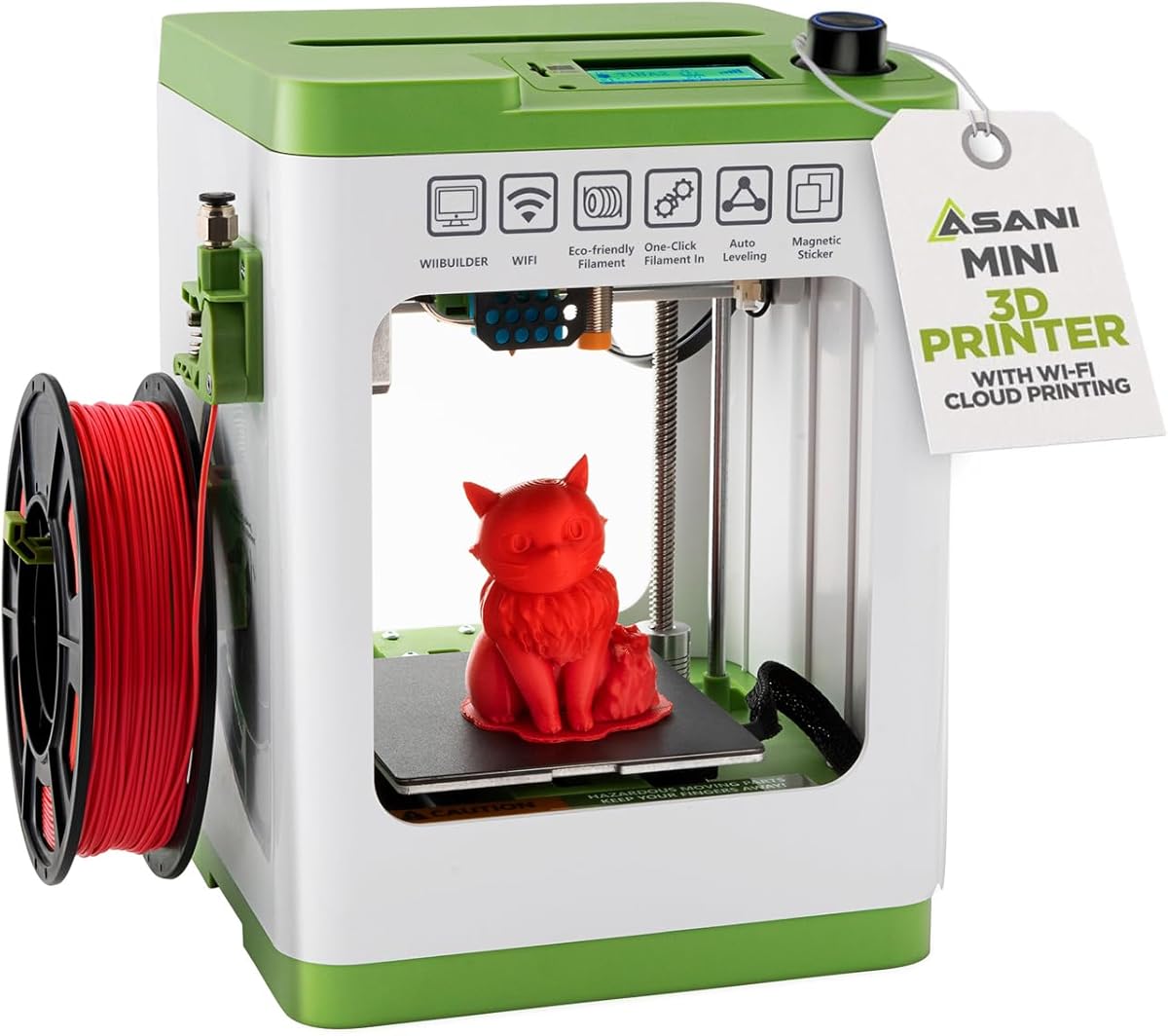
TINA2S Fully Assembled Mini 3D Printer for Kids and Beginners, Starter Kit
4.6Editor score
Auto leveling included
Compact mini design
Complete starter kit
Discover the easiest to use 3D printers for beginners and pros. This guide compares top models with auto leveling, speed, and safety features.
Choosing the right tool can feel overwhelming for newcomers. An easy to use 3D printer simplifies creation with intuitive controls. These devices allow anyone to turn digital ideas into physical objects quickly.
We evaluated ten top models based on setup speed and calibration. Each option offers reliable performance with minimal manual adjustment needed. Our selection covers various budgets while maintaining high quality output.
Every pick highlights key strengths and potential tradeoffs clearly. Prices vary by retailer and change over time. Check current listings before buying to ensure the best value available today.
4.6Editor score

4.7Editor score

4.5Editor score
This table provides a side-by-side overview of all ten models. Compare core specifications like speed, size, and special features to find the perfect match for your needs.



This model stands out with a 4.7 rating for its seamless ease of use. It delivers high speed precision while keeping maintenance simple for new users.
We may earn a commission when you buy through this link, at no additional cost to you.
The full auto calibration eliminates manual bed leveling hassles entirely. Active flow compensation ensures smooth consistent prints every single time.
Users note that while AMS lite adds cost for multi color, the base speed is impressive. Quiet noise canceling makes it suitable for home offices.
Ideal for those wanting reliable quality without technical setup struggles. It balances speed and usability better than most rivals today.
Auto Z offset and leveling ensure perfect first layers every time without tools.
Active motor noise canceling keeps the environment peaceful during long prints.
We may earn a commission when you buy through this link, at no additional cost to you.
This printer offers rapid prototyping speeds with a 3.9 rating. It targets users needing fast turnarounds without manual leveling steps.
We may earn a commission when you buy through this link, at no additional cost to you.
The CoreXY structure supports high speeds up to 600mm/s. Smart app monitoring allows remote status checks and alerts from mobile devices.
Some users report inconsistent first layers needing manual tweaks despite auto leveling. The nozzle swap remains quick for maintenance tasks.
Suitable for tech savvy users prioritizing speed over guaranteed plug-and-play perfection. It delivers efficient production cycles for small batches.
Max speed reduces wait times for prototypes and functional parts quickly.
Flash Studio app lets you adjust settings or monitor progress remotely.
We may earn a commission when you buy through this link, at no additional cost to you.
This compact unit holds a 4.4 rating for its beginner focused design. It includes a creative LED lamp kit to inspire immediate DIY projects.
We may earn a commission when you buy through this link, at no additional cost to you.
The Bambu ecosystem offers easy app management and ready-to-print models. Quiet operation fits well in home studios without disturbing others.
Its small footprint saves space but limits large scale prints. Auto calibration keeps setup frustration low for first time users.
Best for hobbyists needing a reliable desk friendly solution. The included kit adds value for educational or home decor needs.
Ready-to-print lamp models let you make functional lights straight away.
Access MakerWorld and Bambu Handy for seamless model management.
We may earn a commission when you buy through this link, at no additional cost to you.
With a 4.5 rating, this premium model offers speed and enclosure benefits. It handles a wider range of advanced filaments than open-frame units.
We may earn a commission when you buy through this link, at no additional cost to you.
The fully enclosed body improves performance for PETG and ASA. Auto leveling ensures high quality prints quickly after setup in 15 minutes.
AMS connectivity is required for its multi-color capabilities, adding cost. It remains a top choice for serious makers needing versatility.
Ideal for users wanting reliable performance with minimal intervention. It bridges beginner ease with professional-grade material handling.
Closed design enables reliable printing of tougher materials like ASA.
Get printing within 15 minutes with user-friendly assembly steps.
We may earn a commission when you buy through this link, at no additional cost to you.
This 4.5 rated printer empowers kids to create via AI tools. It turns ideas into toys easily without prior design skills.
We may earn a commission when you buy through this link, at no additional cost to you.
Features like AI Doodle and photo-to-avatar simplify creativity. The enclosed design and TÜV tested PLA ensure safety during home use.
It prints single colors but allows assembly for complex designs. The included camera lets parents monitor progress remotely with ease.
Perfect for families seeking educational tech gifts. It combines safety with engaging tools to inspire young makers.
Turn text or images into 3D models instantly with AI prompts.
Enclosed pinch-resistant build keeps kids safe during operation.
We may earn a commission when you buy through this link, at no additional cost to you.
This 4.4 rated mini printer starts printing in just 8 minutes. It is fully assembled for easy setup by beginners.
We may earn a commission when you buy through this link, at no additional cost to you.
The Poloprint Cloud app offers AI search and STEM courses. Auto leveling reduces manual adjustment for better first layer adhesion.
Its small print volume limits it to small projects and toys. Maintenance remains simple with quick-swap printhead structures.
Great for classrooms needing a budget-friendly starter. It prioritizes education and fun over large print capabilities.
Guided setup gets users printing projects almost instantly.
Interactive courses and modules turn printing into education.
We may earn a commission when you buy through this link, at no additional cost to you.
With a 4.2 rating, this model balances speed and reliability well. It features fully automatic one-click leveling for easy setup.
We may earn a commission when you buy through this link, at no additional cost to you.
The CoreXY structure ensures smooth low-noise performance at high speeds. Tool-free nozzle swaps simplify maintenance significantly.
Resume after outage protects long prints from power interruptions. The Orca slicer and app allow remote monitoring.
Good for users wanting consistent results without complex tuning. It supports batch printing and flexible customization options.
Accurate offset measures nozzle-to-plate distance automatically.
Saves ongoing layer and resumes after power is restored.
We may earn a commission when you buy through this link, at no additional cost to you.
This 4.6 rated kit offers an easy entry into 3D printing. It is fully assembled to avoid setup errors for beginners.
We may earn a commission when you buy through this link, at no additional cost to you.
Includes 10m PLA filament and pre-installed models. Auto leveling and dual z-axis rails ensure high precision results.
Must use included or magnetic metal plate to function. The flexible magnetic build plate simplifies model removal.
Perfect for dorms needing plug-and-play convenience. It removes technical barriers so users can focus on ideas.
Fully built unit works right out of the box.
Includes filament, cards, and accessories for immediate use.
We may earn a commission when you buy through this link, at no additional cost to you.
This 4.1 rated printer is known for reliability and simplicity. It features CR Touch auto leveling to reduce first layer issues.
We may earn a commission when you buy through this link, at no additional cost to you.
The Sprite direct drive extruder handles flexible filaments well. Dual synchronized Z-axis screws help minimize vibration.
Quiet operation ensures comfort, though speed is moderate. Setup is straightforward for newcomers seeking affordability.
Ideal for hobbyists on a tight budget. It delivers solid results with proven components.
Automated calibration helps achieve reliable first layers easily.
Smooth feeding supports PLA PETG and TPU filament types.
We may earn a commission when you buy through this link, at no additional cost to you.
This 4.2 rated printer offers native multicolor printing out of the box. It reduces purge waste for more efficient use of materials.
We may earn a commission when you buy through this link, at no additional cost to you.
LeviQ 3.0 ensures 100 percent bed flatness for flawless first layers. Dual-band Wi-Fi allows stable remote monitoring via app.
Filament is not included but expansion up to 19 colors is possible. The large model library offers 100000 design choices.
Great for home makers wanting color variety. It combines speed with user-friendly connectivity for easy operation.
Four built-in colors support vibrant designs immediately.
Smart monitoring prevents waste by detecting tangled filaments early.
We may earn a commission when you buy through this link, at no additional cost to you.
Selecting the right model depends on your skill level and goals. These factors help you find a reliable printer that fits your needs.
Look for printers with auto leveling to avoid manual adjustments that frustrate beginners.
Auto calibration ensures better first layers without tools.
Higher speeds reduce wait times for prototypes or toys.
Balance speed with quality to ensure details remain sharp.
Consider the physical dimensions of your planned projects.
Larger volume allows for bigger models but increases size.
Enclosed designs protect users from hot parts and fumes.
Pinch-resistant edges and auto shut-offs add family safety.
Ensure support for common types like PLA and PETG for versatility.
Check extruder type to see if it handles flexible filaments.
Quiet motors prevent disruption in home or office spaces.
Noise canceling features enhance overall user comfort.
WiFi and app control allow remote monitoring and status checks.
Look for dual-band options to ensure stable connections.
Ready-to-print models and app libraries simplify design.
Strong software support makes troubleshooting easier.
Begin with guided setup and auto leveling to ensure perfect first layers.
Regularly check nozzle and bed for debris to prevent print failures.
Store filament properly to avoid moisture issues affecting print quality.
Many models arrive fully assembled to save time. Others offer quick setup in under 15 minutes with clear guides for beginners.
PLA is the most forgiving and widely supported. It prints at lower temps and is easy to remove from the build plate.
Most new units use silent boards or noise canceling motors. They operate quietly enough for offices or bedrooms during use.
Many printers include cloud apps or browser tools for slicing. Third-party options like Cura also offer easy beginner presets.
Enclosed models with safe materials like PLA are ideal. Supervision and auto shut-off features further reduce risks during operation.
Auto leveling detects bed unevenness and adjusts offsets automatically. This ensures consistent first layers without manual tweaking.
Our top picks range from budget-friendly mini units to premium enclosed systems. Each offers simplicity suited for different project needs.
Prioritize auto calibration and safety features to reduce setup stress. Reliable performance matters most for long-term enjoyment.
Check current prices and stock before purchasing. Retailers may vary on bundles or included accessories.