
Selore USB C Docking Station Dual Monitor
4.4Editor score
Affordable 8-in-1 design
100W PD charging input
Dual 4K@60Hz HDMI ports
This guide compares the top docking stations with 2 HDMI ports for dual monitor setups, covering compatibility, charging, and connectivity options.
Finding a docking station with 2 HDMI ports is essential for modern professionals who need dual monitor setups to boost productivity and streamline their workflow effectively.
We evaluated ten top-rated models based on video output quality, charging capabilities, data transfer speeds, and overall build quality to help you make an informed decision.
Each pick highlights specific strengths and weaknesses so you can choose the right hub for your laptop while keeping in mind that prices and availability change frequently.
4.4Editor score

4.5Editor score

4.5Editor score
This side-by-side comparison outlines the key specifications of each model so you can quickly identify which docking station meets your specific dual monitor and connectivity needs.


The Anker 8-in-1 USB C Hub stands out as a top choice for users seeking a reliable docking station with 2 HDMI ports. With a solid 4.5-star rating, it delivers consistent dual monitor performance and robust power delivery for most laptops.
We may earn a commission when you buy through this link, at no additional cost to you.
This hub supports dual 4K displays at 30Hz on both HDMI ports, making it ideal for professionals who need extended desktop space. The 85W power delivery pass-through ensures your laptop stays charged while you work, and the inclusion of Ethernet and card readers adds practical versatility.
While it lacks Ethernet support for macOS users and has limited Linux compatibility, these are minor trade-offs for the overall build quality and performance. The device manages heat well even during extended use, ensuring stable video output without overheating issues.
If you need a dependable solution for dual monitor setups on Windows or ChromeOS, this Anker hub is an excellent investment. It balances port selection, power, and durability better than many competitors in its price range.
The dual HDMI ports support 4K resolution, allowing you to extend your workspace across two screens seamlessly for improved multitasking.
With up to 85W power delivery pass-through, your laptop remains charged even under heavy workloads without needing a separate charger.
We may earn a commission when you buy through this link, at no additional cost to you.
The Acer 13-in-1 Docking Station offers an expansive set of features that justify its premium price tag for power users. It uniquely supports triple independent displays on Windows laptops, making it perfect for complex workflows requiring multiple screens simultaneously.
We may earn a commission when you buy through this link, at no additional cost to you.
With a robust 110W power adapter included, this dock can handle high-power laptops without external charging issues. The combination of two HDMI ports and one DisplayPort gives you flexible connectivity options, while the built-in security slot adds physical protection for your setup.
The aluminum body dissipates heat efficiently, and the range of ports includes Ethernet, USB-C, USB-A, and card readers. However, triple display support is Windows-only due to macOS limitations, and the cost is significantly higher than other options.
For professionals who need maximum connectivity and triple monitor capabilities, this Acer dock is unmatched. It provides the reliability and power needed for demanding office environments where uptime and versatility are critical.
Windows users can connect three independent screens using two HDMI and one DisplayPort output for a command center setup.
The included 110W adapter ensures your laptop receives enough power even when driving multiple displays and peripherals at once.
We may earn a commission when you buy through this link, at no additional cost to you.
The Selore 8-in-1 USB C Hub delivers excellent value by supporting dual 4K@60Hz HDMI displays at a very competitive price. It is ideal for budget-conscious users who still demand high-resolution dual monitor capabilities for their daily work.
We may earn a commission when you buy through this link, at no additional cost to you.
This hub features a 100W power delivery port that charges your laptop while using the dock. The USB-C and USB-A ports support fast data transfer, and the SD card reader provides quick access to photos and files without extra adapters.
While it lacks Ethernet and mac users are limited to mirror mode, the performance on Windows is impressive for the cost. The device is compact enough for travel and stays cool even during extended use.
If you need a cost-effective solution for dual monitors with high refresh rates, this Selore hub is a smart choice. It offers the core features most users need without unnecessary extras that drive up the price.
Both HDMI ports support 4K at 60Hz, providing smoother visuals for video editing or gaming on external displays.
The compact design and 100W power delivery pass-through make it easy to carry in a bag while keeping your laptop charged.
We may earn a commission when you buy through this link, at no additional cost to you.
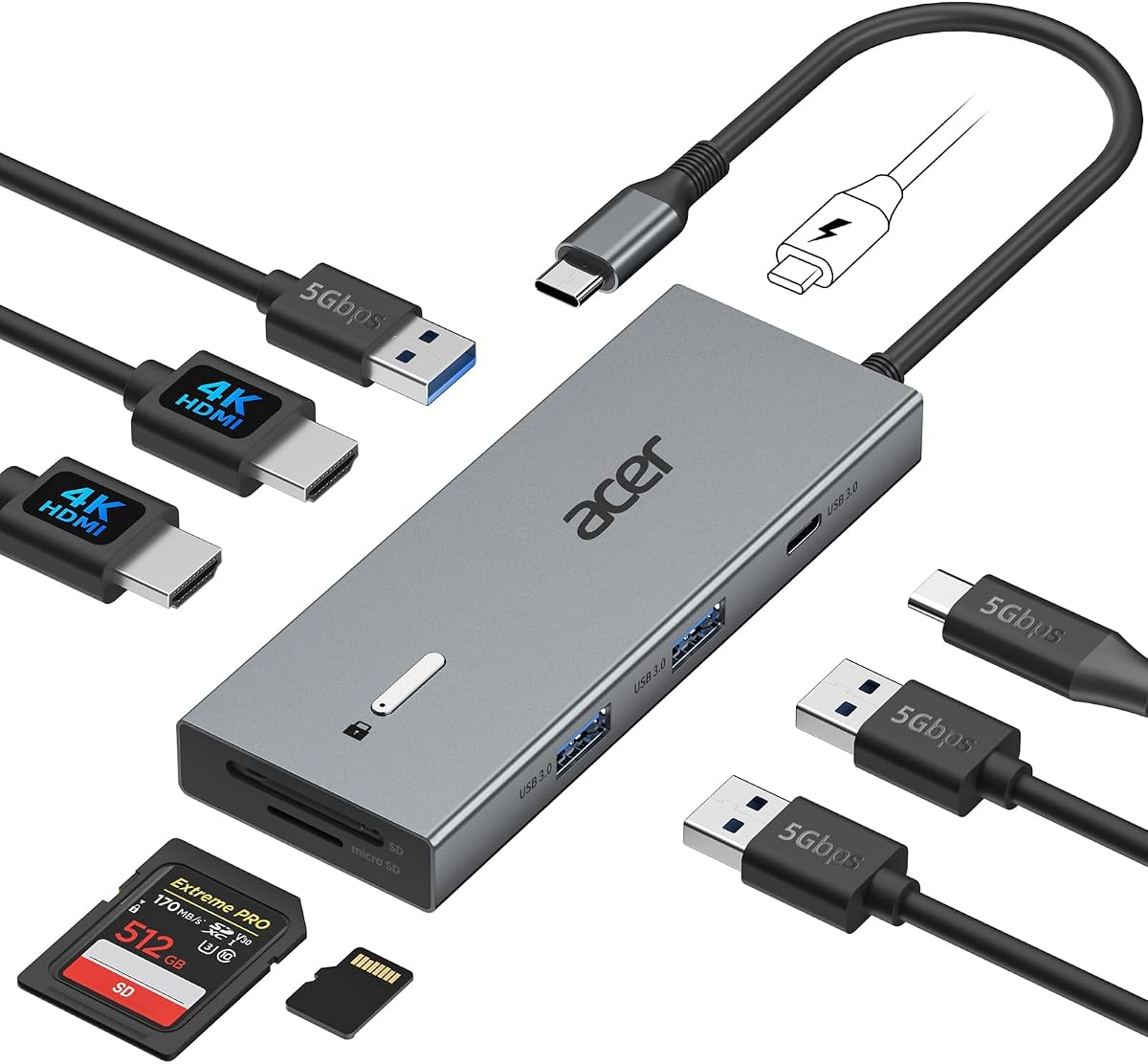
The Acer 9-in-1 Laptop Dock combines security and performance in a compact package. Its built-in lock button allows you to instantly lock your screens, protecting sensitive data in public or shared workspaces effectively.
We may earn a commission when you buy through this link, at no additional cost to you.
With dual 4K@60Hz HDMI ports, this hub delivers smooth video output for productivity tasks. The 100W power delivery pass-through keeps your laptop charged, and the multiple USB ports support fast file transfers between connected devices.
While the power adapter is not included, the built-in cable reduces clutter and simplifies setup. The aluminum body is durable and dissipates heat well during extended use.
If you value security features alongside dual monitor support, this dock is a strong option. It is particularly useful for office environments where data protection and reliable connectivity are priorities.
Press the button to lock your screens instantly, preventing unauthorized access to your work during breaks.
Dual HDMI ports support 4K resolution, and 100W PD pass-through ensures your laptop stays powered throughout the workday.
We may earn a commission when you buy through this link, at no additional cost to you.
The Dell D3100 is a classic desktop docking station that provides stable dual or triple monitor support for Dell laptops and compatible devices. It is designed for users who prefer a larger, more robust docking solution over portable hubs.
We may earn a commission when you buy through this link, at no additional cost to you.
With two HDMI ports and one DisplayPort, you can connect multiple high-resolution screens for expanded workspace. The built-in 65W power supply ensures your laptop receives consistent charging without needing external adapters.
While it uses USB 3.0 rather than USB-C, it remains reliable for users who prioritize stability over portability. The Ethernet port provides a wired network connection that is faster and more stable than Wi-Fi.
If you are looking for a traditional dock that can sit permanently on your desk, this Dell model is a solid choice. It offers the connectivity needed for a full desktop replacement experience.
Connect up to three external monitors using the combination of HDMI and DisplayPort outputs for maximum screen real estate.
The included 65W power adapter ensures consistent charging and stable operation even with multiple peripherals connected.
We may earn a commission when you buy through this link, at no additional cost to you.
The Anker 7-in-1 USB-C Hub is designed for users who prioritize speed and portability over maximum resolution. It supports dual 1080p displays at 60Hz, which is sufficient for many office and productivity tasks.
We may earn a commission when you buy through this link, at no additional cost to you.
With 10Gbps data transfer capabilities, this hub moves large files quickly between devices. The 100W power delivery pass-through ensures your laptop stays charged, and the compact design fits easily in a laptop bag for travel.
While it lacks Ethernet and is limited to 1080p resolution, the reliability and speed of data transfer make it a great choice for users who value performance over video resolution.
If you need a portable hub with fast data speeds and reliable dual monitor support, this Anker model delivers. It is a practical solution for professionals who frequently move between locations.
The 10Gbps port allows you to transfer large files quickly, boosting productivity when working with big datasets.
The compact form factor and 100W PD pass-through make it easy to carry while ensuring your laptop remains powered on the go.
We may earn a commission when you buy through this link, at no additional cost to you.
The MOKiN 13-IN-1 Docking Station offers an impressive array of ports, including two HDMI ports for dual 4K@60Hz displays. It is well-suited for users who need extensive connectivity options for various peripherals and monitors.
We may earn a commission when you buy through this link, at no additional cost to you.
With multiple USB-C and USB-A ports, you can connect numerous devices simultaneously. The 100W PD charging ensures your laptop stays powered, and the security lock button adds a layer of physical protection for your workspace.
While the adapter is not included, the hub supports 100W input and delivers stable power. The aluminum body helps dissipate heat effectively, ensuring reliable performance even during extended use.
If you need a hub with many ports and dual monitor support, this MOKiN model provides excellent versatility. It is a practical choice for users with multiple USB devices and display needs.
With 13 ports including HDMI, USB-C, USB-A, and Ethernet, this hub can handle nearly all your connection needs in one device.
The lock button secures your screen quickly, and 100W PD pass-through keeps your laptop charged during heavy usage.
We may earn a commission when you buy through this link, at no additional cost to you.
The Selore 10-in-1 Multiport Hub stands out by offering triple 4K display support on Windows laptops. This makes it ideal for users who need maximum screen real estate for complex tasks like video editing or financial modeling.
We may earn a commission when you buy through this link, at no additional cost to you.
With a dedicated monitor control button, you can cycle through display modes or turn off screens quickly. The Gigabit Ethernet port ensures stable internet connectivity, and 100W PD input provides ample power for your laptop.
While Windows users get the full triple 4K benefit, Mac users are limited to mirroring. The aluminum chassis helps dissipate heat, and the build quality feels durable for daily office use.
If you need triple monitor support in a compact hub, this Selore model is an excellent option. It combines high-resolution video with the connectivity needed for a complete workstation setup.
Windows laptops can drive three independent 4K monitors using HDMI and DisplayPort outputs for maximum productivity.
The monitor control button simplifies switching display modes, and Gigabit Ethernet provides fast, stable internet for large file transfers.
We may earn a commission when you buy through this link, at no additional cost to you.
The Anker 13-in-1 USB-C Dock is a premium solution designed for power users who need extensive connectivity. It supports triple displays on Windows systems and includes a powerful 135W power adapter right out of the box.
We may earn a commission when you buy through this link, at no additional cost to you.
With multiple USB-C and USB-A ports, you can connect various devices simultaneously. The vertical design saves desk space, and you can charge your laptop at 85W while powering a phone at 18W at the same time.
While the Mac support is limited to mirroring for displays, the charging and data features remain strong. The adapter provides plenty of power for even high-demand laptops.
If you need a desktop dock with maximum port selection and power, this Anker model delivers. It is designed for users who want a single cable solution for all their workstation needs.
The included 135W adapter ensures your laptop and peripherals stay powered without needing separate chargers on your desk.
The vertical orientation saves desk space compared to traditional horizontal docks, keeping your workspace tidy and organized.
We may earn a commission when you buy through this link, at no additional cost to you.
The Dell D3100 legacy dock is designed for stability and traditional desktop setups. It offers triple display support through HDMI and DisplayPort connections, making it suitable for multi-monitor workflows.
We may earn a commission when you buy through this link, at no additional cost to you.
With multiple USB 3.0 ports and Gigabit Ethernet, you can connect plenty of peripherals without network concerns. The built-in power supply ensures consistent operation, and the design is robust for office use.
While it does not feature USB-C connectivity, the USB 3.0 speeds are still sufficient for most data transfer needs. The dock remains a reliable choice for users with older laptops.
If you have a Dell laptop and need a dependable desk dock with multiple ports, this model is a solid option. It provides the connectivity needed for a full desktop workstation experience.
The classic desktop dock design ensures stable connections and consistent performance for daily office tasks.
Connect up to three external displays using HDMI and DisplayPort to expand your workspace for increased productivity.
We may earn a commission when you buy through this link, at no additional cost to you.
Choosing the right docking station involves understanding your laptop's capabilities and your specific dual monitor needs.
Check that your laptop's USB-C or Thunderbolt port supports video output through DisplayPort Alt Mode. The docking station should support the resolution and refresh rate you need on both HDMI ports.
Ensure both HDMI ports can run at your desired resolution simultaneously without performance drops.
Look for a hub that supports Power Delivery pass-through charging to keep your laptop powered while using external displays. Aim for 100W if your laptop requires high power.
Confirm the dock can pass through enough wattage to charge your laptop under heavy workloads.
USB 3.1 or USB 3.2 Gen 2 ports are ideal for fast file transfers between connected drives and devices. This matters if you frequently move large files.
Choose hubs with fast USB ports to minimize wait times when working with external storage.
Verify that the dock is compatible with your operating system, especially macOS. Most dual HDMI setups require Windows for extended displays due to MST limitations on Mac.
Check that the manufacturer lists support for your specific OS version before purchasing.
Consider what additional ports you need such as Ethernet, USB-A, SD card readers, or audio jacks. A hub with too few or too many ports may not fit your workflow.
Pick a model that offers the exact mix of ports you need for your peripherals and accessories.
Aluminum housings generally dissipate heat better than plastic ones. Good heat management ensures stable performance during long sessions without thermal throttling.
Look for solid construction to ensure the dock withstands daily use and prevents overheating issues.
Compare prices to find a hub that offers value for money. Higher-end models may cost more but include adapters or longer warranties for peace of mind.
Choose a model with a warranty that covers defects to protect your investment over time.
Some docks include power adapters or cables which can save additional purchase costs. Others may require you to source them separately at extra expense.
Verify what comes in the box so you can budget for any missing accessories.
Connect your laptop to the docking station using a high-quality USB-C or Thunderbolt cable that supports data and video. Ensure the cable is firmly seated to prevent disconnection issues.
Plug your monitors into the HDMI ports and any other peripherals into the available USB, Ethernet, or SD card slots. Turn on your devices and allow the system to install necessary drivers.
Keep the dock in a well-ventilated area to avoid overheating and regularly check cables for wear or damage. Clean dust off vents with compressed air to maintain performance.
Yes, but macOS typically limits multiple displays to mirroring unless you use DisplayLink technology. Check that your specific laptop model supports the docking station's video output features before purchasing.
Most modern docking stations support 4K on both HDMI ports, but refresh rates may vary. Some models offer 4K at 60Hz on one port and 30Hz on the other depending on bandwidth.
If your laptop port does not support DisplayPort Alt Mode, video output will not work. You may need to use DisplayLink adapters or find a dock that includes external graphics support.
Most dual monitor setups require at least 60W to 100W of power delivery pass-through. Check your laptop's charger rating to ensure the dock provides enough power while in use.
Some docking stations support triple monitors using an extra DisplayPort. This often requires Windows for MST and a laptop that supports multiple external displays via USB-C.
Most hubs are plug-and-play and require no drivers. However, advanced features like extended displays on Mac may require DisplayLink software for proper functionality.
The Anker 8-in-1 USB C Hub leads our list for its balance of performance and value. It provides reliable dual HDMI support and strong power delivery for most users.
For those needing more ports or triple displays, consider the Acer 13-in-1 or Selore 10-in-1 models. They offer extended capabilities for advanced workloads and multitasking.
Always check your laptop's specifications before buying to ensure full compatibility. Prices fluctuate regularly so verify current deals before finalizing your purchase.