
CENMATE Aluminum 4 Bay
4.3Editor score
Aluminum Alloy Build
5Gbps USB 3.0
Supports 80TB Total
Direct Attached Storage provides a reliable way to expand your digital footprint without complex network setups. These enclosures connect directly to your computer via USB or Thunderbolt, offering high speeds and massive capacity for backups, media files, and active projects. Choosing the right DAS ensures your data remains accessible and secure.
We evaluated ten leading DAS enclosures based on transfer speeds, build quality, compatibility, and ease of use. Our analysis covers models ranging from simple 4-bay units to advanced hybrid systems supporting both HDDs and NVMe SSDs. Each product was assessed for its ability to handle demanding workflows efficiently.
Each pick in this guide highlights key strengths and potential trade-offs to help you make an informed decision. We focus on real-world performance and features that matter most for professionals and enthusiasts. Please note that pricing and availability can change frequently, so verify details before purchasing.
4.3Editor score

4.2Editor score

5.0Editor score
As an Amazon Associate we earn from qualifying purchases.
The following table provides a side-by-side comparison of all ten selected DAS enclosures. It highlights key specifications such as bay count, interface type, maximum capacity, and special features to help you quickly identify the model that fits your requirements.


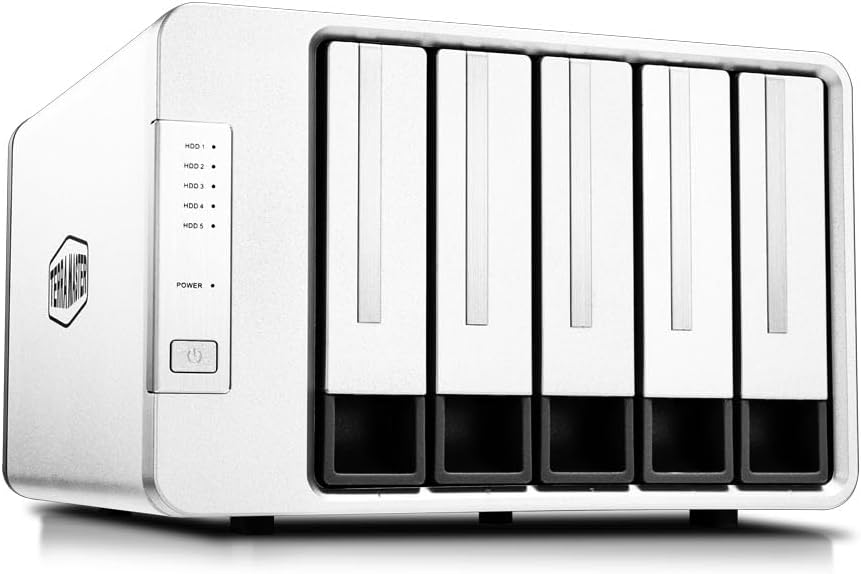


The TERRAMASTER D4-320 stands out as a top choice for users seeking high-speed direct attached storage. With a 4.2 star rating, this enclosure delivers up to 10Gbps via USB 3.2 Gen2, making it ideal for large file transfers. Its robust build and intelligent cooling system ensure reliable performance during extended use.
We may earn a commission when you buy through this link, at no additional cost to you.
This enclosure supports up to 120TB total capacity, accommodating various SATA HDDs and SSDs. The tool-free Push-Lock design simplifies drive installation, while the quiet fan reduces noise during standby mode. Compatibility with Windows, Mac, and Linux ensures seamless integration into existing workflows.
While it lacks hardware RAID, which may deter enterprise users, this limitation keeps the design simple and cost-effective for most professionals. The noise level during active use is slightly higher than standby but remains acceptable for office environments. It prioritizes speed and capacity over complex redundancy.
Best for creatives and power users needing fast access to massive storage volumes, the D4-320 is a highly recommended DAS. It balances performance and usability effectively. For those who need RAID, consider models with dedicated controllers, but for raw speed, this model excels.
Achieves up to 10Gbps transfer speeds, ensuring rapid access to large media libraries and project files.
Features a Push-Lock design for easy drive installation without additional tools, streamlining maintenance.
We may earn a commission when you buy through this link, at no additional cost to you.
The QNAP TR-004 offers a unique blend of DAS convenience and RAID protection. With a 4.2 star rating, it supports hardware RAID 0, 1, 5, and JBOD, providing flexibility for data redundancy. Its USB Type-C connectivity ensures fast data access directly to a computer.
We may earn a commission when you buy through this link, at no additional cost to you.
Designed for QNAP NAS users, this enclosure can expand storage capacity effectively. It supports four 3.5-inch SATA drives and includes lockable bays for security. The plug-and-play nature eliminates driver installation, simplifying setup for most operating systems.
However, files stored on drives moved to a NAS may not be recognized, limiting flexibility if you switch devices. RAID configuration is also specific to TR-004 units, which may complicate migration. These constraints are trade-offs for its streamlined NAS integration.
Ideal for QNAP ecosystem users needing extra storage with RAID protection, the TR-004 is a solid choice. It bridges the gap between DAS and NAS effectively. Verify compatibility with your current NAS model before purchase to avoid limitations.
Supports multiple RAID levels for data redundancy without requiring external software configurations.
Expands QNAP NAS capacity directly, adding storage pools for enhanced backup and archival workflows.
We may earn a commission when you buy through this link, at no additional cost to you.
The TERRAMASTER D8 Hybrid 2 offers unmatched versatility with hybrid support for both HDDs and NVMe SSDs. Holding a perfect 5.0 star rating, it delivers up to 10Gbps transfer speeds, ideal for heavy-duty professional workflows. Its unique design separates hot and cold data storage effectively.
We may earn a commission when you buy through this link, at no additional cost to you.
This unit supports up to 152TB total capacity across eight independent drives. The TPM power management optimizes energy use and wake-up times, enhancing efficiency. It is highly compatible with macOS, Windows, Linux, and NAS systems, ensuring seamless integration.
While the price is higher than simpler models, the performance and capacity justify the investment for power users. The layout can be complex for those new to hybrid storage, but it offers significant workflow benefits. It is a premium solution for demanding environments.
Best for professionals managing large media libraries and active projects, the D8 Hybrid 2 excels in speed and capacity. It combines massive storage with rapid access. Consider this if you need both long-term storage and high-speed editing capabilities in one enclosure.
Combines HDD capacity with NVMe speed for efficient management of hot and cold data streams.
Proprietary power management optimizes efficiency and wake times for better daily performance.
We may earn a commission when you buy through this link, at no additional cost to you.
The CENMATE Aluminum 4 Bay offers excellent value for budget-conscious buyers needing reliable external storage. With a 4.3 star rating, it supports up to 80TB total capacity via USB 3.0. Its aluminum shell provides durability and efficient heat dissipation during operation.
We may earn a commission when you buy through this link, at no additional cost to you.
This enclosure supports both 2.5 and 3.5-inch drives and offers hot-swappable bays for easy maintenance. The plug-and-play design works with Windows, Mac, and Linux without additional drivers. It includes a DC power adapter for stable high-speed transmission.
Users sensitive to noise may find the fan loud during active use, reaching 40-50 decibels. While it lacks RAID, this simplifies the device for straightforward storage needs. The build quality remains impressive despite the competitive pricing.
Best for home users or small businesses on a tight budget, the CENMATE enclosure delivers solid performance. It prioritizes basic functionality and affordability. Verify your noise tolerance before purchasing, as this is its primary trade-off.
Durable aluminum shell enhances heat dissipation and structural integrity for long-term reliability.
Provides reliable 5Gbps speeds at a competitive price point for entry-level DAS needs.
We may earn a commission when you buy through this link, at no additional cost to you.
The SABRENT DS-SC5B is a robust 5-bay DAS dock designed for reliability and scalability. With a 4.1 star rating, it uses a dedicated ASMedia controller for each bay, ensuring stable independent connections. Its 10Gbps USB-C interface supports high-speed data transfers.
We may earn a commission when you buy through this link, at no additional cost to you.
This unit features tray-less hot-swap with per-bay power switches, simplifying drive management. It includes a Kensington slot for security and supports daisy-chaining peripherals. The internal auto-switching power supply eliminates the need for an external brick.
While it lacks hardware RAID, the individual drive management offers flexibility for users needing direct access to multiple drives. The price is higher than simpler 4-bay models, reflecting its advanced controller and power features. It is well-suited for workstation setups.
Ideal for users managing multiple independent drives, the DS-SC5B provides reliable access and scalability. Its daisy-chain support and internal power design reduce cable clutter. Consider this if you need five drives with maximum connection stability.
Dedicated controller per bay ensures stable connections for each drive without interference.
Supports peripheral daisy-chaining to expand your workspace without cluttering ports.
We may earn a commission when you buy through this link, at no additional cost to you.
The TERRAMASTER D8 Hybrid provides a flexible solution for users needing both HDD capacity and NVMe speed. With a 3.5 star rating, it holds up to 152TB total across eight bays. Its design supports strategic storage planning for different data types.
We may earn a commission when you buy through this link, at no additional cost to you.
Equipped with USB 3.2 Gen2, it offers up to 10Gbps transfer speeds. The tool-free tray design simplifies drive swaps, while the intelligent fan adjusts speed based on temperature. Power-on recovery ensures stability after abnormal power loss events.
While it offers significant capacity, the user rating suggests potential reliability or usability quirks. The complexity of managing hybrid storage may challenge beginners. However, the potential performance benefits appeal to those needing both speed and storage in one unit.
Best for users seeking a cost-effective hybrid setup, the D8 Hybrid is a viable option. It balances cost and capacity well. For simpler needs, a standard DAS may be preferable, but this is strong for specific hybrid workflows.
Facilitates storing frequently accessed data on NVMe SSDs while archiving on HDDs.
Ensures the device can reboot automatically after unexpected power loss without manual intervention.
We may earn a commission when you buy through this link, at no additional cost to you.
The TERRAMASTER D5-310 is designed for users prioritizing hardware RAID protection and massive capacity. With a 3.6 star rating, it supports RAID 5, 0, 1, 10, and Single modes via a dedicated knob on the back. This simplifies configuration significantly.
We may earn a commission when you buy through this link, at no additional cost to you.
It accommodates up to 120TB across five drives, ensuring ample space for backups. The unit works with Windows, macOS, and Linux without drivers, offering broad compatibility. Hot spare disk features minimize downtime by automatically replacing failed drives.
Transfer speeds are capped at 5Gbps, which may limit performance for high-throughput workflows. User feedback varies, indicating some reliability concerns. However, the hardware RAID and large capacity make it a strong contender for specific backup needs.
Best for data protection without NAS complexity, the D5-310 offers robust RAID capabilities. It is ideal for those who need physical redundancy. For faster transfers, consider USB 3.2 models, but this excels in storage security.
Dedicated knob simplifies switching between RAID modes without software configuration.
Automatically replaces failed drives in supported configurations to reduce data loss risk.
We may earn a commission when you buy through this link, at no additional cost to you.
The WAVLINK 4-Bay enclosures storage with an innovative HDMI video output feature. With a 4.0 star rating, it supports 4K@60Hz resolution, allowing direct media playback on TV. It also delivers 10Gbps data transfer speeds for efficient file access.
We may earn a commission when you buy through this link, at no additional cost to you.
This enclosure supports up to 88TB total capacity and includes dual temperature-controlled cooling fans. The aluminum shell ensures durability and effective heat dissipation. Independent ON/OFF switches on each bay allow convenient drive management without powering down the system.
The HDMI feature requires a host USB-C port that supports video output, which may limit compatibility. For users not needing video output, this may be an unnecessary cost. However, it offers unique utility for media centers or direct display setups.
Best for multimedia users needing direct TV playback, the WAVLINK enclosure stands out. It combines robust storage with display capabilities. For standard data storage, simpler models may suffice, but this is ideal for media workflows.
Allows 4K playback directly from connected drives via HDMI port when supported.
Dual fans activate automatically at 48C to maintain optimal operating temperatures.
We may earn a commission when you buy through this link, at no additional cost to you.
The ORICO 5 Bay offers a simple and affordable way to expand storage for home users. With a 4.0 star rating, it supports up to 110TB capacity via USB 3.1 Type-C. Its magnetic chip cover eliminates the need for screws, simplifying access.
We may earn a commission when you buy through this link, at no additional cost to you.
Drives are recognized quickly in about three seconds, improving workflow efficiency. The enclosure includes multiple protection designs against over-voltage and heat. The 60mm double-bearing fan provides basic cooling for steady operation.
On Linux systems, only one drive may be read at a time with multi-HDD enclosures, which limits multi-drive functionality. The fan is adequate but basic compared to more advanced models. It remains a reliable choice for Windows and Mac users.
Best for budget-friendly home storage expansion, the ORICO 5 Bay delivers essential features. Its easy access and protection features make it user-friendly. Ensure compatibility with your operating system before purchasing to avoid Linux limitations.
Tool-free magnetic design simplifies opening the enclosure for drive installation.
Includes anti-over voltage and short-circuit safeguards to protect data during transmission.
We may earn a commission when you buy through this link, at no additional cost to you.
The QNAP TR-002 is a compact DAS ideal for users needing two-drive redundancy or expansion. With a 4.0 star rating, it supports hardware RAID 0, 1, JBOD, and individual disks. Its USB Type-C interface ensures modern connectivity for various systems.
We may earn a commission when you buy through this link, at no additional cost to you.
Designed for QNAP NAS expansion, it integrates smoothly into existing networks. Lockable drive bays provide physical security for your data. It includes a USB-C to USB 3.0 cable, offering flexible connection options without adapters.
The 2-bay design limits total capacity compared to larger models, making it less suitable for massive storage needs. However, it excels in portability and simplicity. It is a good choice for secondary storage or backup drives.
Best for small offices needing compact redundancy, the TR-002 offers reliable RAID capabilities. It is a solid entry point for QNAP users. For larger archives, consider 4-bay models, but this is perfect for essential backups.
Provides essential redundancy in a small footprint for space-constrained workspaces.
Physical lock secures drives from unauthorized access or accidental removal.
We may earn a commission when you buy through this link, at no additional cost to you.
Selecting the right Direct Attached Storage involves evaluating your specific storage needs and workflow requirements. This guide outlines key factors to consider when choosing an enclosure that balances performance, capacity, and usability.
Transfer speed is critical for productivity, especially when dealing with large video files or datasets. Look for USB 3.2 Gen2 (10Gbps) or Thunderbolt interfaces if you need rapid access to data. USB 3.0 (5Gbps) is sufficient for basic backup tasks but may bottleneck large transfers.
Prioritize models with USB 3.2 or Thunderbolt for professional workflows requiring fast data movement.
The number of drive bays determines your total storage potential. Models range from 2-bay to 8-bay units. Calculate your future storage needs and choose a b that supports drives with enough capacity to meet those goals without requiring frequent upgrades.
Select a bay count that aligns with your projected data growth and current project requirements.
Some DAS enclosures offer hardware RAID for data redundancy, while others rely on individual disk access. Hardware RAID provides better performance and security but may limit portability. If data protection is critical, a hardware RAID model is worth the extra cost.
Decide between raw access and redundancy based on how critical data protection is to your workflow.
Ensure the enclosure supports the drive types you intend to use, such as 3.5-inch SATA HDDs or M.2 NVMe SSDs. Hybrid enclosures support both mechanical drives and SSDs. Checking specifications avoids compatibility issues after purchase.
Verify drive type support (SATA, NVMe) matches your existing or planned hardware before buying.
Enclosures with active cooling fans prevent overheating during heavy use. However, fans can generate noise, which may be distracting in quiet environments. Look for models with temperature-controlled fans or passive cooling if silence is a priority.
Balance cooling efficiency with noise tolerance based on your workspace environment.
Tool-free drive installation and hot-swappable bays simplify maintenance and upgrades. Enclosures with simple layouts are easier for beginners to manage. Consider the physical design and accessibility of drive trays for long-term usability.
Choose models with tool-free designs to minimize maintenance time and effort.
Most DAS units work with Windows, macOS, and Linux out of the box. However, specific features like RAID may vary by OS. Confirm universal compatibility to avoid driver issues or software conflicts across different operating systems.
Ensure broad operating system support to maximize flexibility for your computing environment.
Price varies widely based on features like RAID support, speed, and build quality. While budget models save money, they may lack advanced features. Determine your essential requirements to find the best balance between cost and performance.
Invest in features that directly impact your workflow rather than paying for unnecessary extras.
First, connect the DAS enclosure to a stable power source and your computer using a high-quality USB or Thunderbolt cable. Ensure the interface matches the enclosure's port for optimal speed. Wait for the operating system to recognize the drives before transferring files.
Second, manage your storage by formatting drives appropriately for your OS. Use disk management tools to initialize volumes if necessary. Regularly backup important data to another medium to ensure redundancy, even with RAID protection.
Third, maintain the enclosure by keeping it in a well-ventilated area. Clean dust from fans and vents periodically to prevent overheating. Avoid moving the unit while drives are spinning to prevent physical damage or data corruption.
Direct Attached Storage connects directly to a single computer via USB, offering high speed but limited sharing. Network Attached Storage connects to your network, allowing multi-device access but potentially lower speeds. DAS is ideal for individual high-performance needs.
Yes, many modern DAS enclosures support both HDDs and SSDs. Check the product specifications to ensure compatibility with SATA or NVMe drives. SSDs offer faster speeds and durability for active workloads.
Most DAS enclosures are plug-and-play and work without additional drivers on Windows, macOS, and Linux. Some advanced features may require software, but basic storage functionality is usually automatic. Verify compatibility with your specific OS version.
Yes, many DAS models support hot-swapping, allowing you to replace drives without powering off. Ensure the specific model supports this feature before attempting. Always follow safety guidelines to avoid data loss or hardware damage.
Hardware RAID provides redundancy but adds complexity and cost. For personal backups, simple external drives may suffice. If data loss is critical, hardware RAID or external backups are recommended. Evaluate your risk tolerance before purchasing.
Keep the enclosure in a dust-free area and ensure vents are unobstructed. Regularly clean fans with compressed air to maintain airflow. Overheating can reduce drive lifespan, so monitor temperature if possible.
The top picks in this guide cover a range of needs, from budget-friendly options to high-performance hybrid systems. Whether you need simple capacity or complex RAID features, there is a model to suit your workflow.
Prioritize speed and compatibility based on your current setup. A model that fits your existing OS and transfer needs will offer the best long-term value without requiring extra adapters or software.
Prices and availability fluctuate frequently, so double-check current listings before purchasing. These models provide reliable storage solutions for various users, but verifying details ensures you get the best deal available today.