
Behringer X AIR XR18
4.6Editor score
18 Input Channels
MIDAS Preamps
WiFi Control
USB Audio Interface
This guide compares the top digital mixing consoles for live sound and studio use, evaluating features like channel count, connectivity, DSP power, and
Digital mixing consoles have revolutionized the way audio engineers handle live sound and studio production. These powerful devices offer precise control over multiple audio sources, allowing for complex routing and real-time adjustments. A good console provides reliability, intuitive operation, and high-quality sound processing.
We evaluated ten leading models based on their channel capacity, input and output options, digital signal processing capabilities, and overall user experience. Our analysis focuses on how well each unit performs in demanding environments. We considered factors like build quality, software integration, and ease of use for operators of all skill levels.
Each product highlight in this guide showcases key specifications and real-world applications to help you make an informed decision. Whether you need a compact unit for small venues or a large format system for major productions, this list covers diverse options. Please note that availability and pricing can change over time.
4.6Editor score

4.7Editor score

4.2Editor score
This comparison table provides a quick overview of the most important specifications for each console on our list. By looking at channel counts, bus structures, and interface types side by side, you can quickly identify which models match your required input and output configurations for your specific audio production environment.




The Behringer X32 stands out as a leading choice for professional audio environments. With a high user rating, this console delivers exceptional fidelity and reliability. Its standout quality lies in the integration of MIDAS designed preamps that ensure clean signal capture across all inputs.
We may earn a commission when you buy through this link, at no additional cost to you.
This unit features forty input channels and twenty five buses, providing immense flexibility for complex mixes. The motorized faders allow for instant scene management and precise control over audio levels. Its processing power supports extensive effects and dynamics processing without compromising audio integrity during live performance.
One trade-off is the physical size of the console, which may require significant space in smaller setups. Additionally, mastering the full depth of its features requires time and practice. However, these aspects are acceptable given the professional performance and versatility it offers for demanding applications.
This console is ideal for live sound engineers and studio producers who need a comprehensive mixing solution. It suits venues ranging from medium size churches to touring productions. We recommend it for users seeking a balance of high-end audio quality and robust functionality.
The integration of MIDAS designed preamps ensures that every input channel maintains high signal integrity and low noise floors for professional recording and live sound.
Fully automated motorized faders enable engineers to recall complex mixes instantly, making transitions between songs or show segments seamless and efficient for any production.
We may earn a commission when you buy through this link, at no additional cost to you.
The Behringer X AIR XR18 offers an affordable entry into digital mixing without sacrificing essential features. It receives strong feedback for its ease of use and compact design. The console is particularly praised for including high-quality MIDAS preamps that deliver clear audio even at lower price points.
We may earn a commission when you buy through this link, at no additional cost to you.
Control is managed entirely through an iPad or Android tablet via a built-in WiFi router. This allows the engineer to stand anywhere in the venue while adjusting levels and effects. The eighteen input channels and twelve bus architecture are sufficient for small bands, bands, and installed audio systems.
The lack of physical faders on the unit itself means you must rely on the app for real-time mixing adjustments. This can be a limitation for those who prefer tactile feedback. However, the convenience and portability often outweigh this drawback for mobile operators and remote mixers.
This mixer is perfect for small venues, podcasting setups, and mobile DJs who need a lightweight solution. It is also a great choice for users who prefer controlling their mix from a mobile device. We recommend it for budget-conscious buyers seeking professional sound quality.
The built-in tri-mode WiFi router enables direct operation from tablets, allowing engineers to control the mix from anywhere without needing external network equipment or cables.
Sixteen programmable MIDAS designed preamps provide audiophile sound quality and high gain range, ensuring clean and quiet signal capture for all connected microphones and instruments.
We may earn a commission when you buy through this link, at no additional cost to you.
The Behringer WING represents the top tier of digital mixing capabilities available today. It is designed for large scale productions requiring extensive input capacity and deep processing. Users appreciate its robust construction and the inclusion of award-winning MIDAS PRO components that ensure pristine audio fidelity.
We may earn a commission when you buy through this link, at no additional cost to you.
With forty eight channels and twenty eight buses, this console handles the most complex routing scenarios. The touch sensitive editing section allows for quick adjustments of channel parameters without digging through menus. AES50 connectivity ensures ultra-low latency when connecting to remote stage boxes over long distances.
The main drawback is the significant investment required to acquire this system. Additionally, the sheer number of features can be overwhelming for those new to digital mixing. However, for professionals needing maximum flexibility and power, these trade-offs are well worth the cost and learning curve.
This console is suited for large touring productions, major broadcast events, and high-end recording studios. It is ideal for engineers who need to manage large ensembles and complex signal paths efficiently. We recommend it for advanced users seeking the highest level of control.
AES50 ports featuring SuperMAC technology provide ultra-low jitter and latency for connecting remote I/O, allowing signals to travel long distances without degradation or delay.
A dedicated touch-sensitive channel editing section with rotary controls allows engineers to stay on top of all channel properties quickly and intuitively during live shows.
We may earn a commission when you buy through this link, at no additional cost to you.
The Yamaha MGX12 is a standout for content creators and streamers needing video and audio integration. It has received perfect ratings for its ease of use and versatile features. The console simplifies the setup process by combining audio mixing with HDMI video capture in one compact device.
We may earn a commission when you buy through this link, at no additional cost to you.
It features an 18-channel layout with tactile faders and a 4.3-inch touchscreen for intuitive control. The USB-C interface supports high-speed audio transfer to computers, while the HDMI pass-through allows for 4K video capture. This makes it ideal for live streaming or recording professional content without extra gear.
While it lacks the channel count of larger consoles, it covers the needs of most small to medium productions perfectly. The learning curve is minimal due to simple and standard modes that guide users through setup. These limitations are acceptable for its target audience of media creators.
This mixer is perfect for podcasters, YouTubers, and small event production teams. It offers a streamlined workflow for those who need both audio and video control in one unit. We recommend it for anyone looking to enhance their digital production quality.
The USB-HDMI interface features 4K video capture and pass-through, enabling creators to record high-quality video and audio simultaneously without additional external capture cards.
Features like Simple Mode, Auto Gain, and Clip Safe help beginners achieve professional sound quickly, while Standard Mode provides full control for experienced engineers.
We may earn a commission when you buy through this link, at no additional cost to you.
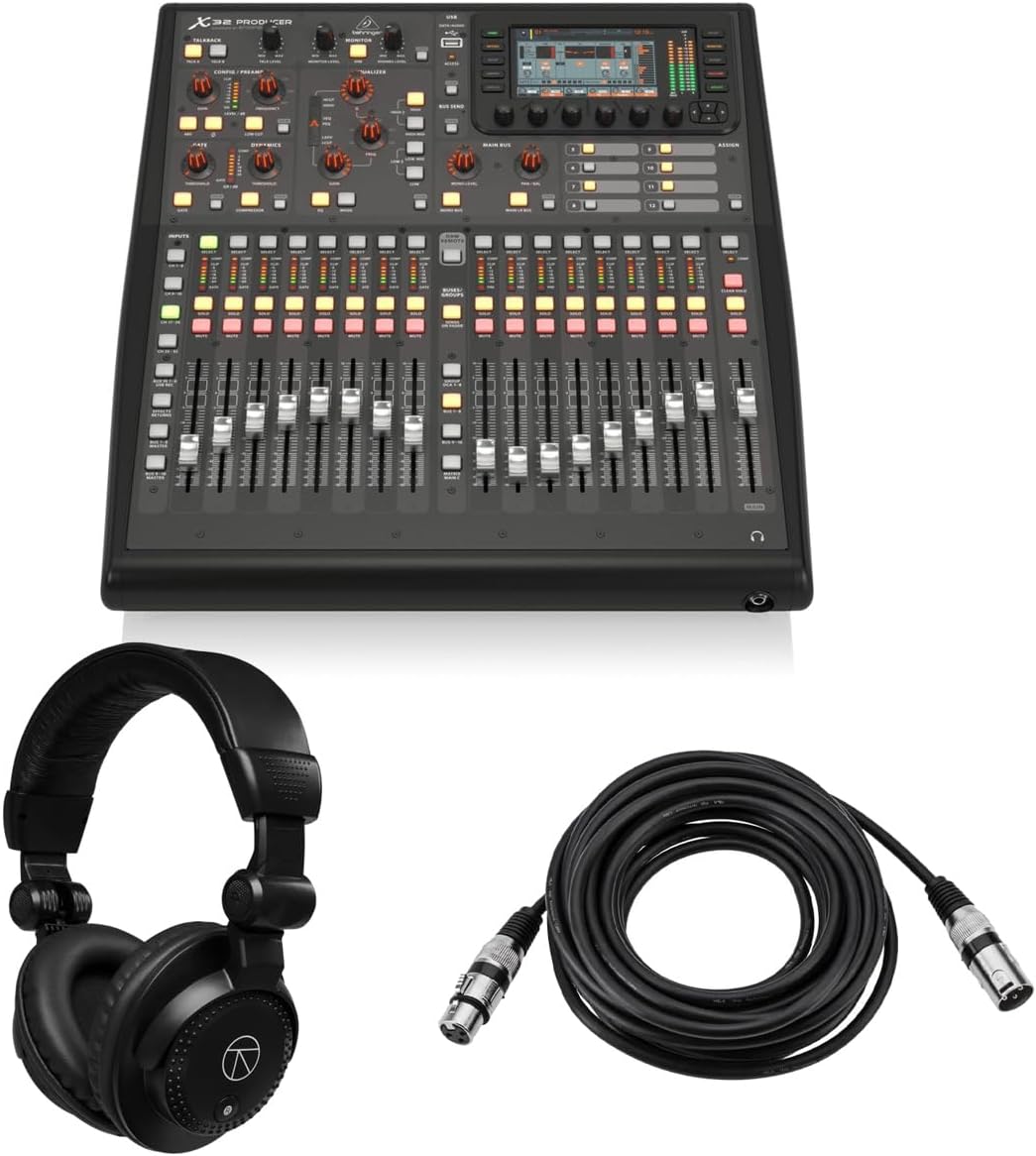
The X32 PRODUCER brings the full power of the X32 series into a compact rack-mountable unit. It is highly rated for its versatility and value. This unit is designed for users who need extensive routing and channel capacity in a smaller form factor that fits into equipment racks.
We may earn a commission when you buy through this link, at no additional cost to you.
It includes sixteen programmable MIDAS preamps and supports forty input channels with twenty five buses. The bundle often includes essential accessories like headphones and cables, making it ready for use right out of the box. The high dynamic range ensures that audio signals remain clear even with high gain settings.
Because it is a smaller version, it has fewer physical faders than the full-size model, relying more on screen navigation for certain adjustments. For some, this might feel less tactile. However, for fixed installations or mobile racks where space is limited, this design is a significant advantage.
This console is ideal for houses of worship, mobile recording trucks, and broadcast trucks. It suits professionals who need deep functionality without the footprint of a full console. We recommend it for users needing to save space without sacrificing performance.
Despite the compact size, this unit offers the full feature set of the X32 including 16 MIDAS preamps and 25 buses for complex audio routing and management.
The bundle often includes studio monitor headphones and professional XLR cables, providing a complete start-to-finish solution for recording and live sound applications.
We may earn a commission when you buy through this link, at no additional cost to you.
The X32 COMPACT is a streamlined version of the flagship X32, offering similar power in a smaller chassis. It maintains the high ratings associated with the X32 series. This console is engineered to save space while providing the same level of performance and routing capabilities as its larger counterpart.
We may earn a commission when you buy through this link, at no additional cost to you.
It features forty input channels and twenty five buses with sixteen MIDAS preamps. The fifteen motorized faders allow for intuitive scene management and instant overviews. Individual LCD Scribble Strips help identify channels quickly, which is crucial during live performances or complex studio sessions.
Although smaller than the standard X32, it still requires significant table space and might not fit in very small setups. It is not a tiny mixer but a more compact option. This trade-off is necessary to maintain the full feature set and build quality of the professional series.
This console is perfect for medium-sized venues and fixed installations where space is a concern. It suits engineers who need a professional console but have tighter space constraints. We recommend it for users who want X32 power in a smaller package.
The compact 40-input design offers the same capabilities as the full model in a smaller footprint, making it easier to integrate into tight control rooms and stages.
Individual and dynamic LCD Scribble Strips on all channels allow for easy assignment and clear visual distinction, reducing the chance of errors during live operation.
We may earn a commission when you buy through this link, at no additional cost to you.
The PreSonus StudioLive Classic 16.0.2 is a classic choice for integrating analog feel with digital convenience. It offers a solid feature set for recording and live sound. The console is appreciated for its Fat Channel EQ and processing which are easy to dial in for fast, professional results.
We may earn a commission when you buy through this link, at no additional cost to you.
It features sixteen inputs and a robust USB interface that records all channels to a computer. The included software bundle like Studio One Artist makes it a turnkey solution for recording. Users can store and recall scenes instantly, ensuring consistent settings across different sessions.
While it has a loyal user base, newer models often offer more modern connectivity. The interface is slightly dated compared to touch screens on other units. However, the tactile feedback and proven reliability of the hardware make it a reliable choice for studio environments.
This mixer is ideal for home studios, bands, and small live venues. It suits those who prefer physical controls and need a direct path to digital recording. We recommend it for users looking for a traditional mixing experience with modern recording capabilities.
All channels and buses feature Fat Channel EQ, compressor, and limiter, providing powerful signal processing directly on the console without needing external plugins.
The 18-in/16-out USB interface records all channels directly to your computer, allowing for multi-track recording and playback without extra audio hardware.
We may earn a commission when you buy through this link, at no additional cost to you.
The Yamaha DM3 brings renowned sound quality to an ultracompact form factor. It is designed for small to medium applications where space is at a premium. The console is well rated for its build quality and the clarity of its preamps and output stages.
We may earn a commission when you buy through this link, at no additional cost to you.
It features twenty two channels and a large nine inch touch screen for intuitive operation. The 96kHz sample rate ensures high fidelity audio recording and processing. Sixteen professional preamps and multiple USB interfaces make it versatile for both live performance and studio recording sessions.
The compact nature limits the total number of inputs compared to larger units. However, for most small productions this count is sufficient. The touch screen replaces physical knobs, which some users may take time to adjust to. This is a minor trade-off for the size savings.
This console is perfect for small venues, educational institutions, and mobile recording. It suits users who need portability without compromising on sound quality. We recommend it for anyone seeking a compact, high-quality mixing solution.
The 96kHz sample rate and renowned Yamaha sound quality ensure crystal clear audio reproduction for both live mixes and digital recordings.
A best in class 9-inch touch screen provides a modern and intuitive interface for managing scenes, EQ, and routing with just a few taps.
We may earn a commission when you buy through this link, at no additional cost to you.
The Allen & Heath Qu-5 introduces advanced XCVI FPGA processing to the digital mixing world. It offers exceptional audio quality with ultra-low latency which is critical for professional live sound. This model stands out for its flexible architecture allowing users to configure inputs and outputs as needed.
We may earn a commission when you buy through this link, at no additional cost to you.
It includes thirty eight inputs and twenty four outputs with a seven inch touchscreen and motorized faders. The SLink expansion port allows for further connectivity expansion. With multi-channel recording capabilities via USB-C, it is a robust choice for capturing full productions without extra hardware.
As a newer model, there are fewer long-term reviews available compared to established lines. The advanced features may require some learning for basic users. However, the technology ensures it remains relevant for years and the performance is on par with top-tier units.
This console is ideal for professional installations and broadcast environments needing reliable performance. It suits engineers who want future-proof technology and deep customization. We recommend it for users seeking top-of-the-line audio quality and modern features.
The 96kHz XCVI FPGA processing delivers exceptional audio quality and ultra-low latency, providing the power needed for demanding live sound and installed applications.
Integrated recording features include USB-C multitrack recording and SD card support, allowing for seamless capture of up to 32 channels directly from the mixer.
We may earn a commission when you buy through this link, at no additional cost to you.
The QSC TouchMix-16 is designed to make digital mixing accessible to everyone. It offers a simple interface that reduces the learning curve for operators. The console is highly rated for its ease of use and robust build quality that can withstand tough transport conditions.
We may earn a commission when you buy through this link, at no additional cost to you.
It features twenty inputs and a full parametric EQ on every channel. The TRS outputs can drive In-Ear Monitors directly, which is a huge convenience for musicians. The wizard-based setup guides users through basic functions, making it easy to get great sound quickly.
While it simplifies many tasks, it offers less routing flexibility than advanced consoles. This is acceptable for its intended use cases like small venues or events without complex needs. The trade-off ensures reliability and speed of operation without sacrificing essential sound control.
This mixer is ideal for small bands, corporate events, and mobile DJs. It suits users who need a reliable and easy-to-use solution without deep technical knowledge. We recommend it for anyone wanting quality sound with minimal setup hassle.
The intuitive wizard setup guides users through initial configuration, making it easy to get great sound quickly without needing extensive audio engineering knowledge.
TRS Aux outs can drive wired In Ear Monitors directly, providing a cost-effective and convenient solution for band monitoring during performances.
We may earn a commission when you buy through this link, at no additional cost to you.
Selecting the right digital mixing console depends on matching your specific production needs with the features offered by each model. This guide outlines the most critical factors to consider to ensure you invest in a system that performs reliably in your environment.
The number of inputs and outputs dictates how many microphones and instruments you can connect simultaneously. Always count your typical needs and add a margin for expansion to ensure you do not run out of channels during a show.
Choose a console with enough channels to cover your largest expected setup plus room for growth. This ensures long-term usability and flexibility for different event types.
DSP power determines how many effects and EQ adjustments you can run at once without latency. Higher processing power allows for more complex mixes and better sound shaping capabilities in real-time scenarios.
Look for models with dedicated DSP engines that support multiple internal effects and dynamics processors. This ensures you have the creative control needed for professional results.
Connectivity options such as USB, Ethernet, and wireless control determine how you interact with the console. Modern consoles often allow control from tablets or computers which adds convenience for remote mixing.
Verify that the console supports the connections you need for recording and control. This includes USB audio interfaces and wireless networking capabilities for flexible operation.
The quality of the microphone preamps directly affects the clarity and noise floor of your recording. High-quality preamps ensure that signals are captured cleanly and without unwanted hiss or distortion.
Opt for consoles with well-regarded preamp designs known for low noise and high headroom. This is crucial for achieving professional sound quality in any production.
The physical layout and interface design impact how fast you can adjust settings during a performance. A good workflow allows you to access key functions quickly without getting lost in complex menus.
Choose a layout with physical faders or intuitive touchscreens that match your working style. A logical interface reduces the risk of errors during critical moments.
Since many consoles are used in mobile or stage environments, physical durability is essential. A sturdy build ensures the unit can withstand transport and rough handling without damage.
Look for robust construction with quality knobs and switches. This ensures the console remains reliable over years of regular use and travel.
Software updates and support determine how long the console remains useful and secure. Manufacturers that provide regular firmware updates ensure you get new features and bug fixes over time.
Check for available desktop and mobile apps that enhance control and recording capabilities. Strong software support adds significant value to your purchase.
When setting up your console, start by connecting all inputs and outputs according to the manual. Ensure that gains are set properly using the metering to avoid clipping or distortion during the soundcheck phase.
Regularly update the firmware on your console to access new features and fix known issues. Keeping your software current ensures the system runs smoothly and securely without compatibility problems.
Clean the console with a soft dry cloth and avoid using harsh chemicals on the screens. Store the unit in a cool dry place when not in use to protect electronic components from humidity and dust.
Digital consoles offer more flexibility with routing effects and recall capabilities. They also allow for remote control and recording which is difficult with analog. However analog can be simpler for basic tasks. The choice depends on your specific needs.
Count the number of instruments and microphones you use regularly. Add extra channels for future growth or guest performers. A 16-channel mixer suits small groups while 32 or 40 is better for larger bands and complex shows.
Most digital consoles have built-in audio interfaces via USB. This allows you to send multi-track audio to your computer for recording or streaming. Check the specific channel count of the interface before purchasing.
Motorized faders move automatically to reflect saved mix scenes. This makes it easy to recall settings instantly without manual adjustment. It is very useful for live shows with multiple songs or segments.
No, digital mixers function independently. A computer is only needed for recording or using control software. You can perform all mixing tasks on the unit itself without external devices.
Touchscreens provide intuitive control and faster access to detailed settings. They allow for easy editing of EQ and dynamics without many physical buttons. This streamlines the workflow and reduces clutter on the surface.
Choosing the right digital mixing console depends on your specific production needs and budget. The X32 remains a top choice for overall value and power while the XR18 offers incredible portability at a lower price point.
Prioritize consoles that offer enough inputs and the necessary DSP to handle your typical mix. Look for features that support your workflow like remote control or direct recording capabilities to streamline your work.
Remember to check current availability and pricing as these can fluctuate over time. The models listed here represent some of the best options available for audio professionals today.