
Digital Calendar 10.1" Touchscreen
4.4Editor score
Affordable price point
Interactive reward system
No hidden fees
Keeping track of household tasks can be challenging for busy families. A digital chore chart offers a modern solution that replaces paper lists with interactive screens. These devices help organize schedules while motivating children through visual cues and digital rewards systems.
We compared ten leading models based on screen quality, synchronization capabilities, and user interface design. Each product was evaluated for ease of setup, subscription costs, and overall family functionality to ensure you find a reliable tool for your home management needs.
Every pick in this list highlights specific strengths for different household sizes and preferences. Note that prices and availability may change over time so check the links for the most current offers before making your final purchasing decision today.
4.4Editor score

4.4Editor score

4.4Editor score
As an Amazon Associate we earn from qualifying purchases.
This side-by-side comparison evaluates ten top-rated digital chore chart devices to help you decide which one fits your family's organizational needs and budget constraints best.
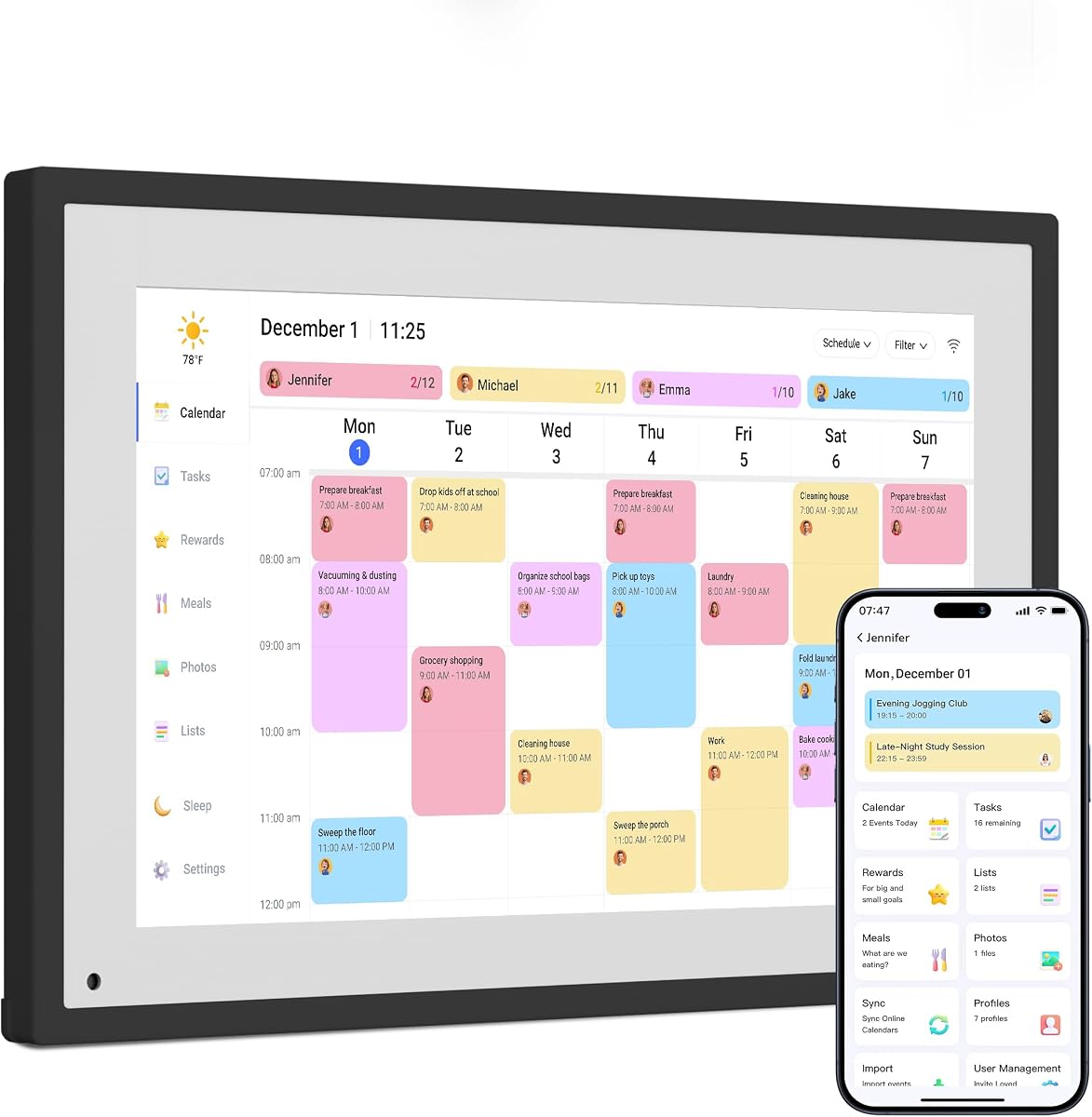




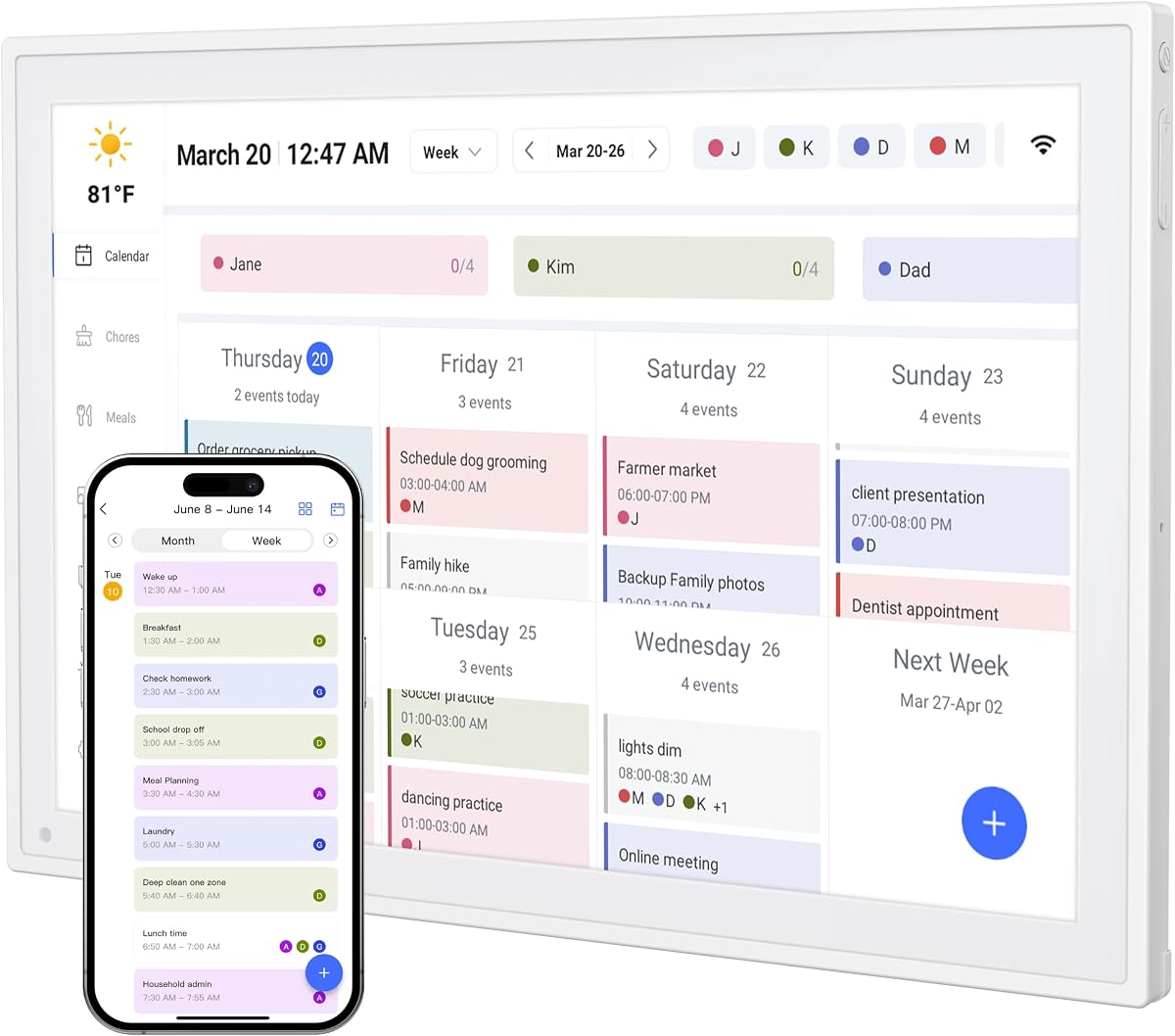

The 15.6" Digital Calendar Wall Touch Screen stands out as a top choice for families needing a comprehensive command center. With a 4.4 rating it offers significant value through its no subscription model and real-time synchronization capabilities.
We may earn a commission when you buy through this link, at no additional cost to you.
This device integrates calendars meal planning and chore charts into one sleek interface. The built-in motivational chore system turns routines into a gamified experience which is particularly effective for keeping children engaged and responsible.
While the price is higher than smaller models the screen size and feature set justify the cost for large households. The only minor drawbacks are the need for external batteries and the initial setup complexity.
Families seeking a robust long-term solution for coordination will find this device invaluable. It effectively centralizes household management without ongoing monthly fees making it a smart investment for busy homes.
This calendar syncs instantly with Google Outlook and iCloud allowing multiple members to edit schedules simultaneously without conflicts.
Parents can assign tasks while children check them off to earn points fostering responsibility and positive habits effectively.
We may earn a commission when you buy through this link, at no additional cost to you.
This 10.1" Digital Calendar offers an exceptional balance of features and affordability for budget-conscious families. It earns a strong 4.4 rating thanks to its comprehensive functionality that remains fully unlocked without hidden costs.
We may earn a commission when you buy through this link, at no additional cost to you.
The device shines with its interactive chore list and smart weekly meal manager features. Kids love earning stars for tasks while parents appreciate the automatic grocery generation that simplifies weekly shopping routines significantly.
Trade-offs include a smaller screen that might be harder to read from a distance compared to larger models. The display quality is adequate but lacks the premium feel of more expensive options available in the market.
Families looking for essential organization tools without breaking the bank should consider this model. It provides all necessary functionality for daily planning while remaining accessible to a wide range of buyers.
Every feature including calendar sync and rewards is included with zero hidden fees ensuring long-term affordability for users.
Visual weekly menus combined with automatic grocery lists help reduce dinner stress and food waste effectively.
We may earn a commission when you buy through this link, at no additional cost to you.
The Skylight Calendar represents the premium end of the digital chore chart market with its elegant design and advanced features. With a 4.4 rating it delivers a polished experience suitable for modern households seeking style and substance.
We may earn a commission when you buy through this link, at no additional cost to you.
Its standout feature is the Disney Mode which uses animations and avatars to engage children. The HD display is visually stunning and the interface is intuitive making daily check-ins seamless for all family members.
While the cost is higher the quality justifies the expense for those prioritizing aesthetics and user experience. Some advanced photo features do require a subscription which adds to the long-term cost slightly.
Families wanting a stylish command center that doubles as high-end decor should choose this option. It combines practical utility with premium design elements that elevate the overall home environment beautifully.
Engage kids with iconic characters animations and avatars through the premium subscription offering unique interactive fun.
The sleek HD display mounts easily to walls or sits on countertops offering a sophisticated look for any room.
We may earn a commission when you buy through this link, at no additional cost to you.
The Dragon Touch 10.1 inch combines scheduling and decor into one seamless device that appeals to design-conscious users. It holds an excellent 4.5 rating for its ability to organize family schedules while adding elegance to any room.
We may earn a commission when you buy through this link, at no additional cost to you.
Users can assign different colors to each member making tasks clear and simple. When not in use the touchscreen transforms into a beautiful picture frame that showcases family memories with high clarity and precision.
The lack of wall mount support means it sits only on surfaces limiting flexibility for some kitchen setups. However the intuitive interface and high-quality screen make up for this limitation in most home environments.
Families prioritizing simplicity and visual appeal will find this device perfect for daily use. It effectively merges organizational utility with home aesthetics providing a functional and beautiful addition to living spaces.
Assign different colors to tasks for each member making schedules simpler and more intuitive at a glance.
Transform the calendar into a stunning photo display to add elegance to any room effectively.
We may earn a commission when you buy through this link, at no additional cost to you.
This model is marketed as a top gift choice for its ease of use and elegant design. With a 4.5 rating it offers reliable organization features that make family planning simpler for busy households and gift recipients.
We may earn a commission when you buy through this link, at no additional cost to you.
The device supports easy setup by simply plugging in and linking mobile apps. It also includes a dinner planner which eliminates daily debates about meals while keeping everyone informed on kitchen duties.
While it lacks some advanced features found in larger models it covers the essential needs for most families. The screen remains clear and responsive ensuring smooth interaction without technical difficulties during daily use.
Those looking for a thoughtful and practical present should consider this model. It balances functionality with style making it an ideal choice for anyone needing better household organization and coordination tools.
Enjoy user-friendly design allowing quick setup with just plug-in connection to Wi-Fi and mobile apps.
Display family dinner plans to keep everyone informed and eliminate the daily what is for dinner question.
We may earn a commission when you buy through this link, at no additional cost to you.
Designed specifically for kitchen countertops this model offers a compact yet powerful solution for family planning. Its 4.4 rating reflects strong user satisfaction with its ability to unify schedules chores and meals in one central hub.
We may earn a commission when you buy through this link, at no additional cost to you.
The dual-band Wi-Fi ensures instant updates so everyone stays on the same page regardless of location. Parents appreciate the clutter-free paperless management which helps children build independence through interactive digital checks on tasks.
The compact design is perfect for small kitchens where space is limited. However users should ensure they have stable Wi-Fi coverage in that area to maintain real-time sync reliability throughout the week.
If your primary goal is kitchen organization and meal planning this device is highly effective. It streamlines daily routines while keeping the family coordinated and engaged in household responsibilities seamlessly.
Syncs with Google iCloud and Outlook merging appointments into one intuitive display for all family members.
Kids can check off completed tasks easily building habits and independence in a paperless way.
We may earn a commission when you buy through this link, at no additional cost to you.
This 15.6" model offers exceptional storage with 64GB of internal memory ideal for large families with extensive media libraries. It earns a solid 4.4 rating for its high-resolution display and versatile organizational features.
We may earn a commission when you buy through this link, at no additional cost to you.
Users can transfer thousands of media files directly via the AiMOR app which makes viewing memories seamless. The large touchscreen supports customizable widgets including meal planners and weather updates that simplify daily planning tasks.
While the interface is comprehensive it may require some learning for older users to navigate effectively. The photo transfer process relies on app connectivity which might be less direct than other simpler calendar solutions available.
For families with rich photo collections and a need for a large view area this is a strong option. It combines robust storage with high-quality visuals providing a durable and functional command center for busy households.
Built-in 64GB storage holds thousands of media files ensuring ample space for extensive photo memories.
Personalize your wall calendar with drag-and-drop widgets including meals weather and other daily tools.
We may earn a commission when you buy through this link, at no additional cost to you.
Achieving a rare perfect 5.0 rating this calendar excels in user satisfaction and family-friendly design. Its focus on positive reinforcement through rewards makes it highly effective for building habits without external pressures.
We may earn a commission when you buy through this link, at no additional cost to you.
The customizable reward charts encourage kids to earn stars by completing tasks fostering independence and responsibility. Parents benefit from the no subscription model which keeps costs low while ensuring all core features remain available for daily use.
While the screen is standard size it remains clear and functional for most household tasks. Some users might find the syncing features less robust compared to higher-end models but the simplicity is often a benefit for daily routines.
Families seeking a straightforward motivational tool for children will find this model ideal. It combines practical scheduling with effective behavioral support making it a top choice for positive home management solutions.
Create a fun routine with customizable reward charts that encourage kids to complete tasks and earn stars.
Enjoy all core functions free forever without needing monthly fees or hidden costs for basic features.
We may earn a commission when you buy through this link, at no additional cost to you.
This model stands out with its silent vibration motor making it unique for bedside or quiet room use. With a 4.2 rating it offers practical features for families who value unobtrusive alerts and simple design solutions.
We may earn a commission when you buy through this link, at no additional cost to you.
The auto-brightness feature ensures visibility day or night without glare disruption. Users can switch between portrait and landscape orientations to fit different spaces while maintaining a clear view of schedules and tasks daily.
Although the rating is slightly lower it still provides reliable performance for daily organization. The recipe keeper adds a nice touch for kitchen management though it may not support complex meal planning for larger households.
If you need a subtle alert system for early appointments or nightstand use this is a great pick. It balances functionality with quiet operation ensuring family coordination happens without disturbing sleep or relaxation times.
Set silent vibration to wake you for early appointments without disturbing partners at night.
Plan weekly meals and save family recipes in one place to reduce daily cooking stress.
We may earn a commission when you buy through this link, at no additional cost to you.
The 10.1" Full HD Calendar offers a sleek design that complements modern home decor while providing essential planning tools. With a 4.2 rating it is a solid choice for users prioritizing aesthetics and clear visuals in their daily schedule.
We may earn a commission when you buy through this link, at no additional cost to you.
Its ultra-thin frame and Full HD resolution make it visually appealing for desk or wall mounting. The display shows meal titles clearly without needing complex recipe entries which simplifies the interface for quick daily checks.
Users may find the recipe features basic compared to other models but the simplicity helps reduce clutter on the screen. The no subscription model ensures core functions are free making it accessible for budget-conscious families.
If you want a stylish calendar that doubles as decor this model delivers well. It combines clear visuals with straightforward management making it a practical and attractive choice for everyday family organization.
Features a sleek ultra-thin design that complements any modern home decor seamlessly.
Visually display main course titles to keep the screen uncluttered and easy to read from distance.
We may earn a commission when you buy through this link, at no additional cost to you.
Choosing the right digital chore chart involves evaluating several factors to match your family's specific organizational needs and lifestyle preferences.
Larger screens like 15.6 inches offer better visibility from a distance which is ideal for family command centers. Look for Full HD resolution to ensure text and images remain clear and easy to read even from across the room.
Prioritize a screen size that fits your wall or counter space while ensuring legibility for all family members without strain.
Many digital planners require monthly fees for advanced features so check if all core functions are included. Some models offer unlimited access without subscriptions making them more cost-effective over time.
Choose a model that offers full functionality without recurring fees to keep your budget predictable and simple.
Ensure the device supports syncing with major calendar apps like Google iCloud and Outlook to keep schedules updated across devices. Real-time sync prevents conflicts and ensures everyone sees the latest changes instantly.
Look for real-time sync support to maintain accurate and up-to-date schedules across all connected devices effectively.
Interactive systems that allow children to check off tasks and earn points help build responsibility and motivation. Look for customizable charts that can adapt to different ages and skill levels.
Select a device with interactive rewards to encourage positive habits and independence in children through gamification.
Integrated planners that include weekly menu and grocery list generation simplify kitchen management significantly. This feature helps reduce daily decision fatigue and minimizes food waste through organized planning.
Choose a model with meal planning features to streamline cooking routines and manage grocery needs efficiently.
Decide if you need wall-mountable options or a desk stand based on your home layout. Some models are designed for both allowing you to reposition them as your needs change.
Prioritize models with versatile mounting options to suit various spaces and family usage patterns effectively.
Devices that transition to photo frames when idle add aesthetic value to your space. This feature keeps the device useful even when not actively planning tasks or viewing schedules.
Consider models with built-in photo frame modes to enhance home decor while providing useful organizational tools.
A simple and intuitive interface ensures all family members can use the device without technical difficulties. Look for touchscreens that respond smoothly and menus that are easy to navigate.
Focus on user-friendly interfaces to ensure smooth daily usage and quick adoption by everyone in the household.
Start by connecting the device to your Wi-Fi network and signing into your calendar accounts like Google or iCloud. This initial setup ensures that all schedules and events sync automatically across your devices without manual updates.
Once connected customize colors for each family member to keep tasks organized visually. Add weekly chores and meal plans using the built-in tools so everyone can check off items and stay on track.
Clean the touchscreen with a soft microfiber cloth to avoid scratches and maintain visibility. Avoid using harsh chemicals or excess water which could damage the electronics or screen coating over time.
Most of the top models offer core features without subscriptions but some premium options may charge for advanced photo or sync tools. Always check the product details to ensure you get the functions you need for free.
Yes most devices support real-time sync with Google or iCloud allowing multiple people to edit schedules simultaneously. This ensures everyone stays updated on changes instantly without confusion or overlapping plans.
Yes all models switch to a photo frame mode when idle displaying family photos automatically. This feature helps keep your home looking decorated even when you are not using the calendar functions actively.
Yes most digital calendars sync with both Google and Apple iCloud platforms so they work with both Android and iPhone. This compatibility ensures that mobile users can update schedules from their smartphones easily.
You can assign color-coded tasks to each family member so that children and adults have their own views. Some devices also include reward systems where kids earn stars for completed tasks to stay motivated.
If Wi-Fi disconnects the device will show cached data but new syncs will pause until the connection is restored. Most units continue to display existing schedules so your planning remains functional during outages.
Some models offer recipe storage or weekly meal planning features though not all support full text recipes. Check the specific product specs to see if recipe viewing or meal list generation is included.
Most digital calendars are designed to be plugged into a standard outlet for continuous power. Some models might need batteries for backup or portable use so check the power requirements before buying.
These ten digital chore charts provide powerful tools to bring structure and fun to family routines. From the affordable options to premium models with exclusive features there is a choice for every household size and budget preference.
Prioritize a device that offers seamless sync and a user-friendly interface to ensure long-term adoption by all family members. Consider whether you need advanced meal planning or simple task tracking to find the best fit for your home.
Prices and availability can change quickly so check the links for current pricing and offers before you finalize your purchase. With the right tool you can transform daily planning into a smooth and organized experience for everyone.