
YATINEY Desktop Printer Stand Rustic Brown
4.7Editor score
Z shaped modern design
Affordable price point value
Easy assembly instructions included
Finding a reliable desktop printer stand helps maximize your workspace efficiency. A good unit elevates your device while offering additional storage for supplies. This selection focuses on sturdy construction and versatile designs for modern offices.
We evaluated ten top models based on stability, storage capacity, and ease of assembly. Each option provides unique benefits whether you need wheels for mobility or drawers for organization. Our team analyzed user feedback and technical specifications to compile this list.
Each pick highlights specific strengths like material quality or dimension compatibility. We ensure every product meets high standards for durability and functional design. Please note that availability and pricing may fluctuate over time on retail platforms.
4.7Editor score

4.8Editor score

4.7Editor score
As an Amazon Associate we earn from qualifying purchases.
This side-by-side comparison highlights key differences between all ten selected models. Look for dimensions weight limits and special features like drawers or wheels to find your perfect match.


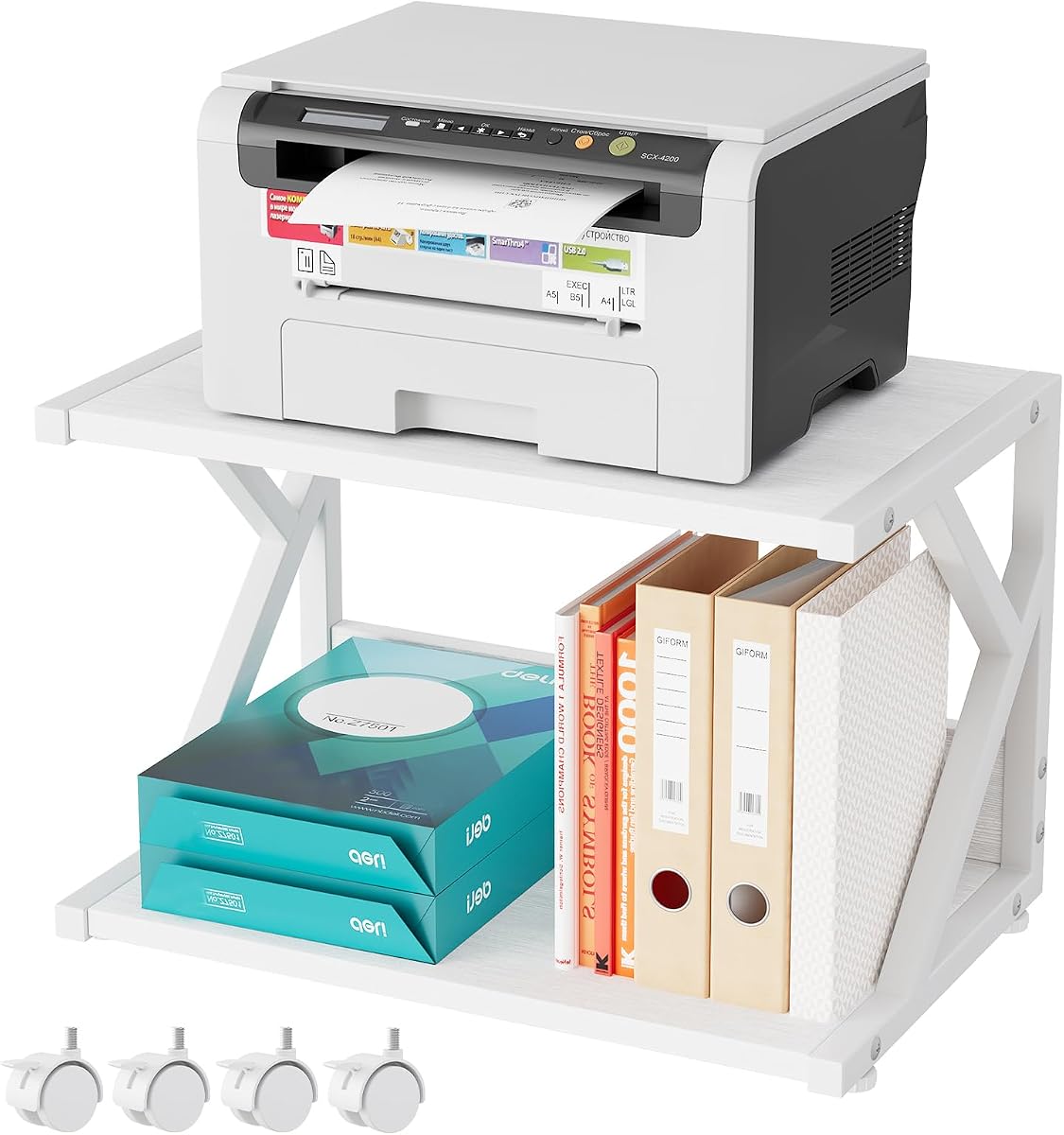
This desktop printer stand earns top marks for its balance of strength and storage. Rated highly by users it features a fabric drawer that keeps essentials hidden yet accessible. The design supports heavy printers while maintaining a sleek profile suitable for home offices.
We may earn a commission when you buy through this link, at no additional cost to you.
The upper shelf holds most standard printers securely thanks to the stable metal frame. The middle open space allows for document organization without cluttering the main desk surface. Its waterproof top ensures spills wipe away easily preserving the look over time.
While the fabric drawer adds charm it might not be as durable as solid wood options. Some users note assembly requires patience due to screw alignment issues. However these minor trade offs are acceptable given the overall value and functionality provided.
If you need a sturdy unit with hidden storage for a modern space this pick is ideal. It suits users who prioritize organization and aesthetics without sacrificing structural integrity for daily printing tasks.
The fabric drawer provides a discreet spot for office supplies protecting them from view while remaining easy to pull out.
A coated top surface resists water damage allowing quick cleanup after accidental spills or wet ink cartridges.
We may earn a commission when you buy through this link, at no additional cost to you.
This budget-friendly stand delivers exceptional value with its clean design and reliable support. The Z-shaped structure adds a modern touch to any desk while offering ample room for printers and supplies. Users appreciate the quick setup and solid build quality at this price point.
We may earn a commission when you buy through this link, at no additional cost to you.
Both tiers support significant weight ensuring stability even with larger laser printers on top. The open layout keeps items accessible for frequent use like paper refeeds or cartridge changes. Its rustic finish blends well with various decor styles from industrial to classic.
The lack of enclosed drawers means small items might gather dust over time. Those needing privacy for documents may need separate bins. Still the affordability and visual appeal make it a top contender for tight budgets.
Ideal for students or small offices needing a simple efficient solution this model stands out. Prioritize this if you want style and strength without breaking the bank on home organization.
The unique Z design adds visual interest and maximizes corner space while maintaining a minimal look.
Open shelves ensure you can grab paper or ink instantly without opening lids or drawers.
We may earn a commission when you buy through this link, at no additional cost to you.
This premium unit stands out for its expandable design and generous storage capacity. The black finish offers a sleek look while the stackable feature allows you to customize height as needs grow. It handles large printers effortlessly with robust structural support.
We may earn a commission when you buy through this link, at no additional cost to you.
Three compartments provide distinct zones for paper files and supplies reducing clutter effectively. The wide base ensures stability preventing tipping even with heavy machinery. Rubber feet keep your floor safe from scratches while minimizing noise during movement.
The larger footprint may overwhelm smaller desks or narrow corners. If space is tight consider measuring first. Assembly is straightforward but could use more detailed diagrams for complex parts. Overall it suits larger offices needing versatility.
For power users or businesses requiring extensive storage this model delivers. Choose it if you value modularity and need room for multiple devices or bulk paper supplies.
Stackable components let you add height or width later making it a future-proof investment for growing needs.
High-quality rubber pads prevent slips and scratches keeping your desks and floors pristine over time.
We may earn a commission when you buy through this link, at no additional cost to you.
Built for durability this stand handles exceptional weight loads better than most competitors. The steel frame reinforces the board top ensuring stability for heavy printers or multiple devices. Its rounded corners prevent accidental bumps making it safer for shared spaces.
We may earn a commission when you buy through this link, at no additional cost to you.
The generous surface area accommodates large office machinery without overhang. Non-slip pads keep the unit fixed in place preventing movement during operation. While it lacks storage drawers it functions well as a simple riser for various items.
Lack of enclosed storage might mean extra bins for small accessories. The utilitarian look fits industrial settings but may not suit polished home offices. Still its strength and safety features justify the choice for demanding environments.
Best for warehouses or heavy-use areas this model offers unmatched stability. Prioritize it if you carry oversized equipment or need a rigid platform for daily wear and tear.
With 100lb capacity this unit supports large laser printers or multiple devices without wobbling.
Rounded edges reduce injury risks making it safer for households with children or busy foot traffic.
We may earn a commission when you buy through this link, at no additional cost to you.
This stand excels at organizing small office items beyond just holding printers. Integrated pen holders and a letter tray keep tools within arm's reach. The drawer adds privacy for sensitive documents or ink cartridges needing protection from dust.
We may earn a commission when you buy through this link, at no additional cost to you.
Metal mesh allows airflow which helps prevent overheating on electronic devices. The design is space efficient fitting neatly into smaller desks. Rubber feet adjust to uneven floors ensuring a level surface for smooth operation.
Drawer slides may feel stiff initially requiring break-in time for smooth motion. The width limits options for wider printers compared to other models. However the organizational features make it a strong choice for tidy workspaces.
Ideal for home offices needing extra supply management this unit shines. Choose it if you want a dedicated spot for pens papers and files under your device.
Hangers and trays keep writing tools sorted so you never search for a pen during a call.
Mesh sides allow heat to escape keeping your printer running cooler during extended print jobs.
We may earn a commission when you buy through this link, at no additional cost to you.
Designed for flexibility this cart moves easily to clean or reorganize your room. Locking wheels ensure it stays put when printing while allowing smooth transport otherwise. Its low profile fits under standard desks freeing up surface space for laptops or monitors.
We may earn a commission when you buy through this link, at no additional cost to you.
Tool free assembly makes setup a breeze even for non-handy users. The bottom shelf stores paper while the drawer hides small accessories. Stacking options let you build storage height without drilling holes or permanent fixtures.
Wheels can make it slightly less stable than floor fixed units on carpet. Lower load limits mean avoid placing extremely heavy industrial devices on top. Still its mobility is unmatched for dynamic work environments.
Perfect for shared spaces or cleaning routines this model offers easy repositioning. Select it if you need to move your setup frequently without lifting heavy furniture.
Locking casters let you glide the unit into place then lock it securely for vibration-free printing.
Stackable segments allow you to customize height so it slides under most desks comfortably.
We may earn a commission when you buy through this link, at no additional cost to you.
This unique unit allows you to hide the drawer completely when not needed. The three tier design supports two printers or a printer plus a scanner. Dual rod support ensures the structure remains steady even with multiple items stacked.
We may earn a commission when you buy through this link, at no additional cost to you.
Vintage finish adds a retro touch to modern offices blending well with wood furniture. The bottom drawer expands when needed and folds flat to save space. Its compact footprint fits tight corners without sacrificing usable shelf area.
Foldable fabric may wear faster than solid drawers with heavy use. Color consistency varies slightly by batch so check photos before ordering. Still the flexibility and stability offer a strong option for varied setups.
Best for those who value flexible storage this model adapts to changing needs. Pick it if you want a rustic look with space-saving features for small offices.
Fold the drawer away when you need extra legroom or want a streamlined look.
Two rods per side distribute weight evenly preventing wobble under heavy printer loads.
We may earn a commission when you buy through this link, at no additional cost to you.
This model focuses on simplicity offering a no-fuss solution for basic storage needs. Open shelves make it easy to access paper and files quickly while the drawer hides clutter. The non-woven material is lightweight yet durable enough for light office items.
We may earn a commission when you buy through this link, at no additional cost to you.
Assembly takes just minutes thanks to clear instructions and pre-drilled holes. The rustic brown tone suits traditional or industrial decor themes well. Metal frames provide a stable base for standard home printers without wobbling.
Drawer bottoms can sag under heavy weight so avoid overloading. Chipboard surfaces need care to prevent scratches from sharp objects. These minor issues are manageable for the price and ease of use offered.
Ideal for renters or students needing quick furniture this stand works well. Choose it if you want a tidy desk quickly without complex assembly or high costs.
Clear steps and simple parts let you build the stand in ten minutes with basic tools.
The drawer keeps pens and papers out of sight maintaining a clean workspace surface.
We may earn a commission when you buy through this link, at no additional cost to you.
This stand stands out by including power outlets directly on the unit for convenience. You can charge phones or tablets while printing without hunting for wall sockets. Hooks manage cables reducing tangles and improving the neatness of your desk area.
We may earn a commission when you buy through this link, at no additional cost to you.
Compact size fits small workspaces where every inch matters. The metal frame ensures stability for smaller inkjet printers. Its rustic industrial style matches modern home office aesthetics perfectly.
Limited shelf depth might restrict larger printer models. Charging ports cannot be moved which limits flexibility for large setups. Still the integration of power makes it a unique choice for tech-heavy desks.
Perfect for home offices charging multiple devices this model offers added utility. Select it if you want a compact stand that powers your tech alongside your printer.
Plug devices directly into the stand reducing the need for extra power strips on your desk.
Hooks keep cords organized preventing tripping hazards and keeping your workspace tidy.
We may earn a commission when you buy through this link, at no additional cost to you.
This versatile stand offers a choice between wheels for movement or feet for stability. The white finish brightens up dark spaces making rooms feel larger. Scratch resistant surfaces withstand daily use without showing signs of wear quickly.
We may earn a commission when you buy through this link, at no additional cost to you.
Dimensions fit standard printers while leaving room for files on the lower tier. The metal frame supports up to 44 pounds per layer ensuring reliable performance. Its simple design blends into any decor theme from office to living room.
Light colors may show dust requiring regular cleaning to look fresh. Hardware quality can vary so tighten screws fully after setup. Despite these small issues it remains a strong value for budget conscious buyers.
Best for flexible needs this model adapts to moving or fixed setups easily. Choose it if you want a clean modern look with adaptable features for your space.
Decide between wheels for movement or fixed pads for stability based on your room needs.
White coating reflects light making smaller workspaces appear bigger and more open.
We may earn a commission when you buy through this link, at no additional cost to you.
Selecting the right stand depends on your printer size storage needs and available space.
Measure your printer's width depth and height before buying. Ensure the stand's top surface exceeds these numbers by at least an inch on all sides for stability.
Always verify dimensions against your device specs to prevent overhang risks.
Check the maximum weight limit per shelf. Laser printers often weigh more than inkjets so look for stands rated for higher loads like 50 pounds or more.
Choose a model with a higher weight limit than your printer for safety.
Decide if you need drawers shelves or hooks. Drawers hide clutter while open shelves make items accessible. Hooks manage cables to prevent tangles.
Prioritize storage types that match your daily workflow needs.
Metal frames offer longevity while wood or particleboard provide aesthetic warmth. Look for waterproof tops to protect against ink spills or water damage.
Select materials that balance durability with your office style.
Wheels add flexibility for cleaning or rearranging but may reduce stability. Rubber feet provide a static base suitable for heavy units on hard floors.
Choose wheels only if you plan to move the stand often.
Check if tools are included or if assembly takes under 20 minutes. Look for clear diagrams and pre-drilled holes to avoid frustration during setup.
Opt for models with tool free assembly if you lack hardware.
Match the stand's color to your existing furniture. Neutral tones like black or brown blend easily while white brightens up darker corners.
Ensure the finish matches your current interior design scheme.
Enclosed boxes trap heat. Open metal or mesh designs allow airflow preventing overheating during long print jobs.
Prioritize designs with open sides for better device cooling.
Place your printer on the top surface ensuring it sits flat. Leave space around edges for paper trays to open freely.
Wipe the top weekly with a damp cloth to remove dust and ink residue. Avoid harsh chemicals that damage finishes.
Check screw tightness monthly if you have wheels. Tightening loose joints prevents wobbling during operation.
Most standard home and office printers fit the dimensions listed. Always check the stand's width and depth against your printer's specifications before buying to ensure a perfect fit.
Weight limits vary by model but many support between 38 to 100 pounds. Select a unit with a rating higher than your printer's weight to guarantee stability during use.
Some models include wheels for mobility while others use static feet. Check the product description for wheel options if you need to move the stand frequently.
Many stands provide necessary tools or offer tool free assembly. However having a screwdriver ready can speed up the process and ensure tighter screws.
Use a soft damp cloth to wipe dust. Avoid soaking the wood to prevent warping and dry it thoroughly to maintain the finish.
Several models are designed with low profiles for under desk use. Verify the height clearance against your desk to ensure the stand fits comfortably underneath.
We reviewed ten top stands offering features like storage drawers wheels and durable materials. The YAOHUOO model leads in storage while the Marbrasse excels in organization.
Prioritize weight capacity and dimensions to match your equipment. Consider your need for mobility or storage before making a final decision.
Always check current availability as stock changes frequently on retail sites. This guide helps you find a stand that fits your specific workflow needs.