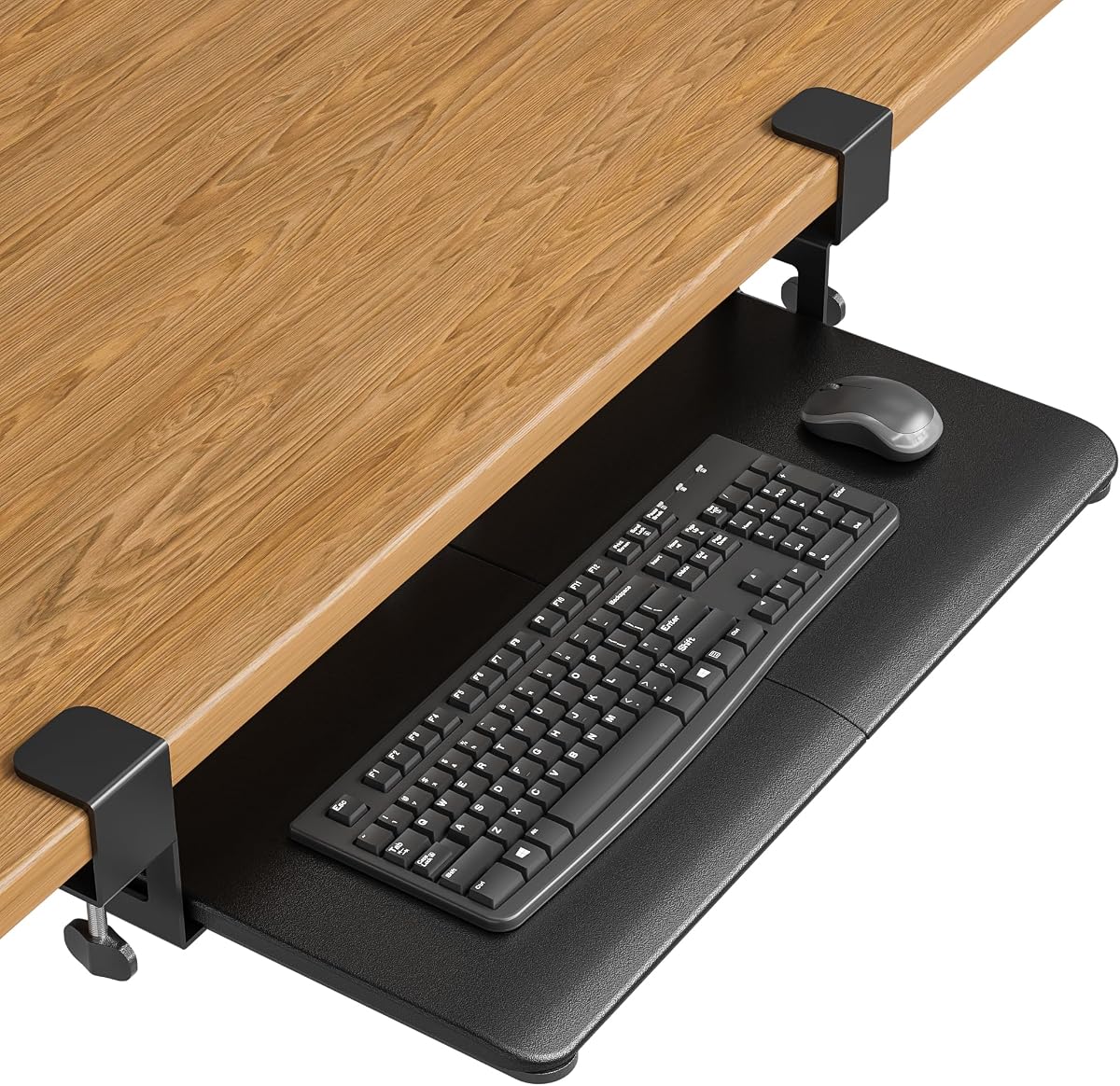
BONTEC Under Desk Keyboard Tray
4.4Editor score
No-drill C-clamp installation
Supports up to eleven pounds
Fits desks up to two inches thick
This guide compares the top clamp on keyboard tray models for ergonomics and space saving to help you choose the right under desk solution for your workspace.
Finding the right clamp on keyboard tray can transform your workspace by freeing up valuable desk space and improving your posture during long work sessions. These devices allow you to position your keyboard and mouse at an optimal height and angle, reducing strain on your wrists and shoulders while keeping your main desk surface clear for other tasks and equipment.
We have carefully evaluated ten leading clamp on keyboard tray models based on their build quality, ease of installation, adjustability features, and overall value for money. Our comparison considers factors like desk thickness compatibility, weight capacity, extension range, and additional features such as tilt adjustments or storage options to ensure you find the perfect fit for your specific setup.
Each product in this list showcases unique strengths whether you need a budget friendly option a a premium model with advanced ergonomic adjustments. Please note that prices and availability can change frequently so we recommend checking the current listings before making your final purchase decision to ensure you get the best deal available today.
4.4Editor score

4.4Editor score

4.3Editor score
The following table provides a side-by-side comparison of all ten featured clamp on keyboard tray models highlighting their key specifications and unique features to help you make an informed decision quickly.


The VIVO Black Clamp-on 27 x 11 in Keyboard Tray stands out as a top choice for users seeking a reliable and affordable under desk solution. With a rating of 4.4 stars from verified buyers this model consistently delivers on its promise to free up desk space while supporting ergonomic typing positions.
We may earn a commission when you buy through this link, at no additional cost to you.
Key strengths include its sturdy C-clamp mechanism that securely attaches to desks without causing damage and the generous surface area that accommodates full size keyboards and mice. The tray extends smoothly up to 8.5 inches allowing you to pull it closer for use and push it away when not needed.
While it lacks advanced tilt adjustments and is not compatible with beveled desk edges these trade-offs are acceptable given the competitive price and solid build quality. Users should ensure their desk surface is flat and under 1.25 inches thick for optimal fit.
This tray is ideal for home office workers and gamers who need a cost effective way to improve their workspace ergonomics without investing in expensive standing desks. We recommend it as a best overall choice for its balance of performance and value.
The under-desk placement frees up your main desktop for monitors and documents creating a cleaner more organized workspace environment.
The C-clamps are designed to hold the tray firmly in place preventing wobble during typing even under normal daily use.
We may earn a commission when you buy through this link, at no additional cost to you.
The VIVO Black Clamp-on 23 to 30 x 11 Adjustable Keyboard Tray offers exceptional customization for users with varying desk setups. Its ability to adjust both width and height makes it a versatile choice for those who need precise ergonomic alignment.
We may earn a commission when you buy through this link, at no additional cost to you.
The tray includes a built-in wrist pad and mouse pad which adds comfort during long typing sessions. The height adjustment feature provides five set points allowing you to find the perfect clearance under your desk for your specific needs.
While the assembly process is straightforward it does require time to align the clamps correctly. Additionally the compatibility restriction with beveled edges means it may not work with all modern desk designs.
This model is perfect for users who need to accommodate thicker desks or want more control over their keyboard position. We recommend it for those prioritizing adjustability and comfort over minimal assembly time.
The height adjustable tray has 2.4 inches of total adjustment with five set points for customized placement to suit your posture needs.
The included keyboard wrist pad and mouse rest help reduce strain on your hands during extended periods of computer use.
We may earn a commission when you buy through this link, at no additional cost to you.
The BONTEC Under Desk Keyboard Tray provides an excellent budget-friendly option for those looking to improve their workstation ergonomics without breaking the bank. It features a solid platform that slides in and out easily to maximize your available desk space.
We may earn a commission when you buy through this link, at no additional cost to you.
Its no-drill C-clamp installation ensures you can set it up quickly without damaging your existing furniture. The protective pads on the clamps help prevent scratches and improve grip on your desk surface for a secure hold.
One limitation is that it is not compatible with desks that have curved or rounded edges so you must measure your desk underside before purchasing. However for standard flat desks it offers a reliable solution at a competitive price point.
This tray is ideal for renters or temporary workspaces where drilling is not an option. We recommend it for anyone seeking a simple effective keyboard tray that balances cost and functionality well.
Protective pads on the clamps prevent scratches and improve grip ensuring your desk stays intact while the tray remains secure.
The slide mechanism allows you to pull the keyboard out when needed and push it back under the desk when finished effortlessly.
We may earn a commission when you buy through this link, at no additional cost to you.
The VIVO Black Clamp-on 27 x 11 in Keyboard Tray & Pencil Drawer adds valuable storage to your workspace while maintaining ergonomic benefits. The dedicated pencil drawer keeps small accessories organized and accessible without cluttering your main desk.
We may earn a commission when you buy through this link, at no additional cost to you.
The tray itself slides smoothly to provide comfortable typing angles that reduce strain on your wrists. The combined extension of the tray and drawer allows for flexible use depending on your immediate needs during the workday.
Installation is straightforward with all necessary hardware included. However the added weight from the drawer means you should ensure your desk can handle the load and the clamps are tightened securely.
This model is perfect for users who need a dedicated space for pens and accessories alongside their keyboard. We recommend it for those looking to keep their workstation tidy and efficient.
The 17 inch pencil drawer provides extra storage for small accessories keeping your workspace tidy and organized.
The tray extends smoothly up to 8.5 inches allowing you to adjust your working position easily throughout the day.
We may earn a commission when you buy through this link, at no additional cost to you.
The VIVO Premium Black Clamp-on 27 x 11 in Keyboard Tray distinguishes itself with nine tilt adjustment settings allowing for precise ergonomic positioning. This level of control makes it a top choice for users with specific posture needs.
We may earn a commission when you buy through this link, at no additional cost to you.
The premium build quality ensures durability and stability during use. The swivel clamps allow you to position the tray at an angle on corner desks making it versatile for various workspace configurations.
While the price is higher than basic models the added adjustability and robust construction justify the cost for serious office users. Ensure your desk is free of beveled edges to guarantee compatibility with this model.
This tray is ideal for professionals who spend long hours typing and need maximum comfort. We recommend it for those willing to invest in premium ergonomic features.
Features 9 different settings that lock into place from positive to negative tilt for customized typing comfort.
Clamps rotate 90 degrees independently for custom placement on corner desk setups providing versatile installation options.
We may earn a commission when you buy through this link, at no additional cost to you.
The VIVO Black Clamp-on 27 x 11 in Keyboard Tray for Corner Desk is designed specifically for L-shaped workstations making it a niche but essential choice for corner desk users. Its swiveling clamps ensure a secure fit even on angled surfaces.
We may earn a commission when you buy through this link, at no additional cost to you.
The independent rotation of the clamps allows for custom placement to match the corner angle of your desk. This ensures stability and ease of use without compromising on typing comfort.
While it is not suitable for flat desks the specialized design makes it invaluable for corner setups. The installation process is straightforward and all hardware is included for quick setup.
This tray is perfect for users with corner desks who need a dedicated keyboard area. We recommend it for anyone struggling to find a compatible tray for their unique workspace.
Swiveling C-clamps secure to L-shaped workstations without causing damage to the desktop ensuring a secure fit on corners.
Clamps rotate 90 degrees independently for custom placement on corner desk setups providing flexibility for angled workspaces.
We may earn a commission when you buy through this link, at no additional cost to you.
The VIVO Black Clamp-on 23 x 10 in Rotating Keyboard Tray offers unmatched flexibility with its ability to pivot a full 360 degrees. This feature allows you to position your keyboard exactly where it needs to be for optimal comfort.
We may earn a commission when you buy through this link, at no additional cost to you.
The single clamp design simplifies installation and saves space under your desk when the tray is not in use. The tray rotates under the desktop for discreet storage keeping your workspace tidy.
The smaller surface area may not accommodate larger keyboards or multiple accessories. Users should also note the compatibility limitation with beveled edges to ensure a proper fit.
This tray is ideal for compact workspaces where flexibility is key. We recommend it for users who need to maximize the utility of a limited desk area.
The single desk clamp allows this keyboard tray to pivot a full 360 degrees providing ultimate flexibility for customized placement.
When not in use the tray can be rotated under the desktop for discreet storage winning back the space you need.
We may earn a commission when you buy through this link, at no additional cost to you.
The Ergonomic Mouse & Keyboard Tray Under Desk offers a great balance of features and price making it a top value choice. Its generous surface and upgraded slide mechanism ensure smooth operation for daily tasks.
We may earn a commission when you buy through this link, at no additional cost to you.
The built-in back baffle prevents your keyboard from sliding during use adding a layer of practical design. The heavy-duty C-clamps accommodate thicker desks than many competitors providing versatility for different desk types.
Installation is simple and can be completed within five minutes thanks to clear instructions. The non-slip pads on the clamps help prevent scratches and improve stability on your desk surface.
This tray is perfect for budget-conscious buyers who still want ergonomic benefits. We recommend it for home office users seeking a reliable tray without overspending.
An upgraded slide mechanism guarantees smooth extension and retraction of the tray for effortless daily use.
A built-in back baffle prevents the keyboard from sliding ensuring safe and efficient typing during active use.
We may earn a commission when you buy through this link, at no additional cost to you.
The VIVO Black Clamp-on 24 x 12 inch Desk Extender is versatile enough to serve as a keyboard tray or extra workspace. Its foldable design allows you to stow it away when not in use saving valuable desk real estate.
We may earn a commission when you buy through this link, at no additional cost to you.
With a high weight capacity of 44 lbs it can support printers or speakers if you choose to use it for other purposes. The sturdy K-shaped brackets provide reliable support for your equipment.
The 3-year warranty offers peace of mind for long-term use. However it lacks the specific ergonomic tilt features of dedicated keyboard trays which may be a drawback for some users.
This extender is ideal for those who need a flexible addition to their desk beyond just a keyboard tray. We recommend it for users wanting a multi-purpose surface solution.
Save desk space when not in use with 90-degree folding design allowing you to store it easily when finished.
Reinforced brackets support up to 44 lbs making this tray versatile for various office equipment beyond just keyboards.
We may earn a commission when you buy through this link, at no additional cost to you.
The Mount-It! Keyboard Tray Under Desk stands out for its lifetime warranty and responsive US-based support. This model provides a solid 27 x 11 inch platform that ensures ample room for standard keyboards and mouse movement.
We may earn a commission when you buy through this link, at no additional cost to you.
The no-drill clamp installation is ideal for renters or shared offices where permanent changes are not allowed. The sturdy construction ensures smooth sliding motion and stability during daily use.
While the price is higher than budget options the warranty coverage justifies the investment for long-term use. It is not compatible with glass desks so ensure your furniture type fits the requirements.
This tray is perfect for users who prioritize long-term reliability and customer support. We recommend it for professionals seeking a durable and trustworthy keyboard solution.
Mount-It! products include a lifetime warranty and responsive US-based product specialists ready to assist with questions.
The 27 x 11 inch tray provides ample room for full-size keyboards and mouse movement for everyday computer use.
We may earn a commission when you buy through this link, at no additional cost to you.
Selecting the right clamp on keyboard tray requires careful consideration of several key factors to ensure compatibility with your desk and ergonomic needs.
Check the maximum desk thickness supported by the tray clamps. Most models accommodate between 1 to 3.5 inches so measure your desk before purchasing.
Ensure the clamps can securely grip your desk without slipping or causing damage during daily use.
Measure the available space under your desk to ensure the tray fits without obstructing drawers or legs.
Choose a platform size that accommodates your keyboard and mouse comfortably while allowing room for movement.
Look for models with height or tilt adjustments to customize your typing position for better ergonomics.
Adjustable trays reduce strain on wrists and shoulders especially during long work sessions.
Most trays use no-drill C-clamps which are easy to install and remove without damaging your desk.
Ensure all hardware and instructions are included for a smooth setup process.
Verify the tray can support the weight of your keyboard mouse and any additional accessories you plan to use.
Models supporting up to 11 lbs are standard but heavier equipment may require stronger options.
Consider extras like pencil drawers or wrist pads that add storage and comfort to your setup.
These features can enhance functionality and reduce clutter on your main desk surface.
Choose a tray made from sturdy materials that will withstand daily use over time.
Look for reinforced brackets and smooth slide mechanisms to ensure longevity.
Check for warranty coverage and customer support options in case you need assistance with installation.
A good warranty provides peace of mind and protects your investment in ergonomic equipment.
To install your clamp on keyboard tray first ensure your desk is flat and free of beveled edges. Attach the clamps securely to the underside of your desk making sure they are tightened enough to prevent slipping.
Once installed test the sliding mechanism to ensure smooth extension and retraction. Adjust the height or tilt settings to find a comfortable typing position that keeps your wrists neutral.
Regularly clean the tray surface and slide tracks to prevent dust buildup. Periodically check the clamps to ensure they remain tight and adjust as needed to maintain stability.
A clamp on keyboard tray is a device that attaches to the underside of your desk using clamps. It allows you to position your keyboard and mouse below the desktop level freeing up valuable desk space and improving ergonomics.
Yes most clamp on keyboard trays are designed for simple no-drill installation. They typically come with all necessary hardware and instructions allowing you to set them up within minutes without special tools.
When installed correctly clamp on trays do not damage your desk. Many models include protective pads on the clamps to prevent scratches and ensure a secure grip without permanent marks.
Some models are specifically designed for corner desks with swiveling clamps to fit angled surfaces. Check the product specifications to confirm compatibility with your desk shape before purchasing.
Not all trays fit all thicknesses so always check the maximum and minimum desk thickness ratings. Measure your desk to ensure it falls within the supported range for a secure fit.
Most standard clamp on keyboard trays are rated to hold up to 11 pounds which is sufficient for most keyboards and mice. Heavy gaming peripherals may require a model with higher weight capacity.
Many models offer height or tilt adjustments to customize your typing position. Look for trays with multiple adjustment points or swivel clamps to find the most comfortable setup.
Yes some keyboard trays include integrated pencil drawers or storage compartments to keep accessories organized. These options help reduce clutter and improve overall workspace efficiency.
We have explored ten top-rated clamp on keyboard trays offering a range of options from budget-friendly to premium models with advanced ergonomic features.
Prioritize desks that match your desk dimensions and offer the adjustability you need for comfortable long-term use without strain or discomfort.
Remember to check current prices and availability before buying as product details and deals may change frequently on online marketplaces.