
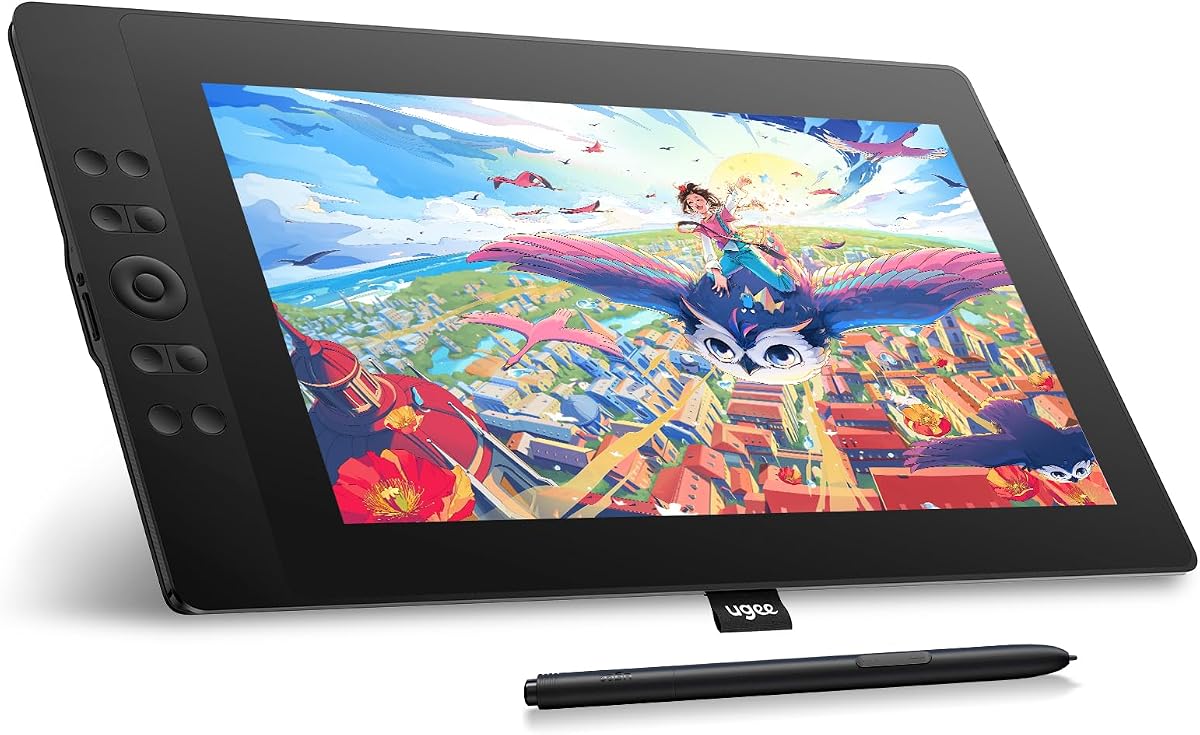
VEIKK VK1200 11.6 inch Drawing Tablet with Screen
4.2Editor score
11.6 inch LED display
8192 pressure levels
Includes two pens and nibs
Finding an affordable pen display can transform your digital art workflow without breaking the bank. These devices let you draw directly on the screen, offering a natural experience similar to traditional sketching tools.
We evaluated ten leading models based on color accuracy, pressure sensitivity, build quality, and software compatibility. Each option balances performance and cost to help you find the right tool for your creative needs.
Every pick highlights key strengths and potential trade-offs to guide your decision-making process. Please note that pricing and availability may vary by retailer and region, so check current listings before purchasing.
4.2Editor score

4.4Editor score

4.5Editor score
As an Amazon Associate we earn from qualifying purchases.
The following comparison outlines the core specifications of each model to help you identify the best fit for your workspace and artistic style.




The XP-PEN Artist12 offers a robust introduction to pen displays with its 11.6 inch Full HD screen and reliable pressure sensitivity. Its battery-free pen mimics traditional drawing tools, making it ideal for beginners and hobbyists seeking professional features without high costs.
We may earn a commission when you buy through this link, at no additional cost to you.
This model stands out for its vivid color representation and customizable shortcut keys that streamline your workflow. The included driver software allows deep customization, ensuring you can adapt the tablet to specific software needs like Photoshop or Clip Studio Paint.
While the anti-reflective screen protector reduces glare effectively, it slightly alters the tactile feel of the surface. Additionally, setup requires a computer connection, which may limit portability for users wanting standalone functionality.
Artists looking for a dependable tool for digital illustration or note-taking will find this tablet delivers exceptional value. Its balance of performance and price makes it a top recommendation for entry-level creators.
The screen reproduces colors vividly with 72 percent NTSC coverage, ensuring your artwork looks true to life across different platforms.
The hexagonal pen grip provides stability during long drawing sessions, reducing hand fatigue while maintaining precise control.
We may earn a commission when you buy through this link, at no additional cost to you.
The VEIKK VK1200 V2 brings full-laminated technology to the budget segment, minimizing parallax and improving cursor accuracy significantly. Its anti-glare glass provides a natural paper-like experience that many artists prefer over glossy alternatives.
We may earn a commission when you buy through this link, at no additional cost to you.
This model simplifies connectivity with a single USB-C cable that transmits data, power, and video signals simultaneously. The compact design fits easily into backpacks, making it a strong choice for students or professionals who travel frequently.
Setup may require patience with drivers on some systems, and the color gamut is standard rather than expansive. However, these trade-offs are minor given the overall performance and build quality relative to the cost.
Ideal for sketching, concept art, or basic photo editing, this tablet offers essential features without unnecessary bells and whistles. It remains a compelling option for those prioritizing screen quality on a tight budget.
Seamless integration between glass and screen reduces visual lag, allowing your pen tip to appear exactly where it touches the display.
Two battery-free pens and numerous replacement nibs ensure you have backups ready, extending the lifespan of your drawing experience.
We may earn a commission when you buy through this link, at no additional cost to you.
The HUION Kamvas 13 Gen 3 elevates the drawing experience with advanced PenTech 4.0 and a unique Canvas Glass 2.0 surface that reduces glare while maintaining clarity. Its factory calibration ensures colors match professional standards right out of the box.
We may earn a commission when you buy through this link, at no additional cost to you.
Dual dial buttons add versatility to your workflow, allowing quick adjustments to brush size or zoom without interrupting your creative flow. The USB-C connection simplifies setup, and the included stand supports comfortable angles for long work sessions.
Although the price is higher than entry-level models, the precision and color fidelity justify the investment for serious creators. It works well with Android devices too, offering flexibility for mobile professional environments.
Professionals in illustration, design, or animation will appreciate the natural feel and reliability of this display. It strikes an excellent balance between portability and high-end performance.
Sixteen thousand pressure levels allow for nuanced shading and line weight adjustments, capturing subtle movements with exceptional detail.
Customizable dials and shortcut keys streamline repetitive tasks, letting you focus more on creativity and less on software navigation.
We may earn a commission when you buy through this link, at no additional cost to you.
GAOMON PD1161 delivers a reliable display with eight customizable shortcut keys that enhance efficiency during complex projects. Its matte film reduces glare effectively, creating a surface that feels familiar to traditional artists.
We may earn a commission when you buy through this link, at no additional cost to you.
The device supports a wide range of software and operating systems, making it accessible for diverse workflows. It includes a power adapter for consistent performance, though users may need additional converters depending on their computer ports.
While it lacks some advanced features like high-end color calibration, it performs consistently for drawing and editing tasks. The stand provides stable angles, and the included accessories ensure you can start immediately.
This model is well-suited for students and intermediate artists seeking a balance between features and affordability. It offers a dependable foundation for digital creation without overwhelming complexity.
Support for Windows and Mac ensures compatibility across most professional environments, while Linux support adds flexibility for tech-savvy users.
The package includes everything needed to begin, from extra nibs to a glove, ensuring a smooth start without additional purchases.
We may earn a commission when you buy through this link, at no additional cost to you.
The Artisul D16 offers a generous 15.6 inch canvas, providing ample space for detailed work and larger compositions. Its full-laminated design minimizes parallax, ensuring your stylus interacts precisely with the digital surface.
We may earn a commission when you buy through this link, at no additional cost to you.
A unique quick dial adds versatility for tasks like scrolling or zooming, streamlining your process significantly. The adjustable stand supports multiple angles, accommodating both sitting and standing work positions comfortably.
As a refurbished model, condition may vary slightly, but it maintains high performance standards. Users appreciate the larger screen for reducing the need to constantly zoom in and out during complex edits.
Designers requiring more real estate for multi-window workflows will find this tablet particularly useful. It bridges the gap between standard displays and larger professional monitors effectively.
The expansive screen allows for multiple open applications, facilitating easier reference management and detailed editing work.
Adjustable angles reduce strain on the wrist and neck, promoting healthier long-term usage habits for professional artists.
We may earn a commission when you buy through this link, at no additional cost to you.
UGEE UE16 excels with a massive 143 percent sRGB color gamut, ensuring your creations display accurately across devices. Its full-laminated screen reduces lag, while the 16K pressure levels offer nuanced control for intricate details.
We may earn a commission when you buy through this link, at no additional cost to you.
Four distinct color spaces allow seamless transitions between different visual needs, supporting diverse creative workflows. The slim body feels comfortable during long sessions, and the included shortcuts enhance usability for various software packages.
Setup is straightforward across Windows, Mac, and Android, though managing cables may require some organization. The tactile feedback from physical keys improves efficiency, making navigation smoother during complex edits.
Artists focused on color integrity will appreciate the rich display and customizable settings. It is an excellent choice for professionals needing reliable color accuracy at a competitive price.
The wide gamut ensures rich, lifelike colors, making this tablet ideal for print design and digital media requiring fidelity.
Seamless integration with Android expands utility, allowing creative work on mobile devices alongside traditional computers.
We may earn a commission when you buy through this link, at no additional cost to you.
The VEIKK VK1200 offers a straightforward entry into digital art with its intuitive shortcut keys and responsive pen. Its anti-glare glass provides a pleasant drawing surface, while the included accessories reduce initial setup costs.
We may earn a commission when you buy through this link, at no additional cost to you.
This model prioritizes ease of use, making it accessible for students and beginners. The two included pens ensure longevity, and the lightweight design makes it easy to transport between locations.
Color saturation may not match high-end panels, but it is sufficient for most illustrative tasks. The glove helps keep the screen clean, and the pen tilt function adds versatility to stroke variety.
For those new to digital drawing, this tablet provides a supportive platform to learn and grow. Its simplicity and value make it a recommended starting point for aspiring creators.
Intuitive controls and a clear interface reduce the learning curve, allowing new users to focus on technique rather than software.
Multiple pens and replacement nibs ensure you have replacements ready, extending the usability of the device significantly.
We may earn a commission when you buy through this link, at no additional cost to you.
The RubensTab T11 Pro stands out as a standalone device, eliminating the need for a separate computer connection. Its built-in battery allows for hours of uninterrupted drawing, making it ideal for travel or outdoor sessions.
We may earn a commission when you buy through this link, at no additional cost to you.
Pre-installed professional-grade apps provide immediate access to creative tools, while multi-touch functions enhance navigation. The compact size makes it easy to carry, though it may feel small for complex professional projects.
While you lack the power of desktop software, the convenience is unmatched for sketching ideas on the go. It is a versatile tool for note-taking and quick sketches alongside regular creative work.
Students and travelers seeking a portable art solution will find this device highly practical. It fills a unique niche for those who need creativity without tethering to a desk.
No cables or external hardware mean you can create anywhere, breaking the constraints of a fixed workstation.
Integrated software and hardware simplify the setup, allowing immediate creation without external dependencies or complex configurations.
We may earn a commission when you buy through this link, at no additional cost to you.
The VEIKK VK1200V2 upgrades pressure sensitivity to 16384 levels, offering finer control over stroke width and shading. Its full-laminated design ensures precise cursor positioning, reducing lag for a smoother drawing experience.
We may earn a commission when you buy through this link, at no additional cost to you.
Two styluses ensure durability and convenience, while the improved color gamut provides richer visuals than standard options. The compact build makes it highly portable, fitting easily into standard backpacks for on-the-go use.
Driver updates can occasionally cause minor instability, but customer support remains responsive. It delivers strong performance for the price, balancing advanced pressure features with accessible ergonomics.
Artists seeking higher precision without premium costs will appreciate this upgraded sensitivity. It serves as a reliable upgrade from older 8192 level devices.
Double the pressure levels of previous models allow for more nuanced strokes, capturing subtle variations in hand movement.
Lightweight construction and a compact frame make it ideal for artists who value mobility and ease of transport.
We may earn a commission when you buy through this link, at no additional cost to you.
XPPen Artist 12 Pro Lite features a unique Red Dial for intuitive control, combining it with standard shortcut keys for efficiency. Its 3-in-1 cable design simplifies connectivity, reducing clutter on your workspace.
We may earn a commission when you buy through this link, at no additional cost to you.
Full-lamination reduces parallax effectively, while tilt support enhances shading capabilities. The screen offers wide viewing angles, ensuring consistent color reproduction from different positions during collaborative work.
While customization for the dial is limited, its placement aids workflow speed. Compatibility with various operating systems makes it a versatile tool for diverse environments.
This model suits artists who value streamlined workflow and compact design. It delivers strong performance for digital illustration and note-taking alike.
The Red Dial offers quick adjustments for brush size or zoom, integrating key actions into the pen workflow seamlessly.
A single cable connection minimizes clutter and simplifies setup, making it ready to use with minimal configuration.
We may earn a commission when you buy through this link, at no additional cost to you.
Selecting the right pen display requires balancing performance features with your specific creative needs and budget constraints.
Screen size dictates your workspace and portability. 11.6 inches offers a balance for most users, while 15 inches suits larger details. Resolution should be Full HD (1920×1080) to ensure clarity without taxing system resources.
Prioritize a size that matches your typical drawing style and transport requirements.
Pressure sensitivity ranges from 8192 to 16384 levels. Higher levels provide nuanced strokes, but 8192 is sufficient for most. Tilt support adds dimensionality, allowing shading without switching tools.
Look for at least 8192 levels and tilt support for a versatile workflow.
Color accuracy is vital for design and illustration. 72% NTSC is standard, but 99% sRGB or higher ensures consistency across devices. Factory calibration guarantees precision from the start.
Choose models with wide color coverage if color fidelity is critical to your work.
USB-C offers single-cable simplicity, while HDMI/USB combos work on older computers. Ensure your system supports the required ports to avoid extra adapters that clutter your desk.
Prioritize USB-C support for streamlined connections and easier portability.
Most pen displays work with Windows, Mac, and Linux. Verify that your preferred applications like Photoshop or Clip Studio are supported to avoid workflow disruptions.
Confirm compatibility with your primary creative suite before purchasing.
Full-lamination reduces parallax, improving accuracy. Lightweight designs help with travel, while adjustable stands support comfortable angles to reduce strain.
Seek robust materials and ergonomic stands for long session comfort.
Extras like extra nibs, gloves, or pens add value. Ensure the package provides essentials so you can start working immediately without additional purchases.
Check the box contents to avoid hidden costs for basic supplies.
Most brands offer one-year warranties. Lifetime technical support is a valuable feature for troubleshooting drivers or hardware issues over time.
Confirm support policies to ensure long-term reliability for your device.
Begin by installing the official drivers for your operating system to unlock full pen features and shortcut functionality. Connect the tablet via the recommended ports to ensure stable performance without lag.
Customize shortcut keys in the settings menu to match your workflow. Assign frequently used actions like undo, brush change, or zoom to specific keys to enhance speed.
Maintain the screen with a microfiber cloth to avoid scratches. Avoid applying pressure directly to the glass, and store the pen safely when not in use.
Most models listed require a computer connection to function. Standalone devices exist but are rare in this price range. Always check product specs to confirm if it supports standalone use.
Full-laminated screens have the glass bonded directly to the display, reducing parallax and glare. Non-laminated screens have an air gap, making cursor tracking slightly less precise and reflective.
Some models support Android via USB-C with specific requirements. Most are designed for PCs and Macs. Check manufacturer specs to confirm mobile compatibility before purchasing.
Nibs wear down based on drawing pressure and surface texture. On average, they last months under regular use. Extra nibs are usually included to extend usability.
Basic models work with standard laptops meeting minimum driver requirements. No high-end specs are needed for drawing, but RAM may impact performance with large files.
Popular tools include Adobe Photoshop, Clip Studio Paint, Krita, and Sai. Most brands provide drivers that enable full functionality across these creative applications.
The ten reviewed models provide a strong mix of features for beginners and professionals seeking affordability. Top contenders like the XP-PEN Artist12 and VEIKK VK1200 V2 balance performance with cost.
Focus on screen size, color accuracy, and pressure sensitivity to match your specific artistic goals. A device that supports your workflow will improve productivity and enjoyment.
Prices and availability may change, so verify current listings before making a purchase decision. Always check the latest driver support to ensure long-term compatibility.