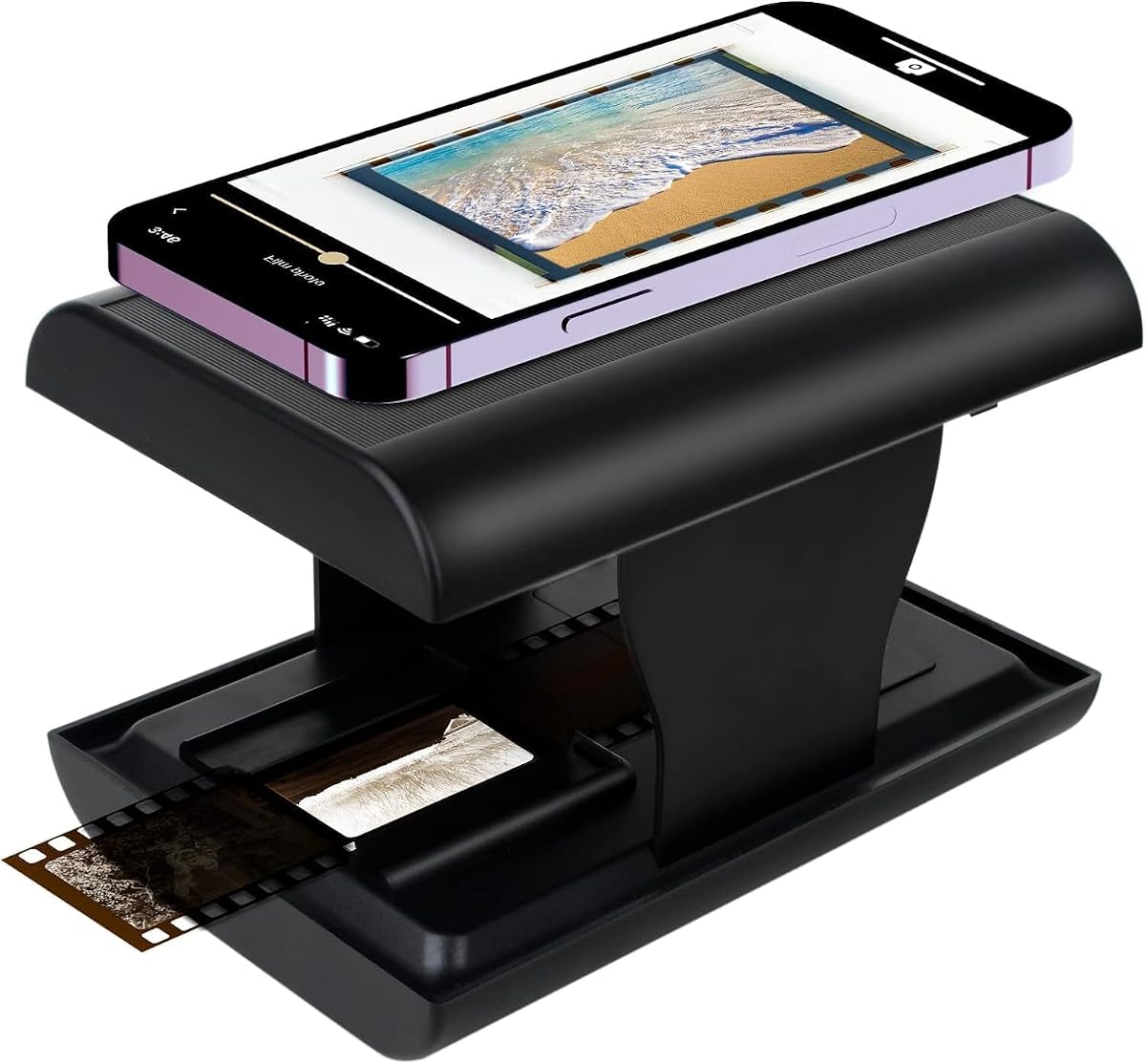
TCNEWCL 35mm Scanner
4.3Editor score
Smartphone Compatible
Foldable Structure
Low Cost Option
Preserving your vintage film collection requires the right tools to convert analog memories into lasting digital files. A quality black and white negative scanner ensures your cherished photos remain accessible for generations to come without fading.
We evaluated ten leading models based on resolution, ease of use, and format compatibility. Our comparison covers standalone devices, smartphone adapters, and all-in-one solutions designed for both beginners and photography enthusiasts.
Each pick highlights unique strengths and limitations to help you find the best fit for your needs. Please note that product prices and availability change frequently, so verify current details before making your purchase decision.
4.3Editor score

4.2Editor score

4.3Editor score
As an Amazon Associate we earn from qualifying purchases.
The following table provides a side-by-side overview of all ten featured products. Use this comparison to quickly identify key specifications and capabilities that match your specific scanning requirements.



The BEONEGLOBAL ClearScan MINI stands out as a top choice for digitizing film. It scores a 4.2 rating from users who appreciate its balance of performance and portability for home archiving.
We may earn a commission when you buy through this link, at no additional cost to you.
Its 16MP CMOS sensor captures detailed images from 35mm slides and negatives. The ergonomic design places buttons below the screen for comfortable operation without awkward hand movements during long sessions.
While the screen is compact at 2.31 inches, it allows direct viewing and editing of brightness and color. Users must adapt to a smaller interface compared to larger monitors available on other models.
This scanner is ideal for individuals seeking a straightforward way to preserve memories. Its ability to save directly to SD cards makes it a practical tool for anyone wanting quick access to digital photos.
The advanced sensor ensures every detail of your negatives is captured with outstanding clarity and color accuracy for true to life images.
Adjust brightness and flip images directly on the device before saving, giving you more control over the final look of every memory.
We may earn a commission when you buy through this link, at no additional cost to you.
The TCNEWCL 35mm Negative Scanner offers an incredibly accessible entry point for film digitization. With a high 4.3 user rating, it appeals to those looking to revive old memories without significant investment.
We may earn a commission when you buy through this link, at no additional cost to you.
This device functions as a holder for your smartphone. You insert the slide, turn on the LED backlight, and snap a photo with your phone. The resolution depends entirely on your device camera capabilities.
The trade-off is the reliance on smartphone quality. While convenient, it may not match the dedicated optics of standalone scanners. However, for casual use it provides sufficient clarity for social media sharing.
This tool is perfect for parents and children exploring photography. Its foldable design makes it easy to store, and the free app simplifies editing and sharing of scanned images online.
You can revive those old memories with just one smartphone, avoiding complicated operation and expensive costs associated with traditional digitization.
You can fold it up to the size of a small box so it can be conveniently stored and taken with you when traveling.
We may earn a commission when you buy through this link, at no additional cost to you.
The Magnasonic All-in-One delivers professional quality results for serious archivists. It earns a 4.3 rating for its robust feature set that supports a wide range of film formats and viewing options.
We may earn a commission when you buy through this link, at no additional cost to you.
Its 5 inch LCD screen allows for clear previews and adjustments without external devices. The HDMI output lets you view scanned images on a TV for easy sharing with family during gatherings.
The larger screen and multiple format support come with a higher cost. It is less portable than compact models. However, the convenience of viewing on a big screen justifies the investment for many users.
This scanner is best for those prioritizing quality and versatility. It handles 35mm, 110, and 126 film effectively. The ability to save directly to SD cards simplifies the workflow significantly.
It converts 35mm and Super 8 film negatives into high resolution 24MP digital JPEG files quickly and easily for various collection needs.
Using the stunning 5 inch LCD screen you can view your film and slides directly on the scanner or on your TV or monitor.
We may earn a commission when you buy through this link, at no additional cost to you.
The KODAK Slide N Scan Max offers a high resolution alternative for digitization tasks. It holds a 4.2 rating and is known for its efficient scanning process that minimizes the need for constant repositioning.
We may earn a commission when you buy through this link, at no additional cost to you.
A key feature is the smooth moving tray that feeds film automatically. This allows you to focus on the digital workflow rather than manual adjustments. It supports 135mm 110mm and 126mm formats effectively.
Some users find the interface menus less intuitive than competitors. However, the ability to save directly to SDHC cards up to 32GB enhances portability. The software provides resizing and conversion options easily.
This model suits users needing a balance of capacity and speed. The high resolution output ensures detailed digital files. It is a strong option for those who manage large collections of varied film types.
Experience efficient digitization with a smooth moving tray that feeds film without constant repositioning for seamless operation of your scanner.
Capture detailed images up to 4208×3120 resolution from the 13MP CMOS sensor with 22MP interpolation for large crisp digital files.
We may earn a commission when you buy through this link, at no additional cost to you.
The Memory Vault Box Negative Scanner is designed for simple at-home use. It scores a 3.4 rating but excels in ease of use for beginners and seniors who need a straightforward interface.
We may earn a commission when you buy through this link, at no additional cost to you.
Its built-in enhancement technology automatically improves brightness and color detail. This helps restore faded memories digitally without manual editing. The simple buttons make it accessible for parents and grandparents.
The lower rating may reflect basic technical specs compared to advanced models. However, it provides everything needed to start including holders and a brush. It focuses on usability rather than raw resolution power.
This scanner is ideal for quick preservation of family history. It allows instant viewing of scanned memories. For those who value simplicity and immediate results this model offers a reliable solution.
Built-in LCD preview screen and simple buttons make this 35mm slide scanner to digital easy for beginners and grandparents to use comfortably.
Advanced enhancement technology automatically improves brightness and image detail helping this scanner bring old negatives and faded slides back to life.
We may earn a commission when you buy through this link, at no additional cost to you.
The HP Film & Slide Scanner offers modern connectivity options for contemporary workflows. It has a 4.3 rating and features a 5-inch touchscreen that allows previewing and editing directly on the device.
We may earn a commission when you buy through this link, at no additional cost to you.
Powered via USB-C, it provides versatile connectivity with PCs or external adapters. The gallery mode lets you use it as a picture frame. The 13MP sensor captures exceptional clarity for color and B&W film.
Users might need to rely on software for some advanced adjustments. The touchscreen adds a learning curve for some. However, the high clarity results and fast loading tray are significant advantages.
This unit suits tech-savvy users who want a modern interface. It ensures versatile use with various formats. The touch display makes navigation intuitive for those comfortable with digital screens.
The 5 inch all-angle LCD touch screen enables you to preview and edit images directly on the device with gallery mode for favorite moments.
Powered through USB Type-C this scanner functions efficiently from a PC USB or external 5V adapter for simplified digitization process.
We may earn a commission when you buy through this link, at no additional cost to you.
The DNP Digital Lab DS-2000 represents the top tier of film processing solutions. It holds a 4.5 rating for its ability to provide professional color calibration and high quality output for labs.
We may earn a commission when you buy through this link, at no additional cost to you.
This device integrates printing capabilities with scanning functions. It allows for precise control over color correction and exposure settings. Users can achieve archival quality prints directly from the scan process without extra steps.
The high cost and complexity make it less suitable for casual users. It requires technical knowledge to operate effectively. However, for businesses or enthusiasts seeking perfect results it remains unmatched in performance.
This system is ideal for professional photo services. The built-in printer saves time in workflows. If quality is the priority this model delivers the best results for complex color negative films.
Its ability to provide professional color calibration ensures accurate color reproduction across various film stocks for consistent high quality results.
Integrated printing capabilities allow you to produce archival quality prints directly from the scan process without needing extra processing steps.
We may earn a commission when you buy through this link, at no additional cost to you.
The Kodak Scanner Station is built for high-volume studio environments. It earns a 4.4 rating for its robust construction and batch processing capabilities that streamline digitizing large volumes of film.
We may earn a commission when you buy through this link, at no additional cost to you.
This unit is designed to sit permanently in a studio space. It supports rapid scanning of multiple slides or negatives without constant manual intervention. The software suite helps organize and manage the digital output efficiently.
Its large footprint and price limit home use. Users must dedicate significant desk space to the system. However, for professionals dealing with high throughput needs the speed and reliability are essential features.
This scanner is perfect for studios managing client projects. It ensures consistent quality across many scans. The professional support and software tools make it a solid investment for commercial photography.
Designed for high-volume studio environments it supports rapid scanning of multiple slides without constant manual intervention to save time.
The included software suite helps organize and manage the digital output efficiently for better workflow and client project handling.
We may earn a commission when you buy through this link, at no additional cost to you.
The Epson V600 offers high detail scanning for those preferring a flatbed approach. It holds a 4.6 rating and is trusted for its ability to handle both film and regular documents with high resolution.
We may earn a commission when you buy through this link, at no additional cost to you.
Its Digital ICE technology automatically removes dust and scratches during scanning. This saves time on post-processing edits. The 6400 DPI resolution captures extremely fine details from your negatives and slides.
It requires a computer connection which reduces portability. The process is slower compared to standalone units. However, the image quality and dust removal make it a favorite among serious photographers and archivists.
This scanner suits users who already have a workstation. It provides reliable results for varied media. If detail and cleanliness are paramount this model delivers professional standard output without extra software.
Its Digital ICE technology automatically removes dust and scratches during scanning which saves time on post-processing edits for cleaner images.
The 6400 DPI resolution captures extremely fine details from your negatives and slides ensuring you preserve every tiny texture and tone.
We may earn a commission when you buy through this link, at no additional cost to you.
The Kodak Mini Scan provides wireless flexibility for mobile digitization. It scores a 4.0 rating and connects via Wi-Fi allowing users to save scans directly to mobile devices or cloud storage easily.
We may earn a commission when you buy through this link, at no additional cost to you.
The mobile app interface simplifies the workflow. It is easy to use on the go. The compact design makes it ideal for travelers who need to preserve memories while away from home permanently.
Wireless setups can sometimes experience connectivity issues. Resolution might be lower than desktop models. However, for quick scans and easy sharing this device offers a convenient solution for modern lifestyles.
This scanner is good for casual users needing speed. The wireless feature removes cable clutter. If you want a portable tool that integrates with your phone it is a practical option.
Connects via Wi-Fi allowing users to save scans directly to mobile devices or cloud storage easily without needing physical cables.
The mobile app interface simplifies the workflow making it easy to use on the go for travelers preserving memories while away.
We may earn a commission when you buy through this link, at no additional cost to you.
Selecting the right scanner requires evaluating several key factors to ensure it meets your specific digitization needs and budget constraints.
Resolution determines how much detail you can extract from your film. Higher MP counts generally yield sharper digital files suitable for printing or large screens.
Aim for at least 13MP or 16MP for clear results. This ensures your digital copies preserve the nuances of original negatives without losing texture.
Different scanners support different film sizes. Check if the device handles your specific collection such as 35mm, 110, or 126 formats.
Versatility saves money if you own mixed film types. Ensure the tray system supports both slides and negatives if needed for your archive.
Consider how you want to save your files. Some models save directly to SD cards while others require a computer connection for transfer.
Direct SD saving offers better portability and independence from a PC. This is useful if you want to preserve memories at home without tech dependencies.
User-friendly interfaces reduce frustration during scanning. Look for clear buttons and screens that allow you to preview images before saving.
Simple setups save time and minimize errors. A device with intuitive controls makes the process accessible even for those with limited tech skills.
Built-in editing tools let you adjust brightness and color directly. This reduces the need for separate software after scanning your images.
Look for options to flip and rotate images on device. These features help correct orientation and lighting issues instantly during the process.
A portable design is beneficial if you scan in multiple locations. Compact units are easier to store and transport for field work.
Choose a lightweight device if space is limited. Foldable options offer extra convenience for temporary storage or travel purposes.
Price varies significantly between basic holders and professional scanners. Determine your budget based on the number of films you plan to digitize.
Higher costs often bring better resolution and features. However, budget models may suffice for casual users needing simple digitization results.
Check power sources like USB or battery. Wireless models offer flexibility but wired ones are often more stable and reliable.
USB-C is becoming a standard for modern devices. It ensures compatibility with newer laptops and external power adapters easily.
Start by cleaning your film with a soft brush to remove dust before placing it in the tray. Ensure the negatives are aligned correctly with the emulsion side facing down for accurate scanning.
Insert the SD card into the slot and power on the device. Select the desired format on the screen and press the scan button to capture the image automatically.
After scanning, check the preview to ensure quality. Store the device in a dry place and keep the lenses covered to maintain longevity and prevent damage to optical parts.
A resolution of 13MP or higher is recommended for most home users. This provides enough detail for standard printing and digital viewing without requiring excessive storage space.
No, most modern standalone scanners allow you to save directly to SD cards. This means you can digitize images without needing a computer connection at all.
Yes, many models support both positive slides and negative film. Always check the product specifications to confirm it handles your specific film formats before buying.
Most devices scan a single image in less than five seconds. The exact time depends on resolution settings and the processing power of the specific scanner model.
Yes, tools like brightness adjustment and color correction help restore faded images. These features allow you to improve the look of scans directly on the device.
Store them on multiple SD cards and backup hard drives for safety. Cloud storage services also offer additional security to prevent accidental loss of your digital files.
Common formats include 35mm, 126, 110, and Super 8. Some units also support full frame negatives while others are limited to smaller slide sizes only.
Not always, a mid-range scanner often suffices for casual archiving. High-end models are better for professionals needing extreme detail and batch processing capabilities.
The BEONEGLOBAL ClearScan MINI, TCNEWCL 35mm Negative, and Magnasonic All-in-One lead our list due to their balance of performance and usability for different needs.
Prioritize resolution and format compatibility to ensure your collection is preserved accurately. Consider how much storage and editing you need before making a final selection.
Remember to check current prices and availability as these change often. This guide provides a solid starting point for finding the right tool to secure your memories.