
NetumScan USB 1D Barcode Scanner
4.4Editor score
Plug and play USB
Durable ABS construction
Affordable price point
This guide compares the top barcode scanners for library use, evaluating connectivity, battery life, and scanning accuracy to help you choose the best model
Libraries rely heavily on efficient inventory management systems to track books and resources accurately. A reliable barcode scanner is essential for streamlining checkouts, returns, and shelf organization tasks.
We evaluated ten top-rated models based on connectivity options, battery durability, and decoding speed. Our analysis focuses on features that matter most for library environments and quiet operation and compatibility.
Each pick highlights specific strengths like wireless range or rugged design to help you decide. Note that pricing fluctuates frequently so verify current costs before purchasing your preferred device today.
4.4Editor score

4.4Editor score

4.3Editor score
The following table provides a side by side overview of key specifications for all ten models we reviewed to help you compare them quickly.




This NETUM model stands out as a top contender for library environments due to its versatile connectivity and robust battery life. It received a strong rating from users who appreciate its ability to switch between wired and wireless modes seamlessly.
We may earn a commission when you buy through this link, at no additional cost to you.
The device features a high resolution CCD sensor that excels at reading damaged or tightly spaced barcodes often found on older library books. Its battery can last up to a month on a single charge making it ideal for busy circulation desks.
While the scanner offers excellent performance users should note that initial setup requires scanning specific configuration barcodes from the manual. Additionally it lacks an onboard screen for adjusting settings which might slow down advanced customization tasks.
Librarians needing a reliable all purpose scanner will find this model highly suitable for daily operations. Its ability to store codes offline ensures you never lose data even if your network drops unexpectedly during peak hours.
The ability to switch between Bluetooth 2.4G wireless and USB wired modes allows staff to adapt to different workstations without changing devices.
With a 2600mAh battery this scanner supports continuous scanning up to 200000 times reducing the need for frequent charging cycles.
We may earn a commission when you buy through this link, at no additional cost to you.
For libraries on a tight budget this NetumScan model offers incredible value without sacrificing essential scanning performance. Its plug and play USB design means you can start using it immediately after unboxing.
We may earn a commission when you buy through this link, at no additional cost to you.
The CCD sensor captures 1D codes from both paper and screens allowing you to scan codes displayed on mobile devices or monitors easily. Its sturdy build can withstand drops from two meters ensuring longevity in busy environments.
The main limitation is the lack of wireless connectivity which may restrict movement around the stacks. Additionally the cable length is fixed so you may need an extension if your workstation is far from the computer port.
This scanner is perfect for fixed stations like circulation desks where mobility is less critical than cost efficiency. It handles standard library barcodes efficiently making it a reliable choice for small libraries or bookstores.
Priced significantly lower than wireless models this scanner provides essential functionality for organizations needing multiple units for different desks.
The high quality ABS material ensures the device survives accidental drops common in high traffic library circulation areas.
We may earn a commission when you buy through this link, at no additional cost to you.
The Tera HW0009 Pro distinguishes itself with a unique built in screen that simplifies the configuration process significantly. This feature is particularly useful for libraries that need to customize scanner settings frequently.
We may earn a commission when you buy through this link, at no additional cost to you.
Its CMOS imaging technology reads both 1D barcodes and 2D QR codes allowing you to scan modern digital assets on top of traditional books. The included charging cradle ensures the device is always ready for duty.
While the price is higher than standard models the added convenience of the screen and cradle justifies the investment for high volume libraries. The larger size might be less comfortable for extended handheld use compared to mini scanners.
Libraries seeking a premium solution with advanced features will appreciate the versatility of this device. It supports a wide range of operating systems making it adaptable to various existing library management systems.
The display allows you to adjust language volume and connection options directly on the device without needing a computer for setup.
Supporting both 1D and 2D codes future proofs your inventory system for digital QR tags on media or electronic resources.
We may earn a commission when you buy through this link, at no additional cost to you.
This Eyoyo Mini is designed specifically for portability making it ideal for staff who move around the stacks frequently. Weighing only 35 grams it places almost no strain on the hand during long shifts.
We may earn a commission when you buy through this link, at no additional cost to you.
The silent vibration mode is a critical feature for libraries requiring quiet environments ensuring scans are confirmed without disturbing readers nearby. Its Bluetooth range extends up to 50 meters providing flexibility across large rooms.
The main trade off is the lack of screen scanning capability limiting it to printed codes only. Battery life is moderate compared to larger models so daily charging might be necessary for heavy use.
Libraries with staff who roam to process returns or checkouts will benefit from this lightweight design. Its ability to store codes offline prevents data loss if the connection drops during a walk through audit.
Vibration feedback replaces audible beeps ensuring the device is suitable for quiet study areas and reading rooms.
Weighing just 35 grams this scanner reduces hand fatigue for staff performing thousands of scans per day.
We may earn a commission when you buy through this link, at no additional cost to you.
The Tera 5100 Purple offers a robust wireless experience enhanced by a unique battery indicator light that prevents unexpected shutdowns. This visual cue allows staff to charge the device before it becomes unusable during a shift.
We may earn a commission when you buy through this link, at no additional cost to you.
Built with an anti shock silicone cover and IP54 rating it withstands dust and accidental drops common in busy library environments. The ergonomic handle provides a comfortable grip for extended use without slipping.
While it lacks 2D support the 1D decoding speed is fast and reliable for standard book barcodes. Users must ensure they have the USB receiver available which might be an inconvenience if lost.
This model is a solid choice for libraries prioritizing durability and wireless freedom. The long transmission range ensures connectivity even in large multi room library facilities without signal loss.
The unique light shows remaining battery level eliminating anxiety about the device dying mid-shift.
Silicone cover and IP54 rating protect against dust and drops ensuring longevity in active environments.
We may earn a commission when you buy through this link, at no additional cost to you.
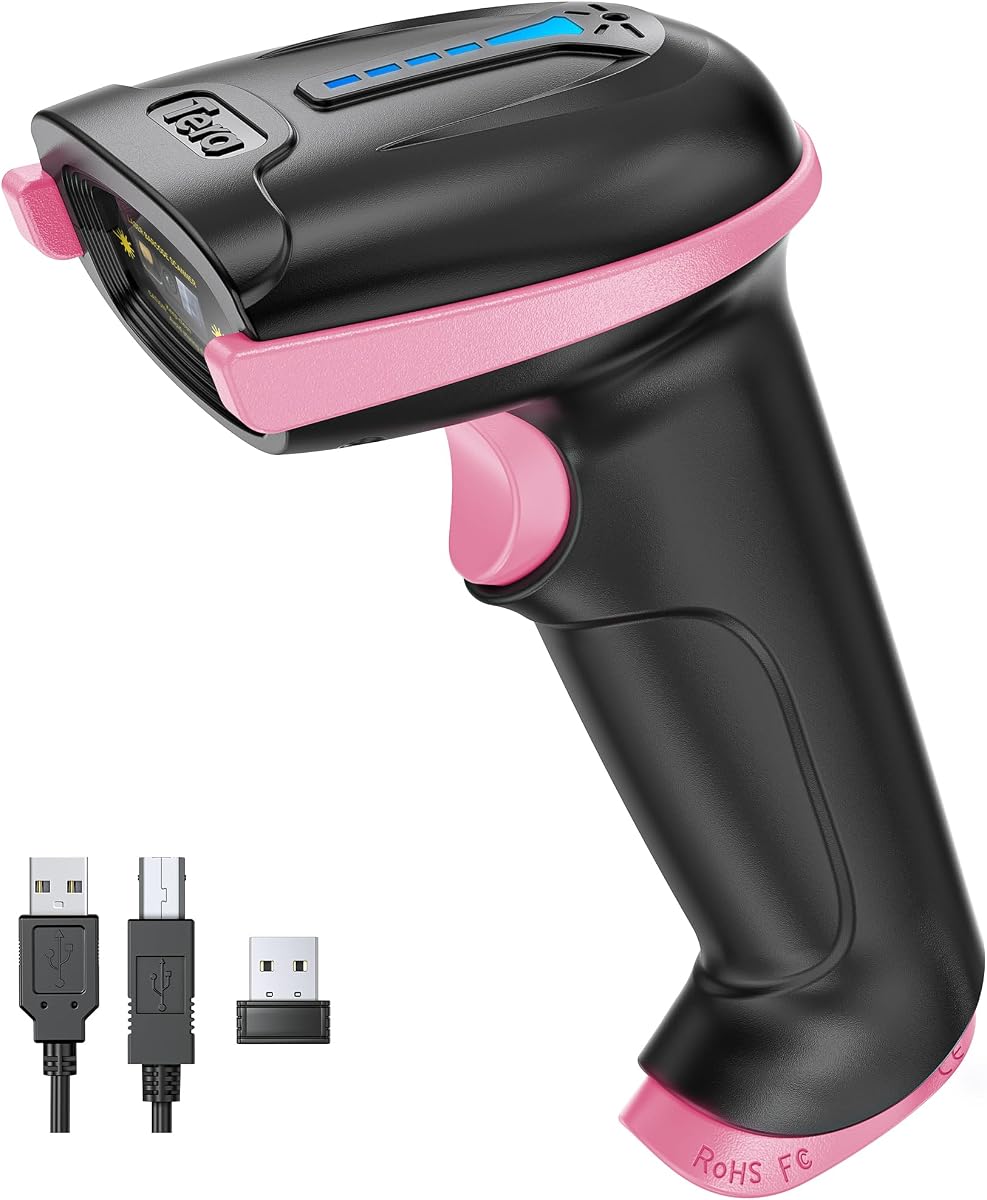
This Tera 5100 Pink model shares the robust features of the purple variant including a visual battery indicator and durable construction. It provides a reliable wireless solution for tracking books and managing inventory effectively.
We may earn a commission when you buy through this link, at no additional cost to you.
The ergonomic design and silicone protection ensure the scanner remains functional even after accidental drops. Its wireless range covers large areas making it suitable for expansive library stacks and reading areas.
The lack of 2D support limits scanning to standard barcodes but this is often sufficient for basic library needs. The aesthetic appeal of the pink color may also boost morale for staff using it daily.
Libraries looking for a stylish yet rugged wireless option will find this model appealing. Its consistent performance and battery visibility make it a dependable tool for daily circulation tasks.
Long range connectivity ensures uninterrupted scanning across large library spaces without signal dropouts.
Extended handle and flat trigger improve comfort during long scanning sessions reducing hand strain.
We may earn a commission when you buy through this link, at no additional cost to you.
The WoneNice USB Laser scanner offers impressive speed with 200 scans per second allowing for rapid checkout lines. Its plug and play design requires no software installation which simplifies deployment for IT teams.
We may earn a commission when you buy through this link, at no additional cost to you.
Users can configure over 300 options to match specific workflow needs such as adding prefixes or suffixes automatically. This flexibility ensures the scanner integrates smoothly with various library management databases.
The laser technology cannot read codes on screens which limits use to physical labels only. Additionally laser safety protocols may require more careful handling compared to safe CCD or camera-based solutions.
Libraries with high traffic checkout desks will appreciate the speed and reliability of this unit. It is a robust choice for environments where processing speed is critical to maintaining customer satisfaction.
200 scans per second ensures quick checkouts even during peak hours without causing bottlenecks.
300 configurable options allow deep customization to match specific library software requirements.
We may earn a commission when you buy through this link, at no additional cost to you.
This Symcode model supports a unique network mode allowing multiple scanners to transmit data to one receiver. This feature is incredibly useful for larger libraries where several staff members are processing items simultaneously.
We may earn a commission when you buy through this link, at no additional cost to you.
The offline storage capacity of up to 100000 codes ensures that data is not lost if the scanner moves out of range. It maintains a long standby time reducing the frequency of charging cycles needed.
While it uses laser technology which does not read screen codes its speed is adequate for standard library items. The auto pairing receiver simplifies setup but users must ensure their library software supports this mode.
Libraries with multiple staff scanners can maximize efficiency with this network capability. It provides a scalable solution that grows with your inventory management needs without requiring complex infrastructure.
One to many mode allows multiple staff to scan concurrently into a single system point effectively.
Stores up to 100k codes ensuring data safety even when moving out of wireless range.
We may earn a commission when you buy through this link, at no additional cost to you.
This portable mini scanner is designed for mobility and features a pink aesthetic that adds a touch of style to operations. It fits easily into a pocket allowing staff to scan items anywhere without dragging cables around.
We may earn a commission when you buy through this link, at no additional cost to you.
The vibration feedback ensures scans are confirmed silently which is essential for maintaining quiet study environments. Its connectivity options allow you to choose the best mode for your specific task or device.
Battery life is modest so daily charging is recommended for heavy use cases. The inability to read screen codes is a limitation for users needing to scan digital assets from a tablet or computer.
Ideal for mobile librarians or book fair volunteers this device offers convenience and style. Its small form factor makes it easy to carry and store when not in active use.
Compact dimensions allow staff to carry the scanner with them anywhere without bulk or weight.
Supports adding prefixes suffixes and keys to match specific workflow requirements easily.
We may earn a commission when you buy through this link, at no additional cost to you.
This scanner includes an adjustable stand enabling hands-free scanning which is perfect for self-service kiosks or busy checkout counters. The auto-sensing feature triggers scans automatically when a barcode is presented.
We may earn a commission when you buy through this link, at no additional cost to you.
Its CMOS sensor supports both 1D and 2D codes allowing it to read QR codes and traditional book barcodes with ease. The adjustable stand ensures you can find the optimal angle for consistent scanning performance.
Because it relies on a wired USB connection it is fixed to a specific location which limits flexibility compared to wireless options. This design is best suited for permanent desk setups rather than mobile use.
Libraries seeking a self-service solution or fixed station scanner will find this model effective. The included stand reduces physical strain on staff by allowing them to simply place items for scanning.
The stand allows for hands-free scanning which is useful for self-checkout or busy service points.
Automatic detection of barcodes speeds up workflow by removing the need to press a physical button.
We may earn a commission when you buy through this link, at no additional cost to you.
Selecting the right barcode scanner involves evaluating how it fits into your library's daily workflow and technical requirements.
Libraries should decide between wireless and wired options based on mobility needs. Wireless scanners using Bluetooth or 2.4G offer freedom to move around stacks while wired USB scanners provide consistent connectivity without battery concerns.
Choose wireless for roaming staff and wired for fixed desks to balance convenience with reliability.
A scanner with long battery life ensures staff can work through busy shifts without interruptions. Look for capacities above 2000mAh if wireless freedom is a priority for your circulation desk.
Prioritize models with clear battery indicators to prevent unexpected shutdowns during peak hours.
Fast scanning speeds reduce wait times for patrons checking out books. Models capable of 200 scans per second or higher are ideal for high traffic libraries.
Ensure the sensor technology matches your needs as CCD works best on paper and screens while lasers excel at distance.
Most libraries focus on 1D ISBN codes but some may need 2D QR support for digital media tracking. Verify that the scanner decodes the specific formats your cataloging software uses.
Confirm compatibility with your library management system to avoid data integration issues.
Library scanners often experience drops and dust so look for models with protective cases or shock resistance ratings. An IP rating like IP54 indicates dust and water resistance which is valuable for long term use.
Select a device with a robust chassis to withstand daily wear and tear in a busy environment.
Staff may scan thousands of items daily so a comfortable grip is essential to prevent hand strain. Look for ergonomic handles and lightweight designs that reduce fatigue during long shifts.
Test the device if possible to ensure it feels comfortable in your hand for extended use.
Advanced libraries often need to add prefixes or suffixes to barcodes to match their database. Models with programmable settings or on-device screens allow for easier customization without external software.
Choose a scanner that supports the specific data formatting requirements of your library system.
Quiet operation is vital in libraries to avoid disturbing readers. Many modern scanners offer vibration feedback or mute options for the beep to maintain a peaceful atmosphere.
Ensure the device has a silent mode if your library policy prioritizes a quiet environment.
Begin by connecting the scanner to your computer or device via the appropriate cable or wireless protocol. Most models are plug and play so you can start scanning immediately without complex drivers.
Calibrate the device by scanning configuration barcodes from the manual if you need to change settings like sound or data formatting. This ensures the scanner outputs data in the format your library software expects.
Regularly clean the scanning window with a soft cloth to prevent dust buildup and maintain performance. Charge the device fully before shifts and store it in a dry place to extend battery lifespan.
Yes many wireless scanners use Bluetooth or a dedicated 2.4G receiver that does not rely on Wi-Fi. These devices maintain a direct connection to your computer regardless of your network strength.
CCD scanners read codes from paper and screens while laser scanners read codes from a distance. For libraries where scanning screens or damaged paper is common CCD is often the better choice.
Battery life varies by model but most wireless scanners last between 10 to 20 hours on a single charge. Some premium models claim up to a month of standby time depending on usage frequency.
Most operate as HID keyboards meaning they input text like a keyboard so no special software is needed. You simply place your cursor in your library management system and scan to enter data.
High quality CCD sensors are designed to read damaged smudged or reflective barcodes effectively. However if damage is severe you may need to manually type the code instead of scanning it.
Yes most models listed support both Mac and Windows operating systems through standard USB or Bluetooth connections. Always check the product details for specific OS version compatibility before buying.
Many wireless scanners have offline storage modes that save scans until they reconnect. This ensures you do not lose data if you move too far from the receiver during a scan session.
Wipe the scanning window gently with a soft dry cloth to remove dust. Avoid using harsh chemicals that could damage the sensor or screen coating.
We reviewed ten top models ranging from budget wired units to premium wireless devices with screens. Our top picks cover various needs ensuring every library can find a scanner that fits their specific operational requirements.
Prioritize battery life and connectivity options when making your decision to ensure staff efficiency. Consider how often your team moves around the stacks to decide between portable and fixed station scanners.
Prices for these devices change frequently so check current offers before finalizing your purchase. Investing in the right scanner now will streamline your library operations for years to come.