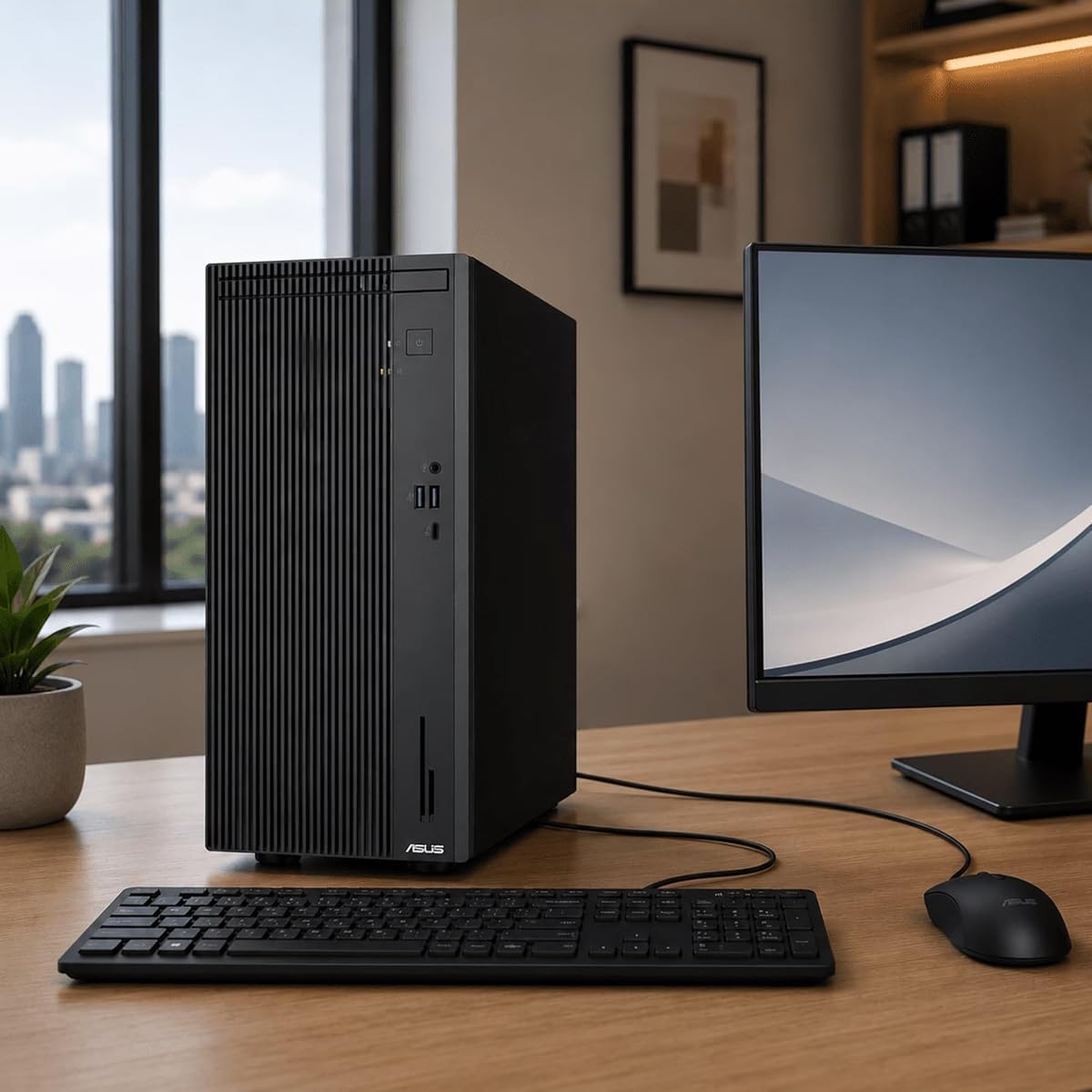
ASUS V500 Business Tower
5.0Editor score
10-core Intel Core i7-13620H
16GB DDR5 RAM
1TB Storage with SSD
Windows 11 Home
This guide compares the top ASUS Desktop PC models for 2026, evaluating performance, connectivity, and value for business and gaming users.
Selecting the right desktop computer involves balancing performance, size, and specific use cases. ASUS offers a wide range of towers tailored for office work, creative tasks, and high-end gaming. Understanding the key differences helps you find a machine that fits your workflow perfectly.
We evaluated ten recent ASUS Desktop PC models based on processor power, memory capacity, storage speed, and connectivity options. Our analysis focuses on real-world usability, upgrade potential, and the overall value proposition each system brings to the table for diverse users.
Each pick below highlights unique strengths, from budget-friendly business towers to premium gaming rigs. Prices and availability change frequently, so check the latest listings before purchasing. Use this guide to narrow down your options and make an informed decision.
5.0Editor score

4.7Editor score

5.0Editor score
The following table provides a side-by-side comparison of all ten ASUS Desktop PC models. It highlights key specifications like processor type, memory size, storage capacity, and graphics capabilities to help you quickly identify the system that matches your needs.


The ASUS V500 Business Tower stands out as an exceptional value for small businesses and home offices. With a 5.0 rating, it delivers reliable performance powered by a 10-core Intel Core i7 processor. This system handles multitasking effortlessly, making it ideal for daily productivity tasks.
We may earn a commission when you buy through this link, at no additional cost to you.
Its 16GB DDR5 RAM ensures smooth operation when running multiple applications simultaneously. The storage configuration combines a fast SSD for the operating system with additional external storage for file archives. Connectivity is robust, featuring HDMI and DisplayPort for dual monitors, plus seven USB ports for all your devices.
While it lacks a dedicated GPU, the integrated graphics are sufficient for office work and media consumption. The included wired keyboard and mouse add immediate value, allowing you to set up quickly. Some users may miss internal expansion options, but the core performance is solid.
This desktop is perfect for users needing a dependable machine for productivity without breaking the bank. If your workflow involves document editing, video calls, and web browsing, this model meets those needs efficiently. It is a top recommendation for budget-conscious buyers seeking ASUS quality.
The system is optimized for business tasks with Windows 11 Home and Office 365 integration. Its compact tower design fits well in professional environments without taking up excessive desk space.
With seven USB ports and dual video outputs, you can easily connect printers, scanners, and secondary displays. This flexibility supports a versatile workspace setup for various professional needs.
We may earn a commission when you buy through this link, at no additional cost to you.
The ASUS ROG G700 Gaming Desktop is a powerful machine designed for gamers and creators alike. It features the latest Intel Core Ultra 7 265F processor and an NVIDIA GeForce RTX 5060 graphics card. This combination ensures smooth gameplay at high settings and handles creative workloads with ease.
We may earn a commission when you buy through this link, at no additional cost to you.
With 32GB of DDR5 RAM, multitasking is seamless even when streaming or running heavy applications. The 1TB NVMe SSD provides fast load times for games and applications. The system includes RGB keyboard and mouse, adding aesthetic appeal to your setup right out of the box.
The cooling design maintains stable performance under heavy loads, preventing thermal throttling during long sessions. Windows 11 Pro offers advanced features for productivity and security. However, the price is higher than standard office PCs, reflecting its premium components.
This desktop is ideal for gamers who want a ready-to-use system without building one themselves. It also suits content creators needing raw power for video editing. If you value performance and style, this G700 model is a compelling choice.
The RTX 5060 supports ray tracing and DLSS, enhancing visual fidelity in modern titles. Players can enjoy high frame rates at 1080p and 1440p resolutions.
The ROG styling and RGB lighting create an immersive gaming environment. The 600W Gold PSU ensures efficient power delivery for all components.
We may earn a commission when you buy through this link, at no additional cost to you.
The ASUS ROG Strix G700 represents the pinnacle of desktop computing power. With a Core Ultra 9 processor and 128GB of DDR5 RAM, it is built for the most demanding professional tasks. The 11TB storage configuration offers ample space for large media libraries and project files.
We may earn a commission when you buy through this link, at no additional cost to you.
This system supports multiple displays with various ports including HDMI and DisplayPort. It is designed for users who need extreme multitasking capabilities, such as video editors, 3D modelers, or data scientists. The RTX 4060 Ti ensures high-quality graphics performance for visualization.
While the cost is significant, the performance justifies the investment for professionals. The included Windows 11 Pro license adds value for business users. However, average users may not utilize the full potential of these specs.
If you require a workstation that never slows down, this model is unmatched. It combines top hardware with reliable ASUS engineering. Consider this if you need maximum power and storage for intensive workflows.
The 128GB RAM allows running virtual machines and heavy software simultaneously without lag. This makes it perfect for complex development environments.
With 1TB SSD and 10TB HDD, you get speed for OS and capacity for archives. This balance supports both performance and data retention needs.
We may earn a commission when you buy through this link, at no additional cost to you.
The ASUS S501MER features the latest 14th Gen Intel Core i7 processor, offering strong performance for modern tasks. It comes with 16GB DDR5 RAM and a 1TB PCIe SSD for fast storage. The inclusion of Wi-Fi 6E ensures future-proof connectivity for high-speed networks.
We may earn a commission when you buy through this link, at no additional cost to you.
This model supports multiple displays via HDMI, VGA, and DisplayPort, making it suitable for creative work. The compact design fits easily on desks. However, the expansion options are somewhat limited compared to larger towers.
While it performs well, user reviews reflect an average satisfaction level. This could be due to specific expectations or configurations. It is a good option for those wanting newer tech in a standard form factor.
Consider this desktop if you prioritize having the latest CPU generation. It balances performance and size well. For users needing more than one display, the port variety is a significant advantage.
The rear I/O includes a variety of USB and audio ports. This allows connecting legacy and modern peripherals simultaneously.
With 5.3GHz turbo speeds, this processor handles high-demand applications well. It is suitable for gaming and moderate content creation.
We may earn a commission when you buy through this link, at no additional cost to you.
This ASUS V500 model upgrades the standard offering with 32GB of RAM, making it excellent for heavy multitasking. The Intel Core i7 processor handles business applications with ease. It supports 4K monitors, allowing for crisp visual output for design work.
We may earn a commission when you buy through this link, at no additional cost to you.
The 1TB PCIe SSD ensures quick boot times and responsive file access. Windows 11 Home provides a modern interface. While it lacks a dedicated GPU, it supports 4K visuals efficiently for non-gaming tasks.
Users appreciate the balance of power and price. It is ideal for power users who need more memory than the standard 16GB models. The included keyboard and mouse complete the package.
If you run virtual machines or heavy software, this 32GB variant is a smart choice. It delivers reliability and speed without the cost of a gaming PC. It fits well in office or home setups.
32GB RAM allows running many tabs and apps without slowdowns. This is crucial for professionals managing multiple projects.
4K support ensures detailed image viewing. It works well with external monitors for extended workspace.
We may earn a commission when you buy through this link, at no additional cost to you.
This 2026 model features the RTX 5070 GPU, promising enhanced gaming capabilities. The Core Ultra 7 265KF processor provides strong performance for games and applications. The dual-glass chassis offers a sleek look with RGB lighting effects.
We may earn a commission when you buy through this link, at no additional cost to you.
Cooling is handled by a quad-fan system and liquid cooler to maintain stable temperatures. The design supports triple-slot GPUs, allowing for future upgrades. Tool-less access makes it easy to swap components when needed.
As a new product, it lacks user ratings but promises high-end specs. The inclusion of an RGB keyboard and mouse adds value. It is a contender for gamers seeking the latest generation hardware.
If you want cutting-edge tech and a stylish build, this system is worth considering. The cooling features suggest it can handle long gaming sessions well. Keep an eye on reviews for real-world performance data.
The liquid cooler and quad-fan setup help prevent overheating. This ensures consistent performance during intense gaming.
Tool-less access simplifies maintenance and upgrades. The chassis supports larger GPUs for future needs.
We may earn a commission when you buy through this link, at no additional cost to you.
This GM700 model uses the AMD Ryzen 7 9800X3D processor and Radeon RX 9070 XT GPU. This setup is powerful for gaming and creative workflows. The 2TB SSD ensures quick loading times and ample storage for large files.
We may earn a commission when you buy through this link, at no additional cost to you.
With 32GB DDR5 RAM, multitasking is smooth. The advanced ray tracing and encoding features support professional video work. It is built for demanding workloads without compromise.
The system is robust but comes with a high price tag. AMD enthusiasts will appreciate the platform. The storage capacity reduces the need for immediate upgrades.
If you prefer AMD components, this is a top choice. It handles heavy gaming and editing tasks well. The combination of CPU and GPU offers a competitive edge for performance seekers.
The 9800X3D processor excels in gaming performance. It delivers smooth frame rates in demanding titles.
2TB of NVMe SSD provides space for many games and files. It reduces the need for external storage.
We may earn a commission when you buy through this link, at no additional cost to you.
This bundle includes a 64GB USB flash drive alongside the standard tower. It runs Windows 11 Pro, which offers better security and management tools. The Intel Core i7 processor ensures solid productivity performance.
We may earn a commission when you buy through this link, at no additional cost to you.
The USB drive adds immediate utility for data transfer. It supports dual displays via HDMI and DisplayPort. This makes it versatile for office setups requiring multiple screens.
User ratings are lower, possibly due to warranty terms for upgrades. The RAM and SSD have third-party warranties. This can be a downside if technical issues arise.
For businesses needing Pro features, this is a good option. It provides essential tools for professional environments. Consider the warranty details before purchasing.
Windows 11 Pro offers enhanced security. It is ideal for business data protection and management.
The included USB drive offers portable storage. It is convenient for file sharing and backups.
We may earn a commission when you buy through this link, at no additional cost to you.
This variant offers 64GB of RAM, pushing the limits of business tower capabilities. It is designed for heavy multitasking and data processing. The 1TB PCIe SSD ensures fast data access speeds.
We may earn a commission when you buy through this link, at no additional cost to you.
Supporting 4K monitors makes it suitable for detailed visual work. It includes standard connectivity options. This model is for power users who need massive memory without moving to a workstation.
Since it is a higher-spec version, availability might vary. It is a great choice for those running virtual environments. The base processor remains the same, so CPU needs may limit it.
If you need extreme RAM capacity, this is a strong contender. It balances business stability with high memory. Consider if the extra RAM fits your specific workflow needs.
64GB RAM is perfect for virtualization and heavy apps. It eliminates memory bottlenecks completely.
4K support ensures high-resolution work. It is ideal for designers and analysts.
We may earn a commission when you buy through this link, at no additional cost to you.
This final model is a solid business desktop with Windows 11 Pro. The Intel Core i7 processor and 16GB DDR5 RAM provide reliable daily performance. It includes a 1TB SSD for efficient storage.
We may earn a commission when you buy through this link, at no additional cost to you.
It supports multiple displays and has various ports for connectivity. The compact tower design saves space on desks. It is well-suited for office environments requiring stability.
Users rate it highly for business use. It balances cost and features effectively. For general office work, it is a strong choice.
If you need a dependable Pro system, this is a safe bet. It handles daily tasks with efficiency. Check compatibility with your existing peripherals before buying.
The Pro OS ensures better security for work. It supports professional network setups.
The compact tower fits in tight spaces. It is ideal for small offices.
We may earn a commission when you buy through this link, at no additional cost to you.
Choosing the right desktop requires understanding your needs. Use these factors to guide your decision.
The processor is the brain of your computer. Look for Intel Core i7 or newer Ultra series for business tasks. Gaming benefits from high clock speeds and cores.
Choose a processor that matches your daily workload to avoid bottlenecks.
RAM affects how many apps you can run at once. 16GB is standard, while 32GB or 64GB suits power users. Ensure the RAM is DDR5 for better speed.
Select higher RAM if you multitask or use heavy software.
SSDs provide faster boot times than traditional drives. Look for NVMe PCIe SSDs for top speed. Consider total capacity based on your file needs.
Prioritize SSD speed for better system responsiveness.
Integrated graphics work for office tasks. Gaming requires dedicated GPUs like RTX or Radeon. Ensure your power supply supports the graphics card.
Choose a dedicated GPU for visual-intensive tasks.
Check the number and type of USB ports. Ensure HDMI or DisplayPort outputs match your monitors. Wi-Fi 6 is essential for wireless networking.
Verify port availability before buying external devices.
Windows 11 Home is standard for most users. Pro versions offer advanced security and management features. Ensure the OS matches your business requirements.
Select Pro for professional and secure environments.
The tower size affects desk space. Look for compact models if space is limited. Consider cooling systems for high-performance units.
Choose a design that fits your physical workspace.
Set up the desktop on a stable surface with good ventilation. Connect peripherals and monitor before powering on. Ensure all cables are secure to prevent connection issues.
Keep the system clean by dusting the vents regularly. Use compressed air to remove debris from fans. This helps maintain optimal cooling performance.
Update Windows and drivers regularly for security and stability. Install antivirus software to protect your data. Reboot the system occasionally to clear memory.
Yes, they offer reliable performance and business-grade features. Models with Windows 11 Pro support better security. They are efficient for daily office tasks.
Most models have open slots for RAM upgrades. Check the specs to ensure compatibility with DDR5. Upgrading can improve multitasking performance.
Business models usually have integrated graphics. Gaming models come with dedicated GPUs like RTX. Always check the specs before buying.
The ROG G700 has dedicated GPUs for gaming. The V500 is better for office work. Choose ROG for high-performance gaming needs.
1TB is standard for most users. Large media libraries may need 2TB or more. SSD storage is recommended for speed.
Business models often come with Pro. Standard models usually have Home. Check the product title for details.
This guide highlighted ten distinct ASUS models for varying needs. From budget towers to premium rigs, there is an option for everyone.
Prioritize your requirements like RAM or GPU to narrow choices. Ensure connectivity matches your peripherals.
Prices fluctuate frequently. Check current listings before buying to get the best deal.