
Logitech G203 Wired Gaming Mouse
4.6Editor score
8000 DPI optical sensor
Six programmable buttons
Customizable RGB lighting
Discover the top analog gaming mice for precision and comfort. This guide compares sensors, buttons, ergonomics, and RGB to help you choose the perfect mouse
Choosing the right analog gaming mouse can transform your gameplay experience. A quality mouse offers precise tracking, comfortable ergonomics, and responsive buttons that keep up with fast-paced action. Whether you play MOBAs, FPS titles, or MMOs, the right tool matters.
We evaluated ten top-rated models based on sensor accuracy, build quality, customization options, and user feedback. Our analysis covers wired options known for stability and low latency. Each product brings unique features tailored to different play styles and hand sizes.
This guide highlights standout picks for budget, overall performance, and premium features. You will find detailed reviews, comparison specs, and buying advice to streamline your decision. Prices and availability may change, so verify details before purchasing to ensure the best deal.
4.6Editor score

4.6Editor score
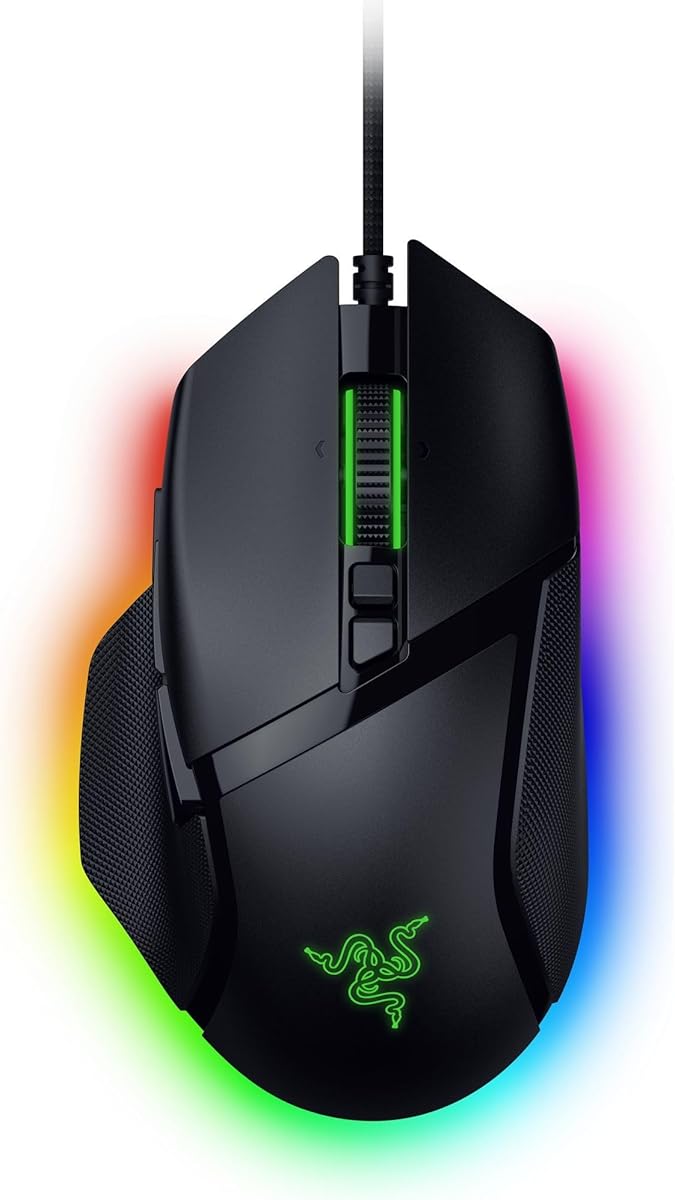
4.5Editor score
This side-by-side comparison highlights key specifications across ten leading analog gaming mice. Use this table to quickly compare sensor DPI, button counts, and unique features like weight systems or scroll modes to find your ideal match.



The Logitech G502 Hero stands out as a top contender in the analog gaming mouse category. With a 4.6 rating, it delivers precision through its HERO sensor and offers robust customization via eleven programmable buttons. This model balances performance and comfort effectively.
We may earn a commission when you buy through this link, at no additional cost to you.
Its HERO sensor tracks movements at the sub-micron level, ensuring zero smoothing or acceleration. The dual-mode scroll wheel and adjustable weights let you tailor the feel to your preference. Mechanical switch tensioning provides crisp clicks that enhance control during intense sessions.
Some users may find the weight slightly heavy even without added weights. Additionally, maximizing the RGB and button features requires installing Logitech Gaming Software. These trade-offs are minor compared to the overall versatility and precision it offers.
Gamers seeking a reliable all-around mouse should consider this model. It suits various play styles and hand sizes. Its combination of sensor accuracy, button count, and build quality makes it a standout choice for serious players.
The HERO sensor ensures your movements translate accurately to the screen. This precision helps in competitive titles where split-second aiming can determine success.
With eleven buttons, you can map macros and shortcuts easily. The dual-mode scroll wheel adds another layer of customization for navigating menus or content.
We may earn a commission when you buy through this link, at no additional cost to you.
The Razer Basilisk V3 offers premium ergonomics and features for extended gaming. It holds a 4.6 rating, reflecting its reliability and comfort. Its design supports the hand while providing access to essential controls for efficient gameplay.
We may earn a commission when you buy through this link, at no additional cost to you.
Optical switches ensure fast actuation with minimal delay. The HyperScroll tilt wheel allows smooth free-spin or tactile cycling, adapting to your needs. RGB zones react dynamically with games, enhancing immersion during play.
Razer Synapse software is required to unlock full customization potential. The cable, while flexible, may feel stiff to some users initially. These factors are manageable given the high-quality hardware and performance benefits.
Ideal for gamers prioritizing comfort and aesthetic customization. Its ergonomic shape reduces fatigue during long sessions. The combination of responsive switches and versatile controls makes it a strong premium option.
The thumb rest and contoured shape fit naturally in the hand. This design minimizes strain during prolonged use, supporting better focus on gameplay.
Chroma lighting reacts with game events for a dynamic setup. This feature adds visual flair that complements your gaming environment effectively.
We may earn a commission when you buy through this link, at no additional cost to you.
The Logitech G203 is a standout budget option for gamers seeking value. It earns a 4.6 rating for its performance and reliability. This wired mouse delivers precise tracking and essential controls without breaking the bank.
We may earn a commission when you buy through this link, at no additional cost to you.
Its 8000 DPI optical sensor offers zero smoothing for clean movement. The six-button design simplifies setup, and mechanical tensioning ensures reliable clicks. LIGHTSYNC RGB adds visual appeal at a competitive price.
It lacks the extensive button count found in higher-end models. RGB customization is simpler compared to more advanced devices. These limitations are acceptable for casual players or those prioritizing affordability.
Perfect for entry-level gamers or those upgrading from a basic mouse. It provides a solid foundation for gaming. Its durability and performance make it a great starting point.
This model offers core gaming features at an accessible price. You get reliable tracking and durability without needing premium add-ons.
LIGHTSYNC technology allows basic color customization. It syncs with other compatible gear for a cohesive look.
We may earn a commission when you buy through this link, at no additional cost to you.
The Logitech G403 Hero focuses on lightweight performance and comfort. With a 4.4 rating, it balances precision and ergonomics. Its design caters to gamers who prefer a lighter feel without sacrificing accuracy.
We may earn a commission when you buy through this link, at no additional cost to you.
The Hero 16K sensor tracks movements with zero smoothing. The shape supports natural grip positions, and rubber grips enhance control. On-board memory stores settings for portability across different PCs.
It comes with only one removable weight, limiting balance customization compared to others. Six buttons may not suit everyone needing extensive macros. However, the lightweight feel benefits fast-paced games.
Recommended for FPS players seeking agility and precision. Its comfort and sensor quality make it a reliable daily driver. It fits those who value speed over heavy customization.
The 87 g weight allows for quick movements. This benefits fast-paced genres where rapid aiming is key.
On-board memory ensures settings travel with the mouse. You can use your preferred configuration without installing software.
We may earn a commission when you buy through this link, at no additional cost to you.
The Logitech G MX518 revives a classic design with modern tech. It holds a 4.5 rating, reflecting its enduring popularity. This mouse combines proven ergonomics with a powerful HERO sensor for versatile gameplay.
We may earn a commission when you buy through this link, at no additional cost to you.
The HERO 25K sensor captures movements accurately across surfaces. Eight buttons offer customization for macros, and on-board memory saves profiles. The design supports palm and claw grips comfortably.
Some may find the shape less trendy compared to newer models. G Hub software is required for advanced configuration. Still, its sensor quality and ergonomics remain highly respected.
Ideal for fans of classic shapes needing modern performance. It suits diverse hand sizes and grip styles. Its reliability and feature set make it a strong contender.
The MX518 shape is trusted by many gamers. It offers comfortable support for extended sessions.
Eight buttons allow extensive customization. This helps in complex games requiring frequent macro use.
We may earn a commission when you buy through this link, at no additional cost to you.
The Corsair Scimitar RGB Elite is built for MMO and MOBA players. With a 4.1 rating, it stands out for its button layout. The 12 side buttons offer unmatched control for complex skill rotations.
We may earn a commission when you buy through this link, at no additional cost to you.
A key slider lets you adjust side button position for comfort. The sensor ensures accurate tracking during intense gameplay. Durable Omron switches withstand heavy use over time.
Its size may feel bulky for smaller hands or tight spaces. The weight could be tiring for those preferring lighter mice. However, the customization options are ideal for specific genres.
Best suited for MMO enthusiasts needing extensive macro access. The layout improves efficiency during raids or battles. Its build quality supports heavy gaming demands effectively.
Twelve side buttons allow complex keybinds. This reduces finger strain during long gaming sessions.
The slider adjusts button position for optimal grip. This feature helps accommodate different hand sizes.
We may earn a commission when you buy through this link, at no additional cost to you.
The Razer Basilisk V3 35K offers advanced sensor tech for precision. It holds a 4.5 rating for its performance. This model provides the latest optical switches and tracking capabilities for serious gamers.
We may earn a commission when you buy through this link, at no additional cost to you.
The Focus Pro 35K sensor works on diverse surfaces including glass. Smart-Reel mode adapts scroll behavior automatically. Optical switches ensure quick, consistent clicks with minimal latency.
The high price may be a barrier for some users. Synapse software is necessary to unlock all features. However, the sensor and build quality justify the investment.
Ideal for professionals or competitive players seeking top tech. Its accuracy and responsiveness elevate performance. The ergonomic design supports comfort during marathon sessions.
The 35K sensor delivers unmatched accuracy. It tracks movements flawlessly across various surfaces.
Smart-Reel mode switches scroll modes automatically. This feature adds versatility for different content types.
We may earn a commission when you buy through this link, at no additional cost to you.
The Corsair NIGHTSWORD RGB excels in weight customization. It holds a 4.5 rating, reflecting its build quality. This mouse allows precise balance tuning for personalized gaming comfort.
We may earn a commission when you buy through this link, at no additional cost to you.
Smart Tunable Weight System detects center of gravity. You can adjust weight between 119g and 141g. The shape fits naturally in the hand, reducing fatigue.
The base weight may feel heavy to those preferring light mice. Configuring weights takes time initially. Still, the ability to fine-tune balance is unique and beneficial.
Perfect for players needing exact weight control for style. Its ergonomics suit prolonged use effectively. The sensor ensures accurate tracking across various scenarios.
120 configurations allow exact balance preferences. This helps match the mouse to your grip style.
Contoured shape supports natural hand positions. Rubber grips add extra stability during fast moves.
We may earn a commission when you buy through this link, at no additional cost to you.
The Corsair M65 RGB Ultra focuses on speed and durability. With a 4.2 rating, it offers high-performance specs. This mouse suits FPS gamers needing rapid response and robust build.
We may earn a commission when you buy through this link, at no additional cost to you.
The AXON Hyper-Processing enables 8000Hz polling. Optical switches ensure instant actuation. The aluminum frame provides lasting durability with a familiar shape.
Its larger size may not fit smaller hands well. The cost is on the higher side. Yet, the performance specs support competitive gameplay effectively.
Ideal for FPS players needing precision and speed. The sensor and frame build quality are top-tier. Its features support aggressive gaming styles.
The 8000Hz polling offers low latency. This improves tracking accuracy during quick movements.
Anodized aluminum ensures longevity. The frame withstands heavy use without bending.
We may earn a commission when you buy through this link, at no additional cost to you.
The Razer Basilisk V3 Customizable offers great value and features. It holds a 4.6 rating for performance. This mouse balances ergonomics with advanced controls for daily gaming.
We may earn a commission when you buy through this link, at no additional cost to you.
The 26K sensor provides precise tracking. Eleven buttons allow extensive customization for macros. The thumb rest supports comfort during long sessions.
The cable length is fixed, limiting desk setups. Synapse software is needed for full features. Still, the specs are competitive at this price point.
Best for gamers seeking ergonomic comfort and high performance. The build and sensor quality are reliable. It suits both casual and competitive players.
The 26K sensor ensures accurate tracking. It adapts to different surfaces smoothly.
The thumb rest supports natural hand position. Eleven buttons provide ample room for macros.
We may earn a commission when you buy through this link, at no additional cost to you.
Selecting the right analog gaming mouse involves evaluating several key factors. This guide breaks down what to consider to match your needs and preferences.
The sensor is the heart of any gaming mouse. Look for high DPI ratings and zero smoothing or acceleration. Advanced sensors ensure your movements translate precisely to the screen.
Prioritize sensors with high tracking accuracy for competitive play.
Comfort is vital during long gaming sessions. Consider the shape that fits your hand size and grip style. Contoured designs reduce fatigue and improve control.
Choose a model that supports your natural hand position.
Extra buttons offer greater customization for macros. FPS players may prefer fewer buttons, while MMO gamers need many. Evaluate your need for programmable inputs.
Match button count to your specific gaming genre.
Durability affects long-term satisfaction. Look for sturdy switches and high-quality materials. Weight systems can also enhance balance and control.
Invest in durable materials to withstand heavy use.
Software enables button mapping and RGB customization. Ensure the manufacturer offers reliable software. Check compatibility with your operating system.
Confirm software features before purchase.
A higher polling rate reduces input latency. Gamers often seek rates above 1000Hz for responsiveness. This ensures quick actions translate instantly.
Select higher rates for competitive gaming.
Wired mice offer stable connections. Look for flexible braided cables to reduce drag. A good cable enhances free movement.
Flexible cables improve comfort during play.
RGB adds personalization and immersion. Some models sync lighting with game events. Ensure the lighting matches your aesthetic preferences.
Decide if RGB is essential for your setup.
Set up your mouse by connecting it via USB. Install the manufacturer software to configure buttons. Adjust DPI settings for comfortable cursor speed.
Keep the mouse surface clean for best tracking. Use a high-quality mousepad to reduce friction. Avoid placing your mouse in dusty environments.
Update your firmware and software regularly. This ensures compatibility with new games. Periodically check cable connections for any wear.
Analog gaming mice often refer to traditional wired mice offering precise analog-like tracking for gameplay. These devices provide direct input without wireless lag. They are popular for competitive gaming due to stability.
Wired gaming mice deliver stable connection with minimal latency. They do not rely on batteries, ensuring consistent performance. This is crucial for fast-paced competitive titles.
Start with 800 DPI and adjust based on comfort. Higher DPI allows faster cursor movement. Test settings during gameplay to determine ideal sensitivity.
RGB lighting does not impact mouse performance. It serves aesthetic purposes and immersion. You can disable it to reduce battery usage if applicable.
Programmable buttons help execute complex macros easily. They save time during gameplay. Essential for MMOs or strategy games requiring multiple actions.
Use a soft cloth to wipe the surface gently. Avoid harsh chemicals that could damage sensors. Keep crevices free of dust using a brush.
Yes, gaming mice work well for productivity tasks. Extra buttons can assist with shortcuts. The ergonomic design benefits long work hours.
Build quality and usage habits determine lifespan. High-quality switches last longer. Avoid physical stress like drops or excessive force on buttons.
This guide explored ten top analog gaming mice offering diverse features. From budget-friendly options to premium picks, each model suits specific gaming styles. Consider sensor accuracy, ergonomics, and customization needs carefully.
Prioritize comfort and performance based on your play style. MMO gamers benefit from extra buttons, while FPS players may prefer lightweight shapes. Ensure the mouse matches your hand size and preferred grip.
Verify current prices and availability before purchasing. Deals may change frequently. Choosing the right tool can significantly improve your gaming experience. Happy gaming!