
Nektar SE49
4.5Editor score
Comprehensive MIDI functionality
DAW integration support
Includes DAW software
Discover the top 49 Key MIDI Keyboards for producers and musicians. This guide compares features, compatibility, and value to help you choose the perfect
Choosing the right controller can transform your music production workflow significantly. A 49 key MIDI keyboard offers a balanced range of notes without taking up excessive desk space. It provides enough octaves for complex melodies while remaining portable for home studios or live performances.
We evaluated ten leading models based on key action, software integration, build quality, and value. Each option brings unique strengths for different workflows, from beginner hobbyists to seasoned professionals seeking advanced control. Our analysis focuses on real-world usability and compatibility with major digital audio workstations.
Each pick highlights specific strengths like velocity sensitivity, DAW mapping, or included software bundles. Prices and availability change frequently so always verify current details before purchasing. This guide helps you navigate the market to find a controller that matches your creative needs and budget constraints.
4.5Editor score

4.7Editor score

4.4Editor score
This side-by-side comparison highlights the core specifications and unique selling points of each model. Use this table to quickly identify which controller offers the features you need most for your specific production environment.




The Novation Launchkey 49 MK4 stands out as a top choice for producers needing deep software integration. Its rating reflects strong performance across various digital audio workstations. The keys feel natural and the pads respond well to dynamic input making it ideal for beat makers.
We may earn a commission when you buy through this link, at no additional cost to you.
Seamless integration with major DAWs like Ableton Live and Logic Pro is a major strength. You can control mixer channels and clip launching without manual setup. The Scale and Chord modes unlock creativity by ensuring you never hit a wrong note while composing.
While the price is higher than entry level controllers the feature set justifies the cost for serious users. The pads use FSR technology which offers better touch sensitivity compared to standard rubber pads. Some users might prefer semi weighted keys but the keys here are responsive enough for most.
This keyboard is perfect for producers who want a complete control surface without adding extra hardware. It bridges the gap between playing and programming music effectively. If you need a reliable controller that grows with your studio this is a strong investment.
The controller maps directly to mixer faders and transport controls reducing mouse reliance significantly.
Scale and chord modes help beginners learn music theory while playing complex harmonies easily.
We may earn a commission when you buy through this link, at no additional cost to you.
The Arturia KeyLab mk3 brings a premium feel with its solid aluminum construction and professional features. It is rated highly for its build quality and extensive control surface. The white variant offers a clean look for modern studios while maintaining robust functionality.
We may earn a commission when you buy through this link, at no additional cost to you.
Aftertouch support allows for nuanced expression which is rare at this price level. You can modulate parameters like vibrato or filter cutoff based on key pressure. The encoders provide tactile control over effects and mixers making production faster and more engaging.
The main trade off is the higher price and larger size compared to compact alternatives. It requires significant desk space which might be an issue for smaller setups. However the USB-C connection ensures stable power delivery and compatibility with modern laptops.
This model is ideal for professional producers who prioritize build quality and advanced control features. It fits well in a studio where durability and performance are key. If you want a controller that feels like a professional instrument this is the top choice.
Aftertouch allows you to add dynamic expression to sustained notes using key pressure.
Nine encoders provide direct access to plugin parameters reducing the need for mouse clicks.
We may earn a commission when you buy through this link, at no additional cost to you.
The Nektar SE49 offers exceptional value for beginners looking to start making music without breaking the bank. It is highly rated for its functionality relative to its low cost. The package includes a DAW which helps get you started immediately.
We may earn a commission when you buy through this link, at no additional cost to you.
Integration with popular DAWs allows you to map transport controls quickly. This saves time setting up your studio environment. The MIDI functionality is comprehensive enough for most home production tasks without needing advanced features like polyphonic aftertouch.
The build is plastic which feels less premium than metal options but remains durable for light use. It lacks aftertouch which limits expressive control on synths but this is expected at this price. The included software adds significant value to the purchase.
This controller is perfect for students or hobbyists who need a reliable entry point. It teaches the basics of MIDI and DAW control effectively. If you are on a tight budget this is the smartest choice available.
The included Bigwig Studio DAW provides immediate software for recording and production.
Simple layout and DAW integration make it easy to learn studio workflows quickly.
We may earn a commission when you buy through this link, at no additional cost to you.
The M-AUDIO Oxygen 49 MKV is a versatile controller designed to work well with Native Instruments software. It supports NKS allowing direct browsing of presets without mouse interaction. This makes it ideal for users invested in the NI ecosystem.
We may earn a commission when you buy through this link, at no additional cost to you.
Smart Chord and Smart Scale modes assist in songwriting by suggesting notes that fit the key. The backlit pads ensure visibility in low light studio environments. The 8 assignable knobs provide tactile control for synthesizers and effects.
While the keys are unweighted they offer decent velocity sensitivity for expressive performance. The design is utilitarian and fits well on a desk without taking up too much space. Software included expands the utility beyond the hardware itself.
Choose this if you rely heavily on Native Instruments plugins and want quick access. It balances features and price effectively for intermediate producers. It is a solid middle ground between budget and premium options.
NKS support allows direct control over sounds making browsing and loading faster.
Smart modes help generate chords and scales instantly to speed up composition.
We may earn a commission when you buy through this link, at no additional cost to you.
The KeyLab Essential mk3 includes Analog Lab V which offers access to thousands of sounds. This makes it a comprehensive solution for music production starting from day one. It is a well rated keyboard with a modern interface.
We may earn a commission when you buy through this link, at no additional cost to you.
Scale and Chord modes allow for intuitive composition even without deep music theory knowledge. The RGB backlit pads provide visual feedback for clips and patterns. Custom DAW scripts ensure that controls are mapped correctly for your software.
The keyboard is lighter and less robust than the full KeyLab mk3 but offers great functionality. It lacks aftertouch which might be a limitation for advanced synth players. However the included software subscription adds significant value.
This is a great choice for producers who want a strong software foundation. The included Analog Lab V is a professional tier instrument. If you want a controller that gives you sound immediately this is ideal.
Analog Lab V included provides instant access to premium sound libraries for production.
Scale modes help generate harmonies that sound good without music theory expertise.
We may earn a commission when you buy through this link, at no additional cost to you.
This generic controller offers a simple and affordable way to get 49 keys for basic input. It is best suited for users who need a simple input device without advanced features. The construction is ABS plastic which keeps costs down.
We may earn a commission when you buy through this link, at no additional cost to you.
The compact dimensions make it easy to store in tight spaces or transport. It lacks the advanced features found on branded controllers but does the basic job. It is a practical choice for simple note input.
There are limited features like aftertouch or DAW mapping which may restrict advanced workflows. The build is basic and may not withstand heavy use over time. It serves best as a secondary controller.
Consider this for a secondary setup or tight budget constraints. It provides the essential keys without extra bulk or cost. It is a pragmatic choice for those needing minimal functionality.
Simple controls focus on basic note input without complex menus or features.
Compact size ensures it fits on small desks or in a laptop bag easily.
We may earn a commission when you buy through this link, at no additional cost to you.
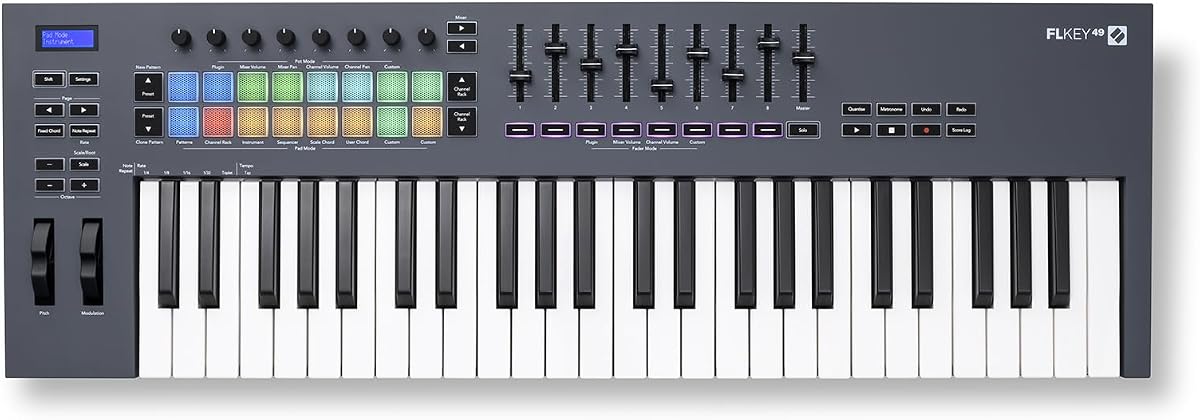
The Novation FLkey 49 is designed specifically for integration with FL Studio software. It provides deep mapping for mixers and channel racks which streamlines workflow significantly. If you use FL Studio this offers unmatched control over production.
We may earn a commission when you buy through this link, at no additional cost to you.
Pots and faders allow you to adjust volumes and pans directly without touching the mouse. The step sequencer mode maps pads to patterns making beat creation faster. Scale modes ensure you stay in key while composing melodies.
While it works with other DAWs the unique FL Studio features are most beneficial for that environment. The build quality is solid and the keys are responsive enough for most users. It is a specialized tool for FL users.
Choose this if FL Studio is your primary DAW and you want maximum control. It turns the controller into an extension of the software interface. For FL users this is the top recommended controller.
Direct mapping to FL Studio mixer reduces mouse usage and speeds up mixing.
Sequencer mode maps pads to FL Studio steps for faster drum programming.
We may earn a commission when you buy through this link, at no additional cost to you.
The M-AUDIO Oxygen Pro 49 brings advanced features like aftertouch and MIDI out to the Oxygen series. It is highly rated for its extensive control options and software compatibility. This model bridges the gap between entry and pro gear.
We may earn a commission when you buy through this link, at no additional cost to you.
Aftertouch adds a layer of expression that allows for dynamic modulation on held notes. The MIDI out port enables connection to external hardware synthesizers which is rare on USB controllers. The 16 RGB pads are responsive and clearly visible.
The layout is dense with many knobs and faders which may require learning time. It is more expensive than basic options but justifies it with advanced features. The NKS support ensures compatibility with Native Instruments products.
This is ideal for users who need to control both software and external hardware. It offers a complete set of tools for serious producers. If you need MIDI out and aftertouch this is the best choice.
MIDI out port allows connection to external synthesizers expanding your studio setup.
Aftertouch adds nuance to sustained notes using pressure for modulation.
We may earn a commission when you buy through this link, at no additional cost to you.
The midiplus AK490 is a straightforward controller focusing on essential MIDI functionality. It provides basic velocity sensitivity and control wheels for pitch and modulation. The inclusion of MIDI out adds versatility for connecting external gear.
We may earn a commission when you buy through this link, at no additional cost to you.
It is a simple device with minimal settings which makes it easy to set up. The octave buttons allow you to access higher and lower ranges easily. It is a no-frills option that gets the job done.
There is limited software integration or DAW mapping compared to more expensive models. The build is basic and the keys feel somewhat light. It serves best as a backup or entry level unit.
Consider this if you need a simple controller with MIDI out at a low cost. It lacks advanced features but covers the essentials well. For basic note input it is a reliable option.
The controller focuses on providing essential note input without extra software complexity.
MIDI out allows connection to external gear without requiring USB hubs.
We may earn a commission when you buy through this link, at no additional cost to you.
The M-AUDIO Keystation 49 MK3 is designed for effortless setup and basic performance. It connects via USB without requiring any drivers to work on Mac or PC. It is a straightforward option for musicians wanting a simple interface.
We may earn a commission when you buy through this link, at no additional cost to you.
The volume fader and transport buttons provide essential control without clutter. The keys are velocity sensitive which captures dynamics for a natural playing experience. It is compact and fits easily on a desktop.
The lack of dedicated DAW mapping means you may need to configure software manually. It lacks pads or knobs for deeper control which might limit some producers. However the simplicity is a major plus for ease of use.
Choose this if you want a reliable controller that just works out of the box. It is perfect for keyboardists who prioritize playing over complex control. For basic tasks it is a solid budget option.
USB connection works instantly on most systems without installing drivers.
Essential controls like volume and transport are available without complex menus.
We may earn a commission when you buy through this link, at no additional cost to you.
Selecting a 49 key MIDI keyboard involves weighing features like key action, connectivity, and software support. This guide outlines the essential factors to consider to ensure the controller fits your workflow.
Key action refers to the weight and resistance of the keys which significantly impacts playing feel. Velocity sensitivity ensures that the controller detects how hard you press to adjust volume. Look for full-sized keys for comfort and avoid miniature ones if you want a professional feel.
Prioritize velocity sensitivity and key size to ensure expressive performances in your productions.
DAW integration allows the controller to map directly to your software for transport and mixing. This feature reduces the need for manual configuration and keeps your hands on the keyboard. Check if the brand supports your specific DAW such as Ableton Live or FL Studio.
Choose a controller with deep integration for your main software to streamline your workflow efficiently.
Connectivity determines how the controller connects to your computer or other gear. USB is standard for computer connection but MIDI DIN out is useful for external synthesizers. USB-C is becoming common for better power delivery and durability.
Ensure the controller has the necessary ports for your existing gear setup.
Many controllers include software like DAWs or instrument libraries which adds significant value. These packages can save money if you are starting out and need production tools. Check the validity and features of the included software to ensure it meets your needs.
Review the included software to confirm it offers value for your production goals.
Build quality affects durability and stability during live or studio use. Aluminum cases are more robust than plastic but often cost more. Look for sturdy pots and faders that will not break over time.
Invest in a controller with sturdy components to ensure longevity in your studio.
Expressive features like aftertouch allow for dynamic changes in sound while a key is held. Pitch and modulation wheels are standard for adding effects like vibrato. These features add depth to your performances and are essential for synth work.
Consider aftertouch and wheels if you want more dynamic sound control.
Price varies significantly based on features and build quality. Entry-level models offer basic functionality while premium options provide advanced controls. Decide on a budget that balances the features you need with your financial constraints.
Balance your budget with the necessary features to find the best value.
Portability is key if you need to transport the controller to different locations. A compact design and lighter weight make travel easier. Consider the footprint of the controller relative to your desk space.
Choose a lighter and more compact model if you need to travel with it often.
Connect your keyboard to your computer using a standard USB cable. Ensure your DAW recognizes the MIDI device in the settings menu. Install any necessary drivers if required by the manufacturer for full functionality.
Keep the controller in a cool dry place away from direct sunlight. Dust the keys regularly with a soft cloth to prevent buildup that can affect responsiveness. Avoid spilling liquids on the surface to prevent electrical damage.
Calibrate your settings regularly if the keyboard has touch sensitive controls. Use the included software to map buttons to your preferred DAW functions for faster workflow. Proper care extends the lifespan of your controller significantly.
Weighted keys simulate the feel of an acoustic piano with resistance while unweighted keys are lighter and springy. Weighted keys are better for piano players but take more space and energy to play. Unweighted keys are preferred for synth work and general MIDI production.
Most modern keyboards are plug and play via USB and do not require drivers. However some advanced models may need software for full DAW integration. Always check the product specifications to ensure compatibility with your operating system.
Yes many keyboards support iOS or Android devices via adapters. You will need a USB OTG adapter for Android or a Camera Adapter for iOS. Check if your DAW app supports external MIDI controllers for proper functionality.
Aftertouch allows you to change sound parameters by pressing keys harder after the initial hit. It is useful for expressive synth sounds but not essential for basic melody composition. Beginners can start without it and upgrade later if needed.
49 keys offer a balance between range and desk space which is ideal for home studios. 61 keys provide more range for hands but take up more room. 88 keys mimic a piano but are large and heavy. 49 is the sweet spot for most producers.
Visit the manufacturer website to download the latest firmware for your model. Connect the keyboard and run the update tool provided by the brand. Follow the on-screen instructions carefully to avoid bricking the device.
We have reviewed the top options for 49 key MIDI keyboards offering choices for every budget. The Novation Launchkey 49 MK4 stands out for its integration while the Nektar SE49 is best for budget. The Arturia KeyLab mk3 leads in premium features and build quality.
Focus on what matters most for your workflow such as DAW integration or expressive features. Consider whether you need pads or faders for your specific production needs. The right controller can significantly improve your creative process.
Prices and stock vary so check the current details before purchasing to ensure availability. Regularly verify compatibility with your software updates. With the right choice you will have a powerful tool for your musical journey.