
Dell 24 240Hz Gaming Monitor
4.7Editor score
0.5ms response time
FreeSync Premium support
TÜV eye comfort
Finding the right display for competitive shooters requires precision and speed. A 240Hz monitor for competitive Valorant delivers the smooth motion and low input lag needed to react instantly to enemy movements and secure clutch plays.
We analyzed ten leading models based on panel technology, refresh rate capabilities, and gaming features. Our comparison highlights monitors that balance cost with performance ensuring you find a setup that enhances your aim and situational awareness.
Each selection below details specific strengths and trade-offs for esports use. While pricing fluctuates daily, these picks represent current market leaders in value and quality for serious Valorant competitors aiming to climb the ranks.
4.7Editor score
4.5Editor score

4.6Editor score
As an Amazon Associate we earn from qualifying purchases.
The following table provides a side-by-side look at key specifications for all ten monitors. This helps you quickly identify which model offers the refresh rate, response time, and panel type best suited for your specific Valorant setup.


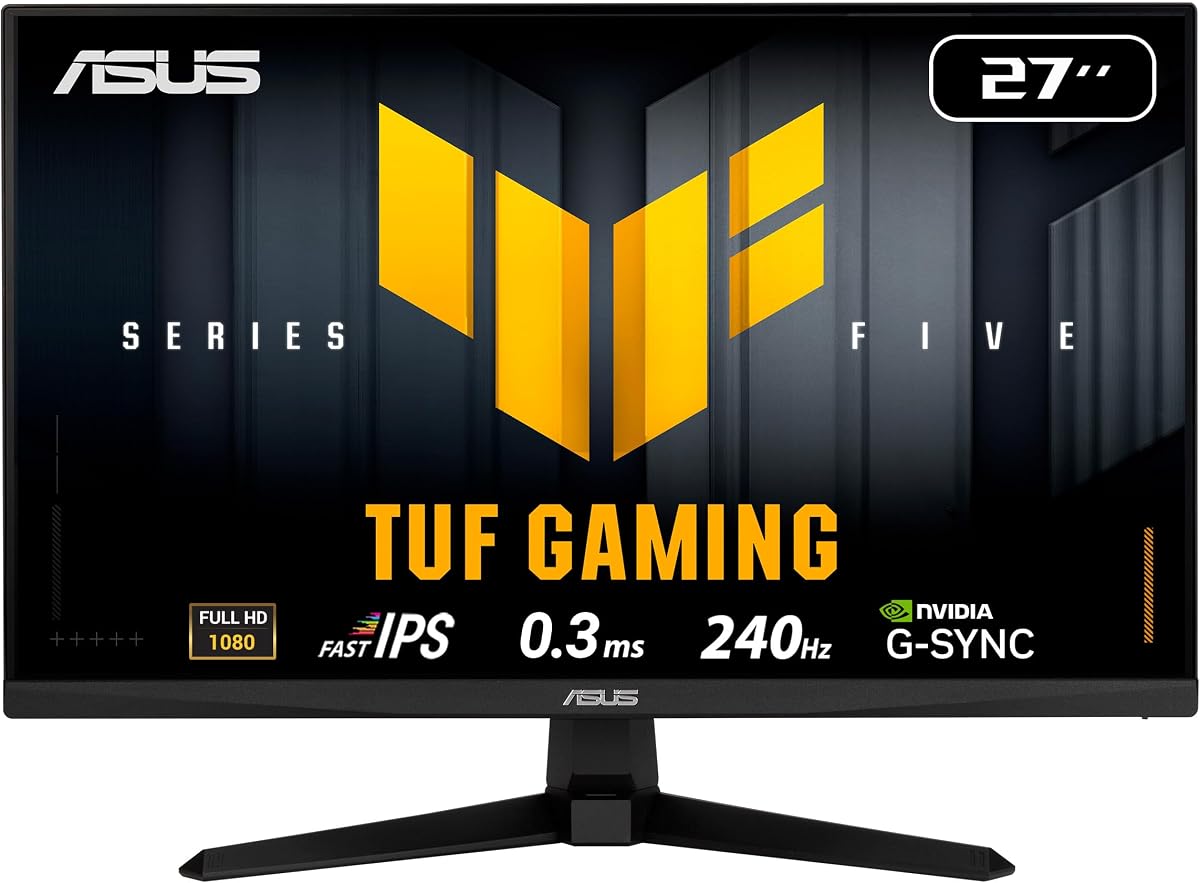
The ASUS TUF VG279QM5A stands out as a premier choice for Valorant players seeking top-tier performance. With a 4.5 star rating, it delivers crisp visuals through its Fast IPS panel and rapid 0.3ms response time.
We may earn a commission when you buy through this link, at no additional cost to you.
Its ELMB SYNC technology ensures that motion blur is minimized even at high refresh rates. This allows you to track fast-moving targets without compromising on variable refresh rate support for a smooth experience.
While the cost is higher than budget options, the investment pays off in competitive scenarios. The trade-off involves fewer stand adjustments compared to premium ergonomic models, but the performance justifies the limitation.
Competitive gamers who prioritize frame clarity and color fidelity will find this monitor ideal. It balances speed and visual quality effectively making it a strong recommendation for serious Valorant competitors.
ELMB SYNC technology combines motion blur reduction with variable refresh rates to eliminate ghosting while maintaining smooth gameplay.
The 99% sRGB coverage ensures that UI elements and enemy models are rendered with accurate colors for better recognition.
We may earn a commission when you buy through this link, at no additional cost to you.
The Dell 24 240Hz Gaming Monitor offers an accessible entry point into high refresh rate gaming. Rated 4.7 stars, it provides a reliable 0.5ms response time and smooth 240Hz refresh rate ideal for competitive titles.
We may earn a commission when you buy through this link, at no additional cost to you.
FreeSync Premium ensures tearing-free visuals when paired with AMD graphics cards. The TÜV 3-Star certification adds value by reducing blue light which helps during long practice sessions.
Though it lacks height adjustment, the tilt mechanism is sufficient for most setups. The compact footprint makes it easy to fit into smaller desks without sacrificing performance quality.
Players looking for value without compromising on speed should consider this model. It delivers essential features for Valorant at a fraction of the cost of premium alternatives.
This monitor delivers high refresh rates and fast response times at a budget-friendly price point perfect for students or casual competitors.
TÜV Rheinland certification ensures reduced blue light emission to protect eyes during extended gaming marathons.
We may earn a commission when you buy through this link, at no additional cost to you.
The AOC 27 Gaming Monitor QHD brings higher visual fidelity to the competitive arena. With a 4.6 star rating and QHD resolution, it offers sharper text and enemy models than standard 1080p displays.
We may earn a commission when you buy through this link, at no additional cost to you.
Its 0.3ms response time ensures minimal blur during rapid crosshair movements. NVIDIA G-SYNC support further enhances the experience by synchronizing the refresh rate with your GPU output.
The main trade-off is the need for a powerful graphics card to drive 1440p at high frame rates. This adds to the overall system cost but delivers a more immersive visual experience.
For players with high-end rigs seeking the best possible visual clarity this monitor is a top contender. It combines speed with resolution in a way few competitors match.
The QHD resolution provides sharper details helping you spot enemies in corners or distant areas more easily.
NVIDIA G-SYNC compatibility ensures ultra-smooth gameplay without tearing when using compatible graphics cards.
We may earn a commission when you buy through this link, at no additional cost to you.
SANSUI offers a compelling option with a refresh rate that exceeds standard 240Hz. Rated 4.5 stars, this monitor provides up to 300Hz on DisplayPort offering extra fluidity for high-refresh GPUs.
We may earn a commission when you buy through this link, at no additional cost to you.
The 120% sRGB coverage adds vividness to the visual output. CrossHair and game assistant features help with aiming drills and specific game modes directly from the OSD menu.
Some users may find the build quality varies compared to established brands. The stand offers tilt adjustment but lacks height or pivot capabilities for ergonomic customization.
Players seeking max refresh rates on a budget might enjoy this model. It provides high speed options at a lower price point than major competitors.
Supporting up to 300Hz on DisplayPort allows for extra smooth motion for those with capable hardware.
Wide sRGB coverage ensures games look colorful and vibrant enhancing the overall visual experience.
We may earn a commission when you buy through this link, at no additional cost to you.
Amzfast brings a unique curved design to the competitive monitor space. Although it lacks a specific star rating, it delivers a 240Hz refresh rate and 1ms MPRT response time suitable for fast-paced play.
We may earn a commission when you buy through this link, at no additional cost to you.
The curved panel helps keep your gaze centered on the screen edges improving immersion. An ultra-slim base allows for under-keyboard storage which helps in maximizing desk space efficiency.
Quality control might be a concern given the lack of established user data. The joystick OSD is intuitive but the overall build feels less robust than premium options.
This model is suitable for those needing a space-saving setup with high refresh rates. It offers a distinct curved experience without breaking the bank significantly.
The ultra-slim base design allows you to store keyboards underneath to free up valuable desk real estate.
A curved screen creates a more focused viewing environment reducing peripheral distractions during intense matches.
We may earn a commission when you buy through this link, at no additional cost to you.
The msi MAG 274CF X24 holds an impressive 4.8 star rating making it a top choice for many buyers. It features a VA panel which offers deeper contrast and rich blacks for cinematic appeal.
We may earn a commission when you buy through this link, at no additional cost to you.
At 0.5ms response time, it competes well with faster IPS panels. AI Vision technology helps reveal details in dark areas which can be beneficial for spotting enemies in shadows.
VA panels generally have slower pixel transitions which might introduce slight ghosting. Viewing angles are narrower than IPS meaning colors may shift if seated off-center.
Players prioritizing contrast and solid value will appreciate this monitor. Its high rating suggests reliability and consistent performance for general gaming needs.
VA technology provides deeper blacks and better contrast ratios compared to standard IPS panels for richer visuals.
AI Vision helps brighten dark scenes so you can spot enemies hiding in shadows more effectively.
We may earn a commission when you buy through this link, at no additional cost to you.
AOC continues its strong performance with this 27-inch model rated 4.6 stars. It offers a native 240Hz refresh rate with an overclocking option up to 260Hz for extra fluidity.
We may earn a commission when you buy through this link, at no additional cost to you.
The panel delivers vibrant colors and stable viewing angles typical of IPS technology. G-SYNC compatibility ensures smooth visuals when using NVIDIA GPUs without screen tearing.
Power usage is efficient which reduces electricity costs over time. However the stand lacks height adjustability which might affect ergonomic positioning for some users.
This monitor is a reliable choice for 27-inch setups with high refresh rates. It balances performance and features well for a reasonable market price.
The ability to overclock to 260Hz provides a small edge in smoothness for compatible hardware.
Eco Mode keeps power usage low while maintaining bright and clear visuals for everyday gaming.
We may earn a commission when you buy through this link, at no additional cost to you.
This SANSUI model offers a curved experience at an accessible price point. With a 4.4 star rating, it provides 240Hz refresh rate and 1ms response time suitable for FPS gaming.
We may earn a commission when you buy through this link, at no additional cost to you.
The 1500R curve enhances immersion by wrapping around your peripheral vision. Shadow booster helps reveal details in dark game environments making enemies easier to see.
Users report mixed experiences regarding consistency and durability. The color performance is impressive for the price but lacks the robustness of higher-end panels.
Casual gamers looking for a curved display without spending much should consider this. It offers core competitive features at a very entry-level price.
The 1500R curvature matches the human eye to create a more focused and immersive viewing experience.
Shadow booster technology brightens dark areas so you can spot opponents hiding in shadows.
We may earn a commission when you buy through this link, at no additional cost to you.
ASUS provides a compact solution with this 24-inch model rated 4.4 stars. It features a height-adjustable stand which is rare in this price range helping you maintain better posture.
We may earn a commission when you buy through this link, at no additional cost to you.
The Fast IPS panel ensures quick response times with 0.3ms capabilities. ELMB SYNC technology reduces blur while maintaining variable refresh rate support for smooth motion.
The smaller size helps on tight desks but limits peripheral visibility. Some settings might be limited compared to larger models but essential features remain intact.
Gamers with limited desk space need adjustable ergonomics will find this monitor suitable. It balances size and performance effectively for competitive setups.
The height-adjustable stand allows you to position the screen for neck comfort during long sessions.
ELMB SYNC technology helps eliminate ghosting for sharper image clarity during fast movement.
We may earn a commission when you buy through this link, at no additional cost to you.
The 25-inch option offers a middle ground between 24 and 27-inch displays. Rated 4.6 stars, it provides a 0.3ms response time and vibrant colors for a rich visual experience.
We may earn a commission when you buy through this link, at no additional cost to you.
G-SYNC compatibility ensures tear-free gameplay with NVIDIA GPUs. The panel covers 99% of sRGB ensuring accurate color reproduction for both gaming and content creation.
While it lacks full ergonomic adjustments, the performance is strong. The 3-year warranty adds value and peace of mind for long-term usage.
This model is a solid choice for those wanting a slightly larger view without going to 27 inches. It delivers balanced performance suitable for serious gaming.
A 25-inch screen offers a good compromise for visibility and desk space efficiency.
99% sRGB coverage ensures that images appear natural and consistent across different content types.
We may earn a commission when you buy through this link, at no additional cost to you.
Selecting the right monitor involves balancing response time, refresh rate, and panel type to match your hardware and skill level.
A 240Hz refresh rate allows the monitor to display up to 240 frames per second which reduces motion blur significantly. For Valorant this fluidity helps you track opponents quickly and react faster during gunfights.
Prioritize models that support 240Hz via DisplayPort to ensure maximum performance from your graphics card.
Response time measures how quickly a pixel changes color. Aim for 1ms or lower to minimize ghosting which can obscure fast moving targets during combat.
Look for monitors labeled as Fast IPS or TN as these typically offer the fastest response times needed for competitive play.
IPS panels offer the best color accuracy and wide viewing angles making them popular for modern setups. While TN panels are faster IPS has caught up significantly for gaming performance.
Choose IPS if you care about image quality alongside speed as it provides better visuals for general use too.
Adaptive Sync like G-SYNC or FreeSync synchronizes the monitor refresh rate with your GPU output. This prevents screen tearing and stuttering which can distract during critical moments.
Ensure the monitor supports the specific sync technology compatible with your graphics card brand.
Most competitive players prefer 24 or 25-inch screens with 1080p resolution to maintain high frame rates. Larger screens can impact performance if your GPU cannot sustain 240Hz.
Stick to standard sizes to ensure your hardware can consistently drive the high frame rates Valorant requires.
Adjustable stands with height and tilt options help maintain proper posture during long sessions. A sturdy base prevents wobble which is important when tapping the desk during intense gameplay.
Check for VESA mount compatibility if you plan to use an arm for better positioning flexibility.
Good color reproduction ensures that enemies and map elements stand out clearly. High sRGB coverage helps you distinguish details in complex scenes without visual strain.
Look for monitors with 99% sRGB coverage to ensure consistent and accurate visuals.
Ensure the monitor has DisplayPort 1.4 to support high refresh rates without compression. HDMI ports should be checked if you also use consoles with compatible refresh capabilities.
Verify cable inclusion and port types to avoid buying extra adapters for full performance.
Calibrate your monitor settings to reduce eye strain during long sessions. Adjust brightness and contrast to a comfortable level and enable night mode if available to minimize blue light exposure at night.
Use a cleaning cloth to wipe dust and smudges gently without using harsh chemicals. Proper cleaning maintains panel clarity and ensures accurate colors remain stable over time.
Keep drivers updated for your graphics card to ensure the monitor runs at its full refresh rate. Checking settings regularly will prevent accidental drops to lower refresh rates that could affect gameplay.
Yes, a 240Hz monitor provides smoother motion and faster visual updates which can help in tracking enemies and reacting to threats. The difference is most obvious when compared to 60Hz or 144Hz screens.
240Hz is widely considered ideal for competitive play as it maximizes fluidity and minimizes blur. If your PC can sustain 240+ FPS, this rate ensures the monitor keeps up with your hardware.
You can, but you might not reach 240 FPS consistently. The monitor still works at lower refresh rates, but you won't get the full benefit unless your system maintains high frame rates.
1080p is preferred for competitive Valorant because it allows higher frame rates on more hardware. 1440p offers sharper visuals but may reduce your maximum FPS which impacts smoothness.
Response time is critical as lower values reduce ghosting and motion blur. Aim for 1ms or lower to ensure clear visibility of fast moving targets during critical gunfights.
Not strictly, but it helps reduce tearing and stuttering when frame rates fluctuate. FreeSync works similarly for AMD users and offers comparable benefits for smooth visuals.
These ten options cover a range of budgets and sizes to suit any competitive setup. The ASUS TUF and Dell models stand out for their reliable performance and essential features tailored to esports needs.
Prioritize response time and refresh rate when making your final decision to ensure your hardware matches your skill level. A reliable panel can significantly improve your ability to track and engage enemies effectively.
Prices and availability change frequently so check current listings to find the best deals. Investing in the right monitor is a worthwhile step toward improving your competitive performance.