
Ethernet Adapter for Fire TV Stick
4.7Editor score
Affordable pricing point
Universal TV stick compatibility
Aluminum alloy heat dissipation
Compare the top 10 Ethernet Adapter for Fire TV Devices to find reliable wired connectivity that eliminates buffering and strengthens streaming performance.
Streaming media devices like Fire TV Stick often rely on Wi-Fi, which can suffer from interference and slow speeds. Using an Ethernet Adapter for Fire TV Devices ensures a stable wired connection that reduces buffering and improves overall performance.
We evaluated ten top-rated adapters based on compatibility, speed, build quality, and ease of setup. Our analysis focuses on models that work seamlessly with various Fire TV generations and other streaming sticks to meet diverse user needs.
Each pick highlights key features and pros and cons to help you decide quickly. Remember that prices and availability can change frequently, so verify the current details on Amazon before making your final purchase decision today.
4.7Editor score

4.5Editor score

4.1Editor score
This side-by-side table outlines the essential specifications for all ten adapters we reviewed to help you compare compatibility, speed, and design features at a glance.


This Micro-USB Ethernet Adapter stands out as the top choice for most Fire TV users. With a strong 4.5 star rating, it offers a reliable way to connect your device to a wired network for consistent internet speeds.
We may earn a commission when you buy through this link, at no additional cost to you.
The adapter connects directly to the USB port on your Fire TV, allowing you to plug in an Ethernet cable from your router. It supports a wide range of devices including Fire TV Stick Lite, Fire TV Stick, and Fire TV Cube.
One trade-off is that it requires a separate micro-USB power adapter to function properly, which may add slight complexity to your setup. However, this is standard for passive Ethernet adapters and ensures stable performance.
If you own a Fire TV Stick with a micro-USB port and want to eliminate buffering, this is the perfect upgrade. It provides a solid wired connection that significantly improves streaming reliability.
By connecting directly to a wired Ethernet network, this adapter frees up WiFi bandwidth for other devices and provides stable internet speeds.
It works with Fire TV Stick Lite, 2nd Gen, 4K, and Fire TV Cube, covering the majority of older micro-USB Fire TV models.
We may earn a commission when you buy through this link, at no additional cost to you.
For users with the newest Fire TV Stick HD featuring USB-C, this Right Angle adapter is an essential accessory. It offers a convenient right angle design that fits well without obstructing nearby ports.
We may earn a commission when you buy through this link, at no additional cost to you.
This adapter supports up to 480mbps when used with the Fire TV Stick HD (2nd Gen), ensuring you get a stable wired connection. It is specifically designed for USB-C connectivity.
The main limitation is that it only works with USB-C devices like the Fire TV Stick HD (2nd Gen). If your Fire TV uses micro-USB, this model will not work with your hardware.
If you have a USB-C Fire TV stick and need a reliable Ethernet connection, this adapter is the ideal choice. It simplifies your setup and helps maintain consistent streaming quality.
This adapter is specifically compatible with the Fire TV Stick HD (2nd Gen) which features USB-C connectivity for a stable wired network.
The right angle design allows the adapter to sit flush against the device, preventing obstruction and cable clutter behind your TV.
We may earn a commission when you buy through this link, at no additional cost to you.
The ELECTOP adapter delivers an extreme 1000Mbps Ethernet experience for users who need top-tier network performance. It features a high quality aluminum alloy body for efficient heat dissipation and includes an LED indicator for connection status.
We may earn a commission when you buy through this link, at no additional cost to you.
This adapter is perfect for Fire TV Sticks with micro-USB ports and supports 4K streaming with zero latency. It also comes with self-adhesive tapes to help secure the adapter in place.
One thing to note is that it does not support USB-C devices. Additionally, for sufficient power supply you may need an extra micro USB power cable depending on your router and TV stick setup.
If you want the fastest possible wired connection for your streaming and gaming needs, this adapter is a strong candidate. The aluminum casing ensures it stays cool even during extended use.
Upgrade to 1000Mbps Ethernet full speed to enjoy unprecedentedly smooth video playback and gaming without lagging caused by weak WiFi signals.
Made of high-quality aluminum alloy this adapter quickly and effectively dissipates heat to maintain optimal performance after long hours of operation.
We may earn a commission when you buy through this link, at no additional cost to you.
This adapter transforms your streaming experience by delivering stable 100 Mbps wired internet to eliminate buffering and lag. It is crafted from premium aluminum alloy to ensure rapid heat dissipation during extended sessions.
We may earn a commission when you buy through this link, at no additional cost to you.
It works seamlessly with Fire TV Stick 2/3/4K/4K MAX and other streaming devices with micro-USB ports. The included self-adhesive tapes help secure the adapter in an optimal position to prevent connectivity issues.
The main trade-off is that it caps at 100 Mbps which is sufficient for 4K streaming but not for faster Gigabit needs. Also it will not work with USB-C devices.
For most users wanting to fix spotty WiFi on a Fire TV Stick 4K this adapter offers excellent value. It is easy to set up and provides a reliable wired connection.
Say goodbye to unreliable WiFi and unlock seamless 4K/HD video and glitch-free gaming by transforming your streaming with a stable wired connection.
Crafted from premium aluminum alloy this adapter ensures rapid heat dissipation and includes self-adhesive tapes for effortless placement and secure mounting.
We may earn a commission when you buy through this link, at no additional cost to you.
With a 4.5 star rating this adapter offers instant streaming with rock-solid wired internet speeds. It is made with a premium aluminum casing to keep cool during binge sessions and features smart status lights.
We may earn a commission when you buy through this link, at no additional cost to you.
Setup takes only a minute simply plug it into the USB port and connect to your router. It works seamlessly with Fire TV Stick Lite 2nd & 3rd Gen 4K and 4K Max models.
One limitation is that it caps at 10/100 Mbps and does not support USB-C. However for standard streaming and browsing this speed is more than enough for most households.
If you need a simple reliable adapter to stop dropouts this is a great pick. The smart lights give you instant visual confirmation that your connection is live.
Just plug the Ethernet Adapter into your Fire TV's USB port and connect to your router boom you're done in under one minute.
Premium aluminum casing stays cool during binge viewing ensuring your favorite shows run without overheating worries or performance drops.
We may earn a commission when you buy through this link, at no additional cost to you.
This adapter offers universal compatibility for TV sticks with a Micro USB port and comes at a very affordable price. It is crafted from aluminum alloy for quick heat dissipation and includes adhesive tapes to prevent loose connections.
We may earn a commission when you buy through this link, at no additional cost to you.
You can activate it instantly by plugging it into the Micro USB port and connecting an Ethernet cable to your router. It supports reliable 10/100 Mbps speeds for smooth streaming.
The main trade-off is that it does not work with USB-C devices like newer Chromecast or Fire TV models. Also it is limited to 100 Mbps speeds.
If you are looking for a budget friendly solution for an older Fire TV stick this is an excellent choice. It is easy to use and helps you ditch spotty WiFi.
Compatible with Fire TV Stick 4K Google Home Mini and Chromecast Ultra Audio this adapter supports a wide range of TV sticks with Micro USB ports.
No drivers or complicated installs are needed just plug the adapter into the USB port and connect the Ethernet cable for instant activation.
We may earn a commission when you buy through this link, at no additional cost to you.
The UGREEN adapter stands out with a 3.3 ft long cable design that provides wiggle room behind your TV. It includes a USB-A power cable to power the network adapter and TV Stick at the same time.
We may earn a commission when you buy through this link, at no additional cost to you.
It supports 10/100 mbps internet speed and is compatible with FireTV Stick Basic 2nd gen 4k Lite Google Chromecast and Google Home Mini. The long cable is very handy for difficult setups.
Note that it requires a USB wall charger over 5W for normal use and is not compatible with USB-C devices. Also it does not support Fire TV Stick 1st gen or 4k Max.
If your TV is far from the outlet this long cable is a significant advantage. It simplifies the setup process and provides a stable connection for streaming.
The Micro USB and USB power cable has a length of up to 3.3 ft which comes in handy if you have little-to-no wiggle room behind your TV.
The USB-A power cord powers the network adapter and TV Stick at the same time so you do not need to buy extra cables.
We may earn a commission when you buy through this link, at no additional cost to you.
Cable Matters provides a reliable wired network connection that eliminates video buffering caused by weak signals. It includes a 3-foot USB power cable for convenient connection to a wall charger.
We may earn a commission when you buy through this link, at no additional cost to you.
This adapter supports up to 300+ Mbps Ethernet speed offering a faster connection than traditional Fast Ethernet. It is compatible with Fire TV Stick Fire TV Cube Google Chromecast and Google Home Mini.
While the speed is impressive it is still limited to micro-USB devices. If you need an adapter for newer USB-C models this will not work for you.
For a hassle-free setup and versatile compatibility this adapter is a strong choice. The included power cable reduces clutter and ensures your device stays powered while streaming.
Supports up to 300+ Mbps Ethernet speed offering a faster and more reliable connection than wireless networks and delivering almost 5x the speed of traditional Fast Ethernet.
Compatible with streaming sticks like Chromecast and smart speakers like Google Home Mini it maintains a stable Ethernet connection for uninterrupted performance.
We may earn a commission when you buy through this link, at no additional cost to you.
The TV xStream adapter hard wires your internet connection to reduce buffering and lagging issues. It is designed for devices with a Type B Micro USB connection and provides a steady internet stream.
We may earn a commission when you buy through this link, at no additional cost to you.
It is driver free and does not need any installation programs. Simply plug it in and it works without channel or frequency issues. It gives you better internet than WiFi can provide during peak times.
The main limitation is that it does not support newer Type-C oval shaped power connections. Also it is limited to 100 Mbps speeds.
If you have congested WiFi or poor wireless signals this adapter offers a practical solution. It helps you get a better internet connection and smooths out your streaming experience.
Reduce buffering and lagging most internet streaming issues by hard wiring your internet connection with this adapter for devices with Micro USB ports.
Get better internet with a steady stream that removes the cause of buffering by giving you a wired connection instead of unstable waves.
We may earn a commission when you buy through this link, at no additional cost to you.
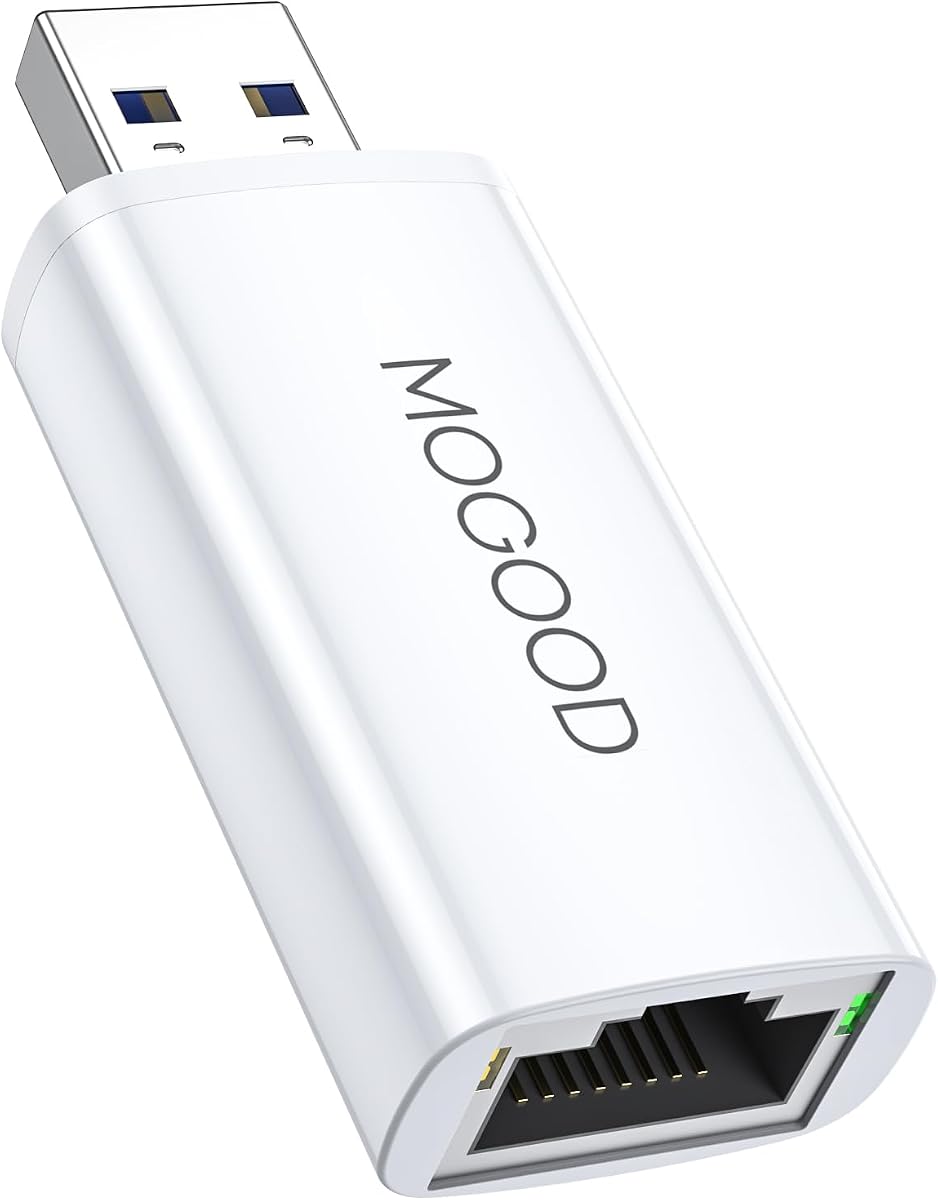
The MOGOOD USB 3.0 to Gigabit Ethernet adapter delivers up to 1000 Mbps wired network speed for fast and stable internet. It is designed for laptops and desktops but also supports Fire TV Cube for wired connectivity.
We may earn a commission when you buy through this link, at no additional cost to you.
It works with Mac Surface Pro Chromebook and other devices needing a stable link without Wi-Fi. The USB 3.0 speed is backward compatible with USB 2.0 for broader use.
This adapter is not intended for Fire TV Sticks with micro-USB ports but it is a great option for Fire TV Cube users with USB 3.0. If you need gigabit speeds this model is strong.
For users wanting high-speed wired internet on a laptop or Fire TV Cube this adapter is reliable. It offers easy setup and a sturdy build for daily use.
Delivers up to 1000 Mbps wired network speed for fast and stable internet connection on the go every day for laptop and TV users.
Works with laptop Chromebook Mac Surface Pro Fire TV Cube and Switch for wired connectivity and a stable network link without Wi-Fi.
We may earn a commission when you buy through this link, at no additional cost to you.
Choosing the right Ethernet adapter involves considering your device's port type, desired speed, and build quality. This guide outlines the most important factors to help you make an informed purchase.
Always check if your Fire TV device uses Micro USB or USB-C. Older models like Fire TV Stick Lite or 2nd Gen use Micro USB, while newer models like Fire TV Stick HD (2nd Gen) use USB-C. Buying an adapter with the wrong port type will render it useless.
Verify your device's port type before purchasing to ensure you select the correct adapter model. This is the most critical step to avoid returns.
Most adapters offer 10/100 Mbps speeds which are sufficient for 4K streaming. If you need faster performance for large downloads or gaming, look for Gigabit 1000 Mbps models. Higher speeds ensure smoother performance during peak internet usage.
Choose a speed that matches your internet plan and streaming needs to get the best value for your money.
Aluminum alloy housings help dissipate heat during long streaming sessions. This keeps the adapter cool and prevents performance drops or connection failures. A sturdy build also increases the lifespan of the device.
Prioritize adapters made with aluminum alloy for better heat management and durability over plastic alternatives.
Some adapters require external power or a wall charger to function properly. Others draw power directly from the TV stick. Check if a power cable is included so you do not need to buy extra accessories.
Ensure you have the necessary power source available before buying to avoid setup issues.
Plug-and-play adapters that require no drivers are the most user-friendly. Simply connect the adapter to the device and router for instant activation. Complex setups with driver software can be frustrating for non-technical users.
Select adapters that offer a straightforward plug-and-play experience for hassle-free installation.
Some adapters include adhesive tapes to secure them in place. This prevents loose connections caused by dangling cables. A longer power cable can also provide more flexibility for placement.
Look for included accessories like tapes or longer cables to make cable management easier behind your TV.
Budget adapters often provide the same core features as premium ones. Consider how much you need advanced features like Gigabit speeds versus basic 100 Mbps. Sometimes the cheapest option is the best fit.
Compare features against price to find the adapter that offers the best value for your specific streaming needs.
Some models include LED status lights to show connection status. Others offer extra protection features like over-voltage or short-circuit protection. These small additions can improve reliability and peace of mind.
Consider extras like LED lights or protection circuits that add convenience and safety to your streaming setup.
To set up the adapter, first turn off your Fire TV device. Plug the Ethernet cable into the adapter's RJ45 port, then connect the adapter to the USB port on your Fire TV Stick. Finally, connect the power cable if required and plug the other end into a wall charger or USB port.
Once everything is connected, power on your Fire TV device. The system should automatically detect the wired connection. Go to your settings menu to confirm the network status shows Ethernet instead of Wi-Fi. Your streaming should now be more stable.
To maintain the adapter, avoid bending the cables sharply and ensure it stays in a well-ventilated area. If you see dust on the ports, clean gently with compressed air. Store it properly when not in use to keep it safe.
Most modern Fire TV devices do not require any driver installation for Ethernet adapters. The Fire TV OS recognizes standard Ethernet adapters automatically upon connection. Simply plug and play the device and it should work instantly without extra software.
No, you cannot use a USB-C adapter on a Fire TV Stick with a Micro USB port. The physical connectors are different and the electrical specifications do not match. Ensure you buy the adapter version that matches your device's port type.
Yes, using an Ethernet adapter typically improves streaming quality by providing a stable and consistent internet connection. It reduces buffering and lag that can occur with weak Wi-Fi signals. This leads to smoother playback and fewer interruptions.
The Fire TV Stick 4K Max has a Micro USB port so adapters with Micro USB connectors will work with it. However, newer Fire TV Stick models with USB-C will require a different adapter type. Always check your device specs before buying.
Most Fire TV Ethernet adapters support up to 100 Mbps which is sufficient for 4K streaming. Some high-end models like the ELECTOP 1000 Mbps adapter support Gigabit speeds for faster data transfer. Choose based on your internet plan needs.
You do not need to unplug your Fire TV entirely but you may need to insert the adapter into the USB port. If your Fire TV uses the same USB port for power, you may need a splitter or external power cable to connect both.
We hope this guide helped you find the perfect Ethernet adapter for your Fire TV streaming needs. Whether you need basic connectivity or gigabit speeds, there is a model on this list that fits your budget and setup.
Prioritize matching the adapter port type to your Fire TV device to ensure compatibility. Also consider factors like build quality and power supply to avoid setup headaches after purchase.
Remember to check current prices and availability on Amazon before buying since offers change frequently. We wish you a smooth streaming experience with your new wired connection.