
ASRock ATX DDR4 Motherboards Z170 EXTREME4
4.2Editor score
Supports 64GB DDR4 memory
Multiple PCIe expansion slots
High definition audio codec
This guide compares the top 1151 Z170 Skylake gaming motherboards for performance, features, and value to help you build a high-speed gaming PC.
Finding the right motherboard is crucial for any gaming build. The 1151 Z170 Skylake platform offers a solid foundation for high-performance computing with support for DDR4 memory and fast storage options.
We evaluated ten top models based on their feature sets, build quality, and user feedback. Each product was assessed for connectivity, overclocking potential, and overall value for gaming enthusiasts in the current market.
This list highlights key strengths and weaknesses for each board. Prices and availability change frequently, so verify current details before purchasing to ensure you get the best deal for your specific system requirements.
4.2Editor score

4.1Editor score

4.2Editor score
The following table provides a side-by-side comparison of the ten selected motherboards to help you quickly identify the model that best fits your specific gaming and computing needs.


The ASUS ROG Maximus VIII Hero stands out as a top-tier option for enthusiasts seeking high performance. With a solid rating, it promises reliability and advanced features that cater to serious gamers.
We may earn a commission when you buy through this link, at no additional cost to you.
Its Extreme Engine DIGI+ technology ensures stable power delivery for overclocking. The SupremeFX 2015 audio system provides an immersive sound experience essential for competitive gaming.
While the feature set is comprehensive, the complexity might be overwhelming for novice builders. The higher cost is justified by the premium components and robust build quality.
This board is ideal for users who demand the best in gaming hardware. We recommend it for those looking to maximize their system potential.
The Extreme Engine DIGI+ ensures precise voltage regulation for stable overclocking.
SupremeFX 2015 delivers high-definition audio for a competitive edge.
We may earn a commission when you buy through this link, at no additional cost to you.
This Gigabyte model is a strong contender for users needing support for newer processors. A perfect rating highlights its reliability and feature completeness.
We may earn a commission when you buy through this link, at no additional cost to you.
It supports 7th Gen processors with a BIOS update, offering future-proofing. The M.2 slots provide fast storage options for modern gaming needs.
The industrial packaging means it lacks original retail boxes, which might affect resale value. Users should ensure they have technical knowledge for installation.
Best for those needing compatibility with 7th Gen CPUs. It offers excellent value and performance for its class.
Supports 6th and 7th Gen Intel Core processors with BIOS updates.
Includes M.2 Socket 3 connectors for high-speed SSDs.
We may earn a commission when you buy through this link, at no additional cost to you.
The ASUS Z170 PRO Gaming delivers a balanced mix of features for mid-range builds. Its focus on audio and connectivity makes it a strong choice.
We may earn a commission when you buy through this link, at no additional cost to you.
SupremeFX audio ensures clear sound without external DACs. USB 3.1 and M.2 support provide ultra-fast data transfer speeds for modern peripherals.
While it excels in connectivity, overclocking might be limited compared to premium models. The durable components ensure longevity over extended use.
This board is recommended for users valuing audio and speed. It offers a reliable foundation for high-performance gaming.
SupremeFX technology offers flawless audio for an immersive gaming experience.
USB 3.1 and M.2 enable ultra-speedy transfers for faster gaming.
We may earn a commission when you buy through this link, at no additional cost to you.
This model emphasizes durability and stability for marathon gaming sessions. The lack of a rating does not diminish its focus on performance.
We may earn a commission when you buy through this link, at no additional cost to you.
Upgraded power delivery and advanced cooling maximize processor potential. The design is battle-tested to withstand heavy usage without issues.
Detailed specs are less clear, but the promise of seamless connectivity is appealing. It suits users prioritizing long-term stability over flashy features.
Ideal for serious gamers needing reliability. We suggest it for those who build systems for extended use.
Enhanced power delivery and cooling maximize processor potential.
Dominate marathon gaming sessions with stability and seamless connectivity.
We may earn a commission when you buy through this link, at no additional cost to you.
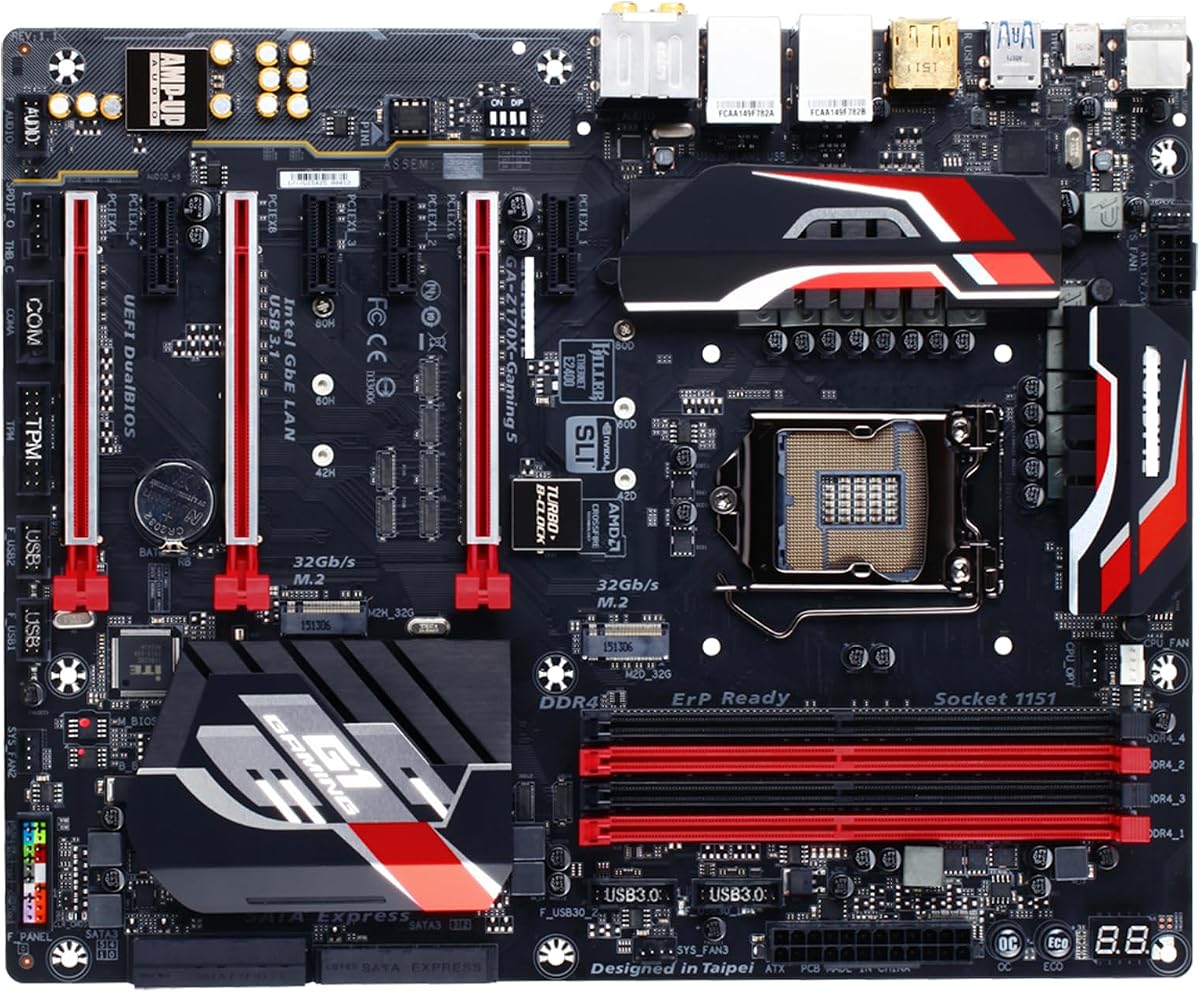
The GA-Z170X-Gaming 7 is built for users wanting multi-GPU capabilities. It supports both SLI and Crossfire configurations effectively.
We may earn a commission when you buy through this link, at no additional cost to you.
With seven USB 3.0 ports, it offers extensive connectivity for peripherals. The ATX form factor ensures compatibility with most full-size cases.
Running multiple GPUs requires careful power and thermal management. This might be a challenge for smaller cases or lower-end power supplies.
This board is best for high-end gaming rigs. We recommend it for those planning to use multiple graphics cards.
Support for 2-Way NVIDIA SLI and 3-Way AMD Crossfire technology.
Includes 7 USB 3.0 ports for extensive device connectivity.
We may earn a commission when you buy through this link, at no additional cost to you.
This model serves as a solid mid-range option with essential gaming features. Its lower rating suggests room for improvement in some areas.
We may earn a commission when you buy through this link, at no additional cost to you.
It includes SATA Express connectors for faster data transfer. The PCIe slot arrangement supports various GPU configurations including SLI and Crossfire.
While reliable, it may lack some of the premium audio or connectivity features of higher-end boards. It remains a viable choice for standard builds.
Recommended for users seeking a balance of cost and features. Check current reviews before purchasing.
3 x SATA Express connectors and multiple PCIe slots for flexibility.
Support for 2-Way NVIDIA SLI technology and 3-Way AMD Crossfire.
We may earn a commission when you buy through this link, at no additional cost to you.
The ASRock Z170 EXTREME4 stands out as a budget-friendly powerhouse. It delivers robust performance without costing a fortune.
We may earn a commission when you buy through this link, at no additional cost to you.
With six SATA3 ports and RAID support, storage configuration is highly flexible. The Realtek ALC1150 audio codec ensures high-quality sound.
The board offers three PCIe x16 slots, ideal for multiple cards or expansion. However, aesthetics are simpler than premium models.
This is an ideal choice for budget-conscious gamers. We highly recommend it for its feature-to-cost ratio.
6 x SATA3 ports support RAID 0, 1, 5, 10 configurations.
Realtek ALC1150 7.1-channel high definition audio codec.
We may earn a commission when you buy through this link, at no additional cost to you.
The MSI Z170 Krait Gaming offers solid protection and performance. Steel Armor slots safeguard your graphics cards during installation.
We may earn a commission when you buy through this link, at no additional cost to you.
Audio Boost 3 enhances sound quality for an immersive gaming experience. DDR4 Boost ensures stable memory operation at high speeds.
With eight USB 3.1 Gen1 ports, connectivity is a standout feature. The rating indicates some variability in user satisfaction.
This board is recommended for those valuing protection and USB ports. Check user feedback for BIOS specifics before buying.
2 PCI-E 3.0 x16 with MSI Steel Armor for durability.
DDR4 Boost technology ensures stable memory operation.
We may earn a commission when you buy through this link, at no additional cost to you.
The ASUS Z170-A is known for its 5-Way Optimization feature. This allows for easy tuning of your system for better performance.
We may earn a commission when you buy through this link, at no additional cost to you.
With a high rating, it offers reliability and user-friendly features. DTS Studio Sound provides clear and rich audio for games.
USB 3.1 Boost ensures faster data transfer rates. However, it has fewer M.2 slots compared to higher-end models.
Best for users wanting easy system tuning. We recommend it for its balance of features and ease of use.
Dual Intelligent Processors 5 with 5-Way Optimization for easy tuning.
DTS Studio Sound provides clear and rich audio quality.
We may earn a commission when you buy through this link, at no additional cost to you.
This model is a certified refurbished option, offering quality assurance at a potentially lower cost. It uses a compact mATX form factor.
We may earn a commission when you buy through this link, at no additional cost to you.
It retains SupremeFX 2015 audio and USB 3.1 features from the series. Lighting control adds aesthetic value to your build.
Being refurbished means it might be in a generic box with standard accessories. Ensure the warranty meets your needs before purchasing.
This is a great choice for SFF builds. We recommend it for those needing small form factors with premium features.
Certified Refurbished product tested to look and work like new.
mATX form factor ideal for smaller cases and builds.
We may earn a commission when you buy through this link, at no additional cost to you.
Selecting the right motherboard involves considering several key factors that impact performance, compatibility, and long-term value.
The Z170 chipset is designed for Intel's 6th and 7th Gen Skylake processors. Ensure the board supports your specific CPU generation, as some may require BIOS updates for full compatibility.
Always verify CPU support lists before purchasing to avoid compatibility issues.
These boards support DDR4 memory, which offers higher speeds than previous generations. Look for boards supporting speeds of 3000 MHz or higher for optimal gaming performance.
Dual-channel memory architecture is standard and should be utilized by installing RAM in matched pairs.
Modern gaming requires fast storage. Look for M.2 slots which support NVMe SSDs for significant speed improvements over traditional SATA drives.
SATA Express ports are also present on some models for high-speed legacy storage options.
Multiple PCIe slots are essential for adding graphics cards or capture cards. Check if the board supports x16 modes for single or multi-GPU setups.
PCIe 3.0 bandwidth is standard on Z170 boards and provides sufficient data rates for most GPUs.
USB 3.1 Type A and Type C ports are crucial for modern peripherals and fast data transfer. Count the available ports to ensure they meet your needs.
Some boards offer USB Boost technology for higher transfer speeds with compatible devices.
Integrated audio codecs vary widely. High-end boards use SupremeFX or ALC series codecs to reduce noise and provide better immersion.
Audio amplifiers are also important for driving high-impedance headphones directly from the motherboard.
Look for features like VRM heatsinks and steel armor on PCIe slots. These components help maintain stability and protect hardware during heavy loads.
Robust power delivery is key for overclocking CPUs to their maximum potential.
Most gaming boards are ATX size, fitting standard cases. However, mATX options exist for those building smaller, more compact systems.
Measure your case dimensions before buying to ensure the board fits properly.
Install the motherboard on standoffs to prevent short circuits. Ensure all screws are secure before connecting any cables or components.
Apply thermal paste correctly on the CPU before mounting the cooler. Improper application can lead to overheating and system instability.
Keep the BIOS updated to the latest version available. This ensures compatibility with newer CPUs and fixes known bugs or security issues.
These boards generally support Windows 11 if using a compatible 7th Gen processor and TPM 2.0 module. Older 6th Gen CPUs may not meet official Microsoft requirements. Check specific TPM support before planning an upgrade.
No, these motherboards strictly support DDR4 memory. DDR3 modules are physically different and will not fit into the slots. Always check RAM compatibility lists before purchasing memory.
Yes, most Z170 boards require a BIOS update to support 7th Gen processors. Some boards have a BIOS flashback feature to simplify this process. Check the manufacturer's support page for update instructions.
Most boards support up to 64GB of system memory across four DIMM slots. Windows 32-bit systems may not show more than 4GB. Ensure you use 64-bit operating systems for full capacity.
Yes, many of these boards include M.2 slots that support NVMe SSDs. However, some ports may share bandwidth with SATA ports. Verify lane sharing rules before installing storage devices.
You can clear CMOS by using the jumper on the board or removing the battery for a few minutes. This resets BIOS settings to default if you encounter boot issues.
Choosing the right Z170 motherboard depends on your specific performance and budget needs. The ASRock Z170 EXTREME4 offers excellent value for budget builds.
For those seeking premium features, the ASUS ROG Maximus VIII Hero provides top-tier audio and power delivery. The Gigabyte options offer strong versatility for 7th Gen users.
Always check current availability and prices as these models may vary in stock. Prioritize features that match your current components and future plans for the best experience.