
Motherboard USB 2.0 to Type C Front Panel Cable
4.8Editor score
Converts 9pin USB 2.0 header
Simple plug and play setup
Compact 6.6 inch cable length
Front panel USB C headers allow you to add modern connectivity to your PC case quickly. These adapters convert internal motherboard ports into accessible external connectors for fast data transfer and charging capabilities.
We analyzed ten leading models based on speed specifications build quality and compatibility with common motherboards. Each product offers unique advantages for expanding your desktop setup without replacing major components.
Every pick highlights key features pros and cons to help you choose the right adapter for your needs. Keep in mind that availability and pricing may change over time as products evolve.
4.8Editor score

4.6Editor score

4.6Editor score
As an Amazon Associate we earn from qualifying purchases.
This side by side comparison evaluates all ten products across speed compatibility port count and installation requirements to help you find the perfect fit for your system.


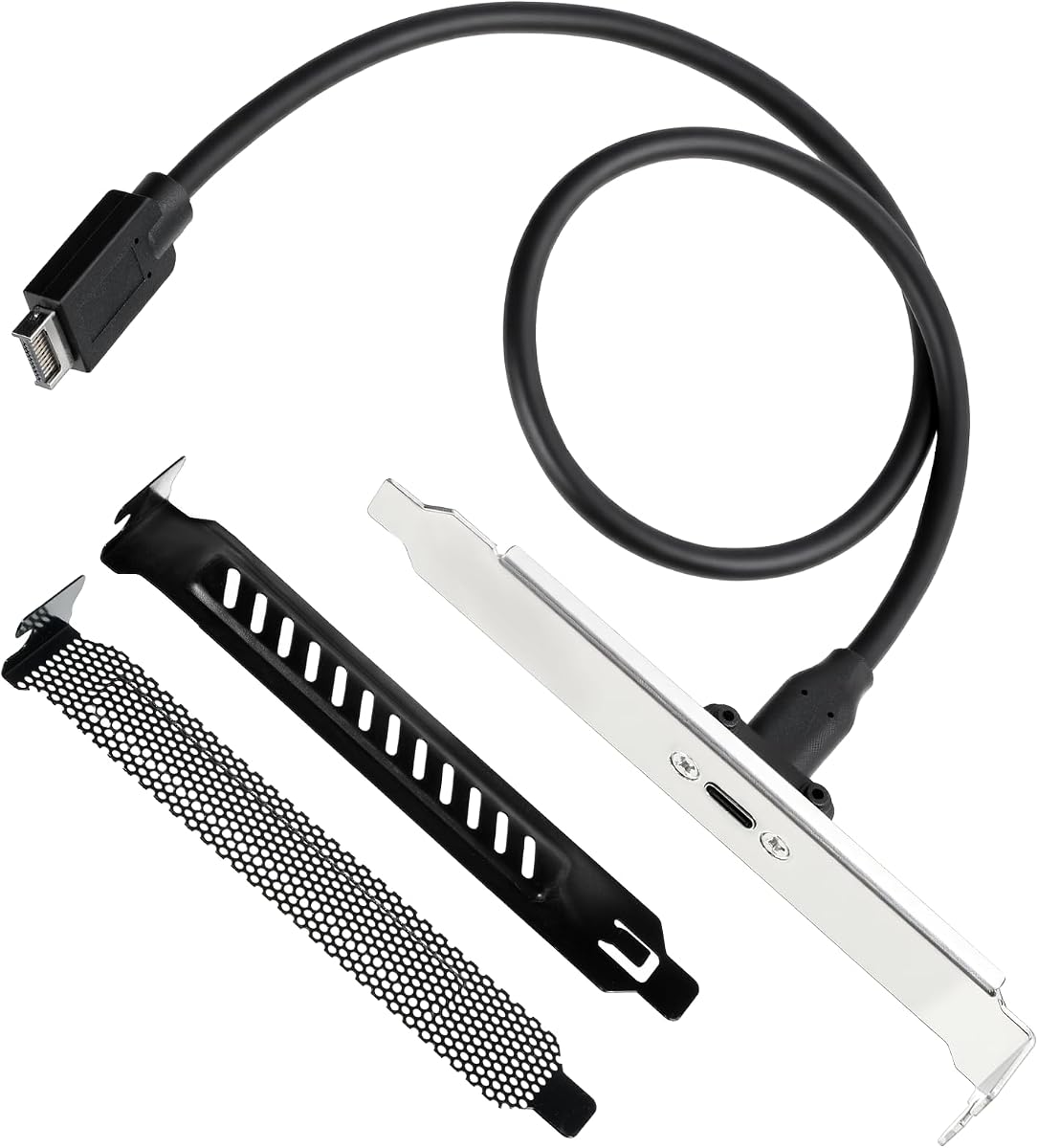


This GRAUGEAR extension cable stands out with its support for USB 3.2 Gen 2×2 and 20Gbps transfer speeds. It carries a solid 4.6 rating from users who value its high-speed performance and build quality for modern PC builds.
We may earn a commission when you buy through this link, at no additional cost to you.
The standout feature is the ability to connect all USB Type-C ready devices including phones tablets and external drives. Its sturdy metal construction ensures long service life while the double shielded EMI/EFI wires prevent noise interference internally and externally for stable data transmission.
One trade-off is the dependency on a 20-pin USB3.2 Key-A Type-E header on your motherboard which older boards may lack. This can be addressed with a conversion adapter or PCIe card but adds complexity for some users seeking the fastest speeds.
It is ideal for users who need fast data transfer and want to expand their case without replacing major components. If your system supports the required header this cable offers reliable performance and versatility for a range of peripherals.
The cable supports 20Gbps speeds ensuring rapid file transfers with compatible devices.
Metal construction and shielding provide durability and reduce signal interference.
We may earn a commission when you buy through this link, at no additional cost to you.
This adapter cable provides a direct way to access USB-C ports on the front of your case using a Type-E header. It holds a 4.6 rating and is designed for users prioritizing speed and ease of connection for modern peripherals.
We may earn a commission when you buy through this link, at no additional cost to you.
Its high-speed wires support up to 20Gbps transfer rates when paired with a compatible motherboard. The panel-mounted USB-C female connector works with phones tablets flash drives and hubs making it versatile for daily tasks. The double shielded wires ensure signal integrity.
Installation is straightforward with plug and play functionality requiring no drivers. However you must confirm your motherboard has the 20-pin USB3.2 Key-A Type-E header before purchase. Older systems might need an additional adapter to use this product effectively.
This is a great choice for enthusiasts who want to maximize their motherboard's USB-C capabilities without buying a new case. It delivers reliable performance and expandability for any build with the right header support.
Supports up to 20Gbps transfer speeds for rapid data movement.
Includes a PCI bracket for stable mounting in the rear of your case.
We may earn a commission when you buy through this link, at no additional cost to you.
This adapter combines both USB-C and USB-A front panel connectivity giving you more flexibility. It maintains a 4.6 rating and is perfect for users who want to keep legacy devices handy while upgrading to faster USB-C technology.
We may earn a commission when you buy through this link, at no additional cost to you.
The 20Gbps high-speed wires ensure that you get the fastest transfer rates when using compatible devices. The wide compatibility allows you to connect phones tablets and other peripherals seamlessly. The double shielded wires help maintain stable signals even with multiple connections.
While it offers great flexibility it does require both a Type-E and a USB3.0 header on your motherboard. If your board lacks either header you will need to install an additional adapter which adds steps to the setup process.
This is an excellent choice for power users who need multiple front ports and want to maximize the speed of their system. It delivers a robust feature set that balances performance and versatility for complex builds.
Offers both USB-C and USB-A ports for connecting diverse devices.
Supports 20Gbps speeds for rapid file transfers with modern peripherals.
We may earn a commission when you buy through this link, at no additional cost to you.
This hub converts a 3.5 inch drive bay into four usable USB ports offering significant expansion for your system. It has a 4.2 rating and is designed for users who need multiple front connections for peripherals or external storage.
We may earn a commission when you buy through this link, at no additional cost to you.
It features two USB-C ports supporting 10Gbps and two USB 3.2 Gen 2 ports for a mix of modern and legacy connectivity. The sturdy construction ensures durability while over-current over-voltage and short circuit protection keep your devices safe during use.
One thing to note is that it requires a 15-pin SATA power connector in addition to the Type-E header. If your power supply lacks available SATA power cables this might limit ease of installation in some cases.
This hub is ideal for users who need to connect multiple devices at once and want a compact all-in-one solution. It balances port count with safety features making it practical for daily work or gaming setups.
Delivers four front ports to connect multiple peripherals simultaneously.
Includes over-current and short circuit protection for device safety.
We may earn a commission when you buy through this link, at no additional cost to you.
This expansion card adds front USB ports using an empty PCIe x1 slot which is useful for motherboards without built-in front headers. It has a 4.5 rating and suits users who want to upgrade connectivity without changing the mainboard.
We may earn a commission when you buy through this link, at no additional cost to you.
It provides one USB 3.2 Gen 1 port and one USB-C front panel header along with a 19-pin socket. The design uses explosion-proof capacitors for stable power and good temperature control. It transfers data up to 5Gbps which is faster than USB 2.0.
Some older Windows versions may require driver installation while newer systems like Windows 10 and 11 work without them. You also need an available PCIe x1 slot which might be occupied in some configurations.
This is a solid option for users who need to add USB-C and USB 3.0 headers to older or limited systems. It provides a reliable way to expand ports using standard expansion slots in your PC.
Uses an empty PCIe x1 slot to add front panel connectivity.
Features explosion-proof capacitors for temperature control and stability.
We may earn a commission when you buy through this link, at no additional cost to you.
This hub offers one 20Gbps USB-C port plus two USB 3.0 ports delivering fast connectivity in a compact unit. It holds a 4.6 rating and is designed for users who want both speed and versatility in a front panel upgrade.
We may earn a commission when you buy through this link, at no additional cost to you.
The USB-C port supports the latest USB 3.2 Gen 2×2 standard which is great for transferring large files quickly. It works with Windows systems and increases the scalability of desktop computers. The package includes six screws to secure it in your case.
A key requirement is having both a Type-E and a USB3.0 header on your motherboard. If you lack either header you will need an adapter or conversion card which may add steps to the installation.
This hub is perfect for users who need one fast USB-C port along with extra USB 3.0 connections for devices. It delivers strong performance and build quality that suits modern high-speed storage and accessory needs.
Provides a 20Gbps USB-C port for rapid file transfers.
Includes two USB 3.0 ports for connecting multiple devices.
We may earn a commission when you buy through this link, at no additional cost to you.
This budget cable converts a standard 9pin USB 2.0 header into a Type-C front panel connector. It has a high 4.8 rating and is ideal for users who want basic USB-C access without investing in high-speed solutions.
We may earn a commission when you buy through this link, at no additional cost to you.
It supports USB 2.0 speeds up to 480Mbps which works well for keyboards mice and slow peripherals. The total length is about 6.6 inches providing enough reach for most cases. It requires no drivers and works by simply plugging it in.
Keep in mind this does not support video or audio output so it is meant for data transfer only. Also it is not compatible with 19pin USB 3.0 headers which limits its use to USB 2.0 ports.
This is a great choice for older motherboards or budget builds that just need a front USB-C port for basic devices. It provides an affordable and easy way to bring modern connectivity to legacy systems.
Offers a low cost way to add a USB-C port to older systems.
Requires no drivers and connects directly to USB 2.0 headers.
We may earn a commission when you buy through this link, at no additional cost to you.
This adapter delivers 20Gbps transfer speeds for fast data handling and includes two PCI slot covers for a tidy installation. It has a 3.8 rating which suggests mixed experiences but still offers useful features for certain builds.
We may earn a commission when you buy through this link, at no additional cost to you.
The USB-C female connector supports smartphones tablets and external drives. The cable is made of metal and PVC materials for durability and flexibility. It uses a 20-pin Type-E A-Key male connector which is clearly labeled for correct orientation.
Installation is simple with no drivers needed. However users should note the lower rating which may indicate issues with compatibility or durability for some users. Confirm your motherboard has the right header before buying.
This is a decent choice for users who need a long cable and included covers for a clean back panel setup. It provides high-speed support but buyers should verify compatibility carefully to avoid issues.
Includes two PCI slot covers for a professional and tidy installation.
Supports 20Gbps speeds for transferring large files quickly.
We may earn a commission when you buy through this link, at no additional cost to you.
This cable uses an ultra-thin flat TPE design that is flexible and easy to route inside tight cases. It has a 4.3 rating and supports 10Gbps speeds which work well for most modern USB-C devices.
We may earn a commission when you buy through this link, at no additional cost to you.
The Type-E 20Pin male to USB-C female connection is reversible and simple to plug in. It uses silver plated wires to reduce impedance for faster transmission. The double shielding layer helps keep signal transmission stable during use.
One thing to check is that your motherboard has a USB 3.1 Type-E port. The panel screw spacing is 20mm which may affect mounting fit. It does not need drivers and works immediately after installation.
This is a good option for users who want a flexible flat cable that fits well in compact cases. It balances speed and design quality for daily use with phones and other peripherals.
Ultra-thin flat TPE cable is easy to route in tight spaces.
Double shielding and silver plated wires help reduce signal interference.
We may earn a commission when you buy through this link, at no additional cost to you.
This adapter supports 20Gbps USB-C transfers and includes two USB 3.0 ports for a strong mix of connectivity. It has a perfect 5.0 rating from users who value its high-speed capability and build quality for versatile setups.
We may earn a commission when you buy through this link, at no additional cost to you.
The panel-mounted USB-C and USB female connectors let you connect phones tablets and drives easily. Its metal construction ensures durability while the double shielded EMI/EFI wires prevent interference. It works with plug and play so no drivers are needed.
To use it you must have both a Type-E and a USB3.0 header on your motherboard. If either is missing you will need an adapter which adds steps to the installation process.
This is a top pick for users who want one fast USB-C port plus extra USB 3.0 connections without buying a hub. It delivers excellent performance and fits well for modern multi-device workflows.
Supports 20Gbps USB-C speeds for rapid file transfers.
Includes two USB 3.0 ports for connecting additional devices.
We may earn a commission when you buy through this link, at no additional cost to you.
Choosing the right front panel USB C header depends on your motherboard's available slots and your speed requirements. This guide explains key factors to help you select a product that fits your build.
Check if your motherboard has a 20-pin Type-E header or a 19-pin USB 3.0 header as these determine which adapter will work. Some adapters need both headers for multi-port hubs so verify your available slots before buying.
Confirm the header type on your motherboard to ensure the adapter can plug in directly.
Determine if you need 5Gbps 10Gbps or 20Gbps speeds based on your devices. USB 3.2 Gen 1 supports up to 5Gbps while Gen 2 offers 10Gbps and Gen 2×2 reaches 20Gbps for fast drives.
Choose a product that matches the maximum speed your devices and motherboard can handle.
Decide how many USB-C and USB-A ports you need on the front panel. Single port adapters are compact while hubs offer four ports for multiple devices but take more internal space.
Count how many devices you will connect to pick the right port layout.
Measure the distance from your header to the front panel opening to select a suitable cable length. Cables around 20 to 30 inches provide enough slack for routing through tight cases.
Ensure the cable is long enough to reach without stretching or kinking.
Some hubs need a SATA power connector to run multiple ports at full speed. Single adapters usually draw power from the motherboard so check if your power supply has available SATA power cables.
Check if the product requires extra power beyond the motherboard header.
Look for metal brackets and double shielded wires to reduce signal interference and improve durability. Good shielding helps maintain stable transfers especially for high-speed devices.
Choose models with sturdy construction for long-term reliability.
Select products that offer plug and play functionality without needing extra drivers. Clear labeling on connectors helps avoid mistakes during installation.
Prefer adapters with simple instructions and clear connector types.
Most adapters work with Windows 10 and 11 without drivers but older systems may need installation. Check the product details to confirm OS compatibility.
Ensure the adapter supports your current operating system out of the box.
Turn off your computer and unplug the power cable before opening the case. Locate the appropriate header on your motherboard and connect the adapter or hub securely.
Route the cable carefully to avoid blocking airflow or other components. Use the included screws to secure the bracket or hub in place at the front panel.
Plug in devices gently and avoid forcing connectors to prevent damage. Regularly check that the cables remain secure and free of strain for consistent performance.
Most modern adapters work without additional drivers on Windows 10 and 11. Older systems like Windows 7 or XP may require driver installation which varies by chipset and adapter model.
Some models convert USB 2.0 or 3.0 headers to USB-C so they work on older boards. However high-speed options require specific Type-E headers that may only be on newer motherboards.
Gen 1 supports up to 5Gbps while Gen 2 supports up to 10Gbps. Gen 2×2 reaches 20Gbps but needs a compatible motherboard and device to achieve this speed.
Some adapters use PCIe slots for expansion while others connect directly to motherboard headers. Check your motherboard to see which option fits your available slots and power.
Most front panel USB C headers are for data transfer only and do not support video output. Video support depends on the motherboard's USB-C implementation which these adapters may not extend.
Check if your case has a USB-C front opening and enough space for the bracket. Most 3.5 inch drive bays can be converted to house these adapters with proper fit.
Ensure the header is fully seated and the cable is connected correctly. Verify your motherboard supports the header type and update your BIOS if needed for compatibility.
Most adapters are designed for Windows PCs and may not work on Mac systems. Mac compatibility depends on the motherboard architecture which often lacks standard headers.
We reviewed ten options ranging from simple adapters to multi-port hubs offering high-speed connectivity for modern builds. The top picks provide reliable performance and flexible options for users with different needs and budgets.
Prioritize header compatibility and transfer speeds to match your devices and motherboard. Consider power needs and cable length to ensure a clean and functional installation.
Prices and availability change frequently so check the latest listings before buying. The right adapter will keep your system ready for the latest USB-C peripherals without replacing your mainboard.