
VIMIN 10G PCI-E Network Card with 10Gbps Dual RJ45 Ports
4.5Editor score
Intel X540-T2 chipset controller
Flexible PCIe x8 and x16
Excellent heat dissipation design
This guide compares the top 10GB Ethernet Card options for speed compatibility and reliability to help you upgrade your network infrastructure effectively
Upgrading your network infrastructure requires careful selection of high-performance hardware. A quality 10GB Ethernet Card ensures rapid data transfer, low latency, and reliable connectivity for demanding tasks like gaming and server management.
We evaluated ten leading models based on chipset performance, compatibility, and build quality. This list covers various form factors and use cases, ensuring you find a solution that meets your specific networking requirements and budget constraints.
Each pick highlights key features, pros, and cons to simplify your decision. Note that product availability and pricing may fluctuate, so verify current details before purchasing to ensure the best value for your setup.
4.5Editor score

4.2Editor score

4.6Editor score
The following table provides a side-by-side comparison of all ten products, highlighting key specifications and features to help you quickly identify the best fit for your network upgrade needs.




The TP-Link TX401 stands out as a top choice for users seeking reliable 10Gbps connectivity. Its solid rating reflects consistent performance across various setups, making it ideal for home labs and office environments.
We may earn a commission when you buy through this link, at no additional cost to you.
Equipped with 10GBase-T technology, this card delivers speeds up to 10Gbps, ten times faster than standard Gigabit adapters. The QoS feature ensures critical traffic like gaming gets priority, reducing lag during peak usage.
While it supports multiple data rates for compatibility, it lacks dual ports which some users may prefer for redundancy. However, the included CAT6A cable ensures you can maximize speed without immediate additional purchases.
If you need a straightforward upgrade to 10G Ethernet without complexity, this card is highly recommended. Its balance of performance, ease of use, and included accessories makes it a strong contender for most users.
This card leverages 10GBase-T to provide smooth data transmission for local transfers and internet access.
It automatically negotiates speeds and works with Windows and Linux systems for broad usability.
We may earn a commission when you buy through this link, at no additional cost to you.
The VIMIN card offers exceptional value with its dual port design and reliable Intel chipset. Its high rating suggests users appreciate the balance between cost and robust performance for server tasks.
We may earn a commission when you buy through this link, at no additional cost to you.
Utilizing the Intel X540-T2 controller, this card delivers stable 10Gbps connections across two ports. This is ideal for devices requiring high bandwidth, such as file servers or high-end workstations.
However, it does not support intermediate speeds like 2.5G or 5G, which limits flexibility with newer multi-gig networks. Additionally, it requires a larger PCIe slot, which might not fit compact cases.
For budget-conscious buyers needing dual ports and proven stability, this card is a top choice. Just ensure your system has the appropriate slot and does not rely on lower speed auto-negotiation features.
Two RJ45 ports allow for direct connections or link aggregation to maximize throughput.
A built-in heat sink ensures stable operation even during heavy data transmission periods.
We may earn a commission when you buy through this link, at no additional cost to you.
The Asus NADACA0140 brings the reliability of a major brand to 10G networking. Users praise its speed and seamless integration with existing network standards, making it a safe choice for upgrades.
We may earn a commission when you buy through this link, at no additional cost to you.
It supports full backward compatibility with 10/5/2.5/1Gbps and 100Mbps, ensuring smooth integration into mixed environments. The QoS technology helps manage bandwidth to prioritize critical tasks like video calls or gaming.
On the downside, it lacks extra features like dual ports or bundled cables, which can increase total setup costs. The pricing is also higher than some third-party alternatives with similar core specifications.
If brand trust and broad compatibility are priorities, this card is a solid investment. It works well for users who want a straightforward upgrade without worrying about obscure driver issues or compatibility conflicts.
This card adapts to various network speeds automatically, simplifying setup with existing equipment.
It offers flexible integration with Windows and Linux kernels for diverse system requirements.
We may earn a commission when you buy through this link, at no additional cost to you.
The 10Gtek card provides a cost-effective way to add dual 10G ports to a server. Its rating highlights stability and value, particularly for users needing multiple connections in a compact form.
We may earn a commission when you buy through this link, at no additional cost to you.
Featuring the Intel X540 controller, it supports various storage over Ethernet protocols like iSCSI and FCoE. This makes it versatile for storage networks where data integrity and throughput are critical requirements.
Users should note that Windows 11 compatibility requires manual setup steps, which may delay installation. Additionally, hot swapping is not supported, meaning the system must be powered down for changes.
For server builds needing dual ports on a budget, this card is a practical choice. Ensure you have the necessary cabling and drivers ready before installation to avoid delays during setup.
It supports Windows Server and ESX environments for professional-grade storage and network tasks.
A low-profile bracket allows installation in small form factor servers or mini PCs.
We may earn a commission when you buy through this link, at no additional cost to you.
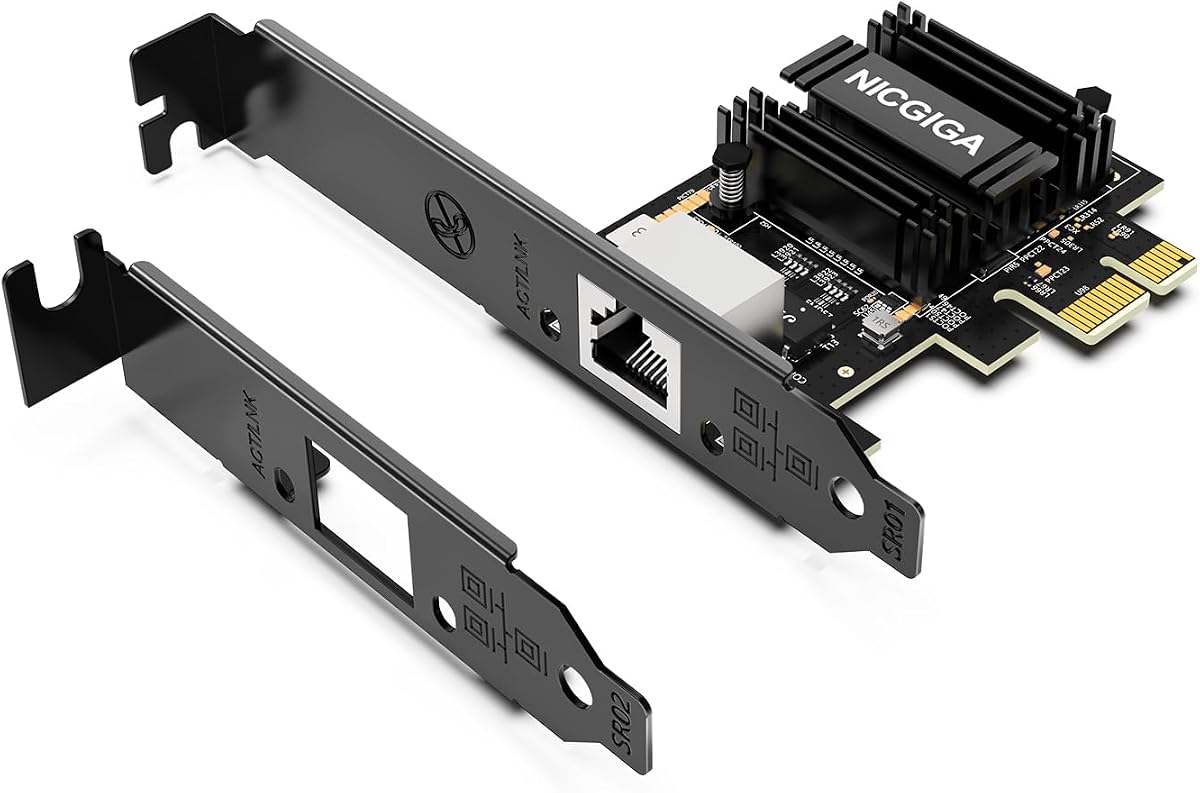
The NICGIGA card is designed for compact systems using modern PCIe 4.0 slots. Its rating reflects strong performance for its size, making it a favorite among Mini PC and ITX build enthusiasts.
We may earn a commission when you buy through this link, at no additional cost to you.
Powered by the Realtek RTL8127, it handles multi-gig speeds down to 100Mbps seamlessly. This flexibility is crucial when connecting to routers that may not fully support 10Gbps yet but need future compatibility.
While it runs cool and uses low power, older Linux kernels may require manual driver installation which can be a hurdle. Also, it is not compatible with legacy PCI slots, limiting use in older hardware.
If you are building a small form factor PC or need an easy upgrade for a compact workstation, this card is excellent. Its modern interface ensures you get the most out of current networking hardware.
The PCIe 4.0 x1 interface uses minimal power and fits into tight spaces without overheating.
It automatically selects the optimal speed to match connected network equipment.
We may earn a commission when you buy through this link, at no additional cost to you.
The VunLink card is another strong contender for compact 10G upgrades using the RTL8127AT chipset. Users report stable performance and easy installation for most common operating systems and hardware setups.
We may earn a commission when you buy through this link, at no additional cost to you.
It supports 10G/5G/2.5G negotiation, ensuring smooth transitions when upgrading network gear gradually. The energy-efficient design means less heat generation, which is vital for maintaining airflow in small cases.
Compatibility with specific NAS platforms can vary based on kernel versions, so checking community forums is wise. While robust, it does not offer fiber options, limiting it to copper networking environments.
For users needing a reliable and efficient copper 10G card for home labs or small offices, this model is a top choice. It balances cost and performance well for standard desktop upgrades.
This card is engineered to reduce power usage and heat output during typical network operations.
Included brackets allow use in both full-height and compact desktop systems easily.
We may earn a commission when you buy through this link, at no additional cost to you.
The Asus XG-C100F is unique for its SFP+ cage support allowing both fiber and copper connections. This flexibility makes it ideal for environments needing longer distances or EMI resistance than copper provides.
We may earn a commission when you buy through this link, at no additional cost to you.
Its aluminum heatsink maintains optimal temperatures during high-speed tasks, ensuring stability even under heavy loads. The card delivers blazing 10G speeds that significantly outperform standard Gigabit networking solutions.
However, the SFP+ modules are not included in the purchase, which adds to the total cost. Also, the requirement for a PCIe x4 slot may limit installation options in systems with limited expansion space.
If you need fiber connectivity or are building a network infrastructure for business use, this card is highly capable. It offers a professional-grade solution for users who need reliable long-distance transmission.
The SFP+ cage allows for both fiber optic and direct copper connections for versatile networking.
A sophisticated aluminum heatsink keeps the card cool during intensive performance tasks.
We may earn a commission when you buy through this link, at no additional cost to you.
The Synology E10G30-T2 is purpose-built for Synology NAS systems, offering seamless integration. Its high rating reflects exceptional performance and ease of use for NAS users needing fast storage access.
We may earn a commission when you buy through this link, at no additional cost to you.
With two 10GbE ports, it allows for bandwidth aggregation or dedicated links to separate networks. The long warranty period indicates the manufacturer's confidence in the product's durability and quality.
This card is exclusive to Synology hardware, limiting its use to those specific devices. The price is also higher compared to general-purpose cards, but the specialized features justify the cost for Synology owners.
If you own a Synology NAS and need to upgrade storage speed, this is the definitive choice. Its optimized design ensures you get the most out of your investment without compatibility issues.
Dual ports support high-performance storage applications and allow for link aggregation.
A five-year warranty provides peace of mind and long-term reliability for critical storage needs.
We may earn a commission when you buy through this link, at no additional cost to you.
The TRENDnet TEG-10GECTX stands out for its NDAA and TAA compliance, meeting strict government requirements for US and Canadian installations. This makes it vital for federal or enterprise contracts.
We may earn a commission when you buy through this link, at no additional cost to you.
It supports 2.5G and 5G speeds, making it versatile for mixed networks transitioning to higher speeds. The 3-year manufacturer protection adds significant value compared to standard warranties on other cards.
Installation requires a PCIe x4 slot which may be less common in home systems. While the performance is robust, the premium price reflects the compliance features rather than raw speed alone.
For enterprise or government users needing compliant hardware, this adapter is essential. For home users, it may be overkill unless you have specific certification requirements for your network setup.
NDAA and TAA compliance ensures the adapter meets US government network security standards.
It supports 2.5G BASE-T over standard cables, offering flexible upgrade paths.
We may earn a commission when you buy through this link, at no additional cost to you.
The Cable Matters USB adapter offers a non-invasive way to add 10G networking to laptops or desktops. Its design focuses on minimizing heat and ensuring silent operation during typical usage.
We may earn a commission when you buy through this link, at no additional cost to you.
It supports auto-negotiation for speeds down to 100Mbps, ensuring compatibility with various routers. The rugged aluminum housing and heat sink maintain efficiency even during long data transfer sessions.
Real-world throughput may fall short of theoretical 10Gbps depending on port speed and host setup. Users need a USB 3.2 Gen 2×2 port for best results which some older devices may not have.
For users who cannot open their device or use external docks, this adapter is a practical choice. It balances convenience and performance well for portable workstations and modern laptop users.
This USB-C adapter offers high speeds without requiring internal installation or opening a device.
Integrated thermal silicon and aluminum housing ensure cool and reliable performance.
We may earn a commission when you buy through this link, at no additional cost to you.
Selecting the right 10GB Ethernet Card depends on several technical factors that impact performance and usability in your specific setup.
The chipset determines performance, stability, and driver support. Look for chips from manufacturers like Intel or Realtek that offer proven reliability and broad operating system compatibility.
Choose a chipset known for stable performance in your specific use case to avoid compatibility issues.
Cards vary by slot size like x1 x4 x8 and x16. Ensure your motherboard has the correct slot to support the card's bandwidth requirements without limiting performance.
Match the card's interface with your available slot to ensure full-speed operation.
Most 10GB cards require Cat6a cables to achieve maximum speeds. Check your existing cabling to ensure it supports 10Gbps over the desired distances without needing immediate replacement.
Upgrade your cabling to Cat6a if you want to ensure stable 10Gbps performance.
Confirm that the card supports your OS version like Windows 11 or Linux. Some cards require manual driver installation on certain systems which can complicate setup for non-technical users.
Verify driver availability and support before purchase to avoid installation hurdles.
Single port cards are common but dual port models allow for redundancy or link aggregation. Consider if you need multiple connections for server applications or backup systems.
Select a card with sufficient ports for your current and future networking needs.
10G chips generate heat so features like heat sinks or efficient designs are important for stability. Poor cooling can lead to throttling or connection drops under heavy load conditions.
Look for cards with adequate cooling features for consistent operation.
A longer warranty indicates confidence in product quality and provides protection against defects. Reliable technical support can also help with setup issues or driver problems.
Prioritize brands with strong warranties and customer support for peace of mind.
Consider whether the card comes with low-profile brackets for small cases. Standard full-height cards may not fit in mini towers or compact workstation builds without adapters.
Ensure the physical size fits your computer case to avoid installation issues.
To install your card, power down your computer and open the case. Insert the card firmly into the correct PCIe slot and secure it with screws ensuring the ports align with the back panel.
Install the drivers from the manufacturer's website or included media to enable full functionality. Check the device manager to confirm the card is recognized and configured properly.
Use Cat6a cables for best performance and ensure connections are secure to prevent signal loss. Keep the internal area clean to maintain airflow and prevent overheating during long data transfers.
Yes, most 10Gbps connections require Cat6a cables rated for 10Gbps speeds. Standard Cat6 cables may work for shorter distances but Cat6a is recommended to ensure stable performance and avoid signal degradation.
It depends on your router's capabilities. If your router supports multi-gigabit ports then you may see slower speeds unless you have a switch or router that supports 10Gbps networking.
Many cards support Linux but driver support varies by model. Check the manufacturer's documentation to confirm compatibility with your specific kernel version before purchasing.
Copper uses standard RJ45 cables while fiber uses optical cables for longer distances and immunity to interference. Copper is easier to install but fiber is better for high-distancing or industrial environments.
Installation is similar to adding a graphics card which requires opening the case and inserting the card. If you are comfortable with basic hardware steps it is straightforward with included instructions.
Yes, but you need enough PCIe slots and bandwidth. Ensure your motherboard supports multiple cards without bottlenecking the total available bandwidth for optimal performance.
This guide highlights top options like the TP-Link TX401 and VIMIN card which balance performance and value. Each model offers unique benefits tailored to different system needs and budgets.
Prioritize factors like chipset stability and slot compatibility to ensure the card fits your hardware. Consider future needs such as port count or OS support to make a long-term investment.
Verify current availability and check for any updates before purchasing to ensure you get the latest features and pricing. The right upgrade can transform your network speed and efficiency today.