
Acer Nitro V 15.6
4.6Editor score
RTX 4050 GPU
165Hz IPS Panel
1TB Gen 4 SSD
Finding the right gaming laptop for Diablo 4 requires balancing raw power with portability. You need strong graphics and a smooth display to handle the game's dense environments and frequent combat encounters without lag or stutter.
We compared ten top models focusing on GPU performance, screen quality, and thermal management. Each selection offers a unique blend of features suited for different budgets and play styles across various gaming scenarios and locations.
Every pick highlights key specs and real-world performance traits. Prices and availability change frequently so verify current details before buying. This guide ensures you find a machine that delivers immersive gameplay for years to come.
4.6Editor score

4.4Editor score

4.3Editor score
As an Amazon Associate we earn from qualifying purchases.
This table provides a side-by-side view of the ten leading laptops selected for Diablo 4 gaming. It highlights critical specs like GPU models, refresh rates, and memory to help you quickly identify the best fit for your needs.



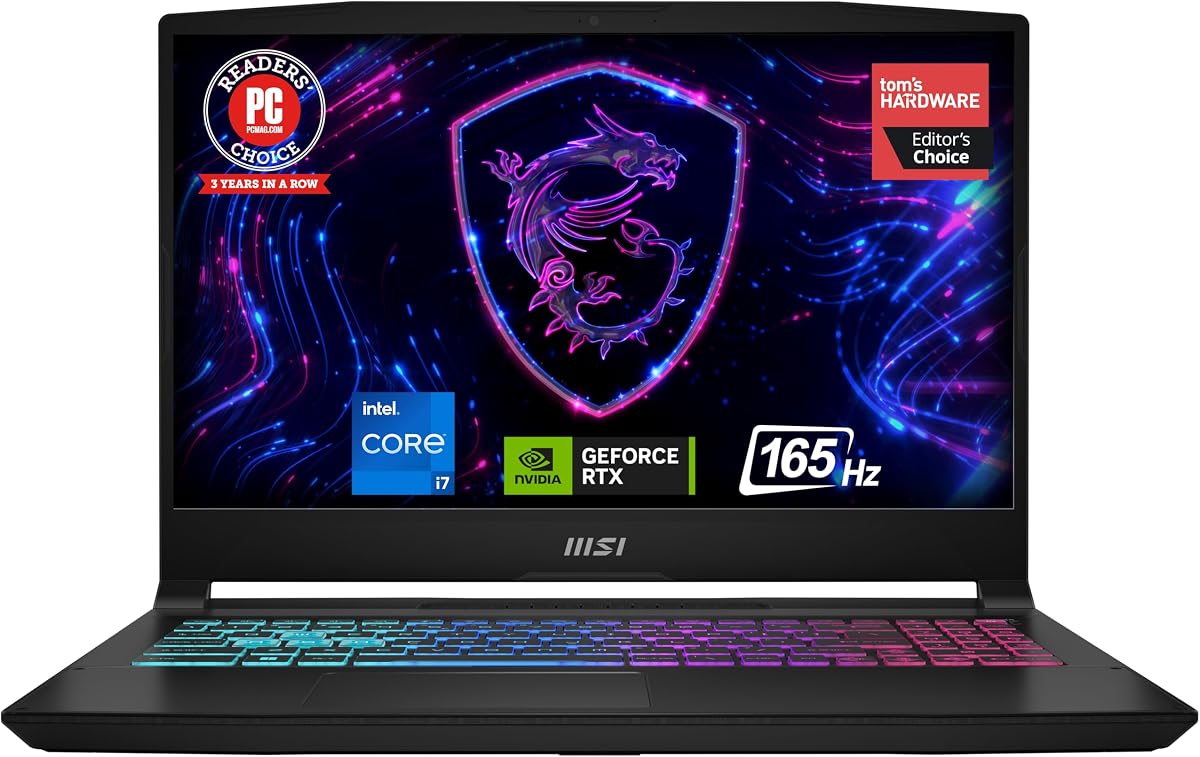

This laptop stands out as a top contender for Diablo 4 gaming. With a 4.4 rating and robust specs, it handles demanding scenes and effects without breaking a sweat. The 165Hz display ensures fluid motion during fast-paced fights.
We may earn a commission when you buy through this link, at no additional cost to you.
The combination of the Intel Core i7 and RTX 5060 provides excellent frame rates. DLSS 4 support helps boost performance further allowing you to max out settings. The 16GB DDR5 RAM and 1TB SSD offer ample space and speed for your library.
While it is not the cheapest option on the market it delivers reliable performance for the price. The cooling system keeps things quiet even under load. Some users may find the battery life could be better for unplugged play sessions.
If you want a balanced machine that handles Diablo 4 with ease this is a great choice. It offers the right mix of power and visuals for an immersive experience. We recommend it for gamers who prioritize performance and screen quality.
The RTX 5060 with Blackwell architecture delivers smooth ray tracing and high FPS in Diablo 4. DLSS 4 optimizes rendering to keep gameplay fluid without sacrificing visual fidelity.
The 165Hz FHD+ screen with a 3ms response time ensures crisp visuals and minimal ghosting. This is ideal for spotting enemies quickly and reacting to skill shots in real time.
We may earn a commission when you buy through this link, at no additional cost to you.
This laptop offers impressive specs including 32GB of DDR5 RAM and a 180Hz display. It is built for gamers who want smooth visuals and the ability to run multiple apps while playing. The rating of 4.4 confirms user satisfaction.
We may earn a commission when you buy through this link, at no additional cost to you.
The AMD Ryzen 7 260 paired with RTX 5060 handles Diablo 4 efficiently. AI features enhance performance and streamline tasks. The WUXGA IPS panel provides vibrant colors and sharp details which are great for exploring Sanctuary's landscapes.
The main trade-off is the Wi-Fi 6 standard compared to newer Wi-Fi 7 models. Still connectivity is fast and stable for online gaming. The heavier chassis is a minor drawback if you move your laptop frequently.
Choose this if you value high refresh rates and memory headroom. It is a strong all-rounder for gaming and productivity. The balance of performance and screen quality makes it a worthy investment for dedicated players.
The laptop features powerful AI capabilities with 38 AI TOPS from the CPU and 572 AI TOPS from the GPU. This enables smarter rendering and better optimization for modern games.
With 180Hz refresh rate and 100% sRGB coverage the display delivers fluid motion and accurate colors. This reduces eye strain and keeps action clear during intense combat scenarios.
We may earn a commission when you buy through this link, at no additional cost to you.
This model earns a high 4.6 rating and is perfect for budget conscious gamers. It delivers strong performance for its price point with a fast 165Hz display. The 1TB SSD ensures plenty of room for games and files.
We may earn a commission when you buy through this link, at no additional cost to you.
Despite having an RTX 4050 it still runs Diablo 4 smoothly with DLSS 3.5 support. The Intel Core i7 processor handles multitasking well so you can stream or chat while playing. It is a compact and capable machine.
While newer RTX 50 series cards offer better AI features the 4050 remains a solid choice for 1080p gaming. Wi-Fi 6 is fast enough for most connections but lacks the latest Wi-Fi 7 tech found on pricier models.
We recommend this for players who want great performance without overspending. It balances cost and capability effectively. If you prioritize value and a responsive screen this laptop is an excellent starting point.
At under 1200 dollars this laptop offers high performance specs. It is one of the most affordable ways to enjoy Diablo 4 with good visuals and fast load times.
Features like Thunderbolt 4 and Wi-Fi 6 make it easy to connect external monitors and peripherals. This flexibility supports a customizable gaming setup for home or travel.
We may earn a commission when you buy through this link, at no additional cost to you.
This premium laptop is built for those who want the best gaming experience possible. It features a powerful RTX 5070 Ti and a 240Hz 2.5K display. The rating of 4.3 reflects high performance despite the high price.
We may earn a commission when you buy through this link, at no additional cost to you.
The Intel Core Ultra 9 processor ensures no bottlenecks for even the most demanding tasks. Wi-Fi 7 provides ultra low latency for online play. The ROG Intelligent Cooling system keeps the system stable during long gaming sessions.
The cost is significantly higher than other options but you get top specs. The 2.5K screen offers sharp details but can impact battery life. It is a luxury choice for serious enthusiasts with no compromise on performance.
If budget is not a constraint this is the ultimate Diablo 4 machine. It handles max settings effortlessly and looks great doing it. We suggest it for power users who want future-proof hardware.
The RTX 5070 Ti with Blackwell architecture delivers unmatched ray tracing and frame rates. DLSS 4 and Max-Q tech maximize efficiency for premium visual experiences.
The ROG Nebula 2.5K screen with 240Hz refresh rate offers incredible clarity and speed. This reduces motion blur and enhances immersion for fast action games.
We may earn a commission when you buy through this link, at no additional cost to you.
This laptop combines a large 17.3 inch screen with a thin chassis. It is a great pick if you want bigger visuals without too much bulk. The RTX 5060 handles Diablo 4 well and the design looks unique.
We may earn a commission when you buy through this link, at no additional cost to you.
The Core 7 240H offers strong performance for gaming and daily tasks. Cooler Boost technology keeps temperatures in check. The translucent black design adds a distinct style that stands out from standard gaming laptops.
While the refresh rate is 144Hz instead of higher rates it is still smooth for most players. The larger size means less portability than 15 inch models. Battery life is typical for this class of device.
Choose this if you prefer a bigger screen for immersion. It balances power and style effectively. For gamers who play mostly at home or in a fixed spot this is a compelling option.
The 17.3 inch FHD panel offers more screen real estate than typical 15 inch laptops. This allows for better visibility of UI elements and enemies in Diablo 4.
Wi-Fi 6E and Type C ports ensure fast wireless and flexible connections. You can easily hook up peripherals and external displays for an expanded setup.
We may earn a commission when you buy through this link, at no additional cost to you.
With a perfect 5.0 rating this laptop is highly praised by users. It features 32GB of DDR5 RAM which is rare at this price point. The Ryzen 7 processor and RTX 4050 provide reliable performance for gaming.
We may earn a commission when you buy through this link, at no additional cost to you.
The 144Hz display is smooth and the design is sleek with a Mica Silver finish. Audio is enhanced with DTS:X Ultra for immersive sound. It supports content creation and gaming equally well.
The main limitation is the lower refresh rate compared to some rivals. Still 144Hz is plenty for Diablo 4 which is not ultra competitive shooter. The 32GB RAM future-proofs the system for heavy multitasking.
This is a strong choice for users who value RAM capacity and reliability. It is easy to recommend for those who want a dependable all-rounder. The high user rating confirms its quality and performance.
With 32GB of DDR5 RAM you can run games while streaming or editing videos. This makes it versatile for creators who also game.
DTS:X Ultra spatial audio enhances the listening experience with rich and clear sound. This adds to the immersion during dungeon crawls and boss fights.
We may earn a commission when you buy through this link, at no additional cost to you.
This is the most affordable laptop in our list. It still offers a 165Hz display and RTX 4050 which is great for entry level gaming. The 4.5 rating shows it satisfies users despite the lower specs.
We may earn a commission when you buy through this link, at no additional cost to you.
The Intel Core i5 handles gaming well but 8GB of RAM may limit background tasks. You may need to upgrade later for smooth multitasking. The 512GB SSD is decent but fills up quickly with large games.
While it lacks high-end specs it gets the job done for Diablo 4. The 165Hz screen ensures fluid visuals which is a big plus. It is ideal for those on a tight budget.
Choose this if you want to start gaming without spending much. It provides a solid foundation. We suggest budgeting for a RAM upgrade to get the most out of this machine.
This model offers the best price point while retaining key gaming features. It is a smart entry into PC gaming for new players.
The laptop has slots for RAM expansion up to 32GB. This allows you to improve performance later as your needs grow.
We may earn a commission when you buy through this link, at no additional cost to you.
This laptop earns a high 4.6 rating for its balanced features. It has a 180Hz screen and 16GB DDR5 RAM which is generous. The RTX 5050 supports ray tracing and DLSS 4 for decent visual quality.
We may earn a commission when you buy through this link, at no additional cost to you.
The Core 7 240H processor handles daily tasks well. Advanced cooling keeps performance stable during long sessions. The inclusion of a microSD card reader adds convenience for media and storage expansion.
The RTX 5050 is less powerful than other models but still capable. It may require tweaking settings for max performance. However the 180Hz display makes up for it with smooth motion.
We recommend this for users wanting a mix of price and features. It fits mid-range budgets well. If you value refresh rates and port variety this is a strong contender.
Dual-fan and quad-exhaust cooling ensure the system stays cool under load. This extends lifespan and keeps noise levels low.
NitroSense tracks performance and allows fan customization. This helps optimize cooling and speed based on your current tasks.
We may earn a commission when you buy through this link, at no additional cost to you.
This model offers a powerful RTX 4070 GPU and QHD display for sharp visuals. It is a solid pick for gamers who want higher resolution than 1080p. The Cooler Boost 5 system maintains good thermal performance.
We may earn a commission when you buy through this link, at no additional cost to you.
The i7 13620H works well with the GPU for gaming and tasks. While the rating is 4.1 it still delivers capable performance. The design is simplistic and fits various settings.
The QHD screen may reduce battery life compared to FHD options. Also older GPU architecture limits some AI features. However raw gaming power is strong for Diablo 4 settings.
Choose this if you prioritize GPU power and screen clarity. It is a good middle ground between budget and high-end. We suggest it for those who prefer QHD resolution.
The 15.6 inch QHD panel offers sharper details and better pixel density. This enhances the look of textures and environments in the game.
Cooler Boost 5 delivers optimal thermal dissipation to prevent overheating. This ensures consistent performance during long gaming sessions.
We may earn a commission when you buy through this link, at no additional cost to you.
This laptop is known for being thin and versatile. With a 180 degree hinge it adapts to different use cases easily. The RTX 5060 and Ryzen 7 260 ensure it handles gaming tasks well.
We may earn a commission when you buy through this link, at no additional cost to you.
The GiMATE AI assistant adds a smart touch to daily use. The slim chassis makes it easy to carry for travel or work. It balances gaming power with a portable form factor effectively.
Data is limited compared to other models but performance is solid. You may find fewer customization options on software. Still the hardware provides strong value for its price and design.
Pick this if you want a slim machine with modern GPU power. It fits well for those who move often. We recommend checking user reviews for detailed software experiences.
GiMATE acts as a smart AI mate to streamline interactions. It helps manage apps and optimize settings for better productivity and gaming.
The 180 degree hinge lets the laptop lay flat for easier sharing or specific use cases. This adds versatility for different work and play environments.
We may earn a commission when you buy through this link, at no additional cost to you.
Choosing the right laptop for Diablo 4 involves several key factors that affect performance and comfort. This guide breaks down the most important elements to consider.
The GPU is the most critical component for gaming. Look for models with RTX 4050 or higher to run Diablo 4 smoothly. Higher tier GPUs like RTX 5060 or 5070 Ti enable ray tracing and higher frame rates.
Prioritize a strong GPU to ensure consistent visuals during combat.
A high refresh rate like 144Hz or 165Hz provides smoother motion and reduces motion blur. This helps you react faster to enemies and spells in Diablo 4.
Choose a refresh rate of at least 144Hz for the best experience.
RAM affects how smoothly you can multitask while playing. 16GB is the standard recommendation for modern games. 32GB offers future-proofing for heavy workloads.
Ensure your laptop has at least 16GB of RAM.
A fast CPU complements your GPU to prevent bottlenecks. Intel Core i7 or Ryzen 7 processors are ideal for Diablo 4. They handle game logic and multitasking well.
Look for recent generation i7 or Ryzen 7 CPUs.
An SSD ensures quick load times for the game and OS. 1TB provides ample space for games and files. Gen 4 NVMe SSDs offer the fastest performance.
Opt for a 1TB SSD for a smooth setup.
Good cooling keeps the laptop stable during long sessions. Advanced vapor chambers or dual fans help maintain performance. Check reviews for thermal management feedback.
Prioritize models with proven cooling technology.
Battery life is often limited on gaming laptops so bring a charger. Consider weight and size if you plan to move the laptop often. Smaller 15 inch models are easier to carry.
Balance power with portability needs.
Wi-Fi 6 or Wi-Fi 7 ensures stable online play. USB-C and HDMI ports allow for external monitors and peripherals. Check for enough ports for your setup.
Ensure connectivity matches your accessory needs.
Keep the laptop clean by using compressed air to clear vents and fans. Dust buildup can cause overheating and reduced performance over time. Aim to clean it every few months depending on your environment.
Use a cooling pad to help airflow if you play for long periods. This reduces internal temperatures and helps maintain stable frame rates. It is an easy way to extend your hardware's lifespan.
Update drivers regularly to ensure optimal performance for new game updates. Use official manufacturer tools to check for BIOS and GPU updates. Keeping software current helps avoid bugs and crashes.
For Diablo 4, a laptop with at least an RTX 4050 GPU and 16GB of RAM is recommended. A 144Hz or higher refresh rate screen improves fluidity. An i7 or Ryzen 7 processor ensures smooth gameplay and multitasking.
While 144Hz is sufficient, 165Hz offers smoother motion and is better for fast-paced scenes. It helps reduce motion blur and improves visual clarity during intense battles.
High-end laptops with RTX 5070 Ti GPUs can handle max settings. Mid-range models may need to lower some graphics options for stability. Always check specific game benchmarks.
No, 8GB RAM is minimal and may cause slowdowns. 16GB is recommended for a smooth experience especially if you have background apps running while you play.
ASUS ROG and Acer Nitro V are known for value and performance. MSI and HP Victus also offer strong options. Compare specific models and reviews for the best fit.
Update drivers and ensure cooling is adequate. Close background apps to free up RAM. Adjust in-game settings like shadow quality and effects for better frame rates.
We reviewed ten laptops with the ASUS ROG Strix G16 standing out as the top choice for performance. The Acer Nitro V options offer great value for budget and mid-range buyers.
Prioritize GPU power and refresh rate to get the best gameplay experience. Ensure your laptop has at least 16GB of RAM and fast storage for a smooth setup.
Prices change frequently so check current deals before buying. Find the right balance for your needs to enjoy hours of immersive Diablo 4 gaming on your new laptop.