
Lenovo 100E Chromebook 2ND Gen
4.0Editor score
Ultra affordable price point
Compact 11 inch display
Reliable MediaTek processor
This guide compares the best cheap Chromebooks for students and families focusing on performance battery life and value across ten affordable models available
Finding the right affordable laptop can be challenging when you need reliability for school or work without breaking the bank. Chromebooks offer a streamlined operating system that keeps tasks simple and secure for users of all ages.
We evaluated ten top models based on processor speed display quality and battery endurance to ensure you get the most value for your money. Each option balances cost with essential features needed for daily productivity and entertainment needs.
Our detailed reviews highlight strengths and weaknesses so you can choose confidently based on your specific requirements. Keep in mind that pricing fluctuates often so verify current deals before making your final purchase decision.
4.0Editor score

4.3Editor score

4.2Editor score
Explore this side-by-side comparison of ten affordable Chromebooks highlighting key specifications like processor type screen size and storage options to help you decide quickly.





This HP Chromebook stands out as a reliable choice for students and casual users needing consistent performance without high costs. With a solid 4.4 star rating it delivers smooth multitasking and secure computing through Chrome OS.
We may earn a commission when you buy through this link, at no additional cost to you.
The Intel Celeron N4120 processor provides enough power for browsing multiple tabs streaming videos and running light productivity apps. Combined with 14 hours of battery life it keeps you productive throughout the day without constant recharging.
While the HD resolution is standard for budget devices the anti glare screen helps maintain visibility in bright environments. The inclusion of accessories like earbuds and a mouse adds immediate value to the purchase price.
Anyone looking for a dependable daily driver for school or home use will find this model offers excellent balance between performance and affordability. It remains a top recommendation for those prioritizing battery endurance and portability.
The quad core architecture handles divided workloads effectively ensuring lag free transitions between applications.
Long lasting battery ensures you can work through classes or meetings without hunting for outlets.
We may earn a commission when you buy through this link, at no additional cost to you.
This HP model emphasizes mobility with a thin lightweight chassis that fits easily into backpacks for commuting. It maintains strong performance for everyday tasks thanks to the efficient Intel Celeron N4120 processor.
We may earn a commission when you buy through this link, at no additional cost to you.
Battery life is a major highlight allowing all day usage without interruption. The fast charge feature ensures you can get back to work quickly if you run low on power during travel.
While storage is limited to 64GB cloud integration in Chrome OS helps mitigate this constraint. The device supports 4K content streaming making it suitable for media consumption during breaks.
Students and professionals who move frequently will appreciate the balance of weight and functionality. It is an ideal companion for those who need a reliable machine that does not weigh them down.
Manufactured with sustainability in mind this model meets rigorous environmental standards for energy use.
Fast charge technology gets your device to half capacity in just 45 minutes of plugging in.
We may earn a commission when you buy through this link, at no additional cost to you.
The Dell Chromebook 11 3100 offers a versatile 2 in 1 form factor with a responsive touchscreen ideal for interactive learning. Its compact design makes it easy to handle for younger users or crowded spaces.
We may earn a commission when you buy through this link, at no additional cost to you.
Powered by the Intel N4020 it handles basic tasks smoothly while keeping energy consumption low. The 32GB storage is modest but sufficient for users relying heavily on cloud services for file management.
Touch functionality allows for intuitive navigation which enhances the experience with Android apps available on Chrome OS. It serves well as a secondary device for casual browsing or reading tasks.
Families looking for a budget friendly device for children will find this model practical and durable. The renewed condition adds extra savings while still providing reliable performance for daily needs.
Flip the screen to tablet mode for easier reading or drawing without needing a keyboard.
Use your finger to scroll and zoom directly on the screen for faster control.
We may earn a commission when you buy through this link, at no additional cost to you.
This Lenovo model bridges the gap between budget and premium with a sharp Full HD touchscreen and robust processing power. The MediaTek Kompanio 520 provides smooth performance for demanding applications and multitasking.
We may earn a commission when you buy through this link, at no additional cost to you.
Wi Fi 6 ensures faster and more stable wireless connections which is crucial for video conferencing and streaming. The slim form factor adds to its appeal for users who value aesthetics alongside utility.
While the price is slightly higher than entry level models the improved display and connectivity justify the cost. It handles modern web experiences better than many competitors with limited specs.
Professionals and students needing better visual clarity will appreciate the IPS display technology. It is a strong contender for those wanting a more polished experience without spending premium brand prices.
The FHD resolution offers significantly more detail for documents and media than HD screens.
Next generation Wi Fi 6 keeps your connection steady even in crowded network environments.
We may earn a commission when you buy through this link, at no additional cost to you.
The Acer Chromebook provides a spacious 15.6 inch display that offers more workspace for productivity tasks. Despite the larger size it remains thin and lightweight enough for regular transport.
We may earn a commission when you buy through this link, at no additional cost to you.
The included 5 in 1 value bundle adds significant utility with wireless earbuds and a mouse right out of the box. This saves extra costs and ensures you have everything needed for immediate use.
While the screen is large the HD resolution keeps costs down making it an affordable large screen option. The anti glare coating helps reduce eye strain during long work sessions.
Users who prioritize screen real estate for spreadsheets or multiple windows will find this model beneficial. It is a practical choice for home office setups where portability is secondary to visibility.
Accessories like a mouse and earbuds are included to save you from buying separately.
The screen coating minimizes reflections allowing comfortable viewing in various lighting conditions.
We may earn a commission when you buy through this link, at no additional cost to you.
This ASUS model offers a notable storage upgrade with 128GB of space which is rare in this price range. It allows for more local file storage and app installations without constant cloud reliance.
We may earn a commission when you buy through this link, at no additional cost to you.
The Full HD IPS display ensures vibrant colors and wide viewing angles making it suitable for media consumption. The renewed condition suggests it has been inspected to ensure high quality standards.
While it is a renewed unit the performance specs remain competitive for daily tasks like browsing and streaming. The HDMI port adds flexibility for connecting to external monitors for expanded setups.
Buyers needing more space than the standard 64GB will appreciate this upgrade. It is an excellent option for those who want a larger screen and more storage without paying full price.
128GB of storage allows for more offline access to files and applications.
Use the HDMI port to connect to a second monitor for a desktop experience.
We may earn a commission when you buy through this link, at no additional cost to you.
Known for its superior audio quality this HP Chromebook features speakers tuned by B&O for a richer sound experience. It is perfect for watching movies or listening to music during study sessions.
We may earn a commission when you buy through this link, at no additional cost to you.
With a high 4.5 star rating users appreciate its reliability and responsiveness. The slim ceramic white design looks professional and fits well in any environment.
Although the storage is limited to 32GB the device handles everyday tasks efficiently. The battery lasts long enough to cover a full school day or work shift without interruption.
For users who prioritize multimedia consumption over heavy multitasking this is a great choice. It delivers an enjoyable entertainment experience while maintaining basic productivity capabilities.
The B&O audio tuning provides clear sound that stands out compared to standard speakers.
A 4.5 star rating reflects consistent performance and customer satisfaction across many users.
We may earn a commission when you buy through this link, at no additional cost to you.
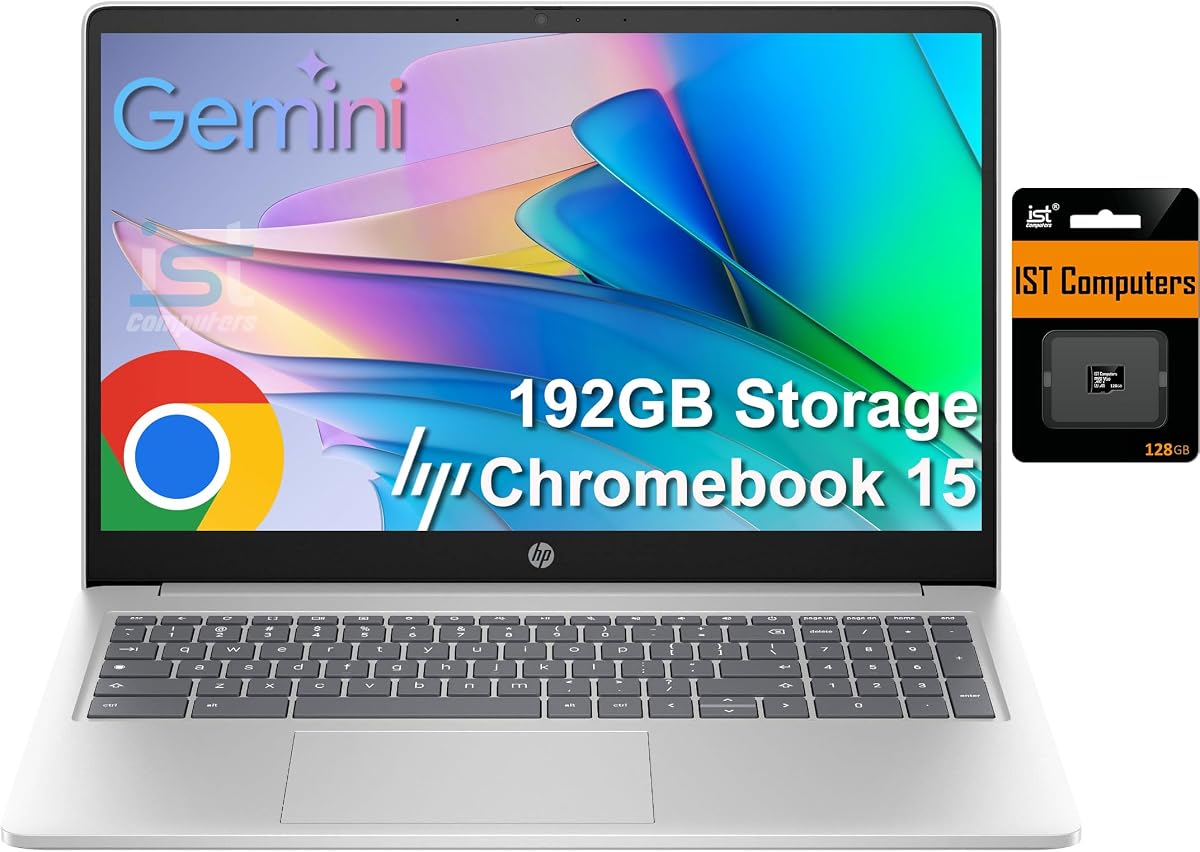
This HP Chromebook stands out with 8GB of DDR5 RAM and nearly 200GB of storage which are rare features in affordable laptops. It handles heavy multitasking far better than models with 4GB RAM.
We may earn a commission when you buy through this link, at no additional cost to you.
The inclusion of a numeric keypad makes data entry easier for work or school tasks requiring numbers. The 15.6 inch screen provides ample space for detailed work and spreadsheets.
While the price is higher than the cheapest options the performance upgrade justifies the investment. It bridges the gap between budget and mid range laptops effectively.
Anyone needing more RAM for smooth performance will find this model ideal. It is a strong choice for students and professionals who need a powerful machine without premium costs.
8GB of DDR5 RAM allows for dozens of browser tabs without slowing down.
A dedicated number pad on the right side streamlines data entry tasks.
We may earn a commission when you buy through this link, at no additional cost to you.
This Acer model combines modern specs like DDR5 memory and Wi Fi 6 with a stylish Dale Purple finish. It offers a visually appealing alternative to the typical silver or black laptops.
We may earn a commission when you buy through this link, at no additional cost to you.
The Full HD IPS screen delivers good color accuracy and viewing angles which are important for media consumption. Being renewed it offers these features at a lower cost than new units.
Performance is adequate for daily tasks thanks to the updated processor and memory standards. It provides a good balance of speed and design for users who value looks.
Buyers looking for a unique aesthetic combined with reliable modern specs will enjoy this device. It is a great fit for those who want their laptop to stand out in a classroom or office.
DDR5 RAM ensures faster data processing and better efficiency than older generations.
The Dale Purple color provides a distinctive look that differs from standard office colors.
We may earn a commission when you buy through this link, at no additional cost to you.
The Lenovo 100E is one of the most affordable Chromebooks available making it accessible for strict budgets. It offers essential features for basic tasks like web browsing and word processing.
We may earn a commission when you buy through this link, at no additional cost to you.
Its compact 11.6 inch form factor makes it highly portable and easy to carry in small bags. The renewed status helps keep costs low while ensuring the device functions correctly.
While storage is minimal it works well with cloud storage solutions for documents and media. It is designed to handle simple tasks without complexity for users needing a basic computer.
Families or individuals needing a secondary device for light tasks will find this model sufficient. It serves as an excellent entry point into the Chromebook ecosystem at a low investment.
The low price point makes computing accessible for those with limited financial resources.
The small 11.6 inch screen allows the device to fit in bags that cannot hold larger laptops.
We may earn a commission when you buy through this link, at no additional cost to you.
Choosing a cheap Chromebook requires balancing cost with performance needs to ensure the device lasts and meets your daily requirements.
The processor is the brain of your Chromebook and dictates how smoothly tasks run. For general browsing and streaming, quad-core Intel Celeron or MediaTek Kompanio chips provide the best balance of speed and efficiency without raising costs significantly.
Look for processors like the N4120 or Kompanio 520 to avoid lag during multitasking.
Random Access Memory helps your system handle multiple tabs and applications simultaneously. Most budget models come with 4GB of RAM, which is sufficient for basic tasks but may struggle with heavy browser usage.
If your budget allows, prioritize models with 8GB RAM for better long-term performance.
A higher resolution screen improves text clarity and media viewing experience significantly. While 1366×768 is standard, Full HD displays offer sharper images and are worth the small price increase if you consume lots of video content.
IPS panels generally provide better viewing angles than standard TN panels.
Chromebooks use flash storage which is fast but often limited to 64GB in this range. Ensure you are comfortable using cloud storage services since local storage fills up quickly with offline files.
128GB or 192GB options are ideal if you need local offline access.
Long battery life is essential for students and professionals who move around daily. Look for models rated for 12 hours or more of real-world usage to avoid carrying a charger everywhere.
Fast charging capabilities are a bonus for quick power top-ups between classes.
Modern Chromebooks often lack legacy ports like USB-A, so check for a good mix of Type-A, Type-C, and HDMI ports. USB-C is vital for charging and data, while HDMI allows easy connection to projectors or TVs.
Ensure at least one USB-A port exists if you have older peripherals.
Since you will type frequently, a comfortable keyboard with good key travel is important. Some models include backlit keys which are helpful for working in dim environments like lecture halls.
Try to test the keyboard feel before buying if possible.
Cheap Chromebooks should still feel sturdy enough for daily use in a backpack. Look for models made with polycarbonate or metal accents that resist wear and tear over time.
Renewed options can offer better build quality for less money if inspected well.
Start by customizing your Chrome browser bookmarks and syncing your Google account to access files securely from any device. This sets the foundation for a streamlined workflow.
Keep your storage clean by regularly deleting unused apps and clearing cache to maintain speed over time. Chrome OS handles most updates automatically but checking settings ensures performance remains optimal.
Protect your device with a sleeve or case to prevent scratches during transport. Avoid placing it in bags with sharp objects and keep it away from extreme heat to preserve battery health.
Yes, cheap Chromebooks are excellent for online school as they support Zoom, Google Classroom, and Microsoft Teams effectively. Their long battery life ensures you stay connected through full class schedules without needing a wall outlet.
You cannot directly install Windows on a Chromebook due to hardware and operating system differences. However, you can use Linux applications within Chrome OS to run many productivity tools similar to Windows apps.
For most students, 64GB is sufficient if you rely on cloud storage like Google Drive for documents and photos. It is ideal for web-based learning but may require cleanup if you store many large offline media files.
Chrome OS is highly resistant to viruses because of its sandboxed design and frequent automatic updates. While not immune to all threats, it offers strong built-in security that protects users without requiring third-party antivirus software.
A cheap Chromebook typically lasts three to five years depending on usage habits and build quality. Most come with an Automatic Update Expiration date usually several years out ensuring software support remains active.
Yes, you can use any USB or Bluetooth mouse with your Chromebook for easier navigation. Chrome OS supports full mouse cursor movement and clicking just like Windows or macOS operating systems.
Our top picks highlight the HP 14 HD for value and the Lenovo Flagship for performance. These models cover most needs from basic browsing to heavier multitasking.
Prioritize battery life and screen size based on whether you move frequently or work mostly at a desk. More RAM and storage are worth the extra cost if you plan to use the device for several years.
Check current deals often as prices fluctuate significantly during sales events. Verify the return policy and warranty details before finalizing your purchase to ensure peace of mind.