
RedThunder One Handed Gaming Keyboard RGB Backlit
4.4Editor score
Anti-ghosting 35 keys
Macro recording FN keys
Driver-free plug and play
Discover the best gaming keypads for 2026. We compare top one-handed keyboards for FPS, MMO, and productivity to optimize your setup and gameplay performance.
Gaming keypads offer a specialized solution for players seeking efficiency and comfort. These compact devices allow you to assign complex commands to a single hand, freeing your mouse for precise movement during intense matches.
We evaluated ten leading models based on build quality, switch technology, customization options, and ergonomic design. Our analysis covers wired and wireless options ranging from budget-friendly picks to high-end analog devices.
Each review highlights standout features, pros, and cons to help you find the right fit. Note that pricing fluctuates frequently, so verify current costs before purchasing to ensure you get the best value available today.
4.4Editor score

4.4Editor score

4.3Editor score
This side-by-side comparison highlights key specifications across all ten models. Use this table to quickly identify differences in switch types, connectivity, key counts, and unique features like analog thumbsticks or wireless capabilities.




The Redragon K585 Wired stands out as the top recommendation for gamers seeking performance without breaking the bank. With a 4.4 rating, it balances functionality and affordability effectively. Its tactical layout ensures easy access to essential commands during competitive play.
We may earn a commission when you buy through this link, at no additional cost to you.
Key strengths include the socketed switch design, allowing you to swap switches without soldering to customize tactile feel. The USB pass-through port keeps your desk organized by letting you plug peripherals directly into the keypad. Customization is deep with onboard macro keys for instant ability rotations.
Trade-offs involve the lack of wireless connectivity and occasional software sluggishness. These are acceptable given the price point. The detachable wrist rest adds ergonomic comfort for long sessions, making it a practical choice for MMO and MOBA players.
Buy this if you want a versatile one-handed device that adapts to your needs. It offers premium features like hot-swap sockets at a budget price, ensuring you can optimize your setup for various games without excessive cost.
The upgraded socket accepts almost any 3-pin or 5-pin switch, letting you tune the response for your preference.
Plug your mouse or headset directly into the keypad for a cleaner desk setup without extra cables.
We may earn a commission when you buy through this link, at no additional cost to you.
RedThunder delivers an incredible entry-level experience with this one-handed RGB gaming keyboard. Its 4.4 rating reflects high satisfaction among budget-conscious gamers. The 35-key design covers essential functions without cluttering your desk space significantly.
We may earn a commission when you buy through this link, at no additional cost to you.
The built-in game chip ensures a 3ms faster response speed for smooth gameplay. All keys are anti-ghosting, which is crucial for executing multiple commands simultaneously. Macro recording is straightforward using FN keys, allowing quick setup without software installation.
Limitations include static RGB modes and non-swappable switches. However, these do not hinder basic functionality. The ergonomic design and wrist rest provide comfort, making it suitable for casual gamers or as a travel companion.
Choose this if cost is your primary concern. It proves you do not need to spend much to gain a one-handed advantage. Its simplicity and reliability make it a strong starting point for those exploring keypads.
Built-in game chip provides 3ms faster response speed for more fluent gameplay experience.
Driver free plug and play compatibility works with Windows, Mac, and Linux systems immediately.
We may earn a commission when you buy through this link, at no additional cost to you.
The AZERON Cyber II represents the pinnacle of innovation in one-handed gaming. With a 4.3 rating, it appeals to enthusiasts willing to invest in unique features. The Hall Effect analog thumbstick replaces traditional WASD for smoother movement control.
We may earn a commission when you buy through this link, at no additional cost to you.
It offers 30 individually connected inputs, ensuring no matrix ghosting. You can configure keys as keyboard, mouse, or macros. The software allows fine-tuned thumbstick settings, including diagonal keybinds and smoothing, providing a competitive edge in FPS games.
The cost is steep, and the setup complexity may deter casual users. However, the 3D printed design ensures a perfect fit for specific hand sizes. Future software updates promise continued evolution, justifying the investment for serious gamers.
Invest in this if you demand cutting-edge performance and ergonomics. It transforms how you interact with games by combining keyboard precision with controller-like movement. It is a specialized tool for maximizing gameplay potential.
The Hall Effect thumbstick eliminates stick drift and supports WASD or 360 analog movement in compatible games.
Adjustable parts ensure a perfect fit with medium-sized keypad ideal for hand sizes ranging from 6.3 to 7.5 inches.
We may earn a commission when you buy through this link, at no additional cost to you.
The Razer Tartarus V2 maintains strong brand loyalty with its 4.3 rating. It is designed for left-handed use, though often used on the left by right-handed gamers. The mecha-membrane switches provide tactile feedback without the noise of mechanical keys.
We may earn a commission when you buy through this link, at no additional cost to you.
Razer Hypershift allows complex commands to be mapped easily. The 8-way thumbpad enhances movement controls, ideal for console-oriented players transitioning to PC. Full Chroma sync creates immersive lighting effects across your entire setup seamlessly.
Cost is a barrier, and the left-handed focus might confuse some users. However, the build quality justifies the price. It is a reliable choice if you already use Razer peripherals and want unified control and aesthetics.
Buy this if you value brand consistency and comfort. The soft-cushioned switches reduce fatigue during long sessions. It integrates perfectly into a Razer ecosystem, delivering a cohesive and polished gaming experience.
The 8-way directional thumbpad allows for more natural controls for console-oriented players and ergonomic experience.
Fully syncs with popular games and Philips Hue to supports 16.8 million colors on individually backlit keys.
We may earn a commission when you buy through this link, at no additional cost to you.
The Redragon K585 PRO Wireless brings wireless convenience to the popular K585 series. With a 4.2 rating, it offers untethered placement without sacrificing core functionality. The battery life supports all-day play, reducing interruptions for charging.
We may earn a commission when you buy through this link, at no additional cost to you.
BT and 2.4GHz options allow flexible setup. The upgraded socket accepts switches for customization. Detachable wrist rest ensures comfort. Pro software allows deep customization for macro sequences and lighting effects tailored to your needs.
Battery dependency and higher cost are minor drawbacks. However, the freedom to position the keypad anywhere enhances ergonomics. It is ideal for those who want the features of the wired version but prioritize a clean desk setup.
Choose this if cable management is a priority. It delivers performance comparable to wired models with added mobility. The long battery life ensures uninterrupted gaming sessions, making it a practical choice for modern setups.
BT and 2.4GHz connectivity lets you set the keypad anywhere on your desk with 15 to 20 hours of battery life.
Record your own macro sequences and design custom lighting effects so the keypad adapts to your exact keybinds.
We may earn a commission when you buy through this link, at no additional cost to you.
The Keychron C0 HE 8K targets competitive FPS players with advanced tech. Its 4.2 rating highlights performance capabilities. The 8K polling rate and Hall Effect magnetic switches deliver ultra-low latency and instant key reset for precise movement control.
We may earn a commission when you buy through this link, at no additional cost to you.
Rapid Trigger allows faster response by detecting real-time key travel instead of fixed points. This gives a competitive edge in games like Valorant. A web-based configurator ensures quick setup across Windows and macOS without installing drivers.
Limited to wired connection and browser-only settings may deter some. However, performance benefits outweigh these constraints. The compact layout keeps essential commands within reach for MMO and MOBA too, offering versatility beyond FPS.
Select this if competitive performance is critical. It provides high-level tools for reducing input lag. The cross-platform support ensures it works seamlessly with any system, making it a robust choice for serious gamers.
Built for high-level FPS gameplay, this keypad features an 8K polling rate and Rapid Trigger switches for instant key reset.
Customize key mapping through a browser-based configurator with no software installation required for Windows and macOS.
We may earn a commission when you buy through this link, at no additional cost to you.
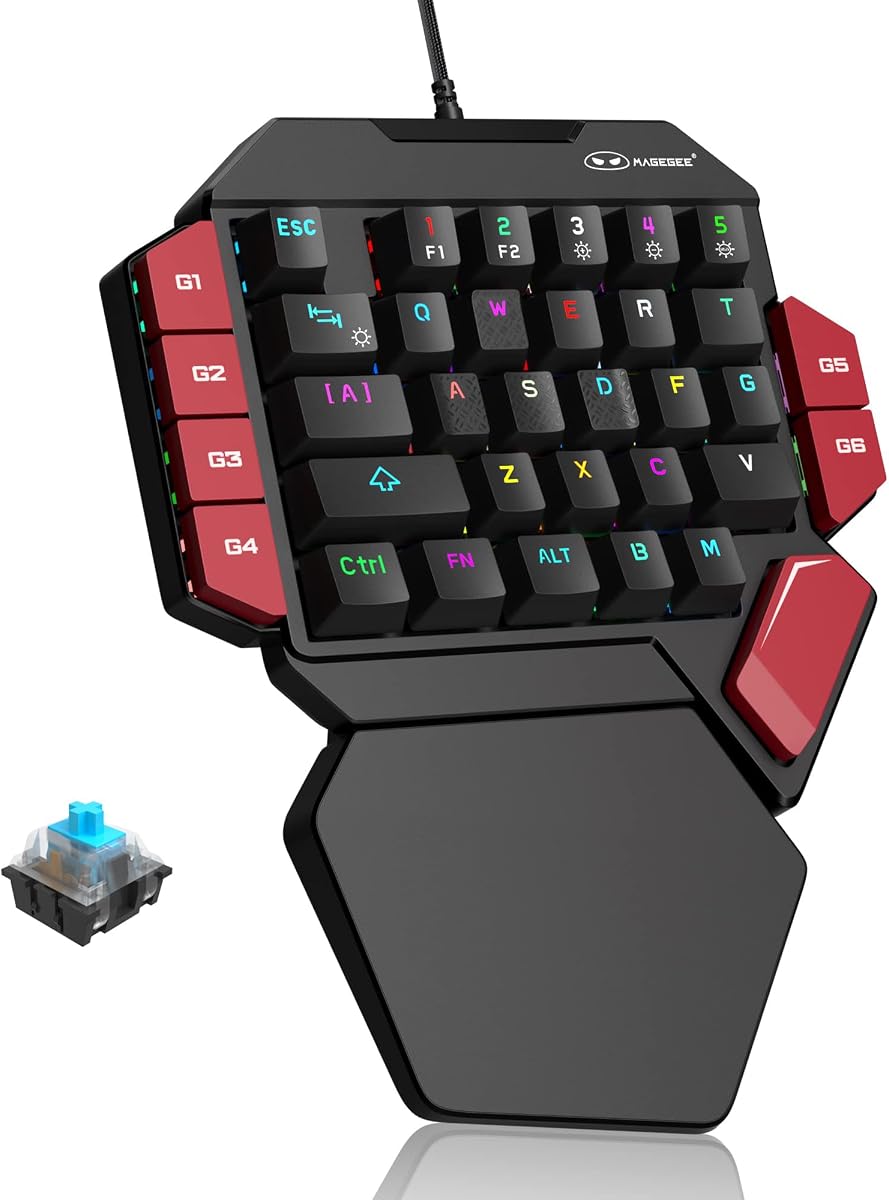
MageGee offers a classic mechanical feel with its blue switches. With a 4.3 rating, it appeals to those who love tactile feedback. The loud click sound and crisp paragraph feeling ensure every press is felt clearly during gameplay.
We may earn a commission when you buy through this link, at no additional cost to you.
Six macro keys provide enough custom commands for most games. RGB lighting is customizable via FN keys without software. The palm rest reduces hand fatigue effectively. It is plug and play, ensuring compatibility with multiple operating systems.
The noise level might disturb others, and software is limited. However, for those who enjoy mechanical switches, this is a solid choice. The design prioritizes direct functionality over complex features, keeping it simple and effective.
Pick this if you prefer traditional mechanical switches. It delivers strong tactile feedback and reliability. The straightforward macro recording allows quick customization, making it a reliable tool for focused gaming sessions.
All 35 keys are non-conflict keys, pressing the switch makes loud click sound and strong mechanical feeling.
Press FN and G1 keys to make macro recording steps easily without additional software installation.
We may earn a commission when you buy through this link, at no additional cost to you.
AJAZZ AK029 achieves the highest 4.5 rating due to superior switch performance. It uses Bingyu Hall Effect magnetic switches for zero dead zone and no debounce delay. This ensures every tap registers instantly for tournament-grade performance.
We may earn a commission when you buy through this link, at no additional cost to you.
The 8KHz polling rate supports flawless counter-strafing. An aluminum-reinforced build adds stability. The compact 29-key design saves significant desk space, freeing your mouse for low-sensitivity FPS play. Web driver allows easy customization without admin rights.
Limited key count and web-based setup are trade-offs. However, the precision and build quality are unmatched in this price range. The durable double-shot PBT keycaps ensure lasting durability and vibrant lighting effects.
Choose this if you need compact, high-performance gear. It frees your mouse and offers ultra-sensitive response. The stable build ensures consistent performance, making it ideal for competitive FPS and video editing workflows.
No physical contact means no debounce delay, and zero dead zone ensures every tap registers instantly for consistent performance.
Ultra-compact 29-key one-handed design saves 60% desk space, freeing your mouse for low-sensitivity FPS play.
We may earn a commission when you buy through this link, at no additional cost to you.
This classic Tartarus V2 variant delivers consistent performance with a 4.2 rating. It aligns with existing Razer setups for seamless integration. The mecha-membrane switches offer a balance between mechanical feedback and soft comfort during play.
We may earn a commission when you buy through this link, at no additional cost to you.
Programmable keys and Hypershift allow deep customization. Chroma support ensures your lighting matches other gear. The thumbpad enhances ergonomics, providing better movement controls than standard keyboards. Build quality remains high for long-term use.
It is an older model and may not justify the cost compared to newer tech. However, if you prefer Razer ecosystems, it remains reliable. The design is proven and comfortable for extended gaming sessions without fatigue.
Buy this if you prioritize ecosystem consistency. It provides reliable programmability and aesthetics. The ergonomic design ensures comfort, making it a solid choice for those invested in Razer hardware.
Fully syncs with popular games and gear from partners to support 16.8 million colors on individually backlit keys.
Provides tactile feedback of mechanical press on comfortable soft-cushioned membrane switch suitable for gaming.
We may earn a commission when you buy through this link, at no additional cost to you.
Redragon RM104 introduces a smart control knob for volume and lighting. With a 4.4 rating, it offers unique utility beyond standard keypads. Tri-mode connectivity ensures seamless switching between Bluetooth, wireless, and wired modes.
We may earn a commission when you buy through this link, at no additional cost to you.
The 4000mAh battery supports long use. Software allows macros and remapping for customization. RGB backlighting syncs with other Redragon gear. It is compatible with PC and Mac, delivering plug-and-play performance.
It is more keyboard than keypad, limiting compactness. However, the knob adds real-world utility for streamers and creators. The buttery-smooth rotation ensures precise feedback during intense usage sessions.
Select this if you want versatile controls. The smart knob simplifies audio and lighting management. It is a practical hybrid for those who need keyboard functions alongside one-handed programmability.
Rotate to adjust volume, press for instant mute, and hold to cycle RGB modes for smoother control.
Tri-Mode Wireless Connectivity allows switching between Bluetooth, 2.4GHz wireless, and USB-C cable.
We may earn a commission when you buy through this link, at no additional cost to you.
Selecting the right one-handed keypad depends on your gaming style, budget, and desired features. Understanding key factors ensures you find a device that enhances performance rather than complicates it.
Most keypads use mechanical, membrane, or magnetic switches. Mechanical keys like Blue switches offer tactile feedback but can be loud. Membrane options are softer and quieter. Magnetic Hall Effect switches provide adjustable actuation for competitive FPS play.
Choose mechanical for feedback, membrane for comfort, or magnetic for precision. Match the switch feel to your main keyboard for consistency.
Wired models offer zero latency, while wireless versions provide desk flexibility. Bluetooth and 2.4GHz wireless reduce cable clutter. Consider battery life if going wireless to avoid interruptions during long sessions.
Prioritize wired for competitive gaming and wireless for desk organization. Ensure the connection supports your gaming PC without lag.
Key counts vary from 29 to 42 keys. Fewer keys save space but limit command capacity. More keys allow complex macro setups but take up more desk room. Choose based on your game's command complexity.
Select compact models for space and MMO models for extensive macros. Ensure essential commands fit without excessive scrolling.
Comfort reduces fatigue during marathon sessions. Look for wrist rests and adjustable designs. Ergonomic thumbpads help with movement control. Ensure the device fits your hand size comfortably without cramping.
Prioritize wrist support and adjustable parts. Test hand fit if possible to ensure sustained comfort during gameplay.
Software allows macros, key mapping, and RGB control. Some require installation while others use web-based configurators. Deep customization enables complex combos and lighting sync with other hardware.
Check software availability and compatibility with your OS. Ensure easy setup for macros without excessive technical barriers.
Build quality impacts lifespan. Metal plates and double-shot keycaps resist wear. Some models offer replaceable switches for longevity. Verify ratings for key presses to ensure long-term use.
Look for reinforced build and durable caps. Replaceable switches extend device life significantly for heavy users.
Advanced models include analog thumbsticks or smart knobs. These offer unique controls for movement or volume. Consider if these features add value to your specific gaming or workflow needs.
Use thumbsticks for fluid movement and knobs for volume control. Ensure they integrate well with your existing setup.
Prices range from affordable to premium. Basic models cover essential keys while high-end models add advanced tech. Balance features with cost to avoid overspending on unused capabilities.
Set a budget before shopping. Prioritize essential features over aesthetic extras to maximize value for money.
To start, connect your keypad via USB or wireless receiver. Download any required software to unlock full customization. Assign common game commands to keys for faster execution during matches.
Maintain your device by keeping it clean from dust and debris. Use a soft cloth or compressed air for maintenance. Avoid excessive force on switches to prolong their lifespan.
Regularly check for software updates to access new features. Calibrate any analog controls to ensure precision. Proper care ensures consistent performance over years of gaming use.
Most gaming keypads are designed primarily for PC gaming. Compatibility with consoles like Xbox or PlayStation varies by model. Always check product specifications to ensure support for your specific console before purchasing.
Yes, many players replace full keyboards with keypads for specific games. It is common in FPS titles where a mouse is primary. However, you still need standard keys for text input or complex commands.
Programming macros usually involves recording keystrokes via dedicated keys or software. Assign the recorded sequence to a specific key for instant execution. Most brands provide user guides for step-by-step macro setup.
Modern wireless keypads use high-speed protocols like 2.4GHz to minimize latency. Some offer wired modes for zero lag. Generally, they perform well enough for casual gaming, but competitive play may prefer wired.
Battery life varies but often lasts 15 to 20 hours with RGB on. Models with efficient power management can run longer. Consider rechargeable batteries for convenience and environmental sustainability.
Thumbpads offer analog movement similar to controllers, which some players prefer. They provide smoother turns and movement. Whether better depends on your preference for controller vs keyboard movement control.
We have explored ten top-tier keypads ranging from budget picks to premium innovations. Whether you need a simple device or advanced features, there is a model for every gamer.
Prioritize ergonomics and switch type for long-term comfort and performance. Ensure the device aligns with your gaming style and budget. Choosing the right tool can enhance your overall gaming experience significantly.
Prices and availability change often, so verify current deals before finalizing your choice. Stay updated on promotions to get the best value for your investment in gaming hardware.