
Large Key Wired Telephone
4.2Editor score
One-inch wide oversized physical buttons
Adjustable earpiece and ringtone volume
Visual light alert for incoming calls
This guide compares ten large button phones for seniors featuring volume controls, photo dialing, and accessibility tools to help elders stay connected safely
Finding the right communication device is crucial for older adults who may struggle with small screens or complex menus. Large button phones for seniors offer a simplified interface designed specifically to meet these needs while maintaining essential calling features.
We evaluated ten top-rated models based on button size, volume output, visual alerts, and ease of setup. Each product was reviewed for its ability to support users with vision loss, hearing difficulties, or memory challenges in real-world home settings.
Every pick highlights key strengths like speed dial, photo keys, and loud ringers to match different user preferences. Please note that product availability and pricing can shift frequently so verifying current details before purchasing is always recommended.
4.2Editor score

4.1Editor score

3.4Editor score
This side-by-side comparison highlights the most important features across all ten models so you can quickly identify which phone best matches your specific accessibility requirements.


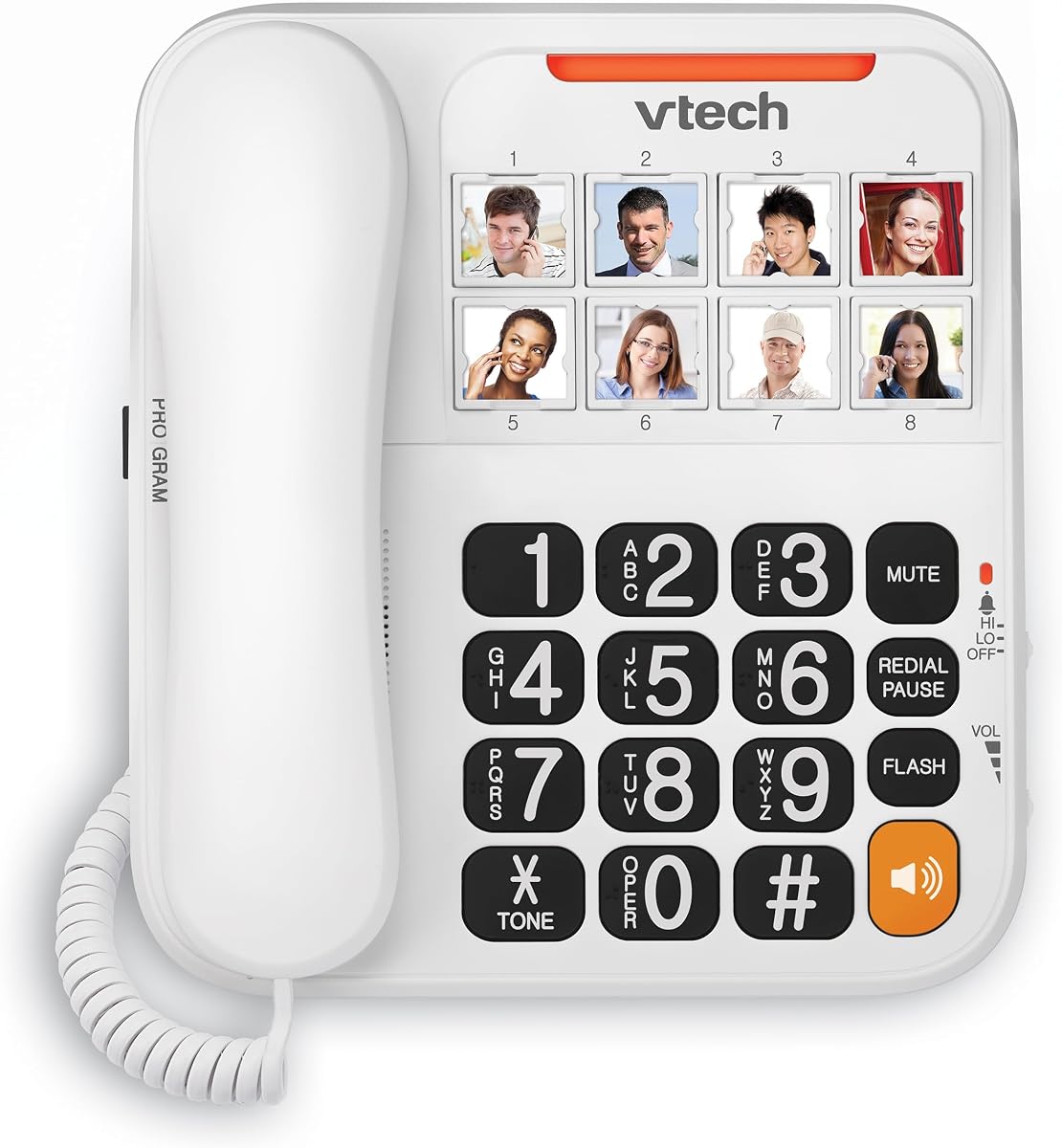


The Uvital Big Button Phone earns top marks for its thoughtful design that supports seniors with vision or hearing challenges. It scores a solid 4.1 rating among users who appreciate its loud ringer and photo-based dialing features.
We may earn a commission when you buy through this link, at no additional cost to you.
Its standout quality is the eight customizable photo speed dial keys that let users call loved ones by pressing an image instead of memorizing numbers. The ringer reaches 120dB while the earpiece goes up to 90dB ensuring conversations are clear even in noisy environments.
One trade-off is the lack of internet features like voicemail or caller ID which limits its use to traditional landline service. However this simplicity is exactly why many caregivers prefer it for users who need distraction-free communication without complex menus.
This phone is ideal for elders living alone or those with memory loss who need reliable and instant access to family. Its emergency SOS button and visual alerts make it a safe choice for daily home use.
The bright red LED flashing light activates on every incoming call so users with hearing loss never miss an important ring.
Customizable photo buttons help seniors with cognitive impairment or dementia recognize contacts instantly without confusion.
We may earn a commission when you buy through this link, at no additional cost to you.
The SWISSVOICE Xtra TMAX10 stands out with its six customizable photo memory keys that make dialing intuitive for seniors who struggle with numbers. Users rate it highly at 4.5 stars for its reliability and straightforward interface.
We may earn a commission when you buy through this link, at no additional cost to you.
Its key strength lies in oversized number keys and photo buttons that reduce dialing errors caused by poor eyesight or arthritis. The volume controls are separate for handset and ringer allowing personalized settings for different hearing needs.
While it offers fewer photo keys than some competitors its simple operation ensures users won't get lost in menus. It avoids unnecessary features so the focus remains on clear and confident phone calls.
This model is best for seniors who value ease of use over advanced features. It provides a solid landline experience with visual cues that help ensure no calls are missed.
Large separated number keys make dialing accurate even for hands with limited movement or arthritis issues.
Adjustable ringer and handset volumes allow users to set sound levels that match their hearing ability perfectly.
We may earn a commission when you buy through this link, at no additional cost to you.
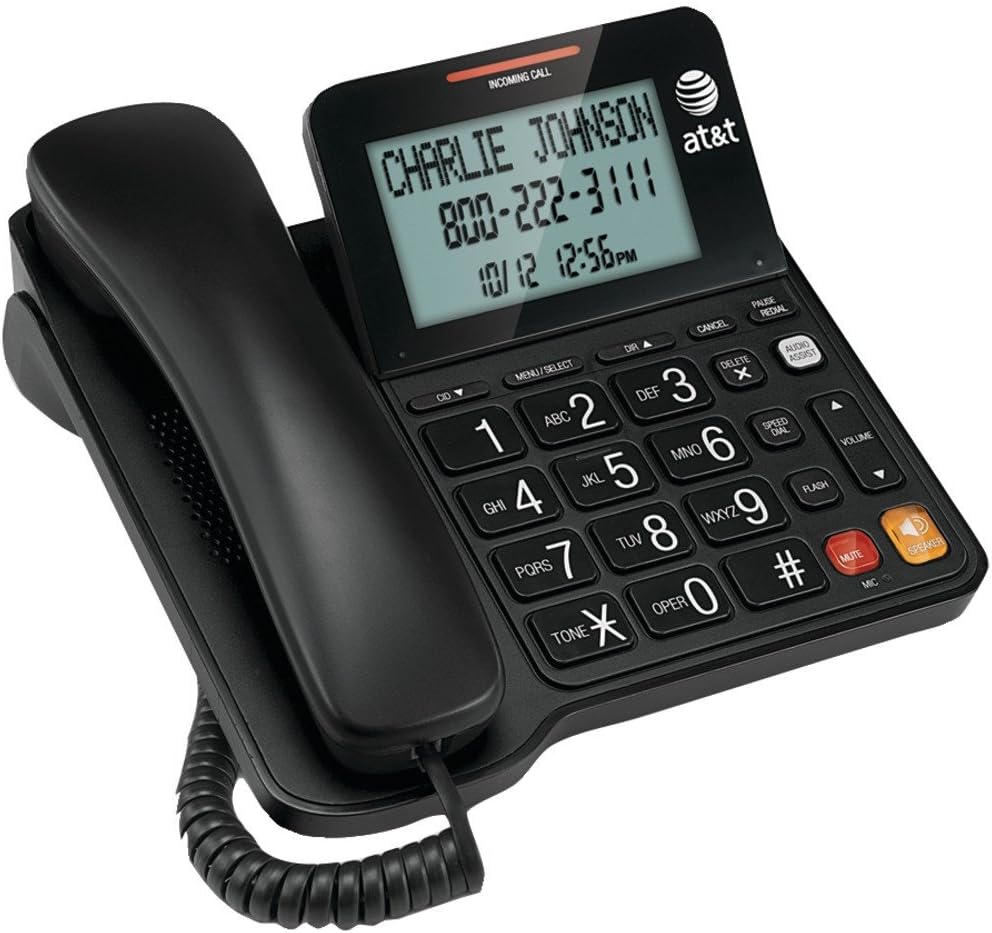
The AT&T CL2940 combines large buttons with a useful tiltable display that shows caller names and numbers clearly. It holds a 4.2 rating for users who want visibility alongside simplicity in their landline phone.
We may earn a commission when you buy through this link, at no additional cost to you.
Its standout feature is the Caller ID screen that helps seniors identify callers before answering which reduces unwanted calls. The audio assist volume boost amplifies incoming sound so hearing-impaired users can follow conversations without strain.
One drawback is the need for batteries to power the display which adds maintenance compared to pure landline models. But the trade-off provides valuable information that many seniors find helpful for daily communication.
This phone suits users who want more than basic calling without adding smartphone complexity. It balances visual clarity with reliable landline performance.
Seeing caller names helps seniors decide whether to answer protecting them from scams or unwanted calls.
The adjustable screen reduces neck strain and makes reading incoming call details easier from different seating angles.
We may earn a commission when you buy through this link, at no additional cost to you.
The Large Key Wired Telephone offers a no-fuss solution for seniors who need big buttons and loud alerts without extra cost. It earns a 4.2 rating from users who prioritize simplicity and affordability in a landline device.
We may earn a commission when you buy through this link, at no additional cost to you.
Its large one-inch wide buttons are easy to see and press reducing mistakes caused by small digits. The visual light at the bottom warns of incoming calls which is helpful for hearing-impaired users in quiet rooms.
This model lacks speed dial or photo keys so it works best for users who know the numbers they call often. However the adjustable volume and lack of battery needs make it a reliable everyday choice.
It is perfect for budget-conscious buyers seeking a functional landline with clear visual and audio cues. The durable design ensures long-term use without complications.
Oversized keys minimize pressing errors for users with vision loss or limited finger dexterity.
A warning light ensures users notice rings even when sound is too low to hear clearly.
We may earn a commission when you buy through this link, at no additional cost to you.
The Large Button Landline Phone emphasizes safety with a dedicated red SOS button that helps seniors contact caregivers instantly. It holds a 4.2 rating among users who value reliability and emergency access in a home phone.
We may earn a commission when you buy through this link, at no additional cost to you.
Its oversized buttons with high contrast numbers make dialing easy for those with fading vision. The 110dB ringer paired with a bright flashing light ensures calls are noticed even when hearing is impaired or rooms are noisy.
Lacking a speakerphone limits hands-free use but this simplicity keeps the device focused on core calling needs. It runs without batteries so it stays reliable during storms or outages which is vital for isolated users.
This phone is ideal for seniors living alone who need a straightforward way to reach help. Its emergency features provide peace of mind for both users and their families.
A dedicated red button allows quick contact with caregivers or family during urgent situations.
Black numbers on white backgrounds improve visibility for users with cataracts or low vision.
We may earn a commission when you buy through this link, at no additional cost to you.
The VTech SN1117 introduces talking digits that announce each number as it is pressed helping seniors confirm their dialing choices. It has a 4.0 rating from users who appreciate voice feedback alongside visual cues.
We may earn a commission when you buy through this link, at no additional cost to you.
Its eight photo speed dial keys allow one-touch access to loved ones while the speakerphone supports natural two-way conversations. Visual ringer alerts ensure calls are noticed even when sound is turned down.
Some users might find the talking feature slightly slow but it adds a layer of confidence for those with memory loss. The speakerphone quality remains clear for group calls or hands-free use.
This model fits users who want audio confirmation of their actions without complex navigation. It balances traditional landline stability with modern accessibility features.
Voice announcements of numbers prevent dialing errors and increase user confidence during calls.
Clear two-way audio supports natural conversations without needing to hold the handset.
We may earn a commission when you buy through this link, at no additional cost to you.
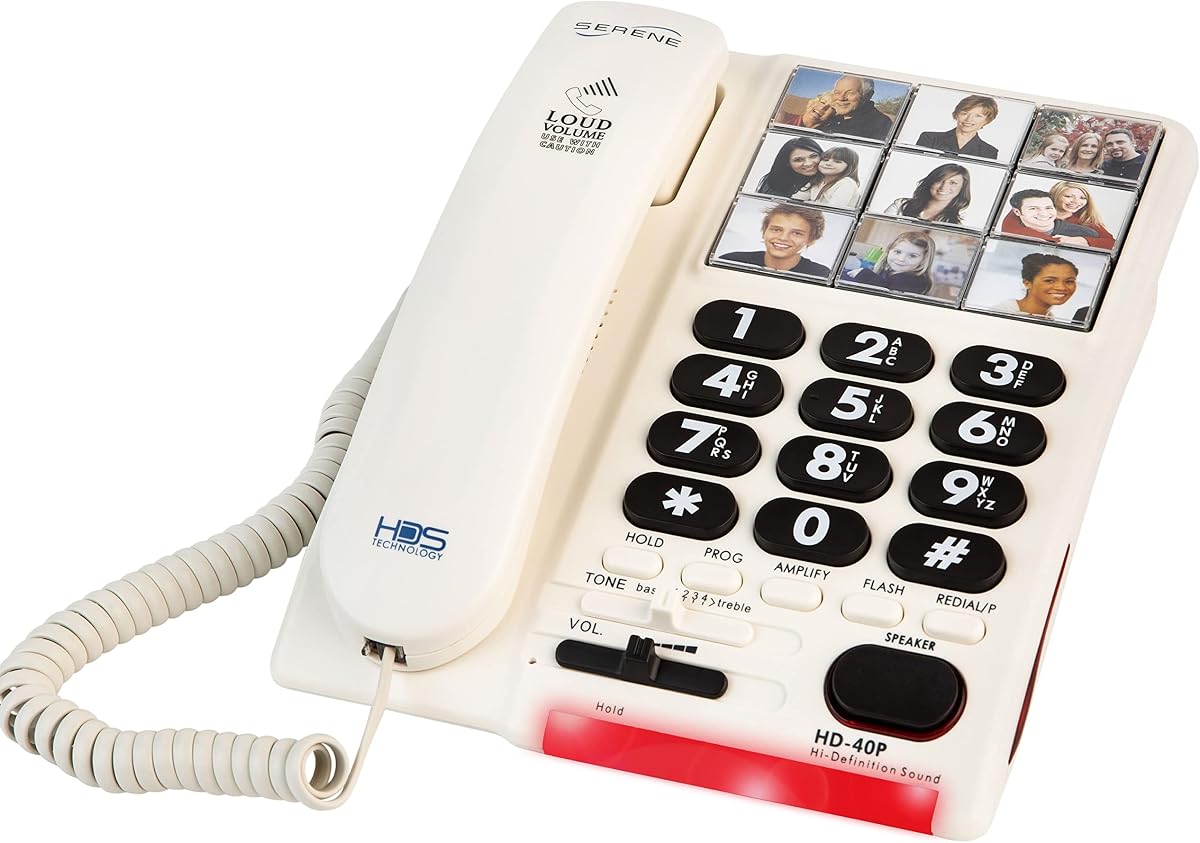
The Serene Innovations Amplified Phone is engineered for seniors with dementia or severe hearing loss using a ring tone of 85dB and photo dial buttons. It holds a 3.9 rating from caregivers who value its assistive life line design.
We may earn a commission when you buy through this link, at no additional cost to you.
Its photo buttons let users see familiar faces before calling which reduces confusion and anxiety. The loud ring ensures that even those with hearing aids can detect incoming calls in a noisy environment.
While some users note the price is higher than standard phones the specialized features justify the cost for families needing memory support. It avoids menus to prevent users from getting stuck or frustrated.
This phone is ideal for care facilities or homes where dementia care is a priority. Its design promotes independence and security for users with cognitive decline.
Recognizing faces on buttons helps users with memory loss connect with loved ones without confusion.
An 85dB ring cuts through ambient noise ensuring users notice calls even with hearing impairments.
We may earn a commission when you buy through this link, at no additional cost to you.
The Big Button Wall or Desk Phone allows flexible placement on walls or desks making it versatile for different room layouts. It receives a 4.0 rating from users who want basic accessibility without paying extra for photo features.
We may earn a commission when you buy through this link, at no additional cost to you.
Its ten two-touch memory slots store frequently called numbers so seniors can access them quickly. The speaker option and LED indicator provide audio and visual alerts that help keep users connected without strain.
Memory setup is straightforward but lacks photo support so it works best for users who can manage numeric codes. Still the durable design ensures long-term use in busy household environments.
This phone suits buyers who need a practical landline with memory and mounting options. It delivers core functions at an accessible price point.
Wall or desk mounting options let caregivers place the phone where it is most visible to seniors.
Stored numbers allow quick access to family or emergency contacts with just two button presses.
We may earn a commission when you buy through this link, at no additional cost to you.
The Big Button Phone One-Touch offers nine speed dial keys and ten memory groups to ensure seniors have quick access to important contacts. It holds a 4.1 rating from users who value flexibility in storing contacts.
We may earn a commission when you buy through this link, at no additional cost to you.
Its adjustable handset volume lets users tailor sound levels to their hearing needs. An LED visual notification ensures calls are noticed even when the ringer is muted for quiet environments.
While it does not include photo buttons its extensive memory system works well for those who know how to program numeric codes. The ABS body design adds durability for daily use over years.
This model is great for households needing multiple stored contacts without photo complexity. It balances memory flexibility with classic landline dependability.
Ten memory groups allow storing multiple contacts for quick access during emergency or daily calls.
Adjustable handset volume ensures comfortable listening levels for users with varying degrees of hearing loss.
We may earn a commission when you buy through this link, at no additional cost to you.
The SWISSVOICE Premium 3355 combines big buttons with an answering machine and optional cordless handset to provide advanced features for seniors. It has a 3.4 rating but stands out for those needing more than basic calling capabilities.
We may earn a commission when you buy through this link, at no additional cost to you.
Its hearing aid compatibility ensures sound clarity for users with devices while the call block feature filters unwanted numbers. The loud adjustable ringer helps hard-of-hearing users notice calls even in busy household areas.
While user feedback is mixed the included cordless handset offers mobility that fixed landlines cannot provide. It is a strong choice for families willing to invest in extra convenience and safety features.
This phone fits households wanting a complete communication solution with memory and portable handset options. It bridges the gap between landline and cordless technology.
Built-in recording captures messages when users cannot answer helping them stay updated on missed calls.
An extra cordless handset lets seniors move around while talking providing flexibility in a fixed landline.
We may earn a commission when you buy through this link, at no additional cost to you.
Choosing the right phone depends on matching specific accessibility needs with practical home use. These factors help you narrow down options quickly.
Look for oversized keys with high-contrast colors like black numbers on white backgrounds. These reduce dialing mistakes for users with vision loss or stiff hands and make the phone easier to see in low light.
Prioritize models with raised tactile buttons that are easy to locate by touch without needing to read tiny digits.
Check for adjustable ringtone and earpiece volumes. Devices with ringers above 100dB ensure the call is heard in noisy rooms while higher earpiece volume helps with hearing loss.
Independent controls let users set loud alerts while keeping conversation volume comfortable for daily use.
Visual indicators such as flashing LED lights are vital for seniors with hearing impairments. These lights activate on incoming calls so users never miss an important conversation due to sound limitations.
Choose models where the light is bright and positioned to be visible from different angles in the room.
Photo speed dial keys allow users to call contacts by pressing an image instead of typing numbers. This reduces cognitive load for those with memory loss or dementia who struggle with numeric sequences.
If photo keys are not available ensure the phone supports two-touch memory storage for quick number access.
A built-in speakerphone allows seniors to talk without holding a handset which helps those with mobility issues or arthritis. Full-duplex speakerphones support natural two-way conversation without cutting off speech.
Look for clear speaker volume controls so conversations remain crisp during hands-free calls.
Most reliable landline phones run directly from the phone line without needing batteries or AC adapters. This ensures the phone works during power outages or storms which is essential for emergency communication.
Confirm the model requires no extra power to function for basic calling to avoid maintenance issues.
If your user needs to see who is calling pick a model with a large readable display. A tiltable screen can reduce neck strain and improve readability for seniors who sit at different heights.
Ensure Caller ID works reliably without requiring complex setup or separate batteries that add maintenance burdens.
Phones with dedicated SOS buttons provide direct one-touch access to caregivers or emergency services. This feature gives families peace of mind when a senior lives alone or has medical needs.
Check that the SOS button is easy to press and clearly marked to avoid accidental activation.
Connect the phone directly to a standard RJ11 landline jack without needing extra power adapters. Plug the handset cord into the base and ensure the line connects securely so calls are clear and uninterrupted during use.
Program speed dial or memory keys by following the quick manual instructions. Assign favorite numbers to buttons using the simple setup process so elders can press one key to call family or emergency contacts instantly.
Clean the buttons and casing regularly with a dry cloth to avoid dust buildup that can block tactile response. Keep the phone away from moisture and extreme heat to maintain reliable operation over many years.
Yes most corded landline phones run directly from the phone line so they work during power outages. This ensures seniors can still make and receive calls when the power goes out at home.
A ringer above 100dB is ideal for seniors with hearing loss or those in noisy homes. Loud alerts ensure the phone rings clearly and can be noticed even if the user is in another room.
Photo speed dial keys are better for users with memory loss or vision issues because they recognize faces rather than numbers. Numeric memory is simpler to set up but requires users to remember contact codes.
Some models include caller ID but many basic large-button phones focus on simplicity and omit this feature. If seeing names matters pick a phone with a display screen that supports caller ID functionality.
Yes all phones can dial emergency services by typing the emergency number. Some models add a dedicated SOS button for one-touch access to caregivers which provides extra safety for seniors living alone.
Many modern models are hearing aid compatible so users can get clear sound through their devices. Check product specs for hearing aid compatibility to ensure seamless audio performance for users with hearing devices.
The Uvital Big Button Phone leads with its strong balance of loud volume photo dialing and visual alerts. The Large Key Wired Telephone offers the best value for budget buyers while the SWISSVOICE Premium 3355 serves those needing premium features.
Prioritize volume and visual indicators if the user has hearing loss and choose photo dialing for those with memory issues. Simplicity is key so avoid phones with complex menus that might confuse or frustrate daily use.
Always verify current product availability and features before purchasing since specifications can change over time. These phones represent reliable solutions to help seniors stay connected safely and comfortably at home.