
Gammeefy Wireless Switch Pro
4.4Editor score
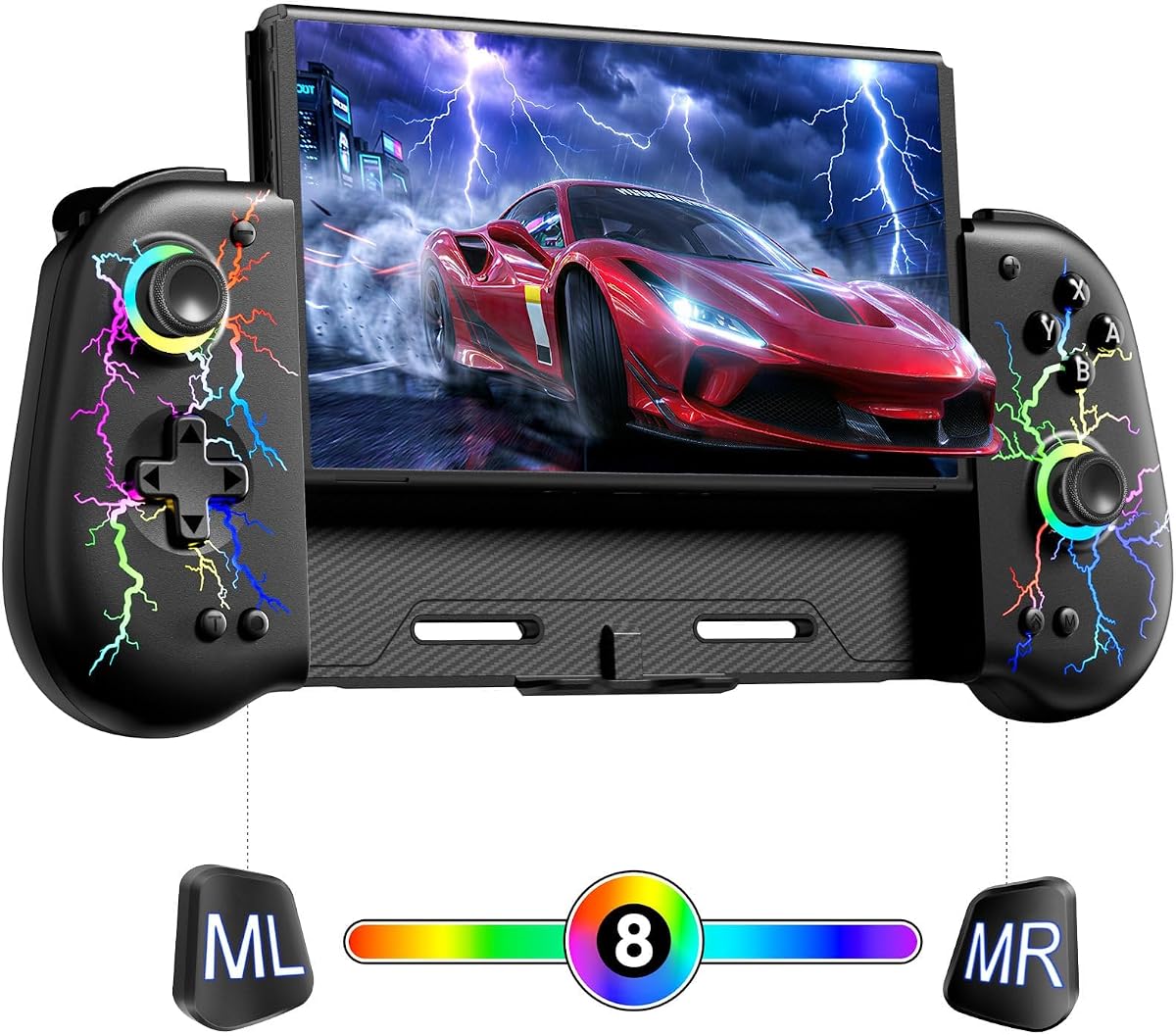
9 Color LED Lighting
1000 mAh Battery
App Customization Support
This guide compares the top Hall Effect Nintendo Switch controllers for drift-free performance, battery life, and premium features across all console models.
Finding a reliable controller is crucial for modern gaming experiences. Hall Effect Nintendo Switch controllers use magnetic sensors to eliminate joystick drift entirely. This technology ensures precise inputs and extends the lifespan of your device significantly for all players.
We evaluated ten top-rated models based on compatibility, build quality, and advanced features. Our analysis covers wireless connectivity, battery capacity, and customization options like programmable buttons and turbo modes. Each entry offers unique strengths for different gaming styles and budgets.
Every pick highlights specific benefits, trade-offs, and ideal user scenarios. Prices and availability change frequently, so verify details before purchasing. This guide helps you choose the perfect controller for Switch, OLED, Lite, and emerging next-gen systems with confidence.
4.4Editor score

4.5Editor score

4.3Editor score
The following table provides a side-by-side comparison of ten leading Hall Effect controllers. Each model offers distinct advantages for wireless play, customization, and durability across multiple platforms.




AceGamer Wireless Pro Controller leads this list with a solid 4.5 rating. It uses Hall Effect technology to eliminate drift, ensuring precision during extended sessions. The build quality supports multiple platforms, including Switch 2 and PC.
We may earn a commission when you buy through this link, at no additional cost to you.
Its standout features include programmable back buttons and a robust 800 mAh battery. The 6-axis gyro enables accurate motion controls in sports or racing games. Vibration levels are adjustable for nuanced feedback in stealth or action titles.
While highly capable, it requires a setup phase to maximize macro functionality. Some users may find the pairing process slightly complex initially. However, the performance gains and longevity make these steps worthwhile for serious gamers.
Ideal for those seeking a versatile, drift-free controller. If you need advanced macros and long playtimes, this model delivers consistently across Switch and PC environments with reliable connectivity.
Hall Effect sensors ensure accurate inputs without mechanical wear, maintaining consistency over time for all game types.
The 800 mAh battery supports hours of uninterrupted gaming, reducing the need for frequent recharging during marathons.
We may earn a commission when you buy through this link, at no additional cost to you.
Gammeefy Wireless Switch Pro offers exceptional value with Hall Effect sensing and strong ratings. It supports Android and iOS seamlessly. The 1000 mAh battery ensures long sessions even with visual effects.
We may earn a commission when you buy through this link, at no additional cost to you.
Customizable LED lighting and app-based mapping add unique flair. You can adjust button layouts for specific games. Turbo modes provide rapid-fire utility in competitive shooters or action titles.
Light effects may impact battery life if always active. Wake-up features do not support Switch 2 audio functions. Despite these minor limits, its versatility and low cost make it a strong budget option.
Best for casual gamers wanting extra customization. If you prioritize affordability and cross-platform play with drift-free controls, this model delivers reliable performance.
Nine color LED options allow personal styling that enhances the gaming atmosphere during evening sessions.
Seamlessly switches between Switch, Android, iOS, and PC for diverse gaming without needing separate hardware.
We may earn a commission when you buy through this link, at no additional cost to you.
8Bitdo Ultimate 2 Bluetooth stands out as a premium choice with TMR technology and Hall Effect flexibility. The integrated charging dock ensures your controller is always ready. RGB Fire Ring adds a sleek visual edge.
We may earn a commission when you buy through this link, at no additional cost to you.
Switchable trigger modes allow adaptation between linear and tactile feel. Vibration and motion control deliver rich immersion. Firmware updates keep compatibility current with new Switch generations.
The dock limits charging flexibility if you play in handheld mode. Pricing is higher than standard options. Yet, the build quality and innovation justify the cost for enthusiasts who demand the best.
Ideal for power users seeking top-tier reliability. If you value precise inputs and charging convenience, this premium controller offers unmatched features for Switch and PC gaming.
TMR sensors enhance sensitivity and durability, ensuring consistent performance even during intensive competitive matches.
The dock simplifies power management, automatically reconnecting and recharging when the controller is placed back.
We may earn a commission when you buy through this link, at no additional cost to you.
AceGamer 2 Pack provides two controllers with Hall Effect reliability. Perfect for local multiplayer. Both units support Switch 2 and legacy models seamlessly. The 800 mAh battery ensures sustained play.
We may earn a commission when you buy through this link, at no additional cost to you.
Turbo burst speeds aid rapid-fire mechanics. Dual vibration offers immersive feedback. Ergonomic design keeps hands comfortable. Wake-up functionality restores sessions quickly after sleep mode.
Managing two devices can be complex without a dock. Documentation may lack detailed tutorials. Still, the pair offers excellent value for households needing multiple controllers without drift.
Best for families or co-op sessions. If you need two reliable, drift-free units for local play, this set delivers consistent performance across platforms.
Two controllers in one package enable instant local gaming with friends without needing to pair separately.
Simple HOME button press resumes your session, avoiding delays when switching between games or apps.
We may earn a commission when you buy through this link, at no additional cost to you.
Diswoe Wireless Pro Controller prioritizes comfort with an ergonomic layout. Hall Effect joysticks eliminate drift. The dedicated screenshot button captures gameplay instantly. Turbo boost aids competitive edges.
We may earn a commission when you buy through this link, at no additional cost to you.
Zero-latency wireless ensures responsive inputs. Asymmetrical shape reduces wrist strain during long sessions. Works across Switch and PC seamlessly. Battery lasts for marathon play.
Battery life is shorter than some rivals. RGB lighting is absent for those seeking style. Despite these points, its focus on comfort and responsiveness makes it a reliable choice.
Ideal for players needing comfort and capture. If ergonomics and instant screenshots are key, this controller delivers strong performance for Switch and PC.
A dedicated button saves screenshots directly, streamlining content sharing without complex key combinations.
Premium wireless chip minimizes lag, ensuring your actions translate instantly to the screen.
We may earn a commission when you buy through this link, at no additional cost to you.
8Bitdo Ultimate 2C offers a streamlined experience with Hall Effect joysticks. Wake-on-shake simplifies power management. Extra bumpers allow personalized configuration. Vibration enhances immersion in action titles.
We may earn a commission when you buy through this link, at no additional cost to you.
Double-shot buttons ensure long-term durability. Grip texture prevents slippage. The design balances simplicity and advanced features effectively. Works across Switch generations and PC.
Missing some extra programmable buttons found in other models. Triggers lack advanced switching. Still, its balance of size and performance suits mobile gamers.
Best for portable use. If you want a compact, reliable controller with Hall tech and ease of use, this fits perfectly.
A gentle shake powers on the controller, removing the need for button presses when resuming play.
Hall sensors and classic D-pad design maintain accuracy in both modern and retro titles.
We may earn a commission when you buy through this link, at no additional cost to you.
Playnex 2 Pack Wireless offers two units with Hall Effect sensing. RGB lighting enhances atmosphere. Macro buttons allow programming. The 10m range ensures stable connectivity.
We may earn a commission when you buy through this link, at no additional cost to you.
Both controllers support Switch 2 and PC. Turbo speeds and vibration levels add customization. Ideal for local co-op sessions. Battery supports extended use without frequent recharging.
Setup lacks advanced tools compared to premium rivals. No docking station included. Still, this bundle provides solid value for players needing reliable dual units.
Best for local gaming groups. If you need two functional, drift-free controllers for friends, this set delivers consistent performance.
Dynamic lighting adds visual flair, making gameplay sessions more engaging in low-light environments.
Wireless connectivity maintains stability up to 10 meters, allowing free movement during gaming.
We may earn a commission when you buy through this link, at no additional cost to you.
VOYEE Switch Controllers focus on Switch OLED. Hall Effect joystick ensures no drift. RGB halo lights provide style. The M button enables complex mappings.
We may earn a commission when you buy through this link, at no additional cost to you.
Six-axis gyro and vibration enhance motion feedback. Turbo speeds aid rapid actions. Non-slip grip aids comfort. Wireless pairing is straightforward via Bluetooth.
Not compatible with Switch 2 or Lite. Limited features compared to broader models. Still, it suits OLED owners wanting style and precision without drift.
Best for OLED-specific needs. If you want a controller designed for OLED with drift-free tech, this offers focused performance.
RGB halo lights around the joysticks create a distinctive look that stands out on the Switch OLED.
A dedicated M button simplifies macro setup for complex moves without external software.
We may earn a commission when you buy through this link, at no additional cost to you.
NexiGo Hall Effect Gripcon is optimized for Switch handheld use. Hall sensors eliminate deadzones. USB-C charging supports uninterrupted play. RGB lights add flair.
We may earn a commission when you buy through this link, at no additional cost to you.
Ergonomic shape aids comfort during long sessions. Extra buttons allow mapping for quick access. Turbo enhances action games. Wired connection ensures zero latency.
Primarily designed for wired handheld rather than wireless docked play. Not ideal for TV setups. Still, it suits portable gamers needing precision and charge.
Best for handheld users. If you play mostly in handheld mode and want drift-free control, this grip offers focused performance.
Direct USB-C connection removes wireless lag, ensuring instantaneous response for competitive handheld gaming.
Ergonomic contours support natural hand placement, reducing fatigue during extended portable sessions.
We may earn a commission when you buy through this link, at no additional cost to you.
NexiGo Hall Effect Wireless excels with a strong 4.7 rating. Hall tech eliminates deadzones. LED indicators show status. Fast charging ensures minimal downtime.
We may earn a commission when you buy through this link, at no additional cost to you.
Dual motors and 6-axis gyro enhance motion control. Anti-interference maintains stable Bluetooth. Ergonomic design fits well. Turbo supports rapid inputs.
Lacks macro buttons. Lighting is functional rather than customizable. Yet, its reliability and precision make it ideal for general players.
Best for standard play. If you want a reliable, drift-free Bluetooth controller with modern features, this delivers consistent results.
LED indicators around the sticks display connection status and input activity for easy verification.
Anti-interference technology ensures strong Bluetooth links, preventing dropouts during intense sessions.
We may earn a commission when you buy through this link, at no additional cost to you.
Selecting the right controller involves evaluating multiple technical and comfort factors. This guide outlines critical aspects to consider before purchasing a Hall Effect device.
Hall Effect technology uses magnetic sensors instead of physical contact to detect joystick movement. This eliminates mechanical wear and prevents drift, a common issue with traditional potentiometer-based controllers. When selecting a model, ensure it explicitly mentions Hall Effect or Magnetic Joysticks for long-term reliability.
Always verify the product description confirms magnetic sensor use to avoid potential drift issues over time.
Battery capacity significantly impacts playtime. Models with 800 mAh or higher support extended sessions without frequent recharging. Fast charging capabilities further reduce downtime. Look for USB-C ports for universal charging compatibility with other devices.
Prioritize controllers with at least 800 mAh capacity and USB-C support for convenient, long-lasting play.
Controllers must match your console generation. Some support Switch 2 and PC while others focus on Switch OLED. Check for multi-platform features if you use multiple systems. Ensure firmware updates are available for ongoing compatibility with future releases.
Confirm the controller supports your specific console model and offers update pathways for new systems.
Programmable buttons allow mapping complex actions to single presses. This is essential for competitive gaming or RPGs. Models offering macro buttons or software app support provide this benefit. Consider whether you need external app configuration or built-in programming.
Choose a controller with macro support or app compatibility if you require advanced customization options.
Comfort determines how long you can play. Ergonomic designs with textured grips reduce fatigue. Hand shape matters; ensure the controller fits comfortably. Features like non-slip materials enhance stability during motion controls or intense gameplay.
Look for textured, ergonomic designs that match your hand size for prolonged, comfortable use.
Accurate vibration motors enhance immersion. Four-level feedback options allow adjustment for stealth games. Six-axis gyro sensors are crucial for motion games like racing or sports. Ensure the controller supports these features if you play motion-heavy titles.
Verify adjustable vibration and gyro support if you want immersive feedback and precise motion controls.
Visual customization like RGB lighting adds personality. Models with adjustable lights allow color changes or effects. Some include docking stations for charging convenience. These features vary by model and may appeal to aesthetic-focused gamers.
Consider RGB options and accessories like docks if you value style and convenience.
Wireless stability is vital for lag-free play. Look for Bluetooth controllers with strong anti-interference claims. Wireless range around 10 meters ensures freedom of movement. Wired USB-C options are useful for docked or handheld modes.
Prioritize Bluetooth models with high stability claims and sufficient range for your setup.
Begin by connecting your controller to the console. For Switch, hold the SYNC button until the light flashes, then pair via Bluetooth. For PC, use USB-C or Bluetooth depending on settings. If using macros, configure them via any required app before play.
Maintain performance by storing the controller in a dry place. Avoid moisture to protect electronics. Periodically check firmware updates to ensure compatibility. Use USB-C cables for charging and keep them away from pets or children to prevent damage.
For long-term durability, avoid dropping or over-extending the joysticks. If drift occurs, recalibrate via the app. Proper care ensures Hall sensors remain accurate. Following these simple steps prolongs the controller lifespan and keeps gameplay smooth.
Hall Effect technology uses magnetic sensors instead of physical contacts to detect joystick movement. This eliminates friction and wear, preventing drift common in traditional controllers. It provides precise inputs and ensures consistent accuracy over years of use.
Many modern Hall Effect controllers support Switch 2 alongside legacy consoles. Check product compatibility before buying as firmware updates may be needed for full functionality. Look for listings explicitly mentioning Switch 2 readiness for assurance.
Hall Effect joysticks are rated for millions of rotations due to magnetic sensing. They typically last significantly longer than traditional potentiometer units. Lifespan depends on usage intensity, but they generally eliminate premature failure from wear.
Most models support PC via Bluetooth or USB-C connections. Many include X-Input mode for Steam compatibility. Verify the specific model supports Windows for seamless integration with PC gaming libraries and launchers.
RGB lighting adds visual flair and personal style to gaming setups. Some models offer multiple colors and patterns. While purely aesthetic, it enhances the atmosphere during night sessions and allows customization to match room lighting.
A dock is optional but convenient for wireless charging and organization. Some premium models include docks. If you charge via USB-C directly, a dock is unnecessary. Consider it for simplified power management if budget allows.
Most controllers reset by holding the SYNC or HOME button for a few seconds. This clears pairing info for reconnection. Check the product manual for exact steps as button combinations vary between brands and models.
Macro usage depends on the game and tournament rules. Some competitive modes ban them. Check official guidelines before use. Casual play usually permits macros, but always verify with community standards to avoid penalties.
Hall Effect controllers offer a significant upgrade in precision and durability. The top three picks deliver drift-free performance with tailored features for budget, premium, and general users. Whether you need macros, RGB, or simple reliability, these models cover the core needs.
Prioritize Hall technology, battery capacity, and ergonomics when selecting. Verify compatibility with your specific console generation. Features like programmable buttons enhance gameplay depth. Choosing a model aligned with your playstyle ensures maximum value.
Prices and availability shift frequently. Always check current listings and reviews before finalizing your choice. With the right selection, you gain a controller that enhances performance and endures over time. Happy gaming.