
CC Store for iPad A16
4.6Editor score
Marathon battery life
Magnetic detachable keyboard
Built-in pencil holder
This expert guide compares the top 10 iPad A16 folio case with keyboard options for 2026, focusing on compatibility, typing comfort, trackpad quality, and
Finding the right iPad A16 folio case with keyboard transforms your tablet into a productive workstation. These versatile accessories combine protection with typing efficiency, making them essential for students, professionals, and creatives who need reliable mobile tools for their daily tasks and creative projects.
We evaluated ten leading options based on compatibility with the A16 and 10th generation models, trackpad responsiveness, battery life, and overall build quality. Each product was assessed for its ability to provide a seamless laptop-like experience while maintaining the portability that makes iPads so popular among modern users.
Each pick highlights specific strengths like magnetic detachment, backlight options, or rugged protection. Prices and availability change frequently so check current listings before buying to ensure you get the best value for your specific needs and workflow requirements today.
4.6Editor score

4.4Editor score

4.4Editor score
Here is a side-by-side comparison of all ten top-rated options to help you quickly identify the best fit for your iPad A16 or 10th generation model based on key features and design priorities.




The Apple Magic Keyboard Folio leads our list with its seamless integration and reliable performance. Rated highly by users for its precision trackpad and robust build quality, it stands out as the most dependable option for daily professional use and creative tasks.
We may earn a commission when you buy through this link, at no additional cost to you.
Its unique two-piece design allows the keyboard and back panel to attach magnetically without any pairing or charging. This ensures that you can focus on your work without worrying about battery life or connection drops during critical moments of productivity.
While it offers unmatched convenience, the premium price might be a consideration for budget-conscious buyers. However, the durability and reliability justify the investment for those who need a consistent, long-term solution for their iPad A16.
If you prioritize a laptop-like experience with minimal setup friction, this is the top choice. It transforms your tablet into a powerful workstation instantly, making it ideal for students and professionals alike who demand excellence in mobility.
The keyboard attaches instantly with magnets, eliminating the need for Bluetooth pairing or separate charging entirely.
Multi-Touch gestures enable smooth navigation and cursor control directly on the pad for efficient task switching.
We may earn a commission when you buy through this link, at no additional cost to you.
The Harvopu case offers a compelling mix of features for those who want customization and functionality. With its quick navigation trackpad and 7 RGB backlight options, it caters to users who enjoy personalizing their workspace while maintaining high productivity.
We may earn a commission when you buy through this link, at no additional cost to you.
Its detachable keyboard connects via Bluetooth with a strong magnetic hold, ensuring stability during typing. The 420mAh battery provides reliable performance, and the energy-saving mode helps extend its life during periods of inactivity.
The case material is designed to be anti-stain and smooth, keeping your device looking new. However, unlike the Apple option, it requires separate charging and pairing which may be a minor inconvenience for some users.
This is an excellent choice for individuals who want style and function in one package. It balances cost and features effectively, making it a strong contender for students and casual users seeking versatility.
Adjustable RGB backlight allows you to customize the look of your typing experience to suit your environment.
The case protects against shocks and scratches with a honeycomb TPU design for internal safety.
We may earn a commission when you buy through this link, at no additional cost to you.
The typecase Folio stands out for its ultra-light construction that does not add bulk to your device. Users appreciate its quiet scissor-style keys and 7-color backlighting which makes typing comfortable even in low-light environments.
We may earn a commission when you buy through this link, at no additional cost to you.
The magnetic keyboard attachment is strong and allows for quick removal when you just want to read or watch content. The built-in pencil holder ensures your stylus is always handy and protected alongside your device.
Despite its light weight, the case offers solid protection with precise cutouts for all ports. The synthetic leather and TPU edges provide a premium feel while keeping the device secure from daily wear.
This is the ideal choice for travelers who want to minimize weight without sacrificing typing capabilities. It delivers a clean, efficient typing experience with added convenience features that make it a standout budget-friendly pick.
The ultra-light design ensures easy carrying and storage without adding significant weight to your daily carry.
Integrated storage keeps your stylus secure and prevents it from getting lost in a bag.
We may earn a commission when you buy through this link, at no additional cost to you.
CHESONA brings a unique advantage with its ability to pair with two devices simultaneously. This feature is perfect for users who switch between multiple tablets or computers throughout the day, offering unmatched workflow flexibility.
We may earn a commission when you buy through this link, at no additional cost to you.
The 500mAh battery provides ample standby time, lasting up to 120 days in sleep mode. The multi-touch trackpad supports gestures that adapt well to the iOS system for smooth navigation across apps.
While it is slightly heavier than some competitors, the added battery and multi-device support justify the weight. The keyboard lights up with three levels of brightness, ensuring visibility in dim conditions.
This option is best suited for multi-device users who need seamless transitions between tasks. It bridges the gap between a simple keyboard case and a robust productivity tool for power users.
Easily switch between two devices with a single click to streamline complex workflows.
High capacity ensures long periods of use without needing to plug in for charging.
We may earn a commission when you buy through this link, at no additional cost to you.
The typecase Edge features a unique floating stand that holds your iPad above the keyboard for a superior laptop-like view. This design improves ergonomics and typing comfort making it a premium choice for extensive work sessions.
We may earn a commission when you buy through this link, at no additional cost to you.
With 11-color backlighting and palm rejection on the trackpad, it offers high-end features at a competitive price. The hinge stability is tested for durability ensuring it withstands daily use without wobble.
Although it is heavier than ultra-light options, the stability and premium feel justify the weight. The trackpad handles gestures smoothly reducing accidental cursor movements while typing with speed and accuracy.
This is the best pick for users who want a premium build that mimics a traditional laptop. The floating stand adds significant value for anyone spending hours typing and browsing on their iPad.
Raises the screen for a better viewing angle and improved posture during long work periods.
Prevents accidental cursor movements so your palms can rest naturally while you type.
We may earn a commission when you buy through this link, at no additional cost to you.
The Logitech Rugged Folio is designed for tough environments where durability is paramount. It exceeds military standards for drop protection and features a waterproof keyboard cover that protects against spills and crumbs.
We may earn a commission when you buy through this link, at no additional cost to you.
It connects via Smart Connector technology meaning no Bluetooth pairing or separate battery is needed. The power comes directly from the iPad ensuring you never have to worry about charging the keyboard itself.
While it lacks backlighting and adds some weight, the rugged build is unmatched in this category. The flexible kickstand offers 40 degrees of tilt for comfortable viewing in various scenarios.
This case is ideal for field workers or students who need maximum protection. It ensures your device survives drops and spills while providing a reliable typing surface for daily tasks.
Withstands drops and mishaps with shock-absorbent technology for peace of mind.
Smart Connector provides instant connection and power without complex Bluetooth steps.
We may earn a commission when you buy through this link, at no additional cost to you.
The typecase Folio Duo adapts to your needs with a flexible design for portrait and landscape use. It combines a refined leather-style exterior with a precise trackpad for a polished and productive experience.
We may earn a commission when you buy through this link, at no additional cost to you.
Users appreciate the 7-color backlight for visibility and the responsive gestures for smooth navigation. The keyboard snaps on magnetically allowing you to detach it for a slimmer tablet mode quickly.
While it is priced higher than basic cases the build quality and warranty add value. The pencil holder keeps your stylus secure and the case protects against daily wear effectively.
This is a great choice for creatives who switch between modes often. It offers a balance of style and function that appeals to professionals seeking a premium everyday carry option.
Works in both portrait and landscape orientations for versatile reading and writing tasks.
Leather-style materials provide a sophisticated look and feel for daily use.
We may earn a commission when you buy through this link, at no additional cost to you.
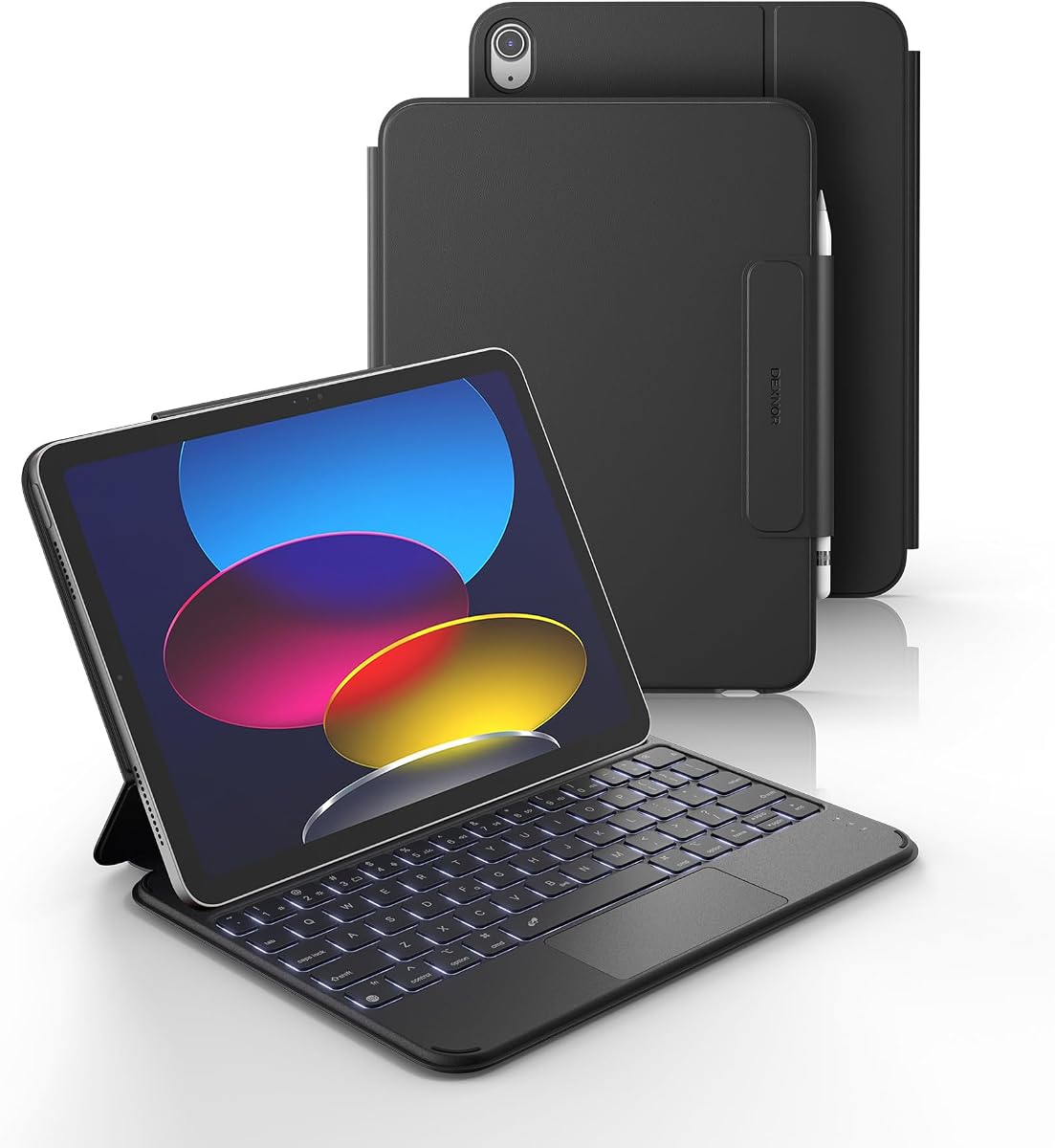
The Dexnor case prioritizes battery efficiency with a massive 650mAh cell that supports up to 200 hours of typing. This makes it perfect for travelers who cannot rely on frequent charging during long trips.
We may earn a commission when you buy through this link, at no additional cost to you.
The 120-degree viewing angle ensures comfortable use on desks or laps without adding bulk. Its smart power-saving features turn off the backlight after inactivity to conserve energy efficiently.
While it lacks a floating stand the stability is solid due to its magnetic anchoring. The white backlight is functional but lacks the color variety of other models.
This is the best pick for battery consciousness users who value portability. It ensures you can type for days without worry while keeping the setup lightweight and easy to carry.
Hundreds of hours of use between charges so you are always ready to work.
Automatically sleeps and dims to extend battery life during idle periods.
We may earn a commission when you buy through this link, at no additional cost to you.
The ESR case features an extra-large trackpad that is significantly bigger than standard options. This design allows for intuitive gestures and smooth navigation which makes multitasking feel more natural on the iPad.
We may earn a commission when you buy through this link, at no additional cost to you.
Its slim profile and Air Guard corners offer protection without bulk. The keyboard can be detached easily so you can switch to tablet mode for watching videos or reading without hassle.
Although it lacks backlighting the two viewing angles cover most needs. The 65-degree and 20-degree angles are perfect for typing and sketching respectively.
This is the ideal choice for touch and gesture fans. The large trackpad enhances usability and the slim design keeps the iPad feeling light and portable for daily carry.
The oversized trackpad makes scrolling and editing easier with more room for finger movement.
Fits easily into bags and sleeves for effortless transport during commutes.
We may earn a commission when you buy through this link, at no additional cost to you.
The CC Store case offers the best value with a battery life that rivals premium models at a lower price. It includes a pencil holder and adjustable kickstand making it highly functional for students and professionals.
We may earn a commission when you buy through this link, at no additional cost to you.
The keyboard is magnetic and connects quickly via Bluetooth. The 200+ hours of working time ensures you can use it for weeks without needing a charge.
While it may not have premium features like RGB lighting it delivers on core needs reliably. The PU leather cover protects your device well and the overall design is practical.
This is the top pick for budget buyers who want quality. It provides all the essential tools for productivity without breaking the bank or sacrificing essential features.
Delivers strong performance and long battery life at an affordable price point.
Includes all necessary tools like a kickstand and pencil holder for everyday use.
We may earn a commission when you buy through this link, at no additional cost to you.
Selecting the right case requires weighing compatibility features and durability against your specific workflow needs.
Ensure the case explicitly lists the A16 and 10th generation models in its specifications to avoid fit issues.
Always check the model number on the back of your device before purchase to guarantee proper alignment with ports and buttons.
Decide if you prefer Bluetooth or Smart Connector connectivity based on whether you want independence from the tablet's battery.
Magnetic attachment ensures quick setup while Bluetooth offers flexibility for pairing with multiple devices simultaneously.
Look for multi-touch gesture support to enable smooth scrolling and app switching without touching the screen.
Precision trackpads with palm rejection reduce accidental cursor movement while you type for a better experience.
Evaluate the battery capacity if the keyboard requires charging to ensure it lasts through your workday.
Some models offer standby modes that significantly extend usage time reducing the need for frequent charging.
Consider materials like TPU or synthetic leather to protect against scratches and daily wear.
Rugged options offer military-grade drop protection which is ideal for users in harsh environments.
Adjustable kickstands allow you to find the perfect angle for typing or drawing.
Floating stands provide a laptop-like experience that elevates the screen for better posture and visibility.
Lightweight designs are essential if you carry your iPad frequently during commutes or travel.
Detachable keyboards help reduce weight when you only need the tablet for reading or watching videos.
Check for built-in pencil holders to keep your stylus secure and easily accessible.
Backlit keys are valuable for working in low-light environments or during late-night sessions.
To start pairing a Bluetooth keyboard open the Bluetooth settings on your iPad and follow the on-screen prompts to connect the device securely.
Clean the keyboard gently with a soft dry cloth to remove dust and debris avoiding harsh chemicals that could damage the keys or screen.
Store the iPad in a cool dry place away from direct sunlight when not in use to maintain the battery and material integrity over time.
No most models in this guide are specifically designed for the A16 and 10th generation iPads. Check the specifications carefully as incompatible models may not fit or connect correctly.
Turn on the keyboard and open Bluetooth settings on your iPad. Select the device name from the list and follow any prompts to complete pairing easily.
Most Bluetooth models have a built-in rechargeable battery. They typically use a USB-C cable for charging and offer long standby times between charges.
Yes folio designs cover both sides providing protection against scratches and drops. Some models also include reinforced corners for added impact resistance.
Most cases include a built-in pencil holder slot. This ensures your stylus is secure and easily accessible while protecting it from damage.
Some rugged options feature waterproof membrane covers that protect against spills. These are ideal for users working in environments with potential liquids.
Yes most models include a row of function keys designed to work with iPadOS. This allows you to control brightness volume and other settings directly.
We hope this guide helps you find the perfect keyboard case for your workflow. The Apple Magic Keyboard Folio offers the best overall experience while options like the CC Store provide incredible value for budget-conscious buyers.
Prioritize features that matter most to you such as trackpad quality battery life or rugged protection. Your choice should align with how you use your device daily to maximize productivity and convenience.
Remember to check current availability and details before purchasing as offerings may change. Take the time to verify compatibility for your specific model to ensure a smooth setup.