
Razer DeathAdder V3 Pro
4.7Editor score
Focus Pro 30K sensor
Ultra lightweight design
90-hour battery life
This comprehensive guide compares the top 10 Blue Gaming Mouse models available in October 2026 to help you find the perfect fit for your gaming setup.
Finding the right peripheral can significantly impact your performance and comfort during long gaming sessions. A blue gaming mouse often stands out with unique aesthetics and specialized features designed for competitive play or casual enjoyment.
We evaluated ten leading options based on sensor accuracy, build quality, and design preferences. Our analysis focuses on real-world usability, ensuring each recommendation meets the demands of various gaming styles and hand sizes.
Each pick highlights specific strengths like lightweight design or customizable lighting. Keep in mind that product availability and pricing fluctuate frequently, so verify current details before making your final purchasing decision online.
4.7Editor score
4.6Editor score

4.5Editor score
The following table provides a side-by-side comparison of all ten selected models, highlighting key specifications to help you quickly identify the best fit for your needs.


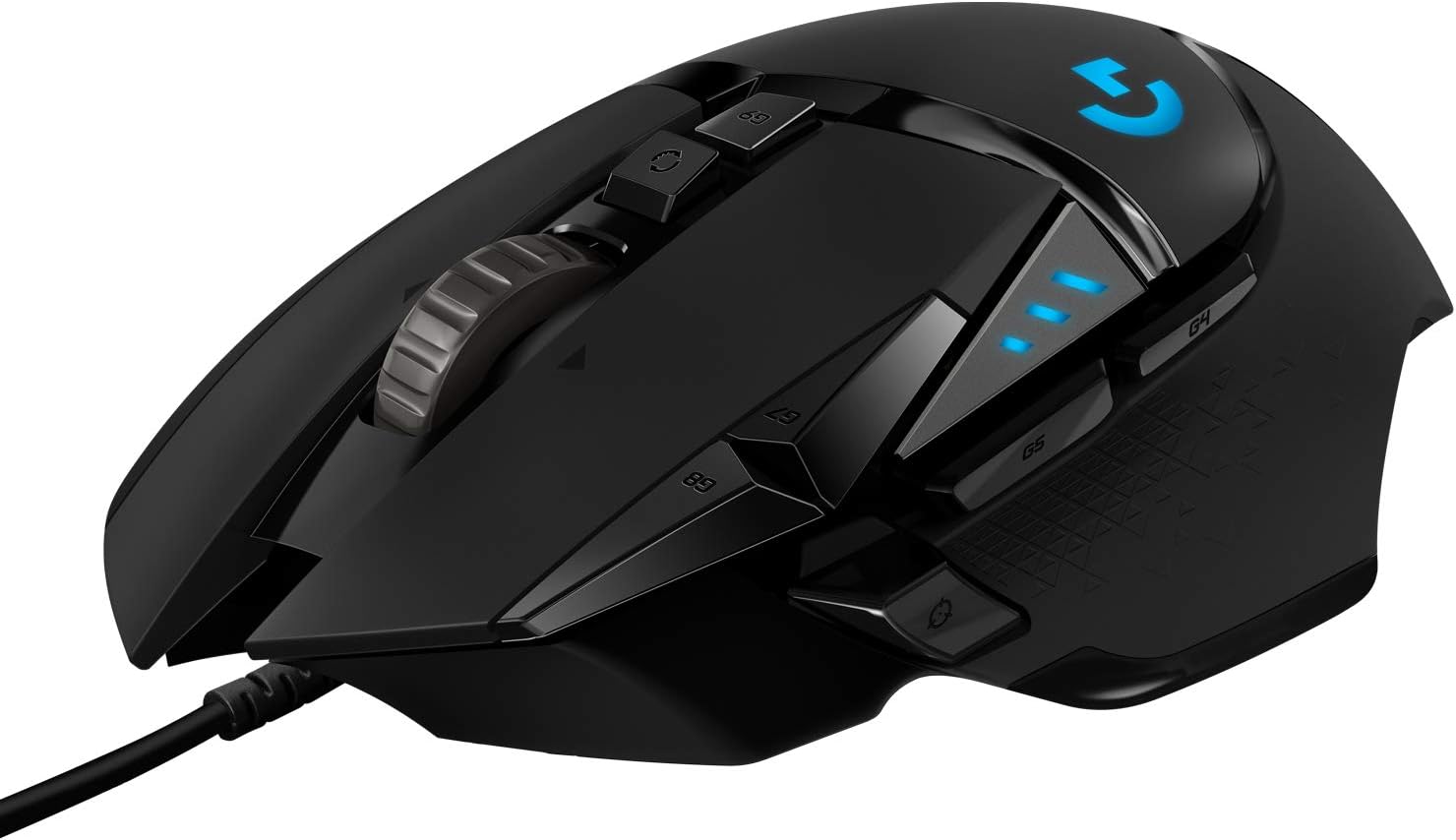
The Logitech G502 X Plus stands out as a top-tier choice for gamers seeking precision and versatility. Its HERO 25K sensor delivers unmatched accuracy, ensuring your movements are tracked perfectly during intense matches.
We may earn a commission when you buy through this link, at no additional cost to you.
This model features a robust wireless connection that minimizes latency. The battery life is impressive, allowing for extended play sessions without frequent recharging. The ergonomic shape fits well in most hand sizes.
While it offers exceptional performance, the weight might be a consideration for those who prefer ultra-light mice. Additionally, the software offers many features which can initially feel complex to navigate for new users.
Ideal for MMO players and general gamers alike, this mouse balances performance with comfort. We recommend it for anyone looking for a reliable, high-end wireless gaming experience that lasts.
The sensor technology ensures zero acceleration and perfect tracking at any speed.
LIGHTSPEED wireless technology provides a responsive 1ms report rate.
We may earn a commission when you buy through this link, at no additional cost to you.
Razer continues to dominate the gaming space with the DeathAdder V3 Pro. This wireless mouse combines a classic ergonomic shape with modern wireless, making it a favorite among FPS enthusiasts.
We may earn a commission when you buy through this link, at no additional cost to you.
Its lightweight construction allows for quick movements without fatigue. The Focus Pro 30K sensor ensures that every pixel on your screen is reached accurately. Optical switches provide instant actuation.
Some users might find the lack of extra buttons limiting if you rely on macros. However, the simplicity often translates to better performance in fast-paced games. The battery life is solid for daily use.
This mouse is perfect for gamers who want high performance without breaking the bank. If you value speed and comfort, the V3 Pro offers exceptional value for the money.
Weighing just 63 grams, this mouse reduces strain during long sessions.
The Focus Pro 30K sensor tracks motion with zero smoothing or jitter.
We may earn a commission when you buy through this link, at no additional cost to you.
The SteelSeries Aerox 9 Wireless is a powerhouse for MMORPG fans. With eighteen programmable buttons, you can map every skill and macro you need directly under your fingertips.
We may earn a commission when you buy through this link, at no additional cost to you.
Its IP54 water resistance protects against spills and sweat, making it durable for intense environments. The TrueMove Air sensor offers consistent tracking. The RGB lighting adds a sleek look to any desk.
The added buttons do increase the weight slightly compared to streamlined mice. Some users may also find the software interface needs updates. These trade-offs are acceptable given the functionality offered.
Choose this mouse if you need maximum customization for complex games. It provides the ultimate control package for gamers who demand extensive input options.
Eighteen buttons allow for extensive macro programming and key mapping.
Water-resistant construction ensures longevity even in messy setups.
We may earn a commission when you buy through this link, at no additional cost to you.
Corsair offers a versatile wireless mouse with the Dark Core RGB Pro. The standout feature is the support for Qi wireless charging, letting you power up on compatible mousepads effortlessly.
We may earn a commission when you buy through this link, at no additional cost to you.
Performance is strong with a 1000Hz polling rate option. The sensor handles most gaming scenarios well. The ergonomic design supports long sessions without hand strain.
While the shape is comfortable, it is on the heavier side. Some competitive players might notice minor smoothing at high speeds. However, for general gaming, the performance is excellent.
This mouse is ideal for users invested in the Corsair ecosystem. If you appreciate convenience like wireless charging, it is a compelling option.
Wireless Qi charging eliminates the need for constant cable tethering.
Hyper-polling provides faster response times for competitive advantage.
We may earn a commission when you buy through this link, at no additional cost to you.
The HyperX Pulsefire Haste 2 delivers top-tier performance in a wired format. It weighs only 61 grams, making it incredibly agile for quick movements across your mousepad.
We may earn a commission when you buy through this link, at no additional cost to you.
The 26000 DPI sensor ensures precise tracking. The switches are rated for high durability, ensuring longevity. The Hex shell design adds style while reducing weight effectively.
Wireless users might miss out, but the wired connection guarantees zero latency. The software is functional but lacks advanced features found in competitors. Still, it offers great value.
Best for FPS players wanting a reliable, fast wired mouse. If budget is a concern but performance is key, this model fits perfectly.
The lightweight build allows for rapid flicks and control.
High-quality switches ensure consistent clicks over thousands of uses.
We may earn a commission when you buy through this link, at no additional cost to you.
The Glorious Model O Wireless continues to be a fan favorite due to its balance of price and performance. The honeycomb shell design makes it light and visually striking.
We may earn a commission when you buy through this link, at no additional cost to you.
BAMF 2.0 sensor provides smooth tracking. The battery life is sufficient for weeks of use. It connects reliably via wireless technology.
The holes in the shell may trap dust over time, requiring cleaning. Some users report a hollow feel when clicking. Despite these minor issues, it remains a top pick.
Ideal for gamers wanting a lightweight wireless mouse without overspending. If you like unique designs, this model is highly recommended.
The honeycomb shell reduces weight while looking distinct.
Cord-free movement enhances comfort and desk space.
We may earn a commission when you buy through this link, at no additional cost to you.
ASUS created a durable option with the ROG Gladius III. The unique push-fit switch socket allows you to change switches without soldering, extending the mouse's lifespan significantly.
We may earn a commission when you buy through this link, at no additional cost to you.
The sensor handles high-speed movements well. The wireless connection is stable. Its ergonomic shape supports natural hand positioning during long play.
It is slightly heavier than ultra-light alternatives, which might slow down reaction time. The RGB is understated. However, the modularity is a strong advantage for enthusiasts.
Choose this if you value longevity and customization. It is a robust tool for gamers who maintain their gear carefully.
Swap switches easily to adjust click tension or replace worn parts.
High-performance sensor ensures reliable tracking across surfaces.
We may earn a commission when you buy through this link, at no additional cost to you.
The Logitech G Pro X Superlight is the definition of a minimalist wireless gaming mouse. Designed for pros, it strips away non-essential features to maximize speed and performance.
We may earn a commission when you buy through this link, at no additional cost to you.
It features a 63 gram shell with a zero-additive design. The HERO 25K sensor delivers precision without acceleration. The wireless latency is non-existent.
The price is high compared to similar specs. It lacks RGB or extra buttons. This simplicity, however, is exactly why competitive players choose it.
Best for those who want pure performance and a clean look. If you seek a distraction-free tool, this is the top choice.
Used by esports champions, it offers zero compromise in speed.
The matte finish and lack of RGB reduce distractions.
We may earn a commission when you buy through this link, at no additional cost to you.
The Razer Viper Ultimate offers a true ambidextrous design suitable for both left and right-handed users. It comes with a convenient charging dock to keep your setup neat.
We may earn a commission when you buy through this link, at no additional cost to you.
Optical switches provide fast actuation. The wireless connection is responsive. It weighs only 74 grams, aiding in quick movements.
The dock might be bulky on a small desk. Side buttons are compact. Despite this, the symmetrical shape makes it versatile for various users.
Ideal for lefties or shared setups. If you need a symmetrical wireless mouse with reliable performance, this model works well.
Comfortable for both left and right-handed gamers equally.
Dock ensures your mouse is always ready without cable mess.
We may earn a commission when you buy through this link, at no additional cost to you.
The Cooler Master MM711 is one of the lightest mice available. At 60 grams, it allows for effortless movement. The umbrella-style cord is very flexible.
We may earn a commission when you buy through this link, at no additional cost to you.
The 16000 DPI sensor is adequate for most games. The honeycomb shell is durable. It offers a great entry point for those wanting lightweight gear.
Being wired limits its use for some users. The sensor technology is slightly older than newer models. Yet, the value it provides is hard to beat.
Best for budget-conscious gamers seeking a lightweight wired mouse. If you want speed without high costs, this is a solid choice.
The light frame reduces fatigue during extended usage.
The soft cord reduces drag on the mousepad.
We may earn a commission when you buy through this link, at no additional cost to you.
Selecting the right gaming mouse involves evaluating several critical factors that influence comfort, performance, and longevity.
The sensor determines how your movements translate to on-screen actions. Look for models with high DPI and IPS ratings to ensure no jitter.
Prioritize sensors known for reliability in competitive environments to maintain consistent aim.
Lightweight mice help reduce fatigue during long sessions. Heavier models often feel more substantial but may slow your aim.
Consider your play style; FPS players often prefer lighter mice for speed.
The shape of the mouse should fit your hand comfortably. Symmetrical designs suit both hands, while ergonomic ones support palm grip.
Try to measure your hand size before buying to ensure a proper fit.
Wireless mice offer freedom from cables, though wired ones guarantee zero latency. Modern wireless tech has closed the gap significantly.
Choose wireless if you value clean setup, or wired for absolute reliability.
MMO gamers need many programmable buttons, while FPS players prefer minimal layouts. Evaluate which buttons you need for your specific games.
More buttons add complexity but increase customization options.
Build quality ensures your mouse survives drops and heavy use. Look for switches rated for high click counts and water resistance.
Strong materials extend the lifespan of your investment.
Software lets you customize lighting and macros. Ensure the provided tools are intuitive and compatible with your operating system.
Robust software adds value by allowing deep personalization.
Gaming mice range from affordable to expensive. Determine how much you are willing to spend for the features you require.
Often, mid-range options offer the best balance of price and performance.
Start by connecting your mouse to your PC via USB or receiver. Install the manufacturer's software to customize settings like DPI and lighting.
Clean the sensors and feet regularly using a soft cloth. Dust buildup can affect tracking accuracy and cause stuttering.
Store your mouse in a cool, dry place when not in use. Avoid dropping it to prevent internal damage to the components.
The color does not impact performance directly. However, specific models chosen for blue aesthetics often feature premium parts that improve gameplay.
A good mouse lasts years. Replace it only if switches fail or performance declines despite cleaning and updates.
Modern wireless technology is stable and low latency. They are now as reliable as wired mice for most gamers.
Preferences vary, but weights between 60 to 80 grams are common for FPS. Heavier mice suit strategy games.
Yes, modern sensors track on most surfaces. A mousepad is recommended for consistent performance regardless of color.
Use a soft brush or compressed air to remove dust. Wipe the lens gently with a dry cloth to avoid damage.
Absolutely. These mice offer precise control useful for design work or general productivity tasks.
Check your connection, update drivers, and ensure the battery is charged. Interference from other devices may also cause delays.
Our top picks for November 2026 include the Logitech G502 X Plus and Razer DeathAdder V3 Pro for their outstanding balance of features.
Prioritize sensor quality and ergonomics to ensure your mouse meets your specific gaming demands effectively.
Remember to check current prices and availability before buying, as deals change frequently in the market.