
Artist Drawing Glove 3-Layer
4.6Editor score
3-Layer anti-smudge
Includes cleaning cloth
Multiple size options
This guide compares the top digital drawing glove options for artists using tablets and touchscreens to prevent smudges and improve glide comfort.
Digital drawing gloves are essential accessories for artists who work on tablets or touchscreens. They prevent smudges and reduce friction allowing for a smoother creative process without compromising precision or comfort during long sessions.
We have carefully evaluated various models based on material quality, fit, and specific features like palm rejection and breathability. Our list covers options suitable for different hand sizes and device types to ensure you find the perfect match.
Each selection highlights unique benefits and potential trade-offs to help you make an informed decision. Keep in mind that availability and pricing can change frequently so always check the latest details before purchasing your next accessory.
4.6Editor score

4.5Editor score
4.4Editor score
The following table provides a side-by-side look at the key specifications and features of each selected digital drawing glove to help you compare them quickly.


The HUION Artist Drawing Glove stands out as a top choice for digital artists seeking comfort and reliability. With a solid rating it offers a seamless experience for those who draw on graphic tablets or monitors regularly.
We may earn a commission when you buy through this link, at no additional cost to you.
Its soft Lycra and Nylon material provides exceptional flexibility which allows for natural hand movements during intricate artwork. The anti-fouling design ensures that your hand does not leave smudges or scratches on your device surface.
While it effectively reduces friction it is important to note that it does not prevent accidental touches on touchscreens. Users with touchscreen devices may need to adjust settings to avoid unintended inputs while using this glove.
This glove is an excellent choice for both right and left-handed artists due to its universal fit. It is highly recommended for anyone looking to enhance their drawing workflow with a comfortable and durable accessory.
The material choice ensures that your hand glides smoothly over the tablet surface without catching or sticking.
The black color is resistant to dirt meaning you won't need to wash it frequently to keep it looking clean.
We may earn a commission when you buy through this link, at no additional cost to you.
This 3-Layer Palm Rejection glove offers exceptional value for artists who need reliable protection against smudges and accidental touches. Its design focuses on enhancing grip while maintaining comfort during extended creative sessions.
We may earn a commission when you buy through this link, at no additional cost to you.
The three-layer design provides robust anti-slip and anti-smudge protection which is crucial for maintaining a clean drawing surface. The fabric is soft and stretchy with moisture-wicking properties to keep your hand cool and dry.
One unique feature is the inclusion of a cleaning cloth and multiple size options which ensures a better fit for different users. This thoughtful packaging makes it a great gift for digital artists or students just starting out.
If you are looking for a budget-friendly option that does not compromise on quality this glove is a strong contender. It works seamlessly with various devices including iPads and digital drawing tablets.
The smooth glide across the screen ensures precision in every stroke enhancing your overall digital art experience.
The high elasticity fabric ensures comfort during long creative sessions preventing fatigue and irritation.
We may earn a commission when you buy through this link, at no additional cost to you.
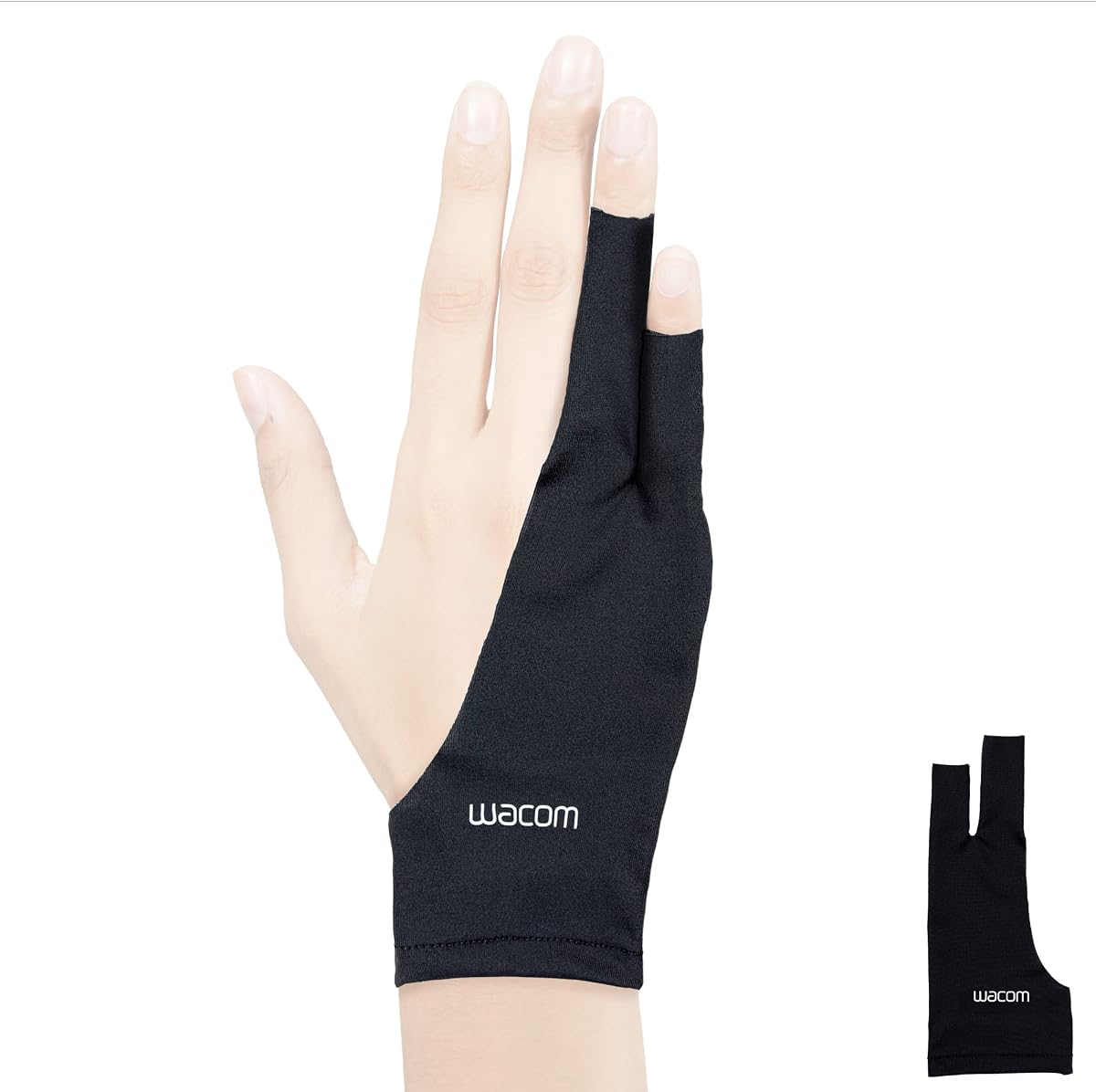
The Wacom Artist Drawing Glove is a premium option that combines functionality with environmental consciousness. Made from recycled materials it offers a sustainable choice for artists who care about their ecological footprint.
We may earn a commission when you buy through this link, at no additional cost to you.
Its exposed fingertip design is a standout feature that allows users to access touchscreen capabilities and type with ease. This versatility makes it suitable for a wide range of tasks beyond just drawing on tablets.
The glove is designed to reduce friction significantly allowing your hand to glide smoothly over the screen for hours. This feature helps prevent smudges from oils or sweat ensuring your screen remains clear and professional.
While it may be priced higher than some competitors the quality and eco-friendly aspects justify the investment for many users. It is an ideal choice for those seeking a durable and sustainable accessory for their digital art setup.
Constructed from 90% recycled polyester and spandex this glove offers comfort stretch and durability with less environmental impact.
The exposed fingertips allow for seamless interaction with touchscreens and keyboards without needing to remove the glove.
We may earn a commission when you buy through this link, at no additional cost to you.
This XPPen Drawing Glove is designed with high elastic material that ensures excellent air permeability and comfort. It is a reliable choice for artists who prioritize breathability and a snug fit during their work.
We may earn a commission when you buy through this link, at no additional cost to you.
The soft skin-friendly texture allows for an easier glide on the tablet surface while stopping smudges effectively. Its black color is resistant to dirt meaning you do not need to wash it frequently to keep it looking presentable.
Available in three sizes it offers a better fit for different hand types compared to universal one-size models. This attention to fit enhances the overall experience by reducing the chances of the glove slipping during use.
For artists using both right and left hands this glove is a versatile option that adapts to your habits. It is a solid choice for those seeking a balance between comfort and practicality in their drawing accessories.
The high elastic material provides excellent air permeability ensuring your hands stay comfortable during long drawing sessions.
The black color resists dirt effectively reducing the need for frequent washing and maintenance.
We may earn a commission when you buy through this link, at no additional cost to you.
The OTraki 4 Pack offers excellent value for artists who need multiple gloves for daily use or sharing. This set includes four soft painting gloves that are universal for both hands making them highly versatile for different users.
We may earn a commission when you buy through this link, at no additional cost to you.
The lightweight design allows your hand to slide smoothly over the tablet screen while eliminating friction and potential scratches. Made from high-elastic Lycra fiber they provide strong tensile strength and good air permeability for comfort.
It is important to note that these gloves may not prevent your device from sensing your palm so you may need to adjust settings. The black color is soiling resistant which helps maintain a clean appearance with minimal effort.
This pack is perfect for sketching inking and coloring on various devices including light boxes and tracing pads. It is a recommended choice for students and professionals who want reliable accessories in bulk.
The reduce friction design improves work efficiency by allowing your hand to slide easily over the screen without catching.
Ideal for use with graphics monitors tablets light boxes and tracing light pads to suit various artistic needs.
We may earn a commission when you buy through this link, at no additional cost to you.
This XPPen glove stands out with its cute cat print offering a charming and unique alternative to standard black gloves. It combines style with functionality ensuring you stay comfortable while drawing on your tablet or device.
We may earn a commission when you buy through this link, at no additional cost to you.
Like the standard model it features high elastic material with excellent air permeability to keep your hands cool during work. The soft skin-friendly texture stops smudges and allows for an easier glide across the screen.
The black color with print is resistant to dirt meaning you won't need to wash it frequently to maintain its look. It is suitable for both right and left hands making it a versatile choice for any artist.
If you are looking to add a personal touch to your art supplies this glove is a fun and practical option. It is a great gift for artists who appreciate a bit of personality in their tools.
The unique cat print design adds charm and uniqueness while maintaining all the practical benefits of a standard drawing glove.
Soft material ensures a comfortable fit while preventing smudges for a clean and smooth drawing experience.
We may earn a commission when you buy through this link, at no additional cost to you.
This OTraki set includes four soft drawing gloves with the same size available in multiple other sizes to ensure the perfect fit. It is a versatile kit designed for artists of different hand sizes looking for reliable protection.
We may earn a commission when you buy through this link, at no additional cost to you.
The lightweight design reduces friction allowing your hand to slide smoothly over the tablet screen without leaving grease or scratches. The two-finger design ensures you can focus on creating without any distractions during your work.
The moisture-wicking fabric ensures comfort making it ideal for long sessions of drawing without discomfort or overheating. The black color is stain resistant which reduces the need for cleaning and helps maintain a professional appearance.
These gloves are perfect for sketching inking and coloring on a wide range of devices including monitors and light pads. They are an ideal choice for artists who need a durable and comfortable accessory for daily use.
The glove acts as a protective barrier guarding against unsightly smudges on the drawing surface to keep your work pristine.
High elastic Lycra fiber provides strong tensile resistance and air permeability for a comfortable and long-lasting experience.
We may earn a commission when you buy through this link, at no additional cost to you.
This product listing currently lacks detailed public information so please check the product page for full specifications. It may offer standard features common to drawing gloves but verification is recommended before purchase.
We may earn a commission when you buy through this link, at no additional cost to you.
Artists should look for details on material composition and sizing to ensure it meets their specific needs. Checking reviews can help determine if this option provides the comfort and protection you require.
Given the limited data it is wise to compare this with other well-documented options on the list. Ensure you confirm that it supports both hands and fits your device type before making a decision.
If you find that this product matches your requirements at a good value it could be a viable alternative to the other picks. Always prioritize verified specs to avoid compatibility issues with your drawing setup.
Check the product page to confirm if it includes standard features like smudge prevention and a comfortable fit.
Ensure the item is in stock and ready to ship before adding it to your cart to avoid delays in your workflow.
We may earn a commission when you buy through this link, at no additional cost to you.
This product entry has minimal details listed so please refer to the Amazon page for accurate specifications and features. It may provide basic protection against smudges but specific details need to be confirmed directly.
We may earn a commission when you buy through this link, at no additional cost to you.
When evaluating this option consider checking the material and sizing information to ensure it will fit your hands properly. Reviews from other buyers can also provide insight into the comfort and durability of the product.
It is important to compare this with other options that have more complete descriptions to make an informed choice. Verify that the glove is compatible with your specific device type before proceeding with a purchase.
If you find that this product meets your needs and offers good value it could be a suitable addition to your art supplies. Always double check the details to ensure you are getting exactly what you expect.
Visit the product page to verify specific details such as material type and sizing options before purchasing.
Read customer reviews to get an idea of the real-world performance and comfort of the glove.
We may earn a commission when you buy through this link, at no additional cost to you.
This listing currently lacks sufficient public information so please check the product page for full details and specifications. It may offer typical features for drawing gloves but verification is essential before making a purchase.
We may earn a commission when you buy through this link, at no additional cost to you.
Artists should ensure that the glove meets their needs in terms of comfort and functionality. Looking at customer reviews can help gauge the quality and reliability of the product if available.
Compare this option with other well-documented gloves on the list to ensure you are making the best choice for your setup. Confirm compatibility with your device and hand size to avoid any issues with fit or performance.
If the product turns out to have the features you need it could be a viable option for your art supplies. Always prioritize verified information to ensure you are satisfied with your final selection.
Check the detailed product page for specifications that are not listed in this summary.
Ensure the size and material match your specific requirements for comfortable and effective use.
We may earn a commission when you buy through this link, at no additional cost to you.
Choosing the right digital drawing glove involves considering several factors to ensure comfort and functionality for your art.
Look for gloves made from soft Lycra or Nylon blends that offer breathability and stretch. High-quality materials prevent hand fatigue during long sessions.
Prioritize fabrics that wick moisture to keep your hands cool and dry while you work on your tablet.
Select a glove that fits snugly without restricting movement. Some gloves offer one-size-fits-most while others provide multiple size options.
Ensure the glove works for both hands if you switch between left and right-handed drawing modes.
Choose a glove with anti-fouling or anti-smudge properties to protect your screen from oils and sweat. This keeps your artwork clean and professional.
Look for designs that cover the palm and fingers to shield your device from accidental marks.
The best gloves reduce friction between your hand and the tablet surface allowing for a smooth glide. This enhances your ability to draw precise lines and strokes.
Check that the material does not feel sticky or rough against the glass of your device.
Select gloves with strong tensile strength to resist tearing and stretching over time. Durable materials ensure the glove lasts through regular use.
Black or dark colors often resist stains better reducing the need for frequent washing.
Verify that the glove is compatible with your specific tablet or touchscreen device. Some gloves may interfere with touch sensitivity if not designed properly.
Look for exposed fingertip designs if you need to access touchscreen capabilities while wearing the glove.
Features like moisture-wicking fabric and high elasticity enhance comfort during extended drawing sessions. These features prevent your hands from overheating or feeling restricted.
Consider gloves that are lightweight and seamless to avoid irritation on your skin.
Gloves sold in multi-packs offer better value for daily use or sharing among team members. Check if extras like cleaning cloths are included.
Balance the price with the quality of features to ensure you get a product that meets your needs without overspending.
Put the glove on your hand with the two fingers exposed and the palm covering the skin. Ensure it sits comfortably without sliding down during use.
Use the glove on clean screens and tablets to avoid transferring dirt. Clean the surface periodically to maintain a smooth drawing experience.
Hand wash the glove if it becomes visibly soiled and lay it flat to dry. Avoid frequent washing to extend the life of the material.
Most digital drawing gloves are ambidextrous and can be worn on either the left or right hand. This design allows flexibility for artists who switch hands or use different devices with varying input methods.
While gloves reduce friction and smudges they may not always prevent the screen from sensing your palm. Check your device settings to disable palm rejection or adjust sensitivity if needed.
You should wash the glove only when it becomes visibly dirty or sweaty. Many models are made from soiling-resistant materials that do not require frequent washing to stay clean and effective.
They are not strictly necessary but they greatly improve comfort and prevent smudges on your screen. This makes them a valuable accessory for artists who draw for long periods.
The ideal size fits snugly without restricting movement or feeling too tight. Look for options that offer multiple sizes to ensure the best fit for your hand.
Most gloves do not interfere with stylus use since the fingers are exposed or designed to allow pen interaction. Ensure the glove is thin enough not to block stylus signals.
Yes some gloves are marketed for both digital and paper sketching to reduce friction on various surfaces. Check product details to confirm if it suits traditional art needs.
Look for high-elastic Lycra or Nylon blends that offer breathability and durability. These materials ensure comfort and prevent skin irritation during extended use.
The top picks in this guide offer reliable options for artists seeking comfort and smudge protection. Each model has unique features to suit different preferences and device requirements.
Prioritize material quality and fit to ensure a comfortable experience during long drawing sessions. Consider features like moisture-wicking fabric to keep your hands cool and dry.
Remember to check current prices and availability before making a purchase to get the best deal. These accessories are affordable investments that can significantly enhance your digital workflow.