
Mitoart Digital Alarm Clock
4.7Editor score
Voice announcement time support
Simple one click setup
7 inch large font display
Compare the top digital clocks with date and day of week for seniors and families. This guide reviews large displays, alarms, and easy setup for clarity.
Finding a clock that clearly shows the day and date helps everyone stay oriented. We looked at models with big screens and simple controls to find the best options for your home.
Our team analyzed ten highly rated digital clocks focusing on readability and useful features like auto dimming and multiple alarms. We compared display sizes and setup ease to help you choose quickly.
Each pick shows key strengths and potential drawbacks so you can decide what fits your needs. Prices and availability change often so check the current listings before making your final decision today.
4.7Editor score

4.6Editor score

4.6Editor score
We compare ten leading digital clocks to help you find the right fit. Each model offers unique features for visibility and routine support across different needs.


This clock stands out with its ultra large 11.5 inch screen that spells everything clearly. It receives strong ratings for helping seniors and kids stay oriented with full text not abbreviations.
We may earn a commission when you buy through this link, at no additional cost to you.
You get seven display modes including analog and digital so everyone can find a preferred view. The 12 customizable alarms let you set reminders for medication appointments and water intake easily.
The five time cycles like morning afternoon evening help users understand where they are in the day. It auto adjusts for daylight saving time so you never have to change it twice a year.
Anyone needing clear time and date info will love this model. It is a solid choice for households where memory loss or young kids benefit from large clear visual cues daily.
The screen spells out the full day of the week and month so there are no confusing abbreviations to misread.
Sun and moon icons change with the day cycle giving a visual cue for morning afternoon evening and night.
We may earn a commission when you buy through this link, at no additional cost to you.
This budget friendly clock offers voice announcement so you can hear the time by pressing a button. It earns high marks for simplicity and clear large lettering ideal for those with poor vision.
We may earn a commission when you buy through this link, at no additional cost to you.
The setup is designed for one click so anyone can get started without complex menus. Auto dimming adjusts brightness at seven pm and seven am to reduce eye strain during day and night.
Multiple alarms and reminders help keep daily tasks on track without stress. The clear display shows week month and date without abbreviations so it is easy to scan from a distance.
If you need an affordable and simple clock for elderly members this fits well. Its voice feature and dimming settings make it accessible and comfortable for regular use at home.
Press the OK button or remote to hear the time announced in one of nine languages for those with weak vision.
The screen darkens at night and brightens during day automatically for comfortable viewing without manual adjustment.
We may earn a commission when you buy through this link, at no additional cost to you.
This clock focuses on high quality materials and a compact clear layout for easy reading. It is praised for its solid housing and straightforward time day and date visibility for daily routines.
We may earn a commission when you buy through this link, at no additional cost to you.
Auto dimming adjusts brightness to match ambient light so it stays readable in any room lighting. Multi-language support makes it accessible for users who speak different languages or prefer other formats.
The setup is guided by an easy to read manual so you can get it running quickly. Custom alarms help keep track of medication and appointments without needing extra devices.
If you want a premium durable option with clear layout this clock delivers. Its high contrast display and auto dimming features support consistent readability in any lighting condition at home.
Clear digital calendar layout with no confusing abbreviations ensures time day and date are visible from any angle.
Brightness adjusts automatically to ambient light so the screen is readable in brightly lit or dimly lit rooms.
We may earn a commission when you buy through this link, at no additional cost to you.
This clock offers extensive customization with 20 alarms and 20 custom reminders for daily tasks. It gets attention for its 12 themes and color options that adapt to different users and indoor scenes.
We may earn a commission when you buy through this link, at no additional cost to you.
Ten brightness levels let you tailor the screen from very dim to full brightness to reduce eye strain. The HD display shows six distinct time periods with sun and moon icons for clear context.
A pictures playback function allows you to insert a drive to display photos making it a photo frame too. Volume control and snooze options ensure alarms are heard and managed comfortably each morning.
If you need many alarms and visual variety this clock fits well. Its themes and brightness levels make it adaptable for vision impaired users or those who want more screen options.
Choose from 12 display themes and color options to match indoor scenes or preferences of vision impaired users.
Insert an SD or USB drive to play photos making the clock a dual purpose time display and photo frame.
We may earn a commission when you buy through this link, at no additional cost to you.
This clock features voice timing so you can hear the time in nine languages when needed. It is praised for its simple interface and clear large bold lettering that shows week month and date without abbreviations.
We may earn a commission when you buy through this link, at no additional cost to you.
Auto dimming adjusts brightness at seven pm and seven am for comfortable viewing day and night. Multiple alarms and reminders help with medication and schedules so tasks are not missed.
One click setup means anyone can start using it without complex steps. The display is designed specifically for the elderly and those with weak vision to ensure easy readability from a distance.
If you need voice assistance and simple controls this clock is a strong pick. Its auto dimming and large font make it accessible for daily use by seniors with vision challenges.
Press OK to hear the time announced in nine languages especially helpful for those with weak vision.
The interface is simple and intuitive so even elderly users can get started without needing complex settings.
We may earn a commission when you buy through this link, at no additional cost to you.
This clock has a 7.6 inch big screen that shows time date and temperature for easy reading across a room. It earns strong ratings for its clear display and battery backup to avoid resets after power cuts.
We may earn a commission when you buy through this link, at no additional cost to you.
Auto dimmer dims digits at nine zero one pm and brightens at seven am so you do not adjust it manually. A USB port on the back helps charge devices so you save outlet space.
Four level alarm volume helps heavy sleepers hear alerts without waking others too loudly. The design is simple and serves well as a home office decoration while keeping routines on track.
If you want a reliable clock with a bigger screen this model fits well. Its battery backup and USB charging add convenience for everyday use without extra devices cluttering your desk.
Clear large display shows time date day and indoor temperature for easy reading across bedroom or living room.
A USB port on the back charges smart devices so you save outlet space at the bedside or desk.
We may earn a commission when you buy through this link, at no additional cost to you.
This clock uses a seven inch IPS display with a wide 175 degree viewing angle so no distortion from any direction. It receives praise for clear time date and week info suitable for elderly with poor eyesight.
We may earn a commission when you buy through this link, at no additional cost to you.
Auto and manual dimming let you adjust screen brightness for eye protection. The clock updates to current time on restart after power failure so you do not reset it manually after outages.
It supports eight languages and seven display models so many users can adapt the layout to their needs. Medication reminders display cartoon pictures to help those with memory decline stay on track easily.
If you want a reliable clock with wide viewing angles this fits well. The time memory and dimming options support consistent use in any room where light levels change through the day.
IPS screen shows clear time date and week with no distortion from any angle up to 175 degrees.
After power failure the clock updates to current time on restart without needing manual reset from you.
We may earn a commission when you buy through this link, at no additional cost to you.
This clock offers dual alarms with separate cycles for workdays weekends and every day to suit different schedules. It is praised for its sleek mirror style and big digits that make time date and week easy to read.
We may earn a commission when you buy through this link, at no additional cost to you.
Auto manual dimming lets you set brightness or turn display off to match your room conditions. Indoor temperature is shown alongside date week and seconds so you get a full view on one screen.
Snooze function with five minute durations helps you manage wake up times smoothly. The clock is stylish and works as a modern calendar in the bedroom or living room without taking much space.
If you need two alarms and a stylish look this clock fits well. Its temperature display and dimming options help you track comfort and visibility throughout day and night at home.
Set two alarms each with separate cycles for workdays weekends or every day to match your weekly schedule.
Use light sensor auto dimming or set low medium high levels or turn display off for customization.
We may earn a commission when you buy through this link, at no additional cost to you.
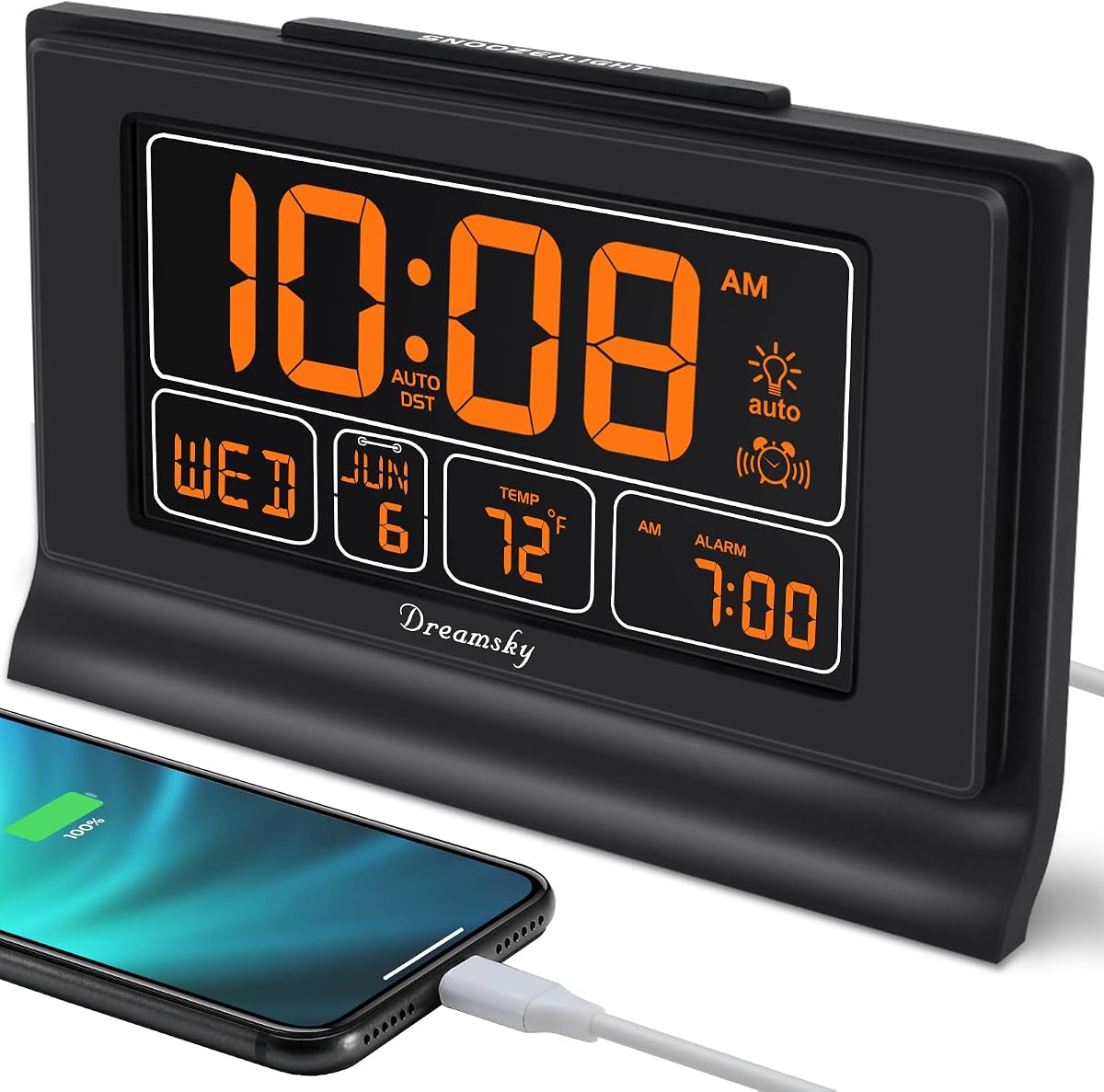
This clock features an oversized easy to read screen that shows time date and week simultaneously from a distance. It gets strong ratings for its reliable plug-in power and automatic DST adjustment so you do not reset seasonally.
We may earn a commission when you buy through this link, at no additional cost to you.
Adjustable brightness ensures comfortable viewing day and night without disturbing sleep. Multiple volume settings range from gentle to loud to match different hearing needs so you never oversleep.
A USB charger port on the back charges your phone while you sleep so you save outlet space. This plug-in design means no frequent battery replacements and consistent timekeeping throughout the day.
If you want a reliable plug-in clock with an oversized display this fits well. Its USB port and DST automation make it convenient for daily use in any bedroom or office.
Oversized easy to read screen shows time date and week simultaneously for excellent visibility from a distance.
USB charger port on back charges phone while you sleep so you save valuable outlet space.
We may earn a commission when you buy through this link, at no additional cost to you.
This clock sets itself to the right time and date when you plug it in so you skip setup. It receives strong ratings for its auto DST adjustment and battery backup that holds settings during power interruptions.
We may earn a commission when you buy through this link, at no additional cost to you.
Seven USA time zones plus one newfoundland zone make location setup flexible. The ascending alarm wakes you up naturally and snooze gives you extra minutes before it rings again eight minutes later.
A USB charging port lets you charge cellphone and other devices while you sleep. Full range dimmer gives six levels plus auto dim so you control brightness to suit your needs day or night.
If you want a simple auto set clock with zones this fits well. Its battery backup and USB port add convenience for consistent timekeeping without manual resetting each week.
Clock sets to right time date and temperature once plugged in so you skip complex setup.
Seven USA time zones plus one newfoundland zone selectable so you match your location easily.
We may earn a commission when you buy through this link, at no additional cost to you.
Choosing the right digital clock involves balancing display clarity features and setup ease. Consider how you will use it to find the best fit for your home or office.
Look for screens with at least seven inches to ensure you can read time and date from across a room. Higher resolution and bold fonts reduce eye strain especially in low light or for those with vision challenges.
A clear high contrast display helps everyone read quickly without squinting. Larger text for day and date prevents confusion and keeps you oriented throughout the day.
Multiple alarms help track different tasks like medication appointments or meals. Custom reminders with icons or labels make it easier to stay on schedule without extra notes.
Choose models with adjustable volume and snooze to fit your waking needs. Reminders that show words help prevent missing important daily tasks.
Auto dimming adjusts screen brightness based on time of day so it stays readable without glare. Manual controls let you lower light levels at night for comfortable viewing.
Brightness that changes automatically reduces eye strain and improves sleep. Ensure the dimming range fits your room's light conditions.
Simple setup like one click or auto set saves time and effort. Look for clear menus and buttons that are easy to press even for those with limited dexterity.
Avoid complex menus that require multiple steps to set basic info. Intuitive controls make daily use smoother and less stressful.
Plug-in models avoid frequent battery changes but need an outlet nearby. Battery backup ensures time and date stay saved during power outages so you do not reset often.
Check if batteries are included or sold separately for backup. A reliable power source keeps your clock consistent without interruptions.
Some clocks support multiple languages and 12 or 24 hour formats to match user preferences. This helps households with diverse needs or those who prefer different time conventions.
Ensure the display shows full day names and month spellings to avoid abbreviations. Clear language support helps users stay oriented without confusion.
Extra functions like USB charging ports or photo frames can save space and add value. Voice announcements help those with weak vision hear the time without looking.
Consider which extras fit your daily routine. Useful features should support convenience without complicating the core task of timekeeping.
Set your clock up near a power outlet and plug it in so the display turns on immediately. Follow the included manual to select your time zone and preferred date format for accurate display.
Place the clock at eye level or where you can see it easily from bed or desk. Adjust brightness and dimming settings to match your room lighting for comfortable viewing day and night.
Keep the clock dust free with a soft dry cloth and avoid placing it near water or heat sources. Check battery backup levels periodically to ensure settings stay saved during power outages.
Most models in this guide show the full day of the week with no abbreviations. This clarity helps users understand the exact day without confusion at a glance.
Many clocks include auto dimming that lowers brightness at set times like seven pm. This feature helps reduce glare and eye strain during nighttime viewing.
Use the menu or keys to enter alarm setup and choose time and days. Some clocks support multiple alarms with reminders so you can schedule several tasks daily.
Models with battery backup keep time and settings saved when power fails. Once power returns the clock shows the correct time automatically without needing a reset.
Some clocks offer voice announcement that speaks the time when a button is pressed. This feature helps those with weak vision hear the time clearly.
Many include auto DST adjustment that changes the time in spring and fall automatically. This keeps your clock accurate without manual changes twice a year.
The top picks offer strong clarity and features like voice announcements auto dimming and multiple alarms. They help you stay oriented and on schedule without extra effort.
Focus on display size and setup ease to ensure daily use is simple. Choose models that fit your room and support your routine needs best.
Prices and availability change so check current listings before buying to get the best deal for your chosen clock.