
GANA Aluminum HDMI Switch
4.3Editor score
No external power needed
Bidirectional switch design
4K@60Hz support
This guide compares the top cheap HDMI switches for 2026, evaluating performance, features, and value for gamers and home theater enthusiasts seeking reliable
Finding a reliable cheap HDMI switch can transform your entertainment setup without breaking the bank. Whether you are connecting gaming consoles, streaming devices, or computers, a quality selector simplifies your display connections. These devices allow you to toggle between multiple sources effortlessly, ensuring your TV or monitor stays clutter-free.
Our selection process involves analyzing user feedback, technical specifications, and real-world performance to identify the most cost-effective solutions. We examined switches ranging from simple two-port models to extensive five-port hubs capable of handling high-resolution video. Each product was vetted for stability, resolution support, and ease of use.
Each pick below highlights specific strengths such as 4K support, remote control inclusion, or durable build quality. We focus on providing clear insights to help you choose the right model for your needs. Please note that product availability and pricing may change frequently, so checking current listings is recommended before purchase.
4.3Editor score

4.3Editor score

4.4Editor score
This table provides a side-by-side comparison of all ten selected HDMI switches, highlighting key specifications like port count, resolution support, and power requirements to help you make an informed decision.
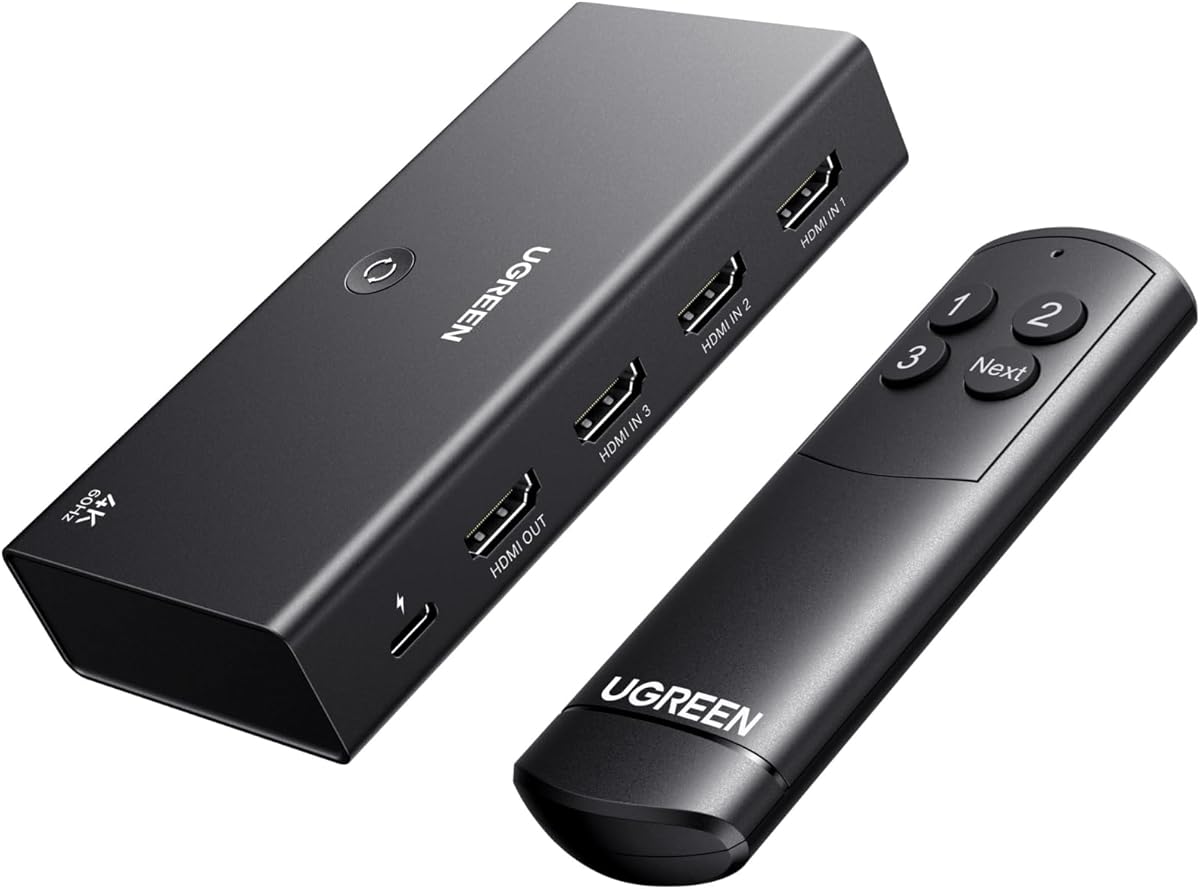





The UGREEN HDMI Switch 5 in 1 Out is designed to handle multiple gaming consoles and streaming devices with ease. Its high rating reflects user satisfaction with its stability and speed. This switch supports 4K@60Hz and advanced features like VRR for smooth gaming performance.
We may earn a commission when you buy through this link, at no additional cost to you.
It supports a wide range of devices including PS5, Xbox, and Roku. The remote control allows switching from a distance while the manual buttons offer quick access. The USB power design ensures stable transmission without signal loss during intense gaming sessions.
While it does not support automatic switching, the manual control is responsive. The power requirement is standard for high-performance switches. This is a reliable choice for users needing many ports and advanced video features.
Ideal for gamers and home theater setups with many devices. It balances performance and price effectively. Ensure your HDMI cables are within the recommended length to maintain 4K@60Hz quality.
With 18Gbps transmission, this switch handles high-resolution gaming without lag. It supports VRR and HDR for immersive visuals.
Switch between devices conveniently using the included remote or buttons. The LED lights show the active port clearly.
We may earn a commission when you buy through this link, at no additional cost to you.
The GANA Aluminum HDMI Switch stands out by not needing external power. This makes it perfect for simple setups where simplicity is key. Users appreciate its sturdy aluminum housing and quick manual switching.
We may earn a commission when you buy through this link, at no additional cost to you.
It supports 4K@60Hz and works well with consoles like PS5 and Xbox. The bidirectional feature allows one source to two displays or two sources to one. The LED indicators help identify the active input quickly.
The lack of power is a plus but limits advanced features. It is best for basic HDMI switching needs. The compact size fits easily behind TVs or monitors.
Choose this for cost-effective and simple connectivity. It is great for secondary displays or occasional use. Keep cables short for best 4K performance.
No power adapters are needed. Just press the button to switch inputs instantly.
Connect one console to two screens or two devices to one. This dual mode offers unique versatility.
We may earn a commission when you buy through this link, at no additional cost to you.
The Anker HDMI Switch is a top choice for those wanting a compact solution. It delivers 4K@60Hz performance reliably in a small package. Users rate it highly for stability and build quality.
We may earn a commission when you buy through this link, at no additional cost to you.
It integrates well with laptops, consoles, and monitors. The manual button allows quick switching between two devices. Anker provides a strong 18-month warranty for peace of mind.
While it lacks a remote, the button is easy to reach. It is best for users with two main sources. The small size keeps your setup tidy.
Recommend this for travelers or minimalists. It handles modern resolution standards well. Check your HDMI cable length for optimal results.
Anker is known for durable electronics. This switch reflects that quality with robust construction.
Its small form factor fits behind TVs easily. Ideal for clutter-free entertainment centers.
We may earn a commission when you buy through this link, at no additional cost to you.
The UGREEN HDMI Switch 3 in 1 Out is excellent for audio and video performance. It supports HDR10+ and Dolby Atmos for a cinematic experience. Users enjoy the clear sound and smooth video output.
We may earn a commission when you buy through this link, at no additional cost to you.
It connects up to three devices to one TV. The remote control allows easy switching from a couch. It supports high bandwidth for fast data transmission.
Power is required which is standard for these features. There is no auto-switch but manual buttons work fine. The build is reliable and easy to set up.
Best for movie lovers and gamers needing audio clarity. It balances features for a moderate cost. Ensure you have a proper power adapter included.
This switch handles Dolby Atmos and DTS audio formats. It delivers immersive sound for movies and games.
Control your inputs from the comfort of your seat. The remote range is sufficient for living rooms.
We may earn a commission when you buy through this link, at no additional cost to you.
The acer HDMI Switch is designed for home theater enthusiasts needing multiple inputs. Its metal body and gold-plated ports ensure durability and signal integrity. Users find it robust for long-term use.
We may earn a commission when you buy through this link, at no additional cost to you.
It supports 4K@60Hz and offers seamless switching for consoles and TVs. The remote control is convenient. It also handles HDR and 3D for immersive visuals.
Heat vents help maintain performance under load. Power is required but not included in the box. It is a solid choice for serious setups.
Ideal for users wanting five reliable inputs. It offers good value for a metal switch. Keep cables short for best video quality.
The metallic body resists wear and heat. Gold-plated ports protect against corrosion over time.
Built-in vents help dissipate heat. This keeps the switch stable during long gaming sessions.
We may earn a commission when you buy through this link, at no additional cost to you.
The GANA HDMI Switch with pigtail cable is great for quick setups. It includes an HDMI cable so you can use it right away. Users appreciate the convenience and cost-effectiveness.
We may earn a commission when you buy through this link, at no additional cost to you.
It supports 4K at 30Hz which is fine for streaming. The USB-C power ensures stable transmission. The manual button is easy to press for switching.
Lack of remote limits flexibility but works for nearby use. It is best for secondary displays or simple needs. The pigtail prevents cable mess.
Choose this for ease of use and value. It is a practical solution for most home needs. Ensure your device supports 30Hz output for best results.
The 1.8ft pigtail cable saves you buying extra wires. It simplifies initial installation significantly.
USB-C power ensures reliable operation. Keep it connected to a USB port for best results.
We may earn a commission when you buy through this link, at no additional cost to you.
The BENFEI HDMI Switch stands out for its Adaptive Equalization tech. This helps maintain signal quality over longer HDMI cables. Users who place their switch far from the TV find this helpful.
We may earn a commission when you buy through this link, at no additional cost to you.
It supports 4K@60Hz and includes a pigtail cable. The 10M transmit support ensures reliability even with longer wires. It handles multiple sources smoothly.
Manual buttons control the switch and power is required. It is a reliable solution for challenging setups. The warranty provides extra assurance.
Best for rooms with long cable runs. It reduces signal loss risks effectively. Ensure you use a stable power source.
Adaptive Equalization allows signal up to 10 meters. This reduces signal degradation over distance.
A 4ft HDMI cable is included. This saves you an extra purchase and ensures proper connection.
We may earn a commission when you buy through this link, at no additional cost to you.
The NEWCARE HDMI Switch offers excellent value with included cable. Its gold-plated connectors protect against corrosion. Users find it reliable for everyday switching tasks.
We may earn a commission when you buy through this link, at no additional cost to you.
It supports 4K@60Hz and high performance transmission. The included cable simplifies setup. It works with most devices like consoles and PCs.
Manual switching works well for small setups. Power is needed but not included. It is a practical choice for budget buyers.
Recommend for those needing a 4K switch with cable. It handles standard tasks well. Keep power supply in mind when ordering.
Gold-plated connectors resist corrosion. This ensures long-term signal integrity and performance.
Supports 12-bit deep color for better image quality. This enhances visual detail significantly.
We may earn a commission when you buy through this link, at no additional cost to you.
This GANA HDMI Switch offers five ports for multiple devices. Users appreciate the aluminum build and remote control. It balances high resolution with practical features.
We may earn a commission when you buy through this link, at no additional cost to you.
It supports 4K@60Hz and HDR. The remote allows switching from a distance. LEDs show the active port clearly for quick identification.
Power is required which is standard. It is a good choice for entertainment setups. The cable management design helps keep things tidy.
Ideal for users with many gaming consoles. It offers solid performance for the price. Ensure you have power and HDMI cables ready.
Five ports allow connecting multiple consoles. This reduces cable clutter significantly on your TV.
The aluminum housing ensures durability. It looks modern and helps with heat dissipation.
We may earn a commission when you buy through this link, at no additional cost to you.
This HDMI Switch offers a simple solution with remote control. Its ABS material is durable and cost-effective. Users find it easy to set up and use.
We may earn a commission when you buy through this link, at no additional cost to you.
It supports 4K@30Hz which is sufficient for streaming. The remote adds convenience for casual users. LEDs indicate active inputs clearly.
Limitations exist in resolution but work for most needs. It is affordable and practical. Check if your use case needs 30Hz.
Best for basic home theater needs. It keeps things simple and functional. Ensure your TV supports 30Hz for best performance.
Switch inputs from your couch easily. The remote control makes daily use more convenient.
No complex settings are needed. Just connect devices and start using the remote instantly.
We may earn a commission when you buy through this link, at no additional cost to you.
Selecting the right cheap HDMI switch involves understanding your device needs and compatibility. This guide outlines key factors to consider for a successful purchase.
Count how many devices you plan to connect. Switches range from 2 to 5 ports. More ports mean more flexibility but higher cost.
Choose at least one extra port beyond your current devices for future growth.
Ensure the switch supports your TV's max resolution. Look for 4K@60Hz for modern TVs. Some budget models only support 4K@30Hz.
Match the switch specs to your display capabilities to avoid quality loss.
Some switches need external power while others work via HDMI. External power ensures stable high-bandwidth transmission. Check if a power adapter is included.
Power requirements affect setup complexity and cable management.
Remote control adds convenience for switching inputs. Some models include remotes while others rely on buttons. Remote range and battery type matter.
Consider a remote if you plan to use the switch from a distance.
Materials like aluminum or metal improve durability. Gold-plated ports resist corrosion over time. Check user reviews for build quality insights.
Better build quality often correlates with longer product life.
Reputable brands offer better support and warranties. Anker and UGREEN are known for reliability. Check warranty length and customer service.
A good brand provides peace of mind for electronics.
Check if cables are included or sold separately. Longer cables may require higher bandwidth support. Ensure cables match your setup length.
Short cables often work best for 4K signals.
Ensure the switch supports HDCP 2.2 or higher. This is required for streaming copyrighted content. Without it you may get errors.
HDCP compliance is essential for modern streaming services.
Start by connecting your HDMI sources to the input ports on the switch. Use quality HDMI cables to ensure stability. Connect the output to your TV or monitor.
If the switch requires power, plug the USB cable into a power source. Some models work without external power but may be less stable.
Use the remote or buttons to switch between devices. Keep the switch in a ventilated area to prevent overheating. Regular cleaning helps maintain port integrity.
Most switches work with standard high-speed HDMI cables. For 4K@60Hz use certified HDMI 2.0 cables. Avoid cables longer than recommended to prevent signal loss.
This often happens due to long cables or insufficient bandwidth. Ensure cables are short and rated for high speed. Check your TV settings for correct resolution.
Yes most switches support gaming consoles like PS5 and Xbox. Ensure the switch supports VRR and HDCP 2.2 for best performance. Check your console settings for correct output.
Use a standard USB power adapter that meets the switch requirements. Many models use 5V/1A adapters. A stable power source ensures good performance.
Most switches support backward compatibility with older HDMI versions. They work with older consoles and PCs. Check specs for HDMI 1.4 support.
Check all cable connections and power supply. Try different HDMI ports on your TV. Reset the switch by disconnecting and reconnecting power.
A remote is optional but useful for convenience. Manual buttons work fine for nearby setups. Consider your viewing distance when deciding.
A splitter sends one source to multiple displays. A switch connects multiple sources to one display. Choose based on your setup needs.
The UGREEN HDMI Switch 5 in 1 Out and Anker HDMI Switch offer top choices for different needs. Both provide reliable performance and strong user ratings.
Prioritize resolution support and port count when deciding. Ensure compatibility with your devices to avoid issues. Consider power requirements for easy setup.
Prices and availability change frequently so check current listings. Read user reviews for latest experiences. Choose the model that fits your budget best.