
PROZOR 192KHz Digital to Analog Audio Converter
4.4Editor score
Supports up to 192KHz/24bit
Gold-plated RCA connectors included
Compact aluminum alloy housing
This guide compares the top audio converters for Mac, evaluating digital to analog, USB, and optical adapters for superior sound quality on your system.
Finding the right audio converter for Mac can transform your listening experience. Whether you need to connect legacy gear or boost digital output, the right tool ensures high fidelity. This guide explores models designed for seamless integration with macOS.
We analyzed ten top-rated converters based on compatibility, sound quality, and user feedback. Each product offers unique features like USB-C, optical inputs, or DAC capabilities. Our goal is to help you choose the perfect fit for your setup.
Each pick highlights key strengths and ideal use cases for different needs. Prices may change over time, so verify current offers before buying. We focus on reliable brands and tested performance to ensure value for your investment.
4.4Editor score

4.6Editor score

4.5Editor score
This side-by-side comparison highlights key specifications across all ten selected audio converters. From basic adapters to professional interfaces, each model serves different needs for Mac users seeking enhanced audio performance.
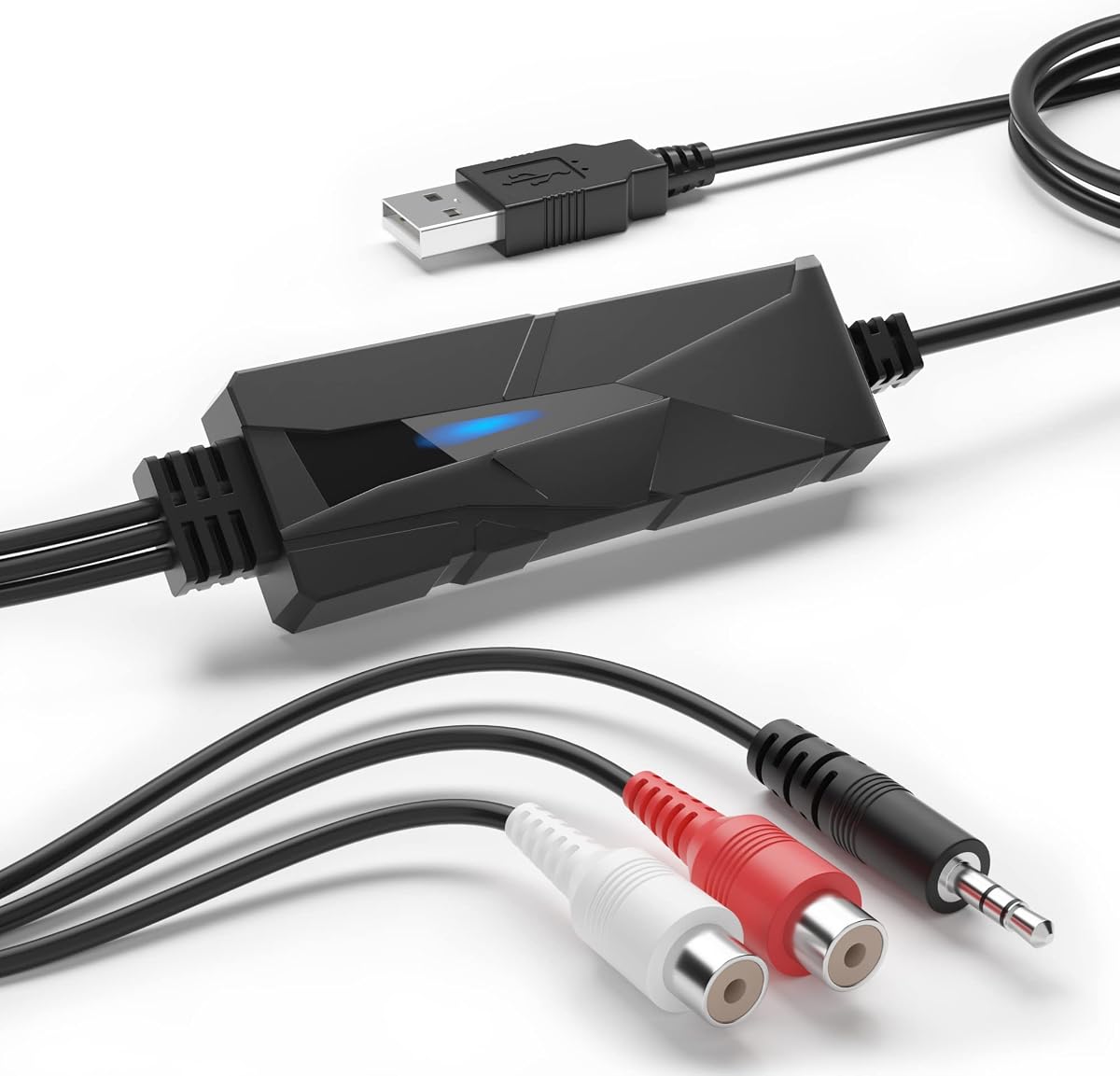


The DriverGenius AudioXfer is a dedicated audio capture card designed to bring analog sources into your Mac digital environment. With a solid 4.2 rating, users appreciate its ability to record live audio from tapes or turntables easily.
We may earn a commission when you buy through this link, at no additional cost to you.
Its key strength lies in the 3.5mm and R/L audio connector inputs, allowing seamless connection to legacy devices. The included LED indicates activity, and the device supports standard audio sample rates for YouTube or MP3 creation.
While effective, users must ensure they update Audacity to the correct 64-bit version for macOS 15. This adds a small setup step but ensures compatibility without requiring additional drivers for basic recording tasks.
Buyers seeking to digitize old music collections should prioritize this tool. It offers a straightforward path to preserving memories without needing a complex studio interface, making it accessible for casual users.
This device bridges the gap between older audio gear and modern Mac systems through standard connectors.
No complex drivers are needed, ensuring quick setup for immediate recording sessions.
We may earn a commission when you buy through this link, at no additional cost to you.
The Fosi Audio K5 Pro serves as a versatile DAC headphone amplifier combo, perfect for gaming and music on Mac. Its 4.3 rating reflects strong performance in converting digital signals to analog with low distortion.
We may earn a commission when you buy through this link, at no additional cost to you.
It converts USB Type C, Optical, or Coaxial signals into RCA or 3.5mm AUX, offering rich audio details. The Texas Instruments NE5532 op-amp chip ensures a clean sound and improved dynamic range for immersive listening.
Some users may find the combined volume and power button requires a long press to switch on. However, the ability to drive headphones from 16 Ohm to 300 Ohm makes it highly flexible for various setups.
Gamers and streamers will find this unit ideal for external sound card replacement. Its ability to handle multiple inputs means you can switch between sources like your Mac and console without hassle.
Support for USB, optical, and coaxial inputs ensures compatibility with diverse audio sources.
Capable of driving high impedance headphones, it delivers strong performance for audiophiles.
We may earn a commission when you buy through this link, at no additional cost to you.
This PROZOR DAC converts digital optical or coaxial signals to analog RCA and 3.5mm outputs efficiently. With a 4.4 rating, it stands out as a reliable budget-friendly choice for Mac users needing basic conversion.
We may earn a commission when you buy through this link, at no additional cost to you.
It supports high-resolution audio up to 192KHz/24bit, ensuring uncompressed LPCM or PCM signals are handled with clarity. The aluminum alloy housing offers better heat dissipation and shielding than plastic alternatives.
Users must note that the power adapter is not included, so a certified 5V 1A plug is required. Also, TV volume might need adjustment via settings if the remote doesn't control optical output directly.
For home theater setups connected to a Mac, this provides an affordable way to enhance audio output. Its simple design and gold-plated connectors ensure long-term reliability without breaking the bank.
Support for 192KHz sampling rates ensures crisp, detailed sound reproduction for high-end content.
The aluminum alloy casing protects internal components and improves thermal performance significantly.
We may earn a commission when you buy through this link, at no additional cost to you.
The Douk Audio U2PRO converts USB signals into clean Optical, Coaxial, and I2S outputs for DACs. A 4.1 rating shows its effectiveness in delivering jitter-free digital signals to external converters on Mac.
We may earn a commission when you buy through this link, at no additional cost to you.
Equipped with the XMOS XU316 chip, it supports PCM up to 32bit/768kHz and DSD512, ensuring high resolution. The UAC mode switch allows easy toggle between plug-and-play and high-resolution modes for advanced users.
While it offers great clarity, you must ensure the correct UAC mode is selected for your specific DAC. The expandable oscillator design adds value for audiophiles who want to upgrade clocks later.
Those wanting to feed a Mac's USB signal into a high-end DAC will find this adapter crucial. It removes USB noise and provides stable transmission for superior audio playback in home studios.
The reclocker design minimizes signal noise for cleaner digital transmission to your DAC.
Support for Optical, Coaxial, and I2S allows connection to a wide range of external DACs.
We may earn a commission when you buy through this link, at no additional cost to you.
The SMSL SU-1 is designed for audio enthusiasts needing MQA decoding and high-res playback on Mac. With a 4.2 rating, it delivers clean sound restoration for studio-quality recordings via USB inputs.
We may earn a commission when you buy through this link, at no additional cost to you.
It features the AKM AK4493S DAC chip for distortion lower than 0.00013%, ensuring high fidelity. Support for MQA-CD allows CD players to restore original studio signals when paired with this DAC.
While macOS supports it well, Windows users need drivers for operation. This extra step is minor compared to the benefit of native MQA playback without additional software bloat.
Listeners prioritizing fidelity from MQA sources should consider this unit. It brings professional-grade decoding to your desktop setup, enhancing the detail of your favorite albums significantly.
MQA decoding ensures you hear the full depth and clarity intended by the recording engineers.
The AKM chip delivers ultra-low distortion for a pure and accurate listening experience.
We may earn a commission when you buy through this link, at no additional cost to you.
This SMSL PO100 PRO is a tiny yet powerful digital interface converting USB-C inputs to I2S, optical, or coaxial outputs. A 4.6 rating highlights its reliability for portable high-res audio on Mac.
We may earn a commission when you buy through this link, at no additional cost to you.
It features the XMOS XU316 chip supporting PCM32bit/768kHz and DSD native playback. The MQA decoding works without extra software, making it easy to stream quality audio on the go.
Users must adjust the USB UAC mode before use depending on their output needs. Also, for best MQA output, ensure the computer volume is set to maximum to avoid signal loss.
Travelers and audiophiles will appreciate its bag-friendly size. It allows you to carry high-performance audio conversion anywhere, connecting easily to external DACs or systems via USB-C.
Its pocket-sized form factor makes high-resolution audio accessible without compromising performance.
Built-in MQA support means you can enjoy high-fidelity streams directly without software adjustments.
We may earn a commission when you buy through this link, at no additional cost to you.
The Sound Blaster Play! 3 is a basic USB audio adapter delivering 24-bit 96kHz sound for Mac users. A 4.5 rating reflects its reliability for simple audio output needs without complicated setup.
We may earn a commission when you buy through this link, at no additional cost to you.
It connects easily with all analog headsets via standard mobile or gaming connectors. The downloadable software panel gives control over audio enhancements and optimized profiles for different earphone brands.
As a no-driver solution, it works straight out of the box, saving time for busy users. However, it lacks advanced features like optical input or complex EQ adjustments found in higher-end models.
Anyone needing a quick boost to built-in audio quality should grab this. It is perfect for basic listening, gaming, or calls where high fidelity and ease of use matter most.
No driver installation is required, allowing immediate use with any compatible headset.
Customizable software allows you to tweak sound profiles for a personalized listening experience.
We may earn a commission when you buy through this link, at no additional cost to you.
The iFi Audio Go Link Max is a portable dongle converting USB-C to 3.5mm or 4.4mm for high-res audio. Its 4.5 rating confirms strong performance in driving headphones with clean, dynamic sound on Mac.
We may earn a commission when you buy through this link, at no additional cost to you.
Featuring dual ESS Sabre DAC chips, it supports PCM 32-bit/384kHz and native DSD 256 for high fidelity. The balanced 4.4mm output provides up to 241mW power for demanding headphones.
Users should note that cable flexibility is high to reduce stress on USB sockets, but length is compact. Volume control is typically handled by the source device, which limits direct hardware adjustments.
Mobile listeners wanting professional-grade sound will love this device. It brings studio-quality audio to your pocket, ensuring every detail is heard with clarity and precision during travel.
Compact design delivers studio-grade sound quality anywhere you go with your device.
The 4.4mm output provides superior power and noise rejection for high-end headphone use.
We may earn a commission when you buy through this link, at no additional cost to you.
The Fosi Audio Q6 is a compact desktop DAC converting digital signals to analog for amplifiers. With a 4.6 rating, it stands out for delivering crystal-clear, high-res audio with minimal distortion for Mac setups.
We may earn a commission when you buy through this link, at no additional cost to you.
It uses the AKM AK4493S DAC chip and supports PCM 32bit/768kHz and DSD512. Input options include Optical, Coaxial, and USB-C, making it versatile for connecting various digital sources seamlessly.
Though it cannot drive passive speakers directly, it serves as a perfect front-end for powered systems. Its low noise floor ensures clean signal conversion, allowing your amp to reveal every detail of your music.
Audio enthusiasts looking for a clean desktop upgrade will find this ideal. It balances size and performance, offering professional-grade specs without cluttering your workspace or wallet significantly.
Ultra-low distortion ensures your music sounds exactly as the artist intended.
Multiple input options allow you to switch between devices without changing cables.
We may earn a commission when you buy through this link, at no additional cost to you.
The Shure MVX2U Gen 2 is a professional XLR-to-USB-C audio interface streamlining recording on Mac. A 4.5 rating reflects its top-tier performance in delivering clean, consistent audio for creators.
We may earn a commission when you buy through this link, at no additional cost to you.
It features onboard DSP with Auto Level Mode and Real-Time Denoiser for polished output. The interface provides up to +60 dB clean gain and 48V phantom power for condenser microphones.
Users must install the MOTIV app to access settings like tone EQ and compression. While this adds a step, it ensures precise control over sound for professional podcasting or streaming results.
Content creators needing high-fidelity voice or music capture should choose this. It bridges the gap between studio quality and portable convenience, making it a standout premium choice for pros.
Onboard digital processing ensures your voice sounds polished and professional from the first take.
App integration lets you customize audio settings to match your specific recording environment.
We may earn a commission when you buy through this link, at no additional cost to you.
Choosing the right audio converter depends on your specific needs and connection types. Here are key factors to consider before making a purchase for your Mac setup.
Check which ports your Mac and audio devices use. Look for converters with USB-C, Optical, or Coaxial inputs and outputs that match your speakers or headphones.
Matching input and output types ensures seamless connection without needing extra adapters or cables.
Higher sample rates like 192KHz or 32bit/768kHz offer better fidelity. Ensure the converter supports the resolution of your digital audio files.
High-resolution support preserves detail and clarity in your music and recordings.
Verify that the device works with your current macOS version. Some models need specific drivers or software updates to function correctly.
Driver-free or plug-and-play options save time and avoid installation issues.
Aluminum housings often offer better heat dissipation and shielding than plastic. Check reviews for reliability over time.
A sturdy build ensures long-term performance in varied environments.
Some converters draw power from USB, while others need a wall adapter. Ensure you have the necessary power supply available.
USB-powered options are more portable, while external power can reduce noise.
Look for built-in volume controls, EQ settings, or specific decoding capabilities like MQA. These features add flexibility to your setup.
Extra features enhance usability but may increase complexity or cost.
Set a budget based on your needs. Basic adapters are affordable, while DACs and interfaces cost more. Consider long-term value.
A slightly higher price often means better sound quality and longevity.
Some models come with bundled software like Audacity or specific apps. Ensure you are comfortable with these tools before purchasing.
Good software support can significantly improve your recording or playback experience.
First, connect your audio source to the converter using the appropriate cables like optical or USB. Ensure all devices are powered on and set to compatible output formats.
Next, plug the converter into your Mac. If required, install any necessary drivers or software updates. Verify the system recognizes the device in audio settings.
Finally, adjust volume levels on both the source and the converter. Keep the device in a ventilated space to avoid overheating and clean connectors with a dry cloth periodically.
Most modern converters support macOS, but compatibility varies by model. Always check the product details for specific OS requirements to ensure they work with your current version.
Analog converters record from older devices like tapes into digital formats. Digital converters transform high-quality digital signals into analog for speakers or headphones to play.
Mac built-in audio ports may lack high-fidelity output. A DAC improves sound quality by converting digital data to analog signals with better precision and less noise.
USB-C offers newer connectivity for modern Macs with higher bandwidth. It is generally preferred for digital audio interfaces but adapters exist for older USB-A ports.
Yes, models like the DriverGenius AudioXfer or Shure interface allow recording. Ensure your chosen device supports input for capturing audio from external sources.
Some USB-powered units work without adapters, while others need a 5V plug. Check the product specs to see if an adapter is included or required separately.
MQA decoding restores studio-quality audio from compressed files. Converters with this feature can play high-resolution tracks that otherwise sound limited.
Use a soft dry cloth to wipe the exterior gently. Avoid using liquids near connectors to prevent damage to internal components over time.
This guide highlights top converters ranging from budget adapters to professional interfaces. Each option addresses unique needs for connecting legacy gear or enhancing digital sound on Mac.
Prioritize features like input type and resolution support to match your specific workflow. The right converter can transform your audio experience significantly.
Always check current prices and availability before purchasing as they may change over time. This ensures you get the best value for your chosen audio upgrade.